OCR for Healthcare:
Medical Records, EOB & Claim Form Processing
A single CMS-1500 claim form contains over 30 fields — patient demographics, insurance identifiers, up to 12 diagnosis codes (ICD-10-CM), procedure codes (CPT/HCPCS), modifiers, diagnosis pointers, charges, and provider NPI numbers — all on one page in a layout designed for paper processing, not digital extraction. Now multiply that by the 247,000 paper claims still submitted weekly to Medicare alone, add EOBs from 1,500+ unique payer formats, lab reports with nested result tables, and patient intake forms filled out in rushed cursive at the front desk, and the question shifts from "can OCR handle healthcare documents" to "which approach handles which document, and where does each approach break."
Key Takeaways
- 30% of all medical billing denials start with CPT or ICD-10 codes entered incorrectly — at $48 per denied claim to rework, versus $3 for pre-submission validation, manual data entry costs 16 times what automation costs.
- Template OCR hits 99% field accuracy on a clean CMS-1500 — but photocopy that same form and accuracy crashes below 80%, a scanner calibration catch that vendor accuracy claims almost never mention.
- No signed Business Associate Agreement means the OCR tool cannot legally process any document containing patient data — HIPAA requires it regardless of how many nines the extraction accuracy benchmarks have.
What OCR for Healthcare Actually Is
OCR for healthcare is the application of optical character recognition and AI-based document understanding to the specific documents that medical organizations handle: insurance claim forms (CMS-1500 for professional claims, UB-04 for institutional claims), Explanation of Benefits (EOB) statements from payers, lab results and pathology reports, patient intake and registration forms, prescription pads, referral letters, discharge summaries, and clinical notes.
The distinction from OCR in other industries matters because medical documents combine three challenges that rarely appear together elsewhere: strict structural variability (1,500+ EOB formats), domain-specific codes that must be accurately transcribed (CPT, ICD-10-CM, HCPCS, NPI), and regulatory requirements around protected health information (PHI) defined by the HIPAA Privacy Rule at 45 CFR §164.514.
The six document categories that cover 90%+ of the OCR-for-healthcare search intent are: EOBs (payer remittance advice), CMS-1500 (professional claims), UB-04 (institutional claims), lab reports (clinical results), patient intake forms (registration and history), and prescriptions (handwritten or printed medication orders). Each presents a unique extraction profile — and no single OCR approach handles all six equally well.
For a foundational understanding of how OCR works in general, see what OCR is and how it reads documents. For the AI-powered evolution that handles the non-standard documents healthcare depends on, see what AI OCR is and how it differs.
Why Healthcare Needs OCR — The Quantified Problem
Manual data entry in healthcare billing has a specific failure pattern that automation directly addresses. It is not that billing staff are careless. It is that the volume and complexity of paper-based data entry exceed what human accuracy can sustain across an eight-hour shift.
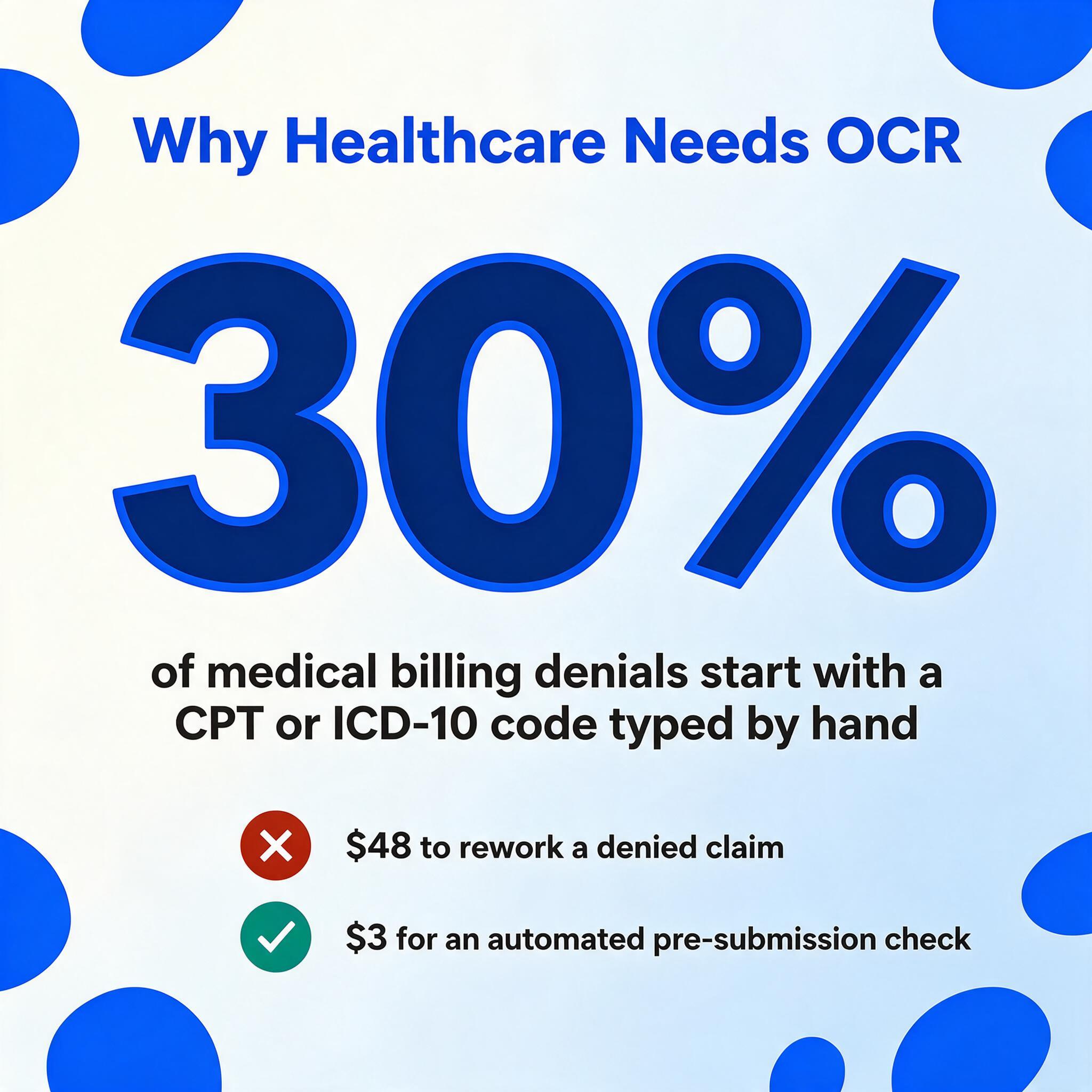
The numbers come from multiple directions. OCR Solutions, which has operated a Texas Medicaid deployment processing over 1 million claims per month since 2021, reports that roughly 30% of all medical billing denials originate from incorrect CPT or ICD-10 codes entered during manual data capture. A separate analysis from the same team estimates average denial rework cost at $48 per claim, compared to $3 for an automated pre-submission check — a 16:1 cost ratio. The AMA's own guidance on coding errors confirms that the most common mistakes — wrong modifier, mismatched diagnosis-to-procedure linkage, outdated code — are structural, not random. They happen because the person entering the data cannot simultaneously check every cross-field dependency that the claims processing system will later enforce.
Then there is the labor math. Manual entry of a single CMS-1500 or UB-04 form takes 5–10 minutes. A hospital revenue cycle team processing 500 claims per day spends 40–80 person-hours on typing alone — not reconciling, not questioning, just transferring characters from one format to another. Automated extraction brings that to under 60 seconds per form, which does not eliminate the human role but moves it from transcription to verification, where clinical and billing judgment actually matters.
Beyond billing, lab result logging and patient intake digitization follow similar patterns: manual transcription from paper requisitions and registration forms consumes time that could be spent on patient-facing work, and the error rate — typically 8–12% in high-volume data entry — accumulates into downstream reconciliation and rework costs that most practices never total up.
Key Healthcare Document Types and Their Extraction Challenges
Healthcare is not one document type. Each major category presents a different extraction profile that determines which OCR approach — template-based, AI-based, or hybrid — is appropriate.
EOB (Explanation of Benefits) Statements
The EOB is arguably the most format-variable document in healthcare. There are over 1,500 unique payer-specific EOB layouts across commercial insurers (BCBS, UnitedHealthcare, Aetna, Cigna, Humana), government payers (Medicare, Medicaid, Tricare), and workers' compensation carriers. Medicare calls its claim identifier an "ICN" (Internal Control Number). BCBS places the claim number in the top-right corner. Aetna puts it in a header block on the left. All three mean the same thing — the claim identifier — but a position-based OCR template would need three separate configurations to capture it.
The fields that matter for reconciliation are: claim number / ICN, patient name and ID, date of service, CPT procedure codes with modifiers, billed amount, allowed amount, plan paid, deductible, co-pay, co-insurance, patient responsibility, and denial reason codes. The challenge is not reading the characters — modern OCR does that reliably. The challenge is mapping each value to the correct column when the same data point appears in different positions on every payer's statement.
This is where template-based OCR hits its limit and semantic AI extraction — where the system understands what a "claim number" means and finds it by concept, not position — becomes necessary. For a deep dive, see our dedicated complete guide to EOB data extraction, or try the EOB to Excel extraction tool directly on a payer statement.
CMS-1500 (Professional Claim Form)
The CMS-1500 form, also known as the HCFA-1500, is the standard paper claim form used by physicians, clinics, and non-institutional providers to bill Medicare and most commercial insurers. It has 33 numbered boxes (plus multiple subdivisions) crammed into a single page. The density is the feature — the form captures everything needed for claim adjudication in a standardized paper footprint — but that same density makes it one of the hardest forms for general-purpose OCR to parse correctly.
The critical structural issue is cross-field dependencies. Box 24E (diagnosis pointer) must reference a valid ICD-10-CM code listed in Box 21 (diagnosis or nature of illness or injury). A misaligned pointer is invisible to human entry — the person typing cannot simultaneously verify that each pointer code in Box 24E matches a valid entry in Box 21 across multiple service lines. The payer's adjudication system catches it 30–60 days later as a denial. Template-based OCR handles this form well — because the layout is standardized per CMS's official form specifications, including the requirement for Flint OCR Red ink on the drop-out scannable version — achieving up to 99% field-level accuracy under optimal scanning conditions.
But there is a catch that most vendors do not mention upfront: CMS-1500 OCR accuracy depends heavily on scanner setup. The "red dropout" feature used by Medicare carriers requires specific scanner calibration. A photocopy of the form (common in smaller practices) does not have the required OCR-red ink, so the dropout zone does not work, and the extraction engine has to parse the full page instead of isolating the fillable fields. The difference between a clean scan and a photocopy can swing accuracy from 99% to below 80% on the same OCR engine.
UB-04 (Institutional Claim Form)
Where the CMS-1500 has 33 boxes, the UB-04 (also called CMS-1450) has 81 form locators. It is used by hospitals, skilled nursing facilities, home health agencies, and other institutional providers to bill for entire episodes of care. The complexity comes from its row-level structure: form locators 42 through 47 are repeating line items where revenue code, service description, date of service, units, total charges, and non-covered charges must all align per row. A single misread revenue code (e.g., 0450 for Emergency Room services vs. 0452 for ER Triage) throws off the entire pricing of that line, and payers reject the claim rather than guess which field is wrong.
Because the UB-04 format is institutional — and institutional billing involves condition codes, occurrence codes, value codes, and revenue codes that have no equivalent on the CMS-1500 — a separate mapping and validation layer is required. Template-based systems with pre-built UB-04 mappings are the industry standard here, and they work well when scan quality is consistent.
Lab Reports and Pathology Results
Lab reports differ from claims forms in a critical way: they are not standardized. Each lab (Quest, LabCorp, hospital-based labs) uses its own reporting template. The data itself is structured — test name, result value, reference range, and flag (normal/abnormal) — but the layout varies. Some lab reports present results in vertical lists, others in tables, and others in a mixed narrative-with-table format. The extraction challenge is distinguishing between the test name (e.g., "Hemoglobin A1c"), the result value ("7.2%"), the reference range ("<5.7% normal, 5.7-6.4% prediabetes, ≥6.5% diabetes"), and the flag ("High"). Reading these as a block of OCR text does not produce usable data — the values need to land in separate columns with the correct row association.
Patient Intake and Registration Forms
Intake forms combine three OCR-unfriendly elements: checkboxes (ticked, crossed, or circled), handwriting (patient name, address, reason for visit, medical history), and mixed-format fields (some pre-printed, some free-text). The checkboxes are particularly tricky — traditional OCR reads text, not the presence or absence of a mark inside a box. AI-based vision models handle this better because they see the document as an image and can detect whether a box is filled, regardless of the marking method. For the handwriting component, AI extraction has improved significantly in recent years, but accuracy varies heavily by handwriting legibility. See our guide to handwriting OCR software for what current technology can and cannot handle.
For the registration paperwork specifically, the practical target is one row per patient: a patient intake form to Excel run maps the ticked boxes, handwritten answers, and insurance fields into those columns in a single pass.
Prescriptions
Prescriptions represent the extreme case of the handwriting problem. Physicians writing after a full clinic day produce some of the most challenging cursive in any industry. The stakes are high — a misread medication name or dosage can cause patient harm. Traditional OCR essentially fails on cursive handwriting; AI-based vision models achieve 85–95% accuracy on reasonable-quality handwritten prescriptions but drop significantly on poor-quality scans or rushed handwriting. Most healthcare OCR workflows treat prescriptions as a human-verification-required category rather than a straight-through automation target.
The Fields That Matter: Medical Codes, Identifiers, and PHI
Medical documents carry data elements that have no equivalent in other industries. An invoice has a date and a total. A medical claim has those plus codes that determine whether the claim gets paid, denied, or audited. Understanding what these codes are and why they matter for extraction is the difference between buying a general-purpose OCR tool and buying one that works for healthcare.
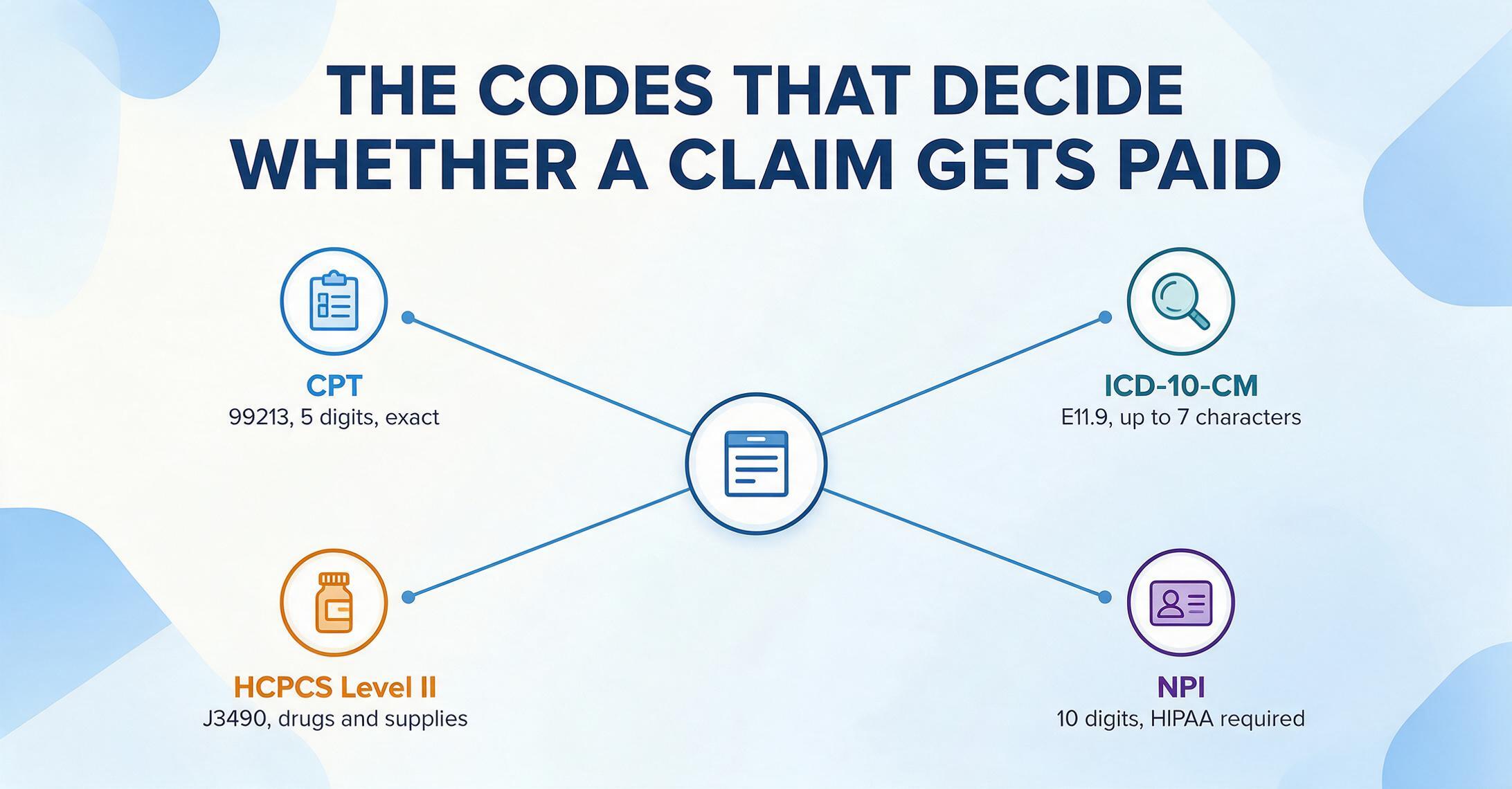
CPT Codes
Current Procedural Terminology, maintained by the American Medical Association. Five-digit numeric codes describing medical procedures and services. Example: 99213 (established patient office visit, level 3). The AI must distinguish the procedure code from the diagnosis code — they often appear on the same line.
ICD-10-CM Codes
International Classification of Diseases, 10th Revision, Clinical Modification. Alphanumeric codes up to 7 characters describing diagnoses. Example: E11.9 (Type 2 diabetes without complications). Approximately 72,000 active codes require precise extraction character by character.
HCPCS Level II
Healthcare Common Procedure Coding System, maintained by CMS. Alphanumeric codes for products, supplies, and services not covered by CPT. Example: J3490 (unclassified drug). Common on UB-04 institutional claims.
NPI Numbers
National Provider Identifier. A 10-digit numeric identifier required by HIPAA for all healthcare providers. Must follow the standard 10-digit format; extraction validation should check against this pattern.
Then there is PHI — Protected Health Information. Under HIPAA's Privacy Rule, 18 categories of identifiers make health information individually identifiable. These include the obvious ones — names, addresses, Social Security numbers — but also dates (birthdate, admission/discharge dates, dates of death), telephone numbers, fax numbers, email addresses, medical record numbers, health plan beneficiary numbers, account numbers, certificate/license numbers, vehicle identifiers, device identifiers and serial numbers, URLs, IP addresses, biometric identifiers, full-face photographs, and any other unique identifying number, characteristic, or code.
The practical implication for OCR tool selection: any tool that processes medical documents containing any of these 18 identifiers — and an EOB without patient name and claim number is useless for billing — creates a HIPAA disclosure. That disclosure requires a signed Business Associate Agreement (BAA) under 45 CFR §164.504(e). A tool that cannot or will not sign a BAA is not a viable candidate for healthcare document processing, regardless of its accuracy numbers.
Traditional OCR vs AI-Based Extraction for Healthcare Documents
The question is not "which is better" but "which for which document." Healthcare is unusual in that both traditional template OCR and modern AI-based extraction have legitimate roles, and the optimal approach varies by document type.
| Document Type | Better Approach | Why | Achievable Accuracy |
|---|---|---|---|
| CMS-1500 (clean scan) | Template OCR | Fixed layout, known field coordinates, red dropout support | 98–99% field-level |
| CMS-1500 (photocopy/fax) | AI extraction | No red dropout zone; AI can infer field locations semantically | 85–92% field-level |
| UB-04 (clean) | Template OCR | 81 fixed form locators, known structure | 98–99% field-level |
| EOB (any payer) | AI extraction | 1,500+ unique layouts; no fixed field positions | 85–95% field-level |
| Lab reports | AI extraction | Non-standard layouts per lab; semantic matching needed | 80–92% field-level |
| Patient intake forms | AI extraction | Checkboxes + handwriting + mixed fields | 75–90% (handwriting-dependent) |
| Prescriptions | AI extraction | Cursive handwriting; requires vision model | 70–88% (requires verification) |
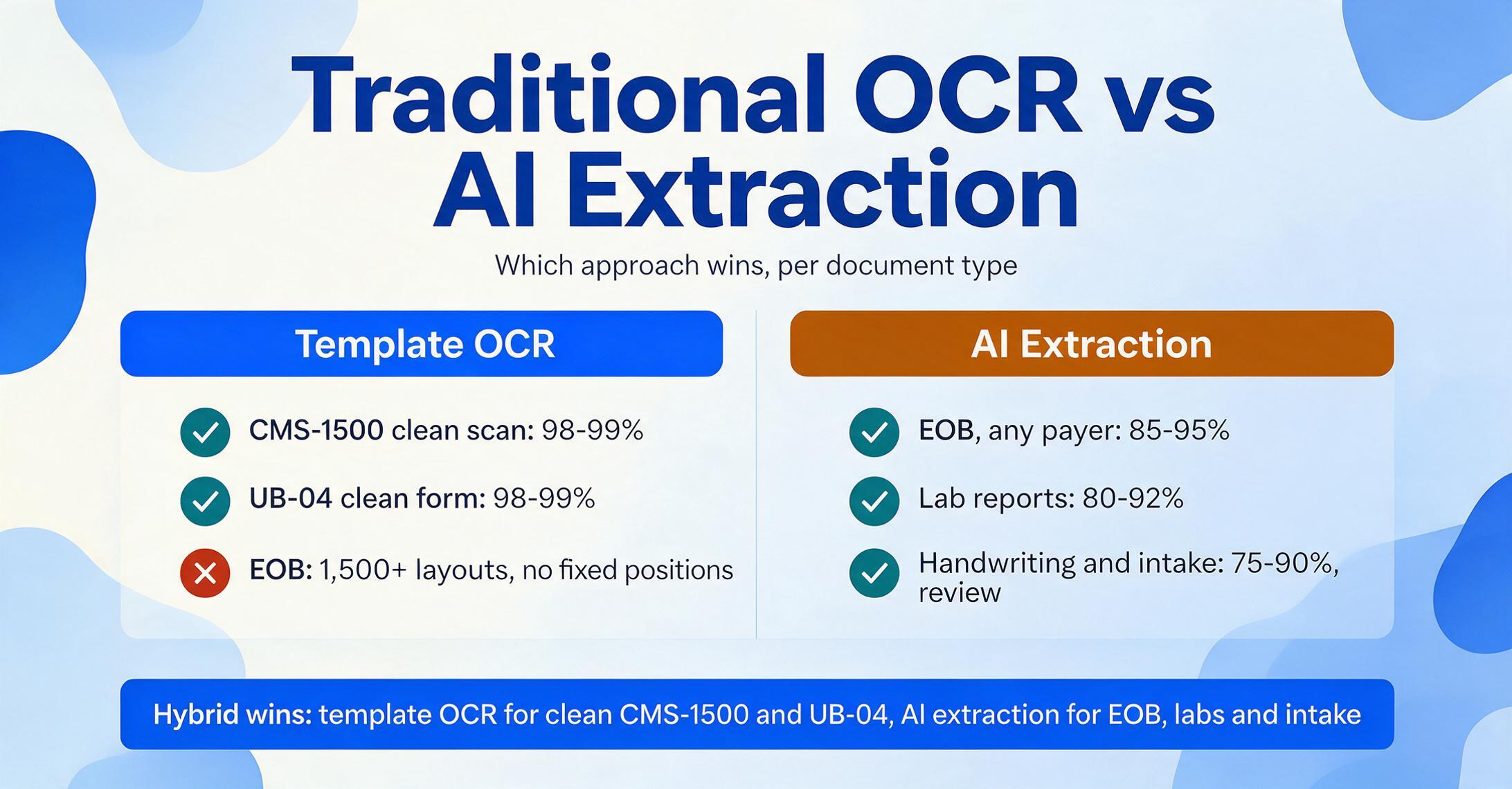
This is why many healthcare organizations end up running a hybrid workflow: template OCR for the structured claim forms where accuracy matters most and field-level validation is critical, and AI extraction for the non-standard documents — EOBs, lab reports, intake forms — where flexibility matters more. The two approaches are not competitors in healthcare; they are complementary tools for different parts of the document spectrum.
The honest answer: for CMS-1500 and UB-04 forms with good scan quality, template-based OCR remains the accuracy leader. For every other healthcare document type — EOBs, lab reports, intake forms, prescriptions — AI-based extraction is the only viable approach because the layouts are too variable for templates to keep up.
Compliance Considerations: HIPAA as a Selection Criterion
This is the section where many OCR tool articles turn into marketing copy. Here is the practical framework instead.
HIPAA compliance is not a feature you turn on. It is a legal framework that governs how a tool can be used with patient data. The relevant components are:
- Business Associate Agreement (BAA) under 45 CFR §164.504(e) — A signed contract between your organization and the tool provider that establishes the provider as a business associate. Without a BAA, transmitting PHI to a third-party tool is a disclosure that violates the Privacy Rule.
- Minimum Necessary Rule under 45 CFR §164.502(b) — You must limit the PHI disclosed to the minimum necessary to accomplish the intended purpose. A tool that extracts everything visible on a document and makes you sort through the output afterward is architecturally inconsistent with this requirement.
- Security Rule under 45 CFR §164.306 — Administrative, physical, and technical safeguards for electronic PHI. For cloud-based OCR tools, this means encryption at rest (AES-256) and in transit (TLS 1.2+), access controls, and audit logging.
When evaluating an OCR tool for healthcare, ask these three questions in order:
- Will you sign our BAA? If the answer is no, the tool cannot be used with any document containing PHI — which rules out essentially all medical documents.
- Where is data processed and stored? The BAA needs to specify the data residency. If your compliance framework requires PHI to stay within US borders (as many healthcare organizations do), the tool must process data in US-based servers.
- What happens to the document after processing? HIPAA's data retention and disposal requirements apply. A tool that stores your medical documents indefinitely creates a compliance liability for both you and the provider. Automated deletion within a defined window (24 hours, 7 days, etc.) is the standard for cloud-based extraction workflows.
We discuss HIPAA and medical document extraction in depth here, including a detailed checklist for verifying your tool provider's compliance posture.
It is also worth noting: even the best BAA does not protect you if you are using a tool that extracts more data than necessary. The Minimum Necessary Rule places the burden on the covered entity — you — to ensure the tool only accesses the specific data elements needed. This is one area where custom column extraction (where you define exactly which fields to pull and the AI extracts only those) provides a structural advantage over full-page OCR that returns everything and requires post-filtering.
How to Choose an OCR Solution for Healthcare
For a full comparison of tools across pricing, accuracy, and compliance readiness, see our best OCR software for healthcare 2026 roundup. If your priority is specifically EOB and CMS-1500 claim form extraction accuracy, our healthcare document extraction tools roundup tests seven tools on real multi-payer documents. The summary below covers the five criteria that matter most during initial evaluation.
1. Document Coverage
Does the tool handle the specific document types you process? An EOB extraction tool is useless for lab reports. A CMS-1500 specialist cannot handle your patient intake forms. If your organization processes multiple document types (most do), look for a tool that covers the full spectrum or plan to maintain separate solutions for each category.
2. Code-Level Accuracy
For claim forms and EOBs, character-level accuracy is insufficient. You need field-level accuracy on CPT codes (five numeric digits, exact), ICD-10-CM codes (alphanumeric up to 7 characters, exact), and NPI numbers (10 digits, exact). A single wrong character in a code field can trigger a denial. Test the tool on your actual documents, not vendor-provided samples.
3. Compliance Readiness
BAA availability is non-negotiable for any PHI-containing workload. Beyond the BAA, check data residency (are servers US-based?), encryption standards (AES-256 at rest, TLS 1.2+ in transit), data retention (how long are your documents stored?), and whether the tool has completed SOC 2 Type 2 audit or equivalent third-party security assessment.
4. Integration with Your Existing Systems
Healthcare organizations run on EHRs (Epic, Oracle Health Cerner, Meditech, Allscripts), practice management systems (athenahealth, AdvancedMD, Kareo, NextGen), and clearinghouses (Office Ally, Change Healthcare, ZirMed). The ideal OCR tool outputs data in formats your billing system can ingest — structured Excel, CSV, or JSON — without manual re-entry. The less your workflow changes, the faster the adoption.
5. Handwriting Capability
If your workflow includes prescriptions, clinical notes, or patient intake forms with free-text fields, handwriting accuracy is a material selection criterion. Test with your actual handwriting samples — not the vendor's curated test set. Understand where human verification is still required and whether the workflow supports that review step.
Files are processed securely and not stored. Try extracting data from an EOB document — no sign-up required.
FAQ
Can OCR accurately read CMS-1500 and UB-04 forms?
Yes, on clean scans using template-based OCR, field-level accuracy reaches 98–99% for these standardized forms. Accuracy drops on photocopies, faxes, and low-quality scans — which is why scanner calibration and the use of proper OCR-red forms (per CMS specifications) are important.
Does OCR handle handwritten medical records and prescriptions?
AI-powered OCR can read handwriting at 75–90% accuracy depending on legibility, but cursive and rushed handwriting — common on prescriptions and clinical notes — remains a human-verification-required category. Most healthcare workflows treat handwriting extraction as a "review before use" step rather than straight-through automation. See our best handwriting OCR tools for detailed accuracy benchmarks.
How does HIPAA apply to cloud-based OCR tools?
If you send any document containing PHI to a third-party OCR tool, you are making a disclosure under the HIPAA Privacy Rule. That disclosure requires a signed Business Associate Agreement (BAA) with the tool provider. Without a BAA, the transmission is a compliance violation regardless of the tool's encryption or security features. Also verify data residency, encryption standards, and the provider's data deletion policy.
What medical codes can OCR extract from claim forms?
Modern AI-based extraction tools can identify and extract CPT procedure codes (5-digit), ICD-10-CM diagnosis codes (alphanumeric, up to 7 characters), HCPCS Level II codes, and NPI numbers (10-digit). The key requirement is that the tool distinguishes between code types — a tool that dumps everything into a single "Code" column forces manual re-sorting that negates the automation benefit.
Is template OCR or AI extraction better for medical documents?
It depends on the document. Template OCR is superior for CMS-1500 and UB-04 forms with clean scans — the layouts are fixed, known, and standardized. AI extraction is superior for everything else: EOBs from multiple payers (1,500+ layouts), lab reports, patient intake forms, clinical notes, and prescriptions. A hybrid approach — template for structured claims, AI for variable-format documents — is the most practical configuration for healthcare organizations.
How much does OCR for healthcare cost?
Costs vary widely by tool and volume. Entry-level cloud OCR tools for healthcare range from $29–$99/month for low-volume processing (100–500 pages). Mid-volume plans (1,000–10,000 pages/month) run $100–$500/month. Enterprise deployments with integration support, custom templates, and dedicated BAAs typically start at $1,000+/month or require annual contracts. The ROI calculation should include not just the typing cost saved but the reduction in denial rework ($48/claim average), fewer compliance risks, and faster days in accounts receivable.
A single EOB processed manually takes 5 minutes and has an 8–12% error rate. The same document processed with AI extraction takes 10 seconds and lands structured data in a spreadsheet — ready for reconciliation, not re-typing. See what your own medical documents look like in an extraction pipeline.