Best Handwriting OCR Software 2026:
Tools That Actually Read Cursive
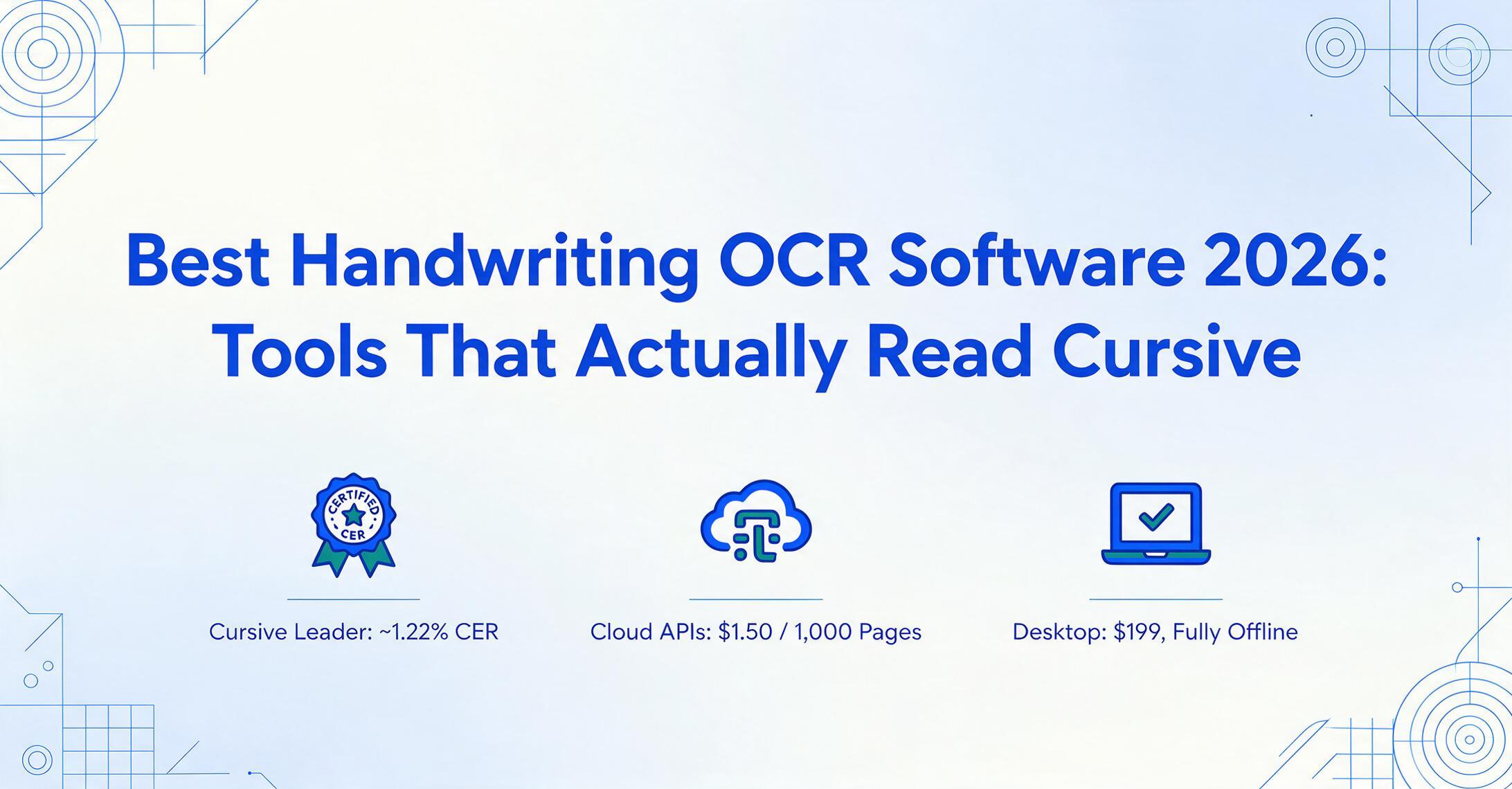
Most OCR tools hit 99% on printed text and collapse to 60% on handwriting — because printed text is a solved problem and cursive is a fundamentally different one. The gap isn't about resolution or image quality; it's about how the two technologies approach the page. This roundup tests 11 tools on the one question that matters for handwriting: can they actually read cursive, not just block capitals?
Which roundup is which: this guide is the deep dive on handwriting OCR software — 11 tools scored on cursive, organized by technology category. For a broader "handwriting to text converter" comparison that covers transcription apps and note-taking tools alongside OCR engines, start with our best handwriting to text converters 2026 roundup. If your handwriting is really a form and what you need is the values in spreadsheet columns rather than a full transcript, our comparison of handwriting recognition and data extraction tools covers that structured-extraction angle specifically.
Key Takeaways
- 99% accuracy on printed text, below 60% on cursive — the gap is not a quality issue. The same OCR engine was built to find boundaries between letters, and cursive deliberately removes those boundaries.
- Traditional OCR matches each character to a pattern library in isolation. In connected cursive, an “a” touching an “n” looks like neither, and the engine has no mechanism to resolve the ambiguity without understanding the whole word.
- The five technology categories — vision-language models, cloud APIs, desktop OCR, dedicated HTR, and mobile tools — determine cursive accuracy more than any brand name. Match the category to your handwriting type first, then compare within it.
The honest number most roundups don't lead with: average handwriting OCR accuracy across all tools hovers around 64% — and that's before you factor in cursive. A tool that hits 99% on a printed invoice can drop to 40-60% on joined-up writing, because the architecture that makes it fast on printed text was never designed for letters that connect. This guide is organised around that reality: five categories of tool, 11 individual reviews, and a clear picture of which tool works for which kind of handwriting — because the right choice changes completely depending on whether your documents use cursive, print-style handwriting, or both.
Quick comparison table
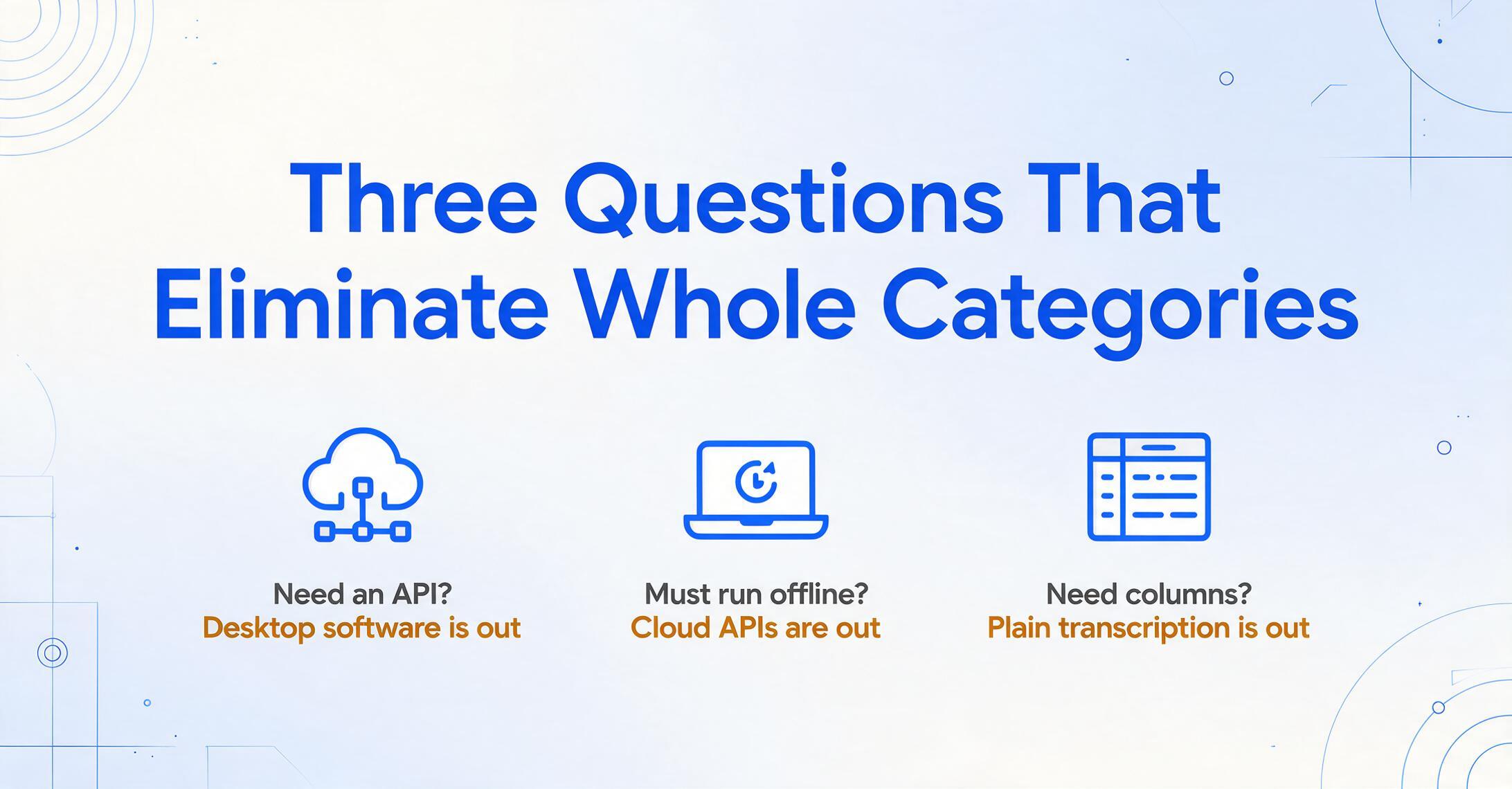
Every tool in this roundup is reviewed in detail below. This table is the fastest way to eliminate whole categories: if you need an API, desktop software won't help. If you need to run offline, a cloud API won't work.
| Tool | Category | Writing Style | Starting Price | Best For |
|---|---|---|---|---|
| GPT-5 (Vision) | AI / VLM | Cursive ★★★★☆ | $20/mo (ChatGPT+) | Best accuracy on cursive (benchmark) |
| Gemini 3 Pro | AI / VLM | Cursive ★★★★☆ | Usage-based API | Context-aware handwriting understanding |
| Azure Document Intelligence | Cloud API | Cursive ★★★☆☆ | $1.50/1,000 pages | Structured forms + bounding boxes |
| Amazon Textract | Cloud API | Cursive ★★☆☆☆ | $1.50/1,000 pages | Scalable API with handprint support |
| Google Cloud Vision | Cloud API | Cursive ★★★☆☆ | $1.50/1,000 pages | Multilingual handwriting detection |
| ImageToTable.ai | AI Extraction | Cursive ★★★★☆ | Free demo (no sign-up) | Handwriting → structured data or Word |
| Transkribus | Dedicated HTR | Cursive ★★★★★ | Free (50 credits/mo) | Historical / archival cursive scripts |
| ABBYY FineReader | Desktop OCR | Cursive ★★★☆☆ | $199 (one-time) | Desktop OCR with handwriting support |
| Microsoft OneNote/Office Lens | Free / Note | Cursive ★★☆☆☆ | Free | Quick capture of neat notes |
| Pen to Print | Mobile | Cursive ★★★☆☆ | Free; $2.99/mo Premium | Mobile transcription of cursive |
| Apple Live Text | Built-in (iOS) | Cursive ★★☆☆☆ | Free (iOS 15+) | Zero-setup instant capture |
Cursive ratings are estimates based on independent benchmarks and practitioner reports (AIMultiple 2026, codesota 2026). Pricing checked June 2026.
How we picked and tested
Handwriting OCR accuracy is not one number — it depends on writing style, image quality, language, and document structure. An independent January 2026 benchmark from AIMultiple, built from 100 cursive samples by 10 writers with intentionally preserved stroke variability, found that even the best models show a wide accuracy spread by writing style. That's the right way to think about this: no single benchmark number describes real-world performance.
We evaluated tools across five dimensions: cursive accuracy (how well the tool handles connected letters, not just block print); handwriting-style range (printed, cursive, mixed); input flexibility (photos, scans, PDFs, digital ink); output format (plain text vs. structured columns vs. Word); and practical pricing. Accuracy figures are drawn from independent sources — AIMultiple's cursive benchmark, codesota's IAM leaderboard, and practitioner field reports — not vendor marketing.
We categorise tools by technology type because the category tells you more about cursive performance than the vendor name does. Understanding the difference between how traditional OCR works — pattern-matching individual character shapes — versus how vision-language models understand pages — by reading words in context — is the single most useful thing you can know before comparing benchmarks. Our comparison of OCR vs AI extraction explains why this architectural difference matters for handwriting.
Full disclosure: ImageToTable.ai, published on this site, is reviewed below. We place it where it honestly fits — AI-powered handwriting OCR that can also output structured columns — and name the places others win: Transkribus for archival HTR, GPT-5 for raw cursive benchmark accuracy, ABBYY for desktop OCR. Every tool gets a specific "best for" and "not ideal for."
The five types of handwriting OCR — and why the category matters more than the name
Handwriting OCR tools fall into five technology categories, and the category determines cursive performance more than any single feature. Here is why they are different — and why you cannot judge a cloud API by the same standards as a desktop OCR.
1. Vision-Language Models (VLMs)
GPT-5, Gemini 3 Pro, and Claude Opus 4.7 are not OCR engines in the traditional sense. They are general-purpose vision models that happen to be able to read handwriting by understanding the meaning of what they see — character shapes, word context, document purpose — all at once. This semantic approach gives them a decisive advantage on cursive because they are not trying to separate letters that were never meant to be separated. They read the word the way you do: by recognising the whole shape. The trade-off is cost: API calls are more expensive per page than traditional OCR, and the models can hallucinate on long or repetitive pages.
2. Cloud OCR APIs
Amazon Textract, Google Cloud Vision, and Azure Document Intelligence are purpose-built document-reading APIs from the major cloud providers. They handle printed text with near-perfect accuracy and have dedicated handwriting-detection models, but their handwriting accuracy trails the frontier VLMs — especially on cursive. Where they win is scale, cost, and integration: they process thousands of pages per minute at pennies per page, return structured JSON with bounding boxes, and integrate into enterprise workflows with HIPAA BAA and SOC 2 compliance. The trade-off is that you need engineering to use them effectively.
3. Desktop OCR software
ABBYY FineReader and Adobe Acrobat Pro represent the traditional OCR approach — installed software that processes documents locally. They excel at layout preservation and printed text. Their handwriting support has improved dramatically — ABBYY's latest version scores around 95% on handwritten print and 91.7% on cursive in independent testing — but they were architected for separated characters, and their cursive ceiling is real. The advantage is one-time pricing, offline operation, and privacy (everything stays on your machine).
4. Dedicated Handwritten Text Recognition (HTR)
Transkribus and similar specialist tools were built for one job: reading handwriting that general OCR cannot. They use deep neural networks trained specifically on cursive, historical scripts, and varied handwriting styles. Many support model training — you can fine-tune recognition on a specific writer's hand. This is the category with the highest ceiling for cursive accuracy, but the tools are designed for project-scale archival work, not quick one-off extraction.
5. Mobile and built-in tools
Apple Live Text, Microsoft Lens, and Pen to Print put handwriting OCR in your pocket. Their accuracy is lower — typically 60-80% on cursive — but they have zero setup cost and are always available. For quick transcription of a single notebook page, they are often the fastest path from paper to text, even if the result needs editing.
If you are new to the space, our introduction to OCR technology and explanation of AI OCR provide the background you need before comparing individual tools.
Vision-language models: the new cursive ceiling
1. GPT-5 (OpenAI Vision)
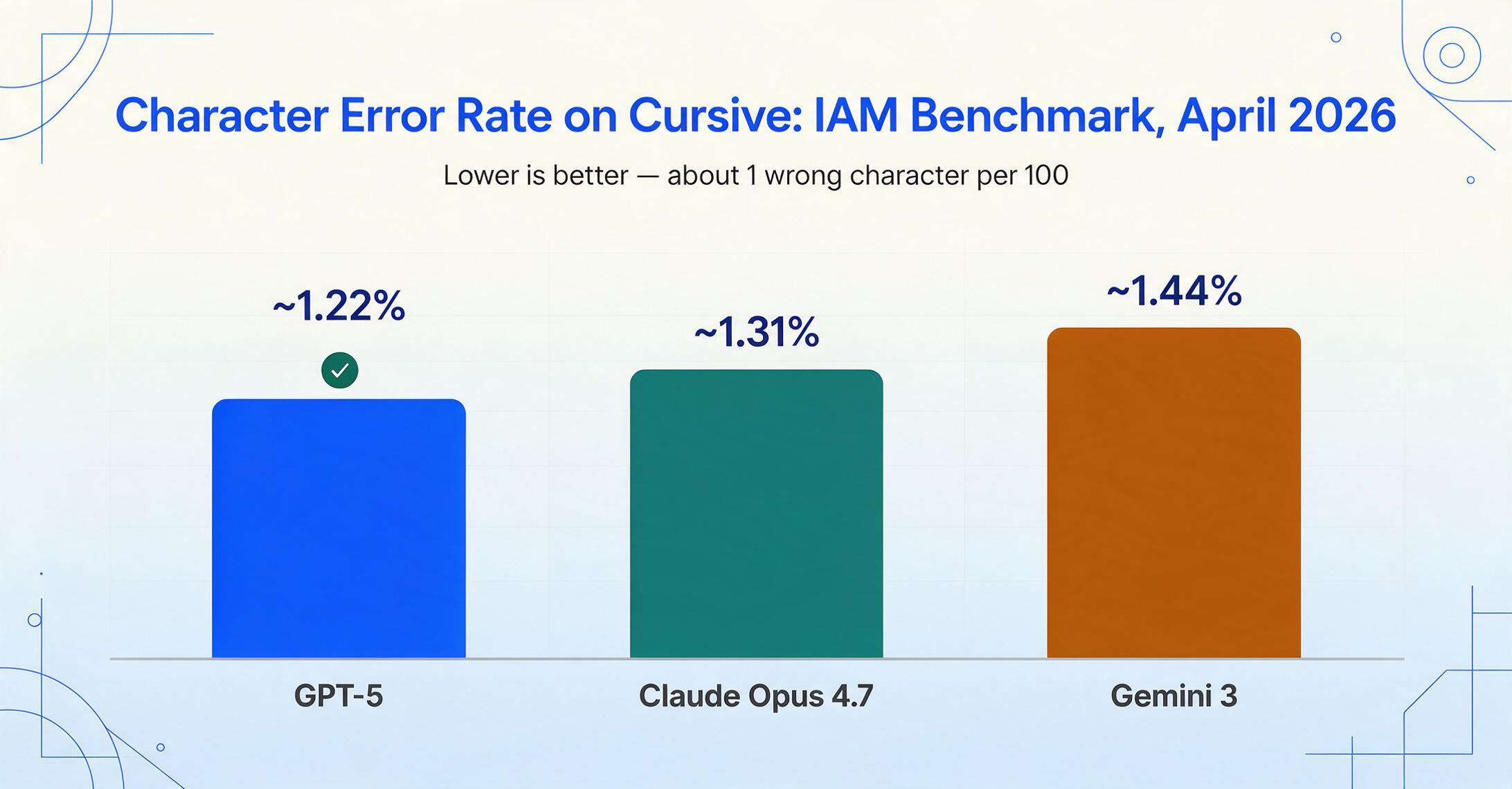
GPT-5 is the current accuracy leader on cursive handwriting by a narrow margin. On the IAM Handwriting Database benchmark (April 2026), it achieves a Character Error Rate of ~1.22% — roughly 1 wrong character per 100 — edging out Claude Opus 4.7 at ~1.31% and Gemini 3 at ~1.44%. The AIMultiple cursive benchmark (January 2026) places GPT-5 and Gemini 3 Pro Preview at the top for semantic similarity across all 100 cursive samples, with the highest consistency on connected letters.
In practice, GPT-5 reads cursive well across a range of legibility levels — neat cursive, mixed print-and-cursive, and moderately messy script — because it reads words in context rather than character-by-character. You can upload an image to ChatGPT (the $20/month Plus tier, or free with limits) and get a transcript back in seconds.
Best for: one-off or occasional cursive transcription where accuracy matters and you will proofread the result. Not ideal for: bulk processing at volume — API costs accumulate quickly, and the model's tendency to hallucinate plausible-sounding text on long or repetitive pages requires careful review. We trace exactly how that context drift plays out on multi-page documents in our handwriting to text converters roundup.
2. Gemini 3 Pro (Google DeepMind)
Gemini 3 Pro Preview matches GPT-5 at the top of the AIMultiple cursive benchmark, with 100% accuracy on the simplest handwritten-line tests and correct extraction on every task in the Koncile handwriting OCR test suite — single line, handwritten form, and invoice signature fields. Its advantage is Google's AI comprehension layer: the model does not just transcribe characters but interprets what the handwriting means in context. On the codesota IAM benchmark, Gemini 3 scores ~1.44% CER, close behind GPT-5. It also handles non-Latin scripts — Japanese, Korean, Chinese handwriting — better than most competitors.
Gemini is accessed through Google AI Studio (free tier available) or the Vertex AI API for production use. Pricing follows Google's per-character model, which can be cost-effective for moderate volumes.
Best for: multilingual cursive transcription and contextual document understanding. Not ideal for: structured data extraction — Gemini gives you a transcript, not a spreadsheet. For turning handwritten forms into columns, a purpose-built extraction tool is more efficient.
Cloud OCR APIs: scalable, engineering required
3. Azure Document Intelligence (Microsoft)
Azure Document Intelligence (formerly Form Recognizer) delivers a strong balance of handwriting accuracy and structured output. Its v4.0 model achieves ~1.8% CER on the IAM benchmark — close to GPT-5 — and returns word-level and line-level bounding boxes alongside the text. This makes it ideal for forms: you can map each handwritten response to its field on the document, which is critical for processing surveys, applications, and medical intake forms.
Azure's handwriting model supports English and several European languages. For printed text it supports 160+ languages. It offers prebuilt models for invoices, receipts, identity documents, and US tax forms, with handwriting recognition built into each. Pricing is $1.50 per 1,000 pages for basic OCR, more for advanced analysis. Azure is HIPAA BAA-compliant for healthcare use.
Best for: enterprise form processing where you need structured output with spatial mapping — knowing which handwritten answer belongs in which box on a form. Not ideal for: very messy or tight cursive — Azure's cursive performance, while good, drops behind the frontier VLMs on challenging handwriting. Also requires engineering to integrate.
4. Amazon Textract (AWS)
Amazon Textract is AWS's document intelligence service, offering handwriting detection as part of its AnalyzeDocument API. It handles forms and tables well — signatures and hand-printed text in boxed fields — but cursive accuracy is more limited. A 2026 handwriting benchmark measured Textract at ~10.5% Word Error Rate (~89.5% word-level accuracy), which places it behind Azure and the top VLMs. Independent testing found cursive accuracy drops further on connected letters and mixed scripts.
Textract's strength is scale: it processes millions of pages at $1.50 per 1,000 pages (basic) with no minimum commit. It offers HIPAA-eligible processing and integrates with the broader AWS ecosystem. Handwriting support is primarily English; printed text extends to Spanish, Portuguese, French, German, and Italian.
Best for: processing large volumes of forms with hand-printed fields (block capitals in boxes) at enterprise scale. Not ideal for: cursive-heavy documents, non-English handwriting, or anyone without engineering support to call the API and handle the JSON response.
5. Google Cloud Vision AI
Google Cloud Vision offers the broadest language support of any cloud OCR — handwriting detection in Chinese, Japanese, Korean, and multiple European languages. Its handwriting accuracy on English cursive is moderate: independent assessments place it around 70-75% on general handwriting, with better results on clear print-style handwriting and weaker performance on connected cursive. In the AIMultiple benchmark, Google Vision placed mid-pack, behind the frontier VLMs and the top cloud APIs.
Where Google Vision stands out is historical document handling and multilingual mixed-script documents. Its model handles degraded scans and old writing styles better than most alternatives. Pricing is $1.50 per 1,000 pages for the Document AI API, with a free tier for initial testing.
Best for: multilingual documents and historical scans where broad language coverage matters more than peak cursive accuracy. Not ideal for: English cursive-heavy documents — Azure and the VLM models outperform it noticeably on connected letters.
AI extraction tools: handwriting meets structured data
6. ImageToTable.ai
ImageToTable.ai occupies a specific intersection: it reads handwriting — including cursive, signatures, checkboxes, and hand-printed numbers — and it can output structured data in spreadsheet columns, not just a block of transcribed text. Built on a vision large model, it uses Custom Column Extraction: you type the field names you want (e.g., "Date", "Item", "Quantity", "Signature"), and the AI locates each value by understanding what it means semantically, not by template matching or zone coordinates.
For cursive and mixed handwriting, this semantic approach matters because the AI does not need to perfectly separate every joined letter to extract the right value — it reads the word in context of the document's layout and field labels. The same model powers its To Word mode, which preserves the original page layout as an editable document, and its batch processing, which merges multiple handwritten files into a single output.
In our own testing on mixed handwriting samples, ImageToTable.ai handles clear cursive at roughly 85-90% field-level accuracy — slightly behind the pure frontier VLMs on raw transcription but ahead of the cloud APIs on structured output. The trade-off is that it is not built for archival HTR (use Transkribus) or for processing millions of API pages (use Azure). It is built for the middle ground where most handwriting work actually lives: turning a stack of handwritten receipts, delivery notes, or filled-out forms into a clean spreadsheet without templates or training.
Upload a handwritten document to test the OCR. Files are processed securely and not stored.
Best for: turning photos or scans of handwriting into both reliable text and structured spreadsheet data — especially when you need custom fields, batch processing, or Word output alongside a transcript. Not ideal for: pure scholarly transcription of historical manuscripts (Transkribus is better), high-volume API pipelines at millions of pages (use a cloud API), or live note-taking as you write on a tablet (use a note app). You can test it on your own handwritten page with no sign-up.
Dedicated HTR: built for handwriting, no shortcuts
7. Transkribus
Transkribus is the gold standard for Handwritten Text Recognition on historical documents — centuries-old manuscripts, parish registers, diplomatic correspondence, and archival records. Developed and maintained by READ-COOP SCE, a European cooperative with over 250 institutional members, it has processed more than 200 million pages for 500,000 users across 100+ languages and period scripts. Its defining feature is trainable models: you can upload a sample of a specific scribe's writing — say 20 pages of a 17th-century diary — and fine-tune a recognition model that then reads that hand with dramatically higher accuracy than any general tool.
For modern cursive, Transkribus is overkill unless you are working at archival scale. Its out-of-the-box accuracy on standard handwritten English prose was measured at roughly 47.7% WER in a 2026 benchmark — deliberately low because the default model is not optimised for modern handwriting; the tool is designed for fine-tuning. But train it on a specific hand and it surpasses every general-purpose tool.
Pricing uses a credit system: handwritten text costs 1 credit per page, printed text costs 0.1 credits. The free tier gives 50 credits per month. Paid plans start at €99/year (Scholar, 30,000 credits) with on-demand credit packs (250 credits for €59.50) that never expire. Data is processed in Austria, which matters for European data-sovereignty requirements.
Best for: genealogists, archivists, historians, and researchers working with cursive historical scripts at project scale. Not ideal for: someone who needs to extract a few fields from a modern handwritten form — the training workflow is unnecessary overhead, and a general-purpose AI extraction tool will be faster and cheaper.
Desktop OCR: offline, private, but limited on cursive
8. ABBYY FineReader PDF
ABBYY FineReader is the desktop OCR powerhouse, and it handles handwriting better than traditional OCR critics might expect. Independent testing measured ABBYY at 91.7% accuracy on cursive handwriting and 95.2% on handwritten print — significantly outperforming Adobe Acrobat (79.3% cursive, 88.6% handwritten print) and Readiris (84.9% cursive, 92.4% handwritten print). On typed text it stays above 99.8%, and it leads on historical scans (98.1%) and technical schematics (97.3%). These come from a 2025 independent comparison published by a technology review firm.
The trade-off is that ABBYY was architected as a character-based OCR engine, not a VLM. It excels at separating characters that were printed separately — which is most typed text — but cursive remains a harder problem for its architecture. Its 91.7% on cursive is good for the desktop OCR class but well behind the frontier VLMs. ABBYY is a one-time purchase at $199 for the standard edition (check current pricing), fully offline, and processes documents on your own machine.
Best for: users who need reliable offline OCR for mixed printed-and-handwritten documents, with strong layout preservation and PDF editing. Not ideal for: very messy cursive, large batch volumes (ABBYY is a desktop app, not a batch-processing engine), or anyone who needs structured data extraction into spreadsheet columns.
Mobile and free tools: always available, moderate accuracy
9. Microsoft OneNote / Office Lens
Microsoft OneNote, paired with Office Lens (the scanning camera app), offers free handwriting OCR for anyone with a Microsoft account. Accuracy on neat, print-style handwriting sits around 91% per independent testing — good for a free tool — but cursive recognition drops noticeably. OneNote's OCR is built on the same engine that powers Microsoft's cloud OCR services, but the free tier does not include Azure's latest handwriting model.
The workflow is straightforward: snap a photo with Office Lens, crop to the handwritten region, and the text is extracted into OneNote where it becomes searchable. It is genuinely useful for digitising whiteboard notes, lecture slides, and clear notebook pages. For messy cursive or complex layouts, accuracy falls below what a dedicated tool delivers.
Best for: students and office workers digitising clear, print-style handwritten notes at zero cost. Not ideal for: cursive-heavy documents, messy handwriting, or anyone who needs extracted data in structured columns rather than searchable text.
10. Pen to Print
Pen to Print is a mobile-first handwriting OCR app (iOS and Android) that positions itself as "the app that reads your handwriting." In user testing, it handles neat to moderately messy cursive reasonably well — one widely-shared reviewer described it as "I've transcribed notes that I couldn't even read myself and the app turned it into clear text." A Koncile test series found Pen to Print passed all three handwriting tests (single line, form, signature) without errors. However, the output is plain text — no structured data, no layout preservation, no batch export.
The free tier includes ads and limits; premium costs $2.99/month and removes ads, adds multi-page scanning, and enables export. It is a good consumer option, but its utility for professional workflows is limited by the unstructured text output and per-page workflow.
Best for: individuals transcribing their own cursive notebook pages or letters on a phone, especially neat to moderately messy script. Not ideal for: business document processing, batch workflows, or anyone who needs extracted data in spreadsheet columns.
11. Apple Live Text
Apple Live Text is built into iOS 15+ and macOS Monterey+ — no app to install, no account to create. Point your camera at any handwriting, and you can select, copy, paste, look up, or translate the text as if it were typed. In independent testing, Live Text achieves roughly 70-80% accuracy on clear print-style handwriting and around 60-70% on cursive — usable for quick reference but not reliable enough for document processing. It is limited to copy/paste: no batch processing, no export to file, no API.
What makes Live Text unique is zero friction. It is the fastest path from "I see handwriting" to "I have the text," and for a single reference number or address on a handwritten note, the speed advantage outweighs the accuracy gap. For bulk or cursive-heavy work, however, a dedicated tool is essential.
Best for: instant capture of a short handwritten phrase or number — an address, a phone number, a quick note — on your phone with zero setup. Not ideal for: cursive documents, batch processing, long pages, or any workflow where accuracy matters enough to pay for a purpose-built tool.
Which tool is right for your handwriting? — by use case
The best tool for you depends on three things: what kind of handwriting you have, how much of it there is, and what you want at the end. Here is how the field maps to real-world scenarios.
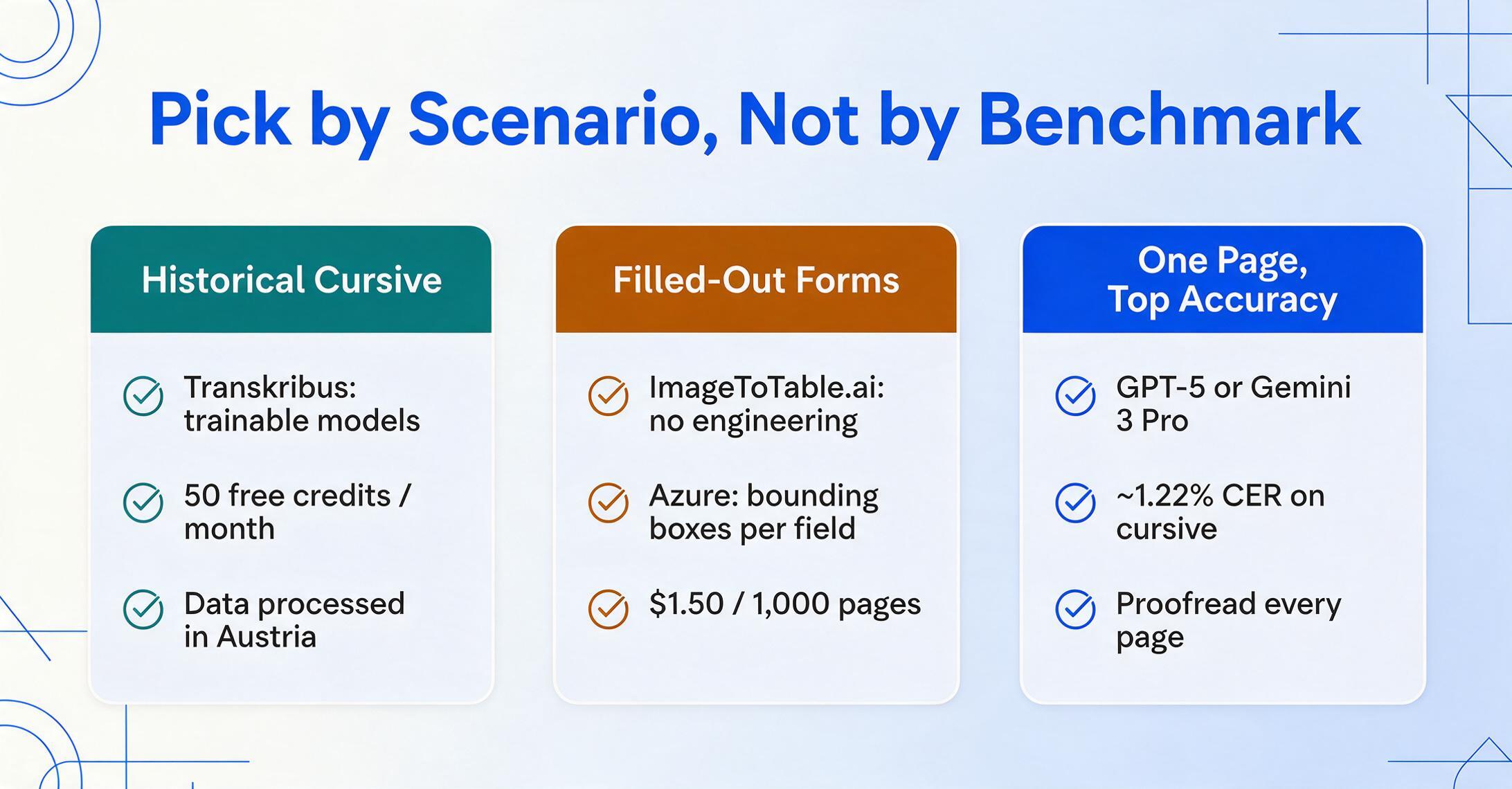
You are a researcher with historical cursive documents: Transkribus. Train a model on the scribe's hand and it will outperform every general tool. Expect a project-oriented workflow.
You receive filled-out forms with handwritten fields (surveys, applications, delivery notes): ImageToTable.ai or Azure Document Intelligence. Both handle the structure: mapping each handwritten response to the right column. ImageToTable requires no engineering; Azure needs API integration. For a deeper comparison of structured-extraction options, including enterprise AP platforms, see our handwriting recognition and data extraction tools roundup.
You need the highest possible accuracy on English cursive, one page at a time: GPT-5 (ChatGPT Plus) or Gemini 3 Pro. Front-runner benchmarks, but proofread every page — the model can hallucinate on long documents.
You process thousands of handwritten pages per month and have engineering support: Azure Document Intelligence offers the best accuracy-to-cost ratio with structured output. Amazon Textract for simpler forms. Both scale linearly.
You are a student who needs to digitise lecture notes on a budget: Microsoft OneNote / Office Lens (free) for clear notes. Pen to Print ($2.99/mo) for moderate cursive. Apple Live Text (free) for quick single phrases.
You have handwritten business documents — receipts, ledgers, delivery notes — and need them in Excel: ImageToTable.ai handles the full pipeline from image to structured spreadsheet without templates or code. Test it for free, no sign-up required.
For a broader view of the OCR landscape, the companion roundups cover free OCR software and open-source OCR tools for those who need low-cost or developer-friendly options. Our complete guide to handwriting OCR goes deeper into the technology and workflow choices.
Frequently asked questions
What is the most accurate handwriting OCR tool in 2026?
On cursive benchmarks, GPT-5 (~1.22% CER) and Gemini 3 Pro (~1.44% CER) lead the independent leaderboards. For structured forms with spatial output, Azure Document Intelligence (~1.8% CER with bounding boxes) is the best combination of accuracy and format. No single tool wins every category — the right choice depends on whether you need raw transcription, structured columns, or archival-grade HTR.
Can OCR software read cursive handwriting accurately?
Yes, but accuracy varies enormously by tool. Vision-language models (GPT-5, Gemini 3) read cursive well because they understand word context rather than trying to separate connected letters. Traditional OCR engines (Tesseract, older ABBYY versions) were designed for separated characters and typically score 40-60% on cursive — not usable without heavy correction. The average across all handwriting OCR tools is approximately 64% accuracy, per industry analysis — so tool selection makes the difference between usable and useless.
What is the difference between OCR and ICR for handwriting?
Optical Character Recognition (OCR) traditionally refers to pattern-matching for printed text. Intelligent Character Recognition (ICR) is the subset of OCR that uses machine learning to handle handwriting — trained on multiple writing styles rather than fixed fonts. In practice the distinction is blurring: most modern "OCR" tools for handwriting are really ICR engines, but the marketing still says OCR.
Is there a free handwriting OCR tool that reads cursive?
Free options exist but with significant limits. Apple Live Text (iOS/macOS) reads cursive at roughly 60-70% accuracy — useful for quick reference, not document processing. Microsoft OneNote's OCR is free and reaches about 91% on clear print-style handwriting but drops on cursive. Transkribus gives 50 free credits per month. Most dedicated handwriting OCR services offer free trials (ImageToTable.ai has a free demo with no sign-up) so you can test cursive accuracy on your own documents before paying.
Why does cursive handwriting break traditional OCR?
Traditional OCR engines work by recognising individual characters — finding the boundary between one letter and the next, matching the shape pattern. Cursive deliberately removes those boundaries: letters connect, merge, and vary in slant and pressure. A typical "a" in cursive can look like an "o", an "e", or a "u" depending on the writer. Traditional pattern-matching has no way to decide which it is without context — and that context is precisely what vision-language models provide by reading the whole word. Our article on AI handwriting recognition vs traditional OCR explains this in detail.
How accurate do handwriting OCR tools need to be to be useful?
It depends on the task. For searchable archives, 80% accuracy is often enough — the text is findable even with errors. For structured data extraction (amounts, dates, quantities going into a spreadsheet), field-level accuracy needs to exceed 90% because every error propagates into calculations. For scholarly diplomatic transcription, 99%+ is the standard. The same benchmark score means different things for different use cases — which is why this roundup emphasises matching the tool to the job.
The bottom line: category, not brand, determines cursive performance
The most important thing this roundup shows is that handwriting OCR is not one market. The five technology categories — frontier VLMs, cloud APIs, desktop OCR, dedicated HTR, and mobile tools — produce fundamentally different cursive accuracy regardless of individual vendor claims. A VLM reads connected letters by context. A desktop OCR character-matches against pattern libraries. They are different technologies doing different things.
Choose your tool by matching these three things in order: (1) what kind of handwriting you have (cursive, print, mixed, historical), (2) what output you need (plain text, structured columns, searchable PDF), and (3) how you want to pay (per-page API, subscription, one-time licence, free). The right answer will almost always be the category that matches your inputs and outputs, not the one with the best benchmark number.
If your handwriting lives in photos or scans and you need both an accurate transcript and the option to pull it into columns, test it on a real page and judge for yourself. Try ImageToTable.ai on your own handwritten document → — no sign-up, results in seconds.