Best Handwriting to Text Converters
in 2026
OCR has been a solved problem for typed text for years — independent testing in early 2026 still puts it above 99% accuracy on clean printed pages. Handwriting is where it falls apart. An independent 2026 benchmark from AIMultiple notes that handwriting "remains challenging due to variations in style, spacing, and irregularities," with even the strongest models scoring far below their typed-text numbers. So when you search "handwriting to text," you're really asking four different questions at once — and the right tool depends on which one you're asking.
Which roundup is which: this guide is the starting point for "handwriting to text converter" searches — eight tools compared for transcription and structured extraction. If your question is specifically about OCR software and how each tool scores on cursive, our companion review of the best handwriting OCR software 2026 breaks down 11 tools by technology category.
Key Takeaways
- There is no single "best" handwriting-to-text tool — OCR (turning images into editable text) clears 99% on typed pages but falls apart on cursive, so your search is really four different questions in disguise.
- The expensive mistake isn't picking the worst tool, it's picking one built for a different job: a live note app can't read your scanned letters, and a general AI starts inventing plausible words by the third page.
- Name your input first — live ink, photos of paper, or historical records — and the field collapses to one or two; for photos that need both a transcript and spreadsheet columns, a dedicated engine like ImageToTable.ai does what pure transcribers can't.
"Handwriting to text" is really four different problems
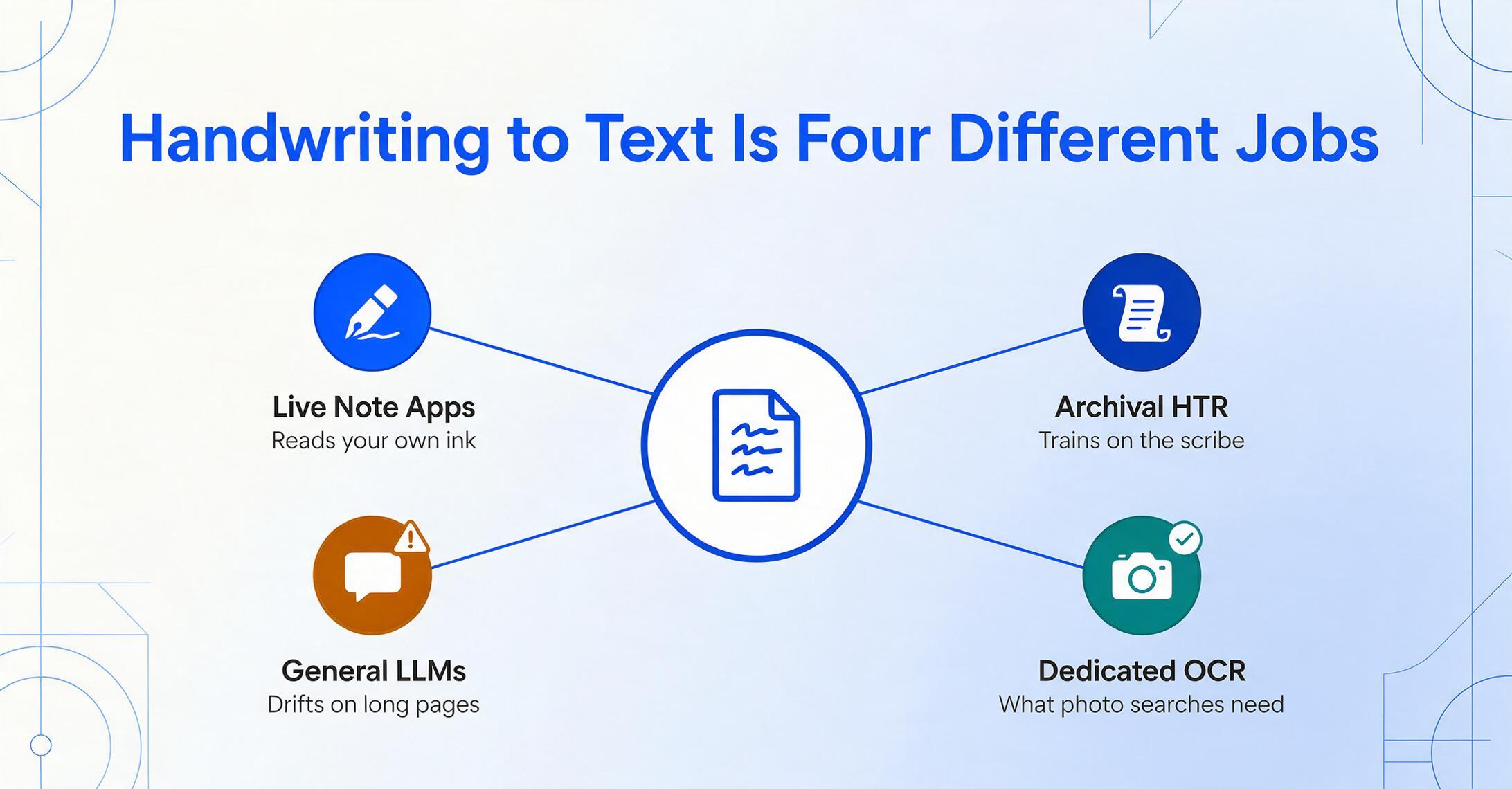
The reason no single tool tops every "best handwriting OCR" list is that the term covers four distinct jobs, and a tool built for one is often useless for another. Sorting them out first saves you from testing the wrong category.
Live note-taking apps
These convert your own ink as you write it on a tablet or stylus device — they never see a photo. Think MyScript Notes (formerly Nebo) or GoodNotes. The recognition happens in real time on digital ink, not on an image of paper.
Historical & archival HTR
Handwritten Text Recognition for centuries-old manuscripts, parish registers, and archival records. Transkribus is the standard here. You often train a model on a specific scribe's hand, and accuracy on period scripts beats any general tool.
General multimodal LLMs
ChatGPT and Claude can read handwriting from a photo because they're vision models — but inconsistently. They're not purpose-built for it, and accuracy drifts on long or messy pages (more on that below).
Dedicated handwriting OCR
Purpose-built to read photos and scans of existing handwriting — notes, forms, letters, ledgers someone already wrote. HandwritingOCR.com, Pen to Print, and ImageToTable.ai live here. This is what most people searching "handwriting to text" actually need.
There's a second fork worth naming, because it changes which tool you should pick. Transcription means you want the words out, in order, preserving the original content — a journal page becomes the same journal page as editable text. Structured data extraction is a different goal: pulling specific fields (date, quantity, supplier) out of a handwritten form and into spreadsheet columns. This roundup is about transcription. If your real need is turning, say, a stack of handwritten delivery notes into a clean spreadsheet of just the fields you care about, that's a structured-extraction job — a narrower problem with a different best tool, and worth treating separately. We flag it here so you don't pick a pure transcriber when you actually need columns. For handwriting specifically, our comparison of handwriting recognition and data extraction tools covers exactly that job. For the broader landscape of structured tools across all document types, our roundup of document data extraction tools for 2026 is the better starting point.
How we picked and tested
We evaluated tools that are genuinely reachable for transcribing handwriting from photos, scans, or PDFs — not enterprise IDP platforms that happen to mention handwriting in a feature list. Each tool here is one a real user would actually reach for to convert handwritten material into text.
We weighted four things: accuracy on real handwriting (cursive and messy, not just neat print), the input it accepts (digital ink vs. photos of paper), export options (plain text, Word, Markdown), and honest, current pricing. Accuracy figures come from independent benchmarks and real-user testing, not vendor marketing — we cite the source for every number. All pricing was read from public pricing pages and is labelled Pricing checked June 2026; prices change, so verify before you buy.
Full disclosure: ImageToTable.ai, the tool published on this site, is one of the eight reviewed below. We've placed it where it honestly fits — dedicated OCR for photos and scans — and we concede the categories where other tools win: Transkribus for archives, Nebo for live note-taking, HandwritingOCR.com for the messiest pure cursive. Every tool gets a specific "best for" and "not ideal for."
The eight tools at a glance
The fastest way to narrow the field is to match your input type and budget to a tool's design. Here's the full roster side by side; detailed reviews follow.
| Tool | Starting Price | Pricing Model | Best For | Key Limitation | Free Trial? |
|---|---|---|---|---|---|
| HandwritingOCR.com | $15 / 100 pages | Pay-as-you-go credits + monthly plans | Messy cursive & mixed scripts from photos/scans | Per-page cost adds up at high volume | Yes (5 free credits) |
| ImageToTable.ai | Free to try (no sign-up) | Free demo + plan quota | Handwriting to text and structured columns / Word | Not built for live ink or diplomatic archival transcription | Yes (free demo) |
| Transkribus | Free (50 credits/mo) | Credit-based; sub + on-demand | Historical & archival handwriting (HTR) | Project-oriented; steep for one-off notes | Yes (50 credits/mo) |
| MyScript Notes (Nebo) | $1.99/mo or $24.99 lifetime | One-time purchase / cheap sub | Live stylus note-taking, math & diagrams | Reads your own ink — not photos of others' writing | Yes (7-day) |
| Pen to Print | Free; $2.99/mo Premium | Freemium mobile app | Quick mobile capture of personal notes | Latin scripts; weaker on very messy pages | Yes (free tier) |
| Google Document AI | $1.50 / 1,000 pages | Usage-based API | Scalable cloud OCR for developers | Needs engineering; cursive only "decent" | Yes (GCP free tier) |
| ChatGPT & Claude | $20/mo each (free tiers exist) | Subscription | Ad-hoc single pages, mixed reasoning | Inconsistent on cursive; drifts on long pages | Yes (free tier) |
| Microsoft Lens / OneNote | Free | Free | Quick capture of clear notes | Optimised for print; weak on messy scans | Free |
Pricing checked June 2026. Figures are entry-level public prices; volume, region, and platform can change them.
Dedicated handwriting OCR: the right tool for photos and scans
If you have images, scans, or PDFs of handwriting someone has already written, a purpose-built handwriting OCR will beat both general LLMs and traditional OCR — because the model has been trained specifically on the messy, cursive, mixed-script reality of real handwriting.
HandwritingOCR.com
HandwritingOCR.com is the most focused player on this exact keyword — its entire product is reading handwriting that regular OCR can't, across 300+ languages and cursive scripts, exporting to Word, Markdown, or plain text. It carries a 4.5/5 G2 rating and a large user base, and it leans hard into the "messiest page" use case: family historians, legal discovery, and anyone with a drawer of handwritten letters. Pricing starts at $15 per 100 pages pay-as-you-go (credits valid a year) or $19/month for 250 pages; the $59/month Pro tier adds table-to-Excel export.
Best for: the hardest pure-transcription jobs — heavy cursive, mixed scripts, faded letters. Not ideal for: teams that mainly need a few fields pulled into a spreadsheet rather than the full text, or anyone processing thousands of pages a month where per-page costs climb.
ImageToTable.ai
ImageToTable.ai sits in the dedicated-OCR camp but answers both forks of the problem at once. Built on a vision large model, it transcribes printed and handwritten text — including cursive, checkboxes, and signatures — and it can also do what pure transcribers can't: pull handwritten content into structured spreadsheet columns. You type the column names you want — say "Date," "Item," "Quantity" — and the AI locates each value by understanding what it means, no template to draw and no model to train. That's Custom Column Extraction, and it's the bridge between "I want the words" and "I want the data." It also offers a To Word mode that rebuilds the original layout as an editable document, batch processing that merges many files into one Excel sheet, and a Google Sheets sidebar add-on. You can test it on your own page with no sign-up.
In practice that makes it the natural pick when handwriting and structure overlap — for example, turning a stack of handwritten receipts into a spreadsheet for tax season, or reading handwritten forms into columns. We cover the accuracy mechanics in our full guide to AI handwriting-to-text conversion.
Best for: turning photos or scans of handwriting into reliable text and structured, exportable data without templates or training. Not ideal for: live note-taking as you write (use a note app), or scholarly diplomatic transcription of medieval manuscripts (use Transkribus).
Pen to Print
Pen to Print is the consumer-friendly mobile app of the group — snap a photo of a notebook page and get text back. It is strongest on neat cursive and is the natural first stop for a student or individual digitising their own legible notes on a phone; its free tier lets you test it before paying anything. The limits are the ones that apply to every mobile converter in this class: output is plain text only — no spreadsheet columns, no batch export — and accuracy drops off on very messy handwriting and non-Latin scripts.
Best for: students and individuals digitising their own legible notes on a phone. Not ideal for: very messy handwriting, non-Latin scripts, or high-volume professional workflows.
For historical and archival handwriting: Transkribus
If your handwriting problem is archival — centuries-old manuscripts, parish registers, or genealogical records — the answer is Transkribus, the de-facto standard for Handwritten Text Recognition (HTR) in the humanities. Its defining edge is trainable models: you upload samples of a specific scribe's hand and the model fine-tunes itself to that writer, something no general-purpose converter can do. That capability is what makes it the answer to the "historical records" problem in the four-way split above, rather than a direct competitor to the other tools here.
The trade-off is workflow, not capability: Transkribus is built for project-scale archival work, not one-off pages. It runs on a credit system with a free monthly allowance, so you can test it at zero cost. Pricing details and benchmark numbers for its cursive accuracy live in our companion review of handwriting OCR software 2026, which covers it in the dedicated-HTR category.
Best for: genealogists, archivists, and researchers transcribing historical or specialised scripts at project scale. Not ideal for: someone who just wants a few modern notebook pages turned into text — the project-oriented workflow is overkill, and a dedicated consumer OCR is faster.
For live note-taking: MyScript Notes (Nebo)
MyScript Notes, formerly Nebo, is the tool to beat if you're converting your own handwriting as you write it on a stylus device — and that's a fundamentally different job from reading a photo. It works on digital ink in real time, recognising full pages plus math and diagrams, and exports clean Word, PDF, and LaTeX. Reviewers consistently rate its recognition the best in the note-app class.
Crucially, it doesn't read photos or scans of paper — it converts the ink you draw on screen. Pricing is refreshingly simple: a 7-day free trial, then $1.99/month, $7.99/year, or a $24.99 one-time lifetime purchase usable across up to 10 devices. See the current details on the MyScript Notes page, since app-store pricing shifts by region.
Best for: iPad, Surface, or S Pen users who write by hand and want typed output instantly, especially with equations. Not ideal for: transcribing handwriting that's already on paper — it has no path for photos or scanned documents.
General LLMs and free tools: capable but inconsistent
General-purpose models and free apps can read handwriting, but their accuracy is too variable to rely on for anything important — useful as a quick free option, risky as a workflow.
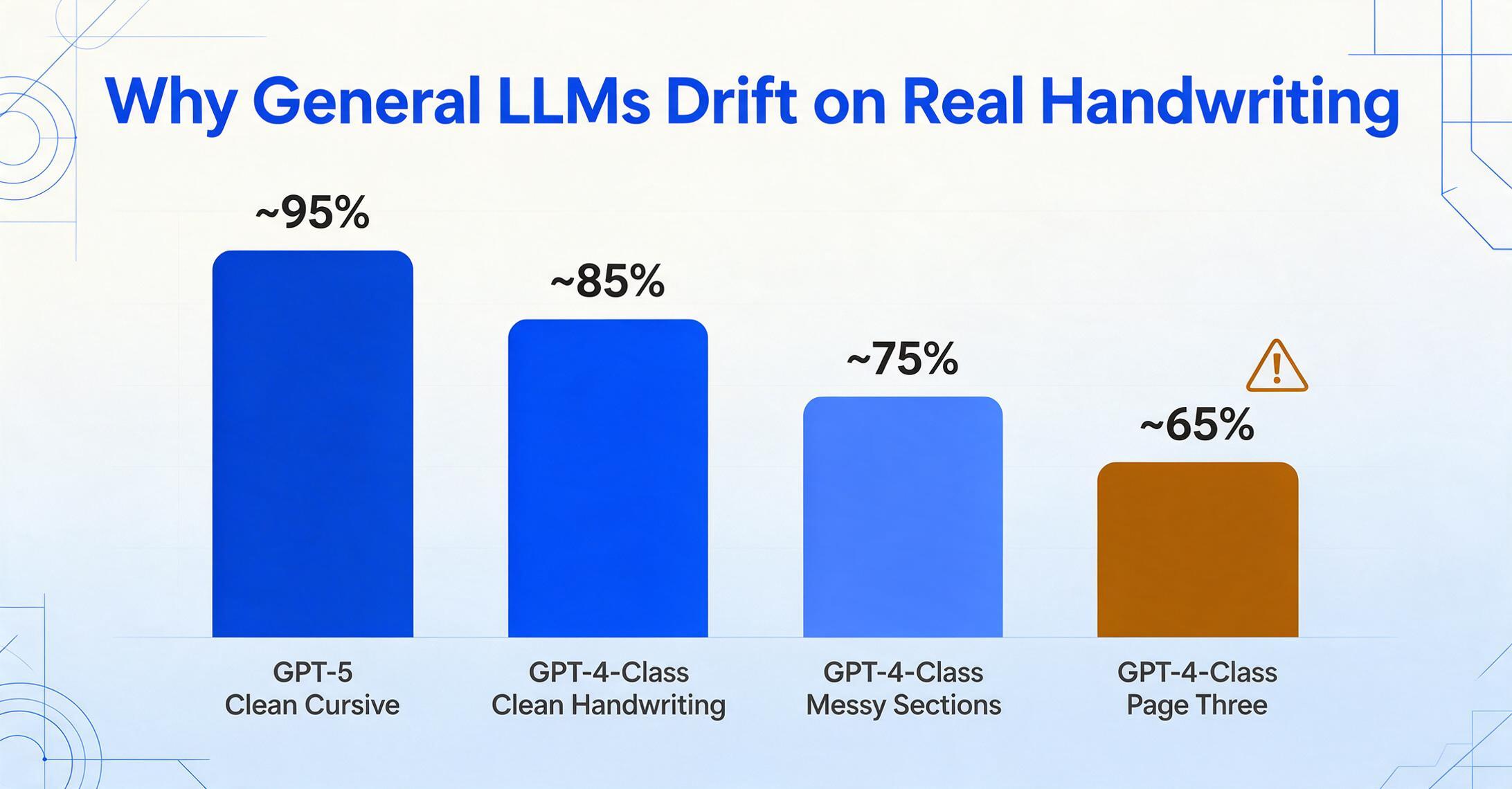
ChatGPT and Claude are vision models, so they'll happily transcribe a photo of a page. On clean single pages they do well — the AIMultiple benchmark put GPT-5 around 95% on cursive — but a detailed practitioner review found GPT-4-class models dropping from ~85% on clean handwriting to ~75% on messier sections, and as low as ~65% by the third page of a multi-page document, where the model starts hallucinating plausible-but-wrong continuations. Claude tends to hold multi-page context better, per real-user testing on r/computervision. Both cost $20/month (with limited free tiers), and both are best for one-off pages where you can eyeball the result. We dig into why this matters for any structured work in why ChatGPT isn't the best fit for handwritten data, and you can read our in-depth ChatGPT comparison →
Google Document AI is a usage-based cloud API ($1.50 per 1,000 pages) that handles print-style handwriting well but is a developer tool — you need engineering to call it, parse the JSON, and build a review interface. Microsoft Lens (with OneNote) is genuinely free and handles clear, print-style notes well, but it's optimised for printed text and stumbles on messy or scanned handwriting. For a fuller treatment of where AI OCR and traditional OCR diverge, see our piece on AI handwriting recognition vs traditional OCR.
Best for: free or ad-hoc transcription of a clean page or two. Not ideal for: consistent, high-volume, or messy handwriting where errors are costly and a purpose-built engine pays for itself.
How to choose, by use case
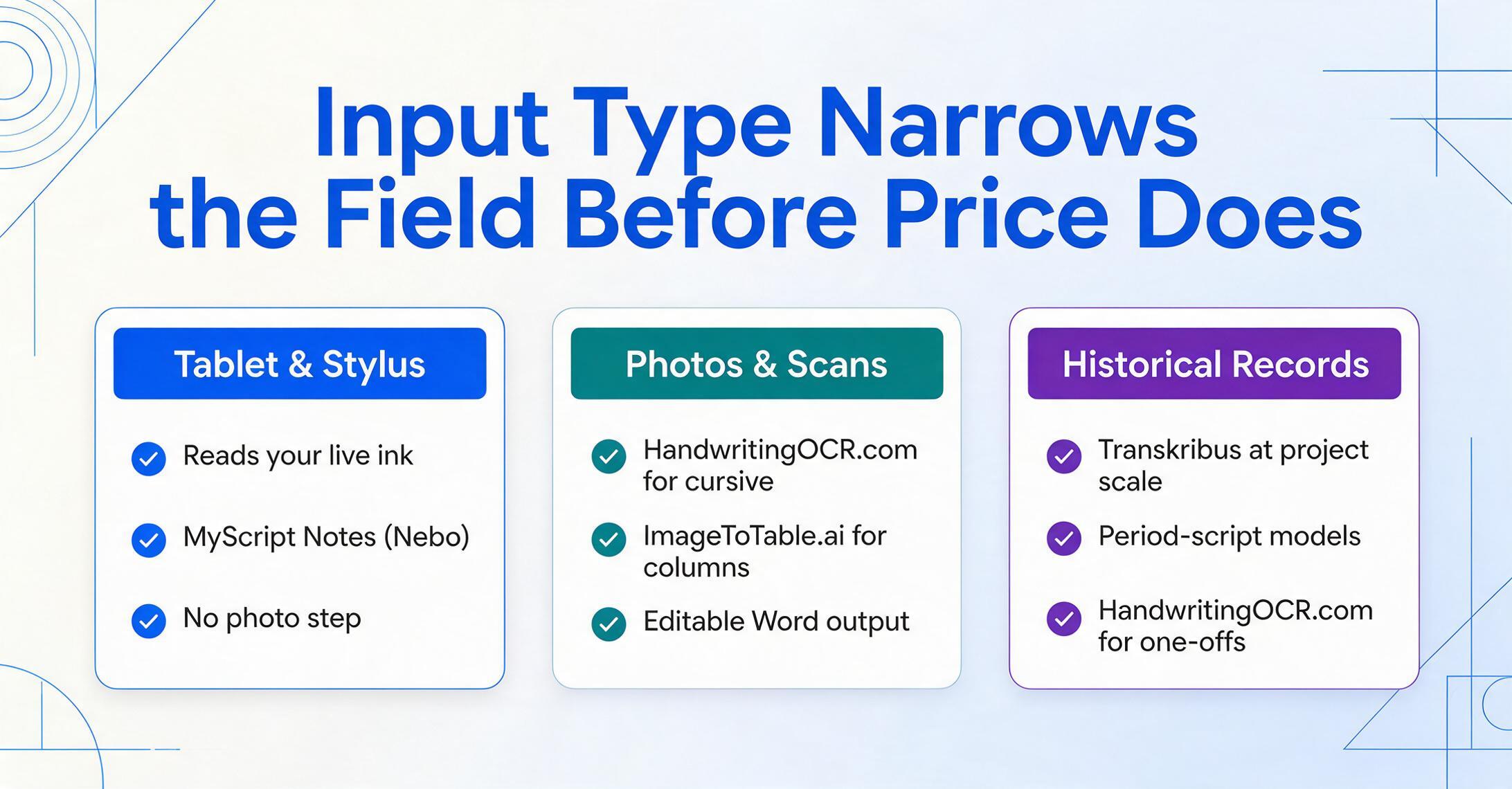
Match the tool to your input and your goal, in that order — input type rules out whole categories before price ever enters the picture.
You write on a tablet and want typed notes: MyScript Notes (Nebo). It reads your live ink — no photo step.
You have old letters, journals, or genealogy records: HandwritingOCR.com for one-off cursive; Transkribus once you're working at project scale or need period-script models.
You have photos or scans of modern handwriting: HandwritingOCR.com or ImageToTable.ai. Pick ImageToTable.ai if you also want the content pulled into spreadsheet columns or an editable Word file.
You're digitising handwritten business documents: ImageToTable.ai handles the overlap of transcription and structure — for example batching handwritten ledgers into Excel. Small teams comparing options more broadly can start with our small-business document tools roundup.
You just need one page read for free: Microsoft Lens, or ChatGPT/Claude if you'll proofread the output.
If your work leans toward turning documents into clean structured data rather than running transcripts, the companion roundups on AI OCR software, no-code document AI tools, and data extraction software cover that side of the spectrum. There's also a deeper look at AI OCR for handwritten documents if accuracy is your main concern.
Frequently asked questions
What's the most accurate handwriting to text converter in 2026?
There's no single most-accurate tool, because accuracy depends on the handwriting itself — neat print, cursive, or messy scrawl — and on the language. For hard cursive from photos and scans, dedicated engines like HandwritingOCR.com and ImageToTable.ai outperform general OCR and LLMs. For historical scripts, Transkribus wins once you train a model. The reliable move is to test two or three tools on your actual pages.
Can ChatGPT or Claude convert handwriting to text?
Yes, both can read a photo of handwriting, and they do well on clean single pages — GPT-5 scored around 95% on a cursive benchmark. But accuracy is inconsistent: on messy or multi-page documents it drops sharply, and the model can hallucinate text that looks plausible but isn't there. For occasional pages you'll proofread, they're fine; for volume or accuracy-critical work, a purpose-built handwriting OCR is safer.
Is there a free handwriting to text converter?
Yes. Microsoft Lens with OneNote is free and works well on neat notes. Transkribus gives 50 free credits a month (about 50 pages). HandwritingOCR.com and ImageToTable.ai offer free trials or a free demo so you can test on your own page before paying. Free tools are best for clear handwriting; very messy or cursive pages usually need a paid, specialised engine.
What's the difference between converting handwriting to text and to a spreadsheet?
Converting to text means transcribing the words in order, preserving the original content — a notebook page becomes the same page as editable text. Converting to a spreadsheet means extracting only specific fields (dates, amounts, names) into columns, dropping the rest. Pure transcribers like Pen to Print do the first; tools like ImageToTable.ai can do both, which matters if your handwritten documents are really forms or ledgers.
Can these tools read cursive and messy handwriting?
Dedicated handwriting engines are built for exactly this and handle cursive far better than traditional OCR, which was designed for printed characters. Even so, no tool is perfect on truly illegible writing — output quality tracks the legibility of the original. Tools trained specifically on handwriting (HandwritingOCR.com, ImageToTable.ai, Transkribus) hold up best on cursive; general OCR engines like Tesseract or AWS Textract degrade badly on it.
The bottom line
The mistake most people make isn't picking the "worst" tool — it's picking a tool built for a different problem. A live note app can't read your scanned letters; an archival platform is overkill for a notebook; a general LLM will quietly invent words on page three. Decide first whether you're capturing live ink, transcribing photos of paper, or working with historical records — then whether you want plain words or structured data — and the right choice narrows to one or two tools.
If your handwriting lives in photos, scans, or PDFs and you want both an accurate transcript and the option to pull it into columns or an editable Word file, test it on a real page and judge for yourself. Try ImageToTable.ai on your own handwritten document → — no sign-up, results in seconds.