Best Data Extraction Software for
Unstructured Documents in 2026
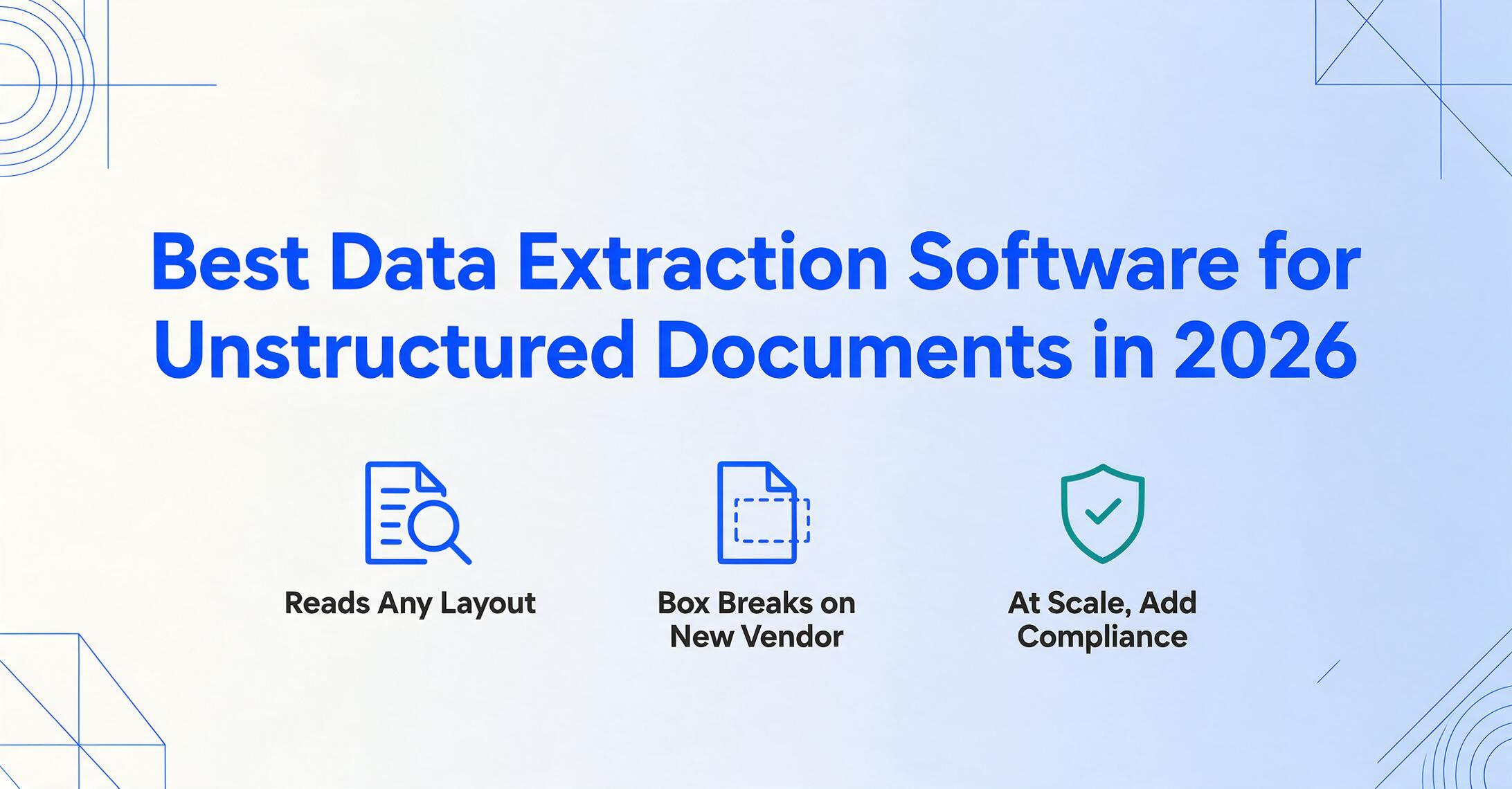
Most data extraction roundups rank tools by feature count or brand recognition. But the variable that actually decides whether a tool works for you is rarely the headline: do your documents hold still? A folder of identical, system-generated PDFs from one vendor is a different problem from a pile of invoices that arrive in twenty different layouts, plus a few phone photos and a scan that came in sideways. The first is structured enough that almost any tool handles it. The second — genuinely unstructured, variable-layout input — is where most tools quietly fall apart. This guide compares nine data extraction platforms specifically on that axis, with first-hand pricing checked in June 2026 and an honest "best for / not ideal for" on each.
Key Takeaways
- The nine tools here span $9 a month to $18,000 a year — they aren't competing for the same buyer, they're solving different problems.
- Feature counts and accuracy percentages don't decide whether a tool fits you — one question does: do your documents hold still?
- The only question that narrows nine tools to one is whether your data sits in a fixed place or moves around, because template tools win when it holds still and AI wins when it doesn't.
What "Unstructured" Actually Changes About Tool Selection
"Unstructured document" doesn't mean messy or low-quality. It means the data you want isn't in a fixed place. The invoice number sits top-right on one vendor's layout and bottom-left on another's. One supplier labels it "Invoice #," another "Document No.," a third prints it next to a barcode with no label at all. The information is all there — it just refuses to line up across documents. That single trait splits the entire market into three approaches, and which one you need is the first decision you should make.
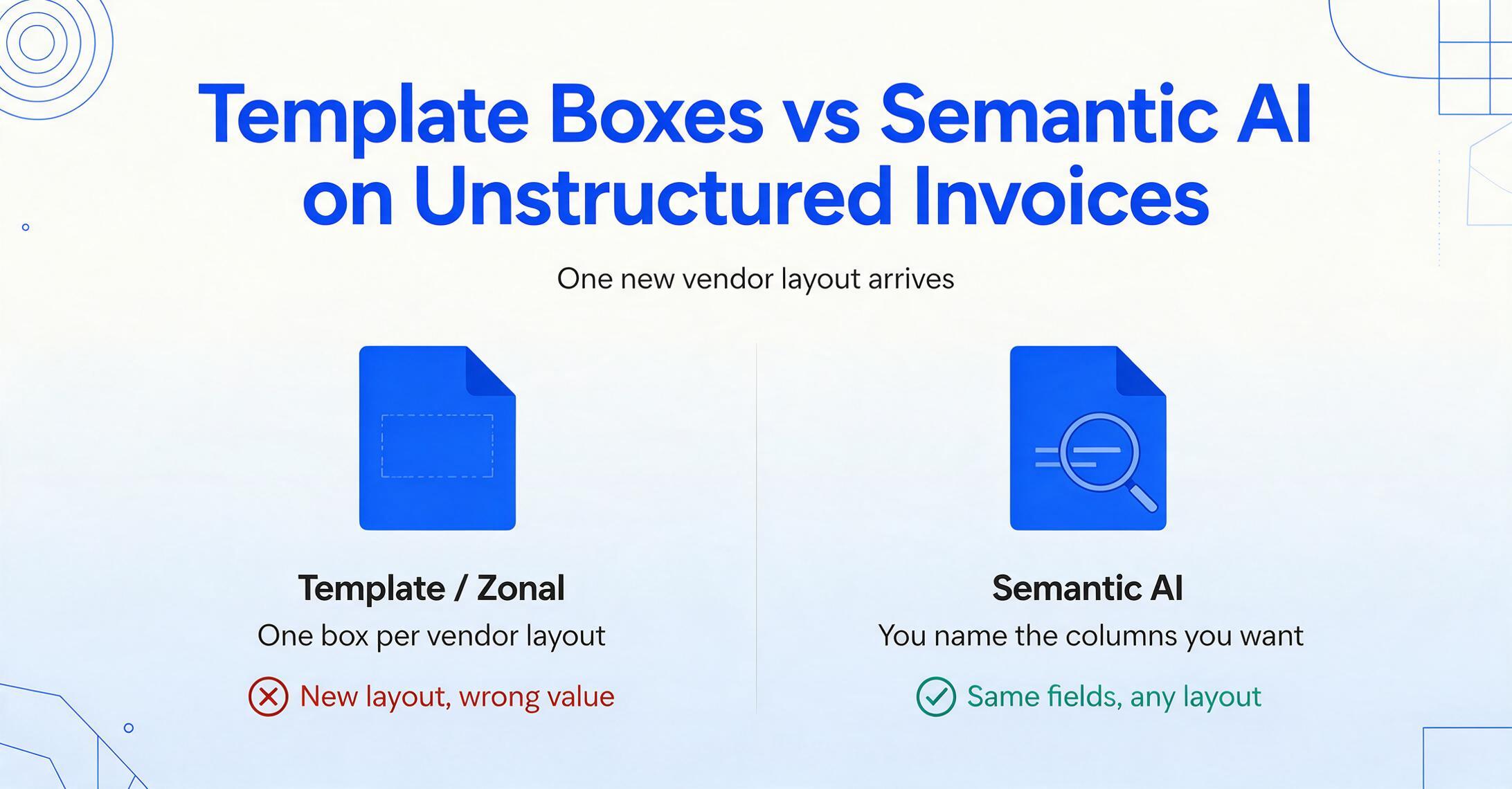
The oldest approach is template or zonal extraction. You draw a box around where the invoice number lives on a sample document, and the tool reads whatever text falls inside that box on every future document. This is fast and accurate — as long as the layout never moves. The moment a vendor redesigns their invoice or you add a new supplier, the box points at the wrong spot and the data comes out wrong. For repeating, stable formats it's hard to beat. For genuinely variable input, it becomes a template-maintenance treadmill.
The newest approach is semantic, AI-based extraction. Instead of reading a position, the tool reads meaning. You tell it you want the "Invoice Number," and a vision model locates the value by understanding what an invoice number is — wherever it appears, however it's labeled. Tools like ImageToTable.ai call this Custom Column Extraction: you type the column names you want — "Invoice Number," "Due Date," "Total" — and the AI finds each value anywhere on the page, then writes it into a spreadsheet column with that exact header. Because nothing is tied to coordinates, a layout change doesn't break anything. This is the shift from position-based to intent-based extraction, and it's the whole reason unstructured documents became tractable for non-technical users.
Between those two sit the enterprise IDP platforms — intelligent document processing systems that combine OCR, machine learning, and workflow tooling. They handle variability well, often through models you train on your own documents, and they bring approval routing, validation rules, and ERP integration. They also bring enterprise pricing and setup time. Sorting the nine tools below into these three buckets is more useful than ranking them 1 through 9, because the right pick depends entirely on which problem you actually have.
How We Picked and Tested These Tools
We started from the tools that real buyers search for and that competing roundups consistently include, then filtered to those that meaningfully handle unstructured, variable-layout documents — not pure PDF-to-text converters. Each tool was evaluated on four things: how it handles layout variation (template, trained model, or template-free semantic AI), what setup it requires before the first usable result, its real entry price pulled directly from the vendor's public pricing page, and the kind of user it genuinely serves best.
Every price in this article was read from the official pricing page in June 2026 — not copied from other roundups, which frequently carry stale or second-hand figures. Where a vendor publishes only "contact sales," we say so rather than inventing a number. We did not test undisclosed accuracy benchmarks against each other, because document mix varies too much for a single percentage to mean anything across tools; instead, the limitation we flag for each is the one most likely to surprise you after you've signed up.
One disclosure up front, repeated at the end: ImageToTable.ai is one of the tools reviewed here, and this guide is published on its site. We've tried to keep the assessment fair — every tool gets a real "not ideal for," and where another tool is the better choice, we say so plainly.
The Nine Tools at a Glance
The table below groups tools loosely by approach — template-free AI first, template/rule-based next, enterprise IDP last — and shows the cheapest published entry point for each. Pricing checked June 2026.
| Tool | Starting Price | Pricing Model | Best For | Key Limitation | Free Trial? |
|---|---|---|---|---|---|
| ImageToTable.ai | $9/mo (≈$0.04–0.06/page) | Subscription credits (1 credit = 1 image) | No-code teams with variable-layout docs | No native email ingestion; no SOC 2/HIPAA | Yes — free demo, no sign-up |
| Airparser | $33/mo (annual; $39 monthly) | Subscription, AI/LLM credits | Email + attachment parsing, no-code | Credits expire monthly; 100 pages on entry | Yes — 30-credit trial |
| DigiParser | $20/mo (100 pages, annual) | Subscription, page packages | Light recurring workloads, bookkeepers | Smaller integration ecosystem | Yes — 7-day trial |
| Docparser | $39/mo ($32.50 annual) | Subscription, template/zonal credits | Stable, repeating layouts at volume | One template per layout; multi-layout is an add-on | Yes — 14-day, no card |
| Parseur | Free (20 pages/mo); paid from $39/mo | Subscription, volume-based pages | Email-driven, high-volume pipelines | Hybrid template + AI; setup for complex docs | Yes — free forever tier |
| Nanonets | Free start ($200 credits); ~$2/invoice usage | Usage-based (pay per workflow block run) | Mid-market AP with custom-trained models | Per-block costs add up; model setup needed | Yes — $200 in credits |
| Affinda | Usage-based (contact sales) | Usage-based per page; monthly or annual | Mid-market document AI, no feature gates | No public starting price; sales-led | Yes — 2-week, 200 credits |
| Rossum | $18,000/yr (~$1,500/mo) | Annual contract, page-volume tiers | Enterprise IDP / AP at scale | One-year minimum contract | Yes — 14-day trial |
| ABBYY (Vantage / FlexiCapture) | Contact sales (enterprise) | Enterprise quote / per page | Large enterprises, on-prem & data residency | No self-serve; sales-call pricing | Trial via sales |
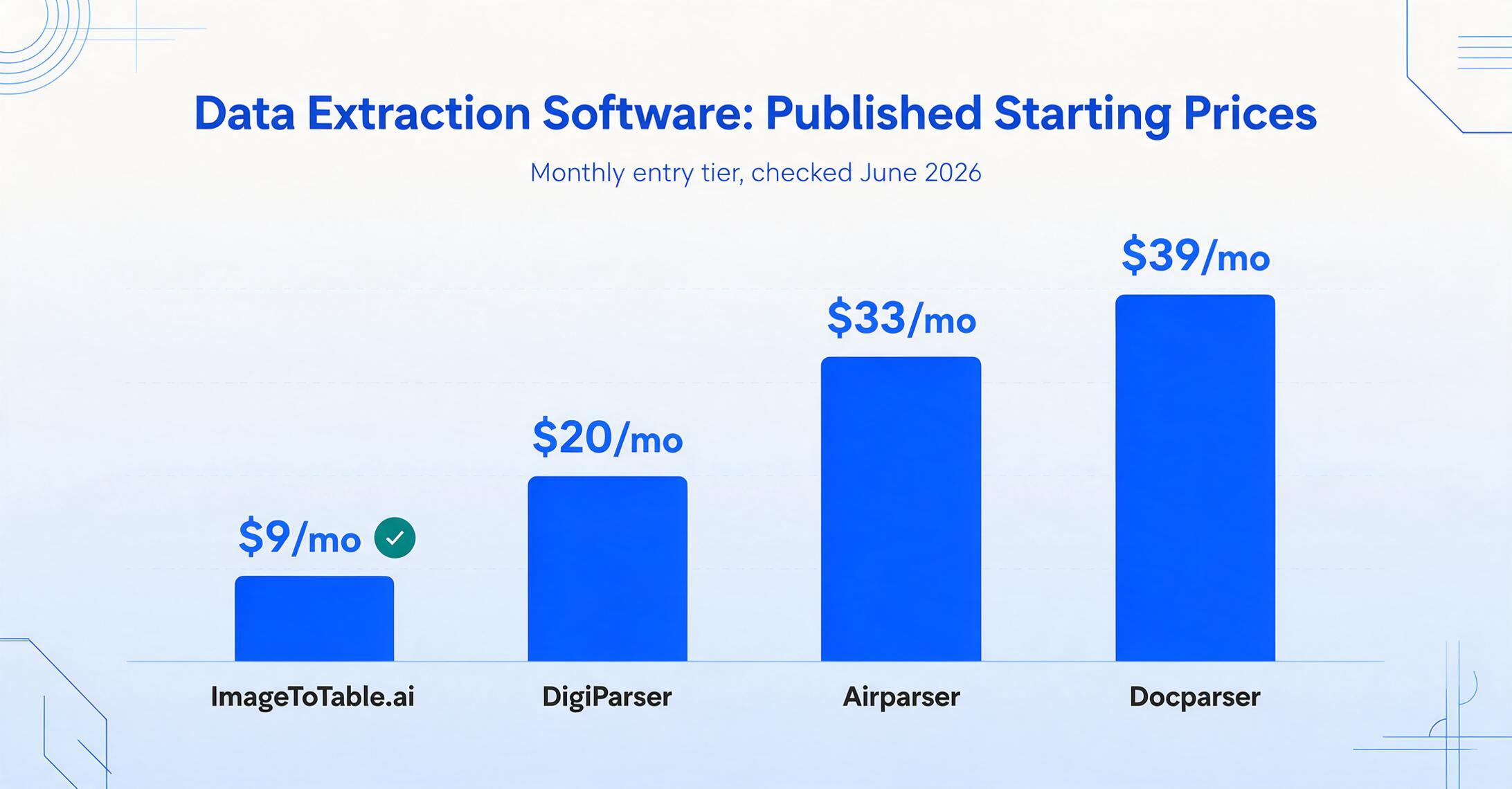
Two things jump out of this table. First, the entry price spread is enormous — from $9/month to $18,000/year — which tells you these tools are not really competing for the same buyer. Second, the "Key Limitation" column is where the real selection happens. A $9 tool with no SOC 2 is a non-starter for a hospital; a $1,500/month enterprise platform is absurd for a freelance bookkeeper. The rest of this guide walks through each category so you can match the limitation you can live with to the price you want to pay.
Category 1: Template-Free AI Tools (Best for Variable Layouts)
This is the category built for the problem in the title. None of these tools ask you to draw boxes or build a template per vendor. You describe the data you want, and an AI model finds it regardless of layout. For anyone whose documents arrive in many formats — which is most people who searched for this — start here.
ImageToTable.ai
ImageToTable.ai is a vision-AI data extraction tool built around Custom Column Extraction. You upload images, photos, scans, or PDFs, type the column names you want, and it returns a merged spreadsheet — no templates, no model training, no coding. Because it's batch-first, you can drop in a stack of mixed-vendor invoices at once and get one unified Excel or Google Sheets table out. It goes a step beyond plain extraction with computed columns (have the AI calculate "Line Total (Qty × Unit Price)" during extraction) and inferred columns (ask for a "Category" the document never printed, and the AI classifies it). A native Google Sheets sidebar add-on writes results straight into your sheet, and a Collection Link lets clients or field staff upload documents into your queue without an account.
Plans start at $9/month (150 credits, where one credit is one image), with Pro at $19/month and Max at $59/month bringing the per-page cost to roughly four cents — among the lowest in this comparison. There's a free, no-sign-up demo you can test on your own file before deciding anything.
Best for: small teams, bookkeepers, and individuals processing variable-layout documents who want results in a spreadsheet without setup. Not ideal for: teams that need built-in approval workflows, native email ingestion, or formal SOC 2 / HIPAA compliance and ERP connectors — for those, an enterprise IDP platform fits better. You can see the tool's broader capabilities on its data extraction software and no-code document AI pages, or try the live tool directly.
Airparser
Airparser combines text LLM, vision LLM, and AI OCR engines to extract structured data from emails, PDFs, images, and even handwritten text in 60+ languages. Like ImageToTable.ai, it's template-free — you describe fields in plain language rather than mapping positions — and its standout feature is native email parsing: forward attachments to a dedicated inbox and it processes them automatically, exporting to 7,000+ apps via Zapier and Make. Pricing starts at $33/month billed annually ($39 monthly) for 100 pages, with a 30-credit free trial.
Best for: no-code users whose documents arrive primarily as email attachments and who want downstream automation. Not ideal for: users who need credits to roll over — Airparser's expire each billing cycle — or who want a deeper integration ecosystem than Zapier/Make. Our in-depth Airparser comparison → covers the differences in extraction approach. Current plans are on the Airparser pricing page.
DigiParser
DigiParser is a straightforward, page-based AI extraction tool aimed at light, recurring workloads — bookkeepers and small teams processing a predictable trickle of documents. It claims ~99% accuracy on structured fields and bills in simple page packages: $20/month for 100 pages (billed annually at $232), scaling up through Pro and Scale tiers. A 7-day free trial gives full feature access.
Best for: individuals and small teams with modest, steady volume who want predictable page-based billing. Not ideal for: teams that need a large integration ecosystem or advanced workflow automation — DigiParser keeps the surface area deliberately small. See live tiers on the DigiParser pricing page.
The defining advantage of this category is that adding a new vendor or document format costs nothing. There's no template to build, no model to retrain — you upload the new layout and it works. That's the single biggest cost difference between AI extraction and the template-based tools in the next section.
Category 2: Template & Rule-Based Tools (Best for Stable Layouts)
These tools predate the current wave of vision AI, and they remain excellent at one specific job: extracting data from documents whose layout doesn't change. If you process thousands of invoices from a handful of fixed-format suppliers, a well-built template is fast, cheap, and precise. The trade-off is the maintenance that doesn't appear on the pricing page.
Docparser
Docparser is the best-known template/zonal extraction tool. You define parsing rules and zones on a sample layout, and it applies them to matching documents with high accuracy. It's affordable at $39/month for 100 credits (one credit = one document up to five pages), or $32.50/month billed annually, with a 14-day no-card trial. The catch with unstructured input is structural: each distinct layout needs its own template, and handling more than one layout reliably pushes you toward the Multi-Layout Parsers add-on at $29.95/month. For twenty supplier formats, that's twenty templates to build and re-fix whenever a vendor redesigns their invoice.
Best for: high volumes of stable, repeating layouts where template precision pays off. Not ideal for: genuinely variable input — the template upkeep negates the automation savings. We cover this trade-off in the detailed Docparser comparison →, and there's a dedicated Docparser alternative analysis. Current plans: Docparser pricing page.
Parseur
Parseur is a hybrid: it offers both template-based parsing and AI parsing, with a strong focus on email and PDF pipelines. Its dedicated email mailboxes ingest attachments automatically, and it's genuinely generous at the low end — a free-forever tier processes 20 pages a month with no card, and paid plans start around $39/month with transparent per-page pricing that drops as volume rises. The AI parser handles unstructured documents well; the template parser is there for fixed email layouts.
Best for: email-driven, high-volume workflows that need predictable per-page costs and 1,000+ native integrations. Not ideal for: users who want a single, purely point-and-name AI experience without choosing parser engines, or who process complex multi-layout documents that need configuration. See the full Parseur comparison → and the live Parseur pricing page.
Category 3: Enterprise IDP Platforms (Best for Scale & Compliance)
When extraction is one step inside a larger automated workflow — approval routing, validation against an ERP, audit logs, data-residency requirements — you're no longer shopping for an extraction tool. You're shopping for an intelligent document processing platform. These handle variability well, often through trainable models, but they price and onboard like enterprise software.
Nanonets
Nanonets processes invoices, receipts, and forms using OCR and deep learning, and lets teams train custom models on their own document types — useful for specialized forms generic models miss. It integrates with Google Drive, SharePoint, Gmail, and major ERPs, and adds approval routing and validation. Pricing shifted to usage-based: every account starts free with $200 in credits, then you pay per workflow block run (roughly $0.30 for a complex AI block, landing under $2 for an end-to-end invoice). Growth and Enterprise tiers add volume discounts, SSO, and HIPAA/SOC 2.
Best for: mid-market AP and operations teams that need custom-trained models plus workflow automation. Not ideal for: individuals or small teams who just want data in a spreadsheet — per-block costs and model setup are overkill. See our Nanonets comparison → or the Nanonets pricing page.
Affinda
Affinda is a document AI platform with usage-based pricing and — refreshingly — no feature gating across tiers; you pay for pages processed, not for unlocking modules. It handles a broad range of document types and offers a two-week trial with 200 credits. The catch is that there's no published starting price: you talk to sales to get a quote shaped around your volume and deployment needs.
Best for: mid-market teams that want platform-grade document AI without per-feature upsells. Not ideal for: buyers who need to compare a concrete monthly number upfront, or who want fully self-serve sign-up. Pricing details: Affinda pricing page.
Rossum
Rossum is an AI-first IDP platform built for end-to-end document automation at enterprise scale — capture, classify, extract, validate, and route. It learns from corrections in real time and is strong on high-variability, high-volume AP. In 2026 it was acquired by Coupa, deepening its spend-management positioning. Pricing starts at $18,000/year (~$1,500/month) with a one-year minimum contract and a 14-day trial.
Best for: enterprises automating large AP or document workflows end to end, with budget and an annual commitment. Not ideal for: small teams or anyone who can't justify a five-figure annual contract — this is genuinely a different market segment. Read the Rossum comparison → or see the Rossum pricing page.
ABBYY (Vantage / FlexiCapture)
ABBYY brings decades of OCR engineering to enterprise IDP. Its Vantage platform offers a marketplace of pre-built document "skills" deployable without training, and both cloud and on-premise options for organizations with strict data-residency rules. That on-prem capability is its real differentiator — few competitors offer it. Pricing is sales-led with no public starting figure; expect enterprise terms and a setup project.
Best for: large enterprises needing on-premise deployment, data residency, and mature pre-built skills. Not ideal for: teams wanting self-serve sign-up or fast time-to-first-result — onboarding is heavier than the AI tools above. See our ABBYY comparison → or ABBYY's Vantage product page.
How to Choose: Match the Tool to Your Documents and Budget
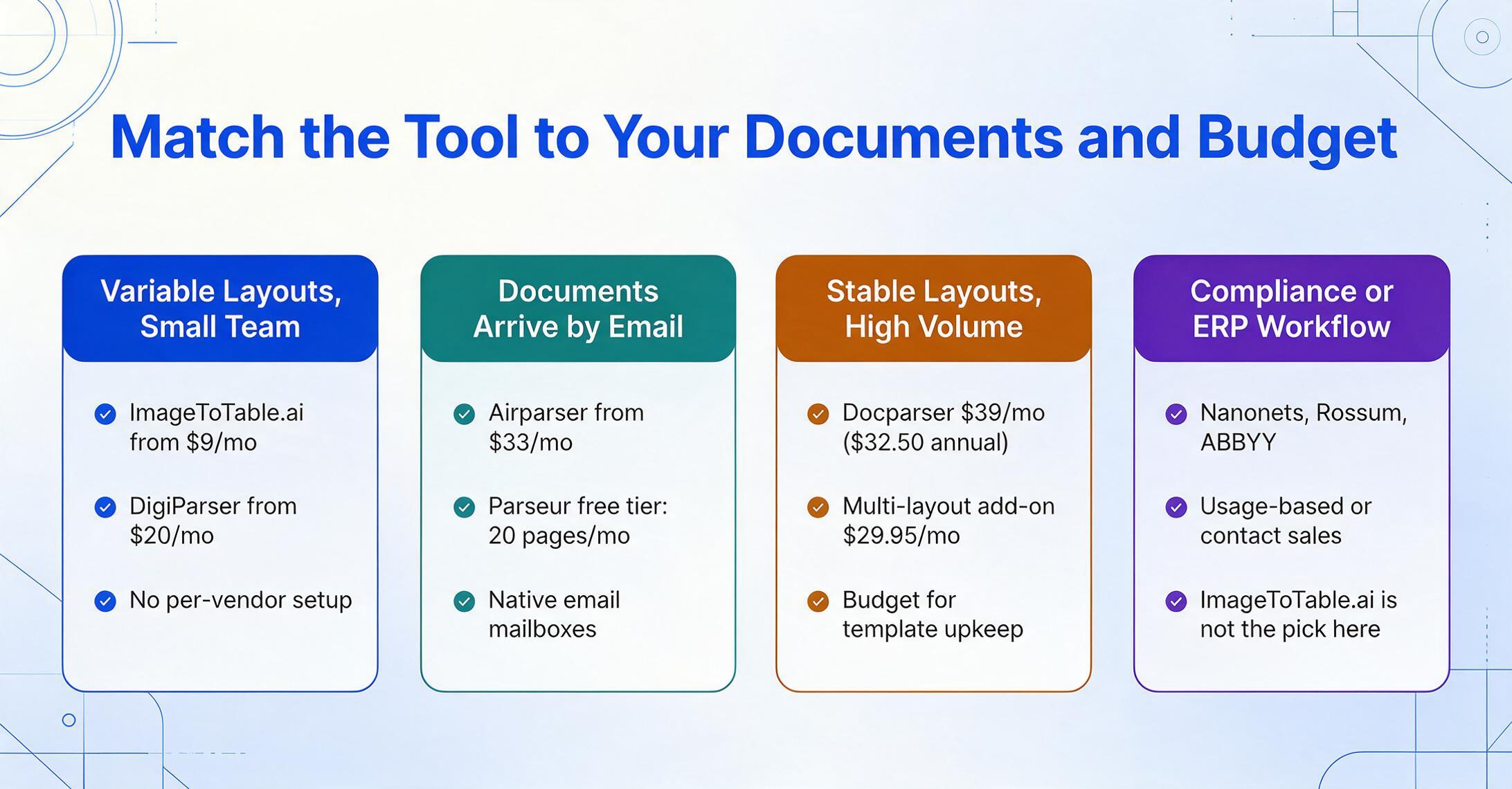
The fastest way to narrow nine tools to one is to answer two questions in order: how much do my layouts vary, and what's my budget and team size? The answers point you cleanly at a category.
Variable layouts, small team or solo
Best fit: ImageToTable.ai ($9/mo) or DigiParser ($20/mo)
Template-free AI eliminates per-vendor setup. ImageToTable.ai wins on per-page cost and adds computed/inferred columns; DigiParser is a clean page-based alternative if you prefer fixed page packages. Both let you process a mixed stack on day one.
Documents arrive by email
Best fit: Airparser ($33/mo) or Parseur (free → $39/mo)
Both offer native email mailboxes that ingest attachments automatically — a feature ImageToTable.ai doesn't have natively (you'd upload manually or use a Collection Link). Parseur's free-forever tier is ideal for testing an email pipeline at zero cost.
Stable layouts, high volume
Best fit: Docparser ($39/mo)
If your suppliers send identical formats every time, a template is precise and cheap. Just budget for the multi-layout add-on and the upkeep when a layout changes — and reconsider AI tools the moment your vendor count climbs.
Compliance or enterprise workflow
Best fit: Nanonets, Rossum, or ABBYY
Need certifications, ERP integration, approval routing, or on-prem? Nanonets fits mid-market AP; Rossum and ABBYY serve true enterprise scale. This is where ImageToTable.ai honestly isn't the pick — it has no ERP connectors or formal compliance certifications.
Notice the honest line in that last card. For variable-layout documents and a lean budget, ImageToTable.ai is hard to beat on cost and setup. But document extraction is a means to an end, and if your end requires an audit trail, a HIPAA BAA, or a write-back into SAP, a heavier platform earns its price. The point of this guide isn't to crown one winner — it's to keep you from buying a $1,500/month IDP for a job a $9 tool does better, is a $39 template tool for a job that will drown you in template maintenance.
For deeper, head-to-head reading, these companion roundups slice the market on different axes: the broad document data extraction tools roundup, the best AI OCR software comparison, and the enterprise IDP platforms guide. If you're extracting a specific document type, the PDF data extraction, bank statement to Excel, and table extraction pages go format-specific. And if you want to know how to test the shortlist rather than just see it, our six-dimension evaluation framework walks through what to test on your own documents — this list gives you the candidates, that guide tells you how to pick between them.
Frequently Asked Questions
What is the best data extraction software for unstructured documents?
For variable-layout documents, template-free AI tools work best because they locate data by meaning rather than position. ImageToTable.ai, Airparser, and DigiParser all handle layout changes without rebuilding templates. The cheapest entry point is ImageToTable.ai at $9/month. Template-based tools like Docparser are better only when your layouts never change.
Do I need to build templates to extract data from unstructured documents?
No — not if you choose an AI-based tool. Template-based tools (Docparser, and the template parser in Parseur) require you to map each layout once, which breaks when the layout changes. AI tools like ImageToTable.ai and Airparser are template-free: you name the fields you want and the model finds them on any layout, so adding a new vendor format costs nothing.
What's the cheapest data extraction tool that handles variable layouts?
ImageToTable.ai starts at $9/month for 150 documents (about $0.06 each, dropping to roughly $0.04 on higher plans) and requires no templates. DigiParser is next at $20/month for 100 pages. Parseur offers a genuinely free tier of 20 pages per month if your volume is very low. Among AI tools, these three are the most affordable entry points checked in June 2026.
Can these tools extract data from scanned documents and phone photos?
Vision-AI tools can. ImageToTable.ai, Airparser, Nanonets, and the cloud platforms accept scans, photos, and PDFs, reading them through OCR and vision models that tolerate angle, lighting, and quality variation. Pure template tools are more sensitive to scan quality because a shifted scan can move text outside a defined zone. If most of your input is photographed or scanned, prioritize a vision-AI tool.
When is an enterprise IDP platform worth the higher price?
When extraction is only one step in an automated process that also needs approval routing, validation against an ERP, audit logs, or strict data residency. Rossum (from $18,000/year), ABBYY (on-prem options), and Nanonets (usage-based with ERP connectors) earn their cost in those scenarios. If you just need data in a spreadsheet, they're overkill — a sub-$50 AI tool does that job faster and cheaper.
Is ImageToTable.ai biased in this comparison since it's published here?
ImageToTable.ai is one of the nine tools reviewed, and this guide is on its site — so treat the recommendation accordingly. We've kept the assessment fair: every tool, including ImageToTable.ai, gets a real "not ideal for," and for compliance, enterprise workflow, and on-prem needs we point you to Nanonets, Rossum, and ABBYY instead. All pricing is read from official pages so you can verify it yourself.
The Bottom Line
The single most useful question when choosing data extraction software for unstructured documents isn't "which tool is best" — it's "do my documents hold still?" If they don't, template-free AI tools turn a maintenance problem into a one-time field description, and at $9–$33 a month they cost a fraction of the enterprise platforms. If your documents are stable and high-volume, a template tool is still hard to beat. And if extraction is one cog in a compliance-bound workflow, an IDP platform is worth its price. Match the limitation you can accept to the budget you have, and the nine tools narrow to one quickly.
The fastest way to know if template-free extraction fits your documents is to run one through it. Upload an invoice, a receipt, or a scan you've been dreading, name the columns you want, and see whether it reads the layout you assumed only a human could.