Best Invoice Data Extraction Software in 2026
11 Tools, Honestly Compared
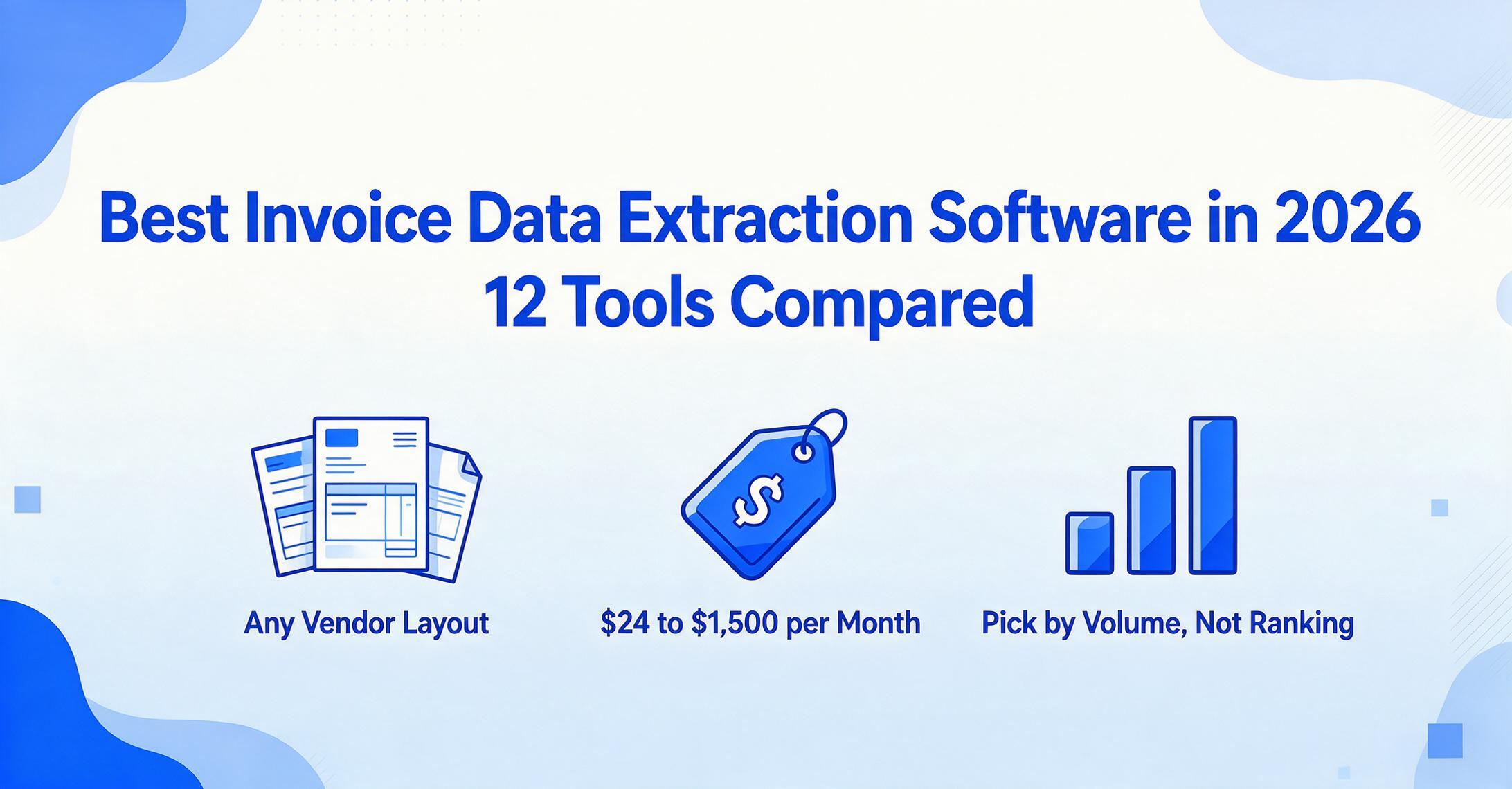
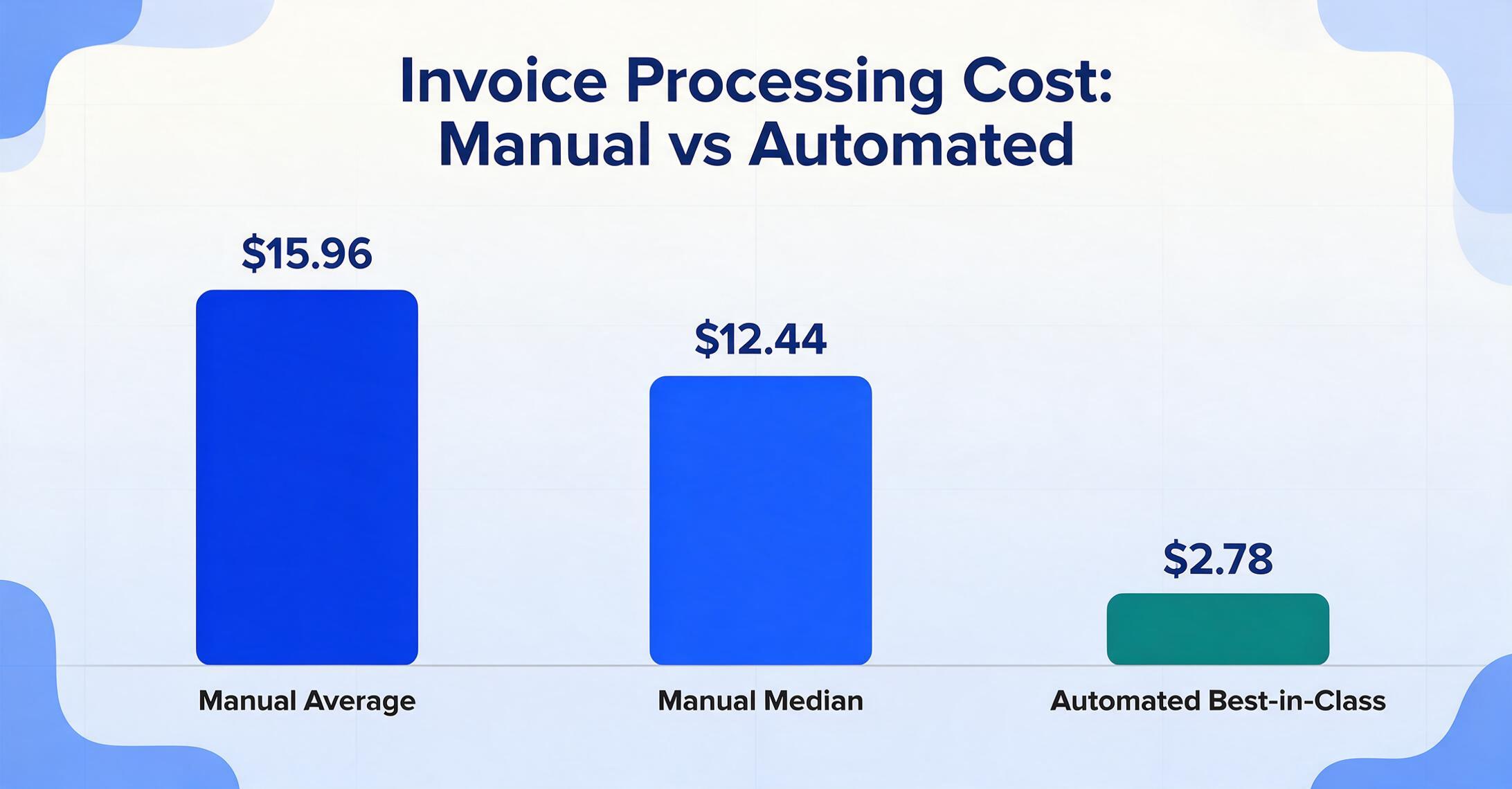
The median company still spends $12.44 to process a single invoice by hand, according to benchmark research from APQC, while the best-automated AP teams do it for $2.78. That gap is why "best invoice extraction software" is one of the most contested searches in finance software — and why almost every list you'll find ranks the author's own product first. So this one opens with a disclosure: ImageToTable.ai is one of the eleven tools reviewed here, and it is not the right pick for every reader. Invoice is the most crowded vertical in document AI, so the useful question isn't "which tool wins." It's which tool fits your invoice volume, your vendor mix, and where the data has to land afterward. This review compares eleven tools on the same six dimensions, gives each an honest "best for" and "not ideal for," and ends with a decision guide.
Key Takeaways
- Every tool here claims it "handles any invoice," but that exact promise quietly means two opposite things.
- There is no canonical invoice — only thousands of near-misses — so the trait that separates a tool that scales from one that becomes a second job is whether it reads by meaning or by a template you rebuild for every new vendor.
- The real deciding question was never whose accuracy is highest but whether a tool handles many vendor layouts without per-vendor templates and what it costs per document.
How We Picked and Tested These Tools
We narrowed a field of dozens to the eleven tools that a serious invoice-extraction shortlist is actually expected to cover. Search any invoice roundup and you'll see the same names recur — the enterprise AP platforms, the mid-market document AI vendors, the no-code parsers, and the accounting-suite capture tools — because those are the four bands real buyers compare across. We left out tools with no published invoice capability and ones that exist only as a demo behind a sales wall with no public detail at all. If you are still defining your criteria rather than comparing brands, start with our guide to what to evaluate in invoice scanning software.
For each tool we did three things. First, we pulled the lowest publicly listed price from the vendor's own pricing page, every figure labeled "Pricing checked June 2026" rather than the vague "starting from." Second, we identified each tool's core extraction model — zone/template, trained model, vision-LLM, or raw OCR API — because on invoices specifically, that single choice determines whether a new supplier breaks your setup. Third, we wrote a plain "best for" and "not ideal for" for every tool, including our own, based on where its price, setup model, and feature set honestly fit.
Disclosure
ImageToTable.ai, the tool published on this site, is one of the eleven tools reviewed below. We've placed it where it honestly fits — template-free multi-vendor batches at the lowest per-document cost — and named the tools that beat it for enterprise AP automation, ERP-integrated workflows, and accounting-suite capture.
Why Invoice Extraction Is Harder Than It Looks
Invoice extraction is hard not because reading text is hard, but because every vendor's invoice has a different layout. A standard invoice carries the same handful of data points a buyer needs — invoice number, issue date, due date, line items, tax, total, and the PO it should match — but those fields sit in a different place on every supplier's template. One vendor puts the invoice number top-right; the next buries it in a footer. One itemizes tax per line; another applies it once at the bottom. There is no canonical invoice, only thousands of near-misses.
That's exactly the wall AP teams hit. As one finance lead described their setup on r/Accounting: "we get maybe 1500-2000 invoices a month… someone opens each one, types the header info into NetSuite, matches to PO manually… we tried the OCR thing built into NetSuite but it chokes on half our invoices because every machine shop and raw materials supplier formats theirs differently." The bottleneck isn't the typing. It's that the tool can't keep up with layout variety.
This is why one technical distinction decides whether a tool will actually help you, and it's the axis the rest of this review turns on:
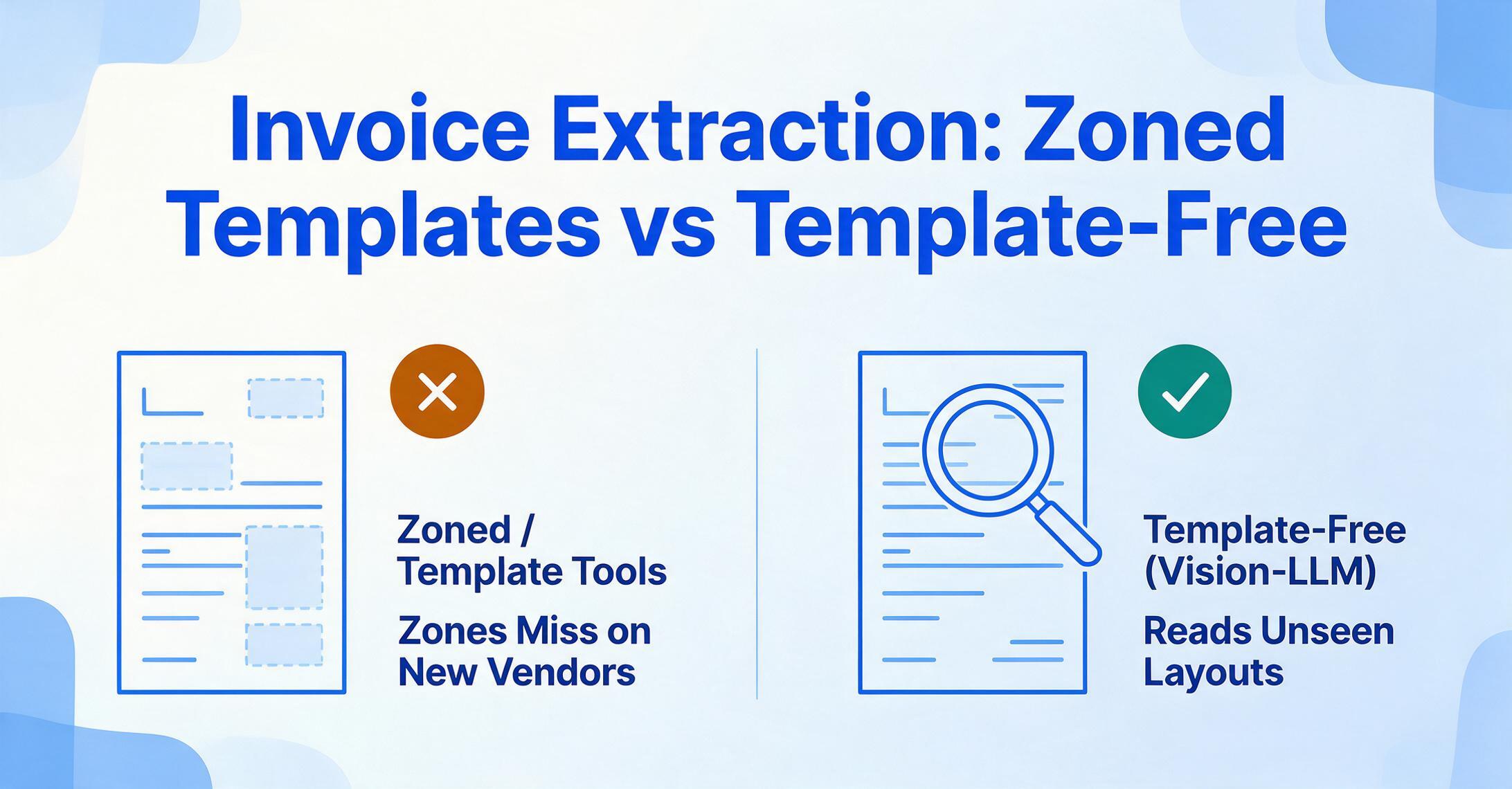
Template / zonal tools
You map each field to a region of a sample invoice — "the invoice number lives in this rectangle." It's precise and cheap for a fixed set of suppliers whose layout never changes. But the map is layout-specific: when a new vendor sends a differently-shaped invoice, the zones miss, and you build a new template. With hundreds of suppliers, template maintenance becomes the job.
Template-free AI extraction
A vision-language model reads the invoice by meaning, not position. You name the fields you want — "Invoice Number, Vendor, Tax, Total, Due Date" — and the AI finds each value wherever it sits, on a layout it has never seen, with no template to build. The trade-off is less pixel-perfect control on rigidly fixed forms, in exchange for handling many vendors without setup.
So when a tool claims it "handles any invoice," what matters is which side of that line it sits on. A template tool handles any invoice you've already built a template for; a template-free tool handles invoices it has never seen. For a business processing one or two recurring suppliers, the first is fine. For anyone juggling dozens of supplier formats, "handles many vendors without templates" is the single feature that separates a tool that scales from one that becomes a second job. (We unpack that mechanism further in our guide to extracting data from different invoice formats into one unified table.)
The 11 Tools at a Glance
Here is every tool on the same six dimensions. Prices are the lowest publicly available entry point as of June 2026; "sales-led" means the vendor publishes no self-serve rate card and you have to talk to sales for a quote.
| Tool | Starting Price | Pricing Model | Best For | Key Limitation | Free Trial? |
|---|---|---|---|---|---|
| ImageToTable.ai | Free to try (no sign-up) | Subscription / usage | Multi-vendor batches, lowest per-doc cost | No ERP posting or approval workflow | Yes — instant, no sign-up |
| Docparser | $39/mo (Starter) | Flat subscription | Stable, repeating invoice layouts | Zone templates break on new vendor formats | Yes — 14-day + free tier |
| Parseur | $39/mo (Micro) | Flat + volume | Emailed PDF invoices into apps | Limited AP workflow depth | Yes — free 20 pages/mo |
| Airparser | $39/mo (100 credits) | Flat + credits | GPT parsing of unstructured invoices | No confidence scoring; tiny free trial | Yes — 30 credits |
| Dext | ~$24/mo | Subscription | Bookkeepers feeding QuickBooks/Xero | Bookkeeping suite, not raw bulk export | Yes — trial |
| Veryfi | From ~$500/mo | Usage / subscription | Mobile + real-time invoice capture | Developer/SDK-oriented; pricey entry | Yes — free tier |
| Docsumo | Sales-led (~$299/mo) | Sales-led | Mid-market finance teams | No transparent self-serve price | Yes — 14-day, 1,000 pages |
| Affinda | ~$0.20/doc (platform sales-led) | Usage / sales-led | Structured doc parsing via API | No free tier; platform pricing opaque | Yes — trial credits |
| Nanonets | Usage (~$0.30/doc); Pro $499/mo | Credits / usage | AP automation at scale, ERP posting | Complex for small, simple jobs | Yes — $200 free credits |
| Rossum | ~$18,000/yr (~$1,500/mo) | Annual / sales-led | Enterprise AP shared-service centers | 30–90 day implementation; overkill for SMB | Demo via sales |
| ABBYY FlexiCapture | Custom (~$0.02–0.08/page at volume) | Page-based / sales-led | Large-scale, regulated, multilingual AP | Heavy to configure; long deployment | Yes — Vantage trial |
Pricing checked June 2026 from each vendor's public pricing page. Usage-based tools (Nanonets, Affinda, Veryfi) bill per page or per document, so monthly cost depends on volume. For the full-market view across every document type — not just invoices — see our document data extraction tools roundup.
No-Code & Lowest-Cost Tools
These are the tools a solo bookkeeper or small AP team should start with: everything runs in a browser, with no model to train and no developer to hire. They became viable for invoices in the last two years because vision-language models read by meaning rather than coordinates — which is what makes template-free extraction possible at $29–$39/month price points. This is also the band where the template-vs-template-free distinction matters most, because the cheapest tools sit on both sides of that line.
ImageToTable.ai
A no-code, vision-LLM extraction tool built around Custom Column Extraction: instead of drawing zones on a sample invoice, you type the columns you want — "Invoice Number, Vendor, Tax, Total, Due Date" — and the AI locates each value anywhere on the page by understanding what the field means. The names you type become your spreadsheet headers. It is batch-first (drop in 50 invoices from 50 different suppliers, get one merged Excel file where each invoice is a row), supports computed columns (write "Line Total (Qty × Unit Price)" and the math is done during extraction), ships a Google Sheets add-on that writes results into the active sheet, and offers a Collection Link — a shareable URL that lets suppliers or staff upload invoices into your queue without an account.
Best for: Teams processing invoices from many vendors who want template-free batch extraction at the lowest per-document cost, with the spreadsheet — not an ERP — as the destination. This is its genuine edge: layout variety is exactly what it's built to absorb.
Not ideal for: Organizations that need automatic ERP posting, three-way PO matching, or an approval/payment workflow. It extracts invoice data extremely well; it doesn't run the AP process before or after extraction.
Pricing (checked June 2026): Free to try with no sign-up; affordable monthly plans, with one of the lowest effective per-document costs in this list. You can start from the full invoice processing workflow, batch supplier invoices straight into Excel, or pull specific invoice fields without setup. If price is the main decision, see the invoice extraction pricing comparison.
Docparser
One of the longest-running parsers in the market, and fundamentally zone-based: you define parsing rules that pull values from specific regions of an invoice. For a fixed set of suppliers whose invoices never change shape — the same vendors, the same forms, month after month — that approach is precise and dependable.
Best for: High-volume processing of consistent, repeating invoice layouts where you can set a template once and trust it.
Not ideal for: Mixed invoices from many suppliers. When layouts vary, zone templates need maintenance, and a new vendor format means a new template — the exact failure mode AP teams describe. We've written about that "the vendor changed their invoice format and the tool broke" problem in detail.
Pricing (checked June 2026): Free tier (limited pages/month), Starter from $39/month, Professional $74/month, with a 14-day free trial.
Parseur
Strong on email and PDF intake. Parseur pairs AI extraction with a deep integration layer (1,500+ apps), so when invoices arrive as email attachments and need to flow into downstream systems, it handles the pipeline well. Its paid tiers offer AI extraction without per-layout rule-writing.
Best for: Automating recurring inbound invoices that arrive by email and need to land in other apps automatically.
Not ideal for: Teams wanting a full AP platform with classification, validation routing, and PO matching out of the box.
Pricing (checked June 2026): Permanent free tier (20 pages/month), Micro from $39/month (annual), scaling to a $399/month tier for 10,000 pages.
Airparser
A GPT-based parser that handles unstructured and human-written documents well, which extends naturally to invoices with irregular layouts. Setup is no-code, and it integrates through Zapier and Make for downstream automation.
Best for: No-code users who want GPT-style extraction on variable invoice layouts and don't need confidence scoring or table-heavy validation.
Not ideal for: Teams needing per-field confidence scores, advanced multi-line-item table extraction, or a generous trial — the free allowance is small.
Pricing (checked June 2026): Basic from $39/month for 100 credits, with higher tiers at 500, 2,000, and 5,000 credits; free trial of 30 credits.
Airparser pricing → · Airparser vs ImageToTable, side by side
Specialist & Accounting-Integrated Tools
These tools cost more than no-code parsers because they add either deep accuracy on financial documents or a tight loop into a specific accounting suite. If your invoices feed a bookkeeping practice or a defined finance pipeline, the integration is the value — not the raw extraction. They suit teams whose destination is QuickBooks, Xero, or a mid-market document operation rather than a flexible spreadsheet.
Docsumo
Aimed squarely at mid-market finance teams, with a focus on high straight-through-processing rates — the share of invoices handled with no human touch — for invoices, bank statements, and similar financial documents.
Best for: Finance teams processing a steady, high volume of financial documents that want strong accuracy plus validation features.
Not ideal for: Buyers who want a transparent, self-serve price before committing — Docsumo's plans are sales-led, with no published rate card.
Pricing (checked June 2026): Sales-led/custom; a 14-day free trial covers up to 1,000 pages. Its published entry tier has historically sat around $299/month.
Affinda
A document-AI platform with strong structured-parsing roots (originally resumes/CVs), now extended across invoices, receipts, and other documents. It offers self-service signup, but there is no free tier — you commit to a paid plan to start.
Best for: Product and platform teams that need reliable structured extraction across several document types via a developer-friendly API.
Not ideal for: Cost-sensitive small teams — there's no free tier, and platform pricing beyond the published per-document rate is scoped through sales.
Pricing (checked June 2026): Usage-based at roughly $0.20 per document for core parsing; full platform pricing is sales-led.
Veryfi
Built around a mobile-first SDK and real-time OCR. Veryfi's standout is fast, accurate capture from phone-camera photos of invoices and receipts, which makes it a strong fit for field teams and for developers embedding capture into their own app.
Best for: Mobile and field-team invoice/receipt capture, and engineering teams embedding real-time document capture into a product.
Not ideal for: A small back-office team that just wants to upload a batch of PDFs in a browser — Veryfi's developer/SDK orientation and entry price are more than they need.
Pricing (checked June 2026): A free tier exists for evaluation; paid plans start in the ~$500/month range and scale with volume.
Dext
A bookkeeping-automation tool (formerly Receipt Bank) built to feed cleaned invoice and receipt data straight into accounting software. For bookkeepers and accountants whose whole workflow lives in QuickBooks or Xero, Dext's tight integration and publish-to-ledger flow are the point.
Best for: Bookkeepers and accounting firms who want extracted invoice data delivered directly into QuickBooks, Xero, or Sage with categorization.
Not ideal for: Teams who need raw structured data in a flexible spreadsheet for their own analysis — Dext is built around the accounting suite, not bulk Excel export. For that accountant-specific view, see our financial document extraction tools for accountants roundup.
Pricing (checked June 2026): Plans start at roughly $24/month, scaling by document volume and number of clients.
Enterprise AP Automation Platforms
Enterprise AP platforms are where extraction stops being the product and becomes one module in a full accounts-payable operation. Alongside reading the invoice, they classify it, match it to a purchase order and goods receipt, route exceptions to human reviewers, post into the ERP, and keep an audit trail. They're built for organizations processing tens of thousands of invoices a month with a dedicated AP team — and the license is rarely the biggest cost; implementation is.
Nanonets
Now positioned as an AI-agent platform for end-to-end AP automation — reading invoices, applying rules, matching against POs, and posting into your ERP. It's substantially more than extraction; it's a workflow engine that scales to enterprise volumes.
Best for: AP and operations teams that want extraction plus automated downstream actions — matching, routing, ERP posting — at meaningful volume.
Not ideal for: A solo bookkeeper or small team with a few hundred simple invoices a month — the platform's depth is overhead you won't use.
Pricing (checked June 2026): Usage/credit-based — every account starts with $200 in free credits, and you pay per workflow "block," working out to roughly $0.30 per document at common configurations; the Pro subscription is around $499/month.
Rossum
Rossum trains a custom extraction model on each enterprise customer's historical invoices, then deploys it into AP shared-service-center workflows with human-in-the-loop validation and certified ERP integrations (SAP, Coupa, NetSuite). Reviews among enterprise AP buyers are strong, with a recurring caveat about implementation timelines and post-sales pricing growth.
Best for: Large enterprises running invoice and PO processing through a dedicated AP team that can absorb a custom-trained, human-in-the-loop deployment with certified ERP connectors.
Not ideal for: SMBs, accounting firms, and lean teams processing under ~5,000 invoices/month — the 30–90 day implementation and custom-model training are overkill.
Pricing (checked June 2026): Sales-led with no published rate card; third-party listings report a starting plan around $18,000 per year (~$1,500/month), with higher tiers custom-quoted.
ABBYY FlexiCapture
A two-decade market leader, with ABBYY Vantage (cloud-native IDP) and FlexiCapture (on-premise/cloud) anchoring its lineup. ABBYY is recognized for accuracy and multilingual support (180+ languages), and is a common choice for regulated industries — banking, insurance, government — processing large, varied invoice volumes.
Best for: Large-scale, multilingual, and regulated AP operations that need maximum accuracy and on-premise or hybrid deployment options.
Not ideal for: Small teams or fast pilots — ABBYY is heavy to configure, and deployments typically require internal or external specialists.
Pricing (checked June 2026): Custom quotes; ABBYY doesn't publish a standard rate card. Buyers processing moderate volumes commonly see per-page pricing in the ~$0.02–$0.08 range, plus implementation.
How to Choose by Volume, Vendor Mix, and Where the Data Goes
The right invoice tool falls out of three questions, not a feature matrix. Answer these in order and twelve options collapse to the two or three worth trialing on your own hardest invoice.
How many invoices a month, and from how many different vendors?
A few hundred invoices from a handful of consistent suppliers: Docparser's zone templates are precise and cheap. A few hundred from many different vendors: a template-free no-code tool (ImageToTable.ai, Airparser) absorbs the layout variety without setup. Thousands of mixed financial documents: a mid-market platform (Docsumo) earns its price. Tens of thousands across an AP department: enterprise IDP (Rossum, ABBYY) or Nanonets.
Who operates it — and do you have developers?
No technical staff: stay no-code or accounting-integrated; everything runs in a browser. One or two developers building capture into a product: Veryfi's SDK or Affinda's API fit. A full engineering team plus an existing ERP: Nanonets or Rossum's certified connectors pay off — provided you budget the build and the implementation window.
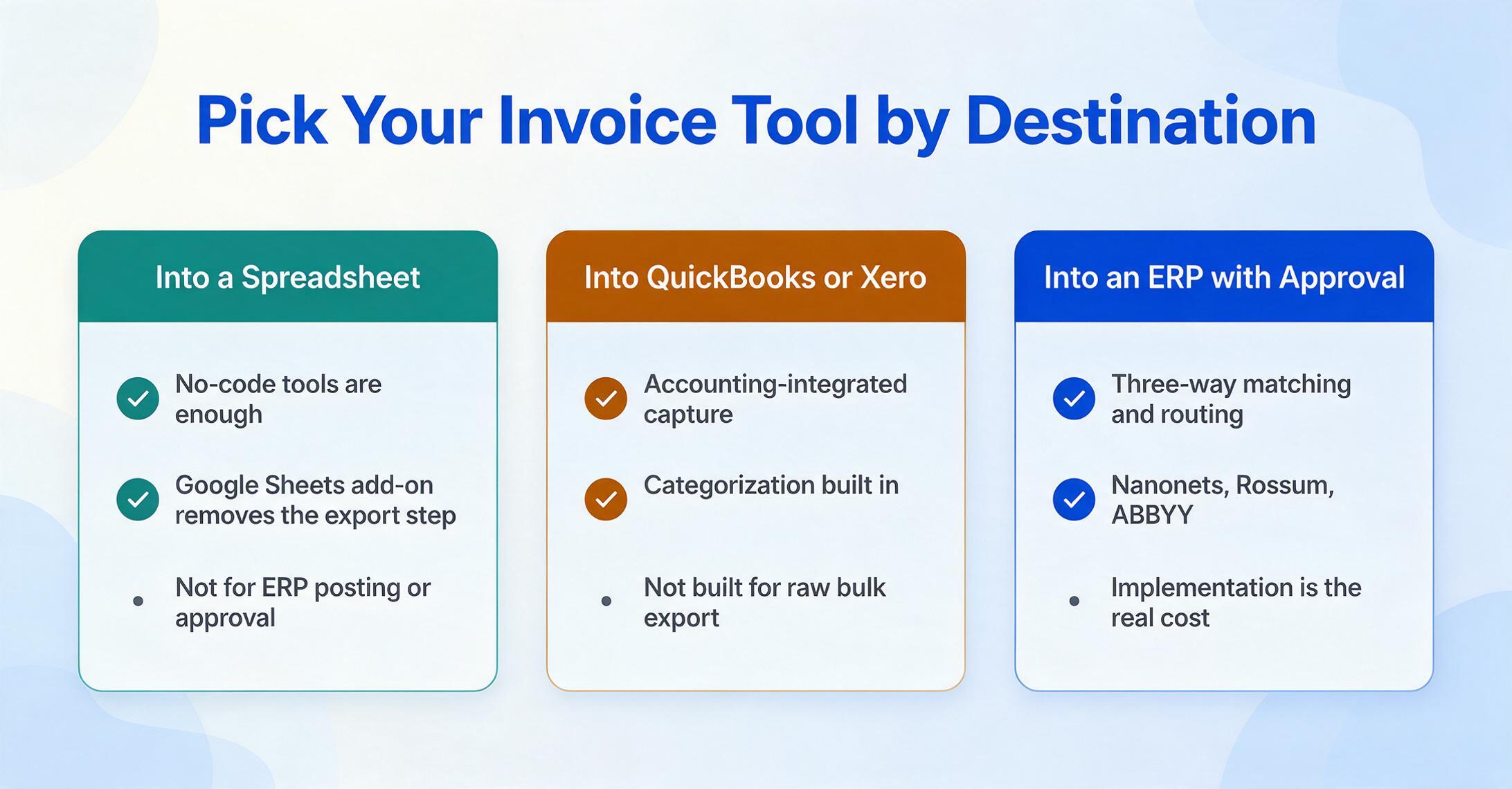
Where does the invoice data go after extraction?
Into a spreadsheet you review and reconcile: a no-code tool is enough, and ImageToTable.ai's Google Sheets add-on removes the export step. Into QuickBooks/Xero/Sage with categorization: Dext or an accounting-integrated tool. Auto-posted to an ERP with three-way matching and approval routing: Nanonets or an enterprise IDP — the territory of full accounts-payable automation.
One honest scoping note: if your real need is three-way matching and payment — invoice against PO against goods receipt, then approval and disbursement — the enterprise platforms and Nanonets are doing work the no-code tools simply don't attempt. General extraction tools, ours included, give you clean invoice data; they don't run the matching and approval process around it. We walk through that exact workflow in our piece on three-way matching across PO, invoice, and receipt.
Frequently Asked Questions
What is the best invoice data extraction software in 2026?
There's no single best tool — the right one depends on your volume, vendor mix, and destination. For a small or mid-size team processing invoices from many vendors into a spreadsheet, a template-free no-code tool like ImageToTable.ai or Airparser is usually the fastest and cheapest fit. For enterprise AP with ERP posting and approval workflows, Rossum, Nanonets, or ABBYY are built for that scale. For bookkeepers feeding QuickBooks or Xero, Dext is purpose-made.
Has anyone automated invoice extraction without relying on templates?
Yes — that's exactly what tools built on vision-language models do. Template-free tools (ImageToTable.ai, Nanonets, Affinda, and the cloud APIs' newer processors) read an invoice by meaning, so they extract the right fields from a layout they've never seen, with no per-vendor template. Template/zonal tools like Docparser are the opposite: precise on fixed layouts, but they need a new template each time a vendor changes the format. If you process invoices from many suppliers, template-free is the feature that matters most.
How much does it cost to process an invoice, manual vs. automated?
Manual invoice processing costs a median of $12.44 per invoice according to APQC, and the Institute of Finance & Management puts the average around $15.96 and 12.5 minutes of labor per invoice. Best-in-class automated AP teams process an invoice for about $2.78, per Ardent Partners. The software subscription is usually a small fraction of the manual labor it replaces, which is why even a $39/month tool pays for itself quickly at modest volume.
Can these tools extract invoice line items, not just totals?
Most modern tools extract line items, but quality varies sharply on real invoices. Header fields (invoice number, date, total) are easy; multi-line item tables — especially when tax is applied per line, descriptions wrap, or a line spans a page break — are where tools diverge. Mid-market and enterprise platforms (Docsumo, Nanonets, Rossum, ABBYY) and template-free vision-LLM tools handle line-item tables better than basic zonal parsers. The only reliable check is running your own messiest multi-line invoice through a free trial.
How accurate is AI invoice extraction?
Character-level OCR accuracy on clean printed invoices is genuinely 99%+ across modern tools, but field-level accuracy on real-world invoices — scanned, skewed, stamped, multi-currency, handwritten — usually lands in the 90–98% range depending on document quality. Most "99% accuracy" marketing measures the easy metric. Our invoice extraction accuracy guide explains what to actually test before you commit.
Is ImageToTable.ai included here because it's your product?
Yes — and we've said so plainly. ImageToTable.ai is published by the same team that wrote this article, and it's reviewed alongside ten competitors on the same six dimensions. We placed it where it honestly fits — template-free multi-vendor batch extraction at the lowest per-document cost — and named the tools that beat it for enterprise AP (Rossum, ABBYY, Nanonets) and accounting-suite capture (Dext, Veryfi).
The Bottom Line
The hardest part of invoice extraction was never reading the text — it's that no two suppliers format an invoice the same way. That single fact reorders the whole market: a tool's price tells you less than which side of the template line it sits on, and whether it can absorb your vendor variety without turning template maintenance into a job. A $39/month template-free browser tool and a $1,500/month enterprise platform read invoices with comparable intelligence; what differs is the operations layer wrapped around the extraction — and whether you actually need it.
So shortlist by your situation, not by a ranking. If you process invoices from many vendors into a spreadsheet, start with a template-free no-code tool and test it on your least cooperative supplier's invoice — the wrinkled scan, the one with tax buried mid-table. Five minutes on your own worst invoice tells you more than any comparison table, including this one.
Disclosure: This article is published by ImageToTable.ai, which is one of the eleven tools reviewed above. All competitor pricing was checked against public pricing pages in June 2026; usage-based prices vary with volume. We aim to describe every tool — including our own — accurately, and we welcome corrections.