Getting Reliable Data from Messy,
Inconsistent Invoices: A Practical Accuracy Guide
Every AI invoice extraction vendor promises 99% accuracy. But when you upload your actual invoices — the ones with handwritten margin notes, stamps in three languages, and tables that wrap onto page 2 — the result is closer to 85%. The gap isn't fraud. It's the difference between page-level accuracy (the marketing number) and field-level accuracy (the number that determines whether your AP clerk trusts the output or re-types everything). Here's how to understand the difference, measure it on your own documents, and close the gap.
Key Takeaways
- "99% accuracy" on a vendor dashboard counts characters, not fields — three misread digits can mean a wrong invoice total, a missed due date, and a broken PO match simultaneously, all while the meter says everything is fine.
- Scanning your invoices at 300 DPI in color instead of 150 DPI in black-and-white shifts field-level accuracy by 5–10 percentage points — more than the gap between any two competing AI vendors.
- Upload your three ugliest invoices first — the ones with stamps covering totals and handwriting in the margins — because if ImageToTable.ai handles those, it handles everything; start with the clean ones and you're measuring demo performance, not production accuracy.
"99% Accuracy" Is a Marketing Number. Here's What It Actually Means.
There are two accuracy numbers in invoice extraction, and they mean completely different things. The confusion between them is the single largest source of disappointment when teams move from vendor demos to real invoices.
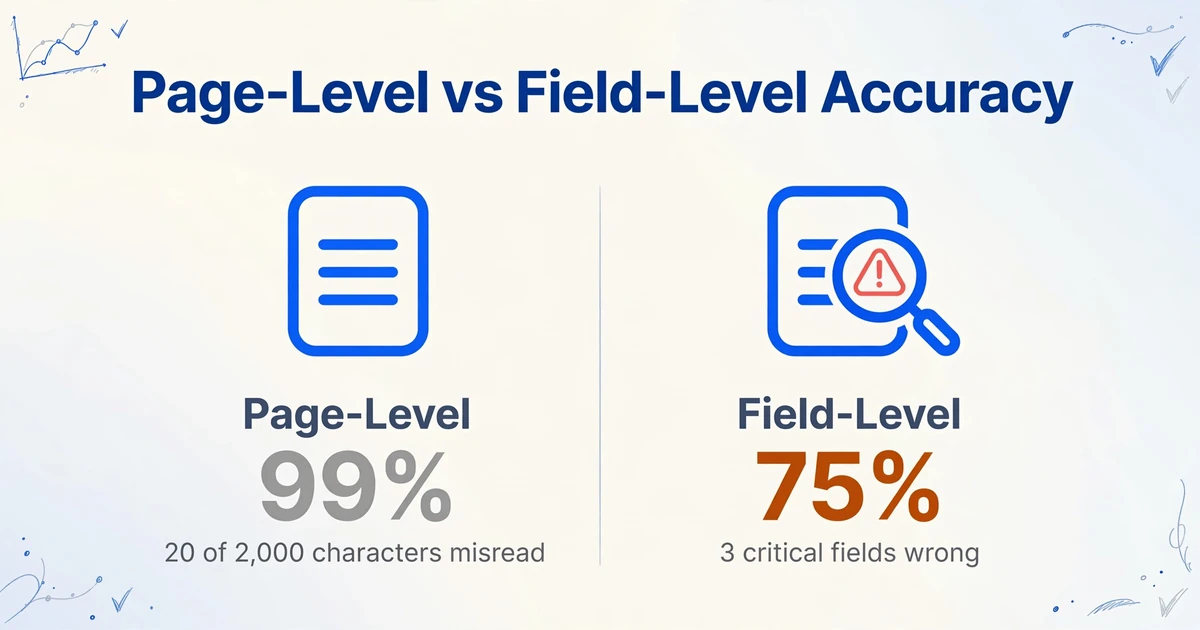
Page-level accuracy — the 98-99% you see on vendor websites — measures how many individual characters were read correctly out of all characters on the page. If an invoice has 2,000 characters and the OCR misreads 20 of them, page-level accuracy is 99%. Sounds great. But if those 20 characters happen to be the invoice number (INV-2456 read as INV-2465), the invoice total ($17,820 read as $17,280), and the payment terms (Net 30 read as Net 3), you have three field-level failures that will cause payment errors — while the vendor's dashboard still reports 99% accuracy.
Field-level accuracy is what actually matters. It measures whether each individual data field — invoice number, date, total, line items, tax amount, vendor name — was extracted correctly, in full. A single misread digit in a 10-character invoice number makes that field wrong. Field-level accuracy is always lower than page-level accuracy, and the gap widens dramatically on messy invoices. A 99% page-level score can mask a 75% field-level score if the OCR errors happen to cluster on the financially significant fields.
Why vendors use page-level accuracy: It's a higher number, it's easier to benchmark consistently (every OCR system outputs it), and it doesn't require knowing which fields matter to your business. Field-level accuracy requires testing with your actual documents and your actual field definitions. That's harder to do — which is why most teams never do it, and why most "99% accurate" implementations produce disappointing results in production.
The only accuracy number that matters for your AP workflow is field-level accuracy measured on your actual invoices with your actual extraction fields. Everything else is a rough approximation that will be wrong in the direction of optimism.
What Accuracy Depends On — The Factors You Control vs. What the AI Controls
Extraction accuracy is the product of two interacting systems: the physical quality of the document entering the AI, and the AI model's ability to interpret what it sees. Most accuracy guides focus entirely on the second system while ignoring the first — which is the one you can improve this afternoon without changing tools.
Factors you control — the document pipeline:
- Resolution. Below 200 DPI, characters blur into each other and OCR engines start guessing. PDFExcel's analysis of handwriting recognition recommends 400-600 DPI for handwritten content. For printed invoices, 300 DPI is the practical minimum. Scanned PDFs at 150 DPI — common for older archived documents — will produce measurably worse results regardless of how good the AI is.
- Color mode. Black-and-white (bi-tonal) scans remove the subtle shading differences that distinguish similar characters. Grooper's handwriting OCR research confirms color scans produce better results than black-and-white — the AI needs the extra data, especially for handwritten annotations, stamps, and watermarks that overlap with financial fields.
- Document condition. Folds, shadows, skew (tilted pages), and compression artifacts degrade recognition. A flatbed scan of a pristine printed invoice is near-perfect input. A photo of the same invoice taken from an angle with a phone under office lighting is substantially worse. Re-scanned documents — copies of copies — compound the problem. Most AP teams don't control the condition invoices arrive in, but they can control whether they scan at 150 DPI in B&W or 300 DPI in color.
- Format consistency. Single-page vs multi-page, embedded tables vs appended attachments, native PDF vs scanned image saved as PDF — these all change what the AI sees. A native PDF contains selectable text that the AI can read directly. A scanned PDF is an image of text that must first be recognized, then interpreted. The same vendor invoice arriving as a native PDF one month and a scanned image the next will produce different accuracy even though the content is identical.
Factors the AI controls — the recognition layer:
- Template vs template-free extraction. Template-based systems look for data in fixed positions ("invoice number is at coordinates x:420, y:180"). They fail when the vendor changes their layout — and vendors change layouts constantly, as LlamaIndex's analysis of real-world invoice variability documents. Template-free AI reads semantically — it understands that "the value next to the label 'Invoice #' is the invoice number" regardless of where it appears. Template-based is faster and cheaper but only works for stable formats. Template-free handles variability but costs more per page.
- OCR vs vision-language models. Traditional OCR converts image → text but doesn't understand the text. A vision-language model (VLM) reads the document like a human: it sees the layout, understands which fields are semantically related, and knows that "Total Due" and "Amount Payable" mean the same thing on different invoices. For printed, structured invoices, OCR alone can achieve high accuracy. For invoices with handwritten notes, stamps overlapping amounts, multi-language content, or irregular layouts — add-ons that are invisible to OCR — a VLM is necessary to hit >95% field-level accuracy.
- Vendor-specific learning. Accuracy improves with repetition. Precoro notes that after processing 10-20 invoices from the same vendor, AI systems develop reliable extraction patterns for that format. The first invoice from a new vendor may extract at 90% accuracy. The twentieth from the same vendor may extract at 98%. This is why accuracy benchmarks on "random diverse invoices" are lower than accuracy in steady-state production — and why teams evaluating tools on 5 test invoices should expect lower numbers than what they'll see after 3 months of production use.
Accuracy by Invoice Type — What to Expect From Clean PDFs, Handwritten Notes, Carbon Copies, and Mixed Formats
Not all invoices are created equal, and applying a single accuracy expectation to all of them is the fastest way to misjudge a tool. Here's what to expect by invoice type, based on what's technically achievable today — not what vendor marketing claims:
| Invoice Type | Realistic Field-Level Accuracy | What Holds It Back | Best Extraction Approach |
|---|---|---|---|
| Clean native PDF (digital) | 97–99% | Unusual field labels, unexpected multi-page structure | Template-free VLM or trained OCR |
| Clean scanned PDF (printed) | 95–98% | Scan resolution, slight skew, OCR character confusion on small fonts | VLM with OCR preprocessing |
| Printed + handwritten annotations | 88–95% | Handwriting over/adjacent to printed fields, stamps, margin notes | VLM (OCR alone drops to <70% on handwriting) |
| Fully handwritten | 75–90% | Character formation variability, cursive, inconsistent spacing, low contrast | VLM — accept human review for critical fields |
| Carbon copies / dot-matrix | 80–92% | Low contrast, broken characters, background bleed-through | High-res scan + VLM; consider re-scanning at 600 DPI |
| Multi-language / mixed-script | 85–95% | OCR language models trained on single languages, field labels in unfamiliar script | VLM with multilingual capability |
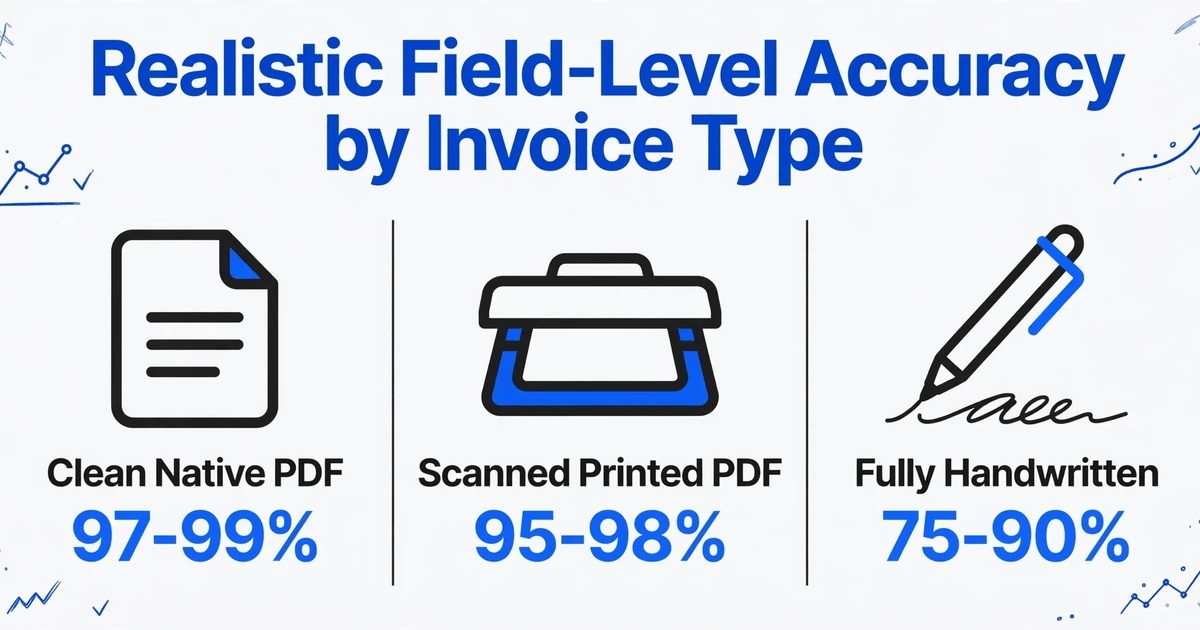
Two important caveats about this table. First, accuracy is per-document, not per-batch. A batch of 100 invoices will contain outliers — the one invoice with a QR code printed directly over the total, the supplier who changed their layout mid-month — that score lower than the batch average. Second, accuracy compounds across fields. If your invoice has 10 fields and each field has 98% chance of being correct independently, the probability that all 10 are correct is roughly 82% — and that's before considering that some fields are interdependent (wrong PO number means three-way matching fails even if every other field is right).
How to Run Your Own Accuracy Test — 20 Invoices, 1 Afternoon
Vendor accuracy claims are based on someone else's invoices. The only accuracy number you should trust is the one you measured yourself. Here's a practical protocol that takes one afternoon and produces a number you can act on:
Step 1: Select 20 invoices. Not your 20 cleanest. Not your 20 most recent. Select a representative cross-section: 10 from your top-volume vendors (the ones you process every month), 5 from occasional vendors with varied formats, 3 with handwritten annotations or stamps, and 2 that have historically caused problems. Include at least one multi-page invoice and at least one non-English invoice if those exist in your workflow. The goal is a sample that represents your actual invoice mix, not a cherry-picked demo set.
Step 2: Define your ground truth. For each invoice, manually record all the field values you want to extract: invoice number, date, due date, total amount, tax amount, subtotal, vendor name, PO number, and any line-item details (description, quantity, unit price, line total). Do this in a spreadsheet — one row per invoice, one column per field. This is your ground truth. Have a second person spot-check 5 of the 20 to verify that the ground truth is correct. The ground truth must be right before you can measure extraction against it.
Step 3: Run the extraction. Upload the 20 invoices to the tool, specifying the same field names you defined in your ground truth. Export the results. Don't clean or modify the output before comparison — that's the whole point of the test.
Step 4: Compare field by field. For each invoice, compare each extracted field against the ground truth. A field is correct if the extracted value matches the ground truth exactly — same format, same content. "17,820" vs "17820" counts as correct if your system can handle format variance in downstream processing. If it causes import failures, count it as wrong. "Jan 15, 2025" vs "2025-01-15" — same rule. Track: which fields failed, on which invoice types, and whether the failure was a total miss (empty field), partial miss (wrong value), or format mismatch (right value, wrong format).
Step 5: Calculate field-level accuracy. Field-level accuracy = number of correctly extracted fields ÷ total number of fields across all invoices. If your 20 invoices have 10 fields each (200 total fields) and 15 fields are wrong, your field-level accuracy is 92.5%. That's the number that matters. Also calculate recall — of all the fields that should have been extracted, what percentage were found? (A field that's blank when it shouldn't be is a recall failure.) And precision — of all the fields that were extracted, what percentage were correct?
The test that changes everything: upload your 3 historically problematic invoices first. If a tool handles those well, it'll handle the clean ones. If it fails on the problem invoices, you learn the failure mode before committing. Most evaluation processes do the opposite — start with clean invoices, see 99%, make the purchase decision, then discover the problem invoices later. Flip the order.
Files are processed securely and not stored.
When "Good Enough" Is Good Enough — Accuracy Thresholds by Invoice Volume
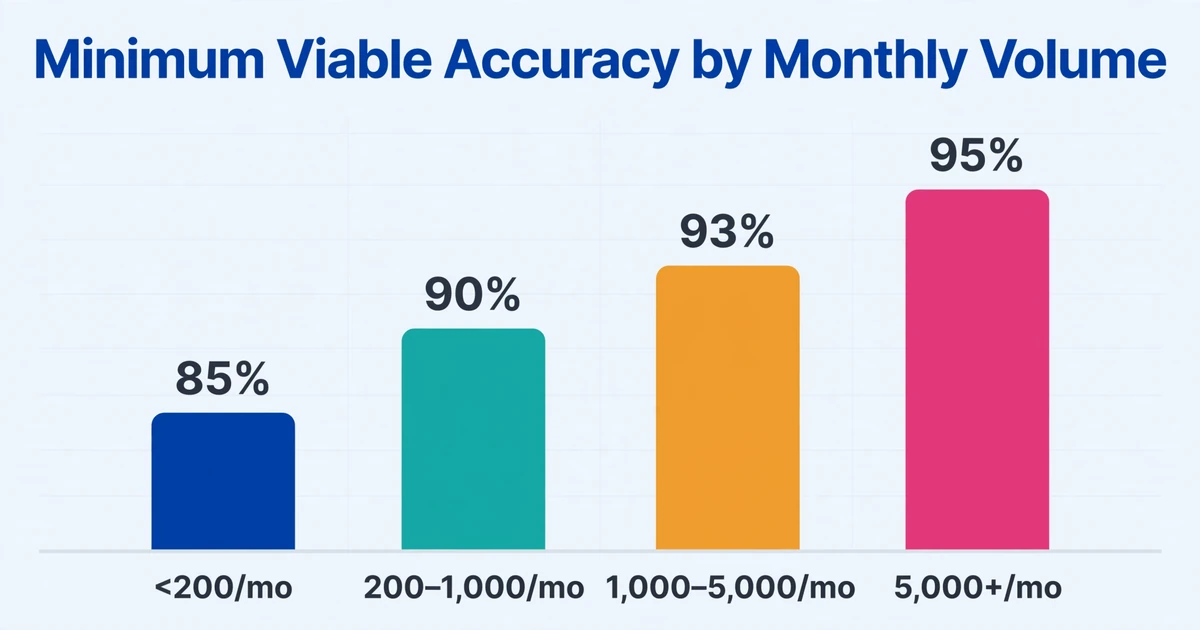
The accuracy you need depends on your volume. At 100 invoices a month, a single AP clerk can manually verify every extracted field — so even 85% accuracy saves significant time because the clerk is reviewing, not transcribing. At 5,000 invoices a month, 85% field-level accuracy means 750 invoices have at least one error. The team can't review them all. The errors that slip through become payments, and the corrections cost more than the extraction saved.
Volume-based accuracy thresholds (field-level):
| Monthly Volume | Minimum Viable Accuracy | Target Accuracy | Strategy |
|---|---|---|---|
| <200 | 85% | 95% | Extract + spot-check critical fields only. Errors are cheap to catch. |
| 200–1,000 | 90% | 96% | Extract + verify all totals and invoice numbers. Accept minor format errors. |
| 1,000–5,000 | 93% | 97% | Extract + automated validation rules. Human review on flagged exceptions only. |
| 5,000+ | 95% | 98%+ | Extract + automated validation + ERP integration. Errors at this volume compound. |
The 98% asymptote. Above 98% field-level accuracy, further gains require exponentially more investment — better scan equipment, stricter vendor format requirements, integrated validation rules, dedicated exception handlers. Chasing 99.5% is almost never worth it unless you're processing 10,000+ invoices a month and regulatory compliance demands near-perfection. The cost of the last 1.5% of accuracy typically exceeds the cost of handling the errors it would prevent.
What matters more than hitting an absolute number is trending the right direction. A team moving from 88% to 94% field accuracy over three months is winning. A team stuck at 99% page-level accuracy with 20% of fields wrong is losing — they just don't know it yet because they're measuring the wrong number.
Improving Accuracy Without Buying a Different Tool
If your accuracy is lower than expected, switching tools is rarely the first fix. Most accuracy problems can be improved by changing what enters the tool and how you ask for data — the input side and the instruction side. These changes cost nothing and work with any extraction system.
On the input side — improve what the AI sees:
- Scan at 300 DPI minimum in color. This alone can shift field-level accuracy by 5-10 percentage points on scanned invoices. Many AP departments scan at 150-200 DPI in B&W for file size reasons. The file size difference (5MB vs 1MB) is irrelevant compared to the labor cost of correcting extraction errors.
- Deskew and straighten. If invoices arrive crooked (common with phone photos and quick scans), the AI has to rotate and reinterpret the page geometry. A deskewed image removes this overhead. Most scanner software includes auto-deskew; enable it.
- Avoid re-scans. An invoice that's been printed, scanned, emailed, printed again, and scanned again carries the accumulated artifacts of every generation. If you have access to the original digital PDF, use it. The first-generation document always extracts better than the Nth.
- Separate multi-page invoices properly. If page 1 of a 3-page invoice gets separated from pages 2-3 during upload, the AI sees a partial document. Page 1 might have the header but page 3 has the totals. Batch upload tools that combine files into a single processing unit handle this automatically.
On the instruction side — ask for data more precisely:
- Use explicit field names. "Invoice Number" extracts more reliably than "Inv #" because the AI looks for semantically matching labels. "Total Amount" is better than "Total." "Tax Amount" is better than "Tax." Ambiguous names force the AI to guess which field you mean, and guessing introduces errors.
- Break complex fields into atomic ones. Instead of asking for "Vendor Address" as one field, ask for "Vendor Street," "Vendor City," "Vendor State," "Vendor ZIP" separately. The AI can locate each component precisely rather than guessing where one field ends and the next begins.
- Use column-name computation for derived values. If the document shows a "Total" that includes tax, but you need a pre-tax subtotal that isn't printed, a column name like "Subtotal (Total − Tax Amount)" tells the AI to compute the missing field from available data. This is more reliable than expecting the AI to guess an unlabeled value — and turns extraction failures (missing field) into successes (computed field).
- Standardize the vendor naming. If your extraction tool can learn from history, always use the same vendor name for the same supplier. "Acme Corp" and "Acme Corporation" and "Acme Corp." are three different vendors to a pattern-matching system. Consistency in your field names and reference data improves consistency in extraction.
The cumulative effect of these changes is often larger than the difference between vendor A's and vendor B's base accuracy. A team that optimizes input quality and field definitions can extract 95% field accuracy from a mediocre tool. A team that throws raw phone photos at the best tool on the market may get 85%. The tool matters — but how you feed it matters more.
For help selecting the right extraction approach for your invoice mix, see our comparison of AI invoice extraction tools. For the larger context of how manual data entry became the structural bottleneck that makes accuracy so critical, see our analysis of why AP teams still rely on manual invoice entry.