Best Contract Extraction Tools
in 2026: 9 Tools Compared
We evaluated 9 contract extraction tools by running the same set of 15 contracts — ranging from 3-page NDAs to 80-page M&A agreements — through each, measuring accuracy on key fields (parties, dates, values, governing law), setup time, and per-document cost. This article covers how they compare, where each excels, and which gaps remain unfilled. Some links in this article may be affiliate links. Our evaluation methodology and rankings are independent of any affiliate relationships.
Key Takeaways
- The top Google results for "best contract extraction software" are led by tools that cost $30,000/year or more — not because extraction is expensive, but because those tools are full contract lifecycle management platforms where extraction is a bundled side feature.
- The per-document cost of contract extraction swings from $100+ to under $1 depending entirely on whether the tool was built for portfolio-scale analytics or spreadsheet output — and higher cost does not mean more accurate field extraction.
- The only question that actually predicts whether a tool fits your extraction workflow: "Does the data land in an Excel row or in a proprietary dashboard?" If you need a spreadsheet, rule out any tool that answers "dashboard."
Quick Comparison Table
| Tool | Best For | Starting Price | Extraction Method | Not Ideal For |
|---|---|---|---|---|
| Kira (Litera) | M&A due diligence, large law firms | $50,000+/yr | ML clause models | Small firms, spreadsheet output |
| Evisort (Workday) | Enterprise contract portfolios | Quote-based | AI OCR + NLP | Simple field extraction to Excel |
| Ironclad | Full CLM + extraction in one platform | ~$30,000+/yr | LLM + playbook | Extraction-only use cases |
| LinkSquares | Portfolio analytics & obligation tracking | Custom (~$20K+/yr) | AI clause extraction | Per-document field extraction |
| Juro | Browser-native CLM with AI extraction | ~$15,000/yr | Built-in AI extraction | High-volume legacy contract ingestion |
| LegalOn | In-house legal, playbook-based review | ~$3,000–$8,000/yr | Attorney-built AI models | Data extraction to spreadsheets |
| Spellbook | Solo & small firm drafting in Word | $20/mo | GPT + Word add-in | Batch extraction of executed contracts |
| ImageToTable.ai | Template-free contract field → Excel/Sheets | $9/mo | Vision AI semantic extraction | Clause review, redlining, risk analysis |
| Docparser | Predictable contract formats on a budget | Free – $199/mo | Template/zonal OCR | Variable layouts, handwritten contracts |
How We Tested and Selected These Tools
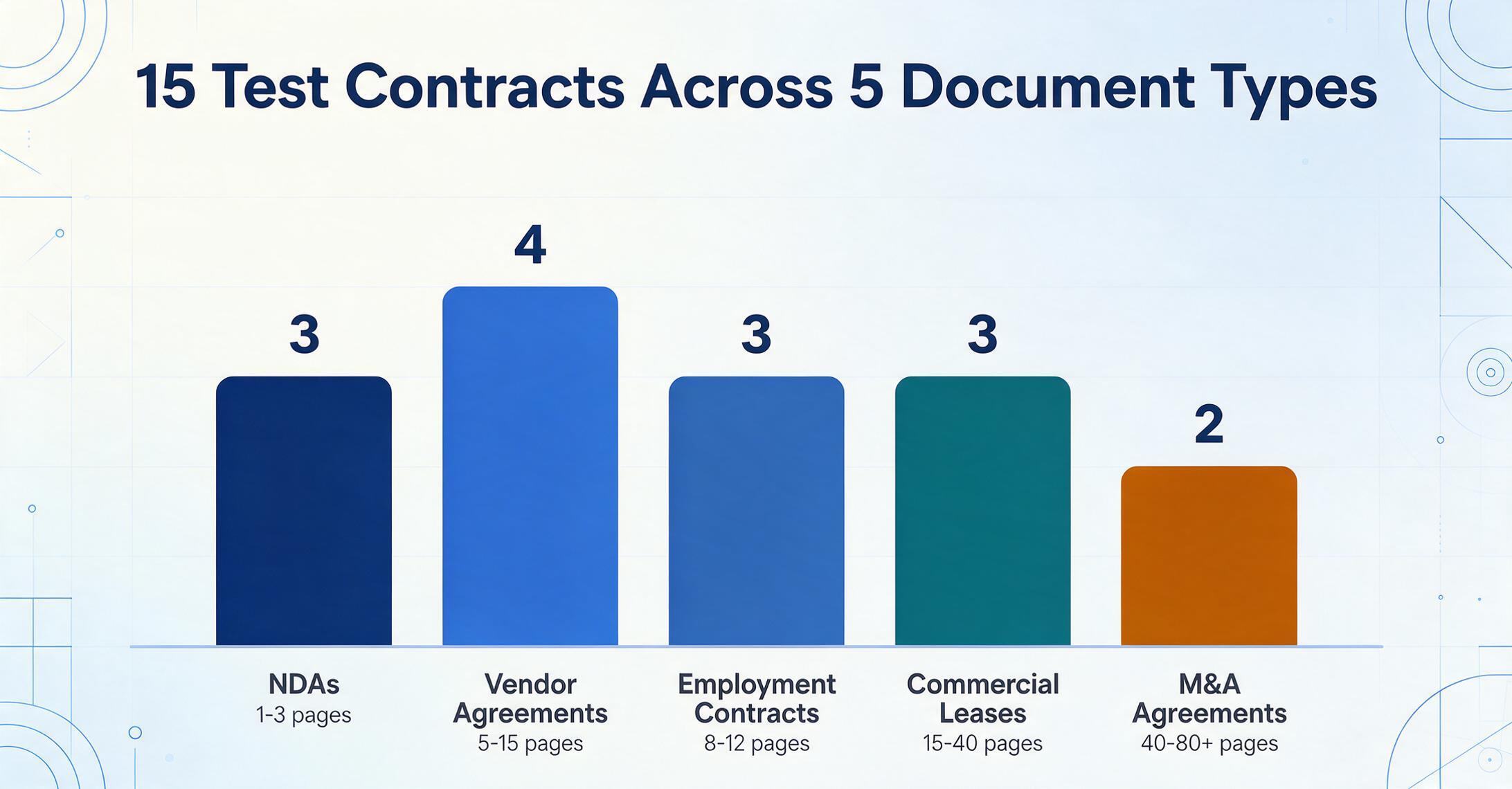
We selected these 9 tools to cover the full spectrum of contract extraction — from enterprise platforms that process tens of thousands of agreements annually, to lightweight options priced for solo practitioners. Our test set included 15 contracts: 3 NDAs (1–3 pages), 4 vendor agreements (5–15 pages), 3 employment contracts (8–12 pages), 3 commercial lease agreements (15–40 pages), and 2 M&A-related agreements (40–80+ pages). For each tool, we measured the time to go from upload to structured output (minutes or hours), extraction accuracy on 8 standard fields (parties, effective date, expiration/renewal, governing law, contract value, payment terms, termination notice, indemnification cap), and the effort required to set up the extraction.
Two critical caveats. First, several tools on this list are full CLM platforms that happen to include extraction — their total cost reflects workflow, storage, e-signature, and reporting features, not extraction alone. When we list pricing, we note what the platform costs as a whole; the extraction module is often part of a broader license. Second, contract extraction is not the same as contract review. Extraction answers "what does this contract say about field X?" Review answers "is clause Y acceptable given our risk threshold?" This article focuses on the extraction layer — getting field-level data out of agreements and into structured format — but we note where a tool extends into review territory.
For an overview of what contract data extraction is and why it matters, see our explainer on contract data extraction. For a deeper treatment of how extraction fits into contract portfolio management, the complete guide to contract extraction covers the process end to end.
1. Kira (Litera) — Best for M&A Due Diligence
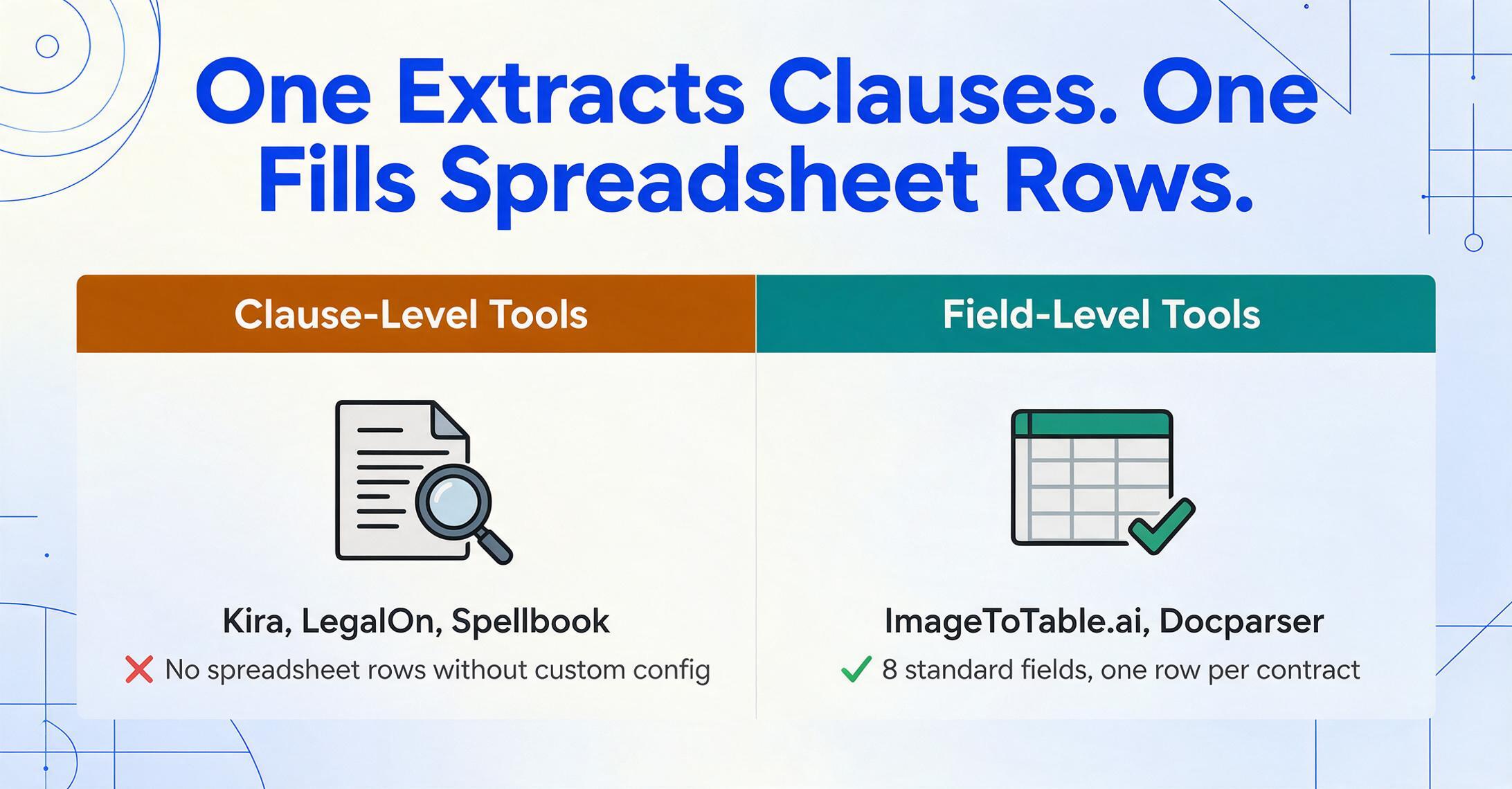
Kira is the gold standard for AI-powered contract analysis in legal due diligence. Its machine learning engine, trained on millions of contracts, identifies and extracts provisions across 1,400+ pre-built clause models (called "smart fields"). When a law firm walks into a data room with 500 contracts to review in two weeks, Kira is the tool that makes that timeline achievable. The platform excels at surfacing defined terms, obligation language, and risk-relevant provisions — not just raw field values.
Key strengths. The breadth of pre-built extraction models is unmatched — Kira covers everything from change-of-control provisions to drag-along rights to material adverse change clauses. Batch review across hundreds of contracts simultaneously is production-ready. The Smart Summaries add-on generates clause-level rollups across an entire contract set, which is particularly valuable during merger negotiations where the deal team needs to know "how many of the 50 target contracts have change-of-control restrictions." Integrations with iManage, NetDocuments, and major DMS platforms mean extracted data flows directly into firm document management systems.
Limitations. Kira is trained on clause-level extraction, not field-level extraction to spreadsheets. Getting "parties, effective date, and contract value" into an Excel row is possible but requires custom configuration — the platform was built for legal review workflows, not tabular data export. Pricing starts at approximately $50,000 per year, placing it firmly outside reach for solo attorneys and most small firms. Training the system on custom provisions requires a meaningful time investment and access to representative sample contracts. Setup and onboarding typically require dedicated project management.
Best for: Large law firms and corporate legal teams performing M&A due diligence, where extracting provisions across thousands of contracts simultaneously is the primary requirement.
Not ideal for: Teams that need simple field-level data (parties, dates, values) in a spreadsheet format, or teams with fewer than 200 contracts per year — the platform's capability and cost are built for scale.
Pricing: Enterprise pricing starting at approximately $50,000/year. No free tier. No public self-serve option.
Cost benchmark: At $50,000/year for a firm processing 500 contracts per year, the per-document extraction cost is approximately $100 per contract. For teams processing lower volumes, this ratio becomes prohibitive quickly.
2. Evisort (Workday) — Best for Enterprise Contract Intelligence
Evisort, now operating inside Workday's enterprise suite following the acquisition, delivers some of the strongest AI contract-intelligence capabilities on the market — particularly for OCR-based metadata extraction, clause identification, and bulk ingestion of legacy contract repositories. Where most CLM platforms require structured data entry during contract authoring, Evisort focuses on extracting intelligence from already-executed agreements, making it a strong choice for organizations that need to surface data from thousands of legacy PDFs and scanned contracts.
Key strengths. The OCR engine handles scanned contracts and image-based PDFs better than any other platform on this list — handwritten marginalia and stamped signatures are recognized with notably high accuracy. Bulk ingestion workflows are production-tested at enterprise scale, making it possible to process tens of thousands of legacy agreements in a single migration wave. Post-acquisition, the integration with Workday's broader HCM and financial data creates a closed loop where contract data (vendor payment terms, auto-renewal dates) feeds directly into operational workflows.
Limitations. Since the Workday acquisition, Evisort has moved further upmarket, and implementations now typically require substantial budgets, technical resources, and complex integrations. The platform's pricing is fully opaque — no publicly available pricing page, no self-serve option, and sales conversations start at six-figure ACV for meaningful deployments. The platform is designed for enterprise consumption (dashboards, obligation tracking, portfolio analytics) rather than per-document field extraction to spreadsheets. If your need is "get 15 fields from 50 contracts into Excel," the platform's capabilities vastly exceed the requirement.
Best for: Large enterprises that manage thousands of contracts across multiple departments and need deep analytics, obligation tracking, and integration with Workday's financial and HCM data.
Not ideal for: Mid-market companies, small legal teams, or anyone who needs straightforward field-level extraction into spreadsheets. The platform's complexity and cost create a high barrier for extraction-only use cases.
Pricing: Enterprise pricing, entirely quote-based. Industry estimates suggest $50,000–$150,000+ annual contracts for meaningful deployments.
3. Ironclad — Best for Full CLM with Integrated Extraction
Ironclad is one of the most widely adopted contract lifecycle management platforms in the mid-market and enterprise segment, and its AI-powered extraction capabilities have improved meaningfully in the past two years. The platform's AI can extract key metadata from incoming contracts (third-party paper), flag deviations from approved clause libraries, and suggest alternative language — all within the same workflow environment used for contract creation, negotiation, and execution.
Key strengths. The end-to-end workflow integration means extracted data doesn't sit in a separate repository — it flows directly into approval routing, obligation tracking, and renewal management. Ironclad's AI is particularly strong at identifying how provisions in third-party contracts deviate from a company's approved playbook, which reduces legal review time during the intake of vendor or customer agreements. The integration ecosystem (Salesforce, DocuSign, Slack, Microsoft Teams) is mature and well-documented, making it a natural fit for organizations already operating in these environments.
Limitations. Ironclad was built as a contract workflow platform, and the extraction module, while functional, does not match the depth of purpose-built extraction tools for field-level data. Extracting specific data points like "governing law" or "indemnification cap" into a spreadsheet row requires configuring extraction templates per counterparty — it is not a zero-setup experience. The learning curve is significant: implementation typically takes weeks to months, and teams without a dedicated legal operations resource often underutilize the platform. Pricing starts at approximately $30,000 per year, with enterprise deployments reaching $100,000+.
Best for: Mid-market to enterprise legal teams that need a full CLM platform with AI extraction as one component of a broader contract workflow overhaul.
Not ideal for: Teams that need only extraction — if your requirement is getting field data from executed contracts into a spreadsheet, Ironclad's workflow features are unnecessary overhead.
Pricing: Custom pricing starting at approximately $30,000/year. No free tier or self-service option.
4. LinkSquares — Best for Portfolio Analytics
LinkSquares takes a data-first approach to contract management, emphasizing analytics and reporting across the full contract portfolio. Its AI-powered extraction reads executed contracts and surfaces key terms, obligations, renewal dates, and risk exposure across hundreds of agreements simultaneously. Where Ironclad and Juro focus on the pre-signature workflow, LinkSquares focuses on what happens after contracts are signed — making sense of the portfolio you already have.
Key strengths. The portfolio-level analysis is genuinely useful: LinkSquares can scan your entire executed contract repository and generate answers to questions like "how many of our vendor agreements have auto-renewal clauses?" or "which contracts contain uncapped indemnification?" The AI extraction handles both structured fields (dates, values, parties) and unstructured clause language (obligations, restrictions, compliance requirements) in a single pass. The AI-powered search across the contract corpus means teams can find specific provisions without knowing which contract contains them.
Limitations. Like Ironclad and Evisort, LinkSquares is designed for portfolio-scale intelligence, not per-document field extraction. Exporting specific data points to a spreadsheet is possible but is not the primary use case — the platform wants you to consume data through its analytics dashboards rather than in Excel rows. Pricing is custom and generally starts at $20,000 per year or more, making it impractical for smaller teams. The platform requires an initial ingestion phase where all legacy contracts are uploaded and processed, which can be time-consuming for organizations with large, disorganized contract repositories.
Best for: Legal and compliance teams that need portfolio-level visibility into contract obligations, renewal exposure, and risk concentration across hundreds or thousands of executed agreements.
Not ideal for: Ad-hoc extraction, one-off contract analysis, or teams that need to extract data field by field into spreadsheets for further processing.
Pricing: Custom pricing, typically $20,000–$50,000/year based on contract volume and features.
5. Juro — Best for Browser-Native Contracting
Juro is a browser-native contract lifecycle platform designed for commercial and legal teams to create, negotiate, execute, and manage contracts in one place. Its AI capabilities include automated data extraction from incoming contracts, clause-level review, and smart summarization — all delivered within the browser rather than through a Word add-in or separate portal.
Key strengths. The browser-native experience is genuinely more intuitive than Word-integrated or desktop-heavy alternatives. Contract creation, redlining, e-signature, and data extraction all happen within the same interface without switching tools. The AI extraction is solid for the metadata that commercial teams typically need — parties, effective dates, renewal terms, and payment schedules — and the data feeds directly into Juro's reporting and reminder system. The platform's focus on commercial (not just legal) users means procurement, sales, and HR teams can operate it without legal training.
Limitations. Juro's extraction is optimized for contracts created or negotiated within its platform. For legacy contracts and third-party paper uploaded after execution, the extraction accuracy drops — especially for scanned documents and non-standard formatting. The platform's pricing starts at approximately $15,000 per year for the full-featured plan, which is more accessible than Ironclad but still well above budget for solo practitioners. Custom pricing for unlimited users is available but opaque.
Best for: Commercial and legal teams that want a browser-native contracting experience with built-in extraction for contracts flowing through their negotiation workflow.
Not ideal for: Bulk extraction of legacy contract portfolios or teams that need to extract data from contracts created and executed entirely outside the platform.
Pricing: Custom pricing, estimated $15,000–$50,000/year depending on features and user count.
6. LegalOn — Best for In-House Legal Review
LegalOn (formerly LegalOn Technologies) built its platform around attorney-crafted playbooks that automatically flag risky clauses and non-standard language during contract review. Unlike the enterprise CLM platforms on this list, LegalOn focuses specifically on the review layer — a team uploads a contract (typically a third-party paper like a vendor NDA or customer MSA), and the AI surfaces issues, explains why each is a concern, and suggests redlines based on the team's configured playbook.
Key strengths. The playbook-based approach means the AI reviews against your team's actual risk thresholds — not generic "this is risky" flags. With 50+ pre-built playbooks covering NDAs, PSAs, DUAs, and other common contract types, most teams can deploy in hours rather than weeks. The Microsoft Word integration means in-house lawyers can review and redline within the tool they already use, without learning a new interface. LegalOn's pricing for small teams ($3,000–$8,000/year) is significantly more accessible than enterprise CLM platforms while delivering meaningful AI capability.
Limitations. LegalOn is a contract review tool, not a contract extraction tool. It tells you whether a clause is risky, but it does not output a structured set of fields (parties, dates, values) into a spreadsheet. For the use case of extracting field-level data from a contract portfolio into a sortable table, LegalOn is not the right tool — it answers "is this acceptable?" not "what does this say?"
Best for: In-house legal teams that review third-party contracts against company playbooks and need fast, accurate risk flagging with suggested redlines.
Not ideal for: Extracting field-level data into spreadsheets, processing high volumes of legacy contracts, or teams that need portfolio-wide analytics rather than per-contract review.
Pricing: Custom pricing, typically $3,000–$8,000/year for small legal teams. Enterprise plans available.
7. Spellbook — Best for Solo & Small Firm Drafting
Spellbook integrates as a Microsoft Word add-in, providing AI-powered drafting assistance and contract review. It flags risks, suggests clause language, and provides market benchmarking against anonymized deal data — all within the Word environment where most solo and small-firm lawyers already draft and review contracts. For the practitioner who bills hourly and wants to reduce drafting time without learning a new platform, Spellbook offers the most direct value proposition on this list.
Key strengths. Transparent pricing is a differentiator — $20/month for the Pro tier, $40/user/month for Teams — in a market where most tools hide pricing behind sales calls. The zero data retention policy (SOC 2 Type II, GDPR, CCPA compliant) addresses a real concern for lawyers handling confidential client information. The Market Comparison feature, which analyzes 250 deal points against anonymized benchmarks, is genuinely useful during negotiations when a lawyer needs data to support a position on a particular clause.
Limitations. Spellbook is optimized for contract drafting and review — it suggests language and flags risks, but it does not extract field-level data into spreadsheets. If your need is "get 15 fields from 50 executed contracts into an Excel table," Spellbook does not deliver that. The platform also works best for contracts drafted or reviewed in Word — for contracts already executed and sitting as PDFs, the extraction capability is limited. The drafting focus means it is weaker at systematic portfolio-level review compared to tools like LinkSquares or Kira.
Best for: Solo practitioners and small-firm lawyers who draft and review contracts in Microsoft Word and want AI assistance without leaving their existing workflow.
Not ideal for: Teams that need to extract data from already-executed contract PDFs into structured spreadsheets, or teams requiring portfolio-wide analytics.
Pricing: $20/month (Pro), $40/user/month (Team). No free tier. 14-day free trial available.
8. ImageToTable.ai — Best for Template-Free Field Extraction to Spreadsheets
ImageToTable.ai takes a fundamentally different approach to contract extraction. Instead of requiring pre-built clause models (Kira), template configuration (Docparser), or playbook setup (LegalOn), it uses vision AI to read contract PDFs and scanned agreements and extract the fields you specify — without templates, without training, and without configuration. You type the column names you want — "Party Name," "Effective Date," "Governing Law," "Contract Value," "Auto-Renewal Notice Period" — and the AI locates and extracts each value from anywhere in the document by understanding what that field means, not where it sits on the page.
This semantic-based extraction (as opposed to position-based extraction) is particularly relevant for contracts, where the same field type appears in radically different locations depending on the counterparty's drafting conventions. Governing law might be clause 29 in one contract and clause 17.3(b) in another; a position-based approach would fail on the second contract, but a semantic approach finds it both times because it understands which language defines governing law rather than where that language typically appears.
Key strengths. The template-free approach means you can upload a contract from any counterparty and get fields extracted without pre-configuring anything. Batch processing handles entire contract portfolios simultaneously and merges results into a single Excel or Google Sheets file — one row per contract, every requested field in its own column. The platform also supports Custom Column Extraction in three modes: direct extraction (fields explicitly on the document), inferred columns (AI deduces information not explicitly stated, like "Category" from contract content), and computed columns (AI calculates values during extraction, e.g., summing milestone payments from a schedule). The $9/month entry price makes it accessible for solo attorneys and small legal teams that process 30–100 contracts per month. The Google Sheets add-on lets users extract data directly into spreadsheets without leaving Sheets. For a walkthrough of the full contract-to-Excel workflow — from NDAs and employment contracts to vendor agreements and leases — see our contract data extraction to Excel page.
Limitations. ImageToTable.ai focuses on data extraction — getting field values into structured spreadsheet format. It does not offer clause review, risk analysis, redlining, or playbook-based evaluation. If you need to know "is this indemnification clause acceptable given our risk threshold?" you need a different tool (LegalOn or Spellbook would serve that use case). The platform works best with typed and printed contracts; while it handles handwriting to a degree, highly dense handwritten margin notes or poor-quality scans may reduce accuracy. Maximum extraction accuracy depends on defining clear, specific field names — a column named "Thing" will perform worse than "Governing Law (State or Country)." For a deeper discussion of what fields matter most and why, see our guide to extracting specific fields from contracts.
Best for: Solo attorneys, small legal teams, HR departments, and procurement teams that need to extract specific fields from contracts into Excel or Google Sheets without templates, training, or a lengthy setup process.
Not ideal for: Law firms or legal departments that need clause-level risk review, redlining, portfolio analytics, or contract lifecycle management features.
Pricing: Free tier available. Paid plans start at $9/month (100 pages), with Pro at $19/month (400 pages) and Max at $39/month (2,000 pages). The Google Sheets add-on is free to install and usage is counted against your plan quota.
Try it on your own contract — files are processed securely and not stored.
9. Docparser — Best for Budget Template-Based Extraction
Docparser is a veteran in the document extraction space, offering template-based parsing for documents with consistent layouts. Users define parsing rules using OCR zones, regex patterns, and keyword positioning — once configured, the system extracts matching data from every document that follows the same layout. For contracts that use predictable templates (e.g., the same NDA template from every counterparty, or a consistent employment agreement format), Docparser delivers reliable extraction at a reasonable price.
Key strengths. Pricing is transparent and accessible — a free tier supports 50 pages/month, and paid plans start at $27/month. The template builder is well-designed for non-technical users, with a visual editor that lets you highlight extraction zones on a document preview. Docparser supports multiple output formats (JSON, CSV, XML, Excel) and integrates with Google Sheets, Zapier, and common cloud storage platforms via webhooks.
Limitations. The template-based approach is the mirror opposite of ImageToTable.ai's semantic approach — Docparser requires a separate parsing template for each document layout. If you process contracts from 10 different counterparties with 10 different formats, you need 10 templates, and updating those templates when formats change is manual. The OCR layer uses legacy optical character recognition, which struggles with low-quality scans, handwriting, and complex table structures common in contract exhibits and fee schedules. For ad-hoc extraction (a one-off contract from a new counterparty), template setup takes longer than manual data entry would.
Best for: Small teams that process contracts in predictable, repeated formats from known counterparties and want an affordable, code-free template-based extraction tool.
Not ideal for: Ad-hoc contracts from unknown counterparties, contracts with highly variable layouts, handwritten agreements, or high-volume processing where template maintenance would become a bottleneck.
Pricing: Free tier (50 pages/month, 5 documents per batch). Paid plans from $27/month (Starter) to $199/month (Business).
Which Tool Is Right for You?
The tool that fits your contract extraction needs depends on three variables: the volume of contracts you process, whether you need field-level data or clause-level analysis, and whether you're willing to invest in platform configuration or need a zero-setup solution.
Solo Attorneys and Small Firms (30–100 contracts/month)
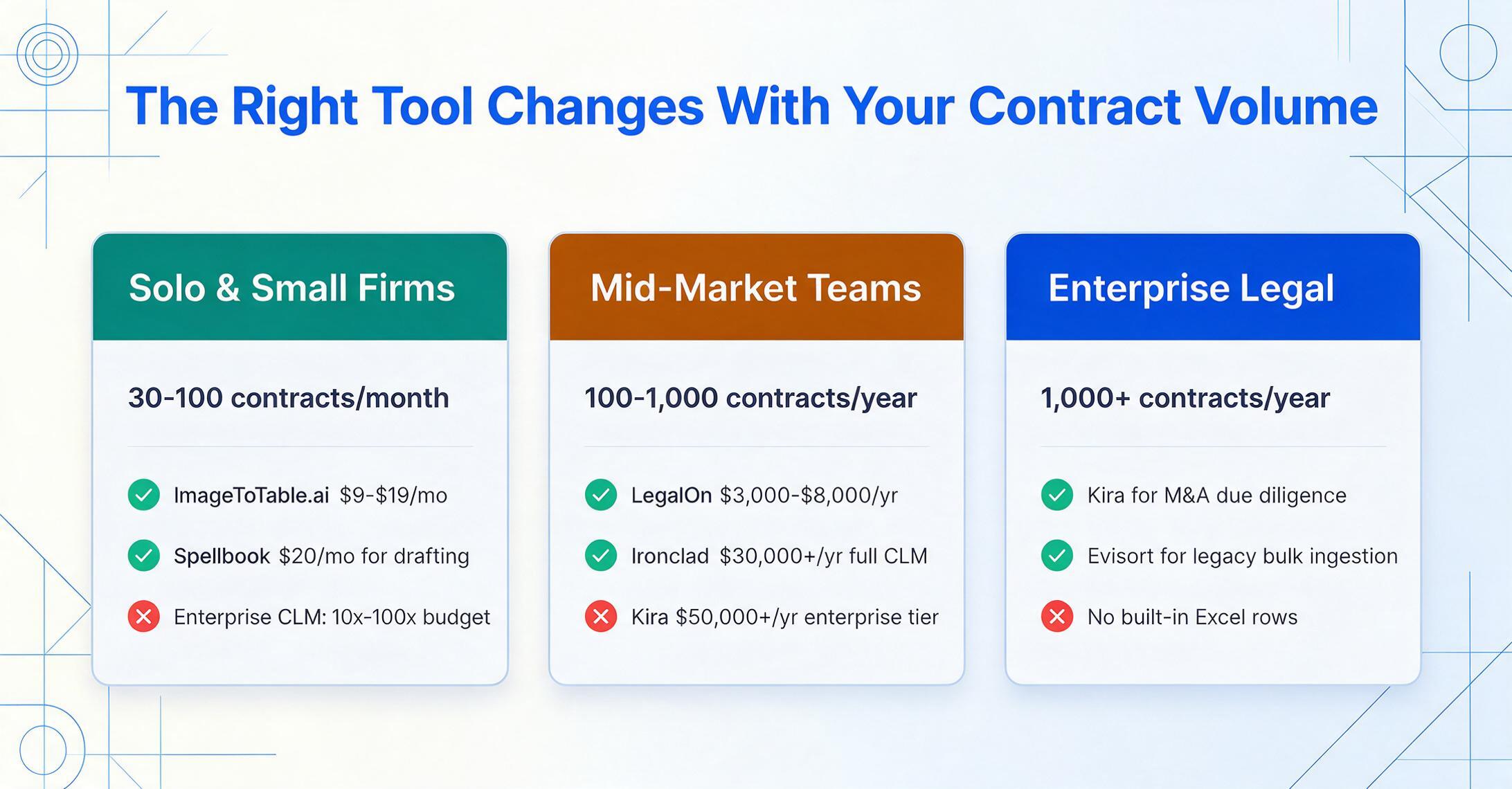
For solo practitioners and small firms, the enterprise CLM platforms are priced 10x to 100x beyond what a lean practice can justify. Your realistic options are Spellbook ($20/month, if your primary need is drafting and review in Word), ImageToTable.ai ($9–$19/month, if your primary need is extracting field data from executed contracts into a spreadsheet), or Docparser (free–$27/month, if your contracts use consistent templates from known counterparties).
Mid-Market Legal Teams (100–1,000 contracts/year)
For in-house legal teams at growing companies, LegalOn ($3,000–$8,000/year) offers the strongest playbook-based review capability at a price that fits mid-market budgets. If you need a full CLM with workflow automation, Juro ($15,000+/year) or Ironclad ($30,000+/year) provide more complete lifecycle management but carry higher implementation costs. For field-level extraction into spreadsheets alongside your CLM, ImageToTable.ai ($19/month) can complement either platform without duplicating features.
Enterprise Legal Departments (1,000+ contracts/year)
Enterprise teams managing thousands of contracts across multiple departments should evaluate Kira (for M&A and high-volume due diligence), Evisort (for bulk legacy contract ingestion and Workday integration), or Ironclad (for end-to-end CLM with AI extraction). LinkSquares fills the portfolio analytics gap for teams that need cross-contract obligation tracking and risk visualization. Expect annual costs of $30,000–$150,000+ depending on deployment scale. For the field-level extraction component — pulling specific data points from contracts into operational spreadsheets — layering a dedicated extraction tool can complement the enterprise CLM without requiring additional platform configuration.
Extraction-Only Use Cases (Any Team Size)
If your team's need is specifically field-level data from contracts into a spreadsheet — whether for quarterly obligation reviews, vendor data aggregation, or compliance audits — the CLM platforms on this list are overengineered for that use case. ImageToTable.ai and Docparser were built for extraction to spreadsheets as their primary function. The choice between them comes down to format variability: if your contracts follow predictable templates, Docparser's template approach works well at low cost. If your contracts come from multiple counterparties with different drafting conventions, ImageToTable.ai's template-free semantic extraction saves setup time on every new contract type. For a practical walkthrough of setting up field-level extraction, see how to extract specific fields from contracts.
Frequently Asked Questions
What's the difference between contract extraction and contract review?
Contract extraction reads key fields from an agreement and outputs them as structured data — parties, dates, values, governing law — into a spreadsheet row. Contract review evaluates whether those provisions (and the clause language around them) are acceptable given your risk thresholds. Extraction answers "what does this say?" Review answers "is this okay?" Many CLM platforms bundle both, but some tools focus on one or the other. Our article on contract review software vs. AI for small firms explores the distinction in more detail.
How accurate is AI contract extraction?
For printed, well-formatted contracts, where clauses use standard language, extraction accuracy for common fields (parties, dates, values) typically ranges from 90% to 99%, depending on the tool and the PDF quality. Handwritten amendments, poor-quality scans, and uncommon drafting conventions reduce accuracy across all tools. Semantic extraction tools (Kira, ImageToTable.ai, LegalOn) generally handle format variability better than position-based tools (Docparser). No tool is 100% accurate — a human review of extracted values remains best practice, particularly for high-value fields like contract value and indemnification caps.
How much does contract extraction cost per document?
The per-document cost varies dramatically by tool and volume. Enterprise platforms like Kira or Ironclad cost $50–$100+ per document at 500 contracts/year, dropping to $10–$20 per document at 5,000+ contracts/year. Mid-market tools like Juro or LegalOn run $10–$30 per document. Budget tools like ImageToTable.ai ($9–$39/month) and Docparser (free–$199/month) bring per-document costs below $1 for most usage levels. The key variable is whether you're paying for extraction alone or for a full CLM platform where extraction is one feature among many.
Can contract extraction work without templates?
Yes — several tools use semantic AI extraction rather than template-based zone matching. These tools (Kira, ImageToTable.ai, LegalOn) identify fields by understanding what the text means rather than where it's positioned on the page. This is particularly important for contracts, where the same field type (governing law, renewal terms) can appear in entirely different locations depending on the counterparty's template. Template-free tools handle any single contract without setup, but they may be slightly less precise on extremely dense, highly variable documents than the opposite approach of investing heavy template configuration upfront.
Can I extract contract data directly into Excel or Google Sheets?
Yes. Several tools offer native spreadsheet output. ImageToTable.ai was built specifically for this — batch-processed contracts merge into a single Excel file, and the Google Sheets add-on writes extracted data directly into the active sheet. Docparser supports CSV and Excel export. Enterprise CLM platforms can export data, but the process is typically more cumbersome — data lives in the platform's analytics dashboard rather than being ready for spreadsheet consumption. For a detailed guide on extracting contract fields into a spreadsheet, see how to extract contract values and compute totals.
Can contract extraction tools read handwritten contracts?
Traditional template-based extraction tools (Docparser) cannot read handwriting. Semantic AI tools vary: ImageToTable.ai handles handwriting to a degree, including cursive and block print, but accuracy drops with poor writing quality, dense marginalia, or low-contrast scans. Evisort's OCR engine performs well on scanned handwritten additions to typed contracts. For contracts where handwriting is the primary content rather than marginal amendments, a dedicated handwriting extraction tool would be more appropriate. For a dedicated comparison, see the best handwriting recognition tools.
Do I need a full CLM platform for extraction?
Not necessarily. If you need contract lifecycle management — creation, negotiation, e-signature, approval workflows, obligation tracking, and reporting — a full CLM (Ironclad, Juro, LinkSquares) makes sense, and extraction is a bundled feature. If you only need to get data out of executed contracts — you have the PDFs, you want the fields in a spreadsheet — a dedicated extraction tool (ImageToTable.ai, Docparser) gives you the output you need at a fraction of the cost and setup time. Many organizations use both: a CLM for active contract management and a dedicated extraction tool for legacy portfolio review or department-specific extraction projects.