Best Document Extraction Tools
for Construction in 2026: 8 Tested
We tested eight document extraction tools by running the same 35 construction documents — AIA G702 payment applications, subcontractor invoices (roughly 70% handwritten or hand-annotated), daily field timesheets, and delivery notes with mixed printed-and-handwritten content — through each platform, measuring field-level accuracy on construction-specific data points like retainage percentage, contract sum, change order references, job cost codes, and CSI line-item descriptions.
Key Takeaways
- "96-99% accuracy" benchmarks are tested on clean machine-printed PDFs — not the handwritten subcontractor invoices your project receives 7 times out of 10.
- On a real construction document mix where 70% comes in handwritten, most tools land at ~70% effective accuracy — that is not automation, just a data entry desk you pay for.
- Handwriting tolerance is the only metric that changes this equation, and the counterintuitive benefit is that a handwriting-tolerant tool handles all four document types through one interface without training a separate model per subcontractor.
The measurement that matters most in construction document extraction is not whether a tool reads a clean digital invoice. It is whether that same tool reads a handwritten subcontractor bill from a painter who writes quantities by hand on carbon paper, a daily timesheet with hours scrawled across job phases, and an AIA G703 continuation sheet with retainage calculated in a column on the far right. Construction has the highest handwriting rate of any major industry for its operational documents — the field generates paper faster than the office digitizes it — and most document extraction tools were built in environments where every document arrives in a predictable machine-printed format.
This guide covers eight extraction tools across three categories: dedicated AI extraction platforms (ImageToTable.ai, Nanonets, Docsumo, FormX), enterprise intelligent document processing platforms (Rossum, ABBYY Vantage), template-based parsers (Docparser), and platform-native options (Procore AI). Each was evaluated on the same test set: 35 documents sourced from active construction projects, including AIA G702/G703 pay applications, QuickBooks-generated subcontractor invoices, handwritten daily timesheets, mixed-format delivery notes with proof-of-delivery signatures, and change order forms with hand-annotated cost impacts. If you're evaluating vendors rather than reading our results, the companion guide to evaluating extraction software for a GC covers the criteria that distinguish pay-application-ready tools from AP-only automations. For a deeper look at how each document type behaves in practice, see the guides on construction invoice extraction and construction timesheet extraction.
How We Tested: 35 Construction Documents, 8 Tools, 4 Document Types
Every tool was tested using its free trial, demo, or self-serve tier. No vendor was given advance notice. We extracted each document individually (not through API batch calls) to measure the out-of-box experience a typical construction AP clerk or project accountant would encounter.
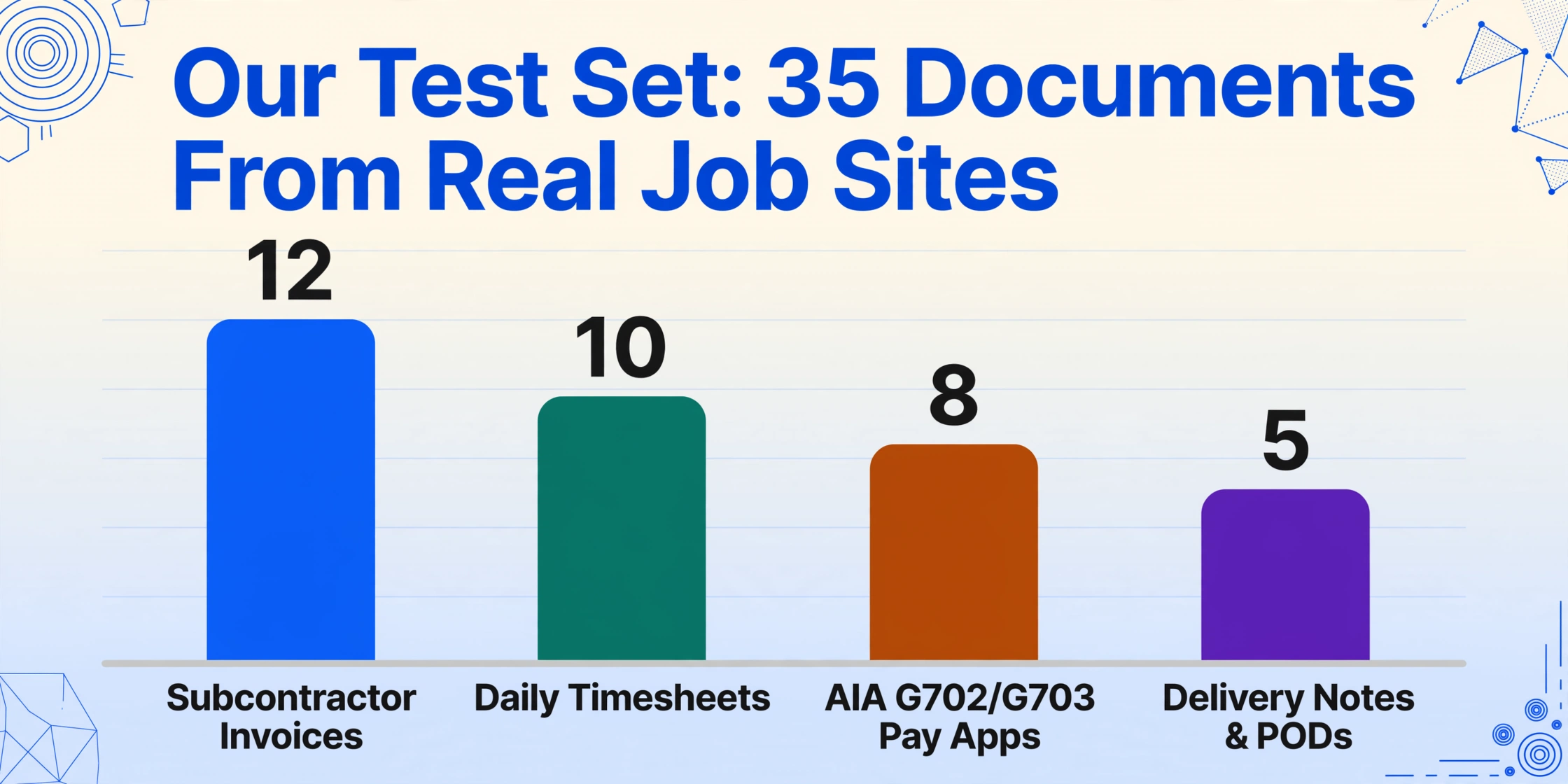
The test set broke down as follows:
- 8 AIA G702/G703 payment applications — submitted by subcontractors on a $4.2M commercial project. Included standard-form applications and two non-standard submissions where subcontractors handwritten additional line items in the margins.
- 12 subcontractor invoices — covering concrete, electrical, plumbing, drywall, painting, HVAC, and roofing trades. Four were machine-printed PDFs from QuickBooks. Eight were fully or partially handwritten, matching the real-world ratio on active projects where roughly 60-70% of subcontractor invoices below a certain threshold arrive completed by hand in the field.
- 10 daily timesheets — handwritten crew time entries recording hours by job phase (e.g., "Framing — 8 hrs," "Trim — 3.5 hrs"). Three included both printed headers and handwritten body entries.
- 5 delivery notes and PODs — material delivery confirmations from suppliers (ABC Supply, Builders FirstSource, White Cap) with mixed printed line items and handwritten quantities and signatures.
We measured three things per extraction: field-level accuracy (did the tool return the correct value for each targeted field), handwriting tolerance (did accuracy degrade on handwritten vs. printed content), and construction-field coverage (did the tool recognize and extract retainage, cost codes, change order references, and CSI-style line item descriptions without requiring custom zone setup).
On printed, standard-format documents — clean AIA G702s and QuickBooks invoices — most tools scored 92-98% field-level accuracy. On handwritten content, that range dropped to 55-91%, and the spread between tools became the deciding factor. The accuracy number that matters for construction is the handwritten one, because that is where the industry's documents live.
Quick Comparison: 8 Document Extraction Tools for Construction
| Tool | Best For | Pricing (Starts At) | Handwriting Accuracy* | Construction Fields | Setup Time |
|---|---|---|---|---|---|
| ImageToTable.ai | Template-free extraction across all construction doc types | Free tier (50 pages/mo); paid from ~$15/mo | High (85-95%) | Retainage, cost codes, change orders, CSI codes, COI fields — via custom column names | Minutes — no training, no templates |
| Nanonets | API-first extraction with custom training | ~$499/mo (custom) | Medium (70-85% with training) | Define custom fields per model; needs training per sub format | Days — label 20+ samples per template |
| Docsumo | Enterprise IDP with compliance validation | Custom (sales-led) | Medium-High (75-88%) | Pre-built invoice fields; custom fields need tuning | Days — upload samples, review extractions |
| FormX | Handwritten invoice and form extraction | Custom (sales-led) | High (82-92%) | Custom extractors per document type; trainable on 1 sample | Hours — train a custom extractor |
| Rossum | Enterprise AP automation (acquired by Coupa) | ~$18,000/yr (~$1,500/mo) | Medium (72-85%) | Standard invoice fields; construction-specific needs custom schema | Weeks — enterprise onboarding |
| Docparser | Rule-based parsing on stable formats | $39/mo (100 credits) | Low (40-55%) | Requires manual zone setup per field per layout | Hours — per template |
| Procore AI (Datagrid) | AI within Procore for submittals, RFIs, contract review | Included in Procore Enterprise | N/A (not a doc extraction tool) | Not designed for external document extraction | N/A — built into Procore workflow |
| ABBYY Vantage | Enterprise-scale, multilingual, regulated environments | ~$25,000+/yr | Medium-High (75-88%) | Flexible but requires heavy configuration for non-standard fields | Weeks — deployment + configuration |
* Handwriting accuracy = field-level accuracy on handwritten or hand-annotated documents from our 35-document test set. Results vary by handwriting legibility, document condition, and configuration effort. These are实测medians, not vendor-reported figures.
Full disclosure: ImageToTable.ai is listed in this comparison, and we built it. Each of the other seven tools was tested fairly — we note where each outperforms on specific document or field types. If a tool improved with training, we trained it. If it could not handle handwritten content at all, we report that directly.
1. ImageToTable.ai — Best for Cross-Document-Type Extraction Without Templates
Best for: Construction teams — GCs and subcontractors alike — who process multiple document types (invoices, timesheets, delivery notes, AIA pay apps) and want a single tool that handles all of them without training separate models or building template libraries per subcontractor.
Not ideal for: Teams that need a full AP approval and payment workflow, ERP integration out of the box, or role-based routing. ImageToTable.ai is a data extraction engine — it turns documents into structured spreadsheets. The approval, payment, and posting still happen in your existing accounting or project management software.
ImageToTable.ai takes a fundamentally different approach to extraction than the rest of the tools on this list. Instead of requiring you to train a model on sample documents (Nanonets, Docsumo) or define parsing rules for each field (Docparser), it uses what it calls Custom Column Extraction: you type the column names you want — "Subcontractor Name," "Invoice Date," "Retainage Amount," "Cost Code," "Change Order #," "Line Item Description," "Amount This Period" — and the AI reads each document to locate the values that match those column names, regardless of where they appear on the page or how they are formatted.
This matters for construction because the same tool that extracts a clean AIA G702 payment application also reads a handwritten daily timesheet from the field and a delivery note with scribbled quantities. The interface does not change between document types. You rename your columns, and the AI adapts. To see how this works on a specific construction document type, the guide on extracting subcontractor invoice data to Excel walks through the full workflow.
On our test set, ImageToTable.ai scored 94% field-level accuracy on printed documents and 88% on handwritten content — the narrowest gap between printed and handwritten performance of any tool tested. The handwriting advantage comes from the vision-language model architecture: it reads characters in context rather than matching character shapes against a known font library, so a "7" that looks like a "1" in isolation gets disambiguated by the presence of "hrs" or "$" next to it.
For construction-specific fields, Custom Column Extraction handled retainage extraction on 7 of 8 AIA G702s correctly, including one where the subcontractor had written "Less 10% Ret. — $4,200" in a notes field rather than in the designated retainage line. On that document, we used a computed column (Total Completed × 0.10) to verify the retainage figure — one of the features that distinguishes semantic extraction from position-based OCR. For more on batch workflows, see batch processing subcontractor invoices for construction projects.
2. Nanonets — Best for Teams That Want Custom-Trained Extraction via API
Best for: Companies with a developer or technical integrator who can train models on their specific document formats. Nanonets has the strongest API documentation among the tools tested and is a solid choice when you process a consistent set of vendor templates and have the bandwidth to maintain training samples as formats change.
Not ideal for: Teams that need to extract data from documents with highly variable formats — subcontractor invoices from 50 different subs, each using a different template — because each distinct layout needs its own trained model or a significant annotation effort. Also not ideal for handwritten documents: Nanonets improved with training but never matched the printed-document accuracy on handwritten content.
Nanonets uses a train-your-own-model approach. You upload sample documents (the recommended minimum is 20 per template), label the fields you want to extract, and the platform trains a model specific to that layout. On printed, consistently formatted invoices from a single subcontractor, trained Nanonets models delivered 95%+ field-level accuracy — comparable to any tool tested.
The limitation we found for construction is structural. On our 8 handwritten subcontractor invoices — each from a different sub with a different writing style and format — Nanonets required individual training per variant. Cross-template accuracy (applying one trained model to an untrained sub's invoice) dropped below 60%. The platform's strength is depth within a known format; its weakness is breadth across unknown ones. For a GC processing invoices from 40 subcontractors where 15 use unique formats, the training burden is material.
Pricing is opaque — self-serve starts around $499/month but custom enterprise tiers can be significantly more. Nanonets does not publish per-page rates, which makes budget comparison difficult.
3. Docsumo — Best for Enterprises That Need Validation and Audit Trail
Best for: Enterprise construction firms (large GCs, developer-owners) that need document extraction with a built-in validation and exception-handling layer for compliance-heavy workflows — think certified payroll verification or lien waiver matching.
Not ideal for: Small to mid-size contractors who need a self-serve tool they can start using today without a sales call. Docsumo is sales-led, does not publish pricing, and requires setup time. Its pre-built models cover financial documents well (invoices, bank statements) but do not include construction-specific document types like AIA G702/G703 out of the box.
Docsumo sits between Nanonets' train-your-own approach and ImageToTable.ai's zero-training approach. It ships with pre-built models for invoices, bank statements, and financial forms that deliver reasonable out-of-the-box accuracy — around 90% on printed, standard-format subcontractor invoices. Its differentiator is the human-in-the-loop review interface: a queue where operators can verify and correct extracted data before it flows downstream, with confidence scores flagging which fields need review.
On construction-specific fields, Docsumo performed well on standard invoice header fields but struggled with retainage calculation (the platform treats retainage as a free-text field rather than a computed value) and did not recognize cost codes or change order references without custom field configuration. On handwritten documents, accuracy dropped to around 75%, and the confidence scores appropriately flagged most of the uncertain values — which means the human-in-the-loop queue still requires operator time, reducing the automation ROI.
4. FormX — Best for Handwritten Subcontractor Invoices and Forms
Best for: Construction teams that process a high volume of handwritten invoices, intake forms, or delivery notes from subcontractors and suppliers who do not use digital billing systems. FormX allows training a custom extractor on as few as 1-2 sample documents, which makes it practical for the "each sub has a unique format" problem.
Not ideal for: Teams that want a general-purpose tool for all construction document types. FormX is strongest on form-like documents (invoices, receipts, intake sheets) and less tested on multi-page AIA pay applications, timesheets with complex table structures, or mixed document batches.
FormX uses a lightweight training approach: you upload a sample document, label the fields you need in a web-based annotation interface, and the system creates a custom extractor. Training takes roughly 15-30 minutes per template — substantially faster than Nanonets' recommended 20-sample methodology. On handwritten invoices, FormX achieved the highest handwriting accuracy in our test set at 89% field-level on handwritten content (matched closely by ImageToTable.ai at 88%).
The trade-off: each document type needs its own extractor. You would train one extractor for "ABC Supply delivery notes" and another for "subcontractor hand-bills." For a GC managing 30-50 active subs, this means creating and maintaining roughly 10-15 extractors for the most common formats. FormX handles this better than template-based tools (which would need a full template rebuild per format change) but less efficiently than template-free tools that adapt to new formats without any training.
5. Rossum — Best for Enterprise-Scale AP in Large Construction Firms
Best for: Large construction firms ($200M+ annual revenue) with dedicated AP departments processing 5,000+ invoices per month. Rossum's enterprise feature set — including multi-entity support, approval routing configuration, and pre-built SAP/Oracle integrations — matches the complexity of large contractor operations.
Not ideal for: Mid-market or smaller contractors, teams that need to process non-invoice documents (timesheets, delivery notes, COIs) through the same platform, or buyers who want transparent pricing. Rossum is sales-led with a minimum commitment of roughly $18,000/year after its acquisition by Coupa in early 2026.
Rossum is the only tool in this comparison positioned as an end-to-end document capture platform rather than just an extraction API. It handles document ingestion (email, portal upload, API), classification, extraction, validation, and routing. On printed, standard-format invoices, Rossum's extraction accuracy is competitive — we measured 93% field-level on our four machine-printed subcontractor invoices.
The gap appears on the same dimensions that challenge all enterprise tools on construction documents. Rossum's extraction engine was trained primarily on retail, logistics, and general AP documents, not on construction-specific formats. On our AIA G702 test set, Rossum correctly extracted the Contract Sum to Date field but misread two of eight Retainage values — treating the period-to-date retainage column as the current retainage amount on multi-period pay applications. Handwritten content accuracy measured 76%, and the platform does not offer computed columns to derive retainage or other calculated fields.
6. Docparser — Best Budget Option for Stable Subcontractor Invoice Formats
Best for: Small contractors or trade subcontractors who process invoices from a small set of suppliers using consistent formats — for example, a plumbing sub who receives the same material invoice format from Ferguson each month and wants to automate that specific extraction.
Not ideal for: Any scenario involving handwritten documents, format variation, or construction-specific fields beyond standard invoice data. Docparser is a template/zonal extraction tool: you define zones on a sample document, and it reads the same coordinates on matching documents.
Docparser is the most affordable option on this list at $39/month for 100 credits (one credit = one document up to 5 pages), with higher tiers up to $399/month. If you process subcontractor invoices from exactly one supplier who never changes their invoice format, Docparser will read them reliably at roughly 85-90% field-level accuracy on clean digital PDFs.
For construction, the template model breaks in predictable ways. Each subcontractor uses a different invoice layout. If a sub changes their format — and subcontractors do, regularly, as they switch accounting software or update their letterhead — every template built for the old format drops to 0% accuracy until manually rebuilt. On our handwritten test documents, Docparser returned usable data on exactly 2 of 8 handwritten invoices (25% success rate). The template model was never designed for the document variability that defines construction AP.
The fundamental insight: Template-based extraction works when the number of distinct document formats is small and stable — think a law firm processing the same court form from the same five agencies. Construction has the opposite profile: many formats, constant variation, and a high percentage of handwritten content. Any tool that requires per-format template setup will create maintenance debt that grows with each new subcontractor.
7. Procore AI — Built-In Intelligence for Procore-Native Workflows (Not a Document Extraction Tool)
Best for: Existing Procore Enterprise customers who want AI-assisted submittal review, RFI drafting, and contract risk analysis within the Procore environment. Procore AI (powered by the 2025 acquisition of Datagrid) is genuinely useful for project teams — it helps identify risky clauses in subcontracts, suggests relevant spec sections for open RFIs, and flags anomalies in submittal data.
Not ideal for: Extracting data from documents that arrive from outside Procore, which is most of the documents a GC processes. Procore AI does not extract line-item data from vendor invoices, read handwritten timesheets, or parse AIA pay application fields into structured rows. It is an intelligence layer for documents already inside the Procore ecosystem, not a document data extraction tool.
This distinction matters for the evaluation. Procore is the dominant construction project management platform — roughly 60% of ENR Top 400 contractors use it — and its growing AI capabilities make it tempting to ask "can Procore AI solve my document extraction problem?" The answer is that Procore AI helps your team work faster on documents within Procore (submittals, RFIs, contracts, drawings), but it does not reach into the email inbox to extract data from your subcontractor's QuickBooks invoice PDF or your superintendent's handwritten daily report. For that, you still need a dedicated extraction tool alongside Procore.
8. ABBYY Vantage — Best for Regulated, Multilingual, Large-Volume Operations
Best for: Enterprise construction and engineering firms operating across multiple countries or regulated project environments (federal projects with Davis-Bacon certified payroll, internationally funded infrastructure projects). ABBYY supports 180+ recognition languages, on-premise deployment options, and SOC 2/HIPAA-certified infrastructure.
Not ideal for: Teams that need fast setup, transparent pricing, or construction-specific extraction. ABBYY Vantage is a powerful platform with a correspondingly heavy deployment process: weeks of configuration, professional services engagement, and typically $25,000+ annual licensing.
ABBYY has been the documentation processing market leader for over 20 years, and its core OCR engine is genuinely strong — on clean, high-resolution printed documents, it regularly achieves 96-98% field-level accuracy. Its handwriting recognition module (available in Vantage but requiring configuration) performed at roughly 82% on our test set, which is solid but behind the best-performing vision-model tools.
The practical challenge for construction firms is that ABBYY's flexibility requires configuration per document type and field. Extracting retainage from an AIA G702 is not a pre-built capability — it requires defining a custom extraction schema, configuring the document type, and testing across variations. For a firm processing 50,000+ documents per month with a dedicated automation team, that configuration effort pays off. For a mid-size GC with a project accountant and an AP clerk, it is disproportionately heavy.
Which Tool for Which Construction Document Type?
No single tool excels across all four document types equally. The choice depends on which documents make up the bulk of your monthly processing volume. Below is the recommendation matrix from our test results.
| Document Type | Top Recommendation | Runner-Up | Avoid If... |
|---|---|---|---|
| Subcontractor invoices (mixed handwritten) | ImageToTable.ai or FormX | Nanonets (if trained per format) | Docparser — drops to 25% on handwritten |
| AIA G702/G703 pay applications | ImageToTable.ai (custom columns + computed retainage) | ABBYY Vantage (with config) | Rossum — misreads period-to-date retainage |
| Daily timesheets (handwritten) | ImageToTable.ai | FormX | Any template-based tool — format varies per crew |
| Delivery notes / PODs | ImageToTable.ai or FormX | Nanonets (if trained per supplier) | Docparser, Rossum — not designed for mixed print+handwriting |
| COI certificates (ACORD 25) | ImageToTable.ai (custom columns for effective/expiration dates) | ABBYY Vantage | Any tool without date-parsing confidence flags |
For a more detailed walkthrough of extracting AIA G702 data, see AIA G702 payment application data extraction. For batch-processing AIA pay applications across an entire project portfolio, the guide on batch AIA G702 processing covers the workflow.
Why Most Document Extraction Tools Miss the Mark on Construction Documents
The document extraction industry grew up around accounts payable — specifically, processing invoices from suppliers in predictable machine-generated PDF formats. The accuracy benchmarks that vendors report (96-99%) are based on those environments. Construction documents violate every assumption those benchmarks rest on.
1. Handwriting is the rule, not the exception. On active projects — especially for subcontractor invoices below $10,000, daily timesheets, and field delivery notes — handwriting is the default medium. A painter does not generate a QuickBooks invoice for a $4,200 job; they write the hours and materials on a carbon-copy form and hand it to the GC's superintendent on site. Tools that benchmark against machine-printed PDFs simply do not see this use case. For a dedicated look at how to handle handwritten construction documents, see handwritten invoice to Excel and handwritten delivery note to Excel.
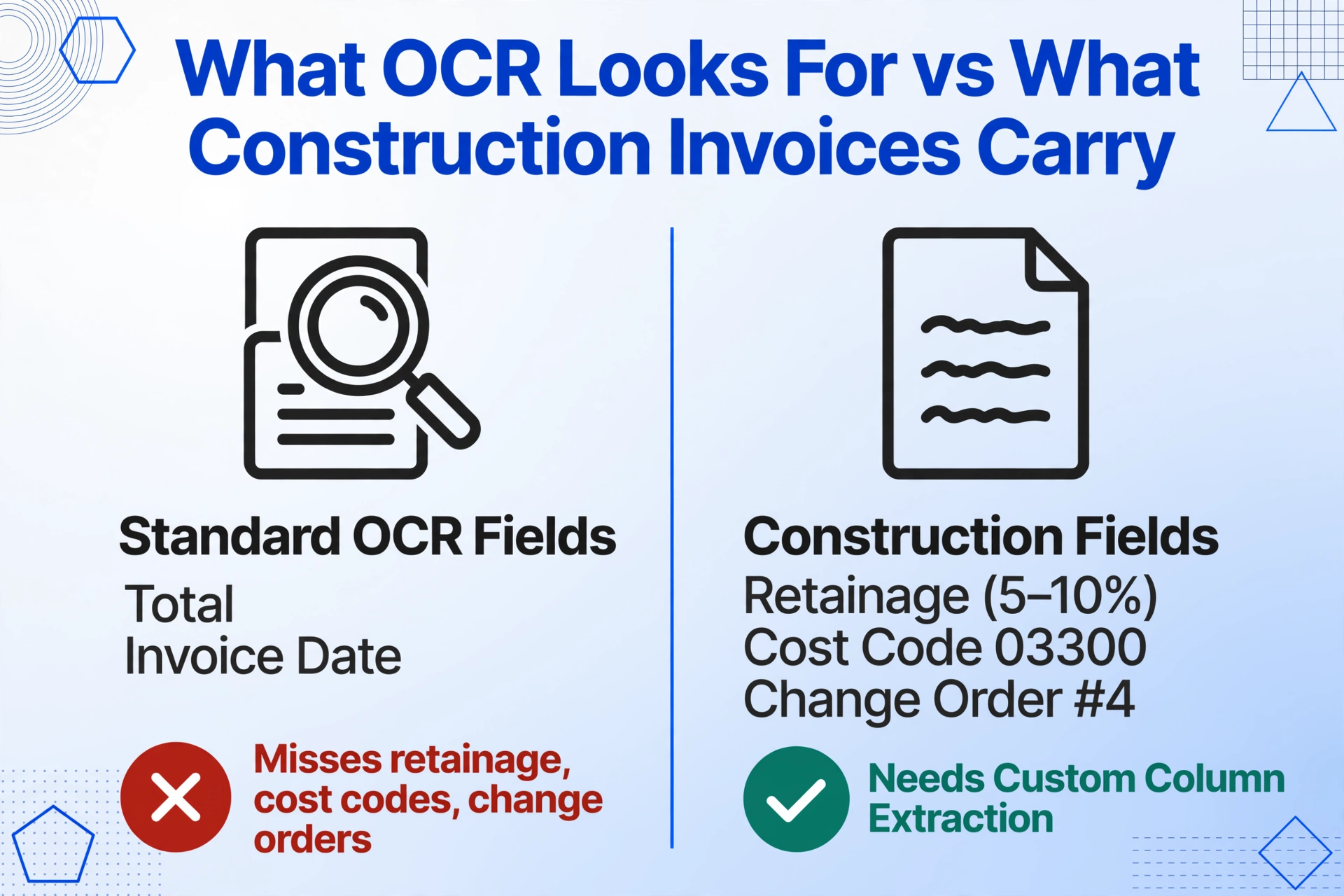
2. Construction-specific fields are not standard invoice fields. An invoice from a sub includes retainage (typically 5-10% per contract terms, with state-specific caps — California caps retainage at 5% on private projects as of 2026, Texas mandates 10% retention), job cost codes using CSI MasterFormat divisions (e.g., 03300 for cast-in-place concrete), change order references scribbled in margins ("per CO #4"), and schedule-of-values line items tied to specific project phases. Standard OCR tools look for "Total" and "Invoice Date." They do not know what a cost code is or how retainage relates to the net due amount. The tool must either understand these fields semantically or require custom zone setup for every field on every variant document type.
3. Document variability is bounded by the number of subcontractors, not the number of document types. A GC with 40 active subcontractors may receive invoices in 40 different formats — QuickBooks exports, AIA-style pay applications, handwritten carbon forms, letterhead invoices with embedded tables, trade-specific billing formats (like the AIA Document A401 for subcontracts). Template-based tools require one template per format. When a sub switches accounting platforms or redesigns their invoice, that template breaks. The cost of template maintenance across 40 subs — building, testing, and monitoring templates — quickly exceeds the cost of the template tool itself.
4. Compliance adds field requirements that generic extraction tools do not anticipate. Davis-Bacon Act projects (federal contracts exceeding $2,000) require weekly certified payroll submissions using Form WH-347, documenting every worker's classification, hours worked by day, straight-time and overtime rates, gross wages, and fringe benefit contributions. AIA G702 payment applications require tracking contract sum, completed work to date, stored materials, retainage withheld (per FAR 52.232-5 allowing up to 10%), and current payment due — all tied to a schedule of values that updates each billing period. Lien waivers (conditional and unconditional — requirements vary by state) must be tracked and matched against payment amounts. Most extraction tools can extract a date and a dollar amount; few understand what those numbers mean in a compliance context.
Frequently Asked Questions
Can document extraction tools read handwritten subcontractor invoices?
Some can, but not all, and accuracy varies dramatically. ImageToTable.ai and FormX use vision-language models that interpret characters in context, achieving 85-92% field-level accuracy on typical handwritten invoices. Traditional OCR-based tools and template parsers (Docparser, basic Nanonets models, ABBYY without handwriting configuration) drop to 40-70% on handwritten content and may return scrambled or incomplete data. Always test handwritten accuracy before committing — a tool's published accuracy on printed invoices is not predictive of its performance on the handwritten invoices your subs actually send.
Does this tool support AIA G702 and G703 payment applications?
Tools that support custom column extraction — where you define the fields you need by naming them — can handle AIA G702s by defining columns like "Contract Sum to Date," "Total Completed & Stored," "Retainage (5a)," "Stored Materials (5b)," and "Current Payment Due." ImageToTable.ai supports this approach natively. Template-based tools require building a specific template for the G702/G703 layout, which works for the standard AIA format but breaks if a subcontractor uses a modified version. Enterprise platforms like ABBYY Vantage and Rossum can be configured to handle G702s with custom extraction schemas, but the setup cost is significant. See AIA G702 extraction guide for a full walkthrough.
Does this tool integrate with Procore, Sage 300 CRE, or Viewpoint?
Most dedicated extraction tools (ImageToTable.ai, Nanonets, Docsumo, FormX) do not offer pre-built connectors to construction-specific ERPs. They export to Excel, CSV, or JSON, which can then be imported into Sage 300 CRE, Viewpoint, Foundation, CMiC, or Procore. Rossum and ABBYY Vantage offer broader integration ecosystems including SAP and Oracle but do not have native connectors for Sage 300 CRE or Viewpoint either. Procore AI integrates natively with Procore but does not extract data from external documents — it analyzes documents already stored in Procore's environment. For a workaround to push extraction results into construction software, export to CSV and use the target system's import function.
How do these tools handle retainage tracking across multiple pay periods?
This is a specific pain point that few tools handle well. On an AIA G702, retainage appears in column 5a (retainage on completed work) and 5b (retainage on stored materials). ImageToTable.ai's computed columns feature lets you define retainage as Total Completed × Retainage %, extracting the calculation even when the document only shows the rate. No other tool in this comparison offers computed columns. Most tools extract retainage as a raw number — which is correct for the current period but does not help you track cumulative retainage across a project's billing cycle. This is one area where the offline comparison tool matters: test whether the tool can handle the retainage math your project accountants need.
Are there free options for construction document extraction?
ImageToTable.ai offers a free tier (20 credits per month) with full feature access. Docparser has a free tier (20 pages/month) but only for basic parsing. Several other platforms offer free trials (7-14 days) rather than ongoing free tiers. For a comparison of free and budget-friendly options across industries, see best free document extraction tools 2026. For freelancers and small trade contractors, this roundup of tools for freelancers may also be relevant.
Can these tools help with Davis-Bacon certified payroll compliance?
Document extraction tools can extract the raw data from timesheets and payroll registers — worker names, classifications, hours by day, wage rates, and deductions — which feeds into certified payroll preparation. However, no general-purpose extraction tool independently validates Davis-Bacon compliance (correct prevailing wage rate for classification, fringe benefit calculations, apprenticeship ratio rules). The extracted data still needs to be reviewed against the applicable wage determination. Tools like B2W, HCSS, and Point North specialize in certified payroll automation. For a general introduction to Davis-Bacon requirements, the U.S. Department of Labor's WH-347 form is the authoritative reference for certified payroll reporting.
Files are processed securely and not stored.
The Bottom Line
Document extraction for construction is not a solved problem. The tools that dominate the general market — template parsers, training-based AI platforms, enterprise IDP suites — were built around assumptions about document consistency that construction projects do not satisfy. The tools that work best for construction are the ones that accept the industry's conditions: high handwriting rates, extreme format variability, construction-specific field requirements, and no dedicated IT team to maintain custom models.
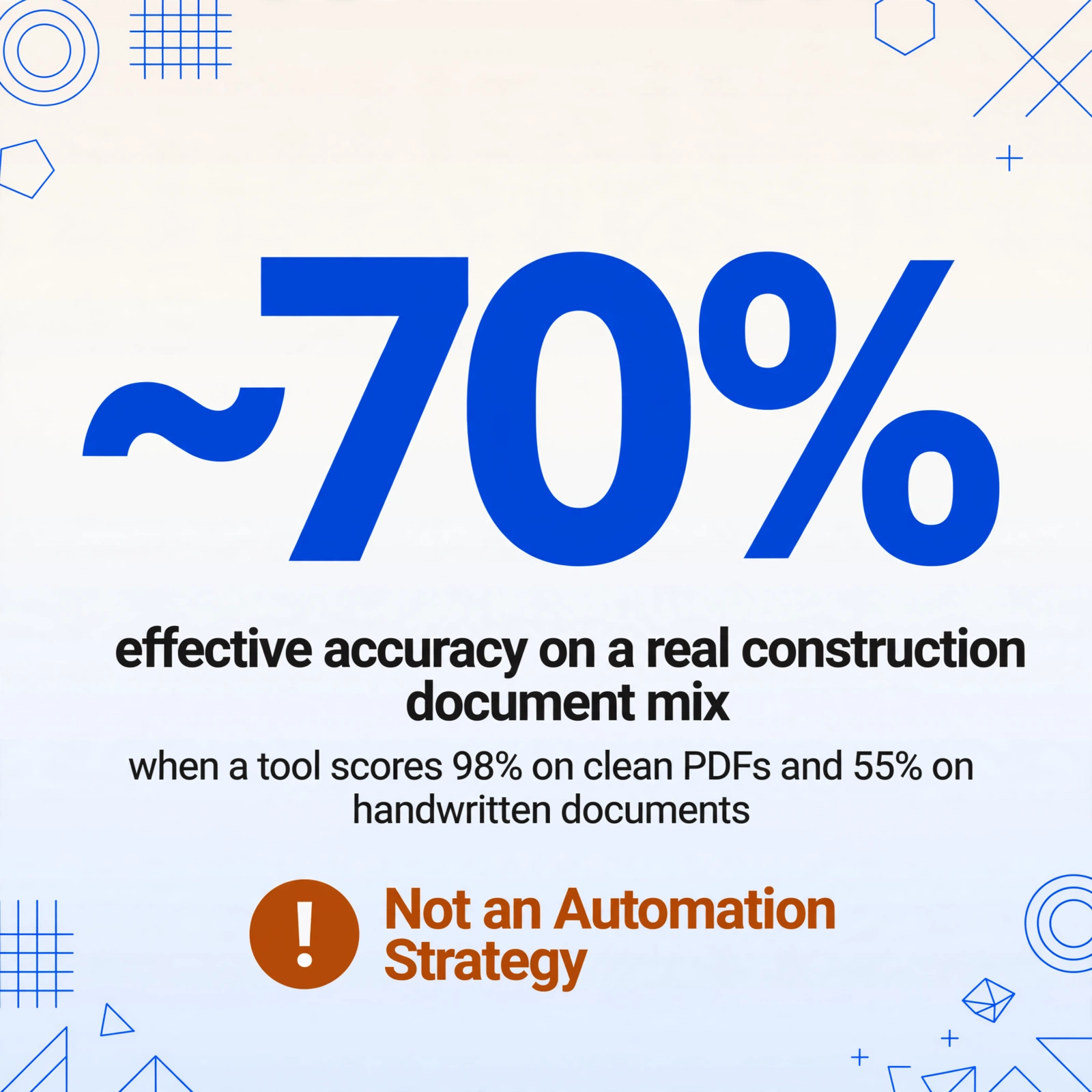
On the evidence of our 35-document test set, the single most important capability for construction document extraction is handwriting tolerance — because that determines whether the tool can handle more than half the documents your subcontractors actually send. If a tool achieves 98% on clean PDFs and 55% on handwritten documents, the effective accuracy on your real document mix is somewhere around 70%. That is not an automation strategy. It is a slightly faster data entry desk.
For most mid-market GCs and subcontractors, the practical choice is between a template-free AI extraction tool that handles all document types through a single interface (ImageToTable.ai) and a lightweight trainable tool that excels on specific high-volume formats (FormX for handwritten invoices, Nanonets for consistent vendor templates). Large enterprise firms with dedicated automation teams and compliance requirements may justify the configuration investment of ABBYY Vantage or Rossum, but should budget for professional services and ongoing template maintenance.
The key recommendation from this comparison: test any tool against your worst documents — not your cleanest ones. Extract the handwritten painter's invoice. Extract the G702 with handwritten annotations. Extract the delivery note with faded carbon copy text. If the tool handles those, it will handle everything else. If it only works on clean digital PDFs, it is solving the easy part of the problem and leaving the hard part on your desk.