AI OCR Reads Handwriting
Where Traditional OCR Goes Blind
A clean typed invoice at 300 DPI, processed through Tesseract or Google Cloud Vision, comes back at 99% character accuracy. Change nothing except the medium — same invoice, filled out by hand — and accuracy drops below 50%. The gap is not a calibration issue. It is an architectural one: traditional OCR was designed to match static character shapes against known templates. Handwriting has no templates. The same letter written twice by the same person produces two different shapes. An AI vision model approaches the problem from the other direction entirely — by reading words as visual patterns and using surrounding context to disambiguate what would otherwise be ambiguous strokes.
Key Takeaways
- A typed invoice at 300 DPI returns 99% character accuracy through traditional OCR while the same invoice filled out by hand drops below 50% — not because the scan worsened, but because the tool was built to separate characters that cursive deliberately connects.
- 30 to 50 words out of every 100 come back wrong from cloud OCR on cursive documents, and no amount of contrast tweaking fixes it — the failure is in the character-segmentation architecture, not the image pipeline.
- You read handwriting by seeing whole words, not by piecing together individual letters — AI vision models now do the same, and on ImageToTable.ai this pushes field accuracy to 85-95%, where verifying 100 handwritten timesheets takes 3 minutes instead of 300.
Why Character-by-Character Reading Breaks on Handwriting
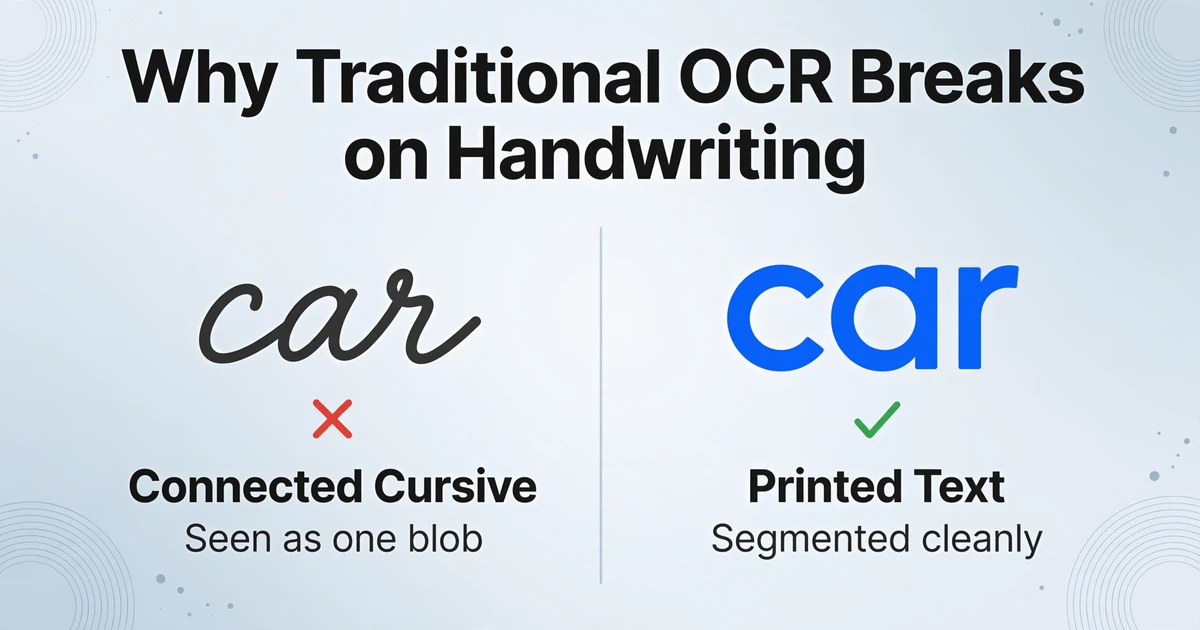
Traditional OCR operates on a segmentation-first model. The engine scans an image, isolates each character by detecting white-space boundaries, and matches the isolated shape against a library of known glyphs. This pipeline works when characters are predictable — printed Arial "A" maps cleanly to stored Arial "A" templates. It collapses when characters refuse to sit in predictable boxes.
Three structural problems make handwriting a segmentation nightmare for traditional OCR. Connected characters — cursive script joins adjacent letters with ligatures, making the space between "a" and "r" in "car" impossible for a boundary-detection algorithm to find. The engine sees one continuous glyph where a human sees four letters. Variable stroke widths — a ballpoint pen pressed hard on downstrokes and lightly on upstrokes produces line-weight variations that fragment single characters into separate detected segments. A "5" becomes a blob plus a separate dash. Inconsistent baselines — people write on a slant, drift upward across a page, and vary letter heights within the same word. The line-finding step that works on typeset text fails when "apple" is written at a 15-degree angle with the "p" diving below the baseline and the "l" rising above it.
The downstream consequence is a cascade. A 2025 study published in the International Journal of Computer Scientific Technology & Electronics Engineering found that traditional OCR accuracy on handwritten documents drops from 92% on clean hand-printed text to 55% under moderate degradation and 30% under severe conditions — conditions that would barely register as noise for printed text processing. Meanwhile, AIMultiple's 2026 cursive handwriting benchmark, testing 100 samples across 14 models, found traditional cloud OCR services like Google Cloud Vision and Amazon Textract landing between 50% and 70% on cursive — meaning 30 to 50 words out of every 100 are wrong.
The Reddit data entry community has been documenting this gap for years. A 2024 r/Automate discussion on extracting data from handwritten invoices framed the problem succinctly: "You need to take not only handwritten data but unstructured handwritten data and make sense of it." The r/computervision community's 2025 review of handwriting OCR tools noted bluntly that new AI models' "handwriting accuracy (~65-85%) still lags behind specialised solutions for business-critical use." These are practitioners, not marketers. Their numbers matter.
How AI Vision Models Read Handwriting as Visual Patterns, Not Character Sequences
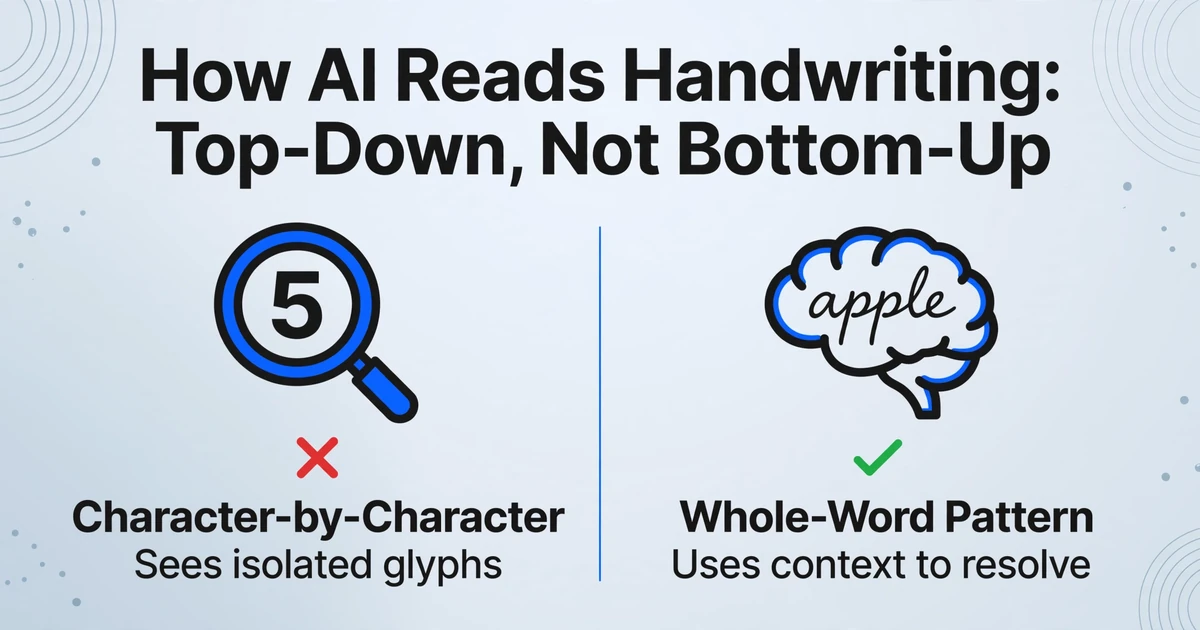
AI vision models — more precisely, vision-language models like GPT-5, Gemini, and Claude — do not perform character segmentation at all. They process the image holistically, seeing entire word shapes as unified visual patterns, then interpreting those patterns with the same language model that understands the sentence the word appears in. This is the crucial inversion: instead of building words from characters (bottom-up), they recognize words as visual wholes and use the understood word to disambiguate individual letter shapes (top-down).
The practical difference is easiest to see on something ordinary — a name field on a form. Imagine a handwritten entry where the writer's pen lifts slightly in the middle of "Sm_th," leaving a faint or missing character between the "m" and "t." Traditional OCR, working character by character, returns "Sm" plus an unrecognized glyph plus "th." The error compounds — the full name might be unrecognizable downstream. An AI vision model sees the word shape "Sm_th" and the surrounding context — this is the "Name" field on a form, the full name is "John Smith." The language model fills in the gap from context, just as you would if you saw it with your own eyes. The same mechanism resolves a handwritten "1" from a lowercase "l," a "0" from an "O," and a handwritten "4" that looks like a "9" — by asking: what makes sense here?
This is why modern AI vision models dramatically outperform traditional OCR on handwriting. AIMultiple's benchmark placed GPT-5 and Gemini 3 Pro Preview at the top for cursive recognition — not because they have better character detectors, but because they read the document the way a person does: by understanding what the text means, not just what its pixels look like. The same benchmark found Google Cloud Vision at roughly 63% on cursive. The gap between 95% and 63% is the gap between "usable with spot checks" and "needs full manual retyping."
This semantic approach is what makes AI-powered data entry template-free by design. You type the column names you want extracted — "Employee Name," "Hours Worked," "Date" — and the AI locates the handwritten values corresponding to each field anywhere on the page by understanding their meaning. No pixel coordinates. No per-form templates. No retraining when someone's handwriting changes. This is the mechanism we call Custom Column Extraction: you define the output schema by naming the columns you want, and the AI maps the document's content to your schema regardless of where each handwritten value sits on the page.
Files are processed securely and not stored.
Mixed Print and Handwriting: The Most Common Document Format Nobody Talks About
Most real-world handwritten documents are not purely handwritten. They are forms — a printed template with labels, boxes, and instructions, filled in with a pen. The label "Patient Name:" is printed in Helvetica. The value "James Peterson" is written in ballpoint cursive. A traditional OCR engine, tuned for print, reads the label perfectly and fails on the value — producing a document where 80% of the text is correct and the 20% you actually need is missing.
This print-plus-handwriting format is where AI vision models show their strongest advantage over the competition. The model does not switch between a "print mode" and a "handwriting mode." It reads the page as a single visual scene — recognizing that "Patient Name" is a field label (printed, clean) and the scribble below it is the field value (handwritten, messy) — and maps both to the correct output column. The context from the printed label actively helps the handwriting recognition: if the label says "Phone Number," the model expects a sequence of digits in the value field, constraining the recognition problem. If the label says "Comments," the model expects full sentences and adjusts accordingly.
This format appears everywhere. Medical intake forms — printed demographic questions, handwritten answers. Field inspection reports — printed safety checklist items, handwritten observations in the notes column. Delivery confirmations — printed tracking numbers, handwritten receiver signatures and timestamps. Vendor quotes — printed line items, handwritten quantity adjustments. In all of these, the workflow bottleneck is not "reading the document." It is "reading the handwritten parts that contain the actionable data." Traditional OCR gives you the label text for free and charges you heavily for the values. AI vision reads both in a single pass.
The concept of reading labels and values in context is not just a handwriting solution — it is the fundamental difference between AI OCR and traditional OCR accuracy. Traditional OCR sees "Date: 03/15/2026" as a character string. AI extraction sees a field label ("Date") with a semantic type (calendar date), and places the value in the correct spreadsheet column even when five other dates appear on the same page — because it understands which date belongs to which label.
Checkboxes, Ticks, and Circles: Reading Intent, Not Shapes
A checked box on a paper form can take any of these forms: a solid fill, a diagonal line, an X mark, a checkmark, a circled answer, a scribbled cross-out of the wrong option, a double underline under the correct one. To a traditional OCR engine, none of these are text — they are image noise. The engine either ignores them or, worse, misreads the mark as a character: a checkmark becomes a "V," a diagonal slash becomes "/," a circled option reads as an "O" prefixed to the answer text.
The problem compounds in structured forms. A safety inspection checklist with 20 Yes/No checkboxes contains 20 binary decisions that determine compliance, maintenance scheduling, or liability. If the engine misreads 5 out of 20, the automation is worse than useless — it silently produces wrong data that looks correct. A field marked "Safe" becomes "Unsafe" because the engine interpreted a tick ✓ as a character "V" next to the wrong option.
AI vision models handle checkboxes differently because they operate on spatial relationships rather than character detection. The model identifies the question text ("Fire extinguisher inspected?") and the answer options ("Yes / No"), then determines which answer region contains a mark — any mark. A tick, a cross, a filled circle, a scribbled line: all register as "this option is selected." The model does not need to classify the mark type. It classifies the selection intent — the spatial connection between the mark and the option it modifies.
Google's Document AI team has documented this challenge directly in their developer forums: practitioners report that checkbox detection fails even with larger box sizes when forms pass through print-fill-scan pipelines. The recommendation — 12-15mm checkbox dimensions — only applies when you control the form design. For the thousands of existing forms already in circulation with smaller boxes, the answer is an AI model that reads spatial intent rather than shape geometry.
What AI Still Can't Read Reliably
Honesty about limitations is what makes the case for AI handwriting extraction credible. Here is what still breaks.
Heavily overlapping writing. When one line of handwriting is written directly on top of another — common in ledger books where corrections were made by writing over the original entry — both traditional OCR and AI vision models struggle. The model sees one visual blob where there are two layers of meaning. A human with context about the document's history might tease them apart. Current AI cannot.
Extremely stylized signatures. Signatures function as identity marks, not as readable text. They are intentionally unique patterns combining flourishes, illegible loops, and personal glyphs. AI models detect that a signature is present — they can identify the signature region on a document — but they do not extract the signer's name from the signature shape itself. The name must appear in printed or handwritten text elsewhere on the document.
Faint pencil on dark backgrounds. Pencil on copy paper, scanned at low contrast, produces text strokes that are barely distinguishable from paper grain. A 2025 academic survey of handwriting recognition techniques noted that "noise robustness" remains one of the key unsolved problems — "researchers should continue to investigate methods that increase the resilience of OCR systems" to suboptimal real-world conditions. This applies to both traditional and AI-based systems.
Non-Latin scripts. Performance is heavily model-dependent. GPT-5 and Gemini perform well on major scripts including Arabic, Devanagari, and Chinese characters — particularly when the model has been trained on those writing systems. Smaller or specialized models may perform well on Latin script cursive but degrade sharply on other writing systems. If your documents include handwritten text in multiple scripts, test the specific model on your documents before committing — cross-script handwriting recognition is not uniformly solved.
Historical documents with degraded paper. Documents with bleed-through (ink from the reverse side visible through the paper), foxing (age spots), water damage, or torn edges introduce visual artifacts that confuse both character-level and holistic recognition. The AIMultiple benchmark found that even top-performing models lose 10-15 percentage points when document condition degrades. Archival-quality digitization may require specialist tools and separate preprocessing pipelines that general-purpose AI extraction tools do not include.
Real Workflows Where Handwriting Extraction Matters
The technology only matters where it changes a real workflow. Here are the scenarios where switching from manual re-entry to AI handwriting extraction produces measurable time savings.
Handwritten timesheets. Construction crews, field service technicians, and shift workers fill out paper timesheets — names, dates, hours, job codes — often in cramped, messy handwriting at the end of a shift. A payroll manager processing 80 timesheets per week spends roughly 3 minutes per sheet on manual data entry: reading each field, typing it into the payroll system, verifying the total. That is 4 hours per week — one full morning — spent retyping handwriting. With AI extraction, the same 80 timesheets upload as a batch, extract into a single spreadsheet with columns named "Employee Name," "Date," "Hours," "Job Code," and export in under a minute. The manager's role shifts from data entry to exception handling: spot-checking the 5-10 entries where handwriting was genuinely ambiguous.
Under FLSA Section 11(c), employers must retain accurate payroll records including hours worked and wages paid. Handwritten timesheet errors that carry into payroll create compliance exposure — and correcting them after the fact is more expensive than catching them during entry.
Field inspection forms. Safety inspectors, quality auditors, and site supervisors fill out paper checklists in the field — often on a clipboard, in the rain, with a pen running low on ink. Each form contains checkboxes (equipment pass/fail), handwritten numeric readings (pressure, temperature, voltage), and free-text notes (observations, corrective actions). Processing 50 inspection forms manually takes a full workday. With no-code AI data entry, the same batch extracts in minutes — checkbox states, numeric readings, and narrative notes each flowing into their own spreadsheet columns. The compliance report that used to take Friday afternoon is ready by Friday morning.
Patient intake forms. A medical clinic processes 60 new patient intake forms per day — medical history, current medications, allergy lists, insurance details — all handwritten by patients in a waiting room. The front desk staff manually enters each form into the EHR system, a process that takes 5-7 minutes per form and introduces transcription errors as staff toggle between illegible handwriting and medical terminology databases. AI extraction reads the handwritten fields and maps them to the correct EHR data categories — "Medication Name," "Dosage," "Frequency" — while flagging any value with low confidence for human verification before it enters the patient record.
Handwritten ledgers and receipt books. Small businesses — food trucks, market vendors, independent contractors — often keep handwritten ledgers. A vendor's carbon-copy receipt book contains hundreds of entries: dates, item descriptions, amounts, customer names, all in pen. At tax time, these must be digitized. Traditional OCR produces garbage on carbon-copy paper — the faint, blue-tinted text confuses contrast-based detection. AI vision models, trained on diverse real-world images, read the entries by understanding the page as a scene — the faint text, the paper texture, the layout pattern of rows and columns — rather than by thresholding pixels into black and white.
Delivery confirmations. Logistics companies receive signed delivery confirmations — printed shipment details with handwritten receiver names, timestamps, and condition notes. The handwritten receiver name is the proof-of-delivery legal record. AI extraction pulls the receiver name and timestamp from the form, populating the delivery confirmation database without manual retyping.
Handwritten recipe cards and personal records. Not every handwritten document is business paperwork. A family recipe card mixes cursive notes, fractional quantities ("1½ cups"), and abbreviations in a layout no form designer planned. The same semantic extraction that reads a field note reads the handwritten recipe card in a photo, returning ingredients, quantities, and instructions as spreadsheet columns rather than a page retyped by hand.
Accuracy Expectations: What 85-95% Handwriting Means in Production
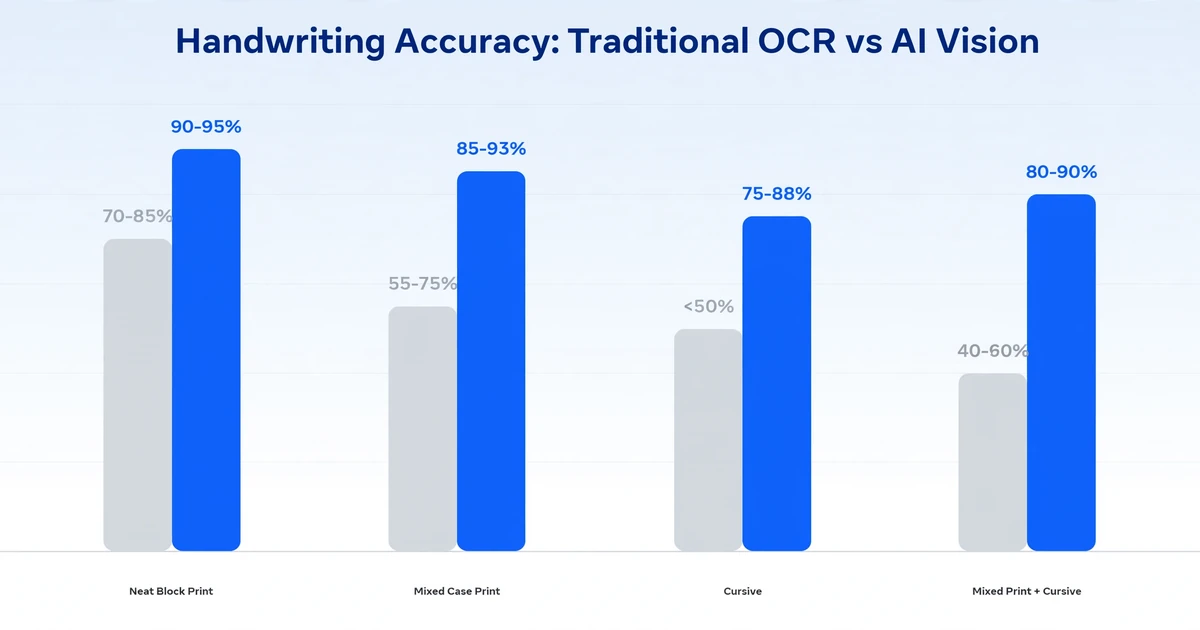
The AI industry's standard accuracy disclaimer — "up to 99% on printed text" — sets an expectation that does not transfer to handwriting. Handwriting accuracy is a fundamentally different number on a fundamentally different scale. Here is what you should actually expect.
| Handwriting Style | Traditional OCR | AI Vision Model | Practical Outcome |
|---|---|---|---|
| Neat block print (all caps) | 70-85% | 90-95% | Spot-check 1 in 10 fields |
| Mixed case print | 55-75% | 85-93% | Spot-check 1 in 7 fields |
| Cursive | Below 50% | 75-88% | Spot-check 1 in 4 fields |
| Mixed print + cursive | 40-60% | 80-90% | Spot-check 1 in 5 fields |
| Degraded / low contrast | Below 30% | 65-80% | Best-effort extraction; human review expected |
Sources: AIMultiple cursive handwriting benchmark (2026); IJCSTEE traditional vs AI-OCR accuracy study (2025); real-world benchmarking across cloud OCR services. All figures reflect field-level accuracy — whether the extracted value in the spreadsheet matches the handwritten original — not character-level accuracy.
The most important number in this table is not any single accuracy figure. It is the ratio between AI extraction time and manual verification time. On 100 handwritten timesheets with neat block printing, AI extraction takes under 30 seconds and produces roughly 5-10 fields that need verification — a 3-minute human review. Manual entry on the same 100 sheets: roughly 300 minutes. The AI accuracy does not need to be 100% to deliver a 90%+ time reduction — it just needs to be high enough that verification is faster than re-typing from scratch.
This is what makes the accuracy conversation practical rather than academic. AI data entry accuracy is not about hitting a marketing number. It is about crossing a threshold where the cost of verifying AI output drops below the cost of manual entry. For printed text, that threshold was crossed years ago. For neat block-print handwriting, it was crossed with GPT-4-level vision models. For messy cursive, it is crossed now — but the verification step is non-negotiable.
FAQ
Can AI OCR read any handwriting style?
Not any style — but most common styles. Neat block print and mixed-case print achieve 85-95% field accuracy on current AI vision models. Cursive achieves 75-88%. Heavily stylized, overlapping, or extremely messy handwriting can drop below 70%. If you cannot confidently read it yourself from a scan, the AI likely cannot either. The practical approach: batch-upload everything, let AI extract what it can, and manually review only the low-confidence entries.
Does AI handle checkboxes and form elements, or just text?
AI vision models handle checkboxes, radio buttons, circled selections, and other form markup by reading spatial intent rather than character shapes. A tick, cross, fill, or circle next to an option all register as "selected." This works best when the form layout is clear — distinct answer regions with visible spatial separation from neighboring options. Tightly packed checkboxes on dense forms may still produce ambiguity that requires human verification.
What is the difference between AI handwriting recognition and traditional ICR?
Traditional ICR (Intelligent Character Recognition) extends OCR with machine learning trained on handwriting datasets, but still operates on the character-segmentation model — isolating individual letters and classifying them. AI vision models skip segmentation entirely, reading whole word shapes as visual patterns and using language context to resolve ambiguous characters. The practical difference: ICR works on neat block letters but degrades on cursive; AI vision works on both, with a smaller accuracy drop between them.
Can I process handwritten and printed documents in the same batch?
Yes. AI vision models read each document as a scene — they do not need to know in advance whether the text is printed or handwritten. The same batch can contain typed invoices, handwritten timesheets, and mixed-format inspection forms. The model adapts its reading strategy per document, not per batch. This is a key distinction from traditional OCR pipelines, which often require separate configuration for printed vs handwritten input.
Is handwriting extraction available in non-English languages?
It depends on the model. GPT-5 and Gemini perform well on major Latin-alphabet languages (French, Spanish, German, Portuguese) in both printed and handwritten form. Non-Latin scripts (Arabic, Devanagari, Chinese, Japanese, Korean) are more model-dependent — test on your specific documents before committing. Handwriting style variation in character-based writing systems (Chinese, Japanese) introduces different recognition challenges than Latin cursive, and accuracy expectations should be calibrated accordingly.
Test the extraction on your own documents before building a workflow around it. The gap between a tidy demo sample and your team's actual handwriting is where the real accuracy number lives.