AI OCR vs Traditional OCR
The Accuracy Gap You Can No Longer Ignore
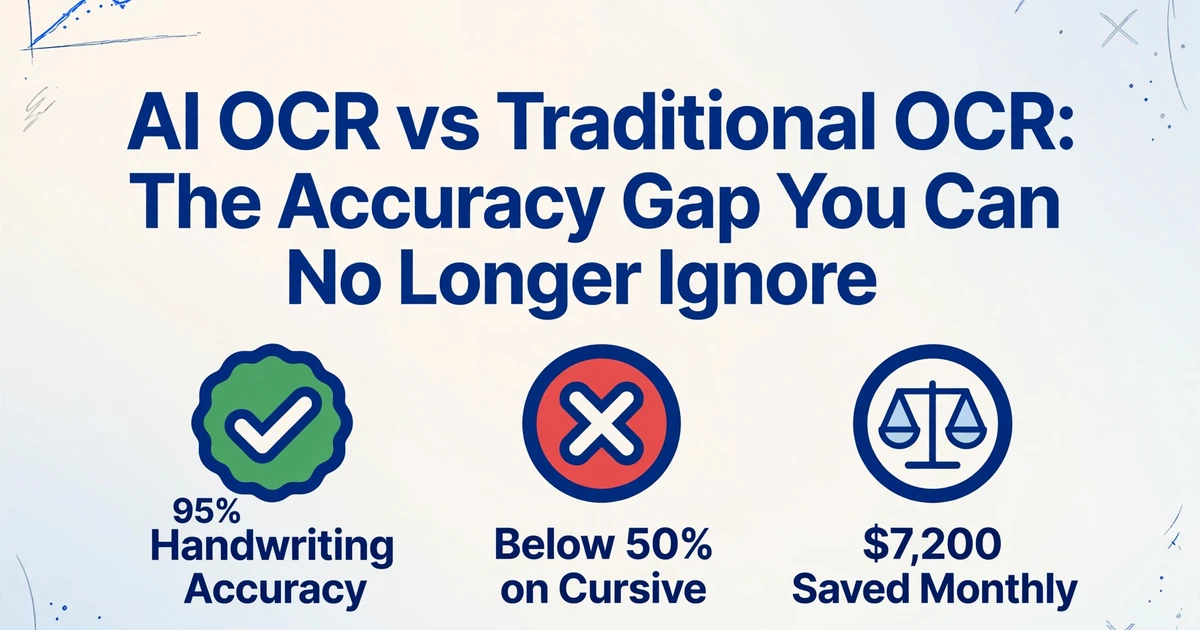
In 2023, the accuracy gap between AI-powered OCR and traditional OCR was debatable. By mid-2026, it is not. When a traditional OCR engine processes a multi-vendor invoice batch, field-level accuracy routinely lands between 60% and 85% — meaning 15 to 40 out of every 100 fields need human correction. An AI vision model on the same batch: 95% to 99%. The gap is no longer about "better" or "worse." It has become a cost line item that shows up in every monthly close, every AP reconciliation, every manual review queue that someone has to staff. This article measures that gap with real numbers, explains what changed, and maps the point where sticking with traditional OCR costs more than switching.
Key Takeaways
- Traditional OCR's "99% accuracy" measures characters, not data fields. On real multi-vendor invoices, field accuracy drops to 40–60% — half your extracted values are wrong before anyone touches them.
- Template drift is the costliest OCR failure: when a vendor moves a field, the template silently pulls the wrong data into your ERP. No error flag fires. The mistake surfaces at reconciliation, when it costs 10× more to fix.
- AI extraction reads by meaning, not pixel coordinates. Type your column names once — "Invoice Number," "Due Date" — and ImageToTable.ai locates them on any layout instantly. Template maintenance and silent drift disappear.
What Traditional OCR Does — and What It Has Never Done
Optical Character Recognition was designed to solve one problem: convert an image of text into machine-readable characters. A scanned page goes in; a string of characters comes out. For that narrow task, modern OCR engines perform well. Tesseract 5, the open-source benchmark maintained by Google, achieves 95% character accuracy on clean printed documents — comparable to commercial engines in controlled conditions.
But character accuracy is not data accuracy. Knowing the characters "1,234.56" appear on a page does not tell you whether that's an invoice total, a quantity, or a reference number. Traditional OCR works bottom-up: recognize individual characters, assemble them into words, group words into lines. The output is a text stream organized by reading order — left to right, top to bottom. It has no understanding of what any of it means.
The downstream consequence is that every layout variation becomes a separate parsing problem. A vendor who puts the invoice number in the top-right corner produces one coordinate map. A vendor who places it below the logo produces another. Change the font, add a new field, rearrange a table — and the extraction logic silently breaks. Template-based OCR systems attempt to solve this by defining pixel coordinates for each field on each document type. This works when your document set is fixed and homogeneous. It collapses when documents vary — which is the norm for any business receiving invoices, purchase orders, or receipts from more than one source.
The Accuracy Numbers: What 2026 Benchmarks Actually Show
The accuracy gap is not theoretical. Independent benchmarks now quantify it across document types and difficulty levels. Here is what the data says at mid-2026:
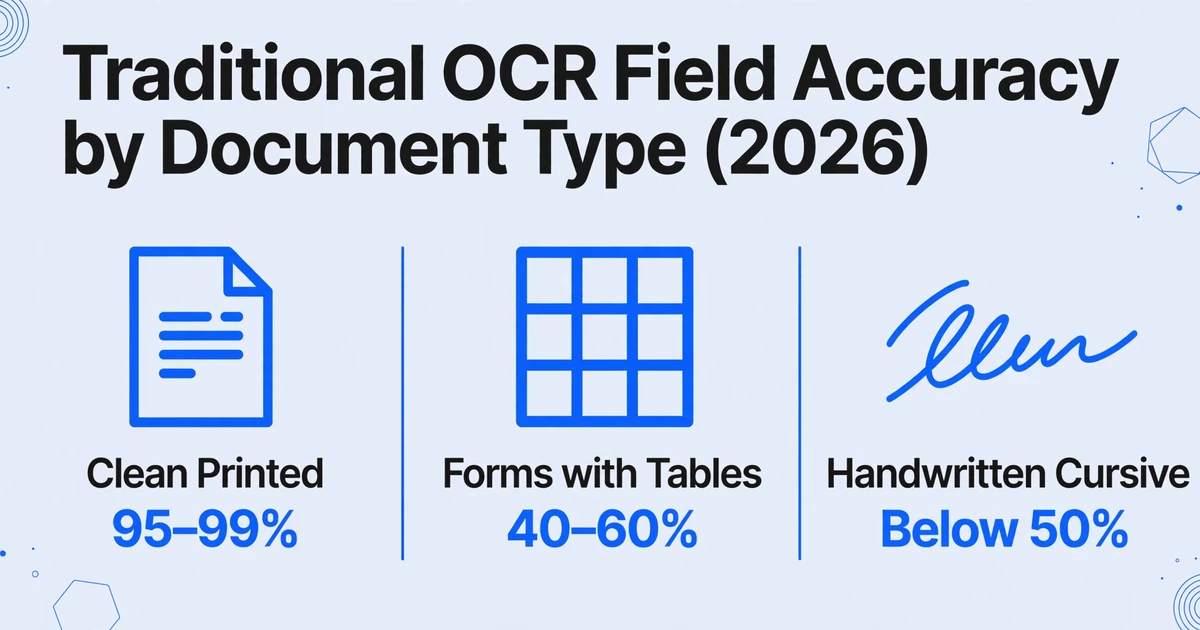
| Document Type | Traditional OCR | AI OCR (VLM-based) | Key Failure Mode for Traditional |
|---|---|---|---|
| Clean printed text, fixed layout | 95–99% | 98–99% | Minimal gap — both perform well |
| Forms with tables & mixed columns | 40–60% | 85–95% | Rows/columns merged or lost at extraction |
| Handwritten text (block print) | 50–70% | 85–93% | Character morphology variance defeats pattern matching |
| Handwritten text (cursive) | Below 50% | 75–85% | Connected characters read as single glyphs |
| Multi-vendor invoices (varied layouts) | 60–85% (field level) | 95–98% (field level) | Template mismatch; coordinate drift; label variation |
Sources: Firstsource AI model benchmarks (2026) for complex document accuracy comparisons; 47Billion Tesseract vs docTR analysis for traditional OCR baselines; AIMultiple handwriting OCR benchmark (2026) for handwriting figures across both categories. All numbers reflect field-level accuracy on production-grade documents, not lab conditions with clean scans.
These numbers expose a pattern. On clean, consistent documents — a typewritten form scanned at 300 DPI with predictable fields — traditional OCR delivers accuracy that is hard to beat at its price point. But the moment documents include tables, handwriting, mixed layouts, or format variation across sources, the drop-off is steep. A 2025 Tesseract practitioner benchmark on real-world documents found only 40–50% field accuracy without heavy preprocessing — meaning more than half the extracted fields needed review before the data was usable.
There is a second layer to these numbers that most comparisons miss. A 99% character accuracy figure — the standard OCR marketing claim for decades — does not mean 99% of the data you need is correct. If an invoice page has 1,000 characters and 10 are misread, character accuracy is 99%. But if those 10 wrong characters happen to fall inside 3 of the 15 fields you care about, field-level accuracy drops to 80%. The TDWI documented this exact scenario: the dashboard says 99%, but 1 in 5 business fields contains an error. Multiply this across 500 invoices and the review queue becomes the bottleneck the tool was supposed to eliminate.
Where Traditional OCR Systematically Fails — Not "Inaccurate," Structurally Blind
It is tempting to describe traditional OCR's failures as accuracy problems. It is more precise to call them structural blind spots — scenarios where the bottom-up, character-by-character approach is architecturally unable to produce correct output, regardless of image quality. Here are the failure modes that drive up error correction costs:
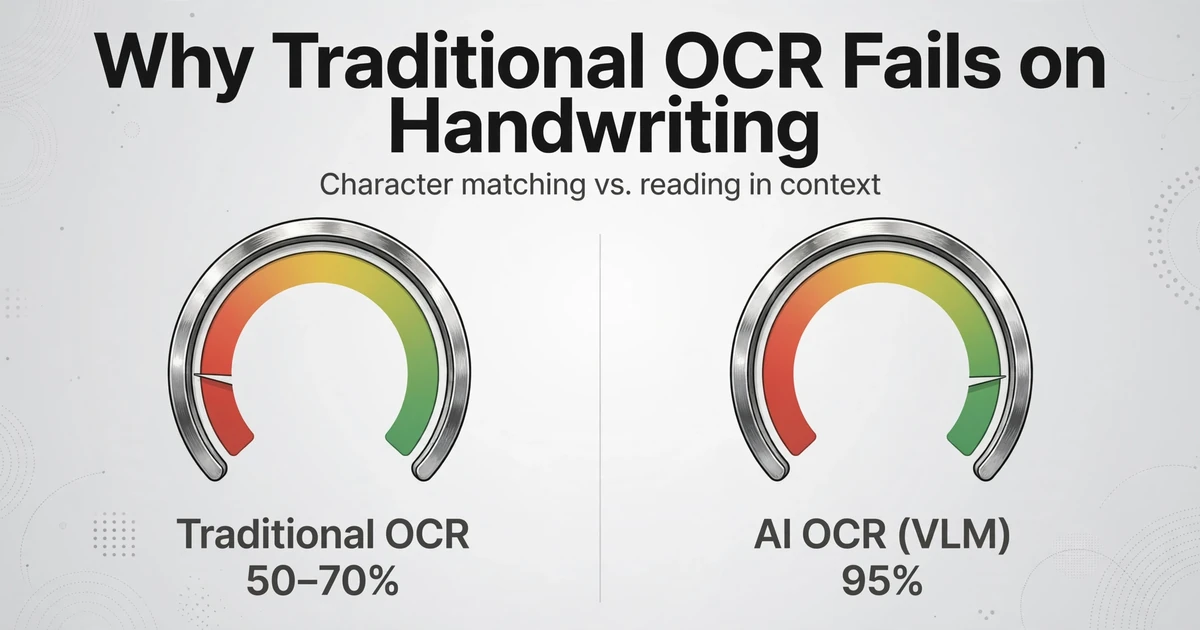
Handwriting. Traditional OCR relies on character shape matching. A "4" that looks like a "9," a cursive "r" that connects to the next letter, a handwritten "7" with a crossbar that the engine reads as a separate character — each is a predictable failure. Independent benchmarks across Google Cloud Vision, AWS Textract, and Azure Document Intelligence show handwriting accuracy between 50% and 70% for these systems. GPT-5, a vision-language model, reaches 95% on the same task by reading words in context — disambiguating characters based on what makes sense in a sentence, not just what the shape looks like.
Multi-column layouts. Traditional OCR reads left to right, top to bottom. A two-column invoice — vendor details on the left, line items on the right halfway down the page, a total box in the lower corner — reads as one jumbled text stream. The engine has no concept of spatial boundaries beyond its coordinate grid. A 2025 Microsoft Q&A analysis of traditional OCR failures in business documents identified multi-column layout as one of the most common causes of data landing in the wrong field, with "entire rows skipped" as a frequent downstream symptom.
Checkboxes, stamps, and overlaid elements. A "PAID" stamp overlaid on an invoice line item renders the underlying text invisible to traditional OCR. An insurance form with checkboxes for "Yes / No" options is read as random characters near geometric shapes. A bank statement with a logo overlapping the account number — the engine sees noise, not data. These are not edge cases. A single missing checkbox value on a COI form can grind an entire compliance approval to a halt.
Low contrast and degraded scans. Thermal paper receipts fade. Phone photos of documents introduce shadows and angle distortion. Faxed purchase orders arrive with compression artifacts that split characters into fragments. Traditional OCR engines degrade sharply below 200 DPI or with non-uniform lighting. AI vision models, trained on billions of real-world images, handle these conditions by interpreting the visual context — a smudged character in a known field position is inferred from what the field is supposed to contain, not just what the pixels show.
Template drift. This is the silent cost. A supplier redesigns their invoice layout — moves the PO number from the top-right to below the shipping address. The traditional OCR template, still looking at the old coordinates, extracts a street address and labels it the PO number. No error flag fires because the field was found. The data flows into your ERP, and the mismatch is discovered when someone reconciles the payment weeks later. Template drift is not a bug — it is the expected behavior of any system that uses fixed coordinates instead of semantic understanding.
How AI OCR Reads Differently: The Whole Page, Not Individual Characters
AI-powered OCR — more accurately called vision-language model (VLM) extraction — processes a document the way a person does: by taking in the whole page at once and understanding what each region, label, and value means. The underlying technology is a multimodal AI model trained on billions of image-text pairs. When you give it a scanned packing slip, it does not scan left to right looking for character shapes. It identifies the document type, parses the spatial layout, reads the text in context, and maps each value to the correct data field based on meaning — not position.
The crucial difference is best illustrated with a concrete example. Consider three text strings on an invoice:
"Date: 03/15/2026"
Traditional OCR sees: six characters "Date" followed by ten characters "03/15/2026." It doesn't know whether this is the issue date, the due date, or the ship date.
"Due Date: 04/14/2026"
Traditional OCR sees: two more words and ten more characters. It cannot connect this to "Date" above or distinguish one from the other. Both are just text strings with a date format.
"Invoice Date: 03/15/2026"
Traditional OCR sees: two more words, same date. To the engine, this is a third text string — unrelated to the first two. No semantic connection is made.
AI OCR sees three different data fields. It reads the labels ("Date," "Due Date," "Invoice Date"), understands what each means in the context of an invoice, and places each value in the correct column of your spreadsheet. The Invoice Date goes in the Invoice Date column. The Due Date goes in the Due Date column. Even if "Invoice Date" appears in the header, "Due Date" in the payment terms section, and a bare "Date" in a line-item row — the model disambiguates based on surrounding context, not pixel location.
This semantic understanding is what makes AI extraction template-free — and it is the distinction that separates modern data extraction software from traditional OCR tools. You do not need to define pixel coordinates for "Invoice Number" on every vendor's invoice layout. You type the column names you want extracted — "Invoice Number," "Due Date," "Vendor Name," "Line Total" — and the AI locates each value anywhere on the page by understanding what it means. The column names you type become the headers of your final spreadsheet. This mechanism is called Custom Column Extraction: you describe the output schema, and the AI maps the document's content to your columns — regardless of where the vendor placed each field.
Files are processed securely and not stored.
The demo above shows this in action on an invoice — type any column name and watch the AI locate the value regardless of where it sits on the page. Try "Invoice Number," "Due Date," or "Vendor Name." The same mechanism works identically on bank statements, purchase orders, receipts, and any document where information lives in a visual layout rather than a database field.
Where Traditional OCR Still Wins — and Why That Matters
A comparison that only talks about AI's advantages is a sales pitch, not an analysis. Traditional OCR has real strengths that make it the correct choice in specific scenarios, and acknowledging them is what makes the AI case credible when it applies.
Standardized documents at massive scale. If you process one million W-2 tax forms annually — identical layout, clean typed text, predictable fields — traditional OCR with a single well-maintained template delivers near-perfect accuracy at a fraction of the per-document cost of any AI extraction tool. Template setup is a one-time investment that amortizes across millions of identical documents. At that scale, a $0.01 per-page OCR API call versus a $0.05 VLM extraction call saves $40,000 per million pages.
Clean, simple documents with no variation. A single-page text document — a typed letter, a simple memo, a clean bank statement with consistent formatting — is a solved problem for traditional OCR. Tesseract and similar engines handle these with 99%+ accuracy and sub-second processing times. Adding an AI layer adds cost without adding value.
Budget-constrained environments with homogeneous input. An organization that receives only one invoice format from one supplier, with no variation and no complexity, may not need AI extraction. Open-source OCR is free. The labor to build a single template for a single layout is a one-time cost measured in hours. In this narrow scenario, the additional subscription cost of an AI tool is hard to justify.
Archival text digitization for search. When the goal is full-text search — making a corpus of historical documents searchable by keyword — rather than structured data extraction, traditional OCR is the efficient choice. You do not need to know which text is a date and which is a name. You need to know what text is on the page. Traditional OCR does exactly that, and does it well at scale.
The Crossover Point: When Error Correction Costs Exceed Subscription Costs
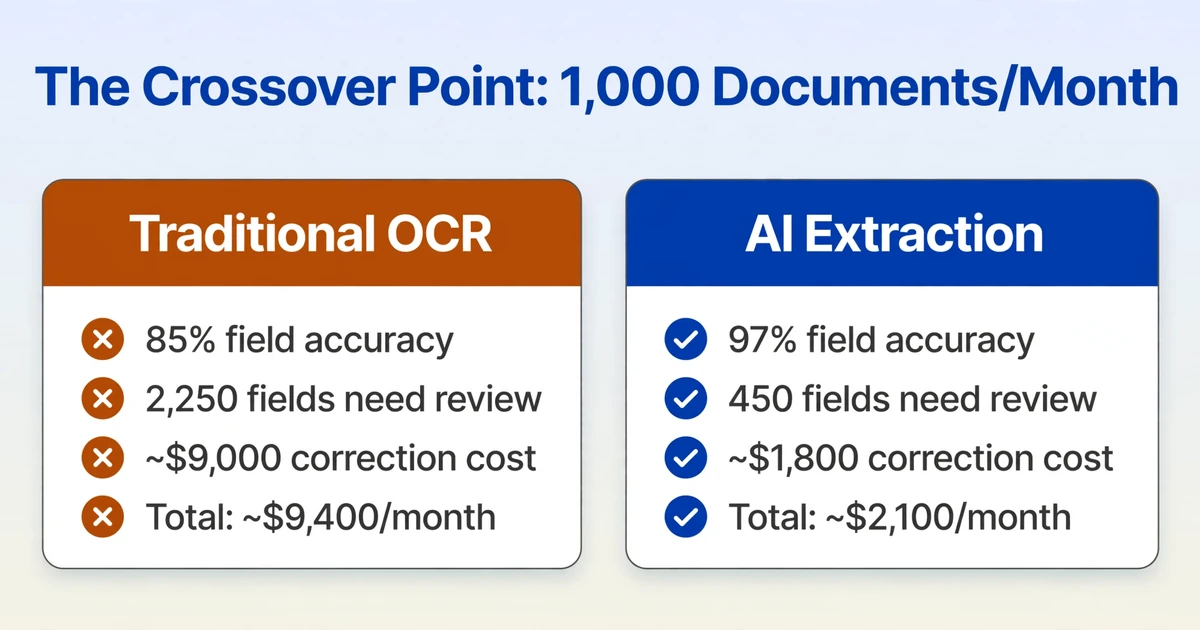
The economic decision between traditional OCR and AI extraction is a function of three variables: document variety, document complexity, and processing volume. When variety and complexity are low and volume is extremely high, traditional OCR wins on cost. When variety or complexity rises above a threshold, the math flips.
Here is the crossover arithmetic at a practical scale. Assume a team processing 1,000 documents per month. Each document has 15 fields that need extraction. The baseline:
| Scenario | Field Accuracy | Fields Needing Review / Month | Correction Cost* | Tool Cost | Total Monthly |
|---|---|---|---|---|---|
| Traditional OCR (templates) | 85% (varied invoices) | 2,250 fields | ~$9,000 | $200–500 | ~$9,400 |
| AI extraction | 97% (varied invoices) | 450 fields | ~$1,800 | $50–300 | ~$2,100 |
* Estimated at $4 per field correction (review, lookup, re-key). Source: data entry error cost analysis (2026). Actual labor costs vary by region and role.
At 1,000 documents a month with 15 fields each and moderate layout variation, the 12-point accuracy difference between 85% and 97% translates to 1,800 fewer fields needing human review — roughly $7,200 a month in avoidable correction labor. The exact crossover point shifts with volume and document complexity, but the pattern is consistent: when field-level accuracy drops below 90%, the cost of fixing errors dwarfs the cost of the tool.
A second dimension of the crossover is template maintenance. When a team maintains templates for 50 different vendor layouts and each vendor changes their layout once every 12 to 18 months, the team is continuously rebuilding templates. A single template takes 30-60 minutes to configure. If three vendors update their invoice format monthly, that is 1.5–3 hours of template work — every month, indefinitely. AI extraction eliminates this entirely because it reads by meaning, not coordinates.
The third dimension is the errors traditional OCR does not catch at all. Template-based extraction does not flag when a value is wrong — it only flags when a value is missing from the expected coordinates. A PO number extracted from the wrong position because the template drifted is not an "error" the system detects. It is data that flows into your ERP and generates a reconciliation problem weeks later. These undetected errors are the most expensive kind — the average downstream correction cost for a data entry error caught after processing is $50–$500, versus $3–$5 for an error caught during review. Template drift creates the expensive kind at scale.
What Changes After You Switch: A Side-by-Side Look
Abstract numbers are useful for decision-making. Concrete examples are useful for understanding what the numbers mean in practice. Here is the same invoice batch, two processing approaches, side by side:
| Dimension | Traditional OCR (Templated) | AI Extraction |
|---|---|---|
| Setup for 20 vendors | 20 templates × 30 min each = 10 hours | Define column names once = 2 minutes |
| Vendor 21 joins | Build a new template = 30 minutes | No change. Same columns work on any layout. |
| Vendor 5 redesigns layout | Data silently misdirected. Discovered at reconciliation. | Fields detected by semantic meaning. Layout change is invisible. |
| Handwritten note on invoice | Unreadable. Field left blank or filled with garbage characters. | Read in context. Cursive "rush" next to "Priority:" becomes the value. |
| Phone photo of receipt | Angle distortion + low contrast = unusable output | Visual context compensates. Faded thermal print is still readable. |
| Checkbox form field | Random characters near a square. Manual verification required. | Identifies checked option by visual salience. "Yes" or "No" extracted. |
| 50 invoices, 15 vendors, 1 output | Run each vendor through its template. Merge outputs. Fix mismatches. | Upload all 50. Define column names once. Download consolidated Excel. |
The most instructive row is "Vendor 5 redesigns layout." In the traditional OCR column, the error is invisible — the template finds text at the expected coordinates and returns it, regardless of whether it is the right text. In the AI column, the layout change is irrelevant because the extraction is based on what the text means, not where it sits. This single difference — silent template drift versus layout-resilient extraction — accounts for more downstream reconciliation costs than any other factor.
The hybrid approach is worth considering for teams that process a mix of document types. Many organizations handling document extraction at scale — as observed across Reddit communities like r/mlops and r/fintech — run layered pipelines: traditional OCR for the high-volume, standardized document types where templates work reliably, and AI extraction for the variable, complex, or handwritten documents where template maintenance costs exceed the alternative. The routing logic is simple: if a document matches a known template with high confidence, process it through OCR. If it does not, or if confidence drops below a threshold, route it to AI extraction. This captures the cost advantage of traditional OCR where it applies while avoiding the error correction penalty where it does not.
FAQ
Can I just use ChatGPT or Claude to extract data from my documents?
For one document at a time, yes — GPT-5 achieves 95% accuracy on handwriting and handles mixed-format documents well. But general-purpose chatbots are not designed for batch processing: uploading 50 invoices and getting one consolidated spreadsheet with consistent columns across all documents. Each document is a separate conversation, column names must be re-specified each time, and there is no built-in mechanism to merge outputs into a single structured file. For one-off extractions, chatbots work. For recurring document processing at volume, purpose-built extraction tools handle the batch, schema consistency, and export workflow that chatbots were never designed to support.
What is the actual per-document cost difference between traditional OCR and AI extraction?
Traditional OCR costs roughly $0.01–$0.05 per page at scale (API pricing from cloud providers). AI extraction costs roughly $0.05–$0.30 per page. The raw software cost gap is approximately 3–10×. But the total cost of ownership — including error correction labor, template maintenance, and downstream error costs — typically reverses the comparison for any workflow processing more than ~200 varied documents per month. The free OCR versus paid AI extraction comparison covers the full TCO breakdown.
Does AI OCR work on handwritten documents?
Yes, and the gap here is larger than on printed text. Traditional OCR engines achieve 50–70% accuracy on handwriting. Vision-language models reach 85–95% on the same documents by using contextual understanding — the model knows what a date should look like in a given field and uses that knowledge to disambiguate unclear characters. For cursive handwriting, the gap widens further: traditional OCR drops below 50%, while VLM-based extraction maintains 75–85%. The limitations are real — very messy cursive, non-Latin scripts with limited training data, and handwriting at extreme angles still challenge all systems — but the relative advantage of AI extraction on handwriting is the largest across any document type.
At what document volume does AI extraction become cost-effective?
The crossover depends on document variety more than raw volume. A team processing 100 documents a month from 3 vendors with fixed layouts may never cross over. A team processing 200 documents a month from 20 vendors with varied layouts crosses over immediately — the template maintenance alone consumes more labor hours than the AI subscription costs. As a rule of thumb: if you maintain templates for more than 10 different document layouts, you have already passed the crossover point. See the 2026 AI document extraction pricing landscape for current tool costs at every volume tier.
What accuracy should I expect from AI extraction in production?
Field-level accuracy of 95–97% on varied business documents is a realistic production expectation based on current VLM benchmarks. On clean, standardized documents, it reaches 98–99%. On heavily degraded documents — faxes, thermal paper receipts, documents with stamps overlaid on text — expect 85–93%. The critical distinction is between character accuracy and field accuracy: a tool reporting 99% character accuracy may deliver only 80% field accuracy if the misread characters land on critical data points. Always measure accuracy at the field level — the percentage of fields that landed in the correct column with the correct value. For a deeper dive into what accuracy numbers mean at processing scale, see the practical guide to AI extraction accuracy.
Does traditional OCR still have a future?
Yes, in three roles. First, as the text recognition layer inside AI extraction pipelines — many VLM-based systems still use OCR as a preprocessing step for text-heavy documents. Second, for high-volume standardized document processing where template costs amortize efficiently. Third, for archival digitization projects where the goal is full-text search rather than structured data extraction. Traditional OCR is not obsolete — its role is shrinking to the specific use cases where its architectural assumptions (fixed layouts, clean text, character-level output) match the actual document characteristics.
Where to Start
The gap between traditional OCR and AI extraction is not getting smaller. Vision-language models continue to improve on complex documents — GPT-5's 95% handwriting accuracy in 2026 is up from GPT-4's 85% in 2025 — while traditional OCR engines have been refining the same character-matching approach for decades. The accuracy gap is now a cost gap, and it shows up in every manual review queue, every template rebuild, every reconciliation issue traced back to silently misdirected data.
There is a straightforward way to see which side of the crossover point your documents fall on. Upload an invoice — preferably one that gave your current process trouble — to a template-free AI extraction tool. Type the field names you need and watch where the values land. For more on how AI extraction differs from OCR at the data level rather than the character level, the explainer on AI data entry versus OCR walks through the output difference with real examples. The cost of running this test is a few minutes. The cost of not knowing where your accuracy actually stands compounds every month.