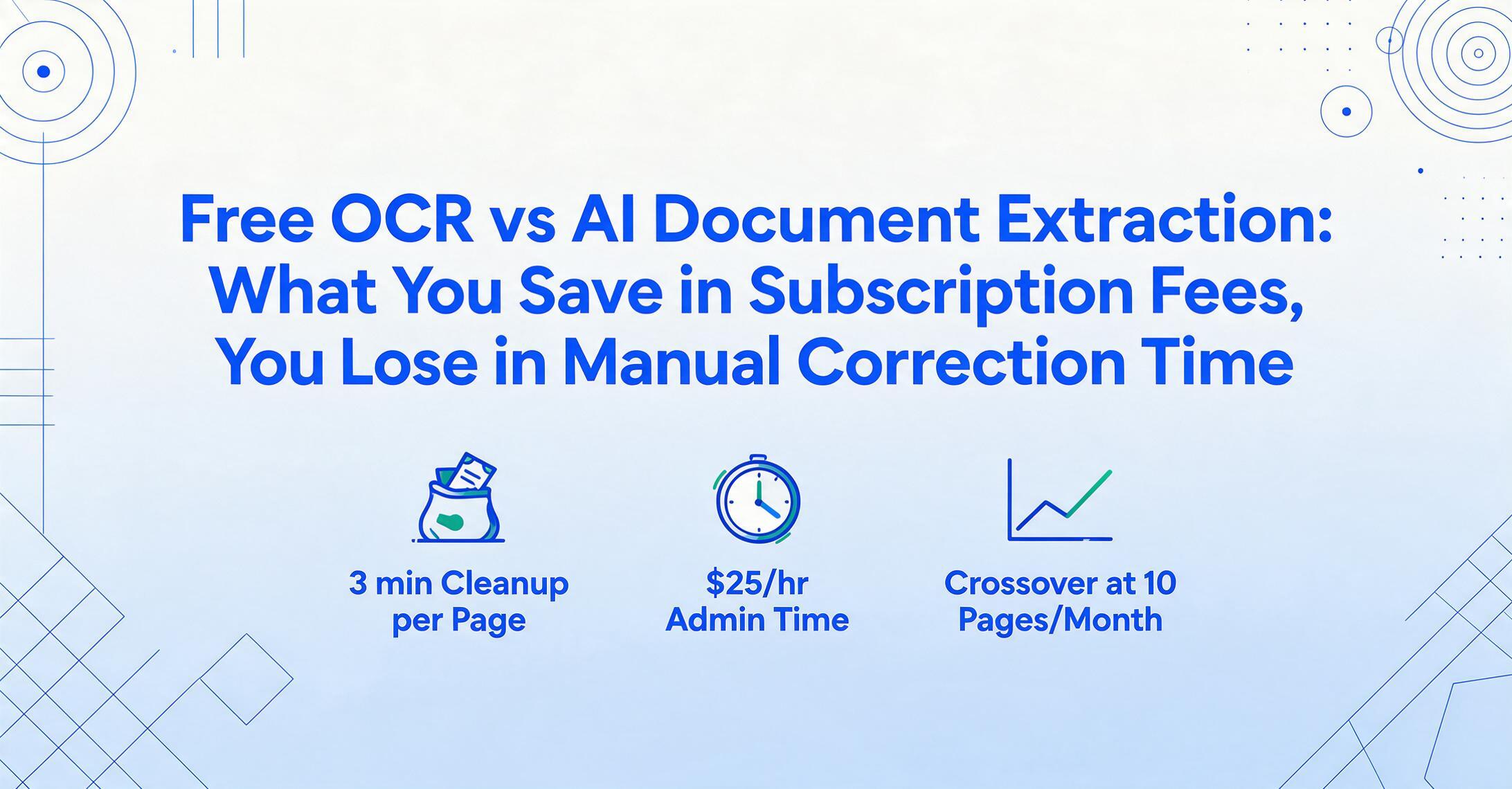
Free OCR vs AI Document Extraction:
The Real Cost of "Free"
Free OCR tools have never been more capable. Google Lens can extract text from a receipt photo. Google Drive OCR turns a scanned invoice into searchable text. Tesseract runs locally and costs nothing. The question is not whether free tools can read your documents — they can. The question is whether what they output is usable without hours of manual clean-up. For most people processing more than a handful of documents, the answer changes faster than they expect.
Key Takeaways
- Free OCR reads every character on your invoice perfectly and delivers the result as an undifferentiated text stream with no columns no field labels and no table structure.
- Putting that raw text into a usable spreadsheet takes five manual steps per page and at 30 pages a month the correction labor costs $37.50 — more than the $9 subscription you were trying to avoid.
- ImageToTable.ai outputs structured columns you named directly into Excel so ten pages take seconds instead of 30 minutes of text repair.
What Free OCR Actually Delivers
Optical Character Recognition was designed to solve one problem: turning an image of text into machine-readable characters. On that narrow task, it has gotten remarkably good. Modern OCR engines on clean, printed documents routinely exceed 98% character accuracy. Google Lens, Google Drive OCR, Tesseract, and free online services like OnlineOCR all handle this baseline well — see our full roundup of free OCR tools if you want the complete list with real free-tier limits.
The issue is what you get back. OCR reads a document left-to-right, top-to-bottom, and outputs a text stream. Drop a supplier invoice into Google Drive OCR and you get something like this — every word on the page, in reading order, with no structure preserved:
ACME Supplies Ltd
123 Commerce Street, Chicago IL 60601
INVOICE
Invoice No: INV-2024-0892 Date: March 15, 2024
Bill To: Greenfield Corp Due: April 14, 2024
Description Qty Unit Price Amount
Office chairs 4 $285.00 $1,140.00
Desk lamps 10 $45.00 $450.00
Total: $1,590.00
Everything is there. But "Invoice No" and "Date" are on the same line separated only by a space. The line-item table is flattened into lines of text — the column relationships between description, quantity, unit price, and amount are gone. The total sits at the bottom disconnected from everything above it. If you need to put this data into a spreadsheet with labeled columns — "Invoice Number," "Date," "Vendor," "Line Item Description," "Qty," "Unit Price," "Amount" — you are starting from scratch.
This is not a bug in OCR. It is what OCR was designed to do: read characters, not understand documents. The problem is that the task most people actually have — "get this invoice data into my spreadsheet" — requires document understanding, not just character recognition.
The Gap Between Raw Text and Usable Data
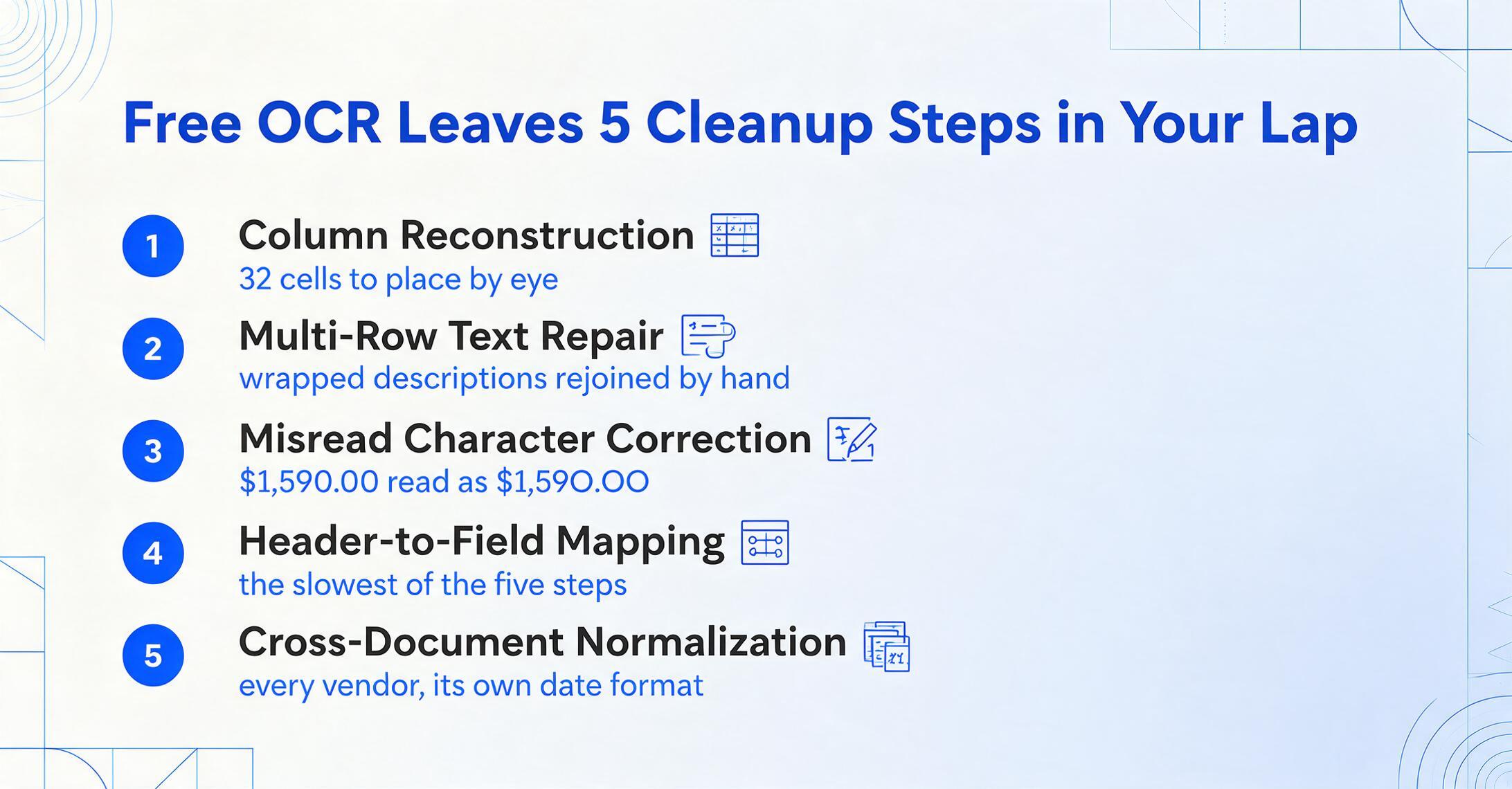
When people say "I used free OCR on these invoices and it worked," what they usually mean is "the text was there" — not "the data was structured and ready to use." Between the OCR output and a clean spreadsheet, there is a sequence of manual steps that nobody talks about in the "free" narrative.
Take a typical expense report with 8 line items across 4 columns: description, quantity, unit price, line total. Here is what happens with free OCR output:
Column reconstruction
The OCR output is a continuous text stream. You need to visually re-map which piece of text belongs to which column. A four-column table with 8 rows means 32 individual cells to identify and place.
Multi-row text repair
Item descriptions that span two lines in the original document get split into separate rows in OCR output. You need to manually rejoin them — for every item with a long description, across every document.
Misread character correction
Even at 98% character accuracy, a page with 500 characters averages 10 errors. "$1,590.00" becomes "$1,59O.OO" (letter O for zero). "Qty" becomes "Qtv." Each error needs spotting and hand-fixing.
Header-to-field mapping
The invoice number, date, vendor name, and total are somewhere in the text stream. You need to find each one, extract it, and map it to the correct column header in your spreadsheet. This is the step that takes the longest — and the one most people skip in time estimates.
Cross-document format normalization
Vendor A formats dates as "03/15/2024." Vendor B uses "15 March 2024." Vendor C uses "2024-03-15." If you are combining 20 invoices into one spreadsheet, you need a consistent date format — and that is another manual pass.
For a single page, these five steps might take 3 minutes. That does not sound like much — and for one page, it isn't. The math changes with volume, and it changes faster than most people calculate. Ten pages: 30 minutes. Thirty pages: 90 minutes. Fifty pages at month-end close: two and a half hours of correction work, on top of the time the OCR already took.
This is the hidden cost of free OCR. The tool costs nothing, but every minute of manual clean-up is time you are not spending on something that actually generates value — analyzing the data, reconciling accounts, or closing the next client. At a typical administrative wage of $25/hour, 2.5 hours of correction work is $62.50 in labor cost. Suddenly "free" is not the cheapest option.
What AI Extraction Does Differently — And Why It Matters for Time
AI document extraction — the approach tools like ImageToTable.ai use — does not try to read every character on the page and then figure out what it means afterward. It reads the document visually the way a person does: it sees the layout, understands which blocks of text belong together, and identifies specific fields by meaning rather than by position.
The practical mechanism is what ImageToTable.ai calls Custom Column Extraction: you type the field names you want — "Invoice Number," "Date," "Vendor," "Line Total" — and the AI locates each value anywhere on the page by understanding what it means, not where it sits. A field labeled "INV#" on one supplier's invoice and "Bill Reference" on another's both get recognized as the same thing and placed under the same column. No templates, no coordinate mapping, no per-vendor setup. If you want to see how this compares against other AI extraction tools rather than just free OCR, our data extraction software comparison covers nine of them.
Three downstream consequences make the time difference material:
Free OCR Workflow
- Output: raw text stream, all structure lost
- Tables: flattened — column relationships destroyed
- Fields: you search the text dump and copy each value
- Multi-page: each page is a separate text block to fix
- Handwriting: accuracy drops to 60–70%
- Mixed formats: each layout type is a new parsing problem
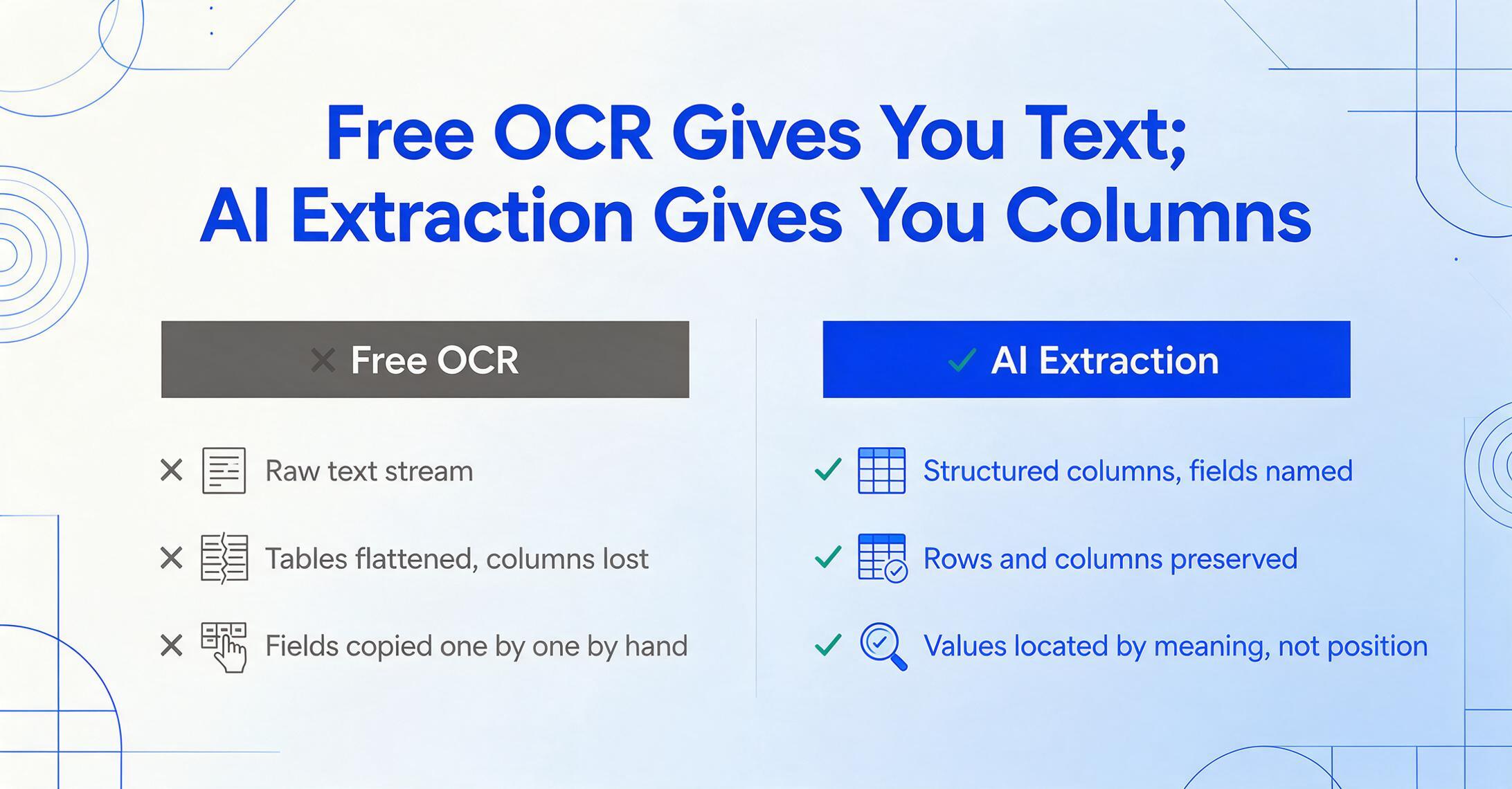
AI Extraction Workflow
- Output: structured columns — fields you named, values filled in
- Tables: rows and columns preserved — ready for Excel
- Fields: AI finds them by semantic meaning, not pixel location
- Multi-page: auto-merged into one consistent output table
- Handwriting: 85–95% accuracy with visual AI models
- Mixed formats: same column schema works across all layouts
Beyond basic extraction, AI extraction adds capabilities that have no equivalent in free OCR. Computed columns let you define calculations that run during extraction — for example, a column named "Line Total (Qty × Unit Price)" automatically computes the product for each row, catching discrepancies between the stated line total and the actual calculation. Inferred columns let the AI classify or derive information not explicitly written on the document, such as assigning a category ("Meals," "Transport," "Office") based on the receipt content. These are not post-processing steps in Excel — they happen during extraction and appear directly in your output table.
The time savings compound when you process documents in batch. Drop 30 invoices into an AI extraction tool: one column schema, one processing run, one output file. The same 30 invoices through free OCR: 30 separate text dumps, 30 rounds of the five-step clean-up process. An in-depth comparison of AI vision extraction versus traditional OCR found that template-based OCR systems break whenever a vendor changes their invoice layout or when you add a new supplier — and most free OCR tools are far more primitive than even template-based systems.
Where "Free" Stops Being Free
The economic case for staying with free OCR is strongest at very low volumes. One or two pages per month, processed one at a time? The clean-up is manageable. The question is where the crossover point lives: at what monthly volume does the manual correction time cost more than a $9 subscription?
The calculation uses three assumptions, all of which lean conservative. Manual correction time per page: 3 minutes, based on the five-step process above (this assumes you are fast and the documents are clean — for handwritten notes or faded scans, the time can double). Effective hourly rate: $25/hour, a typical admin/bookkeeping wage in the US. And an AI extraction subscription at $9/month for the ImageToTable.ai Basic plan, which includes 150 credits (pages) per month.
| Monthly Volume | Free OCR Correction Time | Labor Cost of Correction | AI Extraction Cost | Net Savings with AI |
|---|---|---|---|---|
| 5 pages | 15 min | $6.25 | $9.00 | -$2.75 (break-even zone) |
| 10 pages | 30 min | $12.50 | $9.00 | +$3.50 |
| 30 pages | 90 min | $37.50 | $9.00 | +$28.50 |
| 50 pages | 150 min (2.5 hrs) | $62.50 | $19.00 (Pro plan) | +$43.50 |
| 100 pages | 300 min (5 hrs) | $125.00 | $19.00 (Pro plan) | +$106.00 |
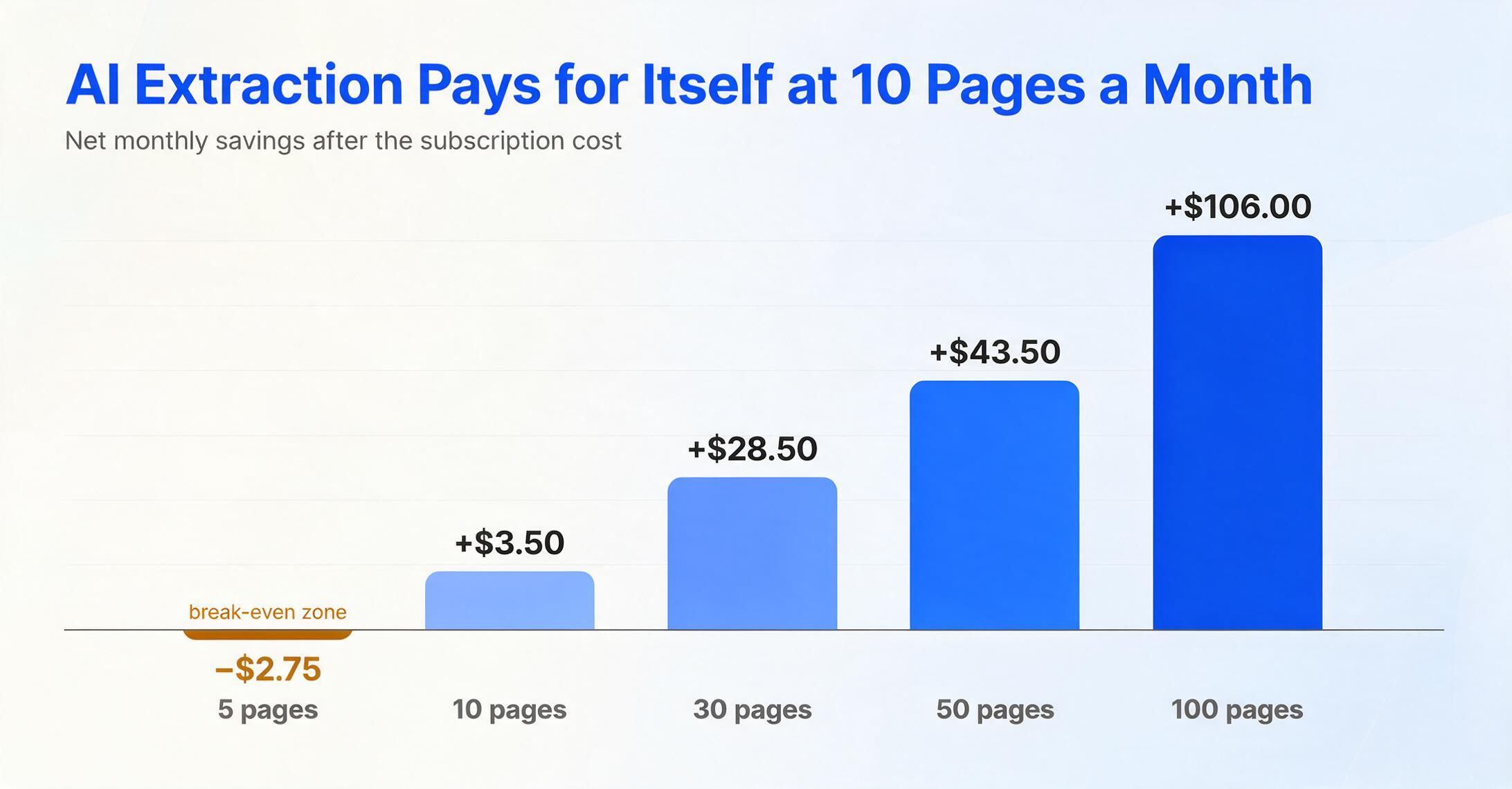
At 5 pages per month, free OCR correction costs about $6.25 in labor — slightly less than a $9/month subscription. This is the volume where the decision genuinely depends on what else you could do with those 15 minutes. But the line does not stay there for long. At 10 pages, you are saving money with a subscription even before factoring in the accuracy advantage and the reduced frustration. At 30 pages — a realistic volume for a freelancer with a few regular clients — a $9 plan saves over $28 per month in labor alone.
The numbers become starker at higher volumes. If you are processing 50 invoices at month-end, two and a half hours of correction is not just money — it is time you cannot get back. And unlike an hourly worker, free OCR does not get faster with practice. The same five-step process repeats for every page, every batch, every month. For a broader look at what different tools and plans actually cost, see our 2026 pricing guide for AI document extraction, which breaks down the per-document cost across every tier.
It is also worth noting that this calculation only counts time — it does not factor in error costs. A misread digit in a total ($1,590 vs $1,5O0) or a misplaced column value (quantity where unit price should be) creates downstream problems that take longer to fix than the original extraction. Those error-correction cycles are invisible in the "free" narrative and very visible in the monthly close.
When Free OCR Is Still the Right Answer
None of this means free OCR is useless. It means its usefulness has boundaries, and knowing those boundaries saves time.
Free OCR tools work well for:
- Making a PDF searchable. If you need to search a scanned contract for a specific clause, Google Drive OCR will get you there.
- Extracting a short block of text. One paragraph from a scan, one address from a form — low-consequence, low-volume extraction.
- Single-format, high-volume, stable-document workflows. If you process 1,000 identical forms with the exact same layout every month, a template-based OCR pipeline (even a free one, with enough configuration) can work — though this is increasingly a niche use case outside of government and legacy systems.
- Documents where structure does not matter. OCR for archival indexing, where the goal is "find which document contains this keyword," not "get specific fields into a spreadsheet."
Free OCR breaks down when your workflow requires field-level extraction from documents with varying layouts — which describes most real-world document processing. If you are handling invoices from multiple suppliers, receipts from different merchants, or bank statements from different banks, free OCR gives you raw text that still needs to be parsed. That parsing step is where the cost actually lives.
For a practical view of what you get at each price point — from $0 tools to $9/month plans to $19/month plans with higher capacity — our comparison of using one tool for all document types versus multiple specialized tools walks through the total-cost-of-ownership math across different volume scenarios.
For freelancers and solopreneurs specifically — a group that often starts with free tools because the budget feels too tight for a subscription — the question deserves its own analysis. Our breakdown of document extraction on a freelancer budget maps typical monthly volumes against plan sizes so you can see whether your actual usage justifies a paid plan or not. Spoiler: most people processing more than 10 pages per month cross the line.
What $9/Month Gets You That Free OCR Never Will
At this point, the question shifts from "free vs paid" to "what does the lowest paid tier actually deliver that free tools cannot?" The answer comes down to five capabilities that directly eliminate the five manual cleanup steps described earlier.
Custom Column Extraction
You name the columns. The AI fills them with data from any document, regardless of layout. No searching, no copying, no template creation. The column names you type become the headers of your output file — directly, with no intermediate step.
Table Structure Preservation
Line-item tables with multiple columns stay as tables. Row and column relationships are preserved, so description stays with the right quantity and amount — not flattened into an undifferentiated text stream.
Batch Processing
Drop 30 invoices, receive one Excel file with all data merged into a single table. Every document processed against the same column schema. This alone saves more time than the subscription costs — every single month.
Format Normalization
Dates, amounts, and numbers are automatically standardized across all input documents regardless of how each vendor formats them. No manual reformatting pass.
The comparison becomes especially clear when you consider the self-serve model. No sales calls, no minimum commitments, no procurement process — the registration-to-first-result pipeline is under two minutes. For more on why enterprise-style document extraction contracts are not the only path, see how AI document extraction without an enterprise contract compares to the traditional "book a demo, talk to sales, sign a 12-month agreement" model that free OCR users are trying to avoid in the first place.
FAQ
Can Google Lens extract table data into Excel?
Google Lens can recognize text from a table image and let you copy it to your device's clipboard. However, the table structure — rows, columns, merged cells, and column alignment — is not preserved. What you paste into Excel will require manual reorganization: separating merged text, re-aligning columns, and fixing formatting. Google Lens is designed for quick text capture, not for structured table extraction. If you need the data in spreadsheet-ready columns, you will spend significant time on post-extraction clean-up.
Is free OCR accurate enough for business documents?
On clean, printed text, free OCR tools achieve 98–99% character-level accuracy. The issue is not raw character accuracy — it is that character accuracy does not equal usable output. A 99% character-level accuracy still means roughly 5 to 10 errors per page, and those errors tend to concentrate on the numbers that matter most: dollar amounts, dates, and invoice numbers. Additionally, character accuracy says nothing about whether table structures are preserved or field labels are correctly mapped to their values. For documents that only need to be searchable — not structured — free OCR is sufficient. For documents where specific fields need to land in specific spreadsheet columns, the gap between "accurate text" and "usable data" requires manual labor to close.
What is the cheapest paid alternative to free OCR?
The lowest-priced AI document extraction tools start around $9/month — approximately $0.06 per page at the entry tier. ImageToTable.ai's Basic plan at $9/month includes 150 pages of AI-powered extraction with custom columns, table structure preservation, and batch processing. For comparison, template-based parsers like Docparser start at $39/month, and AI-first enterprise platforms like Nanonets start at $499/month. The budget tier exists — it is just not the tier most people hear about because the enterprise tools dominate the search results. If you only need occasional extraction, ImageToTable.ai also offers pay-as-you-go credits starting at $6 for 50 pages, with no expiration date and no monthly commitment.
Does AI extraction work on handwritten documents?
Yes, with realistic expectations. AI vision models achieve 85–95% accuracy on handwritten text, compared to 60–70% for traditional OCR. The accuracy depends on handwriting legibility, document quality, and the model used. Clear, consistent handwriting on a clean scan will produce usable results. Cramped, rushed handwriting on a crumpled receipt will challenge any tool — AI included. For a deeper treatment of accuracy across document types and quality levels, our comparison of AI extraction versus traditional OCR covers the accuracy dimension in detail, including how AI models handle handwriting, low-quality scans, and mixed-content documents.
How much time does AI extraction actually save per page?
Based on industry benchmarks and user data, manual data entry from a document takes an average of 2–3 minutes per page. AI extraction reduces the processing time to roughly 5–10 seconds per page — an 18× speed improvement. The real-time savings, however, are not in the extraction speed itself but in the elimination of post-extraction clean-up. Free OCR saves you the manual typing step but adds a manual correction step. AI extraction eliminates both. For a single page, the difference is 3 minutes versus 10 seconds. For 50 pages at month-end, the difference is 2.5 hours of work versus under 10 minutes — and that is before accounting for the errors that manual correction introduces.
The economics of free tools hinge on one variable: how much your time is worth. For anyone processing documents regularly, the math tilts toward paid extraction well before the volume feels "large." The cost of the tool is visible on a billing page. The cost of manual correction is visible on your calendar — once you notice it, you stop calling free OCR "free."
No credit card. No sign-up required for the first page.