AI Handwriting-to-Text:
The Complete 2026 Guide to What Works
In 2023, if you asked whether AI could reliably convert handwriting to text, the honest answer was "sort of: if the writing is neat, if it's block letters, if the scan is clean, and if you don't mind correcting much of what it reads back." Three years later, that answer has changed. AI handwriting recognition improved enough between late 2024 and mid-2025 that most people haven't caught up with it: the technology actually works now, but only if you pick the right approach for your specific documents. This guide maps the landscape as it actually is in 2026, not as vendors want you to believe.
What Actually Changed in Handwriting Recognition Since 2023
Three things happened, and they happened fast enough that most of the assumptions people carry about handwriting recognition are two years out of date.
First, the LLM breakthrough. When GPT-4V shipped in late 2023, it was the first time a general-purpose AI model could read cursive handwriting with any reliability. It wasn't great — hallucination rates were high, and it couldn't output structured data. But it proved something fundamental: handwriting recognition doesn't need to be a character-matching problem. A model that understands language semantically can read messy handwriting the way a human does — by inferring ambiguous characters from context.
By mid-2025, GPT-5 and Gemini 3 Pro had pushed this capability into production-grade territory. The AIMultiple January 2026 cursive handwriting benchmark — a controlled test with 100 handwriting samples from 10 writers — placed GPT-5, Gemini 3 Pro Preview, and olmOCR-2-7B at the top for semantic similarity on cursive text, outperforming dedicated OCR APIs like Azure and Google Document AI (AIMultiple, January 2026). The key finding wasn't that LLMs beat traditional OCR on handwriting — that was expected. It was how much they beat them. Where traditional OCR engines returned 45–60% word accuracy on mixed cursive, VLM-based systems returned 80–90%.
Second, specialist handwriting engines matured. While LLMs were making headlines, dedicated handwriting OCR tools reached production-grade accuracy on specific use cases. HandwritingOCR achieved a 0.9% Word Error Rate (99.1% accuracy) on standard handwritten English prose in independent benchmarks (handwritingocr.com, 2026). ABBYY FineReader 16 hit 91.7% on cursive and 95.2% on handwritten print in a cross-vendor comparison. These aren't the kind of numbers that existed in 2023.
Third, the market infrastructure caught up. The global OCR/ICR market reached $13.95–16.26 billion in 2024 and is projected to hit $42–46 billion by 2030–2033, growing at 13–17% CAGR (ArticSledge, 2026). That's not just "the market is growing" — it means enough capital is flowing into the space that the technology improvement curve from 2024–2026 will look slow compared to what's coming in 2027–2028.
The practical consequence of these three shifts: handwriting recognition is no longer a question of "does it work at all." It's a question of "which technology track fits your documents, your accuracy requirements, and your output format."
The Three Technology Tracks — and Why They're Not Interchangeable
Every handwriting recognition tool on the market in 2026 falls into one of three technology tracks. They differ not just in accuracy, but in what kind of input they can handle, what kind of output they produce, and whether they can extract structured data at all. Pick the wrong track and the accuracy a vendor showed you in a demo won't survive contact with your own documents.
Track 1: Traditional OCR (Tesseract, ABBYY, Cloud APIs)
How it works: Character-by-character pattern matching. The engine compares each pixel region against a library of known character shapes and outputs the closest match. It treats text as a visual pattern recognition problem — "what does this shape look like?" — with no understanding of language, context, or meaning.
What it's good at: Clean, high-resolution scans of printed text in standard fonts. On 300 DPI scans of laser-printed documents, traditional OCR achieves 95–99% accuracy. Azure Document Intelligence and AWS Textract both hit ~99% on clean printed forms.
Where it breaks: The moment handwriting enters the picture. Traditional OCR assumes each character occupies a separable bounding box. Cursive handwriting violates this assumption entirely — letters flow into each other with no clean boundary. The engine either merges multiple letters into one blob (reading "clear" as "dear") or splits a single letter across boxes (reading "m" as "rn").
In production: Tesseract, the most widely deployed open-source OCR engine, returns 45–50% word accuracy on general cursive handwriting. Azure Document Intelligence achieves ~95% on neat block printing but drops to ~45% on cursive narrative comments. Google Document AI hits ~50% on handwritten comment sections. These numbers come from independent benchmarks and practitioner reports on Reddit's r/computervision, not from vendor marketing pages.
Bottom line: Traditional OCR is for printed text. The moment your documents contain handwriting — any handwriting — you need a different track.
Track 2: ICR / HTR (Handwriting-Specific Neural Networks)
How it works: Intelligent Character Recognition (ICR) and Handwritten Text Recognition (HTR) use convolutional neural networks (CNNs) and recurrent neural networks (RNNs) trained specifically on handwritten text datasets. Unlike OCR's pattern matching, these networks learn the underlying features of handwriting — stroke patterns, connection points, letter variations — and can generalize across writers. ICR typically handles hand-printed characters (block letters written separately), while HTR extends to cursive and connected writing. Some tools combine both under the same engine.
What it's good at: Structured forms with handwritten fields, especially when the handwriting is reasonably clear block letters. ABBYY FineReader achieves 91.7% on cursive and 95.2% on handwritten block print. HandwritingOCR reaches 99.1% word accuracy (0.9% WER) on good-quality handwritten English prose. Transkribus, the academic HTR platform from the University of Innsbruck, allows training custom models on one writer's hand across hundreds of pages — useful for historical archives and single-author collections.
Where it breaks: ICR/HTR still treats handwriting as a visual problem. It reads shapes, not meaning. If a character is ambiguous — a sloppy "a" that looks like an "o" — the engine guesses based on visual similarity, not context. A human reader knows "apples cost $5" is more likely than "opples cost $5"; a neural network trained on character shapes alone doesn't. This is why ICR accuracy on cursive and messy writing, while better than traditional OCR, still leaves a significant error gap.
Additionally, most ICR/HTR tools output transcription (plain text), not structured extraction (field-value pairs in a table). Reading a handwritten form's text is one thing; pulling the "Date," "Amount," and "Customer Name" into separate Excel columns is another — and most ICR tools don't do the second.
Bottom line: ICR/HTR is the right track for handwritten text transcription — historical letters, journal entries, free-form notes. For extracting structured data from handwritten forms, you need something that bridges visual recognition and semantic understanding.
Track 3: VLM/AI-Powered Semantic Extraction
How it works: Vision-Language Models (VLMs) like GPT-5, Gemini 3 Pro, and Claude Sonnet process documents as complete images and understand their content semantically. They don't match character shapes or recognize stroke patterns — they "read" the document the way a person does: looking at the whole page, understanding what each field means, and extracting information by meaning rather than by position. When the model encounters an ambiguous handwritten character, it resolves the ambiguity through context — just like a human reader.
What it's good at: Everything on a single page, simultaneously. A VLM can read printed text, cursive handwriting, and block letters on the same form in one pass. It can identify checkboxes (ticked, circled, crossed), locate signatures and stamps, and handle the common real-world document: a printed form with handwritten entries in the blank fields. The AIMultiple 2026 benchmark showed VLM-based systems achieving high semantic similarity scores on cursive text that traditional OCR couldn't touch at all.
More importantly, VLM-based extraction can produce structured output. You define what columns you want — "Invoice Number," "Date," "Total Amount," "Handwritten Notes" — and the model locates each value anywhere on the page by understanding what it means, not where it sits. This is the critical capability that separates the first two tracks from the third: the ability to go from "I can read this page" to "here's your spreadsheet."
Where it breaks: Three honest limitations. Speed: VLM inference is computationally heavier than traditional OCR — processing takes 5–10 seconds per page rather than sub-second. Hallucination risk: VLMs can occasionally invent text, especially on extremely degraded or ambiguous inputs. This is improving (GPT-5 hallucinates significantly less than GPT-4V did), but it's not zero — for a diagnostic framework covering hallucination and the other seven common failure patterns, see our handwriting extraction failure modes guide. Cost: Per-page API costs are higher than traditional OCR — roughly $0.01–0.05 per page vs $0.001–0.005. Whether this matters depends on the cost of correcting errors (see the cost section below).
Bottom line: This is the track that makes handwriting data extraction practical at scale. If your goal is to get handwritten data into a spreadsheet — not just to transcribe handwritten text — this is the architecture you're looking for.
| Dimension | Traditional OCR | ICR / HTR | VLM/AI Semantic |
|---|---|---|---|
| Printed text accuracy | 95–99% | 90–95% | 95–99% |
| Block handwriting accuracy | 70–85% | 85–95% | 85–93% |
| Cursive accuracy | 15–45% | 75–91% | 75–90% |
| Mixed print + handwriting | ❌ Breaks | ⚡ Partial | ✅ Reads together |
| Structured data output | ❌ Text only | ❌ Mostly text | ✅ Excel/JSON |
| Contextual understanding | ❌ None | ❌ Limited | ✅ Semantic |
| Per-page cost | $0.001–0.005 | $0.005–0.02 | $0.01–0.05 |
| Training required | None | Sometimes | None |
Accuracy Reality Check: What the Numbers Actually Mean
Every handwriting recognition vendor publishes an accuracy number. Few explain what that number was measured on, under what conditions, and what the same system delivers when conditions aren't ideal. This section gives you the numbers you actually need, broken down by scenario.
The pattern that emerges from multiple independent benchmarks in 2025–2026 is consistent. On printed text, the three tracks land in the same range, separated by only a few points. On handwriting, they pull apart.
| Document Scenario | Traditional OCR | ICR/HTR | VLM/AI | Real-World Gap |
|---|---|---|---|---|
| Clean printed form (300 DPI scan) | 92–98% | 90–95% | 95–99% | Tight |
| Neat block-print handwriting in boxes | 70–85% | 85–95% | 85–93% | Moderate |
| Mixed cursive + printed labels on form | 45–60% | 65–85% | 80–90% | Large |
| Full cursive narrative text | 15–30% | 75–91% | 75–88% | Massive vs OCR |
| Phone photo of handwritten doc (poor lighting) | <20% | 40–60% | 65–80% | Massive |
| Historical document (faded ink, yellowed paper) | <15% | 50–70% | 60–80% | Massive |
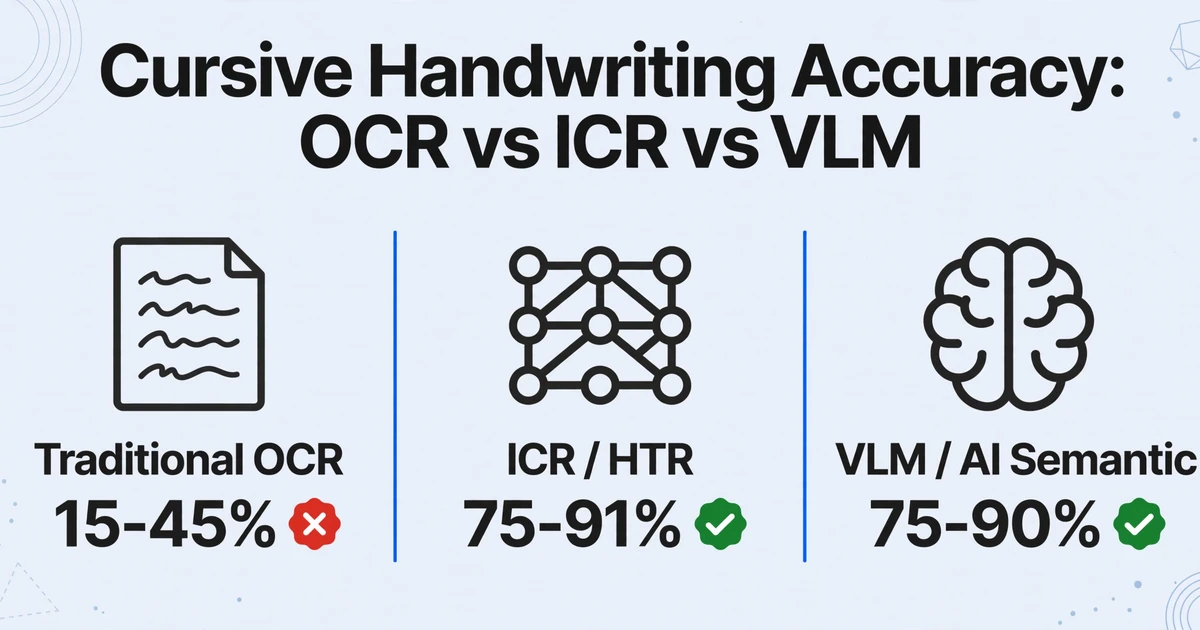
Sources: AIMultiple 2026 Handwriting Recognition Benchmark, Suparse 2026 Best Handwriting OCR Tools Comparison, handwritingocr.com benchmark, Reddit r/computervision production reports. All numbers represent independent measurements, not vendor claims.
Two things stand out from this table. First, the degradation pattern is asymmetric. Traditional OCR falls off a cliff at the first sign of handwriting, dropping from the low 90s on printed text to under a third on cursive. That's not a gradual decline; it's a system failure. VLMs degrade too, but more gently, staying in a usable range from printed text through field photos.
Second, "handwriting recognition accuracy" as a single number is meaningless. A tool that achieves 95% on neat block letters in constrained form fields might achieve 45% on the cursive narrative comments on the same form. If your documents contain both (and most real documents do), the blended accuracy depends on your document mix, not on the vendor's headline number.
The only reliable way to evaluate a tool is to test it on your actual documents — not on clean samples the vendor provides. Any vendor unwilling to let you test on your own files should be treated with skepticism.
Transcription vs. Extraction: The Distinction Most Guides Miss
Transcription and extraction get treated as the same job. They aren't, and the difference decides whether your project produces a spreadsheet or a wall of text.
Transcription is the step from handwritten to digital text. The output is a paragraph or a block of text: "Patient reports abdominal pain for three days, denies nausea." That's transcription. It's useful for search, archiving, and reading, but it's not useful for analytics, accounting, or any workflow that needs to put data into columns.
Extraction means pulling specific data points from a handwritten document into structured fields. The output is a table row: Date = 2026-06-15, Amount = $342.50, Customer = Acme Corp, Notes = "rush order — deliver by Friday." That's extraction. It's what your spreadsheet, ERP, or accounting system actually needs.
Most handwriting recognition tools — including nearly all traditional OCR and ICR solutions — only do transcription. They'll give you a wall of text. They won't tell you which number is the invoice total and which is the tax amount. That separation step — reading the document, then structuring what was read — is where human labor traditionally enters the workflow, and it's where most automation projects stall.
The tools that do extraction, particularly VLM-based systems, bridge this gap by reading documents semantically. You define the columns you want, and the AI locates each value on the page by understanding what it means, not by scanning for text in predefined zones. A tool that can extract "Total Amount = $342.50" from a handwritten invoice doesn't need to know where on the page that number appears. It needs to understand that "Total Amount" is a label and "$342.50" is the value associated with it, even if they're separated by a line break, a handwritten arrow, or a different handwriting style entirely.
This is what people mean by custom column extraction. You name the fields once, in plain words such as "Invoice Number," "Date," or "Total," and that same column list runs against every document you upload, however different the forms look. There is no template to build for each supplier and nothing to retrain when a form changes, because nothing in the setup is tied to a position on the page.
If your workflow ends with data going into a spreadsheet, you need extraction, not transcription. Make sure the tool you're evaluating can do the second, not just the first.
The Real Cost Equation: Why Per-Page Price Is the Wrong Metric
The pricing conversation around handwriting recognition tools always starts with per-page cost. Traditional OCR: $0.001–0.005 per page. VLM-based: $0.01–0.05 per page. Simple math: OCR is 5–10x cheaper. Case closed.
Except it's not. The cost that matters isn't the per-page extraction price — it's the cost of producing a correct result. And that includes the time and labor spent correcting errors.
The real equation is:
True Cost = (Per-Page Extraction Price × Number of Pages) + (Correction Time per Error × Error Count × Labor Rate)
When the error rate is low (printed text, traditional OCR), the correction term is small. When it is high (cursive handwriting, traditional OCR), the correction term dominates the equation entirely.
Let's make this concrete. A construction company processes 100 handwritten daily reports per week. Each report contains roughly 25 data fields — dates, hours worked, materials used, equipment hours, foreman notes. That's 2,500 fields per week, 130,000 fields per year.
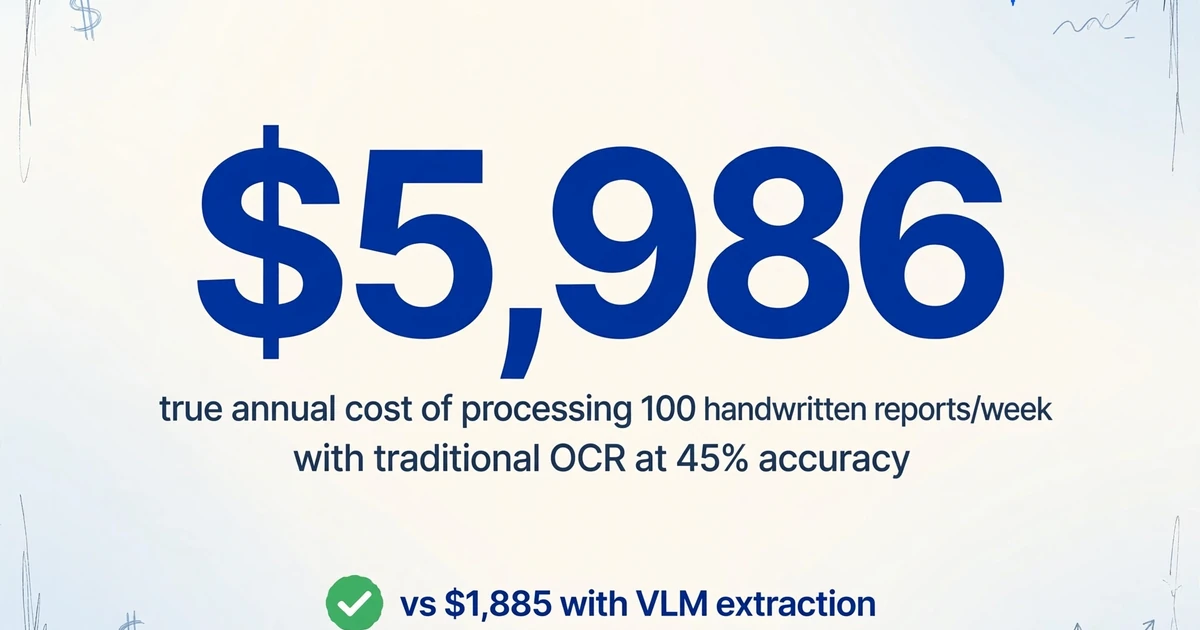
With traditional OCR (45% accuracy on cursive notes): 71,500 fields need manual correction per year. At 15 seconds per correction, that's 298 hours of manual labor — roughly $5,960 per year at $20/hour. The per-page OCR cost is negligible (~$26/year). True annual cost: ~$5,986.
With VLM-based extraction (85% accuracy on cursive): 19,500 fields need manual correction per year. At 15 seconds per correction, that's 81 hours — roughly $1,625 per year. The per-page VLM cost is higher (~$260/year). True annual cost: ~$1,885.
The VLM approach costs 3x more per page — and 3x less in total when you include correction labor. This math holds for any document type where handwriting is a significant portion of the content. A Reddit user who processed 150,000+ pages in production confirmed this pattern: "Traditional OCR platforms appear cost-effective (~$0.001–0.005 per page) but their poor handwriting accuracy (~45–50%) makes them unusable for business workflows with significant handwritten content. The time spent manually correcting errors makes the true cost far higher than specialised solutions" (r/computervision, 2025).
The per-page cost comparison is a trap. The only cost that matters is the cost per correct result. Where handwriting makes up a meaningful share of the content, VLM-based extraction tends to be cheaper in total, often dramatically so, once you include the human correction labor that traditional OCR demands.
Application by Application: Which Track Fits Your Documents
No technology track is categorically better; the right one depends on your documents. What fits where, based on real-world deployments and benchmark data:
Medical Records and Clinical Notes
Medical handwriting is famously bad, and a large share of clinical documentation still starts on paper or in scanned files. The stakes are high: a misread medication name or dosage is a patient-safety event, and HIPAA compliance requires auditable accuracy. A 2025 study on digitizing handwritten clinical records found that "general-purpose OCR systems are currently insufficient for reliable clinical data extraction" due to the "complexity and variability of handwritten medical records" (SciTePress, 2025).
Recommended track: VLM-based semantic extraction, with a human-in-the-loop review step for critical fields (medication names, dosages, diagnoses). At Omega Healthcare, AI-assisted document processing cut documentation time by 40% and saved more than 15,000 employee hours a month at 99.5% process accuracy (Business Insider, 2025). The architecture that makes this work is AI extraction with a confidence threshold: fields above the threshold go straight through; fields below it flag for human review.
What to watch for: HIPAA compliance. If you're using a cloud-based VLM, confirm the vendor's BAA (Business Associate Agreement) and data handling practices. On-premises deployment may be required for certain institutions.
Construction Daily Reports and Field Logs
Construction foremen fill out daily reports by hand — often on-site, in bad weather, with a pen running out of ink. These reports contain safety observations, labor hours, equipment usage, material deliveries, and incident notes. They're legally significant (Davis-Bacon certified payroll requirements in the US mandate specific record-keeping) and operationally critical (delayed billing means delayed cash flow).
Recommended track: VLM-based extraction with batch processing. A typical construction company processes 20–100 daily reports per week, each from different foremen with different handwriting. The batch processing capability — uploading all reports at once and getting a single consolidated spreadsheet — is the operational difference between a tool you'll actually use and one that sits in a training video.
What to watch for: Mixed content. Construction forms almost always mix printed labels ("Date," "Job #," "Foreman") with handwritten entries. Traditional OCR chokes on this mix. Make sure your chosen approach handles both in one pass.
Historical Documents and Archives
Libraries, government agencies, and genealogical organizations are digitizing centuries of handwritten records — birth certificates, marriage registers, census forms, military service records. The University of North Carolina's Wilson Library uses AI-assisted HTR with crowdsourced human validation to transcribe handwritten legal documents from the Jim Crow era. Government archives have taken the same route, scanning civil registers that date back more than a century and running HTR over them, with human reviewers resolving the entries the model can't read confidently.
Recommended track: HTR with custom model training + human review. When you're dealing with one writer's hand across hundreds of pages (a single parish priest's register, a specific clerk's ledgers), custom-trained HTR models (like Transkribus) can hit accuracy levels that general-purpose models can't match. For collections with many different writers, VLM-based extraction provides a strong baseline without training, but human review remains essential — the UVA Library's 2026 evaluation of AI transcription on primary source documents concluded that "these were some of our trickiest primary sources: handwritten letters, complicated ledgers, cross-hatched documents" and that AI accuracy varied dramatically by document type and condition.
What to watch for: Image quality. Faded ink, yellowed paper, bleed-through from the reverse side, and non-standard scripts (Fraktur, Sütterlin, secretary hand) all dramatically affect accuracy. Pre-processing — deskewing, contrast enhancement, background cleaning — is often as important as the recognition engine itself.
Finance and Accounting: Handwritten Ledgers and Receipts
Small businesses, restaurants, and field service operations still generate handwritten receipts, delivery confirmations, and manual ledger entries. A restaurant receives supplier invoices with handwritten quantities and prices in the margins. A delivery driver collects handwritten proof-of-delivery slips. A mechanic writes repair details on a paper work order. Manual entry of this data costs an estimated $15–40 per document when you factor in labor, error correction, and management overhead (Constrafor, 2025).
Recommended track: VLM-based structured extraction. The outputs need to go into accounting software (QuickBooks, Xero, Sage), which means the extraction must produce structured data — not just transcribed text. The ability to define output columns once and process multiple handwritten documents against the same schema is what turns handwriting extraction from a curiosity into an operating cost reduction.
What to watch for: Computed values. A handwritten receipt might show "Qty: 3, Unit: $12.50, Total: $37.50." If the AI extracts all three, that's good — but if the handwritten total contains an arithmetic error, extraction without validation propagates the mistake. The best extraction pipelines let you define computed columns (e.g., "Line Total = Qty × Unit Price") that the AI calculates during extraction, providing a cross-check against the handwritten total.
Logistics and Field Service
Delivery drivers fill out handwritten delivery notes with signatures, timestamps, and exception notes ("left at back door"). Field technicians complete handwritten inspection reports with checkboxes and narrative comments. Insurance adjusters write handwritten claim assessments at accident sites. These documents are generated in the field, often on carbon-copy forms, and need to enter back-office systems quickly.
Recommended track: VLM-based extraction with mobile upload. The ability to photograph a handwritten form with a phone — no scanning, no deskewing — and get structured data back is the operational breakthrough for field teams. Independent benchmarks show VLM-based systems achieving 65–80% accuracy on phone photos of handwritten documents (versus <20% for traditional OCR), making mobile-first workflows practical for the first time.
What to watch for: Checkbox and signature detection. Field forms often combine handwritten text with checked boxes, circled options, and signatures. If the extraction system can't identify which box was ticked or whether a signature field is present, you're still doing partial manual review.
How to Evaluate a Handwriting Extraction Tool: 6 Dimensions
Most evaluation frameworks for document extraction tools were written for printed text. Handwriting changes the evaluation criteria. Here's what actually matters.
Accuracy on your documents, not vendor samples
Any vendor can cherry-pick clean samples. Demand to test on your actual documents — the messy ones, the cursive ones, the ones taken with a phone in bad lighting. If the vendor won't let you test on your own files, walk away.
Structured output, not just transcription
Does the tool produce a spreadsheet with columns you defined, or does it produce a text block you then need to parse? The first replaces data entry; the second replaces transcription but leaves data entry untouched.
Mixed-content handling
Most real documents mix printed labels with handwritten entries. Can the tool read both in one pass, or does it require separate processing steps for printed text and handwriting? The latter adds process complexity that erodes adoption.
Batch processing capability
Processing one handwritten document is a demo. Processing 50 at once and getting a single consolidated spreadsheet is a workflow. Batch capability — upload multiple files, process against the same column definitions, get one output table — is what separates evaluation from adoption.
No training or setup required
If the tool requires you to collect handwriting samples, annotate fields, or train a model before it works, ask how much time that takes and whether it's sustainable as your document sources change. Some tools (Nanonets, some ICR engines) require 10+ annotated samples per document type. Template-free tools that work on first use skip this step entirely.
Total cost, not per-page cost
Calculate the full equation: extraction cost + correction labor at your actual error rate. A $0.001/page tool that needs 30% manual correction costs more than a $0.03/page tool that needs 5% correction. Run the math on your volumes before comparing prices.
FAQ: Handwriting Recognition Questions People Actually Ask
Can AI handle cursive and block letters on the same page?
Yes — and this is specifically where VLM-based systems excel over traditional OCR and ICR. A page with printed section headers, cursive body text, and block-letter margin notes gets read in one pass by a VLM, because the model is reading semantically (by understanding meaning) rather than trying to match character shapes. Traditional OCR and ICR treat printed text and cursive as separate recognition tasks requiring different engines. For a deeper dive on this capability, see our head-to-head comparison of AI handwriting recognition versus traditional OCR.
What accuracy can I realistically expect on cursive handwriting?
On clean, legible cursive scanned at 300 DPI: 85–91% with specialist ICR/HTR tools, 75–90% with VLM-based extraction. On messy, rushed cursive: expect 65–80% from the best tools. On cursive in low-quality phone photos: 60–75%. No tool achieves 99% on cursive in real-world conditions — anyone claiming otherwise is measuring on cherry-picked samples. The practical approach is to use extraction for structured fields (where AI performs best) and reserve human review for narrative text sections where accuracy is critical.
Can handwriting recognition work on historical documents with faded ink?
Yes, but the workflow matters more than the recognition engine. Success with historical documents depends on: (1) high-resolution scanning (600 DPI recommended, not 300), (2) pre-processing — contrast enhancement, deskewing, background noise removal, (3) recognition engine choice — HTR with custom training on similar scripts if the collection has consistent handwriting, VLM-based extraction if it's many different writers. Government and academic digitization projects consistently report that human-in-the-loop review is essential for historical documents — AI handles the bulk of the work, humans verify critical fields. The UVA Library's 2026 evaluation found that "AI accuracy varied dramatically by document type and condition," confirming that historical documents remain the hardest category.
Do I need to train the AI on my handwriting?
For VLM-based extraction: no. These systems are designed to work on first use with any handwriting style — they read semantically, not by matching to training samples. For ICR/HTR tools: sometimes. Tools like Transkribus allow custom model training, which can push accuracy higher if you have hundreds of pages from one writer. For traditional OCR: no, because training won't help — these engines can't handle handwriting regardless. The tradeoff is that custom-trained HTR models can achieve higher accuracy on a specific writer but require upfront training effort, while VLM-based systems work immediately on any writer but max out at ~90% on cursive. Choose based on whether you're processing one consistent handwriting style at scale or many different styles.
Can AI extract data from handwritten forms into Excel — or just convert handwriting to text?
This depends entirely on the tool. Most handwriting OCR tools only produce text — they'll transcribe a handwritten form but won't separate "Date: June 15" into a Date column and "Amount: $342" into an Amount column. VLM-based extraction tools (like ImageToTable.ai) are specifically designed to produce structured spreadsheet output. You define the columns you want — "Date," "Amount," "Customer Name," "Notes" — and the AI extracts the corresponding values from each document into those columns, producing a table where each row is one document and each column is one field. This is extraction, not transcription — and it's the capability that makes handwriting data automation practical for accounting, logistics, and operations workflows. For the hands-on guide, see how to extract handwritten data directly into Excel.
Is free OCR (Tesseract, Google Keep) good enough for handwriting?
For quick, non-critical use — capturing a shopping list or a short note — free tools work adequately on clear block letters. For any business application involving cursive, messy writing, or where accuracy matters: no. Tesseract achieves ~45% word accuracy on cursive. Google Keep handles clear print-style handwriting far better than cursive. The gap between free tools and paid solutions is wider in handwriting recognition than in any other OCR category because handwriting-specific AI models require substantial training data and compute that free tools can't economically provide. If your use case is "I need to find a word in my handwritten notes," free tools might suffice. If it's "I need to extract 50 fields from 100 handwritten forms into a spreadsheet with <5% error rate," you need a paid solution.
What Comes Next: The 2027–2028 Horizon
The 2023–2026 transformation in handwriting recognition was driven by LLMs learning to read semantically. The next shift — already visible in research but not yet in production tools — will be driven by three developments:
Multimodal models that extract, validate, and reason in one pass. Current tools separate extraction ("what does this page say?") from validation ("does this make sense?"). Emerging models will do both simultaneously — extracting invoice line items while checking that the sum of line totals equals the header total, flagging discrepancies without a separate validation step. This collapses the extraction-plus-review pipeline into a single step for routine documents.
Explainable handwriting recognition for regulated industries. Healthcare, legal, and government users need to know why the AI read a particular field as "$500" and not "$600" — especially when the handwriting is ambiguous. Research into explainable AI for document processing is advancing, with confidence scoring at the character level (rather than the document level) moving closer to production use. This will make AI extraction auditable enough for compliance workflows that currently require 100% human review.
On-device processing for field use. Running handwriting recognition locally on a phone — no cloud upload, no connectivity requirement, instant results — is technically feasible with smaller quantized models. The tradeoff between accuracy and speed/latency is narrowing. For field service, construction, and logistics teams that need extraction results before they leave the job site, on-device processing will unlock workflows that cloud-dependent tools can't support.
The direction is clear: handwriting recognition is becoming a solved problem for structured extraction from common document types, and is approaching "good enough with review" territory for the hardest categories (historical documents, heavily degraded inputs). The technology investment cycle is still in its early acceleration phase. The tools available in 2028 will make today's best tools look like Tesseract looks to us now.
The bottom line for anyone evaluating handwriting extraction in 2026:
Don't let past disappointment with traditional OCR shape your expectations of what's possible now. The three technology tracks — traditional OCR, ICR/HTR, and VLM-based semantic extraction — are fundamentally different approaches with different accuracy ceilings, different output formats, and different cost profiles. The right track depends on your documents. The wrong track — which is almost always traditional OCR for any document containing handwriting — costs more than the right track, in both money and time. Test on your actual documents, calculate the full cost including correction labor, and make sure the tool you choose produces structured output, not just transcribed text.
Upload a handwritten document — type the columns you need — get a structured spreadsheet in seconds. No training, no templates.