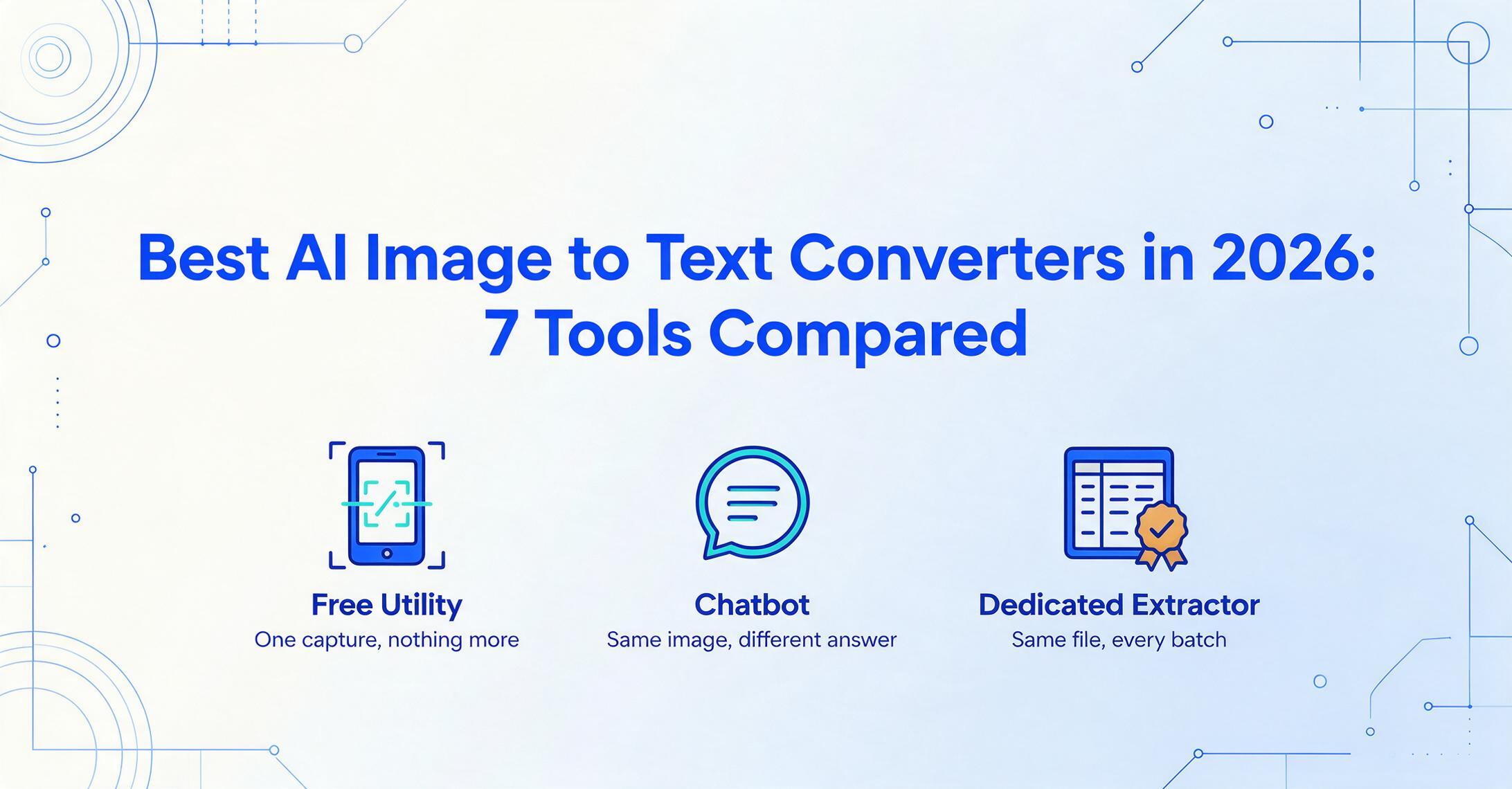
Best AI Image to Text Converters in 2026:
7 Tools Compared
Can a general AI chatbot reliably read an image, or do you need a dedicated tool? That single question is what separates the seven tools in this guide — and most "best image to text" lists never answer it. They put Google Lens, ChatGPT, and a free online OCR site in the same five-star ranking as if they did the same job. They don't. One is a phone utility for a quick grab, one is a brilliant but non-deterministic model, and one is built to read the same kind of document a hundred times and give you the same exportable result every time. This is a technical-advisor comparison of all three categories: what each tool costs, what it's genuinely good at, and — the part that matters most — where it quietly falls apart.
Key Takeaways
- ChatGPT can read handwriting off a photo at around 85% accuracy with zero setup — which is exactly why people stopped opening OCR apps.
- The real risk isn't the characters it misses — it's the clean, confident, wrong value it quietly invents, and the different one it hands you on the next run.
- A dedicated tool reads the thousandth image the same way as the first and gives you a finished, exportable file — so you stop re-checking a hundred captures by eye.
What "Image to Text" Actually Means in 2026
"Image to text" now covers three fundamentally different categories of tool, and choosing well starts with knowing which one your task needs. The phrase used to mean one thing: optical character recognition (OCR) — software that looks at a picture of words and types out the characters. That original image to text workflow is still the core of every tool below. In 2026 it spans a spectrum from a free phone button to a vision language model that reasons about what it sees, and the reliability tradeoffs between them are larger than the accuracy numbers suggest.
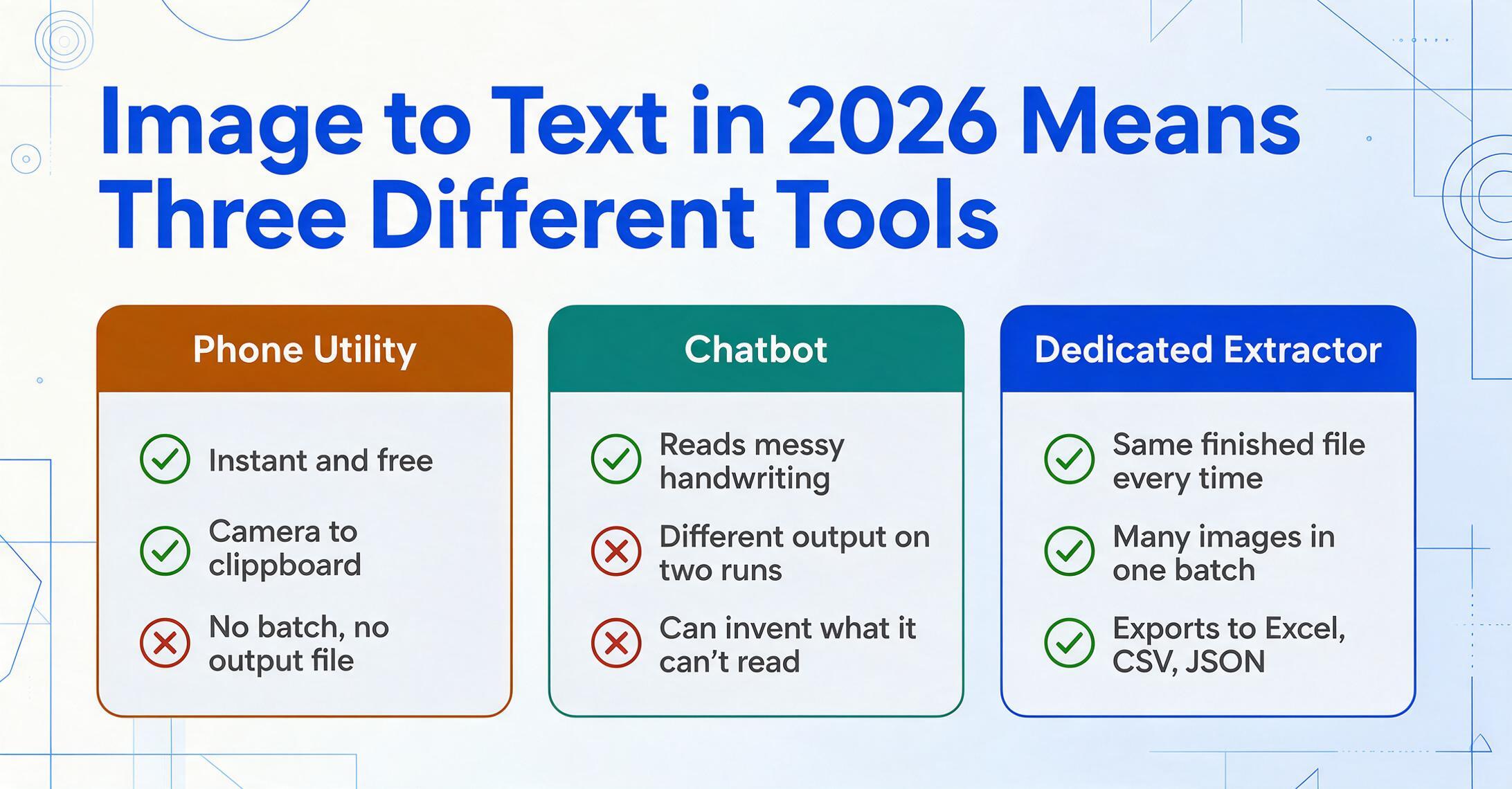
At the first end sit phone and utility OCR tools like Google Lens. You point your camera at a sign or a page, and the text becomes selectable in a second. These are built for instant, one-off captures — grab a Wi-Fi password, copy a paragraph, translate a menu. They're free, fast, and frictionless, and they have no concept of a repeatable job: there's no batch queue, no consistent output file, no way to process fifty images into one clean document.
In the middle are general-purpose multimodal LLMs — ChatGPT, Claude, Gemini. Paste an image into the chat and they read it, often impressively, and can also explain, summarize, or reformat what they find. The catch is that they are non-deterministic: the same image and the same prompt can produce slightly different output on two runs, and the model will sometimes "fill in" a plausible-looking value rather than admit a character is unreadable. There's no built-in pipeline to feed it a hundred images and merge the results into one structured file.
At the third end are dedicated extraction tools built to produce reliable, repeatable, exportable output — Google Document AI and AWS Textract for developers, and no-code apps like ImageToTable.ai for everyone else. The point of these tools isn't that they read a single image better than ChatGPT; it's that they read the thousandth image the same way as the first, hand you a finished file (TXT, Word, CSV, Excel), and do it without you babysitting each run.
The difference between these three categories isn't accuracy — it's reliability and scale. A phone utility wins for one quick capture, a chatbot wins for a conversational one-off, and a dedicated tool wins the moment you need the same result, in an exportable file, repeated across many images.
This guide is about getting an image into editable text — transcription and readable output. If what you actually need is the data pulled into spreadsheet columns (an invoice's totals, a table's rows), that's a related but separate job, and our data extraction software roundup is the better starting point. Here, the question is simpler: image in, words out — and which of these seven tools you should trust to do it.
How We Picked and Tested
These seven tools were chosen to represent the genuine span of how people convert images to text in 2026 — not the easiest list to rank cleanly. We started from the tools buyers actually reach for and that the SERP consistently surfaces for "image to text": the phone utility (Google Lens), a representative free online OCR service (OCR.space), the two general LLMs people increasingly use as OCR (ChatGPT, Claude), the developer-grade cloud APIs (Google Document AI, AWS Textract), and a no-code dedicated extractor (our own ImageToTable.ai).
Each tool was evaluated on four things: what it's really for (a one-off grab, a conversation, or a repeatable job), real pricing (the lowest published figure, not "starting from"), reliability at volume (does it give the same output twice, and can it fabricate?), and honest fit — the scenarios where it genuinely wins and the ones where it doesn't. Where we cite accuracy or failure data, it comes from independent benchmarks and practitioner testing, not vendor demos. Pricing was pulled from each vendor's public pricing page and is current as of Pricing checked June 2026.
One disclosure up front: ImageToTable.ai — the product this site belongs to — is one of the seven tools reviewed. We've positioned it where it honestly fits (no-code, repeatable, exportable extraction) and named the cases where Google Lens, ChatGPT, or a cloud API is the better call. For a single quick capture, Lens beats us outright; pretending otherwise would make this list worthless.
The 7 Best Image-to-Text Tools at a Glance
The table below is the fast answer, with the cheapest entry point for each tool and the one limitation most likely to bite you. "Pricing checked June 2026."
| Tool | Starting Price | Pricing Model | Best For | Key Limitation | Free Trial? |
|---|---|---|---|---|---|
| Google Lens | Free | Free (Google app / Chrome / Photos) | Instant one-off phone capture | No batch, no export file, no repeatable job | Free |
| OCR.space | Free | Free API + paid PRO tiers | Quick or automated plain-text OCR | Plain text only; weaker on messy handwriting | Free tier |
| ChatGPT | Free / $20/mo (Plus) | Subscription (consumer) | Conversational one-off read + reasoning | Non-deterministic; no batch; can fabricate | Free tier |
| Claude | Free / $20/mo (Pro) | Subscription (consumer) | Careful one-off read of long documents | Same LLM caveats; no batch/export schema | Free tier |
| Google Document AI | $1.50 / 1,000 pages | Usage-based (per page) | High-volume cloud OCR for developers | Dev setup; raw output needs post-processing | Free tier (GCP) |
| AWS Textract | $1.50 / 1,000 pages | Usage-based (per page) | High-volume cloud OCR inside AWS | Developer-only; forms/tables cost far more | Free tier (3 mo) |
| ImageToTable.ai | Free / $9/mo | Subscription + PAYG credits | No-code, repeatable, exportable text/data | No native ERP sync, no SOC 2/HIPAA | Free tier |
One pattern explains the whole table: price tracks what surrounds the reading, not how well the tool reads. Lens and OCR.space are free because they hand you raw text and stop — a free image to text tool with no workflow wrapped around it. The chatbots cost $20/month because you're paying for a reasoning model, not an OCR engine. The cloud APIs bill per page because they're infrastructure you build on. And the dedicated extractor charges a small subscription because it wraps the reading in a repeatable, exportable workflow. Match the wrapper to your job and the right pick becomes obvious.
Phone & Free Utility OCR: Google Lens & OCR.space
For a single quick capture, free utility OCR is not just "good enough" — it's the right answer, and nothing on this list beats it for speed. These tools exist to get text off a screen or a page and into your clipboard with zero setup. The moment your task repeats or needs a structured output file, they run out of road.
Google Lens
Google Lens is the OCR built into the Google app, Chrome, and Google Photos: aim your camera (or open any image), tap, and the text becomes selectable, copyable, and translatable in real time. It's genuinely excellent at what it's for — copying a paragraph from a book, lifting a serial number off a label, reading a foreign menu — and it costs nothing.
Best for: instant, on-the-go single captures from your phone, especially when translation is part of the job. Not ideal for: any repeatable workflow — there's no batch processing, no way to export a clean file of results across many images, and no control over output structure. It's a utility, not a document pipeline. Open Google Lens →
OCR.space
OCR.space is a free, no-signup online OCR service with a public API, handy when you want plain text out of an uploaded image or PDF — or want to wire basic OCR into a script. The free tier is generous for light use, and paid PRO tiers add higher limits, larger files, and better engines.
Best for: quick, free plain-text extraction in the browser, or lightweight automated OCR via its API. Not ideal for: messy handwriting, complex layouts, or anyone who needs the text reorganized into named fields — it returns a flat block of characters, and you do the cleanup. For a sense of how a layout-aware tool handles the same job, see our AI OCR extraction page. View OCR.space pricing →
Both tools share the same ceiling: they read, and then they hand the problem back to you. That's fine for one image. It's the wrong shape for fifty — which is exactly where people start reaching for ChatGPT.
Can ChatGPT or Claude Reliably Read an Image?
Yes — and no, and the distinction is the most important thing in this guide. General-purpose multimodal models read images remarkably well for a one-off, but they are the wrong tool for repeatable, high-stakes transcription, because they can quietly invent what they can't read.
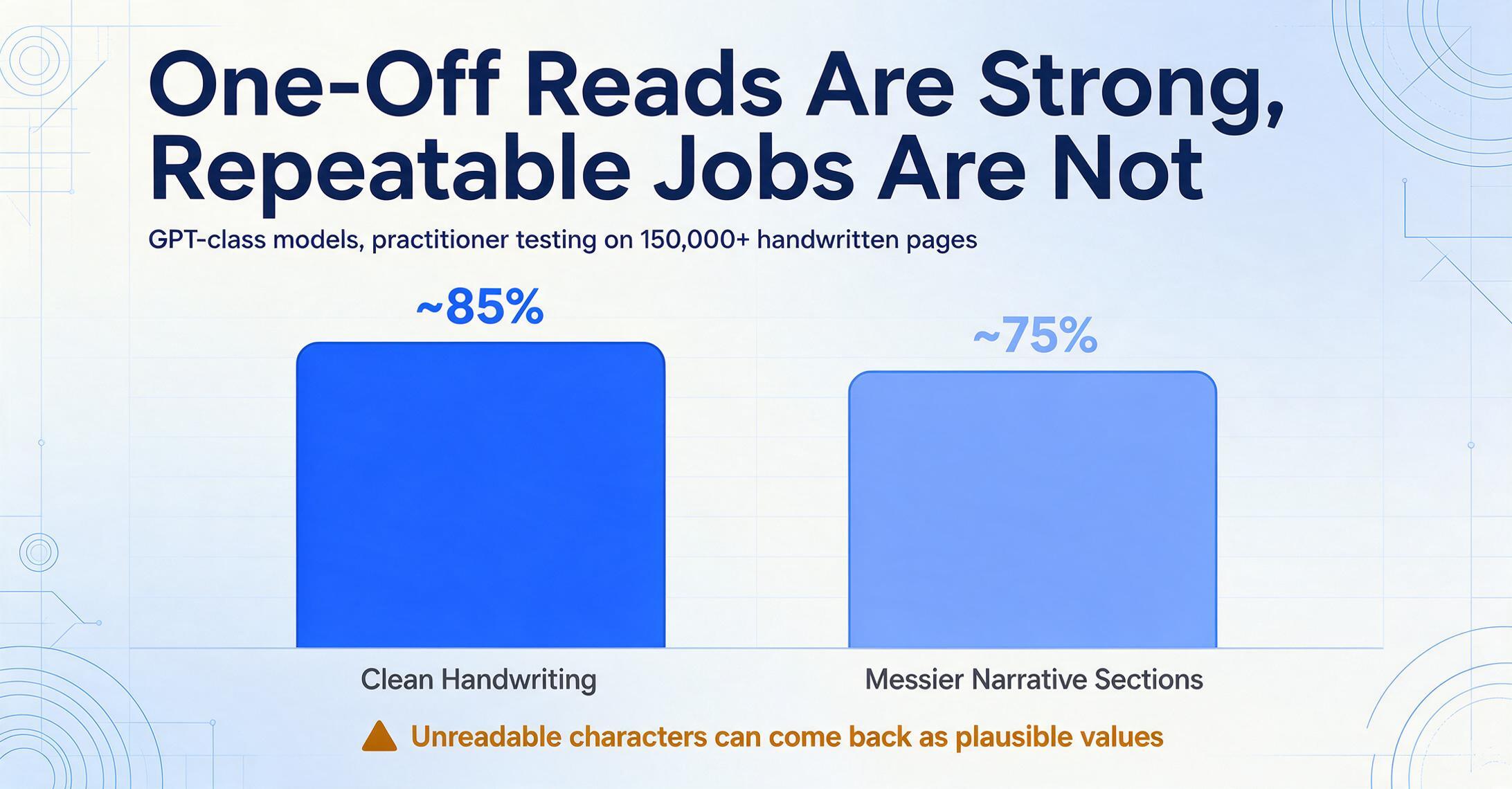
The "yes" is real. On r/OpenAI, the recurring reaction to vision models is plain astonishment that a chatbot "can just straight up read text off of images," and people now routinely paste a photo into ChatGPT and ask for the words. A 2025 practitioner review on r/computervision — from someone who has run over 150,000 handwritten pages in production — found GPT-class models hit "~85% accuracy on clean handwriting," which is strong for a tool that needs no setup.
The "no" is just as real, and it's structural. That same review noted accuracy "dropping to ~75% on messier narrative sections," and the deeper problem isn't the percentage — it's the failure mode. An independent open-source OCR benchmark comparing vision models against traditional OCR sparked a widely-read engineering discussion where one practitioner put it bluntly: vision models "are every bit as susceptible to the (unsolved) hallucination problem," and "the failure modes are totally unbounded (unlike regular OCR)." Academic work agrees — a 2025 NeurIPS paper, "Seeing is Believing? Mitigating OCR Hallucinations in Multimodal LLMs," measures exactly this: under blur, glare, or partial occlusion, an LLM may confidently output a plausible value that was never on the page.
A traditional OCR engine that can't read a character returns garbage you can spot. A language model that can't read a character may return a clean, confident, wrong answer — and give you a slightly different one next run. That non-determinism is why chatbots are excellent for one document and risky for a hundred.
There's also a workflow gap. Neither ChatGPT (Free, or Plus at $20/month) nor Claude (Free, or Pro at $20/month) has a built-in way to process fifty images in one pass and merge them into a single consistent file, and the same prompt can return different column orders or formats across runs. For a one-off — read this receipt, transcribe this note — they're a legitimate, fast choice. For a process, you want the same model's reading wrapped in guardrails. We dig into the specifics in our ChatGPT comparison; the short version is use a chatbot for a document, use a purpose-built tool for a procedure. View ChatGPT pricing → View Claude pricing →
Developer Cloud OCR APIs: Google Document AI & AWS Textract
If you have engineering resources and steady high volume, the two hyperscaler OCR APIs are the cheapest reliable way to turn images into text at scale. They aren't apps you "use" — they're services you build on, which is both their strength and their barrier.
Google Document AI
Google's Document AI is a cloud platform whose Enterprise Document OCR processor runs at $1.50 per 1,000 pages (dropping above 5 million pages/month), with strong multilingual and handwriting coverage and a human-in-the-loop review layer for higher-stakes work. The output is reliable and deterministic in the way LLM chat is not.
Best for: development teams needing scalable, API-based recognition for high, steady volume — especially those already on Google Cloud. Not ideal for: non-developers; there's no point-and-click app, and the OCR returns raw text blocks that need post-processing before they're usable. View Google Document AI pricing →
AWS Textract
Textract is Amazon's document OCR service, exposed through several APIs; its base Detect Document Text call costs $1.50 per 1,000 pages, with a free tier covering 1,000 pages/month for the first three months. The structured features (forms, tables) cost considerably more per page, so it's cheapest when you mostly need plain text.
Best for: teams already inside the AWS ecosystem who want OCR as a building block in a larger pipeline. Not ideal for: anyone without developers, or workloads dominated by forms and tables, where the per-page cost climbs sharply. We break down the trade-offs in our AWS Textract comparison. View AWS Textract pricing →
Both APIs read documents reliably and at low per-page cost — but turning their raw output into a finished, structured file is a development project, not a feature. That's the exact gap the no-code dedicated tool closes.
Dedicated, Exportable Extraction: ImageToTable.ai
When image-to-text becomes a recurring job and you don't want to write code, a dedicated no-code extractor gives you the LLM's reading wrapped in the reliability and export the chatbots lack. This is where ImageToTable.ai — the product behind this site, and one of the seven tools here — sits.
ImageToTable.ai is built on a vision large model, so it reads printed text, handwriting, cursive, tables, and checkboxes with the same contextual understanding that makes LLMs strong on messy documents. The difference is what surrounds the reading. Its To-Word mode takes a document image and returns an editable Word file with the original layout preserved — useful when you want the whole page as text you can edit, not just a flat character dump. Its To-Table mode uses Custom Column Extraction: you type the fields you want — "Date," "Total," "Reference" — and the AI finds each value by meaning, then outputs a consistent table to Excel, CSV, or JSON. Either way, you get a finished file, the same way every time, and you can process many images in one batch rather than one chat at a time. Pricing starts with a free tier, then $9/month.
Best for: freelancers, ops teams, bookkeepers, and small businesses who need to convert images to editable, exportable text or data repeatedly — including handwriting and phone photos — without coding, model training, or babysitting each run. Not ideal for: a single quick capture (Google Lens is faster and free), a conversational read where you also want to discuss the content (a chatbot fits better), or enterprises needing native ERP sync, on-premise deployment, or SOC 2 / HIPAA compliance. You can see the no-code approach on our image-to-Word conversion page or our handwriting-to-text page, and it sits alongside other lightweight options in our no-code document AI roundup. Try ImageToTable.ai free →
How to Choose: One-Off, Bulk, Handwritten, or Developer
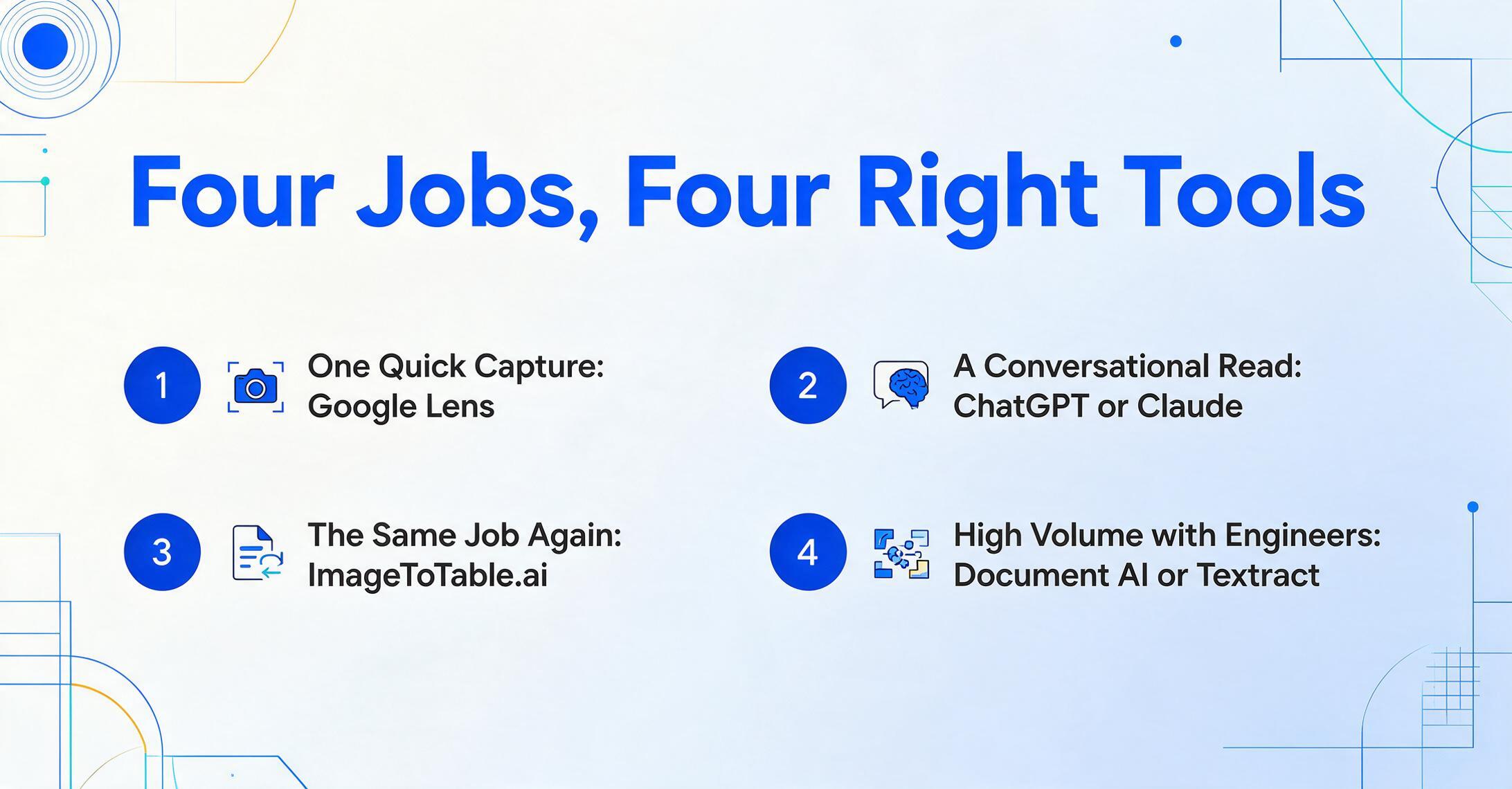
The right image-to-text tool is the one whose shape matches your job, not the one with the most stars. Here's the decision in four common scenarios.
One quick capture
Best fit: Google Lens (or OCR.space)
Grabbing a paragraph, a code, or a menu? Use the free phone utility — it's instant and there's nothing to set up. A paid tool here is overkill. A PNG screenshot that needs to become an editable document is a different job — converting a PNG to Word needs layout awareness the utility tools don't provide.
A conversational read or reasoning
Best fit: ChatGPT or Claude
Want to read a document and ask questions about it? A chatbot is ideal — just verify anything that matters, and don't rely on it for identical output twice.
Many images, repeatable, exportable
Best fit: ImageToTable.ai
Converting the same kind of document again and again into editable text or a spreadsheet, no code, with a consistent output file? This is the no-code sweet spot. Start on the free tier.
High volume with engineers
Best fit: Google Document AI or AWS Textract
Steady high volume and a dev team to build on it? The cloud APIs are cheapest per page. Pick by which cloud you already live in.
If your job overlaps the structured-data side — pulling fields and rows into a spreadsheet rather than just transcribing text — read the sibling guides that go deeper there: our AI OCR software roundup and our document data extraction tools roundup.
Frequently Asked Questions
What is the best free AI image to text converter?
For a quick one-off, Google Lens is the best free option — it's built into the Google app, Chrome, and Google Photos, reads text from any image instantly, and costs nothing. For free plain-text OCR in the browser or via an API, OCR.space is a solid choice. If you need the text repeatedly and in an exportable file, ImageToTable.ai has a free tier that goes beyond a flat text dump to editable Word or a structured spreadsheet.
Can I just use ChatGPT to convert an image to text?
For a single document, yes — paste the image into ChatGPT (Free or Plus at $20/month) or Claude and ask for the text, and it usually reads it well, around 85% accuracy on clean handwriting per independent practitioner testing. The catch is reliability at volume: language models are non-deterministic (the same image can produce different output on different runs) and can "hallucinate" a plausible value when a character is unreadable, with failure modes that are hard to catch. Use a chatbot for a one-off; use a dedicated tool when you need the same result repeatedly.
Are AI image-to-text tools accurate on handwriting?
Vision-model-based tools read handwriting far better than traditional OCR because they use context, but accuracy still drops on messy or cursive writing — practitioner testing shows leading models around 85% on clean handwriting falling to roughly 75% on messier sections. For handwriting-heavy work, test your actual documents on a free tier first, and prefer tools that let you review and correct output rather than ones that hand back a flat block of text.
What's the difference between OCR and an AI image-to-text tool?
Traditional OCR matches pixel shapes to characters and outputs text without understanding it — fast and deterministic, but it breaks on poor scans, handwriting, and unusual layouts. AI image-to-text tools use a vision language model that reads the page in context, so they handle messy real-world images far better. The trade-off is that AI models can occasionally fabricate, which is why dedicated tools wrap them in structure and export controls rather than leaving you with raw chat output.
How do I convert an image to editable text I can edit in Word?
Free utilities like Google Lens and OCR.space give you copyable plain text, but they don't preserve layout. To get an editable document that keeps the original formatting, use a tool with a layout-aware mode: ImageToTable.ai's To-Word mode reads a document image and exports an editable Word file with the original layout intact, so headings, paragraphs, and tables land where they belong instead of as one flat paragraph. A photographed page takes that path too: the JPG to Word workflow exports an editable document with headings and tables in place, not a single text block.
Which image-to-text tool is best for processing many images at once?
Phone utilities and chatbots have no real batch workflow, so for many images you want either a developer cloud API (Google Document AI or AWS Textract, if you have engineers) or a no-code tool built for batch. ImageToTable.ai processes multiple images in one pass and merges them into a single exportable file, which is the gap that one-at-a-time tools like Lens and ChatGPT can't close.
The Bottom Line
The most useful thing to take from this comparison is that "image to text" isn't one category — it's three, and they fail in different ways. A phone utility (Lens, OCR.space) is perfect for one capture and useless for a hundred. A chatbot (ChatGPT, Claude) reads brilliantly for a one-off but is non-deterministic and can fabricate, which makes it risky as a repeatable process. A dedicated tool (the cloud APIs for developers, ImageToTable.ai for everyone else) trades a little single-shot flexibility for the thing the others lack — the same reliable, exportable result, every time, across many images.
Don't pick the tool that reads one image best. Pick the one whose shape matches your job: a utility for a capture, a chatbot for a conversation, and a dedicated extractor for a repeatable, exportable process.
If your image-to-text work has crossed from "every now and then" into "again and again," that's the signal to move off the free utility and the chat window. Upload a handful of your own images, name what you want out, and see whether a finished, consistent file in seconds is worth more than a clipboard full of text you have to re-check by hand.
Disclosure: This guide is published by ImageToTable.ai, which is one of the seven tools reviewed above. We've aimed for a fair, technical assessment — including naming the scenarios where Google Lens, ChatGPT, Claude, or the cloud OCR APIs are the better choice. Pricing was taken from each vendor's public pricing pages and is current as of June 2026; verify the latest figures on each vendor's site before purchasing.