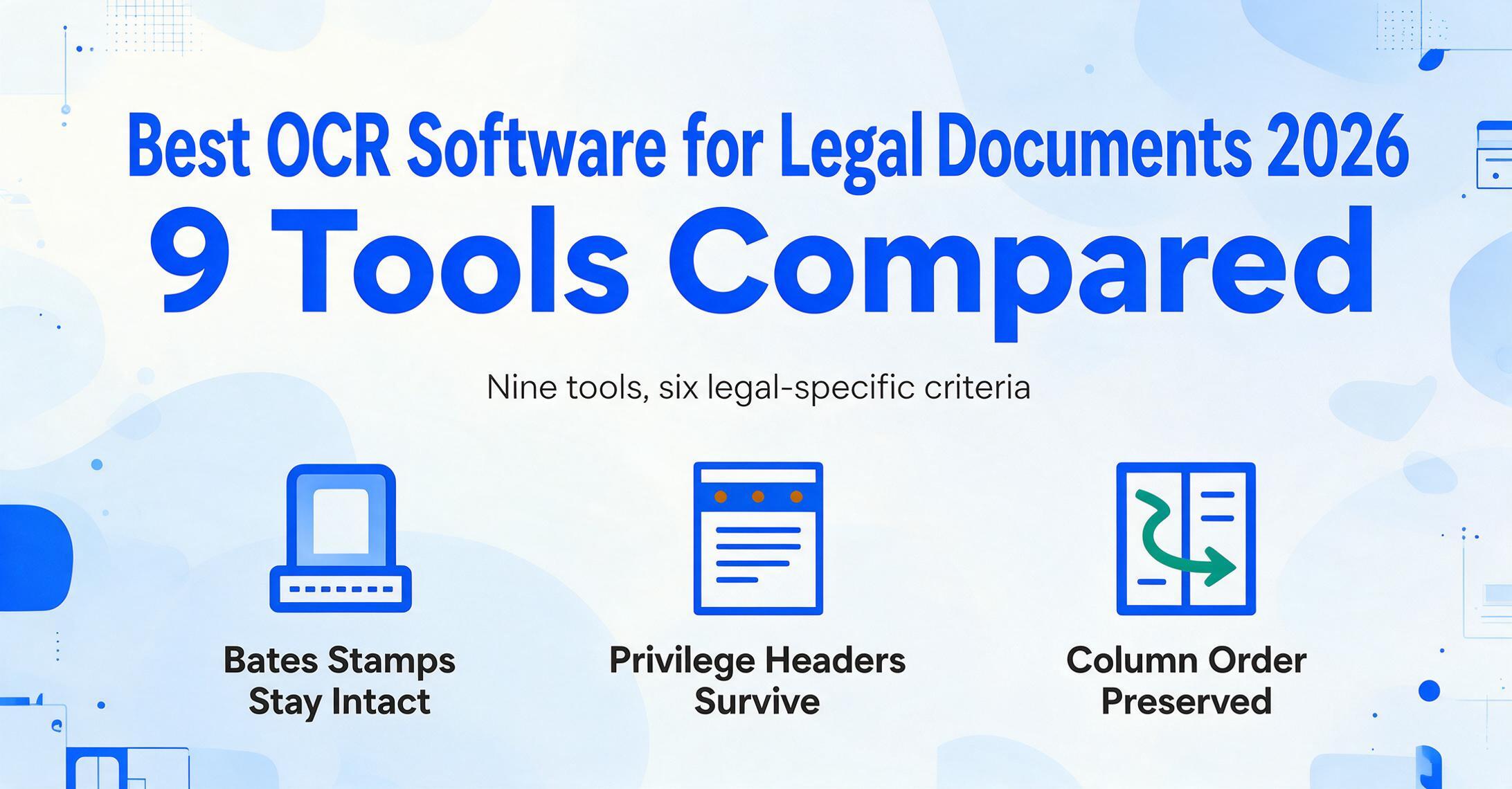
Best OCR Software for Legal Documents in 2026:
9 Tools for Contracts, Briefs & eDiscovery Compared
The International Legal Technology Association's 2025 Technology Survey — covering 580 law firms, over 152,000 attorneys, and approximately 302,820 total users — found that at least 76% of firms have adopted cloud-based document management systems. Yet the same survey reported that 57% of legal organizations still cite "resistance to change" as their top barrier to adopting new technology, and 54% flag security and risk concerns. That tension — between knowing digitization is inevitable and needing to choose tools that satisfy both ABA ethical duties and the practical realities of legal document workflows — is the context for every evaluation on this list. This guide was researched by reviewing each tool's published documentation, compliance certifications, and pricing pages, supplemented by the ABA Model Rules on technology competence and confidentiality, published ILTA survey data, and first-person accounts from legal professionals on r/LawFirm and r/legaltech. Every tool here is evaluated against the specific requirements of legal document processing: contract clause extraction across multi-page agreements, preservation of Bates numbering and privilege designations, multi-column brief format handling, and the data security obligations imposed by ABA Model Rules 1.1 and 1.6. Disclosure: ImageToTable.ai, a modern AI extraction tool, is included in this roundup. I have no affiliation with any other tool on this list. All pricing is sourced from vendor public pages as of June 2026, and every external link goes to the vendor's product or pricing page so you can verify claims independently.
Key Takeaways
- A 99.7% accurate OCR tool can still break your privilege log by treating a "CONFIDENTIAL" header as body text and a Bates number as page decoration.
- Your contract review fails not when OCR misreads a word but when it extracts "indemnification" without knowing whether it caps liability or creates it.
- The only evaluation that matters for your practice is whether the tool preserves the six structural elements that give legal documents their legal meaning — starting with Bates numbers, privilege markings, and cross-page clause continuity.
What Makes Legal OCR Different From Generic Document Capture
A law firm does not need OCR that is "95% accurate on standard documents." It needs OCR that correctly reads a 78-page merger agreement with nested clauses, exhibits A through F, handwritten margin notes, and a Bates-stamp in the bottom-right corner of every page — and then outputs the data in a form that meets the firm's ethical obligations under ABA Model Rules.
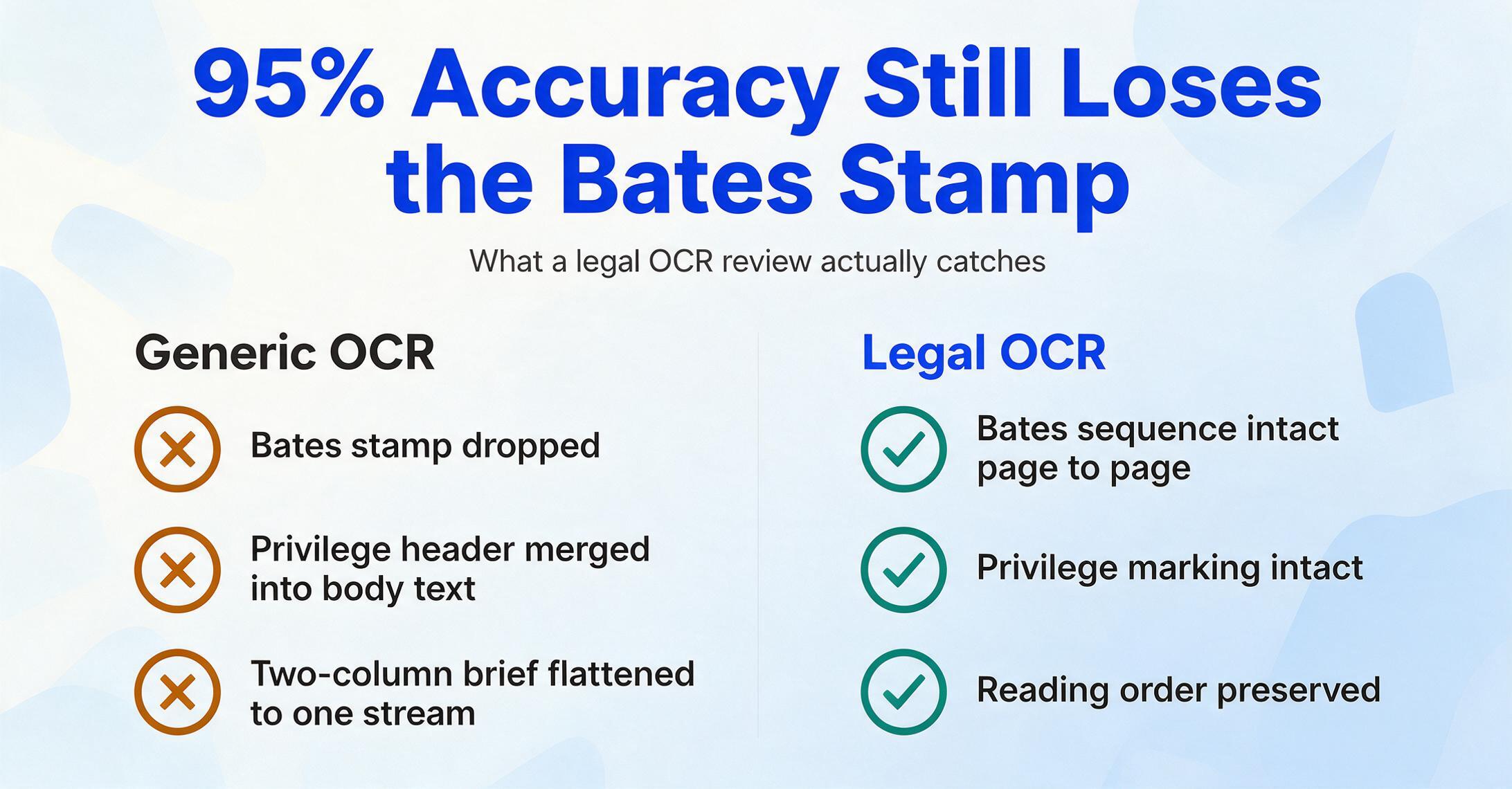
The text-based approach most people think of when they hear "OCR" — recognize characters, output a text file — falls short in legal practice for structural reasons that no amount of accuracy tuning fixes. Legal documents carry meaning in their layout: a clause that spans a page break, a privilege notation in the header, a signature block on the final exhibit page. When standard OCR flattens multi-column briefs into a single text stream or merges a footer annotation into the last line of body text, the result is not just messy — it can be professionally harmful.
Several specific requirements define legal OCR as a distinct use case:
- Bates numbering preservation — Document production in litigation hinges on the Bates stamp. OCR that drops, merges, or misreads page numbers breaks the chain of custody for evidence.
- Attorney-client privilege markings — "PRIVILEGED AND CONFIDENTIAL" headers, redaction zones, and designation labels must survive extraction intact. Losing them creates waiver risk.
- Multi-column legal formatting — Briefs filed under Fed. R. Civ. P. formatting, statutes, and regulations frequently use two-column layouts. OCR must preserve reading order column-by-column, not left-to-right across both.
- Cross-page clause and table tracking — A termination clause in a commercial lease may begin on page 12 and conclude on page 14. A fee schedule table may split across a page boundary. Tools that treat each page as an independent extraction unit miss the structural relationship.
- Specialized vocabulary and citations — Latin phrases (res judicata, sua sponte), legal citations (Fed. R. Civ. P. 12(b)(6), 15 U.S.C. § 78j(b)), and party names in varied formats are routine. OCR engines that rely on standard lexicons flag these as errors.
- ABA Model Rule 1.6(c) data security — Since August 2012, ABA Model Rule 1.6(c) has required lawyers to "make reasonable efforts to prevent the inadvertent or unauthorized disclosure of, or unauthorized access to, information relating to the representation of a client." Any OCR tool that processes client documents must offer data encryption, access controls, and clarity on whether uploaded documents are used for model training.
The tools below were selected and ranked with these six dimensions as the evaluation framework. For a complete overview of OCR technology fundamentals and how traditional character recognition differs from modern AI-based extraction, see our guide on what OCR is and how it actually works.
Quick Comparison Table: Legal OCR Tools at a Glance
| Tool | Starting Price | Best For | Legal-Specific Strength | Key Limitation |
|---|---|---|---|---|
| ABBYY FineReader | $199 one-time / ~$16 mo | Desktop OCR + layout preservation | Industry-leading format retention; offline security | Desktop-only; limited API pipeline |
| Adobe Acrobat Pro | $22.99/mo | Legal PDF workflow & editing | Industry standard; redaction, comparison, Bates stamping built-in | No structured data extraction beyond searchable PDF |
| Amazon Textract | ~$1.50/1,000 pages | Scalable cloud OCR for eDiscovery | Forms, tables, handwriting; query-based field extraction | AWS expertise needed; costs scale with volume |
| Google Document AI | ~$1.50/1,000 pages | Multilingual & handwritten evidence | Broad language coverage; document classification | Cloud dependency; technical setup required |
| Azure Document Intelligence | ~$1.50/1,000 pages | Microsoft-centric law firm workflows | Prebuilt contract models; M365 ecosystem fit | Best value when already on Azure/M365 |
| Kira Systems | Custom enterprise pricing | High-volume contract analysis & M&A due diligence | Purpose-built for contract clause extraction and playbook compliance | Contract-only; expensive; requires training for custom provisions |
| RelativityOne | Custom enterprise pricing | eDiscovery processing & review | Market standard for litigation document review with built-in OCR | Overkill and too expensive for non-litigation firms |
| ImageToTable.ai | Free tier; paid from $9/mo | Template-free contract data extraction | Semantic extraction; no training needed; batch processing to Excel | Newer tool; smaller ecosystem than legacy players |
| Tesseract | Free (open source) | Budget-conscious firms & developer integrations | Zero cost; custom pipeline integration | Poor on complex layouts; no GUI; significant setup effort |
How We Picked and Tested
The nine tools in this comparison were selected to represent the full range of legal OCR use cases — not just the most popular products. The selection spans four categories: desktop OCR (ABBYY, Adobe Acrobat Pro) for firms that prefer offline processing and manual QC; cloud OCR APIs (Amazon Textract, Google Document AI, Azure Document Intelligence) for firms building automated document pipelines; specialized legal platforms (Kira Systems, RelativityOne) for dedicated use cases like contract analysis and eDiscovery; and modern AI extraction (ImageToTable.ai) plus open source (Tesseract) for firms that need alternatives to traditional template-based approaches.
Each tool was evaluated against those six legal-specific criteria from the section above — Bates preservation, privilege marking retention, multi-column handling, cross-page tracking, vocabulary fit, and ABA Rule 1.6 security readiness — in addition to standard metrics like price transparency, setup effort, and integration with the legal software ecosystem (Clio, NetDocuments, iManage, Relativity).
If you are unfamiliar with the baseline difference between traditional OCR (which reads characters) and modern AI extraction (which understands document content), the guide on what AI OCR is and how it differs from traditional OCR provides the foundation you need before evaluating individual tools.
1. ABBYY FineReader — Best Desktop OCR for Layout Preservation in Legal
ABBYY FineReader has been the desktop OCR reference standard for legal professionals who need to digitize documents without losing format fidelity — and for good reason. Its OCR engine consistently achieves high accuracy on scanned legal documents, and its layout preservation capabilities mean that a 40-page brief with footnotes, embedded tables, and multi-column text comes out looking like the original.
Where it shines in legal work: Archive digitization is the primary use case. Law firms converting decades of closed-file paper documents to searchable PDFs need a tool that preserves the original page layout — not just for readability, but because a document's visual structure can have evidentiary significance. ABBYY's document comparison feature is also genuinely useful for contract redlining: import two versions of a lease and the tool highlights every change, including formatting changes that a text-only diff would miss.
Best for: Firms that want a reliable desktop OCR tool for batch digitization, document comparison, and manual quality control — especially solo practitioners and small firms that process documents in-house and prioritize offline security.
Not ideal for: Firms building automated document pipelines that require API-based extraction, teams that need structured data output (Excel/CSV/JSON) rather than searchable PDFs, or any practice that processes contract data at scale — ABBYY's desktop-first architecture means every document needs a human to open it, check it, and export it.
2. Adobe Acrobat Pro — The Legal Industry Standard for PDF Workflows
Adobe Acrobat Pro DC is not primarily an OCR tool — it is a PDF management platform that includes OCR capabilities. But because the legal profession runs on PDF — court filings, discovery productions, contract execution copies — Acrobat Pro is the practical OCR tool for a large portion of legal workflows.
Where it shines in legal work: Acrobat Pro's OCR engine ("Enhance Scans") handles the most common legal OCR task — making scanned documents searchable — competently. Its real value is in the PDF management features that surround OCR: redaction tools that permanently remove sensitive text, Bates numbering that applies sequential stamps across multi-page documents, password protection and permission controls that satisfy the "reasonable efforts" requirement of ABA Model Rule 1.6(c), and document comparison for contract version tracking.
Best for: Any law firm that needs a reliable all-in-one PDF tool for OCR, redaction, Bates stamping, and document review — which describes most firms. Acrobat Pro is particularly strong for the production phase of litigation where documents need OCR, numbered, redacted, and produced in a single workflow.
Not ideal for: Structured data extraction. Acrobat Pro converts scanned documents to searchable text — it does not extract specific data fields (contract dates, party names, clause language) into a spreadsheet. For firms that need to pull structured data from contracts or forms, Acrobat alone is insufficient.
3. Amazon Textract — Scalable Cloud OCR for eDiscovery and Document Processing
Amazon Textract is AWS's managed document OCR service, and it has become a common backend for legal document processing platforms that need to handle high volumes of scanned documents. Unlike desktop tools, Textract operates as an API — you send it a document and receive structured JSON output — which makes it suitable for automated eDiscovery ingestion pipelines.
Where it shines in legal work: Textract's ability to extract text from forms and tables is genuinely useful for legal document processing at scale. The "Queries" feature — where you ask for specific fields in natural language ("What is the effective date of this agreement?") — is a step toward the semantic extraction that legal workflows require. For eDiscovery teams using AWS infrastructure, Textract integrates naturally into a processing pipeline: upload documents to S3, trigger Textract extraction, index the output into a search platform.
Best for: Enterprise legal departments and eDiscovery providers that already operate on AWS and need to OCR large volumes of mixed documents — scanned discovery productions, archived case files, corporate records — as part of an automated processing pipeline.
Not ideal for: Solo practitioners or small firms without technical staff. Textract requires API integration and AWS configuration expertise. It also has no interface for manual review of extraction results, which means errors in complex legal layouts — misread Bates numbers, merged table cells — pass through undetected unless a human validates every output.
4. Google Document AI — Strong Multilingual and Handwriting Capabilities
Google Document AI competes with Textract on cloud-based document processing but brings stronger multilingual support and an emphasis on document understanding — classification, entity extraction, and layout analysis — rather than raw OCR alone.
Where it shines in legal work: For firms that handle evidence across languages — international arbitration, cross-border litigation, multilingual contract sets — Document AI's language coverage is broader than Textract's. Its handwriting recognition is also more capable on the kind of messy, real-world documents that appear in evidence: annotated drafts, handwritten margin notes on printed contracts, signed affidavits in cursive. The prebuilt "Document AI Workbench" processors include options for contracts and forms that reduce the setup effort compared to a generic OCR pipeline.
Best for: Legal teams that process multilingual evidence sets, firms with mixed printed-and-handwritten document collections, and organizations already operating on Google Cloud.
Not ideal for: Firms that lack cloud engineering resources. Document AI, like Textract, is an API-first product. The prebuilt processors reduce some of the integration work, but you still need technical ownership to configure, test, and maintain the pipeline. The pay-per-page cost also becomes a significant line item at eDiscovery volumes (tens or hundreds of thousands of pages).
5. Azure Document Intelligence — Best Fit for Microsoft-Centric Law Firms
Azure Document Intelligence (formerly Azure Form Recognizer) is Microsoft's cloud document processing service. Its primary advantage for legal is not technical superiority over Textract or Document AI — it is ecosystem fit. The 2025 ILTA survey confirmed that Microsoft Azure captures 79% of law firm cloud server deployments. If your firm already operates on Microsoft 365, SharePoint, and Azure, Document Intelligence slots into an existing infrastructure instead of requiring a new cloud platform.
Where it shines in legal work: Document Intelligence includes prebuilt models for contracts that extract parties, dates, terms, and clause language — a useful starting point for CLM (Contract Lifecycle Management) integrations. The custom extraction models can be trained on specific legal form types (intake forms, engagement letters, court docket sheets) with relatively few training documents. For firms already using Microsoft Purview for eDiscovery, Document Intelligence feeds extracted text into the same compliance and search infrastructure.
Best for: Law firms and corporate legal departments operating on Microsoft Azure/M365 that want to add document OCR and extraction capabilities to their existing stack without adopting a second cloud platform.
Not ideal for: Firms that are not on Microsoft infrastructure — the value proposition weakens significantly outside the Azure ecosystem. Also less suitable for small firms that lack the IT staff to manage cloud API services.
6. Kira Systems — Purpose-Built Contract Analysis for M&A and Due Diligence
Kira Systems is not a general OCR tool. It is a specialized contract analysis platform used primarily by large law firms and corporate legal departments for M&A due diligence, lease abstraction, and regulatory compliance contract review. Kira uses machine learning trained on legal documents to identify and extract roughly 1,300+ clause types and data points — things like change-of-control provisions, assignment clauses, indemnification caps, and non-compete scope.
Where it shines in legal work: Kira excels where the task is extracting the same data points from hundreds or thousands of similar contracts. A firm reviewing 200 target company contracts in a week of M&A due diligence can use Kira to pull every "governing law" provision, every "material adverse change" clause, and every "assignment without consent" restriction — and export the results as a structured comparison table. The best and final review still requires a lawyer's judgment, but Kira handles the reading-and-finding work that would otherwise consume three associates for the week.
Best for: Large law firms doing high-volume contract review — M&A due diligence, real estate portfolio lease abstraction, and compliance reviews. Also valuable for corporate legal departments managing large contract repositories.
Not ideal for: Small and mid-size firms — pricing is enterprise-only and not publicly disclosed, but typically starts in five figures annually. Kira also only processes contracts: it does not handle court filings, discovery documents, forms, or other non-contract legal document types. And unlike AI extraction tools that work out of the box, Kira requires training for custom provision types beyond its built-in library.
7. RelativityOne — The eDiscovery Standard With Built-In OCR
RelativityOne is the most widely deployed eDiscovery platform in law firms, processing and reviewing documents for litigation and investigations. It includes OCR capabilities as part of its document processing pipeline — every uploaded document is OCR'd and made searchable automatically — rather than as a standalone feature.
Where it shines in legal work: For litigation work, RelativityOne solves the OCR problem that other tools cannot touch: what happens after the text is extracted. In eDiscovery, OCR is not the end goal — it is the prerequisite for search, review, tagging, and production. RelativityOne handles the entire lifecycle: ingest documents (including scanned PDFs and image-only TIFFs), run OCR, index the text, enable keyword and Boolean searching across the collection, and produce responsive documents with Bates stamps and privilege logs intact. For law firms that handle any volume of litigation discovery, this all-in-one processing-and-review workflow is more valuable than any single OCR engine's accuracy percentage.
Best for: Litigation departments and law firms that handle eDiscovery regularly — from mid-size firms with dedicated discovery practice groups to large firms with full-scale litigation support teams.
Not ideal for: Firms that do not do litigation discovery — the platform is overkill for transactional document processing, contract review, or general office digitization. Pricing starts at enterprise levels (typically $50,000+ annually), putting it out of reach for solo practitioners and small firms. For an alternative eDiscovery platform designed for smaller teams, Everlaw offers a cloud-native eDiscovery platform with similar OCR ingestion capabilities at lower entry pricing.
8. ImageToTable.ai — Template-Free Extraction for Contract Data
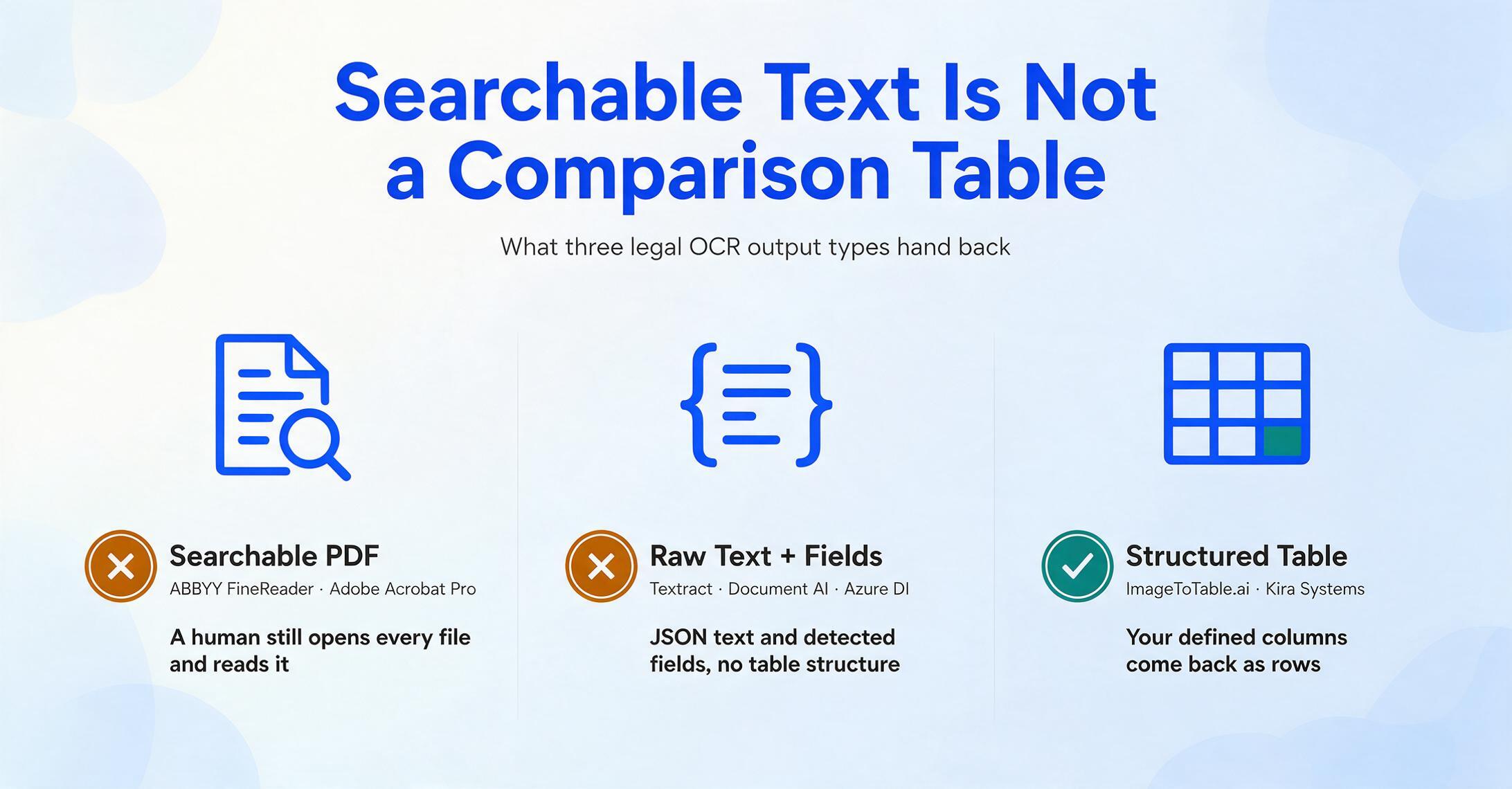
The tools above largely share a core assumption: that a document's structure is predictable enough to define rules or train models for it. ABBYY preserves layout but does not extract structured data. Kira extracts structured data but requires training and only handles contracts. The cloud OCR APIs (Textract, Document AI, Azure DI) return raw text and detected form fields but do not organize data into the table structure most legal teams need for analysis.
ImageToTable.ai approaches the problem differently. Instead of starting from the document's layout (position-based extraction), it starts from the user's output — you define the columns you want, and the AI finds the matching data by understanding what each field means on the page. This is called Custom Column Extraction, and it belongs to a category the industry calls AI Data Extraction — distinct from traditional OCR (which reads characters but does not understand them) and Intelligent Document Processing (which requires templates and training).
Where it shines in legal work: The practical advantage for legal professionals is format independence. A lawyer reviewing NDAs from five different counterparties will encounter five different layouts — some one page, some seven, some with exhibits, some without. A template-based tool would need separate configuration for each counterparty's format. ImageToTable.ai reads the documents by semantic content, not by position. Define columns for "Party Name," "Effective Date," "Governing Law," "Confidentiality Period," and "Non-Compete Scope (Yes/No)" once, and the AI extracts these fields from all five documents regardless of where they sit on the page. Results export to a single Excel table — one row per contract.
The tool also supports batch-first processing: upload an entire due diligence document set, define your extraction columns, and the AI processes the batch as a single operation with merged output. For a firm receiving 30 contracts for a deal, that means one upload, one extraction run, one Excel file — not thirty individual OCR operations.
ImageToTable.ai processes PDF, JPG, PNG, WebP, and AVIF inputs. It supports up to 99% accuracy on printed table data and processes a single page in 5-10 seconds — roughly 18× faster than manual data entry. The Google Sheets add-on lets legal teams extract contract data directly into a spreadsheet without leaving their document management environment. And the Collection Link feature — a shareable upload link with verification code — allows firms to collect documents from clients, opposing counsel, or third parties without requiring them to register.
Best for: Legal teams that need structured data extracted from contracts, agreements, and legal forms across multiple document formats — especially firms doing M&A due diligence, contract portfolio analysis, or intake document processing. Suitable for firms of all sizes because of the free tier and transparent pricing.
Not ideal for: Litigation eDiscovery workflows that require full review platform features (RelativityOne handles that use case). Firms that need format-preserving PDF output rather than structured spreadsheet data. Teams with very simple needs (a searchable PDF of one contract) will find the tool's capabilities exceed their requirements.
Files are processed securely and not stored. Try extracting key clauses, dates, and party names from a sample contract.
9. Tesseract — Free Open-Source Option for Developer-Led Firms
Tesseract is the most widely used open-source OCR engine, maintained by Google since 2006. It is free, supports 100+ languages, and has an active developer community that has produced wrappers and tools (OCRFeeder, gImageReader) that provide a basic graphical interface.
Where it shines in legal work: For firms with in-house technical capability, Tesseract offers something no commercial tool can match: zero-cost deployment at any volume. A firm that needs to OCR 50,000 pages of archived case files without a budget for enterprise software can set up a Tesseract pipeline on a single server and process the entire collection at the cost of electricity alone. Firms using document management systems that support custom integrations can add Tesseract as a local OCR backend for scanned document ingestion.
Best for: Developer-led legal teams, firms with IT staff who can manage command-line tools, and budget-conscious organizations that prioritize zero licensing cost over ease of use and accuracy on complex layouts.
Not ideal for: Non-technical legal professionals — Tesseract has no professional GUI, no support team, and no SLA. Accuracy on multi-column legal documents, low-quality scans, and documents with mixed fonts is noticeably worse than commercial alternatives, which means more manual correction time. As noted in our best open-source OCR tools comparison, Tesseract remains a strong choice for developers building custom pipelines but requires significant engineering effort to productize.
Which OCR Tool Is Right for Your Law Firm?
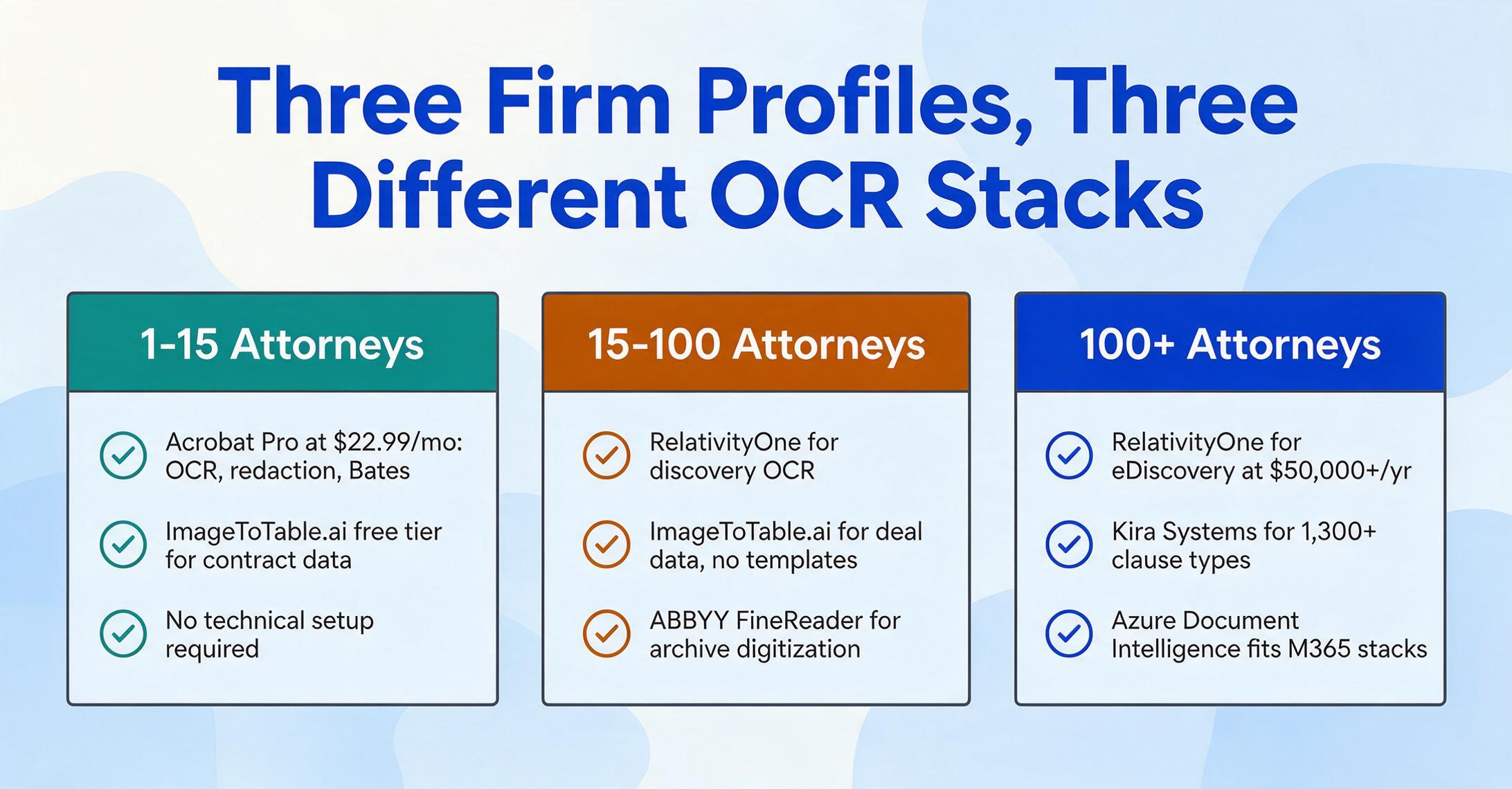
There is no single best legal OCR tool — the right choice depends on your firm's practice area, document volume, technical capacity, and primary workflow. Here is how the decision breaks down by firm profile:
Solo practitioners and small firms (1-15 attorneys): The most common legal OCR need for this group is making scanned documents searchable and occasionally extracting data from contracts or court forms. Adobe Acrobat Pro at $22.99/month covers PDF workflow, redaction, Bates stamping, and basic searchable OCR in one tool. For firms that need structured contract data extraction — pulling clause language for lease negotiations or comparing engagement letter terms — ImageToTable.ai free tier provides a zero-cost starting point. Both tools require no technical setup.
Mid-size firms (15-100 attorneys): This group typically handles a mix of litigation discovery and transactional work. For litigation, RelativityOne (or Everlaw at lower entry pricing) handles the full eDiscovery lifecycle with built-in OCR. For contract work in M&A, real estate, or corporate practice, ImageToTable.ai provides structured data extraction without the training overhead of enterprise contract analysis tools. Firms that need a reliable desktop OCR backup for document comparison and archive digitization should add ABBYY FineReader.
Large firms and corporate legal departments (100+ attorneys): These organizations typically operate with dedicated IT and legal operations teams. The optimal setup is a tiered strategy: RelativityOne or Everlaw for eDiscovery processing, Kira Systems for high-volume contract analysis in M&A and compliance work, and one of the cloud OCR APIs (Azure Document Intelligence for Microsoft-centric firms, Amazon Textract for AWS-native firms) for custom document processing pipelines. Desktop tools like ABBYY FineReader and Adobe Acrobat Pro serve as department-level utilities for document comparison, redaction, and ad hoc OCR.
For developers building legal tech: If you are building a document processing pipeline for a legal application — internal tooling at a law firm or a legal tech product — the starting question is whether you need raw text (use a cloud OCR API like Textract or Azure DI) or structured, field-level data (consider an AI extraction approach). Tesseract is viable as a free local OCR engine for pre-processing, and Docling (an open-source document conversion library) fills the gap between raw OCR output and LLM-ready Markdown or JSON. The general OCR software comparison guide covers the developer-oriented tools in more detail, including deployment models and API benchmarks.
Frequently Asked Questions
What makes OCR software different for legal documents compared to general documents?
Legal OCR must preserve structural elements that general OCR tools routinely lose: Bates numbering, privilege markings, multi-column reading order (briefs, statutes), cross-page clause continuity, and specialized legal vocabulary (Latin terms, legal citation formats). Additionally, the tool must meet the data security requirements of ABA Model Rule 1.6(c) — encrypted processing, access controls, and clarity about whether uploaded documents are used to train the vendor's AI models.
Does ABA Model Rule 1.1 require law firms to use OCR?
ABA Model Rule 1.1 Comment 8 requires lawyers to "keep abreast of changes in the law and its practice, including the benefits and risks associated with relevant technology." This does not mandate OCR adoption specifically, but it does mean that a lawyer handling document-heavy practice areas cannot remain unaware of technology that directly affects competence, efficiency, and confidentiality in document handling. Thirty-eight states had adopted the technology competence comment as of the most recent ABA survey. For a law firm processing scanned documents, selecting an OCR tool that meets confidentiality requirements (Rule 1.6) and provides accurate, reviewable output is increasingly expected as part of competent practice.
What is the best free OCR option for a solo law firm?
For a solo practitioner who needs searchable PDFs from scanned documents, Adobe Acrobat Pro's free trial is the most practical option during evaluation. For ongoing free use, Tesseract through a GUI wrapper like OCRFeeder provides basic functionality but requires technical setup and delivers lower accuracy on complex legal layouts. ImageToTable.ai's free tier allows a limited number of extractions per month and is the best option if your need is structured data from contracts or forms rather than searchable PDFs. See our best free OCR software guide for detailed free-tier comparisons across all categories.
Can OCR software handle eDiscovery document processing?
General OCR tools can extract text from discovery documents, but eDiscovery requires more than text extraction — it requires a review platform that organizes, deduplicates, searches, tags, and produces documents with privilege logs and Bates stamps intact. Platforms like RelativityOne and Everlaw include OCR as one component of a full eDiscovery workflow. Standalone OCR tools (desktop or API) can feed text into an eDiscovery platform but do not replace it. For small-scale discovery (under 10,000 documents), some firms handle OCR with Adobe Acrobat Pro and manage review manually — but at any significant volume, a purpose-built eDiscovery platform is more cost-effective and defensible.
Will OCR accurately extract contract clauses like termination rights and indemnification caps?
Traditional OCR — even the most accurate engines — extracts characters, not meaning. It can tell you that the string "indemnification" appears on page 7, but it cannot distinguish between an indemnification obligation and an indemnification limitation or separate the cap amount from surrounding language. For clause-level extraction, you need either a specialized contract analysis tool like Kira Systems (which has trained ML models for 1,300+ legal provisions) or an AI extraction tool that reads documents semantically rather than positionally. ImageToTable.ai's Custom Column Extraction, for example, lets you define a column like "Indemnification Cap" — the AI reads the document, finds the relevant clause, identifies the capped amount (or returns "Not found" if the clause is absent), and puts it in the spreadsheet cell.
Is cloud-based OCR safe for confidential legal documents?
It depends on the vendor's data handling practices, which is why ABA Model Rule 1.6(c) requires lawyers to make "reasonable efforts" to evaluate security before uploading client documents. Key questions to ask any OCR vendor before use: Are documents encrypted in transit and at rest? Are uploaded documents used for model training (if yes, the tool cannot be used with client data without informed consent)? Is the service SOC 2 Type II certified? Can documents be deleted on your timeline after processing? Where is data processed (data residency matters for regulatory compliance)? Among the tools in this guide, enterprise platforms like RelativityOne and cloud API services from AWS, Google, and Azure each publish detailed compliance reports. ImageToTable.ai processes files in memory without permanent storage and offers documentation on its data handling practices.
What is the difference between traditional OCR and AI extraction for legal documents?
Traditional OCR converts scanned text into machine-readable characters — it turns a page of pixels into a page of letters, numbers, and spaces. AI extraction goes further: it reads the document the way a person would, recognizing that "§ 78j(b)" is a legal citation, that the number in the signature block is an indemnification cap, and that "CONFIDENTIAL" in the header modifies the entire document's treatment. The distinction between OCR and AI extraction matters for every legal use case because the goal is rarely "make this text searchable" — it is "find the specific data points I need across a set of documents." Our detailed comparison of OCR vs AI extraction explains the technical and practical differences with concrete legal document examples.
Making the Choice That Fits Your Practice
The legal profession's relationship with OCR has always been shaped by a tension that the ILTA survey data makes explicit: law firms know digitization is necessary — 88% are mostly or fully in the cloud — yet 57% say change resistance is the top barrier to adopting new technology, and 54% cite security concerns. That tension is not resolved by finding the "most accurate" OCR tool. It is resolved by matching the tool to the specific workflow where it will be used, then verifying that the tool's data security practices meet the firm's obligations under ABA Model Rule 1.6.
For a litigation firm processing discovery documents, the right choice is an eDiscovery platform with built-in OCR (RelativityOne, Everlaw). For a transactional practice extracting contract data across deal documents, the right choice is a tool that does not require templates or training (ImageToTable.ai, Kira Systems — depending on volume and budget). For a solo practitioner who needs to digitize incoming documents for search and storage, Adobe Acrobat Pro or ABBYY FineReader covers the basics competently. And for every firm, regardless of size, the right approach includes a verification step: test the tool on your actual documents — not a vendor's sample set — before committing to a subscription or deployment.
The cost of choosing the wrong OCR tool is not just the subscription fee. It is the time spent manually correcting extraction output. It is the missed clause in a contract that a template-based tool did not find because the layout was unfamiliar. It is the privilege designation that got dropped in a production. Those are costs that a comparison table cannot predict — which is why every tool on this list offers either a free trial, a free tier, or a demo. Use them.
The shortest path to the right OCR tool for your firm: test on your documents, not a demo set.
Take advantage of free tiers and trial periods. Upload a real contract, a real court filing, and a real discovery document to each tool you are considering. Compare not just the accuracy of the text output, but whether the data comes out in a form you can actually use.