Best Open Source OCR Tools 2026:
Tesseract, EasyOCR, PaddleOCR & Beyond
Open-source OCR in 2026 splits into two distinct eras: traditional pipeline engines (detect text regions, recognize characters one at a time, then reconstruct the page) and vision-language models (one model looks at the whole document and reads it like a human would). Most roundups treat them as interchangeable alternatives. They aren't. The right choice depends on your document types, your hardware budget, and whether you need raw text or structured output. This guide covers seven pure open-source tools — no commercial products, no freemium tiers — with the developer workflow details that matter when you're building a pipeline, not just running a one-off test. If you are new to the fundamentals, our guides on what OCR is, how AI OCR differs, and how OCR actually works cover the basics before this deep-dive. Disclosure: I have no affiliation with any tool on this list. Every external link goes to the tool's own project page or an independent benchmark so you can verify claims before committing to a stack.
Key Takeaways
- Seven open-source OCR tools all score between 95 and 97 percent character accuracy on clean English text — near-identical numbers that make choosing feel like a coin toss.
- Character accuracy is a decoy metric because a 97 percent score on a collapsed ten-column table still leaves you reconstructing columns from scrambled cells by hand.
- The real split in 2026 is not between tools but between eras — traditional engines that detect characters versus VLMs that read documents and output structured markdown with tables already intact.
Quick Comparison Table
Seven tools, two architectural eras. The table below shows the headline differences. The sections that follow go deeper into each tool's real-world behavior — including setup time, failure modes, and pipeline integration quirks that no benchmark table captures.
| Tool | Architecture | Languages | GPU Required? | Layout Handling | Best For |
|---|---|---|---|---|---|
| Tesseract | Traditional LSTM | 100+ | No (CPU only) | Weak — loses tables, columns | Clean printed text, CPU-only bulk |
| EasyOCR | Traditional CRNN | 80+ | Optional (GPU accelerates) | Weak — flat text output | Quick prototyping, scene text |
| PaddleOCR | Traditional DL pipeline | 80+ (strong CJK) | Recommended for speed | Good — tables, columns, forms | Production multilingual, complex layouts |
| Surya OCR | VLM (650M params) | 90+ | Yes (optimal), CPU possible | Excellent — layout + table + reading order | Document layout analysis + OCR in one model |
| Docling | Ensemble (VLM + layout) | Multi (via EasyOCR backend) | Recommended | Excellent — full document structure | RAG pipelines, structured document conversion |
| olmOCR | VLM (7B params) | Multi | Yes (NVIDIA GPU) | Excellent — multi-column, tables, equations | Large-scale PDF conversion, scientific documents |
| Qwen2.5-VL | VLM (3B/7B/72B) | Multi (strong CJK) | Yes | Excellent — flexible VLM reading | General VLM-based OCR, custom extraction tasks |
How We Evaluated
This is not a lab benchmark. Published third-party accuracy numbers are cited where available (GigaGPU's April 2026 comparison for Tesseract/EasyOCR/PaddleOCR; Surya's olmOCR-bench score; olmOCR's published benchmarks), but the primary evaluation criteria here are the ones that matter when you're choosing a stack:
Where possible we also cross-check against our own first-party OCR benchmark — 8 open-source engines run on the same RTX 4090, same receipts (SROIE 2019 + CORD v2), same frozen protocol, reporting CER/WER, field-extraction F1, latency, and cost per 1,000 pages with every number traced to a published CSV row. Two findings from that run directly inform the choices below: on character accuracy the best traditional engine (docTR, CER 0.197) ties the best VLM (Surya2, 0.191) — so "VLM is inherently more accurate" does not hold on clean printed text — and once an LLM postprocessor is added, six of the eight engines converge to a 0.57–0.62 field-F1 band regardless of family. See the cost benchmark and latency benchmark for the per-engine operating numbers. Those are our measurements on one document type; the third-party numbers below cover a broader input mix.
- Integration surface — how clean is the Python API, does it return structured data or raw text, does it require glue code
- Hardwall requirements — what hardware must you provide before the tool works at all (CPU-only vs GPU-mandatory)
- Layout intelligence — can it tell the difference between a table header and a page number, or does it just emit character streams
- Community health — recent commits, open issue count, response to pull requests, established ecosystem
- Custom training surface — can you fine-tune it on your own document types, and how much expertise does that require
Every tool link below goes to the project's official GitHub repository. All external references are linked so you can verify the claims yourself.
The Two Eras of Open-Source OCR
Before getting into individual tools, it helps to understand the architectural split that makes 2026 a uniquely interesting year for open-source OCR.
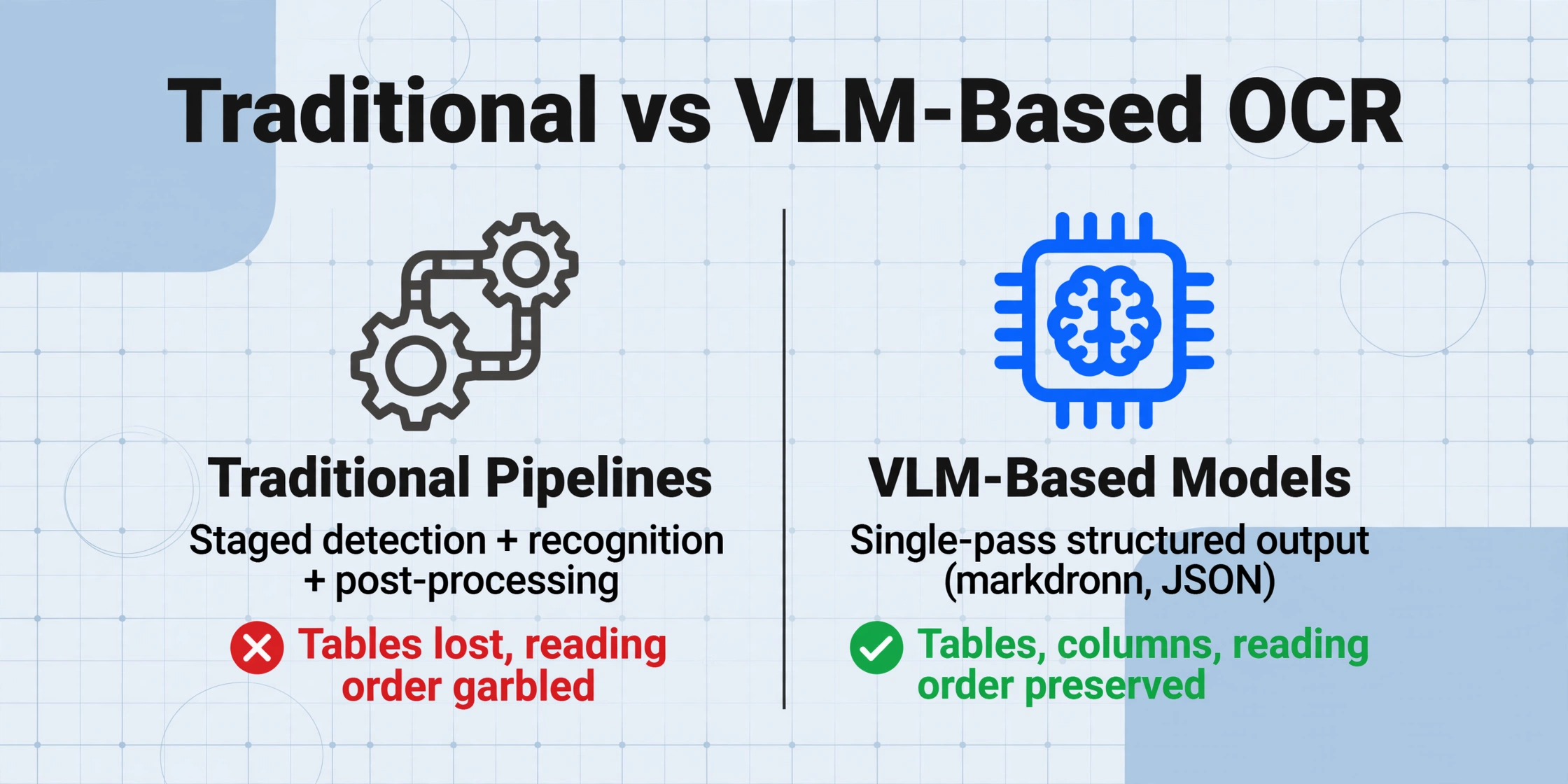
Traditional OCR pipelines (Tesseract, EasyOCR, PaddleOCR) work in stages: a text detection model finds regions of text, a recognition model reads each region character by character, and a post-processing step attempts to reconstruct the page structure. Each stage is a separate model or algorithm, and errors cascade — a missed detection means the recognizer never sees that text.
VLM-based OCR (Surya, olmOCR, Qwen2.5-VL) treats document reading as a single multimodal task. A vision-language model looks at the entire page image and generates structured output — markdown, JSON, or HTML — in one pass. Docling sits in between: it uses ensemble pipelines built on specialized models but provides a unified API that feels VLM-like.
The practical difference: traditional pipelines are cheaper to run (CPU-friendly, small models) but require extensive post-processing glue code to reconstruct tables and reading order. VLM-based OCR is GPU-hungry but delivers structured output directly — no "table lost" or "column A merged into column B" surprises. If you process clean printed text in bulk with simple layouts, traditional engines still win on cost. If your documents have tables, multi-column layouts, or mixed formatting, a VLM-based approach will save you more engineering time than its GPU cost.
1. Tesseract OCR — The CPU Workhorse
Tesseract is the oldest and most battle-tested open-source OCR engine on this list. Originally developed at Hewlett-Packard in the 1980s and maintained by Google since 2006, it supports over 100 languages and runs on every major OS. It uses an LSTM-based neural network (since version 4) for character recognition and a traditional page segmentation algorithm for layout analysis.
Quick Start
pip install pytesseract
# Or via system package manager: sudo apt install tesseract-ocr

# Python usage
import pytesseract
from PIL import Image
text = pytesseract.image_to_string(Image.open("invoice.png"), lang="eng")
print(text)
Tesseract's strength is its zero-cost CPU-only operation and massive ecosystem. On clean, high-resolution printed text at 300 DPI, it delivers approximately 96-97% character accuracy in published benchmarks. It processes roughly 25 pages per minute on a modern CPU with no GPU required — making it the most cost-efficient option for bulk printed text digitization. New to the engine? Our step-by-step Tesseract setup guide walks through installation on Windows, Mac, and Linux plus the beginner pitfalls (including the Windows PATH issue) in about 15 minutes.
The limitations are well documented. Tesseract has no native concept of document structure — it outputs flat text with line breaks approximating the original layout. Tables collapse into sequential text cells with no row/column association. Multi-column documents produce garbled reading order. On challenging inputs like mobile phone photos, accuracy drops to approximately 84% in independent tests. Handwriting recognition is poor at roughly 45% accuracy — functionally unusable for cursive or mixed-hand documents.
Best for: CPU-only bulk processing of clean printed documents where the output can tolerate flat text — think digitizing book pages, archival document search, or preprocessing for NLP pipelines.
Not ideal for: Documents with tables, multi-column layouts, handwriting, low-resolution photos, or any scenario requiring structured (field-level) output. Also not ideal if you want an API — Tesseract is a command-line tool with a Python wrapper, not a service.
2. EasyOCR — The Quickest Path to a Working Demo
EasyOCR, built on PyTorch by Jaided AI, is designed for one thing: getting OCR running with minimal friction. A four-line Python script processes an image and returns recognized text with per-character confidence scores. It supports roughly 80 languages including Latin, CJK, Arabic, and Devanagari scripts — broader coverage than its model size would suggest, because it routes different scripts through dedicated recognition heads.
Quick Start
pip install easyocr

# Python usage
import easyocr
reader = easyocr.Reader(["en", "fr"])  # specify languages
results = reader.readtext("receipt.jpg")
for bbox, text, confidence in results:
    print(f"{text} ({confidence:.2f})")
EasyOCR's convenience is its main feature and its main limitation. On clean English printed text, independent benchmarks show approximately 95% character accuracy — slightly below Tesseract for ideal inputs. But EasyOCR handles curved and rotated text significantly better (82% vs Tesseract's 52% in GigaGPU's benchmarks), making it more useful for real-world photos where the document isn't perfectly aligned.
The performance trade-off is real. On CPU, EasyOCR is roughly 2-3x slower than Tesseract at roughly 8 pages per minute. GPU acceleration (on an RTX 3090) brings it to approximately 60 pages per minute — a 7.5x speedup. The model dependencies are also heavier at roughly 500 MB vs Tesseract's ~10 MB. It handles handwriting at roughly 62% accuracy — better than Tesseract but still not production-usable for most handwritten document workflows.
The Reddit r/LocalLLaMA community frequently discusses EasyOCR as the "instant noodle of OCR" — quick results with minimal effort, but not the tool you reach for when accuracy or throughput matter most. Its failures tend to be predictable (character substitutions for similar-looking glyphs) rather than the unrecoverable noise Tesseract produces, which means regex-based post-processing can salvage many results.
Best for: Python developers who need a working OCR prototype in under five minutes, especially for multilingual scene text or curved/rotated text on real-world photos.
Not ideal for: High-volume batch processing on CPU-only hardware, complex document layouts (tables, forms, multi-column), or production deployments requiring structured field extraction.
If you're choosing specifically between Tesseract and EasyOCR, our Tesseract vs EasyOCR head-to-head goes deeper on the differences that matter in a real pipeline — error recovery, per-document-type accuracy, and install weight.
3. PaddleOCR — Production-Grade Multilingual OCR
Developed by Baidu under the PaddlePaddle framework, PaddleOCR is the most feature-complete traditional pipeline engine on this list. Unlike Tesseract and EasyOCR, which focus exclusively on text recognition, PaddleOCR ships with text detection, recognition, table extraction, layout analysis (PP-Structure), and structured output in a single codebase. It has accumulated over 76,000 GitHub stars and is the closest open-source competitor to Tesseract in terms of ecosystem maturity.
Quick Start
pip install paddlepaddle paddleocr

# Python usage
from paddleocr import PaddleOCR
ocr = PaddleOCR(use_angle_cls=True, lang="en")
result = ocr.ocr("invoice.png")
for line in result[0]:
    print(f"{line[1][0]} (confidence: {line[1][1]:.2f})")
PaddleOCR leads every accuracy category in published benchmarks among traditional engines: 97.2% on clean printed English, 91.5% on noisy scanned documents, 88.7% on curved/rotated text, and 72.8% on handwriting. Its CJK support is particularly strong — expected given its Chinese origin — which makes it the default choice for teams processing mixed English-Chinese documents or any workflow involving East Asian scripts.
The latest updates in 2026 have been significant. PP-OCRv6 was released in May 2026, further improving accuracy and speed. The PaddleOCR-VL-1.5 model (January 2026) introduces vision-language capabilities that push accuracy to 94.5% on the OmniDocBench v1.5 benchmark — bridging the gap between traditional pipelines and VLM-based approaches. Performance is impressive: on an RTX 3090, PaddleOCR processes roughly 120 pages per minute, compared to Tesseract's CPU-bound 25 pages per minute.
Best for: Production multilingual OCR pipelines, especially those involving CJK scripts, complex layouts with tables, or noisy scanned documents. The table extraction via PP-Structure is genuinely useful and not available in any other traditional open-source engine.
Not ideal for: Quick one-off OCR (the dependency setup is involved), CPU-only deployments (performance drops significantly), or teams that want to avoid the PaddlePaddle framework dependency — it's a substantial framework lock-in compared to the more portable PyTorch-based alternatives.
4. Surya OCR — Document Layout Intelligence in Under 1B Parameters
Surya OCR, developed by Datalab, is one of the most impressive open-source releases of 2025-2026. At just 650 million parameters, it achieves an 83.3% score on the olmOCR-bench benchmark — the best result for any model under 3 billion parameters. It combines OCR, layout analysis, reading order detection, and table recognition in a single model. The model weights are available under the OpenRAIL-M license (free for research, personal use, and startups under $5M funding), and the code is Apache 2.0 licensed.
Quick Start
pip install surya-ocr

# Python usage
from surya import OCR
from PIL import Image
ocr = OCR()
result = ocr.recognize([Image.open("invoice.png")])
for text_line in result[0].text_lines:
    print(text_line.text)
What makes Surya architecturally interesting is its unified approach. Unlike traditional pipelines that chain detection → recognition → layout analysis as separate models, Surya uses a vision-language model as the inference backend (served by vLLM on GPU or llama.cpp on CPU/Apple Silicon). This gives it structural understanding that traditional engines lack. The SuryaInferenceManager automatically spawns the right backend, and the API returns richly annotated JSON with bounding boxes, confidence scores, and semantic region labels (headers, tables, images, text blocks).
Performance is competitive: Surya processes approximately 5 pages per second on an RTX 5090 (42 pages/min for typical workloads) and can run on Apple Silicon via Metal at roughly 0.1 pages per second — usable for occasional documents but not batch processing. It supports 91 languages including strong coverage of Asian scripts. The main limitation is that Surya is designed for documents, not general photos — it struggles with non-document images and may ignore advertisement-like regions that its detection model has been trained to skip.
Best for: Teams that need document layout analysis and OCR in one model without the complexity of multi-stage pipelines. The layout-aware output (JSON with bounding boxes, region types, and reading order) makes it ideal for downstream document intelligence workflows.
Not ideal for: General photo OCR (it's specialized for documents), GPU-poor environments (CPU performance is significantly slower), or scenarios requiring permissive commercial licensing of model weights.
5. Docling — Document Conversion for RAG Pipelines
Docling, developed by IBM Research and contributed to the LF AI & Data Foundation, is not an OCR engine in the traditional sense. It is a document conversion toolkit that takes PDFs, DOCX, PPTX, and images and outputs structured JSON, Markdown, or DocTags — a universal markup format that captures layout, tables, formulas, and reading order. It has grown to over 20,000 GitHub stars and is used in production by NVIDIA (optimized for RTX PCs) and within IBM's Watsonx platform.
Quick Start
pip install docling

# Python usage
from docling.document_converter import DocumentConverter
converter = DocumentConverter()
doc = converter.convert("document.pdf")
print(doc.export_to_markdown())  # Structured markdown output
print(doc.export_to_dict())      # Full JSON representation
Docling's architecture combines two specialized IBM models: a Layout Analysis Model trained on ~81,000 manually labeled pages (patents, manuals, 10-K filings) for identifying document elements, and TableFormer for recovering table structure. For scanned documents, it integrates EasyOCR as the OCR backend. The pipeline outputs a DoclingDocument — a Pydantic-based representation that preserves page hierarchy, table cells with row/column indices, picture locations with captions, and mathematical formulas in LaTeX.
Docling's true strength is its integration ecosystem. It plugs directly into LlamaIndex and LangChain for RAG pipelines, and NVIDIA has documented 4x performance improvements when running Docling on RTX PCs versus CPU. IBM also released Granite-Docling-258M (Apache 2.0) in 2026 — a single 258M parameter VLM that does end-to-end document understanding in one shot, complementing the ensemble pipeline approach.
Best for: Teams building RAG pipelines who need to convert diverse document formats into LLM-ready structured data. The combination of layout preservation, table structure recovery, and direct LangChain/LlamaIndex integration is unique among open-source tools.
Not ideal for: Scenarios requiring raw OCR text output without document structure, or teams that need a lightweight dependency — Docling pulls in significant model weights and has an involved setup for GPU deployment.
6. olmOCR — High-Volume PDF Conversion at Industrial Scale
olmOCR, developed by the Allen Institute for AI (Ai2), is a 7-billion-parameter VLM fine-tuned specifically for document OCR. It is built on Qwen2-VL-7B and trained on the olmOCR-mix-0225 dataset — 250,000 pages labeled using GPT-4o with a technique called Document Anchoring that enhances extraction quality by leveraging embedded PDF text and metadata. The model and code are fully open-source, and Ai2 has published transparent documentation of the training data and methodology.
Quick Start
pip install olmocr

# Python usage
from olmocr.data.renderpdf import render_pdf_to_base64png
from olmocr.prompts import build_finetuning_prompt
# Process a PDF page — the toolkit handles rendering and prompting
image_b64 = render_pdf_to_base64png("document.pdf", page=1)
# Feed to the model via your preferred vLLM or SGLang server
The headline number that makes olmOCR stand out is its inference cost: Ai2 reports that olmOCR can convert one million PDF pages for approximately $190 using optimized SGLang inference — roughly 1/32nd the cost of using GPT-4o for the same task. This makes it the most cost-effective option for large-scale document digitization projects, assuming you have the GPU infrastructure to run a 7B model.
Performance on the olmOCR-bench benchmark reaches 82.4% overall (for the olmOCR-2-7B-1025 version, released October 2025), with strong results on mathematical equations, dense tables, and multi-column layouts. The model supports automatic page rendering, rotation correction, and retry logic through the olmOCR toolkit, making it suitable for processing millions of heterogeneous documents without manual intervention.
The practical limitation is hardware. olmOCR requires a recent NVIDIA GPU with at least 16 GB of VRAM for the 7B model at bfloat16 precision. It does not run on CPU or Apple Silicon (though community GGUF quantizations exist for the base Qwen model). The model weights are approximately 14 GB, and inference throughput is roughly 2-3 pages per second on an RTX 4090 — fast enough for batch processing but not real-time.
Best for: Large-scale PDF digitization projects — think digitizing millions of academic papers, government filings, or historical documents. The cost efficiency ($190/million pages) and automated pipeline make it the industrial-scale champion.
Not ideal for: Teams without NVIDIA GPU infrastructure, real-time or interactive OCR applications, or use cases requiring lightweight deployment. The 7B model is overkill for simple text extraction from clean documents.
7. Qwen2.5-VL — The General-Purpose VLM That Excels at OCR
Qwen2.5-VL, developed by Alibaba's Qwen team, is a vision-language model family (3B, 7B, and 72B parameters) that performs strongly across visual understanding tasks — including OCR. While not purpose-built for document processing like olmOCR or Surya, it is a general-purpose VLM with excellent text recognition and information extraction capabilities. This makes it uniquely flexible: you can prompt it to extract specific fields from a document, summarize a page, or transcribe text in a specific format, all with the same model.
Quick Start
pip install transformers qwen-vl-utils torch

# Python usage — using the Hugging Face Transformers library
from transformers import Qwen2VLForConditionalGeneration, AutoProcessor
model = Qwen2VLForConditionalGeneration.from_pretrained(
    "Qwen/Qwen2.5-VL-7B-Instruct", torch_dtype="bfloat16"
)
processor = AutoProcessor.from_pretrained("Qwen/Qwen2.5-VL-7B-Instruct")
# Use the model with text + image prompts
# "Extract all text from this invoice and return it as structured fields"
Qwen2.5-VL's OCR capabilities have been significantly enhanced over its predecessor, with improved multi-scenario, multi-language, and multi-orientation text recognition. It handles vertical text, curved text, and mixed-language pages that would break traditional engines. The 72B version competes with commercial models like GPT-4o on document understanding benchmarks, while the 3B variant is small enough to run on consumer GPUs (approximately 6 GB VRAM).
The key advantage of Qwen2.5-VL over purpose-built OCR tools is flexibility. You are not limited to one output format or pipeline — you can prompt the model to return JSON with specific fields, extract tables as markdown, or describe document structure in natural language. This makes it ideal for document information extraction tasks where you need to target specific data points rather than transcribe the entire page. The r/LocalLLaMA community frequently discusses Qwen2.5-VL as the preferred general-purpose model for OCR tasks, with users reporting that its accuracy on complex layouts often exceeds specialized OCR tools, especially when prompted with explicit extraction instructions.
The trade-off is latency and cost. Even the 7B version requires significant GPU resources, and the 72B version needs multiple GPUs. Unlike traditional OCR engines that process a page in milliseconds, VLM-based inference takes 2-5 seconds per page depending on model size and hardware. For bulk text transcription, specialized OCR tools remain more efficient. For targeted information extraction from complex documents, Qwen2.5-VL's flexibility is unmatched.
Best for: Targeted information extraction from complex documents — prompting the model to extract specific fields in a specific format. Also ideal for teams that want one model for OCR, document understanding, and general visual QA.
Not ideal for: High-throughput bulk OCR where raw transcription speed matters, CPU-only deployments, or scenarios where you need a lightweight self-contained library rather than a GPU-backed model serving infrastructure.
Which Tool Should You Choose?
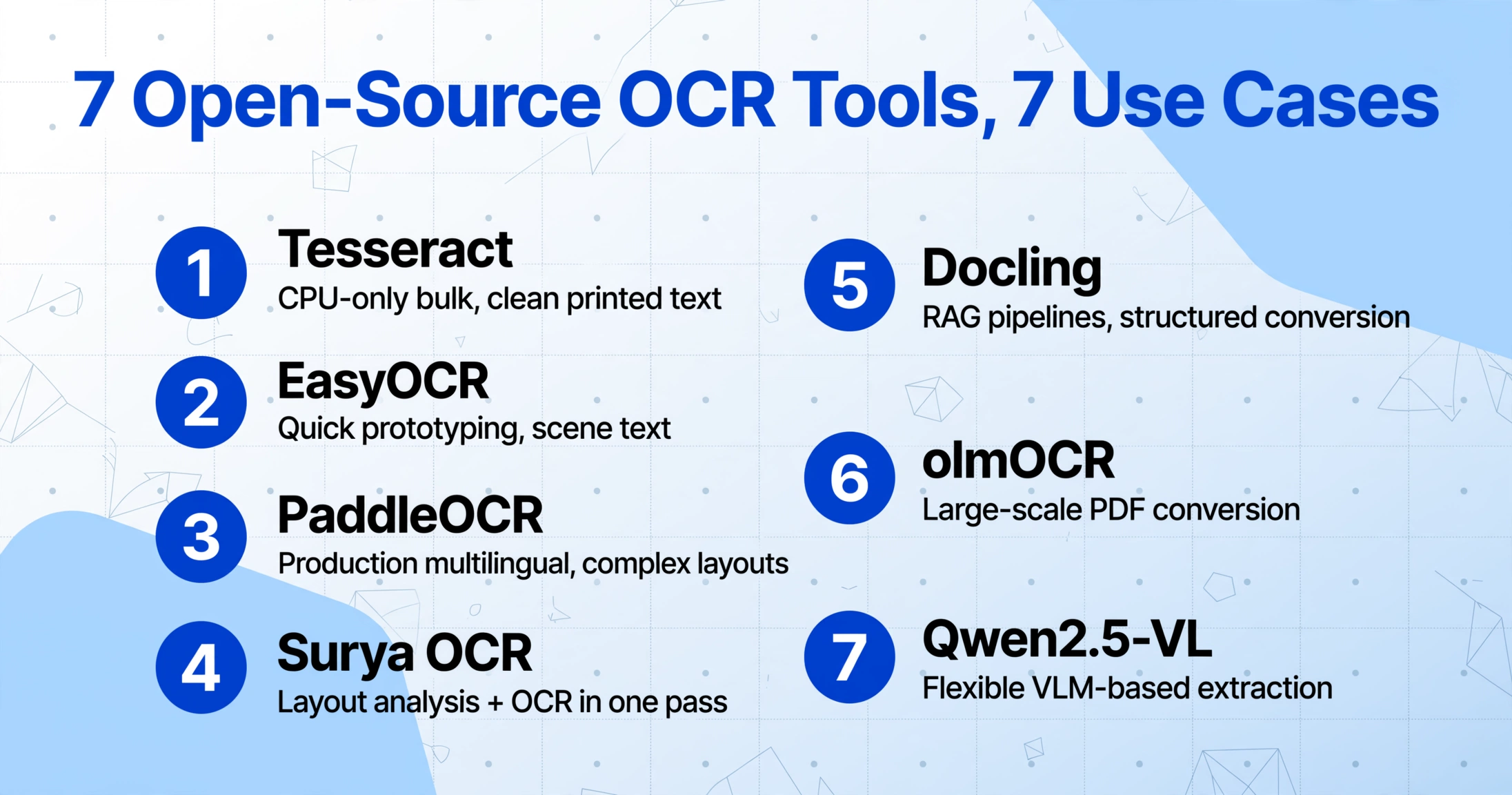
If your documents are clean printed text and you need CPU-only bulk processing at zero cost: Tesseract. It is the only option that works well without a GPU and on any hardware.
If you need a quick prototype for multilingual scene text or curved text from photos: EasyOCR. Setup takes five minutes and the confidence scores make post-processing tractable.
If you are building a production multilingual pipeline with complex layouts and have GPU access: PaddleOCR. Its table extraction, CJK support, and throughput (120 pages/min on GPU) make it the most capable traditional engine.
If you need document layout analysis and OCR in one pass with a lightweight model: Surya OCR. At 650M params with layout-aware output, it is the best cost-accuracy trade-off among VLM-based options.
If you are building RAG pipelines and need structured document conversion: Docling. The LlamaIndex/LangChain integration and table structure recovery are unique.
If you have a large-scale PDF digitization project (millions of pages) and GPU infrastructure: olmOCR. The $190/million pages cost efficiency is unmatched.
If you want flexible VLM-based extraction where you prompt the model for specific fields in specific formats: Qwen2.5-VL. The 3B variant runs on consumer GPUs and the 72B variant competes with GPT-4o-level understanding.
The honest take: If you have GPU access, skip traditional engines for any document with tables, multi-column layouts, or mixed formatting. A VLM-based approach (Surya, olmOCR, or Qwen2.5-VL) delivers structured output directly and will save more engineering time on post-processing glue code than it costs in GPU compute. Keep Tesseract and PaddleOCR in your toolbox for the narrow cases they handle well — clean bulk text and high-throughput CJK respectively — but don't default to them for general document OCR in 2026.
Frequently Asked Questions
Is Tesseract still relevant in 2026?
Yes, but only for a specific use case: bulk processing of clean printed text where you can tolerate flat (unstructured) output. For any document with tables, columns, or handwriting, modern alternatives significantly outperform it. The main reason to still choose Tesseract in 2026 is the hardware requirement — it is the only tool on this list that runs efficiently on CPU without a GPU.
What's the difference between "free OCR" and "open-source OCR"?
Free OCR (covered in our Best Free OCR Software 2026 guide) includes free online services and commercial free tiers — Google Drive OCR, PDF24, OCR.space, and freemium tools like Parseur and Nanonets. Open-source OCR refers to self-hosted software with source code you can inspect and modify. The tools in this article are all open-source, meaning you self-host them on your own infrastructure, which gives you unlimited processing at the cost of setup and maintenance.
Do I need a GPU for these tools?
Tesseract is CPU-only and runs well on any modern processor. EasyOCR and PaddleOCR benefit from GPU acceleration but can run on CPU (slowly). Surya can run on CPU or Apple Silicon via llama.cpp but performance is approximately 50x slower than GPU. olmOCR and Qwen2.5-VL require an NVIDIA GPU — the 7B models need at least 16 GB VRAM. Docling's ensemble pipeline benefits from GPU but can process simpler documents on CPU.
Which open-source OCR tool handles handwriting best?
Among the tools reviewed, PaddleOCR leads on handwriting at approximately 73% accuracy in independent benchmarks (vs Tesseract's 45% and EasyOCR's 62%). The VLM-based tools (Surya, olmOCR, Qwen2.5-VL) show better handwriting recognition in practice, though published benchmarks are limited. For serious handwritten document processing, dedicated commercial AI services generally outperform open-source tools by a significant margin.
Can I train or fine-tune these tools on my own documents?
Tesseract supports custom training via its LSTM fine-tuning pipeline, but the process is involved and requires generating box files for each training image. EasyOCR supports training on custom data using the CRNN architecture. PaddleOCR has the most accessible fine-tuning pipeline, with documented examples for custom datasets. Surya and Docling do not currently support model fine-tuning — they are used as-is. olmOCR and Qwen2.5-VL can be fine-tuned using standard Hugging Face Transformers tooling, but effective fine-tuning requires substantial expertise, data, and GPU resources.
Which tool preserves table structure best?
Docling has the best table structure preservation thanks to its dedicated TableFormer model, which recovers row/column structure, merged cells, and headers. PaddleOCR's PP-Structure module also handles table extraction well. Among VLM-based tools, Surya and olmOCR produce markdown tables that preserve structure for most common table layouts.
Can I use these tools commercially?
License terms vary by tool. Tesseract (Apache 2.0), EasyOCR (Apache 2.0), PaddleOCR (Apache 2.0), and Docling (MIT/Apache 2.0) are fully permissive for commercial use. Surya's code is Apache 2.0, but model weights use a modified OpenRAIL-M license (free for startups under $5M funding/revenue — broader commercial use requires a paid license). olmOCR (Apache 2.0) and Qwen2.5-VL (Apache 2.0 for the 7B/72B, custom for 3B variant) are permissive. Always verify the specific license of the version you intend to deploy — model licenses can differ from code licenses.
When should I consider a commercial OCR tool instead?
Open-source OCR is excellent for prototyping and internal tools. But if you need field-level data extraction (not just text transcription), reliable handwriting recognition, or a zero-setup workflow for non-technical team members, commercial AI extraction tools generally deliver higher accuracy and better structured output. If you are currently evaluating commercial options, try running your actual documents through a tool before committing — open-source and commercial solutions differ most on the documents that matter to your specific workflow, not on standardized benchmarks.
The best OCR evaluation is the one you run on your own documents. Benchmark data gives you a starting point — actual results depend on your document quality, layout complexity, and target output format.
Try AI-Powered Document ExtractionNo signup required. Upload a document and see what modern AI extraction can do.