Tesseract vs EasyOCR 2026:
Which Open Source OCR Fits Your Project?
This comparison is written from the perspective of a developer or data engineer choosing between two free, self-hosted OCR engines for a document processing pipeline. Tesseract — Google's 40-year-old open-source engine — is lightweight, CPU-fast, and excels at clean printed text. EasyOCR — a PyTorch-native library from Jaided AI — uses deep learning for detection and recognition in a single pass, trades speed for accuracy on difficult documents, and gives you GPU acceleration when you need it. The question isn't which is "better." It's which one's trade-offs match your documents, your hardware, and your tolerance for post-processing.
Key Takeaways
- Two free OCR engines, both Apache 2.0, both claiming ~90%+ accuracy — every comparison article makes Tesseract and EasyOCR look like the same tool with different names.
- The number that actually separates them isn't accuracy but error recoverability: Tesseract's misreads are silent and permanent, EasyOCR's failures leave signatures you can spot and clean with a regex.
- Forget accuracy rankings — pick the engine whose mistakes your post-processing pipeline can survive, because errors will come and the only question is whether you'll notice them.
Quick Comparison: Tesseract vs EasyOCR
The table below summarizes the key differences across the dimensions that matter most in a real-world project. These numbers come from independent benchmarks run by GigaGPU and CodeSOTA on standard document test sets. Your mileage will vary depending on image quality, preprocessing, and document type.
| Dimension | Tesseract 5.5 | EasyOCR |
|---|---|---|
| Core technology | LSTM neural net + legacy pattern matching | PyTorch-based deep learning (CRAFT detector + CRNN recognizer) |
| Processing time (per page) | ~0.82 s | ~2.45 s (CPU) / ~0.85 s (GPU) |
| Confidence (clean printed text) | ~89.3% | ~96.8% |
| Install size | ~10 MB + language data | ~500 MB (PyTorch backend) |
| GPU support | No (CPU only) | Yes (CUDA 12.x) |
| Languages supported | 100+ | 80+ |
| Output format | Plain text (no confidence, no bounding boxes by default) | Structured list (text + confidence + bounding box per detection) |
| License | Apache 2.0 | Apache 2.0 |
| GitHub stars | ~73,000+ | ~29,000+ |
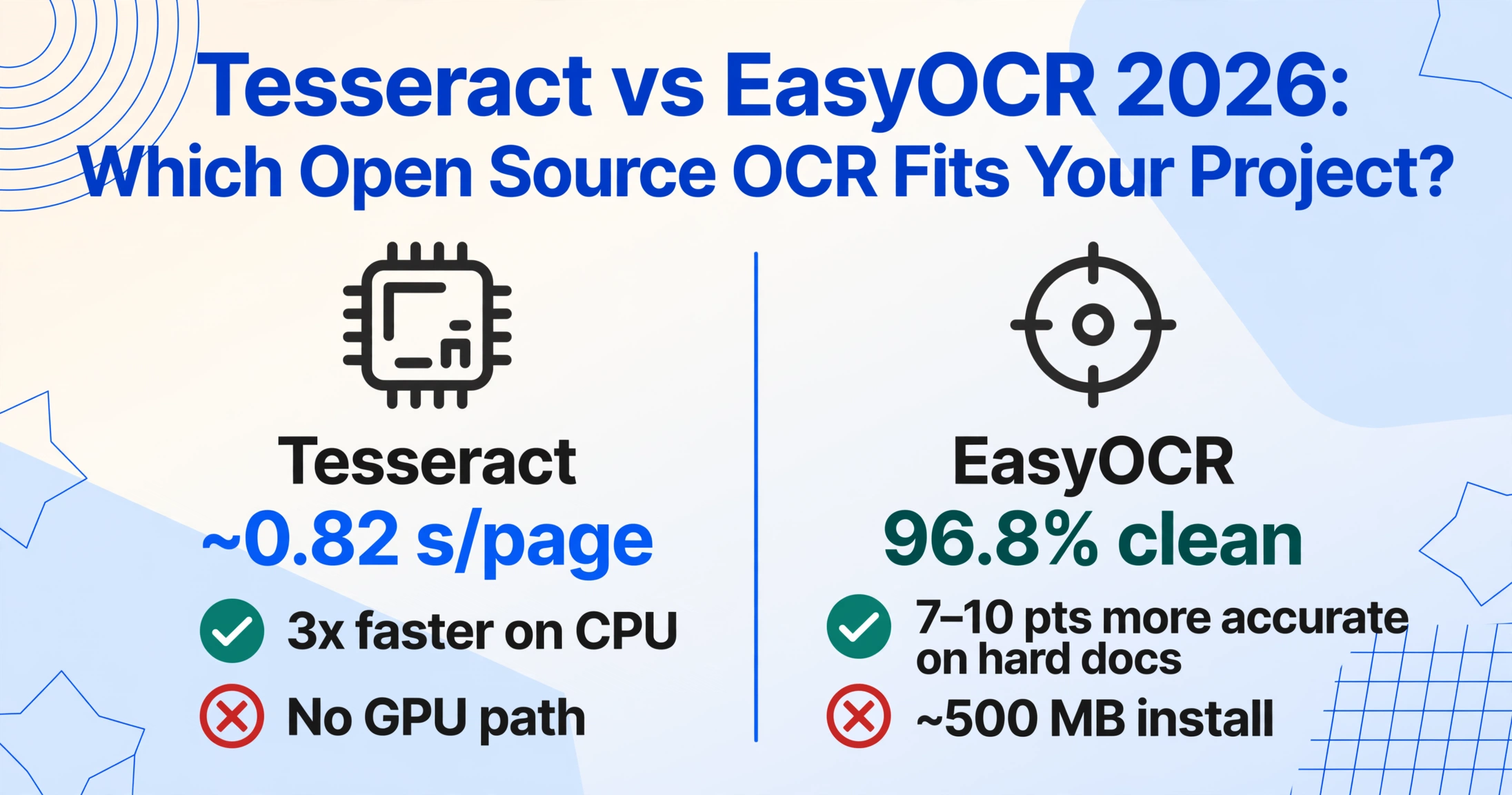
The headline takeaway: Tesseract is 3x faster on CPU, but EasyOCR is 7–10 percentage points more accurate on any document that isn't perfectly clean. The gap widens dramatically as documents get harder.
Installation & Setup
Tesseract wins on simplicity if you're already on a Linux server. A single apt-get install tesseract-ocr or brew install tesseract gets you a working OCR engine in under 30 seconds. The Python wrapper (pytesseract) is a thin shell around the system binary. Total dependency weight: roughly 10 MB for the engine plus additional language data files as needed. If you've never installed Tesseract before, our beginner's setup guide covers all three operating systems and the common first-time pitfalls.
The trade-off: Tesseract requires manual language data installation. Each language needs its own .traineddata file downloaded and placed in the tessdata directory. For pipelines that handle 5+ languages, this becomes a deployment script concern rather than a one-liner.
EasyOCR is heavier to install but self-contained. You pip install easyocr and PyTorch comes along as a dependency — roughly 500 MB for the CUDA-enabled backend. The first time you create a Reader instance, EasyOCR automatically downloads the required language models. There is no manual data file management, no environment variable configuration, no system binary dependency.
For local development and prototyping, EasyOCR's friction-free setup is a genuine advantage. For Dockerized deployments, the 500 MB PyTorch layer is a cost you pay once and cache, so the long-term impact is minimal.
Verdict on setup:
- CI/CD pipelines, server images, embedded devices: Tesseract's 10 MB install is hard to beat.
- Local prototypes, notebooks, multi-language projects: EasyOCR's autodownload and zero-system-dep setup wins.
Accuracy by Document Type
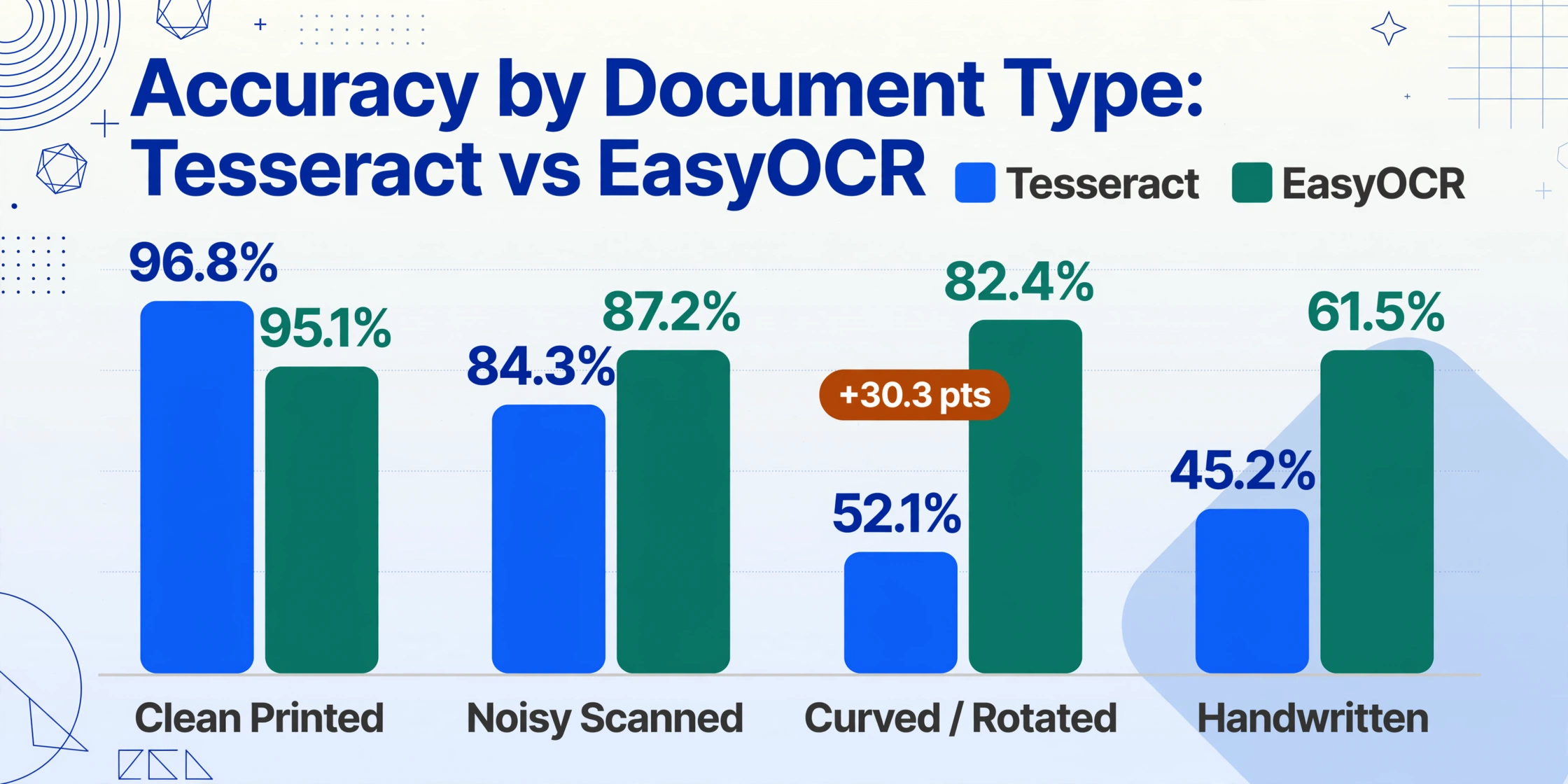
This is where the two engines diverge most meaningfully. Independent benchmarks from GigaGPU tested Tesseract 5 and EasyOCR across four document difficulty levels. The results reveal a clear pattern: on clean, straight, printed text the gap is small. On everything else, it widens fast.
| Document Type | Tesseract 5 | EasyOCR | Gap |
|---|---|---|---|
| Clean printed English | 96.8% | 95.1% | Tesseract +1.7% |
| Noisy scanned documents | 84.3% | 87.2% | EasyOCR +2.9% |
| Curved / rotated text | 52.1% | 82.4% | EasyOCR +30.3% |
| Handwritten text | 45.2% | 61.5% | EasyOCR +16.3% |
The curved/rotated text number is not a typo. Tesseract's traditional computer vision pipeline collapses when text isn't perfectly horizontal — the legacy engine was designed for upright, single-column scanned pages. EasyOCR's CRAFT-based text detector handles arbitrary orientations out of the box because it was trained on scene text data where rotation is the norm.
The handwriting gap is equally structural. Tesseract 5's LSTM engine was trained primarily on printed corpus data. EasyOCR's recognition model was trained on a mix that includes handwritten samples in many of its 80+ languages, giving it a meaningful head start — though 61.5% is still too low for production without post-processing.
Critical nuance that most comparisons miss — failure mode patterns: Tesseract errors tend to be unrecoverable — a character misread ("ay" instead of "Qty") produces an output that looks correct to a string comparison but is semantically wrong. EasyOCR errors more often leave predictable signatures: repeated characters, low-confidence detections (< 0.5), or padding artifacts (~ and [ characters). As the 2026 EasyOCR audit demonstrated, these signatures can be cleaned with regex and fuzzy matching pass. Tesseract's failures cannot be recovered by post-processing — you need better input preprocessing instead.
Speed: CPU vs GPU
This is the single most misunderstood dimension in every Tesseract vs EasyOCR discussion. The popular claim "Tesseract is faster" is true only on CPU — and even that depends on batch size and image resolution.
| Metric | Tesseract 5 (CPU) | EasyOCR (CPU) | EasyOCR (GPU, RTX 3090) |
|---|---|---|---|
| Pages per minute | ~25 | ~8 | ~60 |
| Time per page | ~0.82 s | ~2.45 s | ~0.85 s |
| Batch of 100 pages | ~82 s | ~245 s | ~85 s |
On CPU: Tesseract is roughly 3x faster than EasyOCR per page. For batch processing thousands of documents, that difference compounds into hours. If you're running on a CPU-only server — common in restricted environments like air-gapped systems or older cloud instances — Tesseract is the practical choice.
On GPU: EasyOCR with CUDA acceleration closes the gap almost completely, delivering ~60 pages per minute on an RTX 3090. At that throughput, a batch of 10,000 invoices finishes in under three hours. Tesseract has no GPU path at all — it will always run on CPU, and its speed advantage evaporates the moment the other side has a GPU.
The real question, then, is not "which is faster" but "do you have a GPU in your pipeline?" If yes, the speed argument for Tesseract disappears. If no, Tesseract is substantially faster.
Language Support
Both engines cover the major global languages, but they differ in breadth, ease of use, and quality per language.
Tesseract supports 100+ languages through its tessdata repository. The community has been contributing trained models for two decades, so coverage includes less common scripts like Ancient Greek, Inuktitut, and several Indigenous languages. However, quality varies widely — languages with small training corpora (fewer than 10,000 training pages) produce significantly lower accuracy. You need to manually download each language's .traineddata file and specify it with the -l flag, which adds deployment complexity for multilingual projects.
EasyOCR covers 80+ languages but ships with pre-downloaded models that are automatically fetched on first use. The quality floor is higher because every supported language goes through the same deep learning pipeline, trained on modern corpus data. Languages with non-Latin scripts — Chinese, Japanese, Korean, Arabic, Devanagari — are particular strengths of EasyOCR, because the model was designed from scratch to handle them. Reddit's r/MachineLearning community has noted EasyOCR's advantage on Japanese and mixed-script documents.
Practical recommendation: For English-only or Latin-script pipelines, both engines perform similarly. For any project that needs CJK, Arabic, or mixed-script documents, EasyOCR produces substantially better results with less configuration effort. If you need a rare language that only Tesseract covers, the extra setup cost is worth paying.
Output Quality & API Design
Beyond raw accuracy numbers, the way each engine delivers its output has practical consequences for downstream processing.
Tesseract returns plain text by default via pytesseract.image_to_string(). If you need bounding boxes, you use image_to_data() or image_to_boxes(), which output TSV-format data with per-character or per-word coordinates. Getting structured output — say, a table with Invoice Number, Date, and Total — requires you to write layout analysis code on top of Tesseract's bounding boxes, because the engine has no concept of document structure. It reads lines; it does not understand that a number in the upper-right is the invoice total.
EasyOCR returns a list of dictionaries, each containing [bounding_box, text, confidence]. This structured format is immediately usable for filtering by confidence threshold, sorting by position, or feeding into a downstream layout parser. The inclusion of a confidence score per detection is a significant practical advantage: you can programmatically discard low-confidence results, flag them for human review, or route them through a different OCR backend.
The practical difference: If you need to extract specific fields from a semi-structured document (a purchase order, a driver's license, a certificate), EasyOCR's richer output format saves you one integration step. If you only need raw text from a full page (a book scan, a newspaper article, a letter), Tesseract's plain text output is sufficient and faster to process.
Neither engine produces the kind of structured output that a document extraction pipeline ultimately needs — columnar data mapped to semantic fields. That gap is why the Unstract 2026 OCR evaluation categorized both Tesseract and EasyOCR as "traditional" engines, distinct from VLM-based models that can output field-value pairs directly. If your end goal is a spreadsheet of extracted invoice fields rather than raw OCR text, you still need a semantic extraction layer on top of either engine. For a deeper look at how modern AI extraction differs from traditional OCR, our comparison OCR vs AI extraction covers the architecture shift.
When Tesseract Makes More Sense
Tesseract is the right choice when your documents are predictable and your infrastructure is constrained.
- CPU-only server environments — Tesseract's 25 pages/min on CPU is faster than EasyOCR's 8 pages/min, and there is no GPU option on the other side.
- High-volume clean document batches — If every invoice comes from the same ERP, every receipt is from the same POS system, and text is consistently upright and well-lit, Tesseract's 96.8% accuracy on clean text is sufficient. The occasional error is cheaper to fix than the additional compute cost of a deep learning engine.
- Embedded systems and Docker images — The ~10 MB install footprint fits easily into resource-constrained environments where every megabyte matters.
- Pipelines that already include image preprocessing — If you already have an OpenCV-based preprocessing step (deskew, denoise, binarize), Tesseract's output improves significantly. Teams that invest in preprocessing often close the accuracy gap with EasyOCR on everything except curved text and handwriting.
- Compliance requirements that mandate CPU-only processing — Some regulated industries require that all processing happen on CPU-only hardware. In that scenario, Tesseract is not just better — it's the only practical option among the two.
For a broader view of free OCR options beyond these two, see our guide to the best free OCR software in 2026.
When EasyOCR Makes More Sense
EasyOCR justifies its heavier install and slower CPU performance when document variety or accuracy requirements push Tesseract past its limits.
- Noisy or real-world document images — Photos of receipts taken on a phone, scanned forms with coffee stains, faxed documents with compression artifacts. EasyOCR's deep learning detection pipeline handles these conditions significantly better than Tesseract's threshold-based approach.
- Multi-language documents — EasyOCR's automatic model download and consistent quality across 80+ languages makes it the lower-effort choice for any project that handles more than two scripts.
- GPU-available environments — With CUDA acceleration, EasyOCR matches Tesseract's speed while delivering 5–30 percentage points higher accuracy, depending on document difficulty.
- Structured output requirements — If your pipeline needs confidence scores, bounding boxes, or per-detection metadata, EasyOCR provides them out of the box without additional parsing code.
- Rapid prototyping and notebooks — EasyOCR's three-line setup and automatic model downloads make it ideal for Jupyter notebook exploration, hackathon projects, and proof-of-concept work where setup speed matters more than production optimization.
If your project needs both raw OCR and eventual semantic extraction into structured fields like Invoice Number, Total, and Vendor Name, you may want to read our guide to OCR APIs for structured output after this comparison.
The Verdict: A Scenario-Based Decision
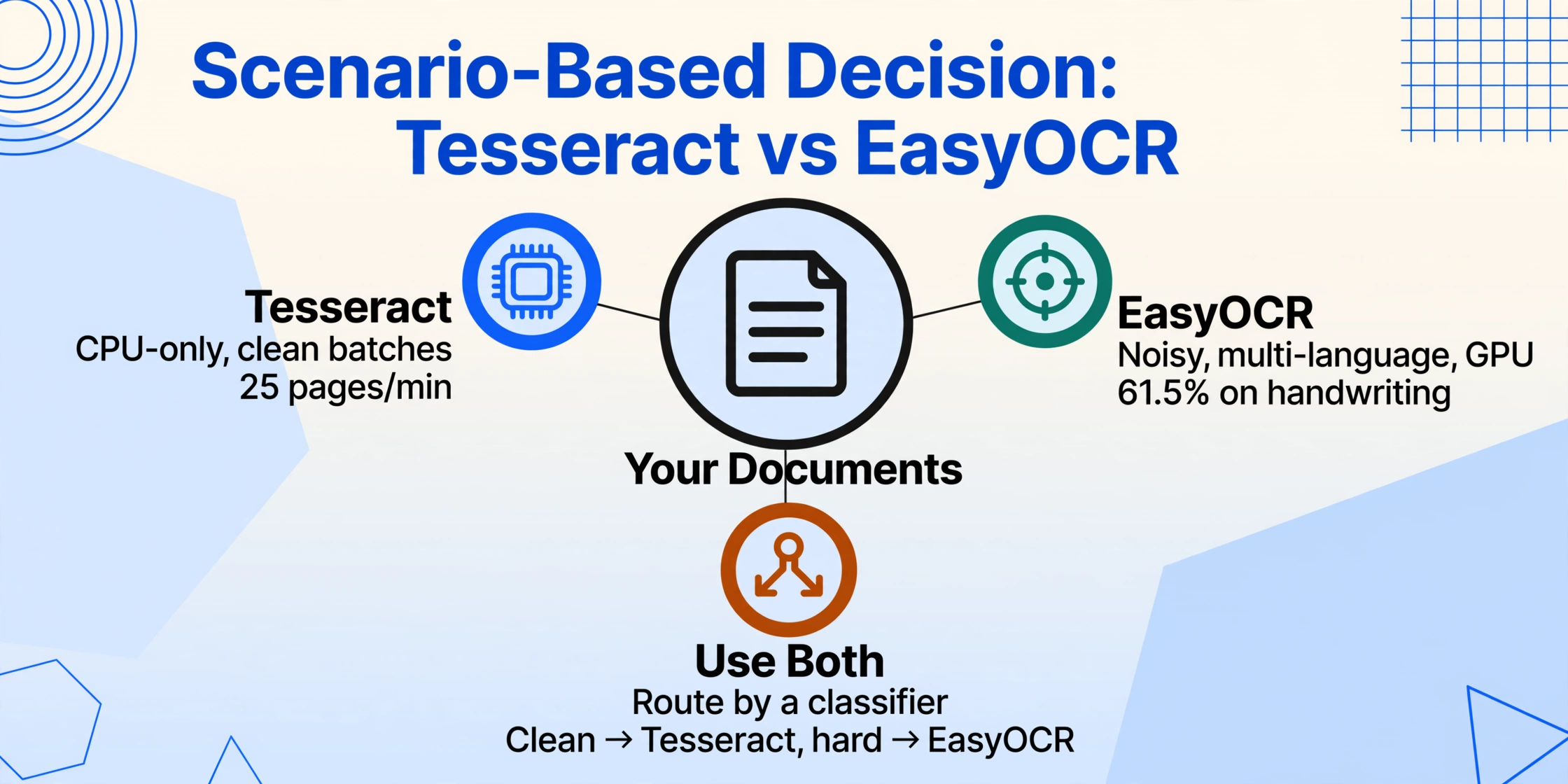
Neither engine is universally "better." The right choice depends on your documents, your hardware, and your tolerance for post-processing. The decision matrix below maps the most common scenarios to the recommended engine.
| Your Scenario | Recommended Engine | Why |
|---|---|---|
| Clean scanned invoices, same vendor format, high volume | Tesseract | CPU fast, 96.8% accuracy sufficient, light footprint |
| Receipt photos from mobile, variable quality | EasyOCR | Deep learning handles noise, rotation, mixed fonts |
| Multi-language documents (CJK, Arabic, mixed) | EasyOCR | Better CJK/Arabic support, auto-download, higher accuracy |
| CPU-only Docker container, 500 MB budget | Tesseract | 10 MB install, no GPU dependency, 3x CPU speed |
| Handwritten forms, historical documents | EasyOCR | 61.5% vs 45.2% — still low, but recoverable with post-processing |
| Batch pipeline, GPU available, 10K+ docs/day | EasyOCR | GPU matches Tesseract speed, better accuracy, structured output |
| You need field-level extraction (Invoice #, Total, Date) | Neither alone | Both produce raw text, not structured fields. Add a semantic extraction layer or see our AI extraction comparison |
A practical strategy used by many production pipelines: use both. Route clean documents to Tesseract for speed, and send difficult documents to EasyOCR for accuracy. With a simple classifier in front — image resolution, file size, or a quick entropy check — you can capture the best of both worlds without committing to one engine for everything.
And if your project ultimately needs structured data (Invoice Number, Total Amount, Vendor Name) rather than just OCR text, neither Tesseract nor EasyOCR gets you there alone. That requires a semantic extraction layer on top — whether you build it yourself with a VLM or use a tool designed for structured output. Our comparison of open-source OCR tools covers the full landscape including VLM-based options.
Key insight
The gap between Tesseract and EasyOCR is not about raw technology — it's about document difficulty. Tesseract handles 80% of clean, printed documents well. EasyOCR handles the remaining 20% that are noisy, rotated, or handwritten. The right pipeline design acknowledges both ranges and routes accordingly.
Frequently Asked Questions
Which OCR is faster: Tesseract or EasyOCR?
On CPU, Tesseract is about 3x faster — roughly 25 pages per minute versus EasyOCR's 8 pages per minute. On GPU, EasyOCR catches up to ~60 pages per minute, matching or exceeding Tesseract's throughput while delivering higher accuracy. The answer depends entirely on whether you have GPU acceleration available.
Which is more accurate overall?
On clean, straight printed text, they are nearly tied (96.8% Tesseract vs 95.1% EasyOCR). On noisy, curved, or handwritten documents, EasyOCR leads by 3 to 30 percentage points. If your documents are always clean, the accuracy difference is negligible. If they vary in quality, EasyOCR's deep learning pipeline provides a meaningful gap.
Can Tesseract or EasyOCR handle handwriting?
Both struggle with handwriting, but EasyOCR performs better (61.5% vs 45.2% accuracy). Neither is suitable for production handwriting recognition without additional training or a handwriting-specific model pipeline. For context, modern vision-language models like olmOCR and Qwen2.5-VL achieve significantly higher handwriting accuracy at the cost of much higher compute requirements.
Does Tesseract support GPU acceleration?
No. Tesseract 5.x is CPU-only by design. There is ongoing community discussion about GPU support for future versions (see the Tesseract 2026 plans thread), but as of mid-2026 there is no GPU path. EasyOCR uses CUDA for GPU acceleration and runs on any PyTorch-compatible GPU.
Are both completely free?
Yes. Both Tesseract (Apache 2.0, Google-maintained) and EasyOCR (Apache 2.0, Jaided AI) are fully open-source and free for commercial use, with no usage limits, rate caps, or API costs. The only cost is the infrastructure to run them — CPU time, memory, and optionally GPU compute.
Can these tools extract structured data like Invoice # and Total?
Not directly. Both engines produce OCR text — characters and words on the page. Extracting specific fields (Invoice Number, Due Date, Line Items) requires additional logic: either regex-based parsing, layout analysis on top of bounding boxes, or a semantic extraction layer. For projects that need field-level structured output from invoices, receipts, or forms, you may want to evaluate AI-native extraction tools that understand document semantics natively rather than relying on OCR + parsing.
From OCR Text to Structured Data — Without the Pipeline Work
If you've read this far, you've understood the core challenge: Tesseract and EasyOCR give you text, but not the structured fields your business processes need. ImageToTable.ai's AI extraction goes straight from document to spreadsheet — no OCR engine tuning, no post-processing regex, no layout analysis. Upload an invoice, name the columns you want (Invoice Number, Total, Vendor), and the AI locates each value by understanding what it means, not where it sits on the page.
With up to 99% accuracy on printed documents, batch processing for hundreds of files, and direct Excel/Google Sheets export, it bridges the gap that this comparison has been describing: the distance between OCR text and usable data.