The Complete Guide to
EOB Data Extraction (2026)
The Healthcare Financial Management Association's 2023 survey found that 35% of healthcare organizations report errors from manual EOB data entry, and 43% experience payment delays as a direct result. Those numbers describe the gap between what an Explanation of Benefits says and what actually gets entered into a billing system — a gap that persists not because the staff is careless, but because the industry asks people to do something fundamentally unnatural with these documents: treat every payer's layout as if it were the same, when no two are.
Key Takeaways
- 35% of providers report EOB data entry errors — not because your billing team is careless, but because no human can read the same data field across 6,000 different payer layouts without error.
- The $2,500 a month you see in transcription labor doubles when you add the error corrections, patient billing disputes, and missed underpayments buried in separate budget lines — costs no single report ever sums up.
- The metric that matters isn't minutes per EOB — it's reclaiming 100 hours a month so your billing team can stop typing numbers and start chasing the underpayments and denials that actually move revenue.
What Is EOB Data Extraction?
EOB data extraction is the automated process of reading key insurance claim fields from an Explanation of Benefits document — patient name, provider, dates of service, CPT procedure codes, billed amounts, allowed amounts, insurance payments, adjustments, patient responsibility breakdown, and denial or remark codes — and converting them into structured data that a billing system or spreadsheet can ingest.
The document itself, the Explanation of Benefits, is sent by a health insurer after a claim is adjudicated. It is not a bill. It is an accounting of what the provider billed, what the insurer allowed under the plan, what was paid to the provider or patient, and what the patient still owes. For a deeper introduction to the concept, see our dedicated article on what EOB data extraction is and how it works.
What makes EOB extraction distinct from other document extraction tasks is the relationship between the data fields. An EOB's value is not in any single number — it is in how the billed amount, allowed amount, plan payment, deductible, coinsurance, copay, and patient responsibility fit together. Extract those numbers correctly but lose the arithmetic that connects them, and the output is technically accurate but practically useless for billing reconciliation.
Why Manual EOB Processing Costs More Than You Think
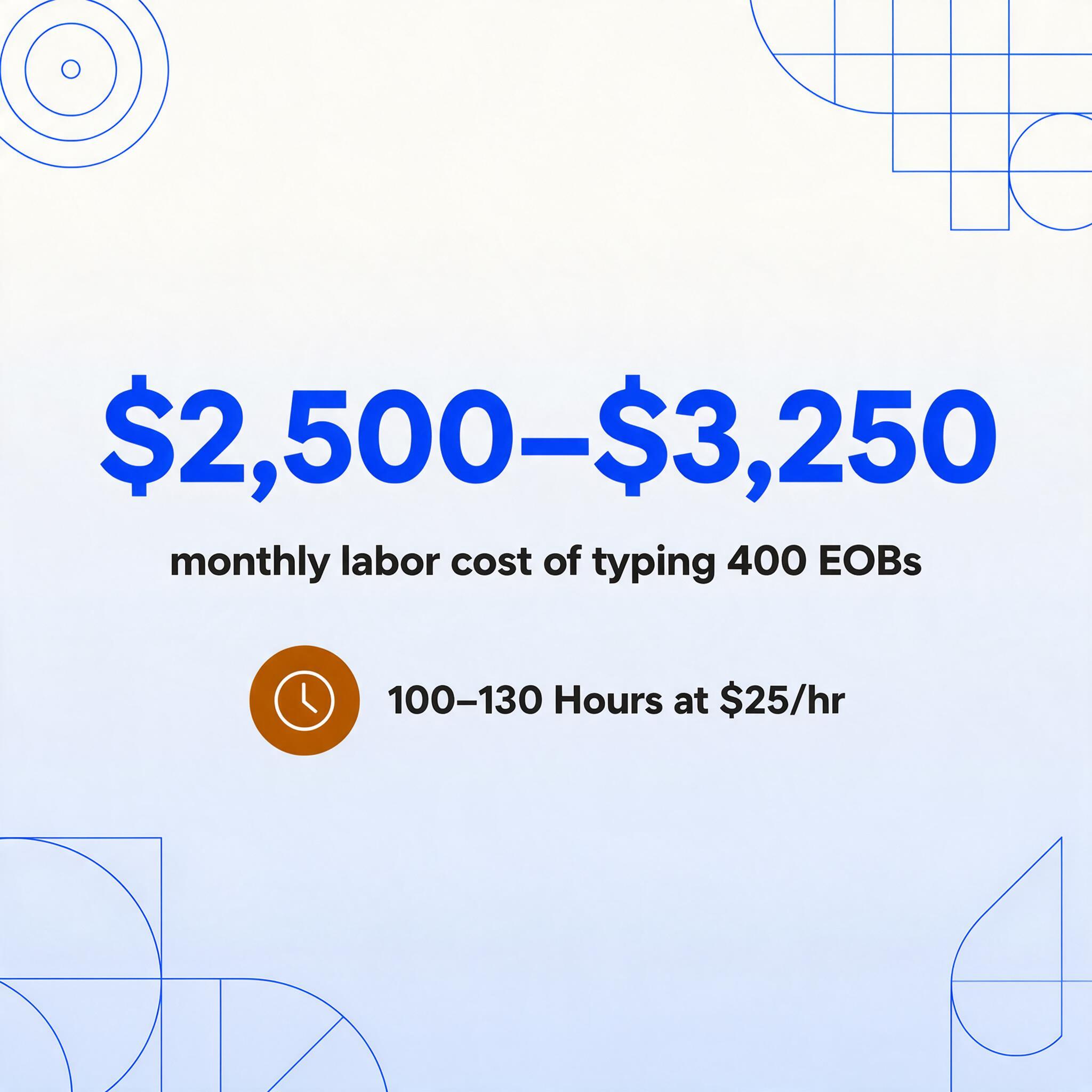
Manual EOB processing looks inexpensive on paper — a billing specialist typing data from a PDF into a spreadsheet or practice management system, one field at a time, at roughly $25 per hour. The real cost arrives through four separate channels that most practices only see when they add up at the end of the month.
The labor of transcription. A mid-size practice processing 400 EOBs per month spends roughly 100 to 130 hours on data entry alone, assuming 15 to 20 minutes per document for reading, locating the correct fields, typing, and verifying. At $25 per hour, that is $2,500 to $3,250 in direct labor cost every month — before any errors are corrected. That is the visible cost. The invisible one is what that billing specialist is not doing: appealing denials, following up on underpayments, reconciling discrepancies, or analyzing payer trends. For a line-by-line breakdown of the full per-claim cost — labor, software overhead, error rework, and unrecovered underpayments — see our manual EOB data entry cost analysis.
The error tax. The 8–12% error rate that is considered normal in manual data entry translates directly into rejected claims, misapplied payments, and reconciliation work that takes longer than the original typing. A single transposed digit in an allowed amount or a CPT code entered incorrectly can generate a denial that takes 30 minutes to research and appeal. Industry data suggests errors in EOB data entry alone account for roughly a quarter of preventable claim denials. Each denied claim costs an average of $118 to rework, and that cost is rarely tracked as an EOB processing cost — it is buried in the denial management budget.
Patient billing confusion. When patient responsibility is calculated incorrectly — a deductible applied to the wrong line, a copay misread as coinsurance — the patient receives a statement that does not match the EOB. That generates phone calls, disputes, delayed payments, and, in the worst cases, complaints to state insurance regulators. The cost of those calls is rarely measured, but anyone who has managed a medical billing desk knows that a single billing dispute can consume 45 minutes across multiple staff members.
Claim reconciliation drag. Matching the payment posted to the claim against the expected reimbursement is supposed to catch underpayments. When the data going into that reconciliation is itself error-prone, the comparison produces false positives (alerts that turn out to be data entry mistakes, not actual underpayments) and false negatives (real underpayments that go unnoticed because the extracted number happens to match the wrong claim). A 2023 HFMA survey found that 43% of providers experience payment delays specifically because of manual EOB processing errors.
These four costs are additive, not alternatives. A practice paying $2,500 per month in transcription labor is likely also losing an equivalent amount to error correction, patient billing disputes, and missed underpayments. The real cost of manual EOB processing is roughly double the visible labor line item.
The Real Challenge: 6,000+ Payer Layouts
The reason manual EOB processing is so error-prone is not that the people doing it are untrained. It is that there are over 6,000 distinct EOB layouts across payers in the United States. Every insurer — UnitedHealthcare, Aetna, Cigna, Humana, Blue Cross Blue Shield (each state plan independently), Medicare, Medicaid managed care organizations, workers' compensation carriers — organizes the same data points differently.
Some payers present the claim summary in a horizontal table with columns for dates, procedure codes, billed amount, allowed amount, and patient responsibility. Others use a vertical stacked layout where each service line is a block of labeled fields. Some break the deductible, coinsurance, and copay into separate sub-columns; others condense everything into a single "Patient Owes" line. Some even change layouts within a single EOB — using one format for paid claims and another for denied claims on the same PDF.
CPT and ICD code recognition. The procedure codes (CPT/HCPCS) and diagnosis codes (ICD-10) that appear on an EOB are the most sensitive fields in the document. A single mistyped CPT code — 99213 typed as 99214 — means the claim was for a different level of service. The billing system will post the wrong payment, the payer may deny the difference on audit, and the provider may have to refund the overpayment months later. These codes are densely packed, often run together without clear delimiters, and are sometimes truncated when they exceed the field width on the printed EOB.
The financial breakdown. An EOB typically shows the billed amount (what the provider charged), the allowed amount (what the insurer considers reasonable), the amount paid by the plan, and the patient responsibility — which is itself a composite of deductible applied, coinsurance percentage, copay amount, and any amounts not covered. Each payer splits these sub-components differently. On a UnitedHealthcare EOB, the deductible may appear in a separate column. On a Blue Cross EOB, it may be embedded in an adjustment row with a remark code. The extraction method must understand which sub-total contains which component, not just locate the dollar signs.
Remark codes. Claim Adjustment Reason Codes (CARC) and Remittance Advice Remark Codes (RARC) explain why an adjustment was applied or a claim was denied — for instance, CO-45 (contractual obligation — charge exceeds fee schedule) or PR-1 (patient responsibility — deductible amount). There are hundreds of active codes maintained by the X12 standards organization, and payers apply them inconsistently. A code on one payer's EOB may appear in plain text on another's. Accurately extracting these codes requires reading them by context, not by position.
These four layers of complexity — layout variability, medical code density, financial arithmetic, and adjustment codes — are what make EOB extraction a fundamentally different problem from extracting a standard invoice. And they are the reason that traditional template-based OCR tools, which rely on fixed field positions, fail on EOBs.
Traditional Processing vs. AI-Powered Extraction
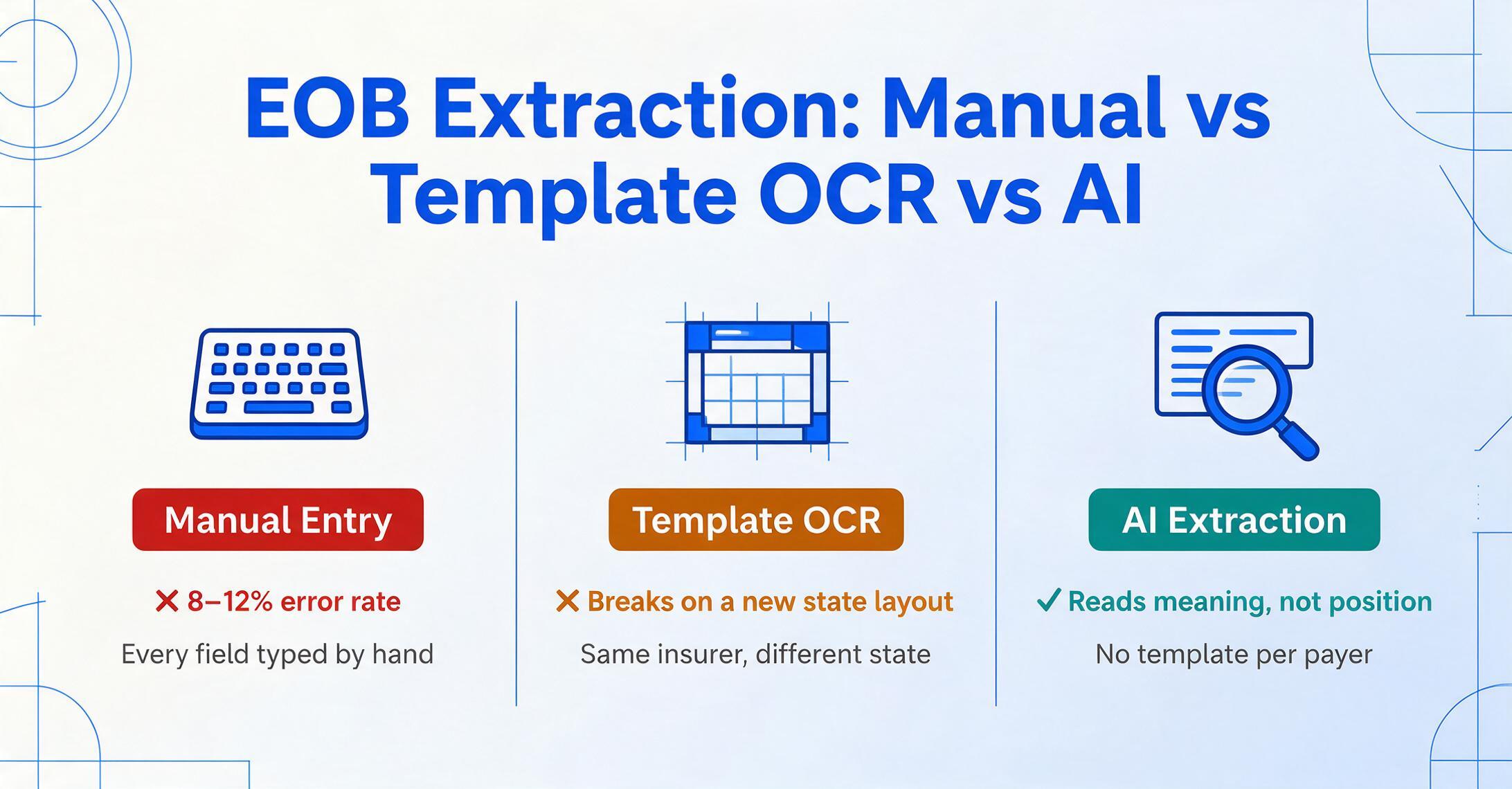
The conventional approach to EOB processing has two variants: manual data entry and template-based OCR. Both share the same fundamental limitation — they treat the EOB as a document with a predictable layout, which it is not.
Template-based OCR works well when the same form arrives every time: the field for "Allowed Amount" is always in the same column on the same page, and the software can be configured to look exactly there. EOBs violate that assumption. A template configured for a Blue Cross EOB from Florida will fail on a Blue Cross EOB from Illinois — same insurer, different state, different layout.
AI-powered extraction, by contrast, reads the document by understanding what each data point means, not where it sits. The technology behind this is a vision language model (VLM) — the same class of model that can look at a photograph and describe what is happening in it. When applied to an EOB, the model sees the document as a whole, identifies the section headers ("Patient Responsibility," "Amount Paid," "Service Description"), and locates the corresponding values by their semantic relationship to those headers, not by their pixel coordinates.
This is the key difference. A template-based approach asks "Where is the deductible?" and looks for it at a fixed coordinate. An AI-based approach asks "What is the deductible for this service line?" and reads the document until it finds the answer.
| Dimension | Manual Entry | Template-Based OCR | AI-Powered Extraction |
|---|---|---|---|
| Payer format coverage | Human reads any format | Only pre-configured templates | Any format, first upload |
| Setup per payer | None (human reads visually) | Template creation + testing per layout | None — zero configuration |
| Processing time per EOB | 15–20 minutes | 2–5 minutes | 5–10 seconds |
| Typical error rate | 8–12% | 5–8% (breaks on format changes) | Under 2% |
| CPT/ICD code extraction | Prone to typos | Dependent on correct zone | Contextual reading |
| Multi-payer batch | Sequential — one at a time | Only same-layout EOBs | Mixed payers in one batch |
| Format change resilience | N/A (human adapts) | Breaks until template is updated | Handles new layouts automatically |
The result is not just faster processing. It is a fundamentally different workflow: instead of a billing specialist opening each EOB, reading it, and typing values into a system, the AI reads the entire batch and the specialist reviews only the exceptions — flagged discrepancies, unusual codes, or amounts outside expected ranges.
The shift is not speed. The shift is attention allocation. A billing team spending 100 hours on data entry has almost no time for denial analysis or payer negotiation. A team whose data entry is handled by AI has those 100 hours back for the work that actually improves revenue cycle performance.
Try It Yourself: Upload an EOB and See the Results
The following embedded demo lets you upload an EOB document — a PDF, a scanned image, or even a photo taken from your phone — and see what AI-powered extraction produces in seconds. No sign-up, no configuration, no template creation.
Files are processed securely and not stored after extraction.
Critical Fields in Every EOB
While every payer formats these fields differently, the data a billing team needs from an EOB is remarkably consistent across all payers. The challenge is not knowing what to extract — it is configuring the extraction method to locate each field correctly from a layout it has never seen before.
| Field | Why It Matters | Common Payer Labels |
|---|---|---|
| Patient/Member ID | Links the EOB to the correct patient record and claim | Member ID, Subscriber ID, Patient ID, ID# |
| Patient Name | Verification of patient identity | Patient Name, Member Name, Subscriber |
| Provider Name / NPI | Ensures the payment is credited to the correct provider | Provider, Rendering Provider, Billing Provider, NPI |
| Date of Service | Determines which benefit period and contract terms apply | DOS, Service Date, From–To, Date of Service |
| CPT / HCPCS Code | Identifies the specific procedure performed — the most error-sensitive field | CPT, Procedure Code, Code, HCPCS, Service Code |
| ICD-10 Diagnosis Code | Medical necessity justification — incorrect codes trigger denials | Diagnosis Code, ICD-10, DX, Principal Diagnosis |
| Billed Amount | What the provider charged — used for contractual adjustment calculations | Billed, Charges, Submitted Amount, Amount Billed |
| Allowed Amount | The payer's negotiated rate — the basis for all downstream payment calculations | Allowed, Covered Amount, Approved, Plan Allowance |
| Plan Payment | What the insurer actually paid — the amount that must match the check or EFT | Paid by Plan, Insurance Payment, Plan Paid, Check Amount |
| Deductible Applied | Portion of the allowed amount applied to the patient's annual deductible | Deductible, Applied to Deductible, Patient Deductible |
| Coinsurance | Patient's percentage share of the allowed amount after deductible | Coinsurance, Patient Coinsurance, Co-ins % |
| Copay | Fixed patient fee per service (often appears separately from coinsurance) | Copay, Co-Pay, Office Visit Copay, Rx Copay |
| Patient Responsibility (Total) | Sum of deductible + coinsurance + copay + non-covered amounts — what to bill the patient | Patient Owes, Patient Responsibility, Amount You Owe, Total Patient |
| Adjustment / Denial Amount | Reductions applied by the payer — contractual or non-covered | Adjustment, Denied Amount, Discount, Not Covered |
| CARC / RARC Remark Codes | Explain why an adjustment or denial was applied — critical for appeals | Adjustment Reason Code, Remark Code, Remark, CARC, RARC |
| Claim Number / ICN | Unique identifier for the claim — links the EOB to the original 837 submission | Claim #, ICN, Internal Control Number, Claim ID |
With an AI-based extraction tool that supports Custom Column Extraction, you type the field names you need — "Patient Name," "CPT Code," "Billed Amount," "Patient Responsibility" — and the AI locates each value by its semantic meaning across any payer's layout. You define the output; the AI reads the document. For a step-by-step walkthrough of setting up these columns and running your first extraction, see our how-to guide for batch EOB extraction.
From Batch EOBs to Patient Billing Summary
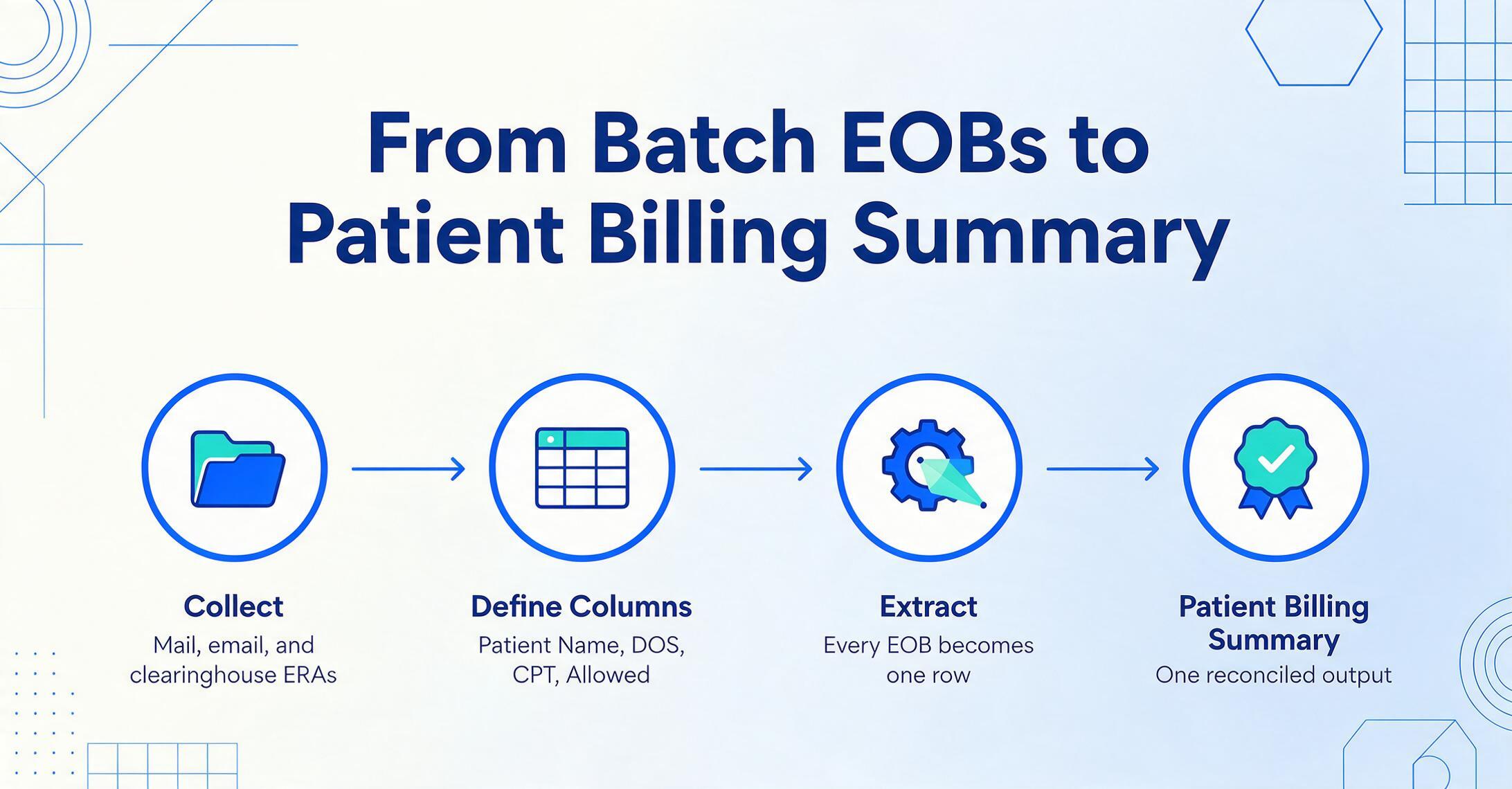
The real power of automated EOB extraction is not processing one document faster — it is processing a batch of documents from different payers as a single group and producing a consolidated output that collapses all the data into a patient billing summary.
Here is how a typical medical billing team moves from a stack of EOBs to a reconciled patient billing summary using batch AI extraction:
Collect the EOBs from every payer.
Some arrive by mail as paper documents. Others arrive as PDF attachments to email. Some practices use a clearinghouse that routes ERA (Electronic Remittance Advice in X12 835 format) for some payers but receives PDF EOBs from others. Each PDF or scan goes into a single folder — regardless of which payer issued it, regardless of the layout.
Upload the batch and define output columns.
Upload the entire batch — it can contain Blue Cross, Aetna, UnitedHealthcare, Medicare, and Cigna EOBs mixed together. Define your column names: "Patient Name," "Member ID," "DOS," "CPT Code," "Billed," "Allowed," "Plan Paid," "Deductible," "Coinsurance," "Copay," "Patient Responsibility." The AI reads each document and maps these fields by semantic understanding, not template matching.
AI processes every EOB in seconds per page.
The extraction runs through the batch sequentially or in parallel depending on the tool. Each EOB produces a row in the output table. Because the AI reads by context, a Blue Cross EOB and a Medicare remittance advice in the same batch both produce data in the same column structure — no per-payer setup required.
Review and reconcile flagged exceptions.
The billing team reviews only the items the AI flags — amounts outside expected ranges, patient responsibility that does not match the expected calculation, adjustment codes that suggest a denial. Everything else is already posted to the output. The review that used to take 15–20 minutes per EOB now takes a few minutes for the entire batch.
Produce the patient billing summary.
The consolidated output — one row per service line, with patient responsibility broken into deductible, coinsurance, copay, and total owed — becomes the source of truth for patient statements. With Computed Columns, you can even define additional calculations directly in the extraction: for example, a column that calculates "Remaining Balance = Patient Responsibility — Payments Received" without leaving the extraction tool. For a deeper dive into multi-payer batch workflows, see our article on how medical billing teams batch-extract data from hundreds of EOBs.
For practices that need to collect EOBs from multiple providers or locations without giving everyone access to the main account, ImageToTable.ai provides a Collection Link feature: generate a shareable URL, send it to providers or field staff, and they can upload EOBs directly to your processing queue — no registration required.
Export and Integration
Extracted EOB data is only useful if it reaches the system where billing and reconciliation happen. Different practices have different downstream needs, and the right extraction tool should support the most common destinations.
Excel or Google Sheets. This is the most common destination for small to mid-size practices. A single extraction batch produces a structured spreadsheet with all the critical fields — patient name, CPT codes, billed amounts, allowed amounts, plan payments, patient responsibility breakdown — in labeled columns. The spreadsheet is ready for import into the practice management system or for use as a reconciliation ledger. For teams using Google Sheets, the ImageToTable.ai Google Sheets add-on pushes extracted data directly into the active spreadsheet without leaving Sheets.
Practice management and EHR systems. Practices using Epic, Cerner, Meditech, AdvancedMD, Kareo, NextGen, athenahealth, or eClinicalWorks typically export the structured data and map it into their system's payment posting module. The key requirement is that the exported data contains the same fields in a consistent schema — column headers do not change between batches, and payer-specific variations are normalized so the downstream import sees a uniform data structure regardless of which payer issued the EOB.
Patient portal billing. Once patient responsibility is calculated and verified, the patient-facing amount feeds into the patient portal or billing statement system. Accurate patient responsibility — the correct split between deductible, coinsurance, and copay — is essential here because a statement that does not match the EOB generates phone calls and disputes.
How to Choose an EOB Extraction Tool
Not all document extraction tools are suitable for EOBs. The specific characteristics of these documents — across-payer format variability, dense medical coding, multi-component financial fields — narrow the field significantly. Here are the criteria that matter most when evaluating an EOB extraction solution.
Multi-payer accuracy on first use. The most important test is simple: upload a Blue Cross EOB, an Aetna EOB, a Medicare remittance advice, and a Cigna EOB into a single batch and see whether the same extraction configuration produces accurate data for all four. If the tool requires a separate template per payer or needs to be trained on sample documents for each format, the benefit of extraction is significantly reduced. ImageToTable.ai's template-free approach means no per-payer setup — the AI reads each document by understanding what each field means, regardless of where it appears on the page.
CPT/ICD code recognition accuracy. Procedure and diagnosis codes are the most error-sensitive fields in an EOB. Look for a tool that demonstrates the ability to read densely packed codes — including codes that run together without clear visual separation, truncated codes that continue on a second line, and codes embedded in section headers rather than in a dedicated column.
Patient responsibility calculation support. The best extraction tools do not just spit out individual fields and leave the math to you. ImageToTable.ai's Computed Columns feature allows you to define the patient responsibility calculation as part of the extraction: specify "Patient Total = Deductible + Coinsurance + Copay + Non-Covered" as a computed column, and the AI calculates it for every row during extraction. This eliminates a manual verification step that is itself error-prone.
HIPAA compliance considerations. EOBs contain protected health information (PHI) — patient names, member IDs, diagnosis codes, and other identifiers that fall under the HIPAA Privacy and Security Rules. Any tool processing EOB data should offer appropriate safeguards. When evaluating a tool, confirm that it supports secure data transmission (AES-256 encryption in transit and at rest), automatic data deletion after processing, and a Business Associate Agreement (BAA) if PHI will be stored or transmitted through the vendor's infrastructure. This is a description of the compliance context, not legal advice. Consult your organization's compliance officer or legal counsel for specific HIPAA obligations.
Batch processing and mixed-format handling. If your practice processes EOBs from more than three or four payers — and most do — the tool must handle mixed-format batches. The ability to drop a folder of PDFs from ten different payers into a single upload and get a single spreadsheet back is the difference between a tool that saves time and one that creates more work.
For a broader comparison of document extraction tools across healthcare use cases, see our roundup of the best document extraction tools for healthcare in 2026.
Frequently Asked Questions About EOB Data Extraction
Can AI extract data from EOBs that include multiple patients on one document?
Yes. Multi-patient EOBs — where a single document lists claims for several patients grouped together by the payer — are a common source of manual extraction errors. AI-based extraction reads the document as a whole and identifies which service lines belong to which patient by the contextual relationship between patient identifiers and procedure details, separating them into distinct output rows. This is significantly more reliable than manual sorting, which is prone to misallocation.
Does the tool need to be trained on each payer's EOB format before it works?
No. ImageToTable.ai extracts data from EOBs using semantic understanding, not template matching. The first EOB from any payer — whether it is a large national carrier like UnitedHealthcare or a small regional plan — is processed with the same configuration. There is no training phase, no sample collection, and no per-payer template creation.
What happens if a payer changes their EOB layout?
The extraction continues to work. Because the AI reads data by meaning rather than by position, a layout change — reordered columns, moved section headers, redesigned headers — does not break the extraction. This is a fundamental advantage over template-based OCR tools, which require reconfiguration every time a payer modifies their form.
Can the tool extract EOBs that were scanned from paper copies?
Yes. The AI processes scanned images and photos of printed EOBs, not just digital PDFs. Common scenarios include paper EOBs received by mail from smaller insurers, copies faxed from referring providers, and photographed EOBs that patients submit for reimbursement. The extraction accuracy depends on image quality — clear scans at 200 DPI or higher produce the best results — but the VLM is designed to handle the typical degradation of scanned documents.
How does the tool handle CARC and RARC remark codes on EOBs?
The AI reads adjustment reason codes and remark codes from the EOB and outputs them as extracted fields. Because some payers embed these codes in plain text while others use numeric code values, the extraction captures both the code and any accompanying explanation text when available. The output can then be used to categorize denials and adjustments for reporting and appeal tracking.
Is the tool HIPAA compliant?
ImageToTable.ai processes documents with encryption in transit (TLS) and at rest (AES-256). Files uploaded by anonymous users are automatically deleted after processing, and logged-in users' files are retained only for the duration of the plan retention period and then permanently deleted. A Business Associate Agreement (BAA) is available for providers who need to document HIPAA compliance with their extracted document workflows. As with any healthcare data processing tool, you should review the specific security and compliance documentation against your organization's policies and consult with your compliance officer.
What is the difference between extracting an EOB and an ERA?
ERA (Electronic Remittance Advice) is the HIPAA-standard electronic transaction (ASC X12 835) that carries the same claim payment information as an EOB but in a machine-readable format. ERAs can be automatically posted to practice management systems with minimal manual intervention. EOBs are typically paper or PDF documents intended for patient or provider explanation. Extraction is the way to make PDF EOBs behave like ERAs — converting their visual data into structured, machine-readable output. Most practices receive a mix of ERAs from major payers and PDF EOBs from others, so a complete revenue cycle workflow needs to handle both.
How many EOBs per month make automated extraction worth the cost?
For practices processing more than 200 EOBs per month, the labor savings from automated extraction typically cover the tool cost in the first month. Below that threshold, the savings are smaller but the time saved may still be significant for a small billing team — 200 EOBs at 15 minutes each is 50 hours of data entry per month that could be redirected to more valuable work.
Does the tool integrate with Epic, AdvancedMD, or Kareo?
ImageToTable.ai exports data in Excel format that can be imported into any practice management or EHR system that accepts structured payment data. Direct API integration is available for teams that need automated posting. For a complete zero-code workflow, the Google Sheets add-on allows extraction results to land directly in a spreadsheet that feeds into your billing system.
Can the tool extract EOBs from workers' compensation carriers?
Yes. Workers' compensation EOBs use a different set of billing rules and often include medical fee schedule adjustments specific to each state's workers' comp system. The AI reads these EOBs the same way it reads commercial payer documents — by understanding the fields semantically. The same extraction configuration that handles a UnitedHealthcare EOB also processes a workers' comp EOB from a state-specific carrier.
The Next Step: From Manual to Structured
The arithmetic of EOB processing is straightforward but easy to ignore because the costs are spread across multiple budget lines — labor, error correction, patient dispute handling, and reconciliation — none of which is large enough on its own to trigger a process change. Together, they add up to a significant drain on revenue cycle performance.
The shift from manual typing to AI-powered extraction does not require a full revenue cycle platform replacement, a new EHR system, or IT involvement. It starts with one batch: upload the EOBs you processed yesterday, define the columns you wish you had, and see whether the output matches what your team typed. If the result is cleaner and faster, the case scales from there.
That gap between what the EOB says and what enters your billing system — the HFMA survey's 35% error rate — is not a people problem. It is a process problem with a straightforward technical solution.