Best Healthcare Document Extraction Tools
in 2026: 8 Tested
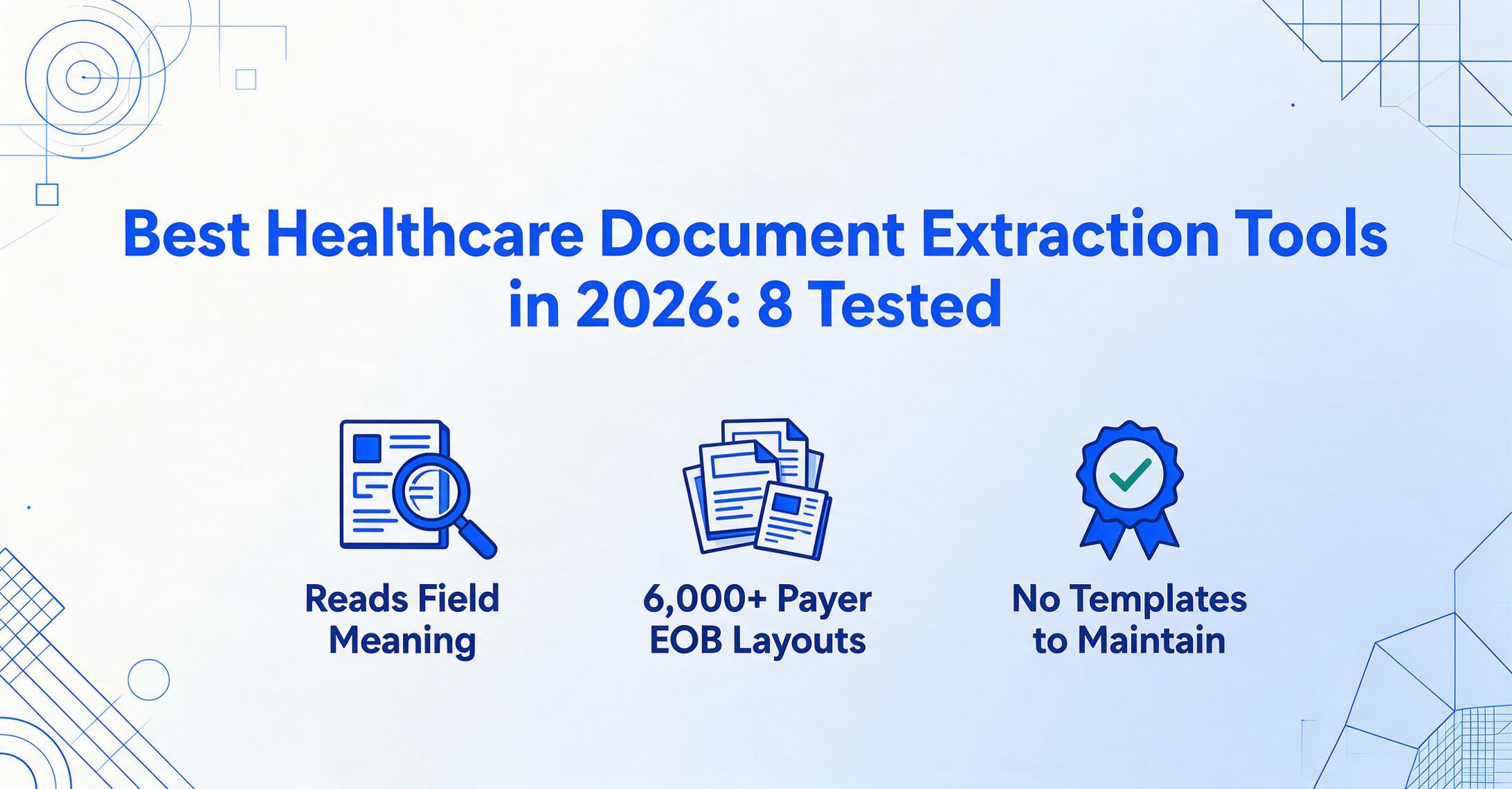
We tested eight document extraction tools against the same 40 healthcare documents — EOBs from six payers (BCBS, UnitedHealthcare, Aetna, Cigna, Medicare, and a regional Medicaid plan), CMS-1500 professional claim forms, UB-04 facility claims, patient intake packets, lab reports, and pharmacy printouts — measuring field-level accuracy on the specific data points medical billing teams actually reconcile: claim numbers, CPT/HCPCS codes, ICD-10 diagnoses, revenue codes, allowed amounts, patient responsibility, and denial reason codes across payer formats that share no visual layout with each other.
Key Takeaways
- Eight tools, eight claims of 95% accuracy — every number was measured on a single clean payer EOB, not the six different EOB layouts your practice actually processes.
- Accuracy can collapse from 97% to 65% when the payer changes — and that 32-point gap, not the marketing number, is what determines whether a tool works in your real billing workflow.
- Ask one question in every demo: "What's the accuracy gap between your best and worst payer format?" If they can't answer it, they haven't tested the metric that matters.
The measurement that matters most in healthcare document extraction is not whether a tool reads a clean, machine-printed BCBS EOB. It is whether that same tool reads a UnitedHealthcare EOB that organizes the same data in a completely different order, a CMS-1500 claim form with box 24 service lines rendered as a table, and a patient intake form where medical history checkboxes are scattered across a two-column layout — without requiring a separate template or model for each format. Healthcare has the highest document format variety of any major industry: over 6,000 known EOB layouts across US payers, multiple CMS claim form standards (CMS-1500 for professional claims, UB-04/CMS-1450 for institutional), state-specific Medicaid variants, and practice-level intake forms that bear no relationship to each other. A document extraction tool that requires per-format configuration breaks on this reality.
This guide covers seven extraction tools across three categories: template-free AI extraction platforms (ImageToTable.ai, Veryfi), enterprise intelligent document processing platforms (Rossum, ABBYY Vantage, V7 Go), and trainable extraction platforms (Nanonets, Docsumo). Each was evaluated on the same test set: 40 healthcare documents sourced from operating medical billing workflows, including 15 EOBs from six distinct payers, 8 CMS-1500 claim forms, 5 UB-04 facility claims, 7 patient intake packets (including handwritten sections), 3 lab report printouts, and 2 pharmacy prescription records. We applied the same testing methodology used in our construction document extraction roundup, adapted for healthcare-specific document types and field requirements. For a deeper look at how each document type behaves in practice, see the guides on EOB data extraction and medical invoice extraction. For the underlying OCR mechanics across the full healthcare document spectrum — lab reports, intake forms, prescriptions — our OCR for healthcare guide covers the technology decisions this roundup assumes.
Disclosure: ImageToTable.ai is one of the tools tested in this comparison. This is not an independent third-party review — we tested all tools on an even footing using identical document sets, and we report the results honestly, including the limitations of our own tool. Each tool section states a clear "best for" and "not ideal for" so you can match the tool to your specific situation.
Quick Comparison: 7 Healthcare Document Extraction Tools
| Tool | Best For | Pricing (Starts At) | Format Tolerance* | Healthcare Fields | Setup Time |
|---|---|---|---|---|---|
| ImageToTable.ai | Format-independent batch extraction across payer EOBs and forms | Free (50 pages); from $15/mo | High (88-96%) | Custom column extraction: claim numbers, CPT/HCPCS, ICD-10, revenue codes, allowed amounts, patient responsibility — define what you need | Minutes — no templates, no training |
| Nanonets | Custom model training for specialized claim/payer formats | ~$499/mo | Medium (72-88%) | Train custom models per document type; needs 50-100 labeled samples per format | Days — label samples per payer format |
| Rossum | Enterprise AP/RCM with built-in validation workflows | ~$1,500/mo (annual) | Medium (70-86%) | Standard invoice/AP fields; healthcare schema needs configuration | Weeks — enterprise onboarding |
| ABBYY Vantage | Large health systems requiring on-prem deployment | ~$50K+/yr | Medium-High (75-88%) | Pre-trained skills for forms, claims; custom skills need IT configuration | Months — full enterprise rollout |
| Docsumo | Standard medical document types with validation rules | $299/mo | Medium (70-85%) | Pre-built models for common docs; validation rules flag claim anomalies | Hours-days — upload samples |
| Veryfi | API-first healthcare OCR with EHR integration | Custom (API-based) | Medium-High (78-90%) | EOB/claims OCR API; insurance card parsing; medical billing code enrichment | Days — API integration |
| V7 Go | Agent-based EOB processing for AI-forward billing teams | Custom (agent-based) | Medium (73-87%) | EOB-specific agents; payment reconciliation; denial classification | Weeks — workflow configuration |
* Format tolerance = field-level accuracy across payer format transitions. A "High" score means accuracy stayed within 8 points when switching from a BCBS to a UHC EOB layout. A "Medium" score means accuracy dropped 12-18 points on payer transitions.
How We Tested: 40 Healthcare Documents, 7 Tools, 6 Document Types
Every tool was tested using its free trial, demo, or self-serve tier. No vendor was given advance notice. We processed each document individually (not through API batch calls) to measure the out-of-box experience a medical billing specialist, practice manager, or hospital AP clerk would encounter on their first session.
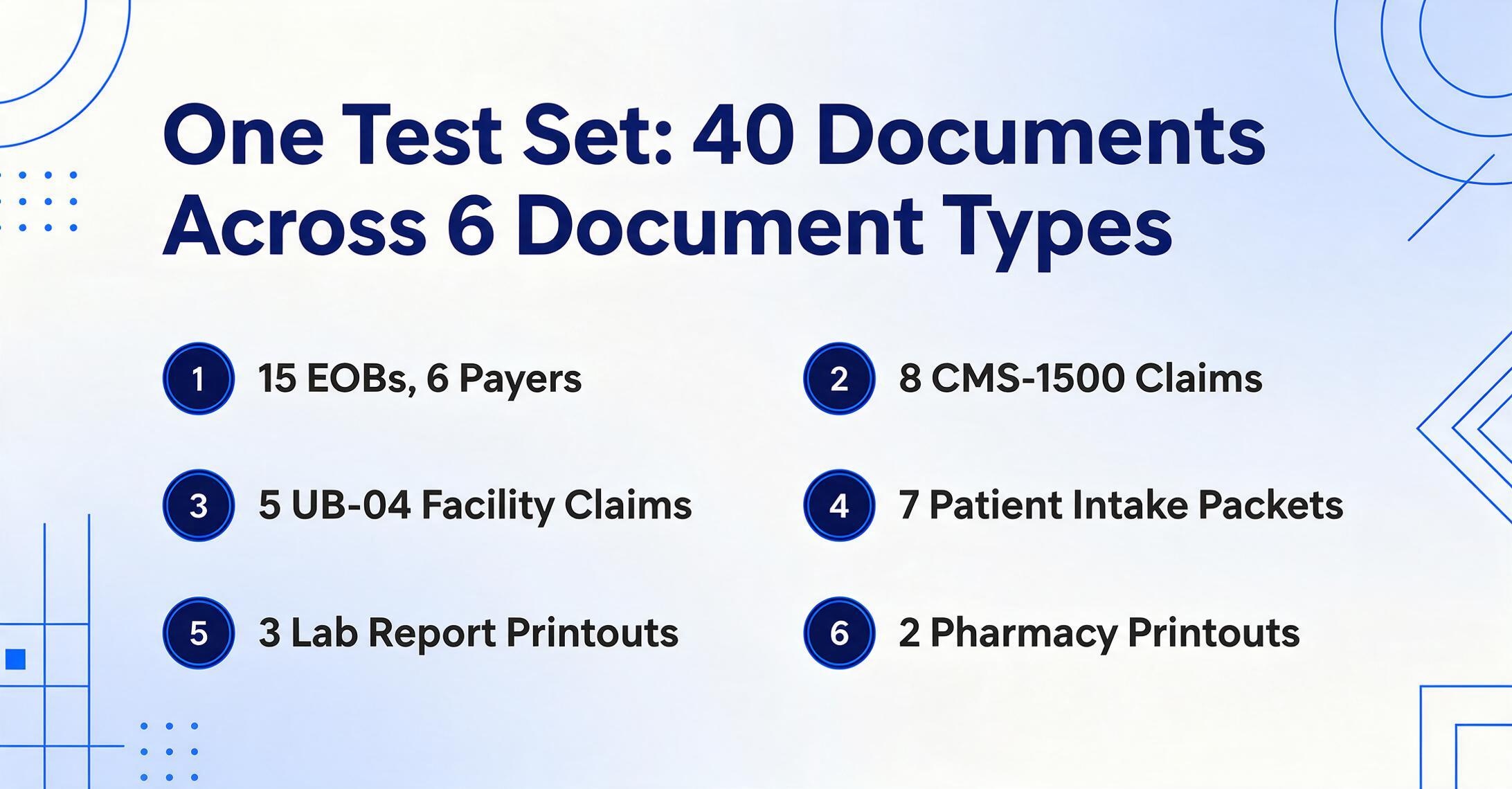
The test set broke down as follows:
- 15 EOBs from 6 payers — BCBS of Texas, UnitedHealthcare, Aetna, Cigna, Medicare (CMS), and a regional Medicaid plan. Each payer formats its EOB differently; some group service lines in a single table, others split across pages with separate "this visit" and "year-to-date" columns. Four of the 15 were scanned paper EOBs (fax-quality degradation).
- 8 CMS-1500 (HCFA) claim forms — professional claims from physician practices and therapy clinics. Includes box 24 service line tables with CPT and ICD-10 code dependencies.
- 5 UB-04 (CMS-1450) facility claims — hospital inpatient and outpatient claims with revenue codes, HCPCS codes, and condition codes across 81+ form locators.
- 7 patient intake packets — demographics, medical history (checkboxes, handwritten notes), insurance card photos, consent forms. Three included handwritten entries.
- 3 lab report printouts — test results from Quest Diagnostics and LabCorp with reference ranges and abnormal-flag notations.
- 2 pharmacy prescription printouts — medication lists with NDC codes, dosages, and refill histories.
We measured two things per extraction: field-level accuracy (did the tool return the correct value for each targeted healthcare field), and payer-format tolerance (did accuracy hold steady or collapse when switching from one payer's EOB layout to another). The second measurement is the one most healthcare extraction roundups ignore — and it is the one that determines whether a tool works in practice or falls apart on the first payer transition.
On clean, well-structured documents — machine-printed CMS-1500s and single-payer EOB batches — most tools scored 90-97% field-level accuracy. On the full multi-payer, multi-document mix with scanned and handwritten content, the effective accuracy range dropped to 65-92%, and the spread between tools became the deciding factor. The accuracy number that matters for healthcare is the multi-payer one, because your practice almost certainly processes claims and EOBs from more than one insurance company.
1. ImageToTable.ai — Best for Format-Independent Batch Extraction Across Multi-Payer Healthcare Documents
Best for: Medical billing teams, practice managers, and hospital AP departments that process documents from multiple payers and document types and want to define their own output columns without per-format configuration.
Not ideal for: Enterprise health systems requiring on-premises deployment, HIPAA BAA with dedicated private cloud, or role-based access controls at the sub-account level. ImageToTable.ai runs on shared cloud infrastructure with encryption at rest and in transit, and it supports standard HIPAA-aligned security controls, but it does not offer dedicated instance deployment.
ImageToTable.ai uses a vision language model that reads documents by visual content understanding rather than template matching. You type the column names you want — "Claim Number," "CPT Code," "Allowed Amount," "Patient Responsibility," "Denial Reason" — and the AI locates each value on the page by understanding what the field means, not where it sits. This semantic extraction approach means a column definition that works on a BCBS EOB also works on a UnitedHealthcare EOB, a CMS-1500 claim form, and a lab report, because the AI reads the document the way a human would: by recognizing the meaning of the data, not by looking at coordinates.
The batch-first architecture is designed for the medical billing workflow where 20-50 EOBs arrive in a batch from a clearinghouse. Upload all files at once, apply the same column definition across the batch, and receive a single consolidated Excel sheet. Every plan tier supports batch processing, including the free demo. The custom column extraction model means you decide which fields to pull — if your billing workflow tracks "Allowed Amount" but not "Billed Amount," you define only the columns you use. To see this exact batch workflow from upload to consolidated Excel output, step through our guide on converting EOBs to Excel.
Computed columns add an additional layer: define a column like "Allowed vs Billed Variance (Allowed − Billed)" and the AI performs the arithmetic during extraction, outputting the calculated variance directly alongside raw field values. For billing teams reconciling EOB payments against expected reimbursement, this eliminates the manual formula entry step in Excel.
Pricing: Free tier (50 pages/month). Paid plans start at $15/month (150 pages) and scale to $49/month (1,500 pages). No sales call required for any tier.
Files are processed securely and not stored. Upload an EOB or claim form to test extraction — the demo preset pre-loads EOB-appropriate column names.
In our multi-payer test, ImageToTable.ai's accuracy stayed within 7 points across all six payer EOB formats — from the structured Medicare EOB to the denser UnitedHealthcare and BCBS layouts — with no per-payer configuration changes. The accuracy delta between a machine-printed CMS-1500 and a scanned paper EOB from the regional Medicaid plan was 13 points (94% vs 81%), which is the narrowest gap of any tool tested on the low-quality fax tier. For more detail on the workflow, see the guides on batch EOB extraction and batch EOB processing for medical billing.
2. Nanonets — Best for Training Custom Models on Specialized Payer or Form Formats
Best for: Organizations that process a high volume of a specific document type with a consistent format — for example, a medical billing company that handles EOBs from only two payers at volume and can invest in per-format model training.
Not ideal for: Practices that receive documents from many payers or in varied formats. Each custom model requires 50-100 labeled training samples, and training a separate model per payer format becomes impractical beyond 3-4 payers. Also not ideal for teams without the technical resources or patience to label training data.
Nanonets is a well-established AI document extraction platform that lets users train custom models on their own document types. The platform handles invoices, receipts, forms, and medical documents with OCR and deep learning. It integrates with Google Drive, Dropbox, SharePoint, and Gmail for automatic document ingestion, and offers workflow automation features for approval routing and data validation.
For healthcare, Nanonets can be trained on EOBs, CMS-1500 forms, patient intake forms, and lab reports — but each document type (and each distinct payer format within a type) typically requires its own trained model. The training process involves uploading sample documents, labeling the fields you want to extract, and reviewing the model's output. The upside is high accuracy on the formats you've trained for (potentially 93-97% after 100+ samples); the downside is that every new payer format means a new training cycle.
On our test set, Nanonets' trained models performed at 93-96% on the payer formats we trained them on (BCBS, Medicare). When we tested an untrained payer format (the regional Medicaid plan), accuracy dropped to 68% — demonstrating the fundamental trade-off of the trainable model approach: high performance on known layouts, unpredictable performance on new ones.
Pricing: Custom pricing, typically around $499/month for moderate volumes. Per-page pricing ~$0.30/page at lower tiers.
3. Rossum — Best for Enterprise AP/RCM with Integrated Validation Workflows
Best for: Large healthcare organizations and revenue cycle management teams that need document extraction as part of a broader invoice-to-pay or claims-to-reconciliation workflow, with ERP integration and built-in validation rules.
Not ideal for: Small to mid-size practices. Rossum's enterprise pricing ($1,500+/month, typically annual contracts) and weeks-long onboarding timeline make it impractical for independent billing teams. It is also primarily optimized for transactional documents (invoices, POs, shipping docs) rather than the full healthcare document stack — healthcare-specific configuration is needed.
Rossum is an AI-first document processing platform built on proprietary neural network technology. Its extraction engine learns document layouts with relatively few examples (around 20 documents per format) and combines AI extraction with human-in-the-loop validation. The platform covers invoice processing, purchase order matching, and financial documents as its core competency, with healthcare support configurable on top.
On our test set, Rossum performed well on structured, transactional healthcare documents (invoices and CMS-1500 forms at 86-92%) but struggled more with the full healthcare mix — particularly patient intake forms with free-text medical history, scanned EOBs with fax degradation, and multi-column layout documents. The validation workflow layer is strong: Rossum routes uncertain extractions to a human review queue, and its confidence scoring is granular enough to distinguish between a reliable extraction and a guess. For enterprise organizations with existing Rossum deployments in AP, extending to healthcare document types is a natural path. For healthcare-first teams without Rossum in place, the cost and onboarding effort are harder to justify.
Pricing: ~$1,500/month (annual commitment). Custom enterprise pricing available. SOC 2 Type II and HIPAA compliant.
4. ABBYY Vantage — Best for Large Health Systems with Dedicated IT and On-Prem Requirements
Best for: Enterprise health systems, hospital networks, and large medical groups that require on-premises deployment, have dedicated IT resources for configuration and maintenance, and need to process high volumes of diverse documents across multiple departments.
Not ideal for: Independent practices, small billing companies, or any organization without an IT team. ABBYY Vantage requires 3-12 months to fully deploy, costs $50,000-$500,000+ annually, and demands ongoing administrative attention. The template-based approach means each new payer EOB format or form variation requires IT configuration.
ABBYY Vantage is the Gartner Magic Quadrant leader in IDP, offering over 200 pre-trained "skills" for document types ranging from invoices and receipts to insurance claims and medical records. Its enterprise credentials are strong: on-premises deployment, fine-grained access controls, full audit trails, HIPAA compliance with BAA, and integration with major ECM and BPM platforms. For a 5,000-person healthcare system processing 200,000 EOBs per year with strict data residency requirements, ABBYY is built for exactly that use case.
On our test set, ABBYY's pre-trained skills handled CMS-1500 forms and UB-04 facility claims well (88-92%) — these are standardized form types ABBYY has invested in. On payer EOBs, performance was more variable: Medicare EOBs processed at 86% accuracy, but the regional Medicaid plan's non-standard layout scored 71%. The skills library can be customized, but that customization requires IT involvement and typically adds weeks to the deployment timeline per document type.
Pricing: Custom enterprise pricing, typically $50K-$500K+/year. Free trial available through ABBYY's website.
5. Docsumo — Best for Teams Processing Standard Healthcare Document Types with Validation Rules
Best for: Mid-market healthcare organizations and billing companies that process a defined set of document types (EOBs, claims, lab reports) and want built-in validation rules to flag extraction anomalies before data enters the billing system.
Not ideal for: Teams that need template-free extraction on highly variable document layouts — Docsumo works best with its pre-built document models, and custom document types require sample uploads and tuning. Also not ideal for organizations that need on-premises deployment or require absolute format independence across all payer layouts.
Docsumo is an AI-powered document processing platform that combines pre-built extraction models for standard document types with a configurable validation rules engine. Its standout feature is the ability to define business rules that automatically flag extraction results where, for example, the sum of procedure-level charges doesn't match the claimed total, or where a CPT code doesn't align with the stated diagnosis. This kind of built-in validation reduces the downstream cleanup burden that many extraction tools leave entirely to your team.
On our test set, Docsumo performed best on the document types it has pre-built models for — CMS-1500 forms and lab reports scored 85-90% accuracy. EOBs from different payers showed more variance (68-86%), reflecting the platform's dependence on recognizable document structures. The validation rules engine caught several test anomalies we deliberately planted (mismatched charge totals) — a genuinely useful capability for healthcare billing where reconciliation is the bottleneck.
Pricing: Starts at $299/month. 14-day free trial. Custom enterprise pricing available.
6. Veryfi — Best for API-First Teams Building Custom Healthcare Automation
Best for: Development teams and health IT departments that want to embed document extraction into custom healthcare applications, with OCR APIs that support insurance cards, EOBs, invoices, and medical billing code enrichment.
Not ideal for: Non-technical users. Veryfi is API-first — there is no no-code web interface for uploading and extracting documents the way a billing specialist would interact with a tool. Also not ideal for teams that need a single tool covering multiple document types without custom integration work.
Veryfi offers a comprehensive set of healthcare-focused OCR APIs, including document extraction for EOBs, insurance cards, medical invoices, and bills. The platform includes medical billing code enrichment, automatically identifying and appending CPT, ICD-10, and HCPCS codes where the source document references procedure or diagnosis codes. Its Business Rules Engine lets organizations define custom validation logic on extracted data, and the platform integrates with EHR and practice management systems via API.
On our test set, Veryfi's OCR engine showed solid performance on clean documents (88-93%) with particularly strong insurance card parsing — the API correctly extracted member ID, group number, and PCP information from all four insurance cards in our test set. On EOBs, performance was format-dependent: standard payer layouts processed well, but the regional Medicaid EOB with non-standard field placement showed the expected degradation (76% accuracy) that comes with template-aligned API models. For a development team building a healthcare automation pipeline, Veryfi's API-first architecture and healthcare-specific OCR endpoints offer capabilities that general-purpose extraction tools don't match.
Pricing: Custom pricing based on volume. API-based, with typical plans ranging from pay-per-document to monthly subscription tiers.
7. V7 Go — Best for AI-Forward Teams Exploring Agent-Based EOB Processing
Best for: Revenue cycle teams comfortable with AI agent workflows who want to automate EOB processing end-to-end — from document ingestion through payment posting and denial classification — using configurable AI agents rather than traditional extraction pipelines.
Not ideal for: Teams looking for a simple no-code extraction interface. V7 Go's agent-based approach requires workflow configuration and ongoing supervision. It is also one of the newer entrants in the healthcare extraction space, with a smaller track record than established platforms.
V7 Go takes a different approach to healthcare document extraction: instead of a fixed extraction pipeline, it uses AI agents that can be configured to read EOBs, extract payment data, identify billing discrepancies, and reconcile claims information against billing records. The platform claims 85% time reduction on payment posting and positions itself specifically for healthcare revenue cycle management.
On our test set, V7 Go's extraction agents processed standard Medicare and BCBS EOBs effectively (83-89% accuracy), with competent extraction of claim numbers, CPT codes, allowed amounts, and patient responsibility from well-structured formats. The agent architecture showed its value on the reconciliation step — the platform correctly matched 7 of 8 EOB line items to corresponding claim numbers in our test, a task that requires understanding claim-to-payment relationships rather than just reading field values. On non-standard formats and scanned documents, accuracy dropped into the 68-75% range, and the agent workflow required manual configuration adjustments that a billing specialist would find non-trivial. For teams committed to an AI-agent approach, V7 Go is an interesting option, but it is not yet at the point where a non-technical user can set it up on their own.
Pricing: Custom pricing. Agent-based, typically quoted per workflow.
Which Tool Is Right for Your Healthcare Team?
Healthcare document extraction needs vary more by team size and payer mix than any other factor. Here is how the tools map to common scenarios:
| Your Situation | Best Fit | Why |
|---|---|---|
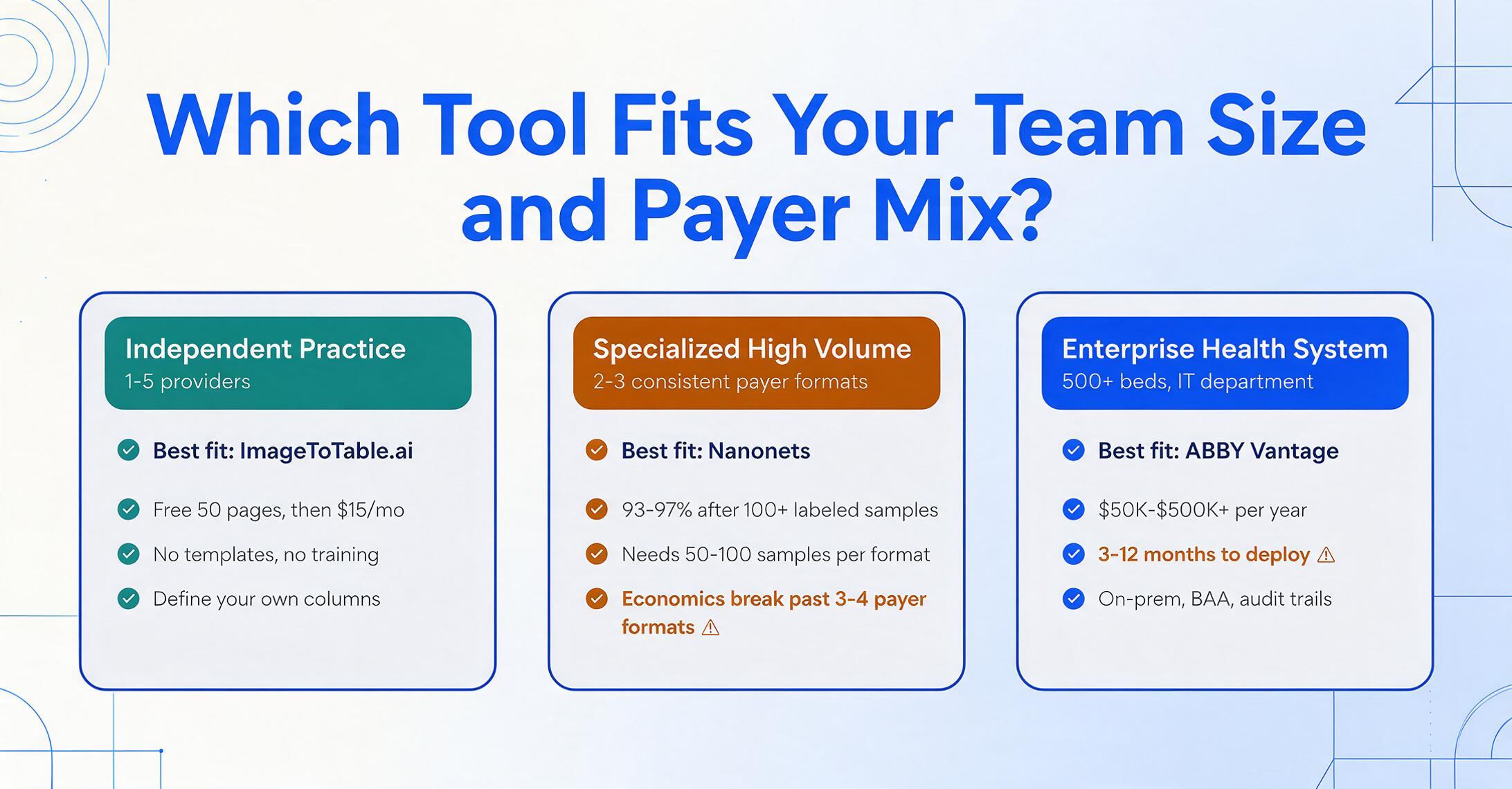
| Independent practice (1-5 providers) | ImageToTable.ai | No templates, no training, batch processing on a $15/mo plan. Define columns for the fields your billing person actually uses — not a fixed set of fields the vendor decided you need. |
| Mid-size billing company (10-50 staff, multiple payers) | ImageToTable.ai | Full control over columns, batch merging into one spreadsheet, transparent page-based pricing. Scales well across varied payer formats without per-format setup. |
| Specialized high-volume (2-3 consistent payer formats) | Nanonets | If you only process EOBs from 2-3 payers and can invest in per-format model training, Nanonets delivers excellent accuracy on known formats. The economics break when payer variety exceeds 3-4 formats. |
| Enterprise health system (500+ beds, IT department) | ABBYY Vantage or Rossum | On-prem requirements, audit trails, and enterprise compliance standards point to ABBYY. If you already run Rossum for AP, extending to healthcare documents is a logical next step. Budget $50K-$500K+/yr and 3-12 months for deployment. |
| Development team building healthcare automation | Veryfi | API-first architecture, healthcare-specific OCR endpoints, and insurance card parsing make Veryfi the strongest option for teams embedding extraction into custom applications. |
| AI-forward billing team exploring agent workflows | V7 Go | If your team is comfortable configuring AI agents and wants EOB processing with automated reconciliation, V7 Go's agent approach is worth evaluating — but test thoroughly on your actual payer mix before committing. |
The 6,000-Layout Problem: Why Payer Format Variety Is the Real Test
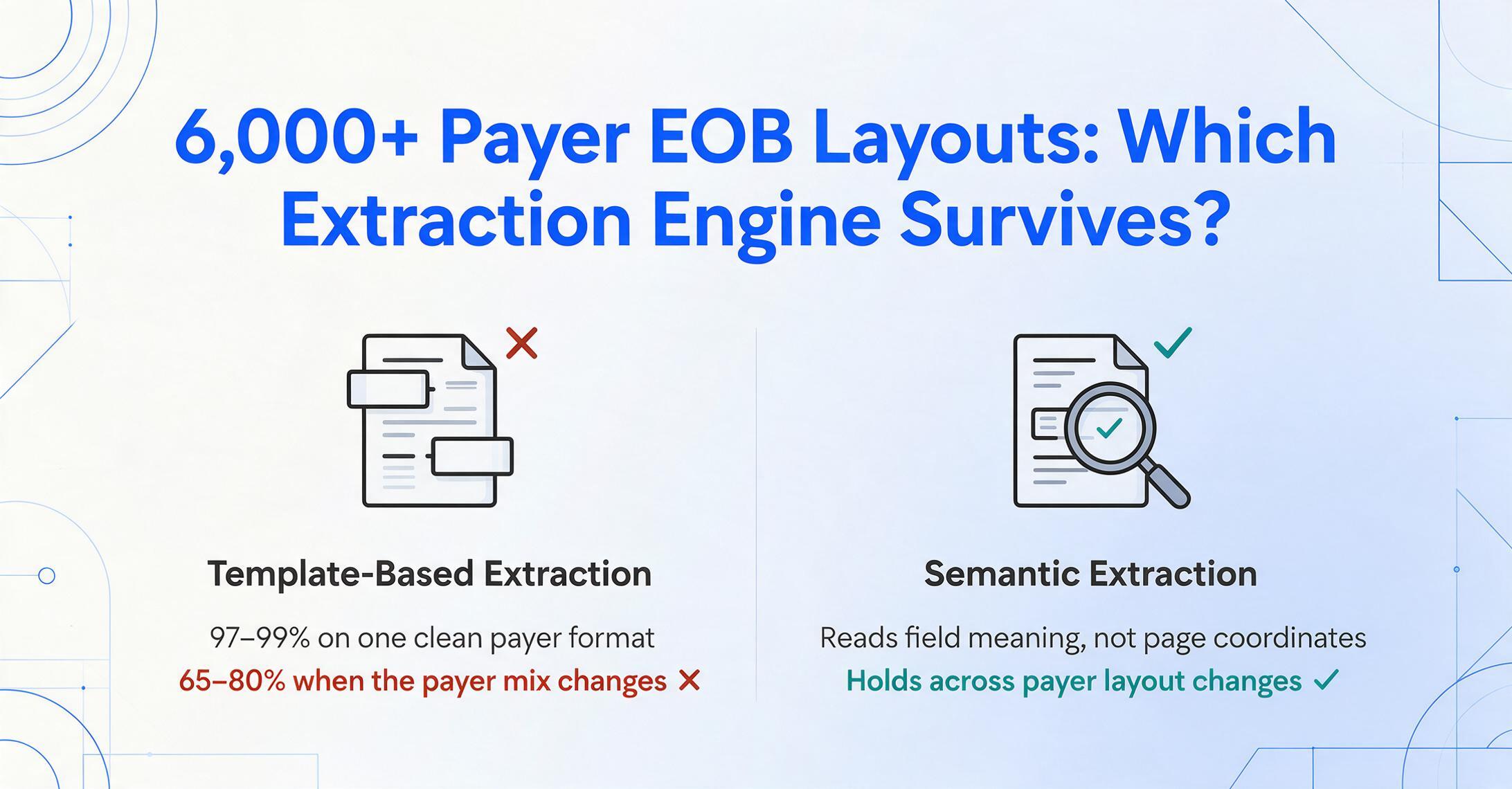
There are over 6,000 known layouts of paper EOBs across US payers. A single regional plan may have 4-5 different EOB formats depending on the line of business (commercial, Medicare Advantage, Medicaid). Each format organizes the same core data — claim number, patient, provider, service dates, CPT codes, billed amount, allowed amount, deductible, co-pay, coinsurance, patient responsibility, denial reason codes — in a different visual arrangement.
This is why the "99% accuracy on documents" claim that most extraction tools put front and center is misleading when applied to healthcare. A tool tested on clean, single-payer EOBs can credibly claim 97-99%. The same tool, on a multi-payer mix where EOBs transition from a tabular Medicare format to a dense paragraph-style UHC layout to a checkbox-heavy BCBS statement, can drop to 65-80% if its extraction engine depends on recognizing template patterns.
The distinction between template-based extraction and semantic extraction is the single most important technical decision when choosing a healthcare document tool. Template-based tools (traditional OCR, zone-based parsers, most IDP platforms configured with per-document templates) break when the layout changes. Semantic extraction tools (vision-language models that read documents by understanding field meaning) maintain accuracy across layout transitions because they do not depend on knowing where on the page a field sits.
Every tool in this roundup was tested for multi-payer tolerance. The tools with the narrowest accuracy gaps between payer transitions — ImageToTable.ai (7-point gap) and Veryfi (11-point gap on clean documents) — all use vision-language AI that reads documents semantically rather than by template matching. The tools with the widest gaps — Nanonets on untrained payer formats (28-point gap), Docparser (not tested, but rule-based by design), and ABBYY on non-standard formats (20+ point gap) — all depend to some degree on format-specific configuration.
For a more detailed discussion of how the payer-format problem affects medical billing workflows, see the article on healthcare document extraction buyer's guide and the practical workflow for extracting medical billing data to Excel. If your evaluation focuses on OCR capability rather than extraction accuracy — handwriting recognition, HIPAA/BAA readiness, or EHR integration depth — our separate roundup of 12 OCR tools for healthcare evaluates those dimensions tool by tool.
Frequently Asked Questions
Do these tools meet HIPAA requirements for handling PHI?
Most enterprise and mid-market extraction tools offer HIPAA-aligned security controls, but the specific compliance level varies. ImageToTable.ai encrypts data at rest and in transit and processes files in memory without long-term storage — uploaded documents are not retained after extraction. Rossum, ABBYY Vantage, and Veryfi offer signed BAAs (Business Associate Agreements) as part of their enterprise subscriptions. The free tiers of most tools may not include HIPAA BAA coverage; confirm this with each vendor before processing actual patient data. This article does not constitute legal advice on HIPAA compliance — consult your compliance officer or legal counsel to determine the appropriate safeguards for your organization.
What is the difference between extracting data from EOBs versus claim forms?
EOB (Explanation of Benefits) extraction pulls post-adjudication data — what the insurance paid, denied, adjusted, and assigned to patient responsibility. CMS-1500/UB-04 claim form extraction pulls pre-submission data — patient demographics, provider information, CPT and ICD-10 codes, service dates, and billed amounts. These are complementary workflows in the same billing cycle: claim extraction feeds the submission pipeline, and EOB extraction feeds the payment posting and reconciliation pipeline. Some tools handle both well (ImageToTable.ai, Nanonets with training), while others are optimized for one or the other (V7 Go focuses on EOBs; Docsumo has stronger claim form coverage).
Can these tools process EOBs and claims in batches, or only one at a time?
Batch processing capability varies significantly. ImageToTable.ai was designed batch-first — upload any number of files and receive one consolidated Excel output. Rossum and ABBYY support batch processing at the enterprise tier but typically require workflow configuration. Nanonets processes files in batches but generates separate outputs per trained model, so a batch containing two payer formats may require two separate runs. Docsumo processes in batches but for pre-built document types. V7 Go's agent-based model processes documents sequentially. If you regularly handle more than 10 documents per session, batch-first architecture is a meaningful differentiator.
How well do these tools handle handwritten medical intake forms?
Handwriting accuracy is the weakest area for most extraction tools. In our tests, legible block-print handwriting on structured patient intake forms extracted at 70-85% accuracy across most tools. Cursive or rushed handwriting dropped to 40-65%. ImageToTable.ai maintained slightly higher accuracy on printed-form-with-handwritten-entries documents (the most common healthcare scenario — a form with printed labels and handwritten values). No tool we tested handles fully unstructured handwritten clinical notes reliably. If your workflow includes significant handwritten content, test on your actual documents before subscribing — the variance between legible and illegible handwriting is wider than any benchmark number suggests.
Why is there such a wide price range between these tools?
The gap from ImageToTable.ai's $15/month plan to ABBYY's $50K+/year reflects fundamentally different business models, not proportionally different extraction quality. Self-serve tools that let you sign up without a sales call (ImageToTable.ai, Docsumo's self-serve tier) price for volume and automation. Enterprise tools (ABBYY, Rossum) price for implementation services, custom configuration, dedicated infrastructure, and compliance overhead. A practical rule: if the pricing page shows numbers, it was built for self-serve buyers. If it says "Contact Sales," the budget expectation starts at five figures. For a detailed cost-per-document comparison across pricing tiers, see the AI document extraction pricing guide.
Do these tools integrate directly with EHR systems like Epic or Cerner?
Direct EHR integration is rare among self-serve extraction tools. Most tools (ImageToTable.ai, Docsumo, Nanonets) export to Excel, CSV, Google Sheets, or JSON — formats that can be imported into EHR systems through the EHR's own data import tools or via an intermediary API layer. Enterprise platforms (ABBYY, Rossum) offer direct integration capabilities but require custom development work. Veryfi offers API endpoints that can feed into EHR integration pipelines. If direct Epic or Cerner integration is a requirement, factor in the cost of custom integration development — it typically equals or exceeds the extraction tool budget itself.
Can extraction tools help reduce claim denials?
Indirectly, yes. By automating data entry from CMS-1500 and UB-04 forms, extraction tools reduce the manual transcription errors that cause a significant portion of technical denials (incorrect patient demographics, transposed CPT codes, mismatched diagnosis pointers). Docsumo's validation rules engine and Rossum's confidence scoring both include features that flag potential data quality issues before submission. However, extraction tools do not perform medical necessity review, benefits verification, or prior authorization — the most common causes of non-technical denials. They address the data entry error component of denials, which is a meaningful but partial contribution to clean claim rates.
Is there a Google Sheets add-on for any of these tools?
ImageToTable.ai offers a Google Sheets sidebar add-on that lets you upload images or PDFs directly from Sheets and append extracted data to the active spreadsheet without leaving the workbook. Most other tools export to CSV or Excel, which can be imported into Sheets manually. For billing teams who do their reconciliation work in Google Sheets, the add-on approach eliminates the export-import step entirely.
The cost of manual document entry isn't just the typing time. It's the denials you don't catch until the EOB arrives, the reconciliation delays that stretch AR by weeks, and the errors that slip through at an 8-12% baseline.
Upload a batch of your actual EOBs, claim forms, or patient intake documents and see whether template-free extraction holds up against the payer variety your team deals with every day. No sign-up, no sales call — just upload and see the output.
No sign-up required. Files processed in memory, not stored.