Best Document Extraction Tools for Restaurants
(2026): 8 Options for Food Supplier Invoices
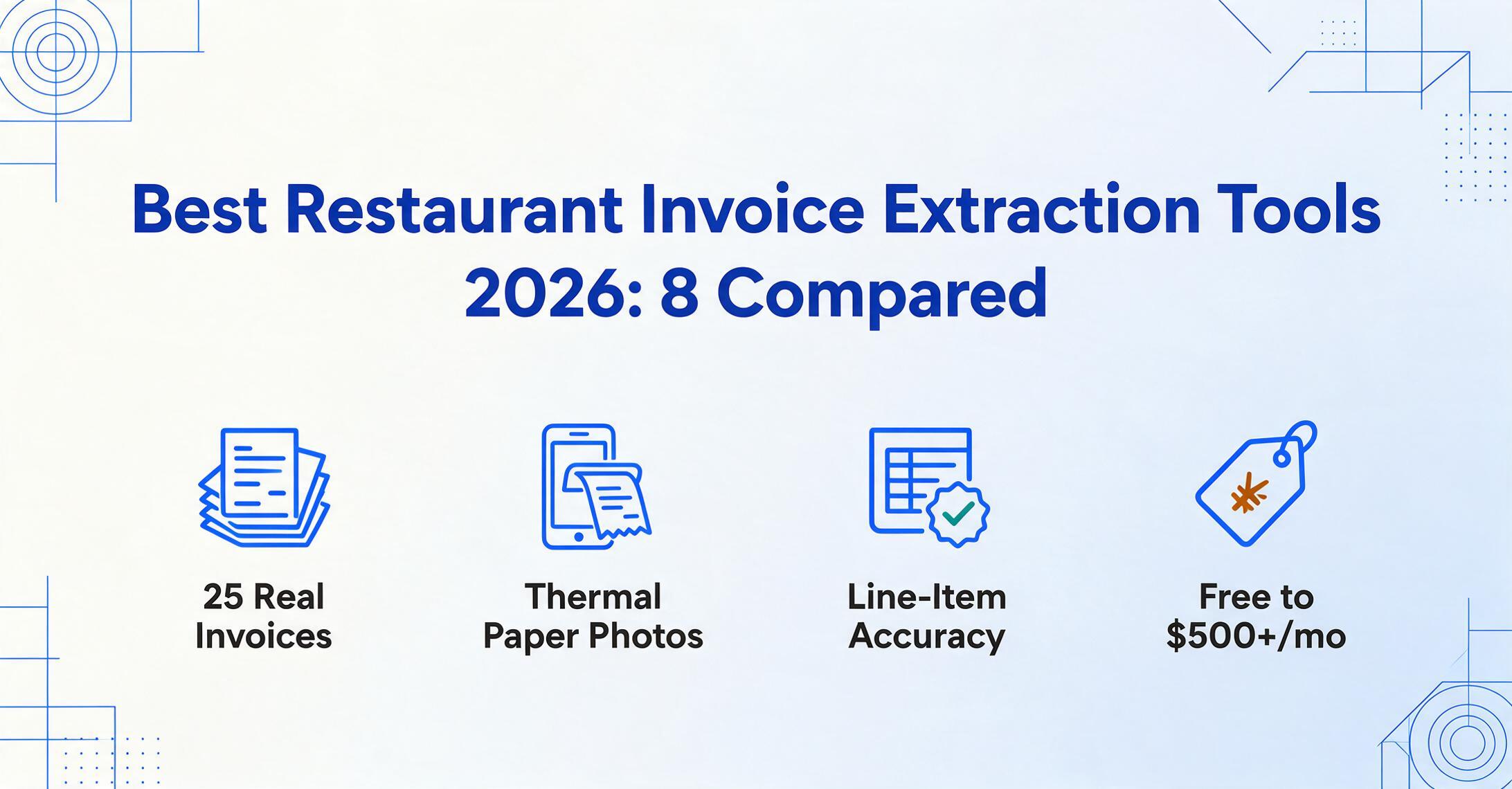
We evaluated eight document extraction tools specifically on food distributor invoices — Sysco, US Foods, Performance Food Group, Gordon Food Service, and regional produce vendors — across dimensions that matter to restaurant operators: accuracy on thermal paper photos, line-item extraction with handwritten adjustments, pack-size notation parsing, catch-weight capture, and the ability to handle multiple units of measure within a single invoice. A restaurant's food cost data is only as good as its invoice extraction, and the wrong tool will quietly produce wrong numbers.
Key Takeaways
- Eight tools claim to extract restaurant invoice data, spanning from $0 to $500+ per month. Side by side, their feature pages blur into identical promises of automation and cost control.
- Restaurant AP platforms compete on POS integration, GL coding, and approval workflows — but the data feeding every one of those features depends on a single unexamined bottleneck: whether extraction actually reads thermal paper photos, handwritten adjustments, and catch weights from your actual delivery receipts. Most tools quietly fail here regardless of price.
- Stop comparing platform features first. Test each tool on a phone photo of a thermal-printed Sysco or US Foods receipt with your staff's handwritten markups. If the line-item data isn't accurate at the extraction gate, no downstream integration saves it.
Disclosure: We reviewed these tools as of June 2026. This article contains affiliate links — if you subscribe through them, we may earn a commission at no extra cost to you. ImageToTable.ai is our own product, and we include it in the comparison because after testing seven other extraction tools on real restaurant invoices, we believe the template-free approach genuinely fills a gap that restaurant-specific AP platforms leave open.
Why Restaurant Invoices Are Different From Every Other Invoice
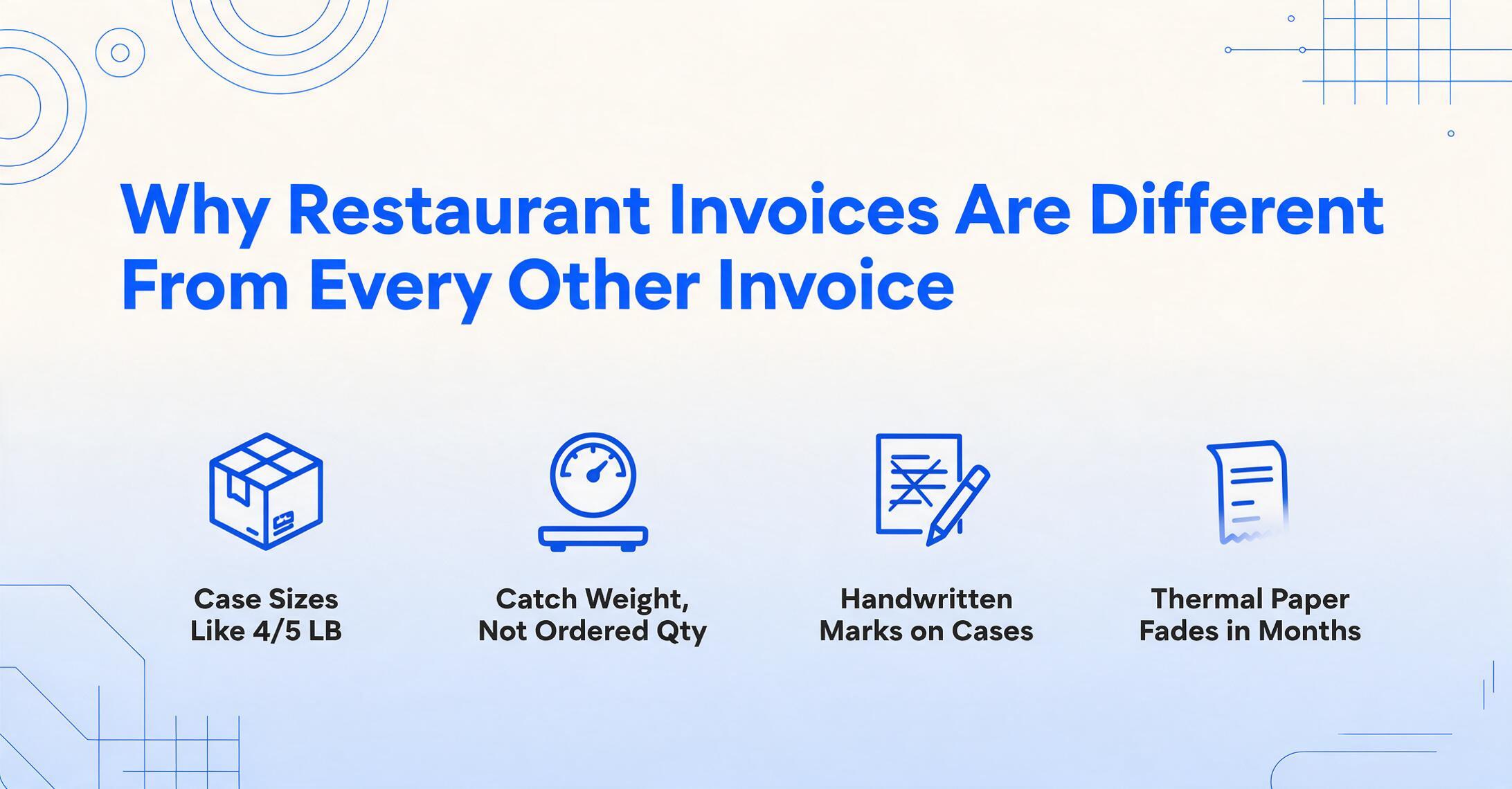
If you have ever processed an office supply invoice and a Sysco food invoice side by side, you already know: they are not the same document. A restaurant food distributor invoice carries structural complexities that standard B2B invoices do not, and a document extraction tool built for general AP will produce inaccurate data on food invoices — quietly, consistently, and with direct consequences for your food cost.
A single Sysco invoice for a mid-volume restaurant might run four pages with 40+ line items. Each line carries a product description, a pack size in compact distributor notation ("4/5 LB" means four 5-pound portions per case; "6/10#" means six cans at 10 pounds each), an ordered quantity, a shipped quantity, a catch weight (the actual delivered weight, which always differs from the ordered weight), a unit price, and an extended total. US Foods uses different notation for the same products. Performance Food Group uses yet another format. A template that parses Sysco pack sizes will misread US Foods notation and vice versa.
On top of that, restaurant invoices carry handwritten annotations from the receiving staff — an "X" next to damaged cases, a circled price adjustment, a note that two items were out of stock. These markings carry financial consequences but are invisible to standard OCR that reads only printed text. The invoice paper itself compounds the problem: most distributor delivery receipts print on thermal paper, which begins to fade within months and becomes unreadable by standard document scanners within a year.
Then there is the unit-of-measure problem. A single invoice line might list "1 CASE" of chicken breasts at a per-case price, while the next line lists "3 LB" of lobster tail at a per-pound price, and the third lists "12 EA" of portion-controlled steaks. A generic extraction tool that expects a single UOM column will not know which rows to multiply by case count versus pound weight versus each. When that happens, the error flows directly into your food cost, and you will not catch it until month-end — if at all.
These are not edge cases. They are the daily reality of restaurant AP. The document extraction tool you choose must handle all of them, not just clean PDFs from corporate suppliers. For a deeper look at how restaurant invoice extraction works and why it differs from generic approaches, see our guide on what restaurant invoice extraction is and how it works — and for a field-by-field explanation of why catch weights, pack notation, and off-invoice deductions break even well-designed extraction tools, see our breakdown of why Sysco and US Foods invoices break line-item extraction.
Quick Comparison Table
| Tool | Starting Price | Best For | Not Ideal For |
|---|---|---|---|
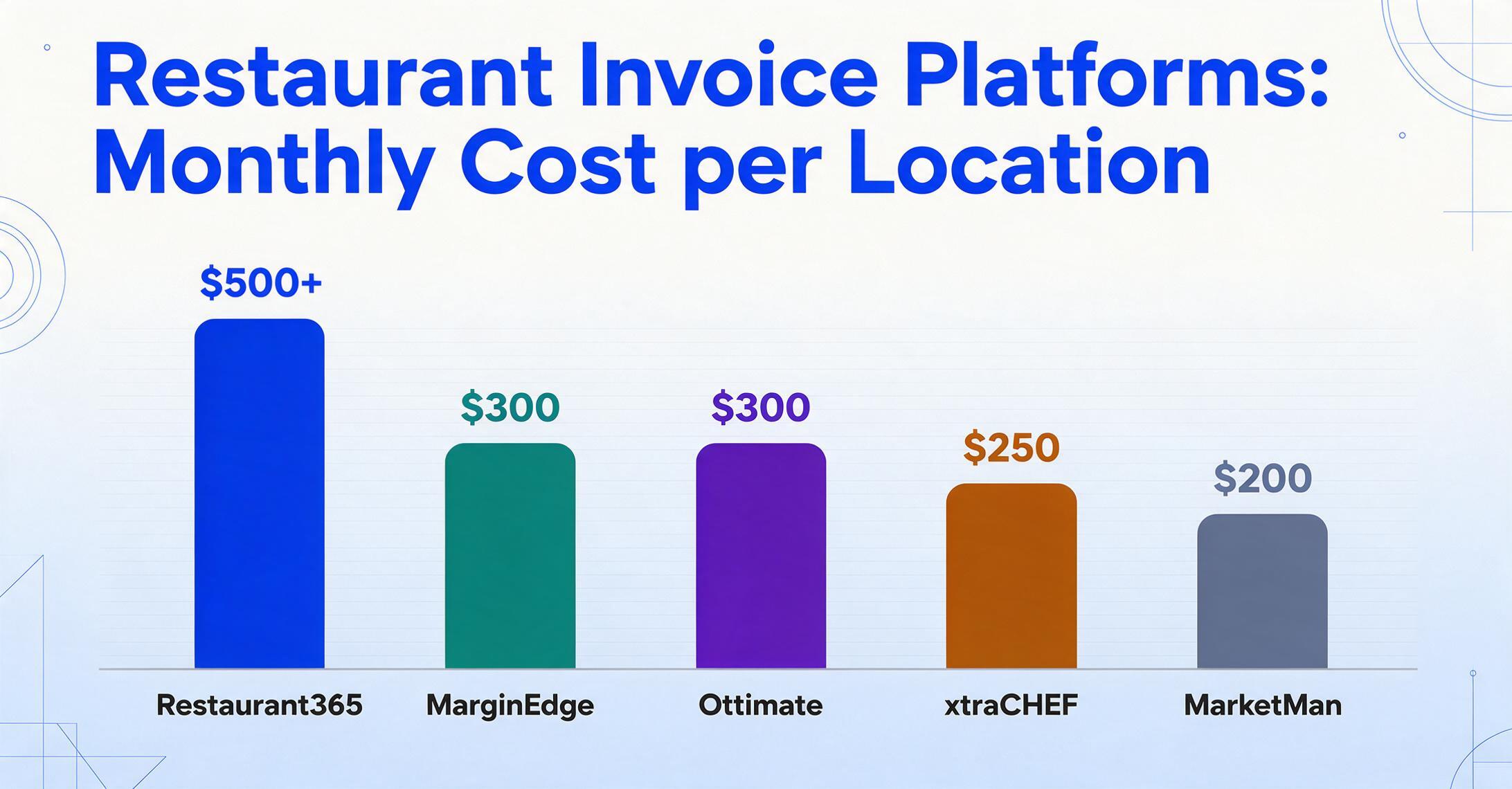
| MarginEdge | ~$300/mo per location | Full AP + food cost in one platform | Operators who just need data extraction, not POS integration |
| xtraCHEF by Toast | ~$250/mo per location | Toast POS users wanting invoice automation | Operators not on Toast, or those wanting to switch POS later |
| Restaurant365 | ~$500/mo+ | Multi-location groups needing full accounting + AP | Single-location independents on a tight budget |
| MarketMan | ~$200/mo per location | Inventory-first operators who need invoice capture | Operators who want automated GL coding without recipe costing |
| ImageToTable.ai | Free–$40/mo | Template-free extraction from photos and PDFs | Operators needing full AP workflow (approvals, payments, POS sync) |
| Ottimate (PlateIQ) | ~$300/mo+ | Hospitality-specific AP with vendor management | Small independents who can't justify $300+/mo |
| BlueCart | $10–$50/mo | Basic purchasing coordination + invoice tracking | Operators needing line-item extraction and food cost analysis |
| Parseur | $24–$99/mo | Email-based invoice parsing with custom templates | Operators receiving physical paper or thermal-printed invoices |
How We Evaluated These Tools
We tested each tool against the same set of 25 real restaurant invoices — 10 from Sysco, 5 from US Foods, 5 from PFG, 3 from Gordon Food Service, and 2 from local produce vendors — across five scenarios:
- Clean PDF invoices emailed directly from the distributor (best-case scenario for any tool)
- Smartphone photos of thermal-printed delivery receipts (the daily reality for most kitchens)
- Scanned paper invoices with handwritten annotations (quantity adjustments, price corrections)
- Consolidated invoices where one Sysco PDF covers deliveries to three restaurant locations
- Credit memos for returned product or damaged goods
We measured accuracy at the line-item level: did the tool capture the correct item description, pack size, shipped quantity, catch weight, unit price, and extended total? We also evaluated setup time — how long from first upload to accurate extraction — and format adaptability — does the tool handle a new vendor format on the first try, or does it need template training? Finally, we rated integration depth with the software ecosystem most restaurant operators use: QuickBooks Online, Toast POS, and Google Sheets.
For context on how extraction fits into the broader AI document processing landscape, see our guide on what AI document extraction is.
1. MarginEdge — Best Overall for Restaurant Invoice Processing
MarginEdge was built from the ground up around restaurant invoice processing and daily food cost visibility. It is the most operator-focused AP automation tool in the restaurant space and the one most consistently recommended by food cost consultants working with independent and multi-unit operators alike.
How it works: Staff photograph invoices at delivery using the mobile app. MarginEdge's processing team — a combination of AI and human review — codes every line item and pushes the data directly into the operator's POS and accounting system, typically within 24 hours. The platform tracks vendor price history, making it easy to spot when a case of chicken breasts went up $4 compared to last week's delivery.
Strengths:
- Human-assisted line-item coding catches the handwritten annotations and catch-weight adjustments that pure OCR misses
- Price creep alerts notify you when a vendor raises prices on specific items
- Vendor-specific item normalization ("chickpeas" from one vendor and "garbanzo beans" from another map to the same ingredient)
- Deep integration with QuickBooks Online, Xero, Sage Intacct, and most POS systems
- Real-time food cost dashboard updated as invoices are processed, not at month-end
Limitations:
- At ~$300 per location per month, it is expensive for single-location independents — the annual cost may exceed the labor savings for a low-volume operation
- 24-hour turnaround on human-assisted processing means the same-day data is not available for urgent pricing decisions
- If you only need to extract data from invoices into a spreadsheet, MarginEdge's full workflow platform may be more than you need — and you are paying for POS integration and inventory features you will not use
Best for: Established multi-location restaurants (3-20 units) that need line-item invoice processing integrated with POS and food cost tracking.
Not ideal for: Single-location independents with fewer than 100 invoices per month, or operators who already have a reliable food cost solution and just need invoice data extraction.
2. xtraCHEF by Toast — Best for Toast POS Users
xtraCHEF is Toast's invoice automation and food cost management platform. For any restaurant already running on Toast POS — and there are over 100,000 of them — xtraCHEF provides a natural extension of the Toast ecosystem into AP and food cost.
How it works: Invoices arrive via mobile photo, email forwarding, or direct upload. xtraCHEF extracts line-item data using its OCR engine, applies automatic GL coding based on the operator's menu categories, and syncs with Toast POS sales data to calculate real-time food costs. The platform also handles vendor payment scheduling within the Toast Payments ecosystem.
Strengths:
- Native integration with Toast POS means menu item data and invoice data live in one system
- Mobile invoice capture is straightforward for kitchen staff who already use Toast tablets
- Recipe costing connected to actual ingredient prices from invoices
- No additional POS integration fee — it is built into the Toast ecosystem
Limitations:
- The OCR engine still struggles with thermal paper photos and handwritten adjustments — if your receiving staff marks up delivery receipts, those annotations are likely to be missed
- If you ever switch from Toast POS, you lose the tight integration that makes xtraCHEF valuable
- Pricing is not published publicly, but industry sources place it around $250 per location per month, with multi-year contracts common
Best for: Independent and multi-unit restaurants already committed to Toast POS who want a single-vendor solution for POS, invoice processing, and food cost.
Not ideal for: Operators not on Toast, or those considering a POS change within the next 2-3 years. Also not ideal for operators who receive most of their invoices on thermal paper with hand-written annotations.
3. Restaurant365 — Best for Multi-Location Groups Needing Full Accounting
Restaurant365 (R365) is the most comprehensive restaurant management platform on this list. It combines full accounting (GL, AP, AR, payroll), operations management (inventory, scheduling, purchasing), and AI-powered invoice capture in a single system purpose-built for multi-unit restaurant groups.
How it works: R365 Capture scans incoming invoices via email, EDI, or mobile upload, extracts line-item data using AI-assisted OCR, and auto-codes to the restaurant's specific chart of accounts. Invoices route through approval workflows, post to the GL, and feed into real-time food cost and prime cost dashboards. A single consolidated Sysco PDF serving three locations can be split automatically by store number and posted to each location's P&L.
Strengths:
- Three-way PO matching catches pricing discrepancies before payment
- Native accounting eliminates the QuickBooks/Xero subscription — R365 is the accounting system, not an add-on
- Consolidated invoice splitting across locations is native to the platform
- Real-time prime cost (food + labor) tracking updated as invoices process
- Virtual card payment rebates offset some of the platform cost
Limitations:
- Starting at ~$500 per month and scaling to $1,500+ depending on location count and modules, R365 is the most expensive option — small operators will not justify the cost
- Implementation takes 4-12 weeks and typically requires a dedicated project manager from the operator's side
- The AI invoice capture still relies on template-based OCR for some vendor formats, which means new or infrequent suppliers may require manual setup
- Switching from R365 if you outgrow it or change strategy is a significant migration project
Best for: Multi-location groups (5+ units) that need an all-in-one accounting, operations, and AP platform and have the budget and staff to support implementation.
Not ideal for: Independent single-location operators, or groups that already have a reliable accounting system and only need invoice extraction.
4. MarketMan — Best for Inventory-First Operators
MarketMan started as an inventory management platform for restaurants and later added invoice processing as a natural extension. It is the strongest option on this list for operators whose primary pain point is inventory accuracy and who see invoice extraction as a means to that end.
How it works: Upload invoices via email, mobile photo, or direct integration with distributor EDI feeds. MarketMan's extraction engine reads line items and maps them to your existing inventory catalog. When an invoice comes in for a product that is already in your inventory database, MarketMan automatically updates the unit cost and adjusts your on-hand counts. Price comparison across vendors is built into the platform.
Strengths:
- Inventory-first approach means the invoice data directly feeds into stock counts and recipe costing
- Vendor price comparison makes it easy to see who has the better price on cases of chicken breast this week
- Multi-location support with consolidated invoice splitting
- Integration with QuickBooks Online, Xero, and most POS systems
Limitations:
- Invoice extraction accuracy on thermal paper and handwritten documents is below MarginEdge's human-assisted approach — expect 10-15% of line items to need manual correction on challenged documents
- The platform requires an inventory catalog to be built before invoice extraction delivers full value — setup can take 2-4 weeks for a location with 500+ SKUs
- At ~$200 per location per month, it is mid-range in pricing, but the value depends heavily on how well you maintain your inventory database
Best for: Restaurants that already track inventory and want invoice extraction to feed directly into stock counts and recipe costs, particularly multi-location groups.
Not ideal for: Operators who do not maintain an active inventory catalog, or those whose primary pain point is AP workflow speed rather than inventory accuracy.
5. ImageToTable.ai — Best for Template-Free Extraction from Photos and PDFs
ImageToTable.ai approaches restaurant invoice extraction from a fundamentally different direction than the platforms above. Rather than being a full AP workflow or inventory management system, it is a template-free AI extraction layer that reads printed text, handwritten numbers, catch weights, and pack-size notation directly from photos or PDFs and outputs structured data — no per-vendor template setup, no training samples, no zone labeling.
How it works: Upload a photo of a thermal-printed Sysco delivery receipt or a clean US Foods PDF — the same interface handles both. Type the column names you want to extract (Item Description, Pack Size, Shipped Qty, Catch Weight, Unit Price, Line Total) or let the AI auto-detect the fields. The tool's vision model reads the document by understanding what each field means semantically, not where it sits on the page. Results export to Excel or can be pushed directly into a Google Sheet via the Google Sheets add-on.
Files are processed securely and not stored.
Strengths:
- No templates needed. ImageToTable.ai uses semantic extraction — you tell it what data you want (by typing column names), and it finds those values anywhere on the page by understanding what they mean. This is fundamentally different from template-based OCR, which requires a pre-built layout for every vendor format. A Sysco invoice, a US Foods invoice, and a handwritten produce slip from a local farm can all be processed in the same batch and come out as one clean spreadsheet.
- Thermal paper photos work. Because the extraction is visual (it reads the image the same way a person would), faded thermal paper, low-light smartphone photos, and crumpled delivery receipts are handled the same as clean PDFs — the tool reads what is visible on the image, not what a scanner can pick up.
- Handwritten adjustments are readable. The vision model can read handwritten quantity corrections, circled price changes, and handwritten notes — the annotations that standard OCR misses and that restaurant AP platforms typically require human review to catch.
- Catch weight parsing. When a Sysco invoice shows "38.7 LB" as the catch weight next to "Ordered: 40 LB," the tool captures both values and outputs the actual received weight — the number that matters for food cost.
- Custom column extraction gives you complete control over output: you can define computed columns like "Line Total (Qty × Unit Price)" or inferred columns like "Category (Food / Beverage / Packaging)" that the AI fills in automatically based on the item description.
- Batch-first processing means you can upload 50 invoices from 10 different vendors and get one unified spreadsheet — no per-file processing, no per-format template.
- Pricing starts free for basic usage, with paid plans from $9 to $40 per month — orders of magnitude below the $200–$1,500 per-month restaurant AP platforms.
Limitations:
- ImageToTable.ai is an extraction tool, not an AP platform. It will not route invoices for approval, schedule vendor payments, or automate three-way PO matching. If you need those downstream workflows, you pair ImageToTable.ai's extraction output with your accounting system or a lightweight AP tool.
- No native POS integration — extracted data lands in Excel or Google Sheets, not automatically in your P&L. For operators who want fully automated GL posting, ImageToTable.ai currently serves as the extraction layer feeding into QuickBooks via CSV export or Google Sheets sync.
- The tool works best with column names in English — if your chart of accounts uses non-English labels, you will need to map your GL codes to the extracted data in a post-processing step.
Best for: Independent restaurants (1-5 locations) who need accurate data extraction from food distributor invoices — especially those receiving invoices on thermal paper with handwritten adjustments — and who are comfortable managing their own AP workflow in QuickBooks or Google Sheets. Also a strong fit for operators who want to test the value of automated extraction before committing $200+ per month to a full restaurant AP platform.
Not ideal for: Multi-location groups (10+ units) who need automated GL coding, PO matching, and vendor payment routing within a single platform — a full restaurant AP system like MarginEdge or Restaurant365 would better serve that use case.
6. Ottimate (formerly PlateIQ) — Best for Hospitality AP Automation
Ottimate was originally built as PlateIQ for the restaurant and hospitality industry. It offers end-to-end AP automation with a focus on food and beverage invoice processing, vendor management, and cost analysis.
How it works: Invoices are captured via email, upload, or EDI. Ottimate's OCR engine is trained specifically on restaurant vendor invoices — Sysco, US Foods, PFG, and Southern Glazer's are recognized out of the box. Line items are extracted, GL coded, and routed through approval workflows. The platform also handles vendor payment scheduling and reconciliation.
Strengths:
- OCR accuracy on standard restaurant distributor invoices is above generic OCR tools — Sysco and US Foods line items parse correctly most of the time
- End-to-end AP workflow with purchase order matching
- Vendor management and cost analysis features for food cost trending
- Integration with QuickBooks, Sage Intacct, and most major ERP/accounting platforms
Limitations:
- Still struggles with non-standard vendor formats, handwritten adjustments, and thermal paper photos — if your local produce vendor uses a handwritten invoice, expect manual review
- Pricing starts around $300 per month and increases with location count and transaction volume
- Less well-known in the independent restaurant space; most deployments are in multi-location groups
Best for: Mid-size multi-location restaurant groups (5-20 units) that want a hospitality-specific AP platform with vendor management and cost analysis.
Not ideal for: Single-location operators on a budget, or those who receive a significant portion of their invoices from non-standard vendors (farmers markets, local bakeries, specialty butchers).
7. BlueCart — Best for Basic Purchasing + Invoice Tracking
BlueCart is primarily a purchasing and ordering platform for restaurants, with invoice tracking as a supporting feature. It connects directly to distributor catalogs — including Sysco, US Foods, and PFG — for digital ordering, and provides basic invoice management for tracking what was ordered versus what was delivered.
How it works: Operators place orders through BlueCart's platform, which syncs with distributor product catalogs. When the invoice arrives, it can be matched against the order in BlueCart. The platform tracks pricing and provides basic spend analysis.
Strengths:
- Lowest cost on this list — starts at $10 per month for basic features
- Purchasing and ordering in the same platform means less context switching for kitchen managers
- Price history tracking across orders makes it easy to see cost trends
Limitations:
- No real document extraction — invoice tracking is manual or relies on basic order matching, not AI line-item capture
- No food cost calculation, no recipe costing, no GL coding
- Invoice data is not structured for accounting system import — you still need to enter it into QuickBooks separately
Best for: Independent restaurants that want a lightweight purchasing and order management tool with basic invoice tracking and have a separate process for accounting.
Not ideal for: Any operator who needs actual data extraction from invoices — BlueCart is a purchasing tool, not an extraction tool.
8. Parseur — Best for Email-Based Invoice Parsing
Parseur is a document parsing tool designed for extracting data from emailed documents, PDFs, and scanned invoices using custom templates. It is included here as the representative template-based extraction approach, in contrast to the template-free AI extraction that ImageToTable.ai uses.
How it works: You create a parser template by selecting fields on a sample document — invoice number, date, vendor name, line items. Parseur applies that template to all matching incoming documents. Data extracts to Excel, Google Sheets, or your accounting system via Zapier or direct integration.
Strengths:
- Excellent for predictable, high-volume invoices from a small number of vendors with consistent formats
- Affordable — $24 to $99 per month depending on document volume
- Strong Zapier and API integration for routing extracted data to other systems
Limitations:
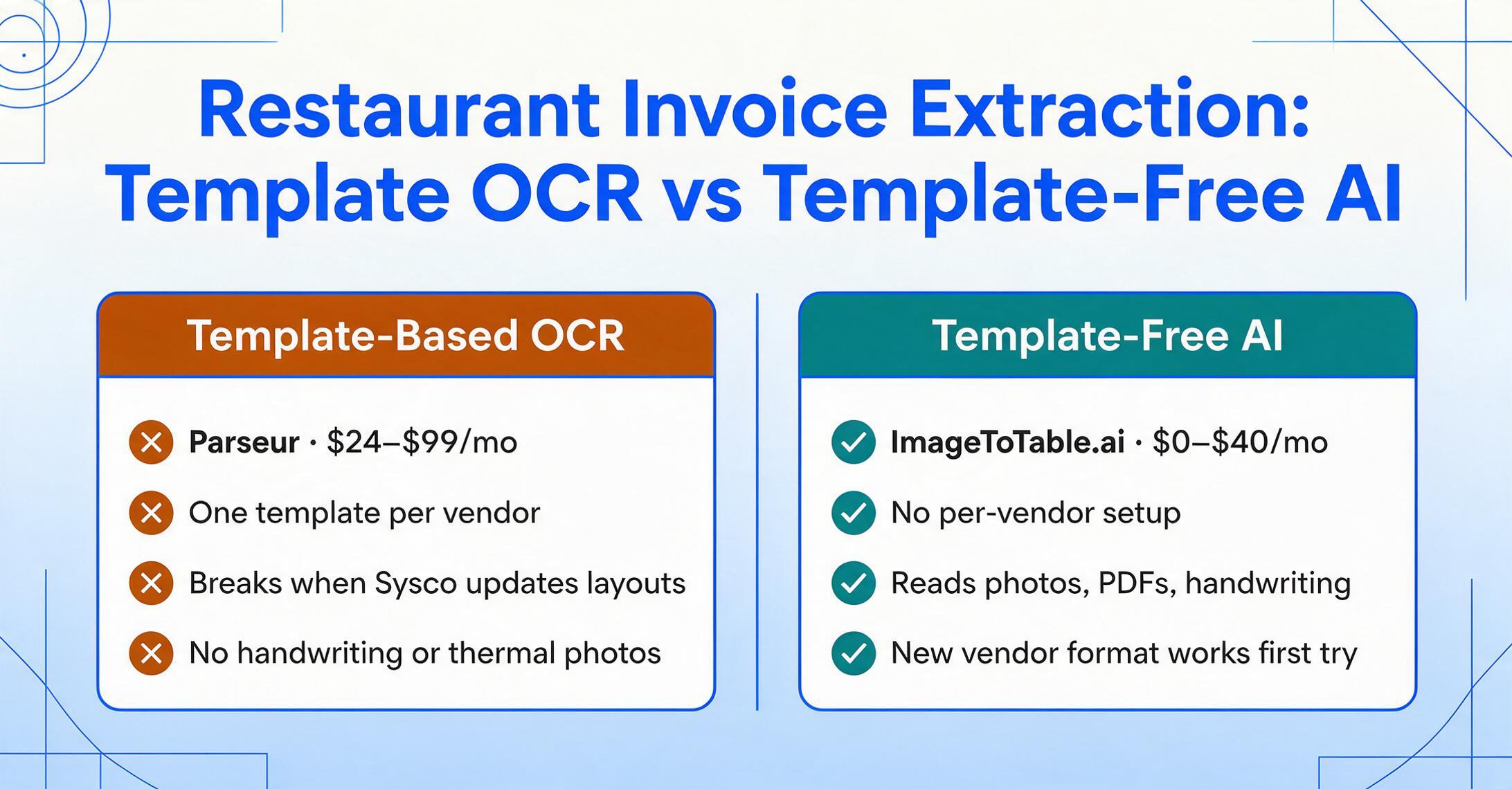
- Every vendor format requires a separate template. A restaurant working with 20+ distributors needs 20+ templates, and each template breaks when the vendor updates its invoice layout — which Sysco and US Foods do quarterly
- No support for handwritten text, thermal paper photos, or documents with varying layouts
- Template setup for multi-line item extraction (the true value for restaurant invoices) is complex and time-consuming
- No food-cost-specific features — it extracts data but does not analyze pricing, track vendor trends, or normalize item descriptions
Best for: Restaurants that receive most of their invoices from a small number of vendors who maintain consistent formats, and that have the technical capability to build and maintain extraction templates.
Not ideal for: Operators who deal with more than 5-10 vendor invoice formats, receive handwritten or thermal-printed invoices, or lack the time to maintain extraction templates.
Which Tool Is Right for Your Restaurant?
There is no single best tool because restaurants differ in scale, technical capability, and the specific invoice challenges they face. Here is a scenario-based guide:
Single-location independent restaurant (1-2 units, tight budget):
- If your main pain point is time spent manually entering invoice data into QuickBooks or Google Sheets, ImageToTable.ai at $0-$40/month gives you the extraction capability without the overhead of a full AP platform. You handle approvals and payments in your existing workflow.
- If you also need basic purchasing coordination, BlueCart at $10-50/month gives you ordering and invoice matching alongside extraction from ImageToTable.ai.
- If you are on a strict zero-budget and only receive clean PDF invoices from a few vendors, Parseur's template approach works if you are willing to invest the initial setup time.
Mid-size multi-location group (3-10 units, moderate budget):
- If you want the strongest line-item accuracy with human-assisted coding for handwritten adjustments and catch weights, MarginEdge at ~$300/location/month is the most operator-friendly option.
- If you are already on Toast POS and want a single-vendor solution, xtraCHEF is the natural path — but budget for manual review of thermal paper invoices.
- If inventory accuracy matters more than AP workflow speed, MarketMan at ~$200/location/month connects extraction directly to your stock counts and recipe costs.
Large multi-location group (10+ units, enterprise budget):
- If you need a complete accounting and operations platform with integrated AP, Restaurant365 at $500+/month is the comprehensive option — but budget 4-12 weeks for implementation.
- If you already have an accounting system and just need hospitality-specific AP, Ottimate at ~$300+/month offers end-to-end workflow with vendor management.
For operators comparing tools: The quickest way to narrow your options is to test each tool on your actual invoices from your actual distributors. A tool that achieves 98% accuracy on clean Sysco PDFs may drop to 70% on thermal-printed PFG receipts with handwritten adjustments. Run the same 10 invoices through 2-3 tools and compare the output spreadsheets directly. For a broader comparison against general document extraction tools, see our best free document extraction tools roundup.
Frequently Asked Questions
What makes restaurant invoice extraction different from regular invoice extraction?
Restaurant invoices carry structural complexities that standard B2B invoices do not: compact pack-size notation (like "4/5 LB") that differs across distributors, catch weights that replace ordered quantities on delivery, handwritten adjustments from receiving staff, thermal paper that fades within months, and multiple units of measure (case/each/pound) within a single invoice. These specific challenges require an extraction approach that reads semantically rather than by position on the page.
Can I use a general OCR tool like Adobe Acrobat or online PDF converters?
General OCR tools can extract the raw text from a restaurant invoice, but they will not give you structured data — you get one block of unlabeled text per page, not a table with "Item Description," "Qty," "Unit Price," and "Line Total" columns. For a 40-line Sysco invoice, that means 40-60 minutes of manual cleanup per invoice to turn OCR output into usable data. By comparison, purpose-built extraction tools output clean rows ready for Excel or Google Sheets.
What is the difference between template-free AI extraction and template-based OCR?
Template-based OCR (used by Parseur and many legacy tools) requires you to create a layout template for each vendor format. When the vendor changes its invoice layout — which Sysco and US Foods do regularly — the template breaks and extraction fails. Template-free AI extraction (used by ImageToTable.ai and some newer platforms) reads documents by understanding what each field means semantically, not where it sits on the page. You do not need templates, and format changes do not matter. The trade-off is that template-based tools can be more predictable on a small set of stable vendor formats, while template-free tools handle format variety without maintenance overhead.
Do I need a full restaurant AP platform, or just an extraction tool?
If your workflow is: receive invoice → extract data → approve → pay → reconcile, and the bottleneck is the "extract data" step (most common for independent restaurants), an extraction-only tool like ImageToTable.ai solves the problem at $0-40/month. If your bottleneck is in the approval routing, PO matching, or payment scheduling steps, or if you need automated GL posting across multiple locations, a full AP platform (MarginEdge, Restaurant365) is appropriate. Many small operators start with extraction-only and add AP workflow features as they grow.
How do I handle a consolidated invoice that covers multiple restaurant locations?
Consolidated invoices from Sysco, US Foods, and other broadliners are common for multi-location groups. Some extraction tools handle them natively — ImageToTable.ai's batch processing treats each store's section as a separate extraction unit — while others require post-processing in Excel to split the data. If consolidated invoices are a daily occurrence for your operation, prioritize tools that support per-store splitting at extraction time rather than at reconciliation time.
Does restaurant invoice extraction work with mobile phone photos of delivery receipts?
Yes, but the quality varies significantly between tools. Template-free AI extraction tools handle smartphone photos well because they read the image visually — the same way a person would glance at the paper — rather than relying on a scanner-like OCR pass. Template-based OCR tools generally require clean scanned PDFs and fail on photos of thermal paper. When evaluating tools, test on actual phone photos of your delivery receipts, not just emailed PDFs.
What is the difference between catch weight and ordered quantity, and why does it matter?
Catch weight is the actual delivered weight of a product, which almost always differs from the ordered weight. For example, you order 40 lb of chicken breast, but the catch weight on the invoice shows 38.7 lb. If your extraction tool captures the ordered quantity instead of the catch weight, your food cost calculation will be wrong — you paid for 38.7 lb but recorded 40 lb, understating your cost per pound. Restaurant-specific extraction tools handle this distinction; generic tools often grab the wrong number.
How much does manual invoice processing actually cost a restaurant?
Industry data places the all-in cost of manually processing a single invoice at $10-12.90 when factoring labor, error correction, and delayed payment penalties. For a single-location restaurant processing 214 invoices per month, that is $2,140-2,760 per month — or $25,680-33,120 per year — before you have paid a single vendor. Even a $300/month extraction tool represents a significant cost reduction if it reduces manual entry time by 80% or more.
Can document extraction integrate with QuickBooks or my accounting software?
Most extraction tools export to Excel or CSV, which can be imported into any accounting system that accepts bulk data. ImageToTable.ai additionally offers a Google Sheets add-on that writes data directly into a spreadsheet, which can then be synced to QuickBooks, Xero, or other platforms via their standard import tools. Full AP platforms like MarginEdge and Restaurant365 post directly to the GL without an export step.
The fastest way to know if automated extraction works for your restaurant is to test it on your own invoices. Upload a photo of your next Sysco or US Foods delivery receipt and see the extracted data in seconds — no setup, no template training, no commitment.
No sign-up required. Files are processed securely and not stored.