What Is Restaurant Invoice Extraction?
How It Works & Who Needs It
Restaurant invoice data extraction is the automated process of reading key fields — like supplier name, delivery date, item descriptions, pack sizes, quantities, catch weights, unit prices, and extended totals — from food and beverage supplier invoices and converting them into structured data for COGS tracking, inventory costing, and accounts payable processing. Instead of a kitchen manager or bookkeeper typing 40 line items from a Sysco invoice into a spreadsheet one cell at a time, extraction software reads the entire document and outputs a structured table in seconds.
Key Takeaways
- 214 food distributor invoices a month eat 35 hours of manual entry, and the catch-weight errors hiding in those typed rows won't surface until month-end food cost reconciliation tells you your margin was wrong all month.
- A generic extraction tool grabs the first number it sees in the Sysco invoice quantity column, which is the ordered weight not the actual 38.7 lb catch weight, and the silent error cascades into every plate cost calculation built on that line.
- Template-free extraction reads by what a field means rather than where it sits on the page, so a Sysco invoice, a US Foods invoice, and a handwritten produce slip go into one batch and come out as one clean spreadsheet.
What Restaurant Invoice Extraction Actually Is
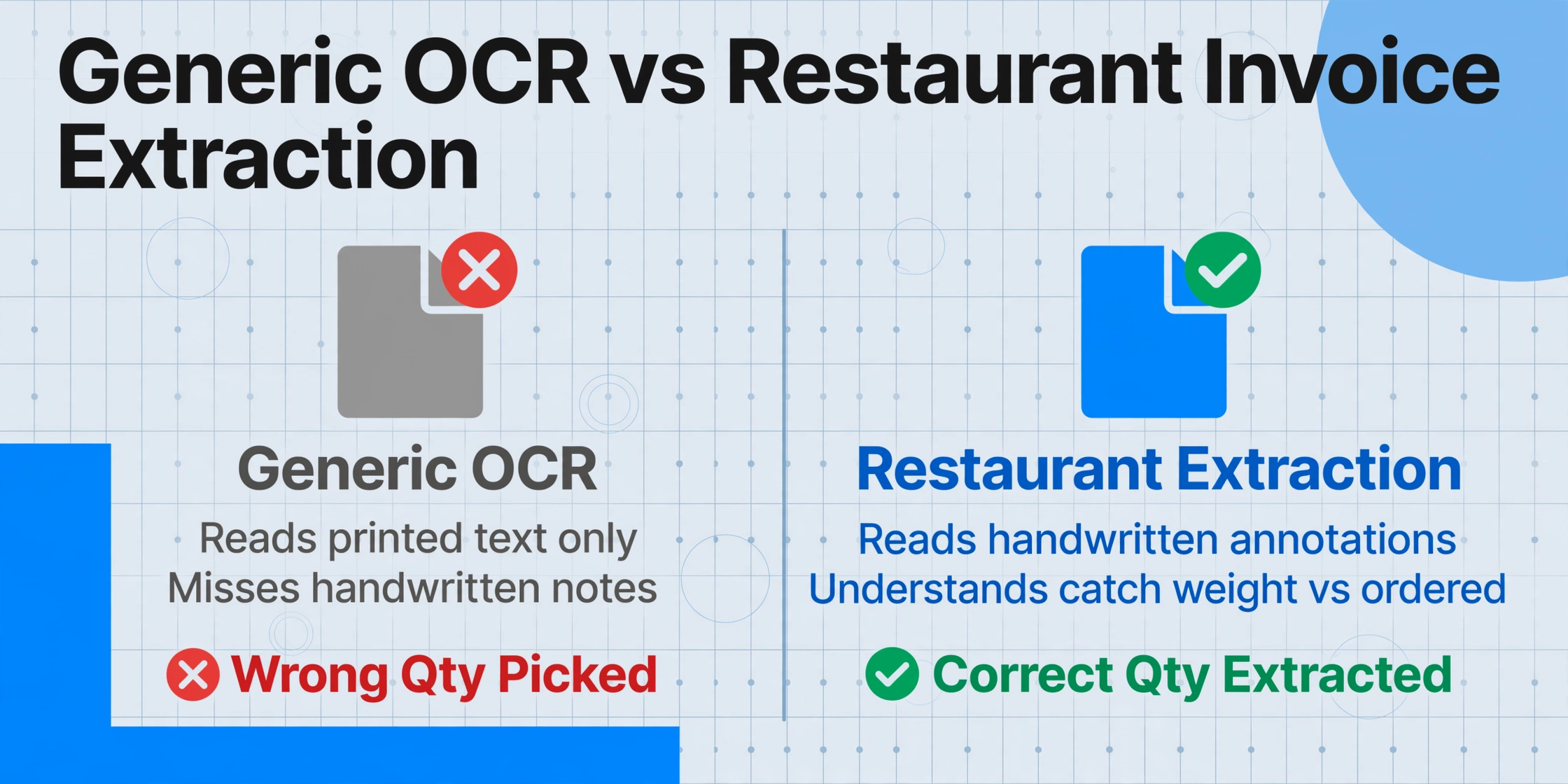
Restaurant invoice extraction is not the same as generic invoice extraction, and using a tool built for office supply invoices on a Sysco food distribution invoice will produce wrong numbers — quietly. The distinction matters because food distributor invoices carry a set of structural features that simply do not exist in standard B2B invoices.
A Sysco invoice for a mid-size restaurant might run four pages with 40+ line items. Each line carries a product description ("SYS CLS CHICKEN BREAST BONELESS SKINLESS 4/5 LB"), a pack size in compact distributor notation ("4/5 LB" means four 5-pound portions per case), an ordered quantity, a shipped quantity, a catch weight, a unit price, and an extended price. The invoice also contains handwritten annotations from the receiver — an "X" next to damaged cases, a circled price adjustment, a note that two items were out of stock — that carry financial consequences but are invisible to standard OCR that only reads printed text.
On a restaurant invoice, the same product appears under different codes, pack configurations, and unit-of-measure labels depending on which distributor sent it. US Foods calls 40 lbs of chicken breast one thing; Performance Food Group codes it another way. A generic extraction tool that expects a clean "Quantity" column will grab the wrong number — the ordered quantity instead of the received quantity, or the case count instead of the pound weight. When that happens, the error flows directly into your food cost calculation, and you won't catch it until month-end reconciliation, if at all.
Restaurant invoice extraction is built to handle this reality: it reads catch weights, parses pack-size notation, distinguishes between ordered and received quantities, and normalizes data across distributors so that you get one clean spreadsheet — regardless of whether the invoice came from Sysco, US Foods, GFS, or a local produce vendor. For the broader context on how this fits into the general extraction landscape, see our guide on what invoice data extraction is.
Restaurant Invoice Extraction vs Restaurant AP Software vs Manual Entry
These three things get conflated in conversations about restaurant back-office technology, but they address different parts of the workflow — and confusing them leads to buying the wrong tool.
Manual entry is the baseline most independent restaurants live with. A kitchen manager or bookkeeper opens each PDF from each distributor, types line items into a spreadsheet or accounting system, and codes each line to the right USAR account — 5110 Meat, 5130 Poultry, 5140 Produce. According to Bureau of Labor Statistics data, the median wage for a bookkeeping clerk is $49,210 per year. At 214 invoices per month — the average for a single restaurant location based on hospitality AP data — manual entry at even 10 minutes per invoice consumes over 35 hours a month. And that's before correcting the errors that come from typing "3879" instead of "3897" in a price field.
Restaurant AP software — tools like MarginEdge, xtraCHEF by Toast, and Restaurant365 — manage the full accounts payable workflow. They receive invoices, route them for approval, match them against purchase orders, schedule vendor payments, and generate food cost reports. These are workflow platforms. But they still need the invoice data to enter the system — and many rely on either manual entry by the user or basic OCR that requires vendor-specific template training. If the data going in is wrong, the food cost report coming out is wrong, and the software just automates the mistake faster.
Restaurant invoice extraction is the specific data capture step. It turns a PDF from a food distributor into structured fields — item codes, descriptions, quantities, prices — ready to be fed into your AP system or spreadsheet. It's the bridge between "a file attached to an email from your Sysco rep" and "clean line items in your COGS sheet." You can use extraction on its own — output to Excel or Google Sheets — or pair it with restaurant AP software. The extraction step is where most of the time and error live. Fix it, and the rest of the workflow gets faster and more accurate by default.
Restaurant invoice extraction is part of a broader shift from template-dependent OCR to AI-driven semantic extraction across all document types. For the full picture, see our guide to invoice data extraction.
How Restaurant Invoice Extraction Works
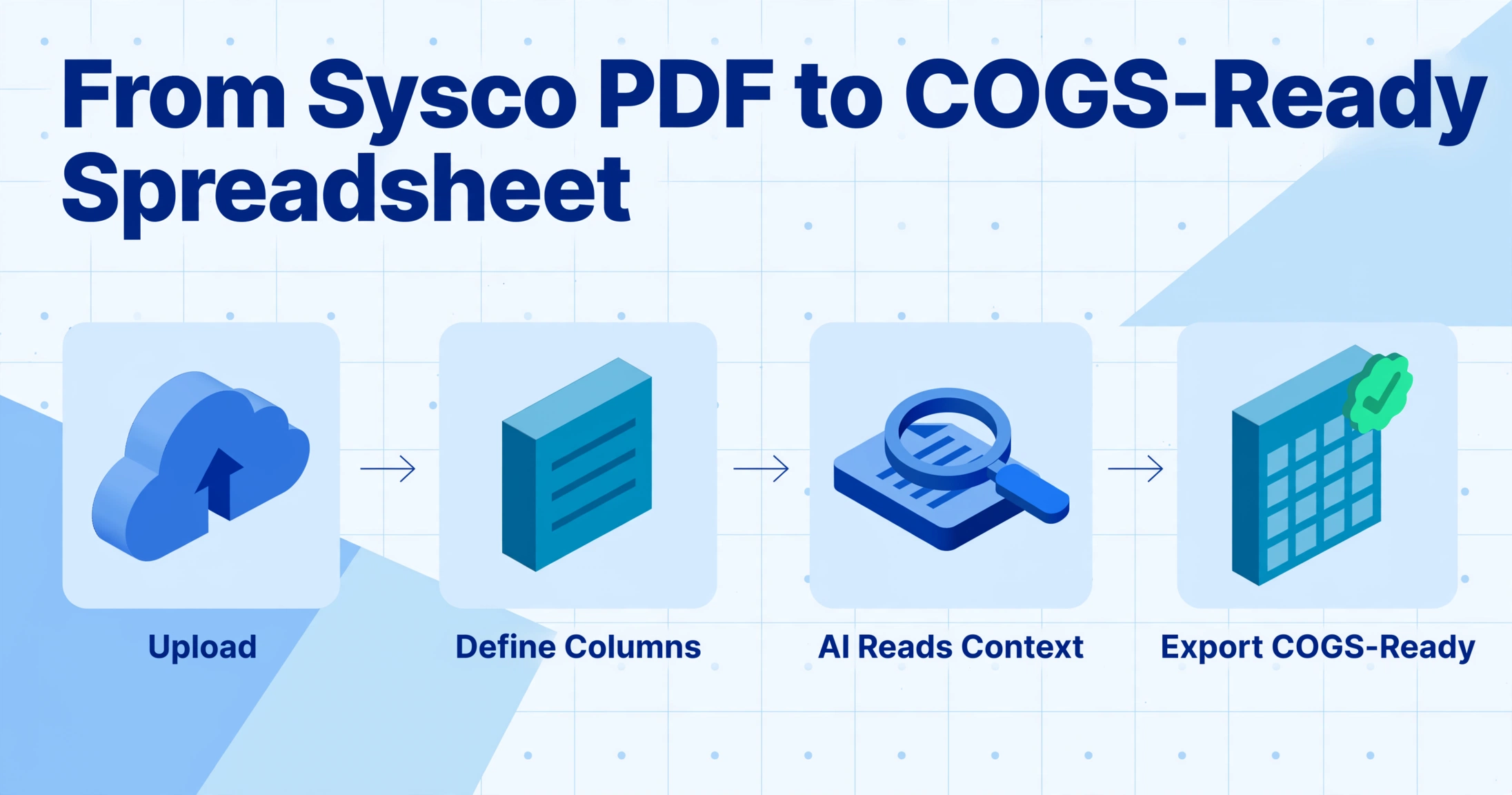
The pipeline from a Sysco PDF to a COGS-ready spreadsheet runs through four steps, and the critical difference from generic extraction happens at step three.
Upload
Drop in PDFs or phone photos of invoices — a single Sysco delivery day's worth, or a full week from multiple distributors. No pre-sorting, no file renaming. The system accepts PDFs, JPGs, PNGs, and WebP. For restaurants, phone photos are essential because receivers often snap pictures of paper invoices at the loading dock.
Define Columns
Type the field names you want extracted — "Item Code," "Description," "Pack Size," "Qty Received," "Catch Weight," "Unit Price," "Extended Price." These become the headers of your output spreadsheet, and they map directly to USAR cost categories: meat items go to 5110, produce to 5140, dairy to 5160. No template setup, no per-vendor configuration, no drawing rectangles around fields. For a detailed walkthrough of setting up extraction fields, see our guide on extracting invoice fields automatically.
AI Reads & Understands Context
This is where restaurant extraction diverges from generic extraction. The vision AI reads the entire document — not just printed text, but handwritten receiver notes, circled adjustments, and margin annotations. It distinguishes between ordered weight and catch weight by understanding field labels, not by assuming a position on the page. It parses pack-size notation ("6/10#") into count and unit weight components. It recognizes that "$42.50" next to "4/5 LB" means $42.50 per case, not per pound. And it does this across Sysco, US Foods, PFG, and GFS formats without reconfiguration — because it reads by meaning, not by layout. For a deeper look at how food distributor line items differ from standard invoices, see our breakdown of food distributor invoice line-item extraction errors.
Export COGS-Ready Data
Download as Excel (XLSX), CSV, or JSON — or write directly into Google Sheets. Line items from all distributors land in one unified table with consistent column structure. From there, the data flows into your food cost spreadsheet, inventory system, or AP platform. If you're processing weekly invoice waves from multiple distributors, batch extraction turns a Tuesday delivery-day stack of 15 invoices from 8 vendors into one spreadsheet in minutes.
Files are processed securely and not stored.
When You Need Restaurant Invoice Extraction
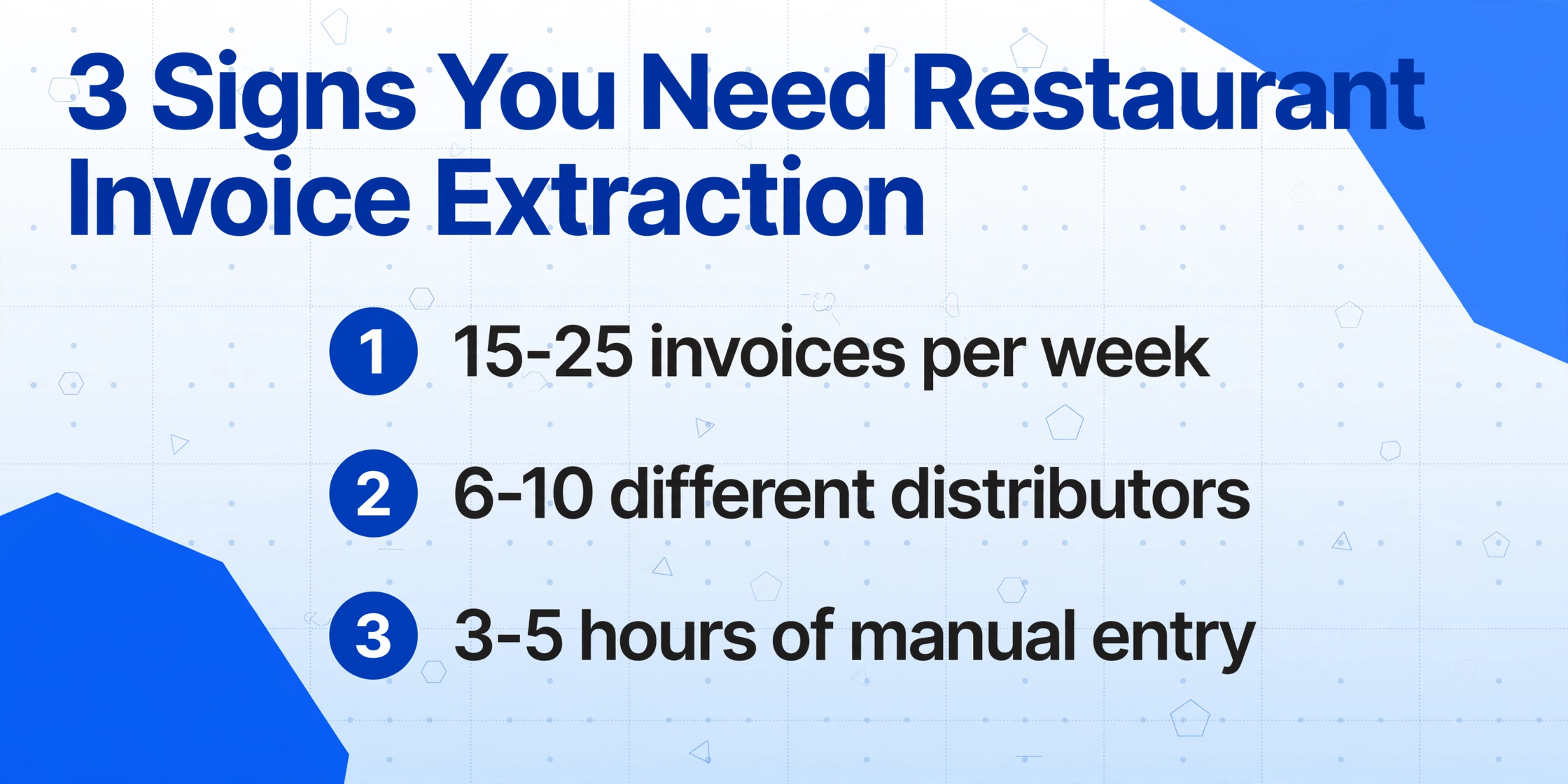
Not every restaurant needs extraction software. A food truck receiving three invoices a week can type those into a spreadsheet in ten minutes. Extraction becomes worth it when the volume and format diversity cross a threshold where manual entry stops being a minor chore and starts being a structural drag on the business.
Daily or weekly invoice waves. Most full-service restaurants receive deliveries 3–5 days a week, each generating 3–8 invoices from different distributors — a Tuesday produce delivery, a Wednesday broadliner drop, a Friday seafood shipment. By the end of the week, a single restaurant can accumulate 15–25 invoices across 6–10 vendors. Manual entry at 10–12 minutes per invoice — realistic when each invoice has 30+ line items needing USAR account coding — consumes 3–5 hours a week. That's a half-shift of labor spent on data entry every week, before factoring in error correction. For the full cost breakdown, see what manual food invoice processing costs a restaurant.
COGS calculation and food cost tracking. Food cost percentage — typically 28–35% of revenue — is the single largest controllable expense in a restaurant. Accurate COGS tracking requires every line item from every invoice coded to the right USAR account: 5110 Meat, 5120 Seafood, 5130 Poultry, 5140 Produce, 5160 Dairy, 5170 Grocery and Dry Goods. When line items sit unprocessed in a stack of PDFs, food cost reporting is delayed until someone types them in — which means you're making purchasing and menu-pricing decisions based on last month's numbers, not this week's. The gap between when you spend the money and when you know the number is where margin leaks. For operators who want to close that gap, see how to calculate food cost percentage from supplier invoice photos.
Inventory costing and plate cost analysis. Plate cost — the ingredient cost of a single menu item — depends on accurate invoice prices flowing into recipe costing. When the Sysco price on chicken breast moves from $3.87/lb to $4.12/lb, your plate cost on the chicken entree moves with it. If that price change sits in an unprocessed PDF for two weeks, you're selling the dish at yesterday's cost while paying today's price. Extraction gets invoice prices into your costing system in the same week the invoice arrives, so menu adjustments happen before margin disappears.
Multi-location consolidation. A restaurant group with three locations might receive 60+ invoices a week across three different receiving docks, each with its own stack of distributor PDFs. Consolidating that data into a single food cost report across locations requires someone to manually type or copy-paste from three sets of invoices — and the report is only as current as the slowest location's data entry. Extraction flattens this: upload all locations' invoices, get one consolidated spreadsheet, and run a multi-location food cost report the same week the deliveries happened. For the scaling implications, read about scaling food invoice processing across restaurant groups.
What to Look For in a Restaurant Invoice Extraction Tool
Extraction tools for restaurants range from basic OCR apps — "take a photo, get text" — to purpose-built AI systems that understand food distributor invoice structure. Here are the criteria that differentiate them in daily use:
Template-free operation. This is the most important differentiator. A restaurant deals with 6–10 active food distributors, each with its own invoice format. Sysco invoices look nothing like US Foods invoices; a local produce vendor's handwritten delivery note looks nothing like either. A tool that requires you to create and maintain a parsing template for every vendor format is not extraction — it's template management with some extraction on the side. The right tool handles a new vendor's invoice on day one, without setup, because it reads by meaning rather than position. For more on why this matters, see how to batch-process a week of food distributor invoices.
Catch weight handling. This is the single most common source of silent extraction errors on restaurant invoices. Proteins, seafood, and cheese are priced by actual delivered weight — the catch weight — which is almost always different from the ordered weight. A Sysco chicken breast line might show "Ordered: 40 LB" and "Qty Rec'd: 38.7 LB" on the same line, with the extended price calculated from the catch weight. A tool that grabs the first number it sees in a quantity column will pull the wrong value — and the food cost error will compound across every protein line item. The tool must understand the difference between ordered weight and catch weight and extract the correct one every time.
Line-item extraction quality across multi-page invoices. A 4-page Sysco invoice with 45 line items that span page breaks is the real test. Tools that extract header fields (invoice number, date, total) but fail on line items solve less than half the problem — because restaurant cost tracking lives in the line items. If someone still has to manually type 45 line items after extraction, the tool isn't saving meaningful time.
Batch processing. Restaurants process invoices in weekly waves, not one at a time. Upload 15 invoices from Tuesday's delivery day and get one unified spreadsheet — line items from Sysco, US Foods, the produce vendor, and the dairy supplier all in the same table, with consistent column structure. If the tool makes you process one invoice at a time, you've replaced typing with waiting, and the time savings evaporate. For the batch workflow end-to-end, see how to extract food distributor invoice line items to Excel.
Output that maps to restaurant accounting. The output should support USAR account coding. If the tool can apply inferred columns — for example, a column named "USAR Category (options: Meat/Seafood/Poultry/Produce/Bakery/Dairy/Grocery)" that the AI populates by reading each line item's product description — extraction and coding happen in a single pass. This eliminates the separate step of manually assigning every line item to an account code after extraction.
Frequently Asked Questions
Does restaurant invoice extraction work with Sysco and US Foods invoices?
Yes. Modern AI-based extraction tools handle Sysco, US Foods, Performance Food Group, Gordon Food Service, and local distributor invoices without per-vendor setup. Because semantic extraction reads by understanding what each field means — rather than where it sits on a template — a new distributor's format works on the first upload. The tool doesn't need to be trained on Sysco's layout separately from US Foods' layout; it understands "this string looks like a product code" and "this number next to 'Catch Wt' is the catch weight" regardless of where those fields appear on the page.
Can AI extraction handle catch weights on food distributor invoices?
Yes, and this is where semantic extraction provides the most value over basic OCR. Catch weight items — proteins, seafood, cheese — show two different numbers that both claim to be the quantity: the ordered weight and the received (catch) weight. A position-based extraction tool grabs whichever number appears in the "quantity column." A semantic extraction tool reads the field labels and understands that "Qty Received: 38.7 LB" is the catch weight and "Ordered: 40 LB" is the nominal — and extracts the right one based on how you defined your columns. For a full analysis of this specific challenge, see our deep dive on food distributor line-item extraction errors.
How is restaurant invoice extraction different from regular invoice OCR?
Regular invoice OCR converts an image of an invoice into a text file. It answers "what characters are on this page?" but not "which number is the catch weight and which is the ordered quantity?" Restaurant invoice extraction understands document structure: it distinguishes between header fields (invoice number, vendor, date) and line items (product code, description, pack size, catch weight, price), parses distributor-specific pack-size notation, and recognizes handwritten receiver annotations that carry financial meaning. It also handles the multi-supplier format diversity that a single-template OCR tool cannot — Sysco and US Foods invoices look entirely different, but extraction reads both without reconfiguration.
What's the accuracy rate for restaurant invoice extraction?
For printed, legible food distributor invoices, AI-based extraction achieves 95–99% field-level accuracy depending on document quality. Line items are the harder category — particularly on multi-page invoices where tables span page breaks — with accuracy typically in the 90–95% range. Handwritten receiver notes and margin annotations will be lower, depending on handwriting legibility. The critical difference from manual entry is not just the accuracy rate but the error type: extraction errors are systematic (the same field on the same type of invoice will consistently fail in the same way), which makes them detectable and correctable. Manual entry errors are random (a mistyped digit here, a skipped line there), which makes them harder to catch systematically. For a comparison of extraction approaches, see our comparison of spreadsheet entry vs AI invoice extraction.
Can I extract line items with different pack sizes and units of measure?
Yes. Distributor pack-size notation — "6/10#" (six 10-lb cans), "4/1 GAL" (four 1-gallon containers), "1/50 LB" (one 50-lb case) — is parsed by semantic extraction tools that understand what these compact codes mean. The extraction can separate the notation into count and unit components for downstream normalization. This is essential because US Foods and Sysco use different UOM conventions for the same products, and arriving at a consistent "unit cost per pound" or "unit cost per each" for plate cost analysis requires normalization across distributors.
Does restaurant invoice extraction integrate with my AP or accounting system?
The output from extraction — Excel (XLSX), CSV, or JSON — can be imported into most accounting and AP systems. If your AP workflow runs through Excel or Google Sheets, the extracted data goes directly into your spreadsheet. If you use restaurant-specific platforms like MarginEdge, Restaurant365, or xtraCHEF, the extracted data can feed into those systems as structured input — replacing the manual data entry step that those platforms would otherwise require. Some extraction tools also offer a Google Sheets add-on that writes extracted data directly into your spreadsheet without any upload-download-import cycle.
How long does it take to process a week's worth of restaurant invoices?
A batch of 15–25 invoices — a typical week for a single full-service restaurant — processes in under two minutes from upload to completed spreadsheet with AI extraction. Compare this to 3–5 hours of manual entry at 10–12 minutes per invoice. The time savings compound further when processing multi-location invoice stacks: a restaurant group with three locations can upload all three weeks' worth of invoices as a single batch and get one consolidated spreadsheet in minutes. For the workflow breakdown, see batch-processing weekly food distributor line items.
Where to Go From Here
Restaurant invoice extraction addresses a specific structural problem: food distributor invoices carry data that generic extraction tools were never designed to handle — catch weights, pack-size notation, distributor-specific product codes, and handwritten receiver annotations that carry financial consequences. The technology exists today to read all of this accurately, across every distributor a restaurant deals with, without template setup per vendor.
The best way to evaluate whether extraction fits your operation is to test it on your own invoices — ideally the most difficult ones: a 4-page Sysco invoice with catch weight proteins, a handwritten produce receipt, and a US Foods invoice with 30+ line items. If the tool handles these cleanly, the straightforward ones are a given. Upload a sample invoice and test it now, or start with our complete guide to invoice data extraction for the broader context.