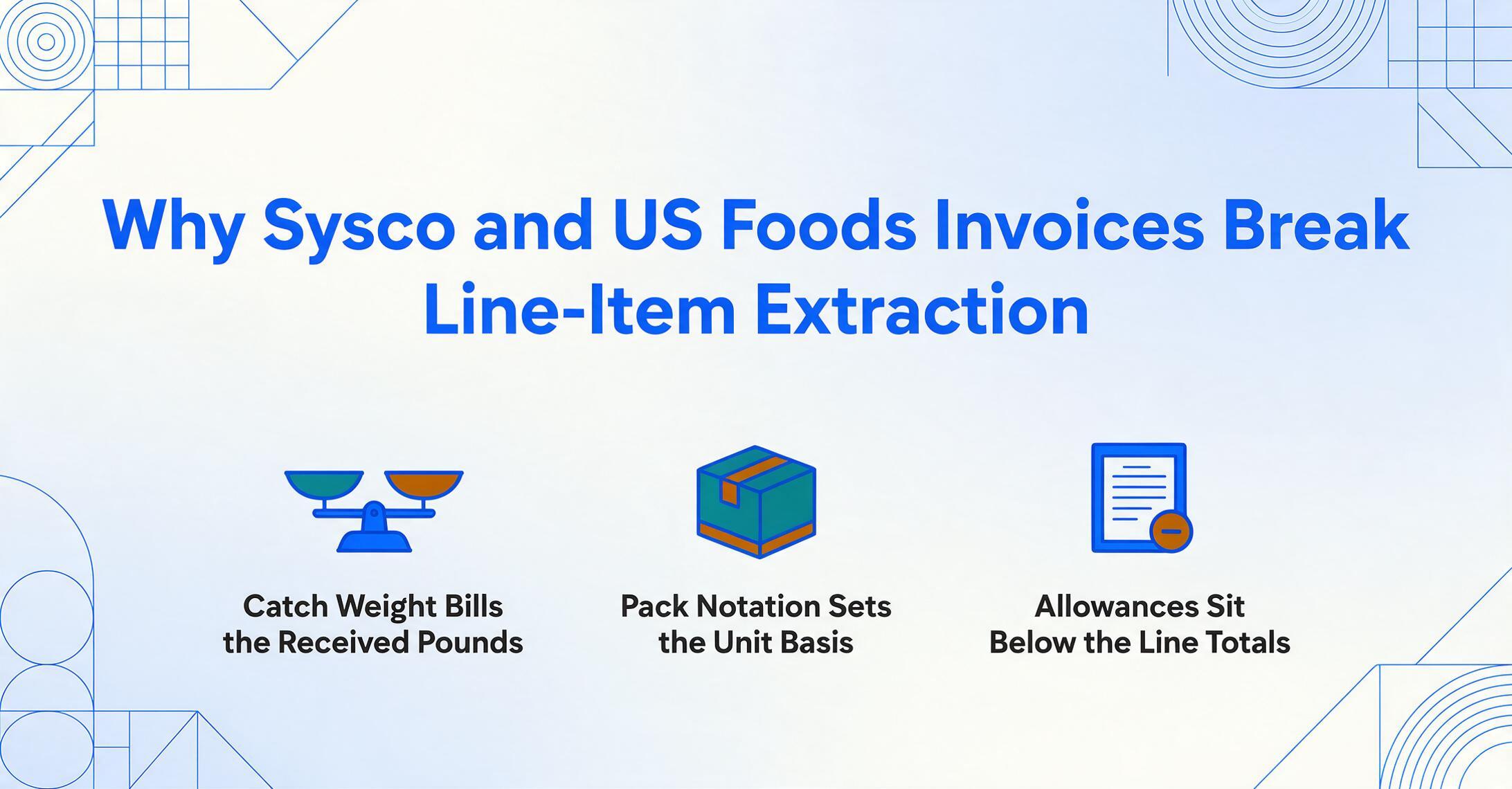
Why Sysco and US Foods Invoices
Break Line-Item Extraction
You pull up your weekly food cost report. Poultry is at 38% of food sales — way above the 28–35% benchmark. But you didn't order more chicken this week. The invoice says 40 pounds of chicken breast at $3.87/lb. Your spreadsheet says $154.80, which matches the invoice. So the report should be right. It isn't. The extraction tool grabbed the ordered quantity — 40 pounds — but Sysco billed you for the actual weight: 38.7 pounds at $3.87/lb. The 1.3-pound discrepancy on one line item is invisible in your spreadsheet. Multiply by 40 line items per invoice, across five vendors, every week. That's how a "correct" extraction silently produces wrong food costs. According to the National Restaurant Association's 2025 Operations Data Abstract, the typical restaurant operates on a pre-tax margin of roughly 5% — meaning a 2% food cost reporting error doesn't just distort a number. It can turn a profitable month into a loss on paper.
Key Takeaways
- $300–$400 in food cost silently evaporates from your weekly report because the extraction tool read the ordered weight (40 lbs) instead of the received weight (38.7 lbs) that Sysco billed, and both weights sit on the same invoice line with nothing telling the tool which one drives the price.
- A food distributor invoice is a billing record, receiving checklist, traceability document, and price comparison sheet rolled into one — and standard extraction reads only the billing layer, silently discarding every field needed to reconcile the other three functions.
- Specify extraction fields by semantic meaning — Received Weight, Pack Size, Allowance Type — instead of page position, and ImageToTable.ai's column-name extraction works across Sysco, US Foods, and every vendor without a single supplier-specific template.
Food Distributor Invoices Are Not "Invoices With Food on Them"
The standard invoice extraction playbook assumes a flat table: description, quantity, unit price, line total. That model works for office supplies, telecom bills, and most B2B invoices — because those invoices were designed to reduce a transaction to its simplest form. A food distributor invoice was designed for an entirely different purpose: it is simultaneously a financial record, a receiving checklist, a traceability document, and a price comparison artifact. The same piece of paper has to answer four different questions for four different people in the operation.
The consequences of this multi-purpose design are the structural features that break extraction:
- Catch weight billing: Proteins, seafood, and cheese are priced by actual weight, not nominal case weight. The invoice shows both the ordered weight (what you expected) and the received weight (what you're actually paying for), often on the same line, often without a clear label distinguishing which one drives the price.
- Pack-size notation:
6/10#,4/1 GAL,4/5 LB— these are not typos. They describe the case configuration. The unit price on the invoice must be interpreted relative to this notation: $42.50 for "chicken breast 4/5 LB" means $42.50 per case (20 lbs total), not per pound. - Off-invoice deductions: Pickup allowances, prompt-pay discounts, volume incentives, delivery-size rebates. Sysco's Supplier Playbook defines a pickup allowance as "an allowance taken off of an invoice amount in instances where the OpCo picked up an order in which freight was included in the cost of goods." US Foods applies prompt-pay and delivery-size incentives as off-invoice line-item deductions. The invoice total does not equal the sum of product line totals — and any extraction that assumes it does will produce a total you can't reconcile.
- Handwritten exceptions: Substitutions ("Subbed 85/15 for 80/20"), short deliveries (crossed-out quantities), damage notes — written directly on the printed invoice by the receiver. Traditional OCR reads these as unrelated text blocks. The meaning connects them to specific adjacent line items.
None of these features exist on a standard office supply invoice. They exist on food distributor invoices because the invoice is doing more than one job. An extraction approach built for a single-purpose invoice will silently process the wrong numbers — and the restaurant operator won't discover the error until month-end reconciliation, when the data is weeks old and the cost of correction has multiplied. This is the foundational difference that the rest of the article unpacks in detail. For a complete walkthrough of the correct extraction approach, see our step-by-step tutorial on extracting food distributor invoice line items to Excel.
Catch Weight: The Invoice Field Where Two Different Numbers Claim to Be the Quantity
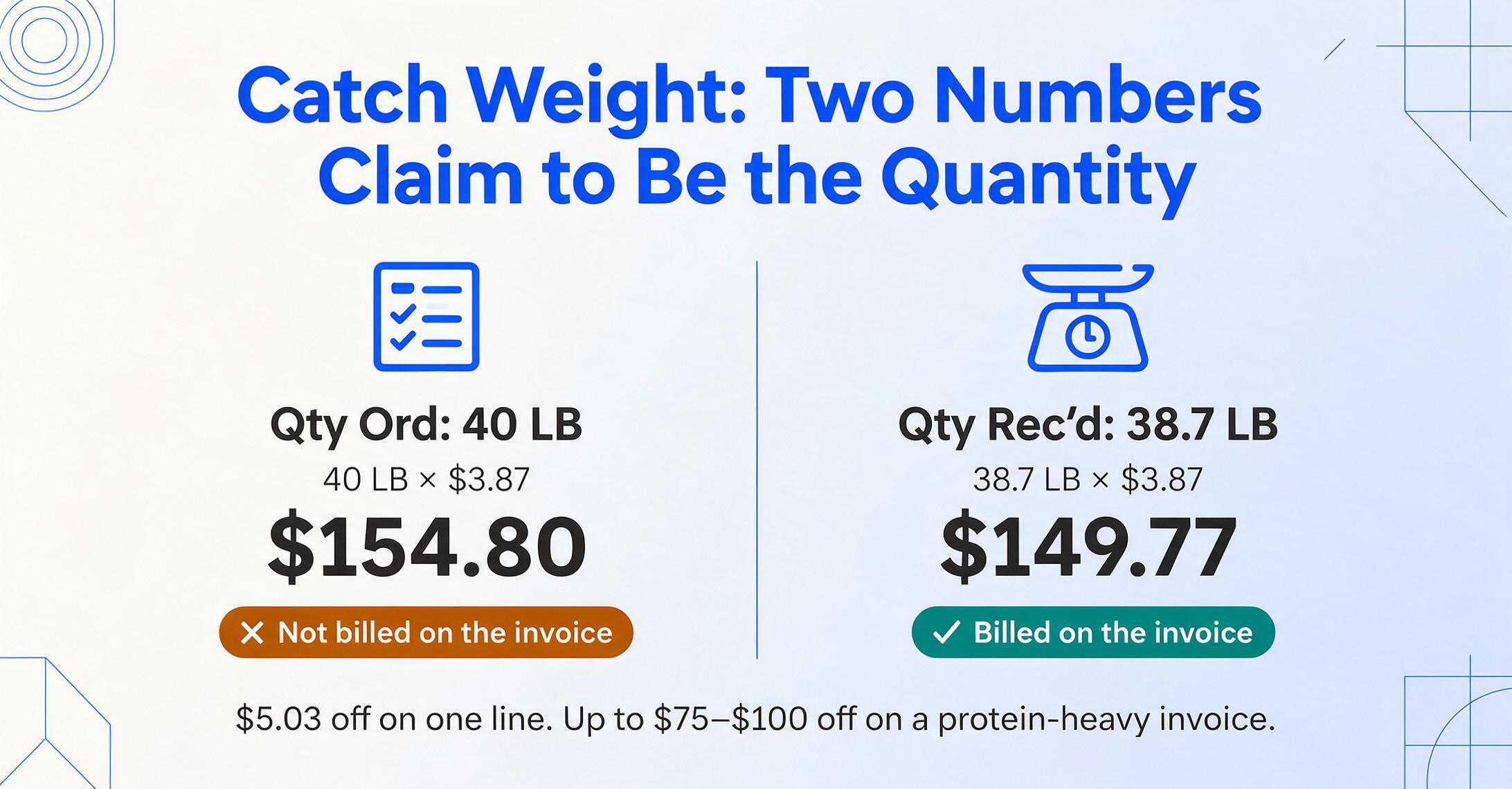
The single biggest source of silent extraction errors on food distributor invoices is catch weight — and the problem isn't that catch weight exists. The problem is that most extraction tools don't know which weight field to trust.
Here's what a real Sysco protein line looks like:
Item: 7077634 SYS CLS CHICKEN BREAST BONELESS SKINLESS 4/5 LB
Ordered: 2 CS | Qty Ord: 40 LB
Shipped: 2 CS | Qty Rec'd: 38.7 LB
Price/LB: $3.87 | Ext Price: $149.77
The extraction system sees three numbers that look like quantities: 2 (cases), 40 (pounds ordered), and 38.7 (pounds received). An OCR tool that grabs the first numeric value it finds next to "Qty" will extract 40 — and multiply by $3.87 to get $154.80. But Sysco billed $149.77 because the price is calculated from the received weight (38.7 lbs × $3.87 = $149.77), not the ordered weight. The $5.03 discrepancy on one line item looks trivial. Across a protein-heavy invoice with 15 catch-weight items, the accumulated error can reach $75–$100 per invoice. Weekly, that's $300–$400 in phantom food cost variance — the exact kind of discrepancy that restaurant operators spend hours chasing at month-end.
Why does catch weight exist in the first place? Proteins, seafood, and cheese are sold by the pound, but the processor can't guarantee that every case weighs exactly 40.0 pounds. A case of chicken breast might weigh 37.4 pounds; the next case might weigh 40.2. The FDA governs net weight labeling under 21 CFR 101.105, and Sysco's Supplier Compliance Manual requires net weight for catch-weight items on every bill of lading to three decimal places. This is not a quirk — it's a regulated practice. The extraction system that reads the first weight field it finds is simply reading the wrong field from a properly structured invoice.
The fix from a tool perspective is semantic field identification: the extraction needs to understand that "Received Weight" or "Actual Weight" is the price-driving field, not "Ordered Weight." A tool that lets you define column names like Received Weight (lb), Catch Weight (Y/N), and Price Basis — rather than blindly parsing any numeric field near a quantity label — can distinguish which weight drives the invoice price and extract accordingly. This is what column-name extraction enables: you specify exactly which fields you want, by semantic meaning, and the AI locates them anywhere on the page regardless of layout.
Pack Notation That Looks Like a Typo — and the Unit Price That Depends on It
A Sysco invoice line item for Roma tomatoes doesn't say "Roma Tomatoes — 25 lbs." It says "Roma Tomatoes — 1 CS" with a pack notation of 5/5 LB buried in the product description. The unit price is $19.75. Your extraction tool copies $19.75 into the spreadsheet. But $19.75 per what? Per pound? Per case? Per individual 5-pound flat?
Pack notation on food distributor invoices uses a shorthand that anyone in foodservice recognizes instantly — but that general-purpose extraction tools can't parse:
Common food distributor pack notations and what they actually mean:
| Notation | Meaning | Total Weight/Volume | The Extraction Problem |
|---|---|---|---|
| 6/10# | 6 cans of 10 lbs each | 60 lbs per case | Unit price of $45.00 is per case ($0.75/lb), not per can ($7.50/can) or per pound. Extraction copies $45.00 — now your per-pound cost is off by a factor of 60. |
| 4/1 GAL | 4 one-gallon containers | 4 gallons per case | Unit price of $18.40 is per case ($4.60/gal), not per container. Recipe costing expects per-gallon pricing. |
| 4/5 LB | 4 units of 5 lbs each | 20 lbs per case | Unit price of $42.50 is per case. Per-pound cost = $2.13. An extraction that copies "$42.50" and labels it "Unit Price" without capturing pack size makes the per-pound cost calculation impossible. |
| 12/48 OZ | 12 units of 48 oz each | 576 oz (36 lbs) per case | Multiple unit conversions required — ounces to pounds, then cost per pound. Each conversion step is a chance for error. |
The extraction failure is twofold. First, the pack notation is often embedded in the product description string, not in a separate "Pack Size" column — so the tool has to parse it out of free text. Second, without knowing the pack configuration, the unit price is meaningless for any downstream comparison. You can't answer "am I paying more for chicken from Sysco or US Foods" unless you can normalize both prices to a common unit (per pound, per ounce, per gallon).
Restaurant-specific invoice tools like MarginEdge ($330/month per location) handle this by maintaining a product catalog that stores the pack-to-unit conversion for every item. General-purpose extraction tools don't — they extract what's on the page and call it done. The restaurant operator doing manual food invoice processing faces the same problem in human form: typing the pack notation into a spreadsheet and then doing the math by hand in a separate column.
The Deduction Line That Makes Your Invoice Total Impossible to Reconcile
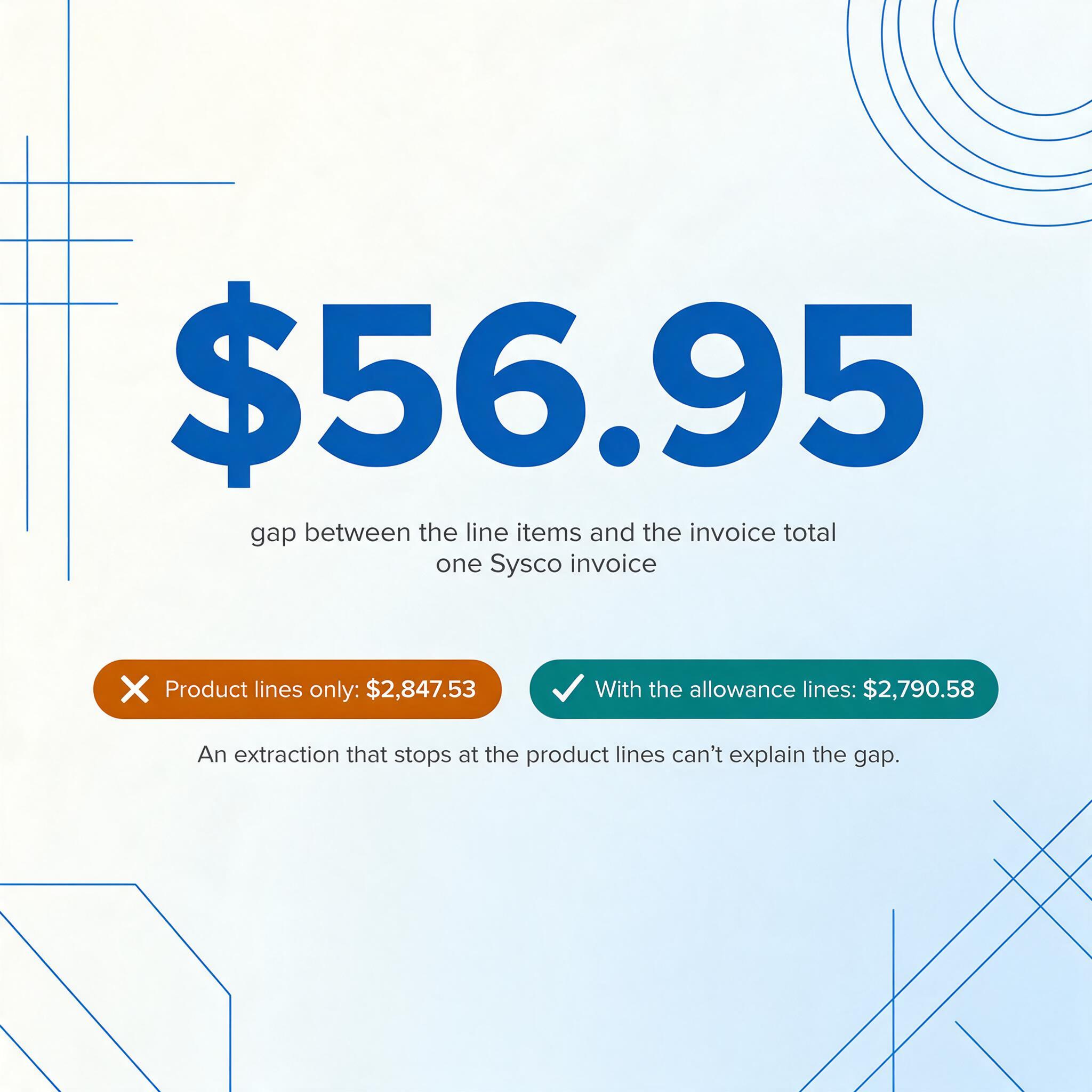
Here's a reconciliation puzzle that breaks spreadsheet-based tracking: you sum all the line-item totals on a Sysco invoice and get $2,847.53. The invoice total printed at the bottom says $2,790.58. The difference is $56.95 — and there's no line on the invoice labeled "Reason for the $56.95 Difference."
That gap is created by off-invoice allowances — deductions applied after the line-item pricing but before the final total. Sysco's pricing structure includes multiple allowance types that appear as their own line items: pickup allowances (when Sysco picks up from the supplier and performs freight that was included in the original price), supplier off-invoice allowances negotiated between the customer and the supplier, and volume-based pricing adjustments. The line items add up to one number; the invoice bottom line is a different number; and the extraction tool that captures the line items but ignores the allowance line can't explain the gap.
US Foods takes a similar approach: prompt-pay discounts (up to 0.60% for prepayment), delivery-size incentives (from 0.15% to 1.20% depending on average delivery size), and volume rebates (0.25% to 0.75% for annual spend over $1 million) are applied as off-invoice line-item deductions — or as separate quarterly credit memos. An extraction that only captures the product lines, but not the allowance and deduction lines, produces a subtotal that doesn't match what you actually paid.
This is not an edge case. Off-invoice deductions are standard practice across the big three broadline distributors (Sysco, US Foods, PFG). Any extraction approach that equates "invoice total" with "sum of all product line-item totals" will systematically under-report your actual spend by the value of these deductions. The financial reconciliation becomes a manual cleanup step — the very thing extraction was supposed to eliminate.
The solution is treating deduction lines as first-class extraction targets: if the invoice has a line that says "Pickup Allowance — ($12.40)" or "Prompt Pay Discount — ($22.15)," those lines must be extracted alongside the product lines. A tool that uses column-name extraction — where you specify the exact field names you want extracted — can capture allowances simply by adding columns like Allowance Type and Allowance Amount to the extraction schema.
The Handwritten Note That Changes What You Actually Received
A Sysco delivery arrives. The receiver opens the case labeled "80/20 Ground Beef" and finds 85/15 instead. The driver hands over the invoice with a handwritten note next to the line item: "Sub'd 85/15 — same price." Or a produce item arrives short: the invoice says 25 pounds of Roma tomatoes, but the box contains 20. The receiver writes "-5 lbs" in the margin.
These handwritten exceptions are not incidental — they are the operational reality of food distribution. According to a 2022 FTC letter on broadline distributor practices, chefs on r/KitchenConfidential routinely post photographs of botched deliveries: on one occasion, a Sysco customer received "eight buckling crates of corn labeled as Russet potatoes." When the invoice says potatoes but the truck delivered corn, the handwritten correction on the physical invoice is the only record that the transaction changed.
For extraction tools, handwritten notes create two distinct failure modes:
- Context detachment: Traditional OCR reads printed text and handwritten text as separate, unconnected blobs on the page. The printed line for "80/20 Ground Beef — 2 CS — $84.60" is one text block. The handwritten "Sub'd 85/15" next to it is another. The OCR output puts them in different rows, different fields, with no indication that the handwriting belongs to the line above it.
- Quantity override failure: Even when the handwritten note is captured, the extraction tool doesn't know that "-5 lbs" should replace the printed "25 lbs" in the quantity field. The spreadsheet ends up showing 25 lbs at whatever price, and the cost report is wrong — not because the tool malfunctioned, but because the tool treated the printed text as authoritative and the handwritten text as noise.
MarginEdge addresses this by employing a human review layer: actual people read the handwritten notes on invoices and code them correctly. xtraCHEF, acquired by Toast, similarly acknowledges that "much of that information is written by hand in the margin" and positions digitization as the way to surface these adjustments. The presence of a human review layer in tools priced at $300+/month is itself evidence that fully automated handwritten-note interpretation on food distributor invoices is an unsolved problem — even for specialized restaurant software.
A vision-model approach to extraction — where the AI reads the entire page as a visual scene and understands which marks belong to which line items — handles this fundamentally differently than OCR. Rather than separating printed from handwritten text, it associates the handwritten content with the adjacent printed line by spatial proximity and semantic context. Handwritten "Sub'd 85/15" next to "80/20 Ground Beef" is recognized as a substitution on that specific line item.
The Four Documents That Should Match — but the Exceptions Live in the Gaps Between Them
Most extraction workflows assume one document = one data set. Extract the fields from the invoice, and you're done. Food distributor purchasing operates on four documents, and the useful information lives in the spaces BETWEEN them — not inside any single one:
The four-document system for food distributor purchasing:
Supplier invoice → What the vendor says they delivered and what you owe
Delivery note / BOL → What the vendor's records show was shipped, including actual catch weights at dispatch
Receiving record → What your warehouse/kitchen actually accepted, including rejections and substitutions
Credit note → The correction for something wrong on a prior invoice — arrives days or weeks later
None of the important exceptions are visible in any one document alone:
- A short delivery only becomes visible when you compare the invoice quantity (what you're being billed for) to the receiving record (what actually arrived). The invoice says 2 cases of chicken breast. The receiving record says 1 case was accepted, 1 was rejected for temperature violation. The invoice alone tells a story that's $77.40 wrong.
- A catch-weight variance only becomes visible when you compare the billed weight on the invoice to the weighed-at-dispatch figure on the delivery note. The invoice bills at 38.7 lbs. The delivery note says the case weighed 37.2 lbs at the dock. The 1.5-lb difference is $5.80 on a single protein line — invisible without both documents.
- A pack-size substitution only becomes visible when the PO specifies
4/5 LBand the invoice line reads2/10 LB. Same total weight, same unit price — no financial discrepancy on the invoice alone. But the purchasing department needs to know the pack format changed, because the kitchen can't use 10-lb bags in a workflow built around 5-lb bags.
The extraction implication is this: a data model designed for food distributor invoice processing needs fields that span documents — PO number, delivery note number, lot/batch ID, received quantity (not just invoice quantity), and credit-note reference to original invoice and original line. Without cross-document fields, the extraction output captures what one document claims happened, not what actually happened. For restaurant groups processing weekly invoices from multiple distributors — a workflow detailed in our guide to batch-processing restaurant distributor invoices for food cost — this cross-document reconciliation is the difference between a food cost report you can trust and one you're guessing at.
When Three Suppliers Use Three Different Names for the Same Ingredient
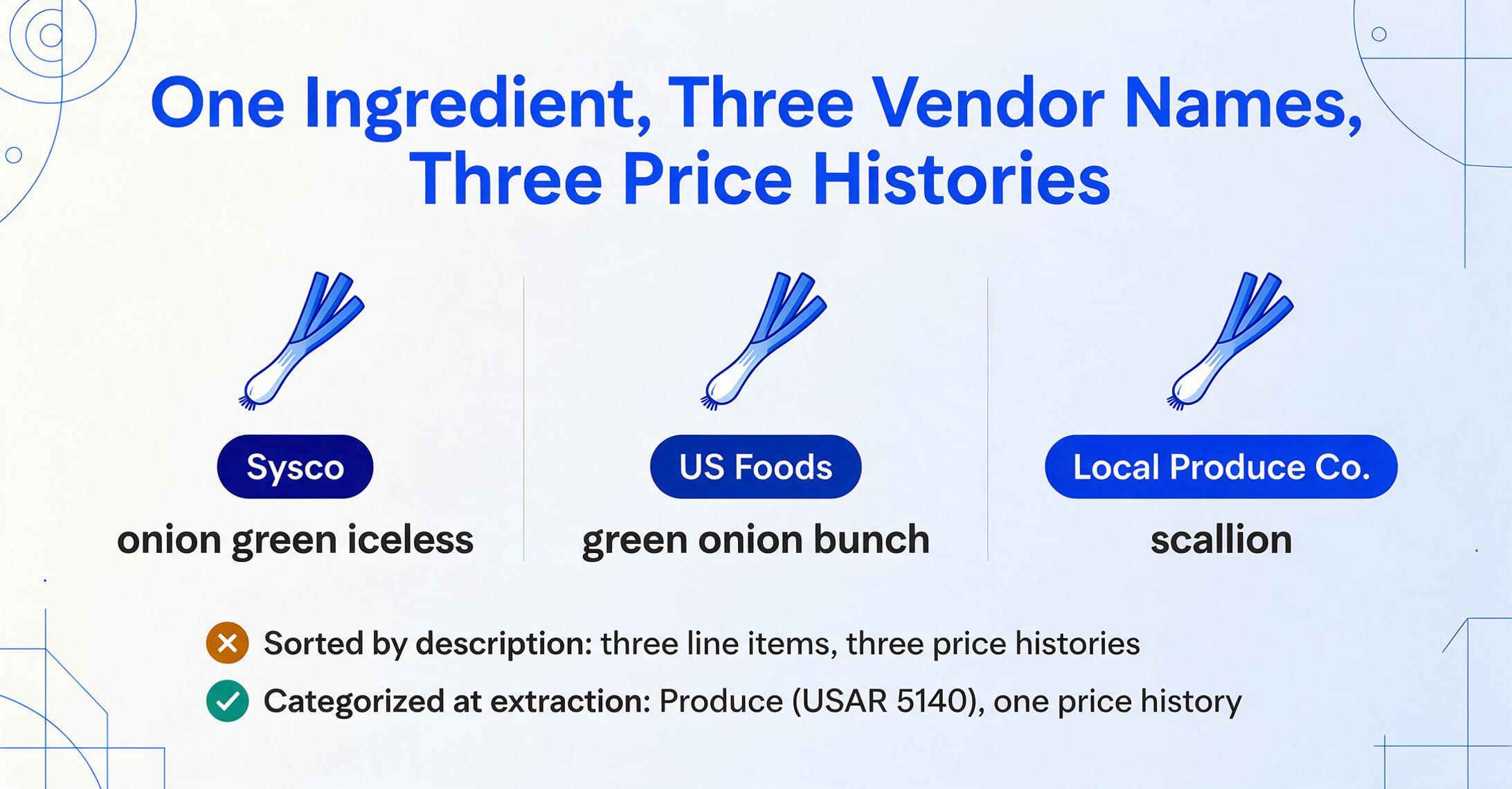
Here is the same ingredient as it appears on invoices from three different suppliers, as documented by MarginEdge's blog:
| Supplier | Line Item Description | What the Kitchen Calls It |
|---|---|---|
| Sysco | onion green iceless | Green Onion / Scallion |
| US Foods | green onion bunch | Green Onion / Scallion |
| Local Produce Co. | scallion | Green Onion / Scallion |
An extraction tool that faithfully captures the description field from each invoice will produce three different product names for the same ingredient. When you sort your weekly purchase log by product description, green onions appear as three separate line items — each with its own price history, none connected to the others. Your food cost analysis now has no way to answer "what am I paying for green onions this week?" because "green onions" doesn't exist in the data. Only "onion green iceless," "green onion bunch," and "scallion" exist.
This is where categorization matters at the extraction level — not after extraction, in a separate cleanup step. If the extraction output maps each line item to a category (Produce, under USAR account code 5140), then "onion green iceless" and "scallion" both land in the same category bucket. The category-level food cost report is accurate even if the item descriptions don't match. Without categorization at extraction time, every recipe re-costing and every food cost report requires a manual reconciliation step — matching each vendor's description to a master ingredient list before any analysis can begin.
The Uniform System of Accounts for Restaurants (USAR), published by the National Restaurant Association, provides the standard coding framework that makes this categorization meaningful. Account code 5110 = Meat, 5120 = Seafood, 5130 = Poultry, 5140 = Produce, 5150 = Bakery, 5160 = Dairy, 5170 = Grocery and Dry Goods. These are not arbitrary categories — they are the line items on your P&L, and a miscategorized invoice line (chicken coded to Produce instead of Poultry) directly corrupts the category-level food cost reporting that operators use to make purchasing decisions. When you understand why the structural reasons food cost tracking remains broken for most restaurants, you recognize that categorization errors at the line-item level are not a minor cleanup issue — they're the gap between a food cost report you can manage from and one you're merely looking at.
Food distributor invoices break extraction for structural reasons — not because the tool is bad, but because the invoice was designed to serve four different functions (billing, receiving, traceability, and price comparison), and the data needed for each function lives in different fields, different documents, and sometimes in handwriting on the same page. An extraction approach built for single-purpose invoices — where description, quantity, unit price, and line total form a clean table — will silently produce wrong numbers on food distributor invoices. Understanding which fields drive the actual transaction (received weight, not ordered weight; actual case count, not nominal; off-invoice deduction, not line-item sum) is the difference between food cost data you can act on and data you'll spend hours correcting.
Frequently Asked Questions
Can AI handle catch weight on food distributor invoices?
Yes — but the tool needs to know that catch weight exists as a concept. General-purpose OCR or template-based extraction treats every numeric field next to a quantity label as equivalent. An AI that understands the semantic difference between "Ordered Weight" and "Received Weight" — and knows that food distributor invoices calculate the invoice price from the received weight — can extract the correct field. The key is specifying the right column names in the extraction request. If you ask for "Quantity" and the tool grabs the first number it finds, you get the ordered weight. If you ask for "Received Weight (lb)" or "Catch Weight Actual," the AI knows which field to target.
Do I need to create a separate template for each supplier (Sysco, US Foods, PFG)?
If you're using a template-based extraction tool, yes — and that's one of the reasons template-based approaches break down in foodservice. Sysco places the unit price in column 5, US Foods in column 7, and the local produce vendor doesn't use columns at all. Template-free extraction — where the AI reads the invoice for meaning rather than matching a pre-configured layout — handles all three suppliers with the same set of column-name specifications. Each supplier's invoice is a different layout expressing the same underlying concepts, and the AI finds the data by understanding what it means, not where it sits.
What about handwritten adjustments — can any tool reliably read those?
Handwritten adjustments on food distributor invoices are the hardest extraction problem in this domain. Even specialized restaurant software like MarginEdge ($330/month) employs a human review layer specifically to handle handwritten notes. General-purpose OCR tools can recognize handwriting as text characters but cannot connect that text to the adjacent printed line item — the substitution note floats disconnected from the line it modifies. Vision models that read the entire page as a visual scene, associating handwritten marks with nearby printed lines by spatial proximity and semantic context, handle this better than OCR alone, but it remains a challenge. The practical approach is to extract the printed invoice first, flag lines with adjacent handwriting for review, and let the vision model propose the most likely connection — rather than expecting fully automated handwritten-note interpretation.
How is food distributor invoice extraction different from standard invoice OCR?
Standard invoice extraction captures header fields (invoice number, date, total) and line items (description, quantity, price). Food distributor extraction must additionally capture pack-size notation, unit of measure, catch weight (ordered vs. received), lot/batch identifiers, off-invoice allowances, delivery-note cross-references, and substitution notes. The extraction is also multi-document — it needs to pull fields from the invoice, the delivery note, and the receiving record, and reconcile quantities across all three. Standard invoice OCR treats one document as self-contained; food distributor extraction treats a single invoice as one piece of a multi-document transaction.
What's the practical impact of getting line-item extraction wrong?
The National Restaurant Association reports that food and labor each account for roughly 33 cents of every dollar in sales, leaving a pre-tax margin of about 5%. A systematic extraction error that inflates food cost reporting by 2% (from catch-weight miscalculation, uncaptured off-invoice deductions, or miscategorization) makes a restaurant believe it has a 3% margin when it actually has 5% — or vice versa. Both directions are damaging: the former causes unnecessary menu price increases and cost-cutting; the latter hides real profitability erosion until it's too late to correct. At the scale of a multi-unit restaurant group doing food invoice processing across 10+ locations, the financial impact of systematic extraction errors compounds across every location, every week.
Extract Food Distributor Invoice Line Items Without Per-Supplier Templates
The structural features described in this article — catch weight, pack notation, off-invoice deductions, handwritten exceptions, product-name inconsistency — are not reasons to avoid automated extraction. They are the criteria you should use to evaluate whether an extraction tool actually handles food distributor invoices, as opposed to handling invoices that happen to contain food items.
ImageToTable.ai uses a column-name extraction approach: instead of building a template for each supplier's layout, you specify the fields you need extracted — Item Code, Description, Pack Size, Qty Ordered, Qty Received (Catch Weight), Unit Price, Line Total, Category — and the vision model locates each value on the page by understanding what it means, not where it sits. This means the same extraction schema works across Sysco, US Foods, PFG, and independent vendor invoices without per-supplier configuration. Upload all of Tuesday's invoices at once and the tool produces a single consolidated spreadsheet — each row a line item, each column the field you specified.
Files are processed securely and not stored.