Batch Extract EOB Data to Excel
No-Code Guide for Medical Billing Teams
On r/HealthInsurance just eight days ago, someone posted a question that every medical billing specialist has asked at some point: "I feel like I'm always trying to match insurance claims with bills from doctors, and the numbers never seem to line up." The answers in that thread describe what most small practices already do — a manual spreadsheet where someone types in claim numbers, CPT codes, billed amounts, and insurance payments from each EOB, one field at a time. It works. It's also the slowest step in the revenue cycle. For a small practice processing 20 to 30 EOBs per day from BCBS, Aetna, UnitedHealthcare, and Medicare — each formatted differently — the re-typing of the same eight fields into a reconciliation spreadsheet consumes two to three hours daily. The data is already printed clearly on the page. The bottleneck is moving it from the page to the spreadsheet.
Key Takeaways
- Two to three hours every day — a billing specialist reads claim numbers, CPT codes (the standard numeric identifiers for medical procedures), and dollar amounts off EOBs and retypes them into a spreadsheet, a step that adds zero judgment and repeats 168 times across five different payer layouts.
- When BCBS changes its EOB layout without notice — which happens — every template-based extraction tool silently produces wrong data, and the billing specialist only discovers the errors when the reconciliation spreadsheet no longer balances.
- Semantic extraction — reading labels for meaning rather than positions — lets ImageToTable.ai process 12 EOBs from five payers into one Excel file, redirecting those two to three hours from retyping values to analyzing denial patterns and underpayments.
What's on an EOB — and Which Fields Matter for Reconciliation
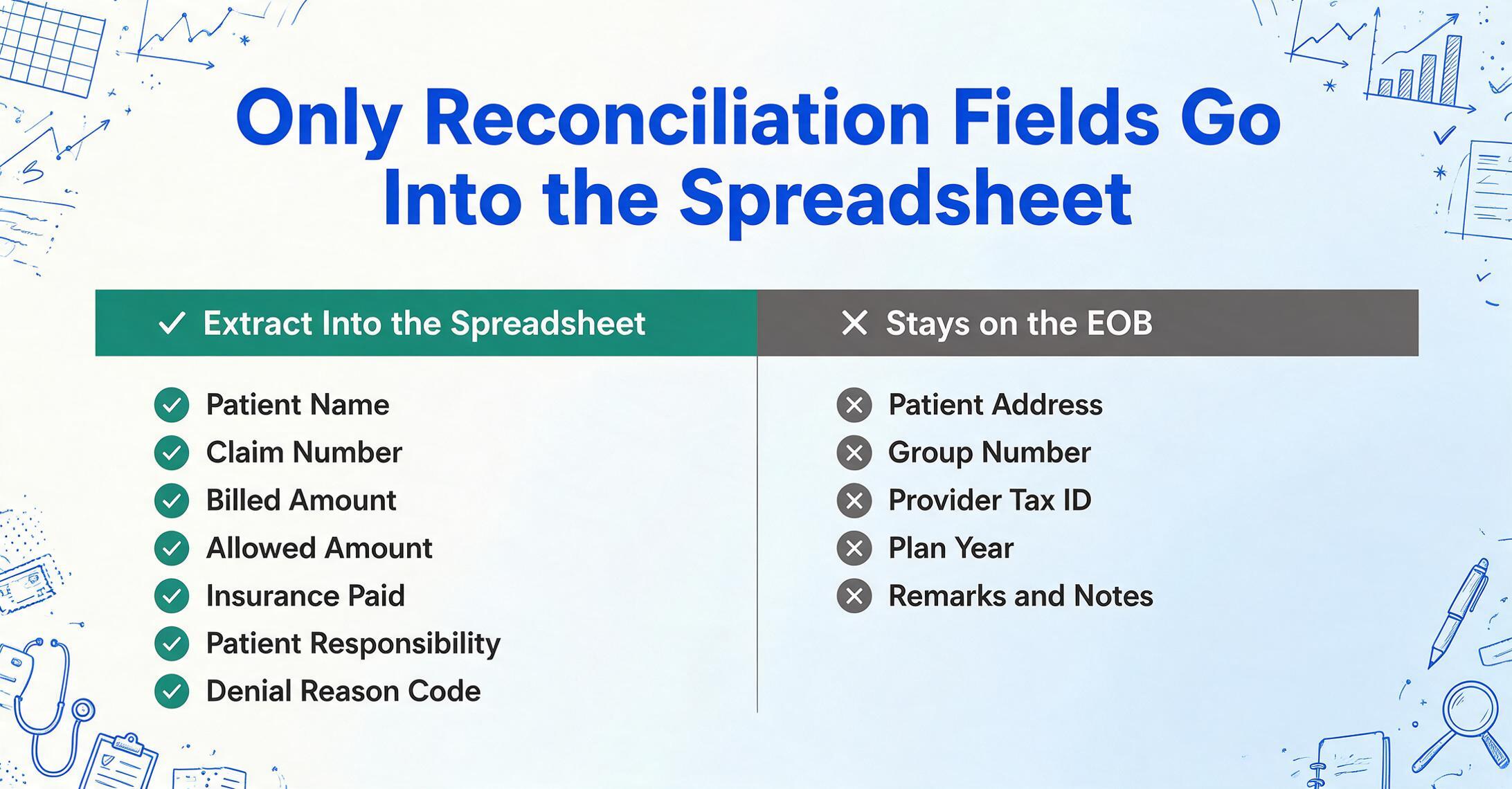
An Explanation of Benefits is not a bill. It's a statement from the insurance company explaining how a specific claim was processed: what the provider charged, what the insurer's contracted rate allows, what the insurance paid, and what — if anything — the patient owes. Every EOB, regardless of payer, contains the same logical structure because it's describing the same transaction. Here's what you'll find on a standard EOB and which fields you actually need for reconciliation:
Core reconciliation fields (extract these from every EOB):
Patient Name  |  Member / Subscriber ID  |  Claim Number
Date of Service  |  Provider Name  |  CPT / Procedure Code
Billed Amount  |  Allowed Amount  |  Insurance Paid
Deductible Applied  |  Coinsurance / Copay  |  Patient Responsibility
Denial / Adjustment Reason Code  |  Claim Status (Paid / Denied / Adjusted)
Reference-only fields (present on the EOB, useful context but not extracted):
Patient Address  |  Group Number  |  Provider Tax ID
Remarks / Notes  |  Plan Year  |  Claim Received Date
The reference-only fields stay on the EOB. The core reconciliation fields are what you type into the spreadsheet — and they're the same fields across every payer. BCBS calls it "Claim #." Aetna calls it "Claim ID." Medicare uses "ICN" (Internal Control Number). Three labels, one concept, one column in your spreadsheet. The variation in labels — not the variation in data — is what makes EOB extraction harder than it looks.
It's worth noting the distinction between an EOB and an ERA (Electronic Remittance Advice). An ERA is the electronic ANSI 835 file containing the same data in a machine-readable format. If your practice receives ERAs through a clearinghouse, the data is already structured and doesn't need extraction. But many smaller payers — and some larger ones for specific plan types — still send paper or PDF EOBs. And even practices that receive ERAs electronically still receive paper EOBs for secondary claims, workers' comp, and auto insurance. The paper-to-spreadsheet gap is narrower than it used to be, but it hasn't closed.
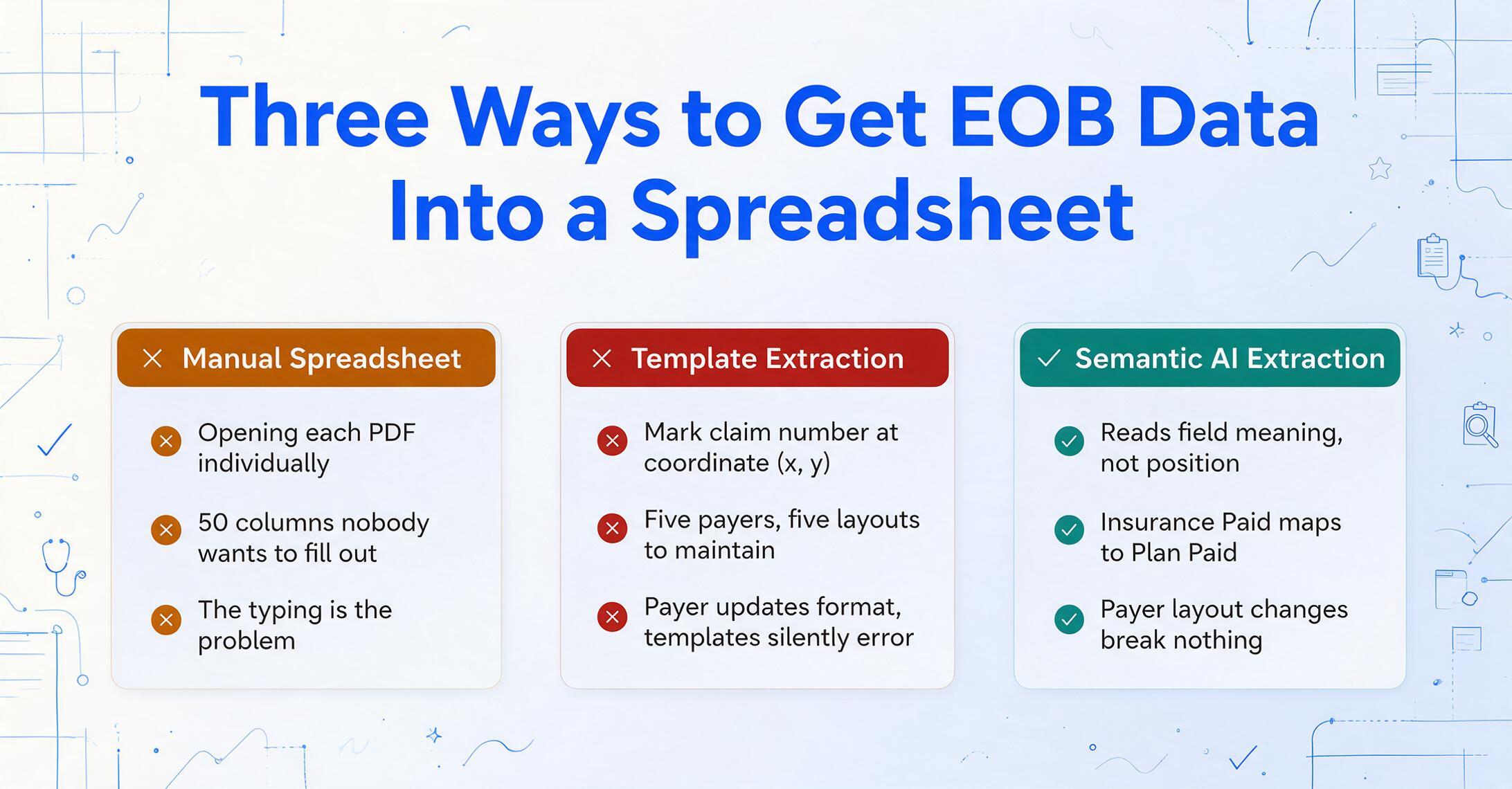
An EOB's structure is predictable in concept — patient, claim, codes, amounts — but unpredictable in layout. The claim number that BCBS prints in the top-right corner, Aetna prints in a header block on the left. The CPT code that UHC lists in a table column, Medicare buries in a "Service Details" section with six other data points on the same line. The fields are the same. The positions are different. That's the whole problem.
Why Every Payer's EOB Looks Different — and Why That Breaks Template-Based Extraction
A Reddit thread from three years ago on r/HealthInsurance captures the frustration precisely. A couple — one of whom developed healthcare software professionally — tried to build a spreadsheet to track their EOBs and gave up. The problem, as they described it: "stuck trying to balance something that's usable and we'll actually be willing to fill out, vs something that can actually track everything but has 50 columns and nobody wants to fill out." Their conclusion: "The general consensus seems to be to push all the responsibility of tracking and reconciling on to the consumer." Even someone who built software for the healthcare industry couldn't solve the EOB tracking problem with a spreadsheet — not because the spreadsheet was wrong, but because getting data into it required typing, and the typing was the problem.
The root cause is structural, not procedural. Template-based extraction tools — the kind that require you to mark "claim number is at coordinate (x, y) on page 1" — face a combinatorially expensive problem with EOBs. A small practice billing BCBS, Aetna, UHC, Cigna, and Medicare deals with at least five distinct layouts. If each payer has two or three EOB variants (different plan types, different states, different coverage types), the number of templates to build and maintain multiplies quickly. When BCBS changes its EOB format — which happens, typically without notice — every template configured for BCBS silently begins producing errors. The billing specialist doesn't find out until reconciliation numbers stop adding up.
The alternative approach that avoids this maintenance burden is semantic extraction: instead of telling the tool where each field sits on the page, you tell it what information you want, and it finds the matching data by understanding what the labels mean. The column name "Claim Number" tells the AI to search the document for any identifier associated with a claim — whether it's labeled "Claim #," "Claim ID," "ICN," or "Reference Number." The AI reads for meaning, not for position, which is why it handles a BCBS EOB and a Medicare Remittance Advice with the same column definition.
Defining Your Extraction Columns Once — and Applying Them to Any Payer's EOB
The workflow starts by defining the output columns. These are the column names you'd use in a spreadsheet — and they become the column headers in the extracted Excel file. Define them once, save as a template, and reuse for every batch:
Patient Name  |  Member ID  |  Payer Name
Claim Number  |  Date of Service  |  Provider Name
CPT Code  |  Modifier  |  Diagnosis Code (ICD-10)
Billed Amount  |  Allowed Amount  |  Insurance Paid
Deductible Applied  |  Coinsurance  |  Copay
Patient Responsibility  |  Denial Reason Code  |  Denial Description
Claim Status  |  Paid Date
The column names are specific enough that the AI can locate each field unambiguously — "Billed Amount" is distinct from "Allowed Amount" in a way that "Amount 1" and "Amount 2" wouldn't be — but general enough that they map across payer terminology. "Insurance Paid" matches "Plan Paid," "Amount Paid by Insurer," "Carrier Paid," and any other variant because the AI understands the semantic equivalence.
The batch upload is where the time savings materialize. A billing specialist opens the morning mail — 12 EOBs: four BCBS, three Aetna, two UHC, two Cigna, one Medicare. Instead of opening each PDF individually and typing values into a spreadsheet, they drop all 12 into a single upload. The AI reads each document independently, mapping every claim's data to the same column structure. The output arrives as one Excel file with 12 rows — one per claim — and the columns populated exactly as defined. You can see this exact workflow in action — upload, columns, one consolidated spreadsheet — on our EOB to Excel demo page.
The manual verification step is faster than manual entry. Instead of typing 12 × 14 = 168 values from scratch, the billing specialist scans the spreadsheet against the original EOBs, verifying that the extracted values match. A value that's correct requires no action. A value that's uncertain or flagged for review gets a quick check against the source document. For the majority of fields — patient names, dates, code strings, dollar amounts printed clearly in standard EOB layouts — the extraction is reliable enough that verification is a scan, not a retype.
Denial Codes and Adjustment Reasons — Capturing the Details That Determine What Happens Next
The financial fields on an EOB — Billed, Allowed, Paid — tell the billing specialist whether the claim was paid in full or not. The denial and adjustment codes tell them why — and whether to appeal, adjust, or bill the patient. These codes are the most actionable information on the EOB and the easiest to miss during manual entry.
Insurance companies use standardized code sets for claim adjustments: CARC (Claim Adjustment Reason Codes) for financial adjustments, RARC (Remittance Advice Remark Codes) for additional explanations, and proprietary denial codes that some payers invent. A typical EOB might list these on the last page, in a section labeled "Claim Adjustment Details" or "Remark Codes," printed in 8-point type. A billing specialist reconciling 20 EOBs in an afternoon may not read every code on every EOB — they're processing for speed, and the codes are easy to skip. But the code is the difference between "denied — needs corrected claim" and "denied — patient responsibility, bill the patient" — two very different next actions.
AI extraction captures these codes systematically. By defining columns for "Denial Reason Code" and "Denial Description," the extraction ensures every code on every EOB is pulled into the spreadsheet, whether or not a human would have noticed it during manual review. The billing specialist still decides what action to take — but the extraction guarantees that no code gets skipped. Over time, aggregating these codes across batches reveals patterns: a particular CPT code is being denied more frequently by a particular payer, suggesting a coding issue — or a payer policy that the practice didn't know about. For a deeper walkthrough of the full EOB extraction workflow — including the 6,000-layout problem and how AI reads them — see our complete guide to EOB data extraction. And when you're ready to compare extraction tools side by side, our healthcare document extraction tools roundup tests seven tools on real multi-payer EOBs.
From Extraction to Reconciliation — How the Spreadsheet Drives the Next Step
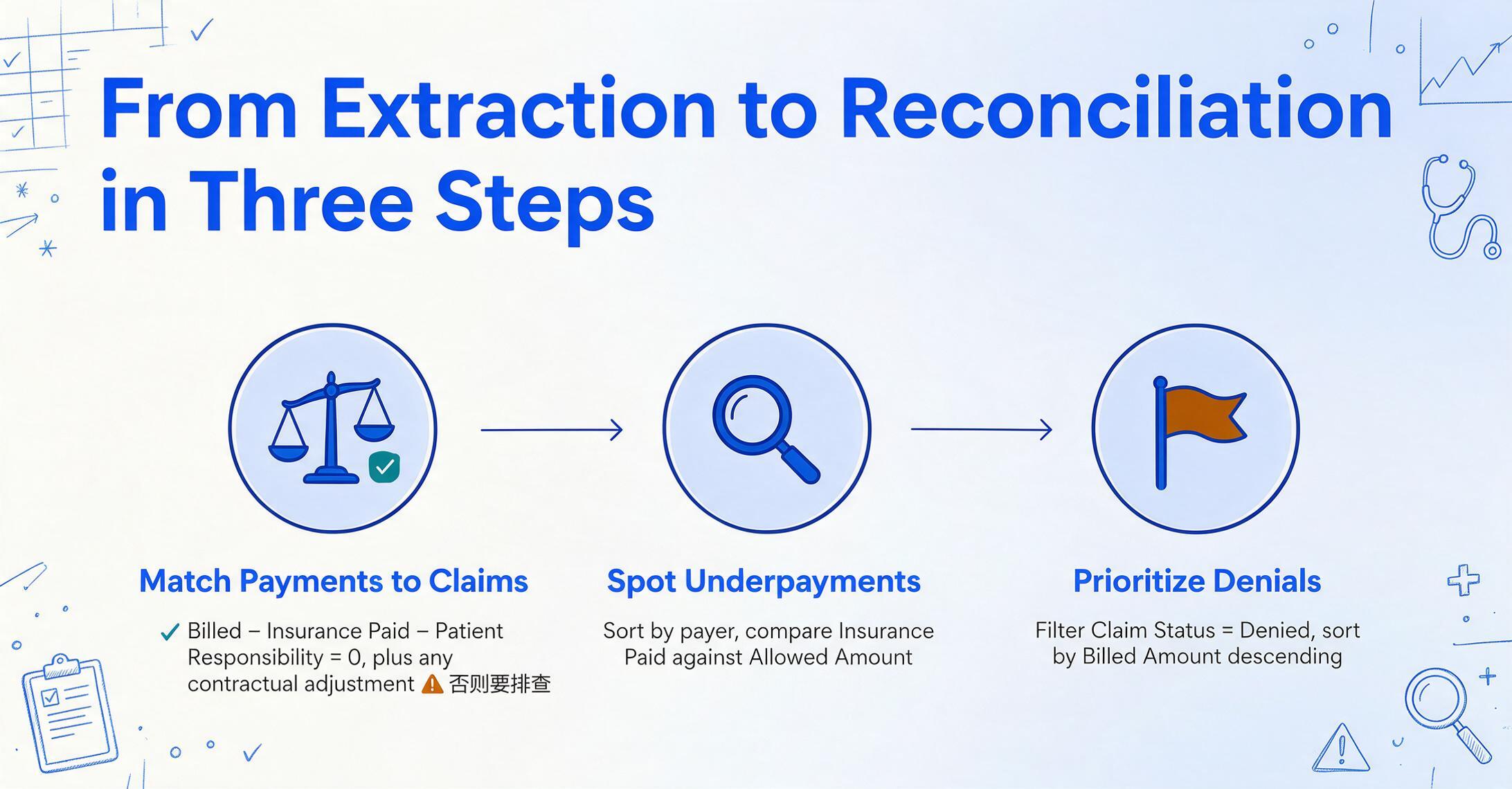
Extracting EOB data is the input to the reconciliation workflow — the step where the billing specialist matches what insurance paid against what was expected. Here's what that looks like with extracted data in hand.
Match payments to claims. The extracted spreadsheet has one row per claim with columns for Billed Amount, Allowed Amount, Insurance Paid, and Patient Responsibility. A quick formula — Billed Amount minus Insurance Paid minus Patient Responsibility — should equal zero plus any contractual adjustment. If it doesn't, that claim needs investigation. The arithmetic that a billing specialist would otherwise perform mentally across two documents (the EOB and the original claim) is now visible in a single row on a single sheet.
Identify underpayment patterns. Sort the spreadsheet by payer and scan the "Insurance Paid vs. Allowed Amount" columns. If BCBS consistently pays 80% of allowed amounts for a specific CPT code but only 60% on the same code after a certain date, that's a fee schedule update that wasn't communicated — and an opportunity to follow up. With manual entry, these patterns are invisible because the data lives in individual EOB PDFs, not in a sortable, filterable table.
Prioritize denial follow-ups. Filter the spreadsheet by Claim Status = "Denied" and sort by Billed Amount descending. The highest-dollar denied claims surface immediately — no digging through EOB stacks. Each row carries the denial reason code, so the billing specialist knows before picking up the phone whether they need to submit a corrected claim, provide additional documentation, or appeal a coding determination. The follow-up list writes itself.
Track patient balances. The Patient Responsibility column, summed across claims and filtered by patient, gives an up-to-date patient balance report without pulling data from the practice management system. For small practices where the PM system doesn't have robust reporting, this is a lightweight workaround that takes minutes to produce.
One thing worth noting: the advice on r/HospitalBills when someone asks how to track EOBs and payments is simply "Yes, a spreadsheet is the way to go." That answer assumes manual entry — but the spreadsheet itself is the right tool. The difference between that Reddit recommendation and this workflow is that the data arrives pre-populated, and the billing specialist's time goes to analysis and follow-up instead of typing.
The spreadsheet isn't the bottleneck. It never was. The bottleneck is the step where a person reads "Claim # 2026BC0047291" off a BCBS EOB and types "2026BC0047291" into cell B4. Removing that step doesn't replace the billing specialist's judgment — it redirects it to the work that requires it.
FAQ
Does this work with EOBs from all major payers?
Yes. Because the AI reads EOBs by understanding the semantic meaning of each field rather than matching a template layout, it handles EOBs from BCBS, Aetna, UnitedHealthcare, Cigna, Humana, Medicare, Medicaid, Tricare, and workers' compensation carriers without per-payer configuration. The column name "Insurance Paid" maps to "Plan Paid" on a BCBS EOB, "Amount Paid by Carrier" on an Aetna EOB, and "Medicare Paid" on a Medicare Remittance Advice — all automatically, because the AI understands they describe the same thing. When you onboard a new payer, there is nothing to set up. When a payer changes their EOB layout, nothing breaks.
Can the AI read the small-print adjustment codes at the bottom of an EOB?
Yes — and this is one of the areas where AI extraction differs most from manual review. Adjustment reason codes (CARC, RARC) and payer-specific denial codes are often printed in small type at the bottom of the last page, in a section that a billing specialist processing a stack of 20 EOBs might glance at but not thoroughly review. The AI reads them as standard text fields and extracts them into dedicated columns alongside the claim data. This doesn't automate the decision about what to do with a denial — the billing specialist still evaluates each code and decides the appropriate action — but it ensures every code is captured, not just the ones a human reviewer noticed.
What about multi-page EOBs where one claim spans several pages?
The AI reads the entire document as a continuous stream, not as isolated pages. If a single claim's service details span pages 2 and 3 of a BCBS EOB, the AI follows the data across the page boundary without interruption. The claim number on page 1 is associated with the CPT codes on page 2 and the payment amounts on page 3 because they share the same document — the AI doesn't lose context at page breaks. A batch upload containing five multi-page EOBs produces one output file with every claim from every page, organized by row, without the billing specialist needing to separate or reorder pages.
How does this compare to using electronic ERAs instead of paper EOBs?
If your practice receives ERAs (ANSI 835 electronic remittance files) through a clearinghouse, those are already structured data files and don't need extraction — they can be posted directly to your practice management system. EOB extraction is for the PDFs and paper statements you still receive: secondary payer EOBs, workers' comp explanations, auto insurance claims, patient-requested copies, and any payer that doesn't send electronic remittances. In most practices, electronic ERAs cover 70 to 80 percent of claims, and the remaining 20 to 30 percent arrive as PDFs. It's that minority that consumes a disproportionate share of data entry time — which is exactly what extraction targets.
Is patient data handled securely during extraction?
EOBs contain PHI (Protected Health Information) and must be handled accordingly. Files uploaded for extraction are processed in memory, encrypted during transit, and deleted after processing completes. However, extraction tools vary in their data handling practices — before processing EOBs through any third-party service, verify the service's encryption standards, data retention policy, and whether they offer a BAA (Business Associate Agreement) if your practice requires HIPAA compliance documentation. For practices with strict data residency requirements, consider using extraction tools that process files locally or offer HIPAA-compliant processing.
Can I process patient EOBs — not just provider copies?
Yes. The patient-facing version of an EOB contains the same fields as the provider copy — claim number, dates, CPT codes, and financial breakdowns — but often in a simplified layout with explanatory text. A patient tracking their own EOBs across multiple providers and payers can use the same column-name extraction approach, defining columns for "Provider Name," "Date of Service," "Billed Amount," "Insurance Paid," and "Patient Responsibility." The output gives patients the reconciliation capability that, as Reddit discussions make clear, insurance companies expect them to have but provide no tools to perform.