The Complete Guide to
Bill of Lading Data Extraction
A bill of lading isn't one document. It's a family of legally distinct document types — straight BOLs, ocean bills, multimodal transports, master and house BOLs — each with different fields, different issuers, and different data destinations. A freight forwarder who processes 100 BOLs a day might touch eight different document layouts from five carriers before lunch. Extraction that works on one BOL type and breaks on the next isn't extraction — it's a partial solution with a manual fallback. This guide covers what you actually need to know to extract BOL data reliably across every type, every carrier, and every standard code your TMS expects.
Key Takeaways
- Template-based extraction for bills of lading means maintaining 750 coordinate rectangles across 50 carriers — and when Maersk moves the container number from the top-right quadrant to mid-page, every BOL they send produces a blank field until someone edits the template.
- The absurdity isn't just the maintenance burden — it's that every template change is a new chance for a misread container ID to reach your TMS, your customer's tracking portal, or a customs filing before anyone notices the container has been missing for three days.
- A single semantic column definition replaces all 750 templates and validates container numbers against ISO 6346 check digits during extraction — catching a mistyped digit before it leaves the extraction layer, not after the demurrage clock starts ticking.
What Makes BOL Extraction Different from Other Document Extraction
Most document extraction articles treat a bill of lading like an invoice with a ship on it. That assumption produces tools that work in demos and fail in production. Here's why BOLs are structurally different from any other document you'll extract data from.
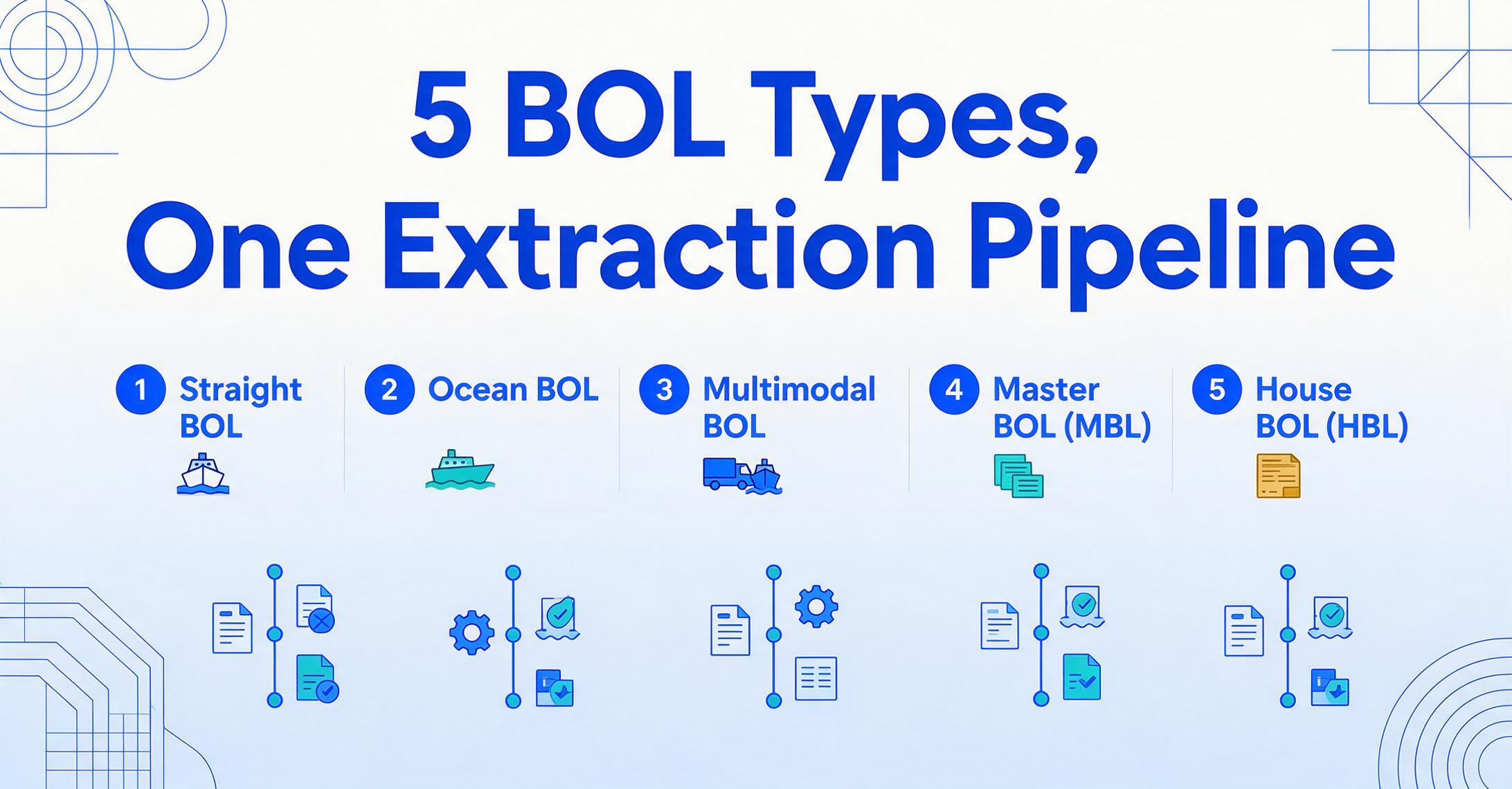
Five legally distinct document types, one extraction pipeline. A straight bill of lading (non-negotiable) names a specific consignee and cannot be transferred — the simplest form, common in LTL trucking. An ocean bill of lading is negotiable and serves as a document of title under the Hague-Visby Rules — whoever holds the original can claim the cargo. A multimodal BOL (also called a combined transport BOL) covers sea, rail, and truck legs under a single document governed by the UNCTAD/ICC Rules for Multimodal Transport Documents. Then comes the split every forwarder deals with daily: the master bill of lading (MBL) issued by the carrier to the forwarder, and the house bill of lading (HBL) issued by the forwarder to the shipper — two documents for the same shipment, sharing fields like container numbers and ports, but with different issuer names, reference numbers, and freight payment terms.
Each type rearranges fields differently. A Maersk ocean BOL places the container number in the top-right quadrant next to the vessel name. An MSC BOL puts it mid-page above the cargo description grid. A house BOL adds an HBL reference number that cross-references the master BOL — a field a straight BOL doesn't have at all. An extraction tool that can't handle all five types without per-type configuration leaves your team maintaining templates instead of moving freight.
The data doesn't just need to be read — it needs to be translated. A BOL might list the port of loading as "CNSHA," "Shanghai," or "Port of Shanghai, CN." Your TMS expects CN SHA, the five-character UN/LOCODE maintained by the United Nations Economic Commission for Europe (UNECE) since 1981 — a system covering over 100,000 locations across 249 countries. A BOL might print the carrier name as "Maersk Line" while your TMS requires the SCAC code (Standard Carrier Alpha Code) MAEU, managed by the NMFTA. Commodities need HS codes — the Harmonized System maintained by the World Customs Organization, used by over 200 countries — mapped from a natural-language cargo description like "woven polypropylene bulk bags" to 6305.33. A BOL extraction tool that outputs plain text isn't finished. One that outputs standardized codes is.
This is the core challenge that makes BOL extraction a different problem from invoice extraction or receipt extraction. For a full definition of BOL data extraction and how it differs from adjacent concepts like TMS data entry, see our what is BOL data extraction guide.
Why Traditional OCR and Template-Based Approaches Fall Short on BOLs
Template-based OCR was designed for documents where the layout is controlled — your own invoices, your own purchase orders, forms you designed yourself. Bills of lading break that assumption at every level.
Multi-carrier format explosion. A freight broker receiving 100 BOLs a day doesn't control which carriers their shippers used. Those BOLs arrive in the formats of Maersk (MAEU), MSC (MSCU), CMA CGM (CMDU), Hapag-Lloyd (HLCU), COSCO (COSU), ONE (ONEY), Evergreen (EMCU), and a dozen regional trucking companies — each with its own layout. Template-based OCR requires you to draw bounding boxes around each field per carrier format. For 50 carriers and 15 fields per BOL, that's 750 coordinate rectangles to define and maintain. When any carrier updates their form — and they do — those templates break silently, producing wrong data in the right columns until someone notices the pattern of B/L correction fees from customs.
Handwriting, stamps, and carbon copies aren't edge cases. A BOL filled out at a loading dock isn't a clean digital PDF. The consignee name was scribbled in pen. The piece count was stamped over in red ink. The freight terms — "PREPAID" — were circled with a marker. The scan is a third-generation carbon copy where text from the original bleeds through into the cargo description field. Traditional OCR treats stamps as noise, carbon bleed-through as extra characters, and handwriting below 90 DPI as unreadable. But on a BOL, those "noise" elements carry the three data points most likely to trigger a carrier invoice dispute: the handwritten piece count, the stamped weight, and the marked freight terms.
NMFC freight class requires semantic understanding. The National Motor Freight Classification system defines 18 freight classes (50 to 500) based on density, stowability, handling, and liability. A BOL might list "Class 70" next to the commodity description "Wooden Furniture, KD" — or it might list the commodity without the class, expecting the carrier to apply it. Template OCR reads both as text strings in the same box. Semantic extraction understands that "Class 70" modifies "Wooden Furniture" and belongs in the Freight Class column, not the Commodity Description column. That distinction determines whether a freight bill is accurate or triggers a $300 reclassification charge three weeks later.
These three failure modes compound. A tool that needs per-carrier templates, can't read handwriting, and can't distinguish freight classes from commodity descriptions is not saving labor — it's creating a review queue as large as the original data entry task.
How Modern AI Extraction Reads a Bill of Lading
The pipeline that replaces manual BOL data entry runs from intake through visual understanding and field mapping to standardization and output — for the full stage-by-stage mechanics of how a vision AI model reads a BOL page and maps fields by meaning rather than position, see our what is BOL data extraction guide. What's worth expanding on here — because it's the stage that separates a real BOL extraction tool from a generic document reader — is standardization and code validation.
Key BOL Fields and the Standards That Validate Them
Every BOL extraction project starts by defining which fields matter. The table below covers the five groups every logistics operation needs, the specific fields within each, and the validation standard that determines whether the extracted value is correct — not just present.
| Field Group | Fields to Extract | Validation Standard | Why It Matters |
|---|---|---|---|
| Parties | Shipper name & address, Consignee, Notify Party, Carrier/SCAC code | SCAC (NMFTA): 2-4 letter carrier code; EORI numbers for EU customs | Misdirected delivery triggers demurrage at $100–500/day; wrong notify party means shipment arrival goes unnoticed |
| Routing | Port of Loading, Port of Discharge, Place of Receipt, Place of Delivery, Vessel/Voyage, Container number, Seal number | UN/LOCODE (UNECE): 5-char code (e.g. CN SHA, NL RTM); ISO 6346: container check digit | ISF filing requires correct port codes 24h before loading; container ID mismatch triggers customs hold |
| Cargo | Commodity description, Piece count & package type, Gross weight (kg/lbs), Net weight, Volume/Dimensions, Freight Class, NMFC code, HS code | NMFC: 18 freight classes (50–500); HS: 6-digit international + country-specific extension; SOLAS VGM: verified gross mass mandatory for containers since July 2016 | Freight class reclassification costs $150–300 per shipment; HS code errors trigger customs penalties up to 10× the duty shortfall |
| Charges & Terms | Freight terms (Prepaid/Collect), Ocean freight, Bunker surcharge, Terminal handling, Accessorial charges | Incoterms 2020: defines cost/risk transfer points | Incorrect freight payment terms mean billing the wrong party and recovering costs from a client who already paid the forwarder |
| Reference | BOL number, HBL/MBL cross-reference, Booking number, PO/Commercial Invoice references, Pickup date, Delivery date/ETA | Format varies by carrier; cross-reference validation between HBL and MBL for forwarders handling both | Shipment untraceable without BOL number in TMS; missed delivery windows erode service-level commitments |
The container number check digit is a particularly valuable validation gate. Under ISO 6346, each container identifier consists of a three-letter owner code (e.g., MSK for Maersk), a one-letter equipment category identifier (U for freight container), six serial digits, and a check digit computed from the preceding characters. If your extraction outputs MSKU 907082 3 but the actual container was MSKU 907082 8, the check digit mismatch flags the error immediately — before that container number reaches your TMS, your customer's tracking portal, or a customs filing. A tool that performs this validation during extraction catches errors that would otherwise survive until a container goes missing in a terminal.
The cargo group — commodity descriptions, weights, freight class, HS codes — is the most data-dense section of any BOL and the most error-prone. It's also the section that varies most dramatically across carriers. One BOL lists five commodity lines with individual weights and a lump freight class; another consolidates everything into one line with "FAK" (Freight All Kinds). A third adds an HS code in the margin handwritten by the shipper. A BOL extraction tool doesn't need to know the layout per carrier. It needs to know what each data type looks like across all the ways carriers and shippers represent it.
Batch Processing: Multi-Carrier BOLs, One Spreadsheet
BOL extraction only delivers its full value when it handles batches — not one document at a time, but dozens or hundreds in a single run. This is where the design assumption of batch-first processing matters.
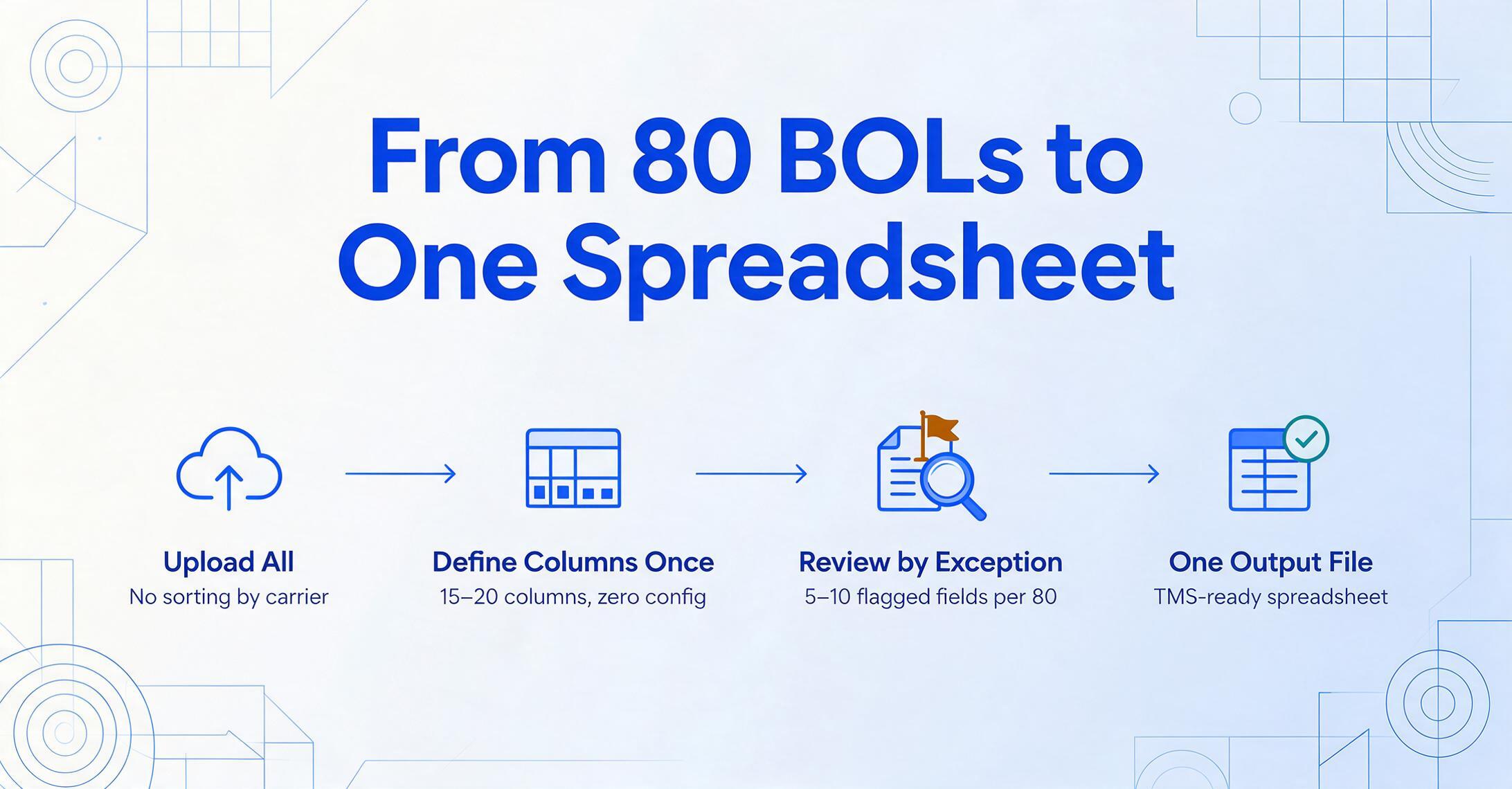
Consider a freight forwarder processing 80 BOLs from a morning's emails. Those 80 documents might come from 12 different carriers, span four BOL types (ocean, house, master, straight), and include a mix of clean digital PDFs and scanned carbon copies from regional trucking companies. The workflow that makes this scale:
1. Upload all BOLs at once. No sorting by carrier, no pre-classification by BOL type. The batch accepts PDF, JPG, PNG, and multi-page documents indiscriminately.
2. Define your columns once. The same 15–20 column names apply to every BOL in the batch. The AI handles the mapping: when it encounters a straight BOL (no HBL/MBL cross-reference), it leaves that column blank. When it encounters an ocean BOL with a multi-line cargo grid, it expands into separate rows per commodity line. No per-document configuration.
3. Review by exception. Fields the AI extracts with high confidence pass through automatically. Fields with lower confidence — a faded carbon-copy weight, a smeared seal number — are flagged for human review. A logistics clerk verifies 5–10 flagged fields per 80-document batch instead of typing 1,200 fields manually. This is the difference between replacing data entry labor and merely relabeling it as "data review."
4. One output file. The result is a single Excel spreadsheet — one row per BOL (or per commodity line, for multi-line shipments), with columns matching the fields you defined. This output is spreadsheet-native: it lands directly in Excel or Google Sheets, ready for TMS import. For teams using Google Sheets, the BOL-to-TMS workflow can run extraction inside the spreadsheet via a sidebar add-on, removing the file-handoff step entirely. For more on scaling batch processing without integration overhead, see multi-carrier batch BOL extraction.
Export Options: Getting Extracted Data Where It Needs to Go
Extracted BOL data has one purpose: entering another system. Which system depends on your operation. The export path you choose determines how much manual handoff remains between extraction and your workflow.
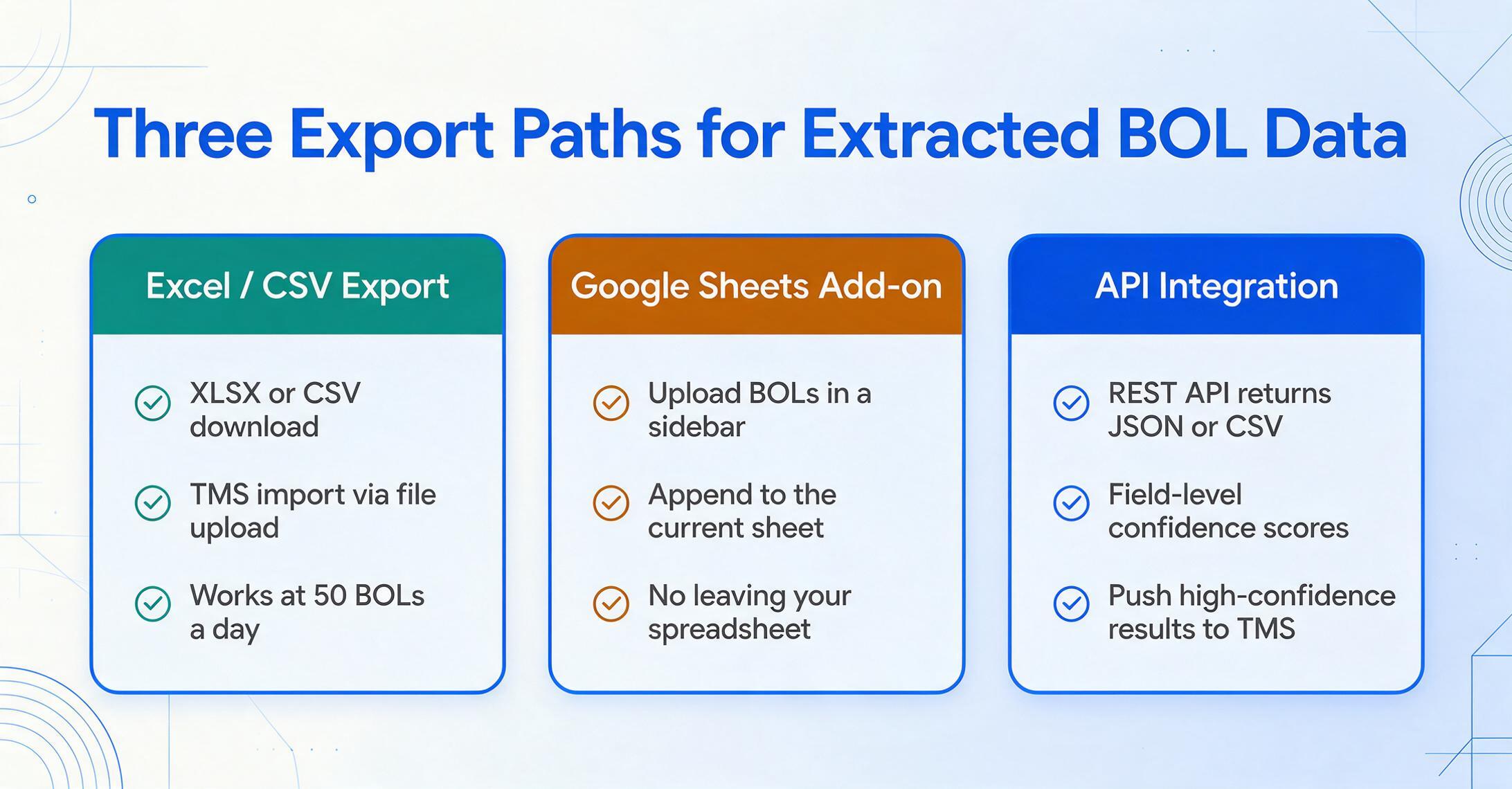
Excel / CSV Export
For: Teams that import into TMS via file upload
Download extracted BOL data as XLSX or CSV. Map columns to your TMS import template — CargoWise, Descartes, McLeod, and others support CSV import. One file, one import, no typing.
Google Sheets Add-on
For: Teams running operations through spreadsheets
A Google Sheets sidebar add-on lets you upload BOLs, define extraction columns, and append structured data directly to the current sheet — without leaving your tracking spreadsheet. Extraction happens inside the tool your team already uses.
API Integration
For: Volume operations with in-house systems
A REST API receives BOL files and returns structured data programmatically — JSON or CSV with field-level confidence scores. Your system can auto-route low-confidence extractions to human review and push high-confidence results straight into the TMS.
The right export path depends on your volume and technical resources. At 50 BOLs a day, Excel export + TMS import works. At 500 a day, the manual file handoff becomes the new bottleneck. Most teams start with Excel export and graduate to API integration when volume justifies the development work. The extraction engine should support both paths so you don't switch tools when you switch export methods.
How to Choose a BOL Extraction Tool
Five criteria separate tools that handle production BOL volumes from those designed for occasional use on clean digital documents.
1. Multi-carrier handling without per-carrier setup. The acid test: process a Maersk ocean BOL, an MSC ocean BOL, an Old Dominion straight BOL, and a scanned carbon copy from a regional LTL carrier — in the same batch, with the same column definitions, without creating a single template. If the tool requires you to define field positions per carrier, you're buying a template maintenance job, not an extraction tool.
2. Standard code validation and normalization. The tool should validate container numbers against ISO 6346 check-digit rules, normalize port names to a standard format (ideally UN/LOCODE), and recognize that "Maersk," "MAERSK LINE," and "MAEU" refer to the same carrier. Without this layer, you're trading manual typing for manual data cleanup — same labor, different step.
3. Multi-page and line-item-level extraction. Ocean BOLs with containerized cargo often run 3–5 pages. Commodity descriptions, container numbers, seal numbers, and package counts are spread across continuation pages. A tool that only reads page one leaves half the data unextracted. Line-item support — where each commodity row becomes a separate data row — is essential for customs classification and inventory reconciliation.
4. Field-level confidence scoring. No extraction tool achieves 100% straight-through processing on the mix of document quality a real logistics operation receives. What matters is that the tool tells you which fields it's unsure about. A confidence indicator per extracted field (high/medium/low) lets your team review only the uncertain extractions — typically 5–10% of fields — while trusting the rest to flow directly into downstream systems.
5. Batch-first design with consolidated output. Processing one BOL at a time works at five shipments a day. At 50, you need batch upload, batch processing, and a single consolidated output — one spreadsheet, one row per BOL, one export step. The tool should be designed from the ground up for batch workflows, not retrofitted with a "batch mode" that processes documents sequentially behind a multi-select dialog.
Test these criteria with your own documents — the BOLs you actually receive, from the carriers you actually work with. A demo with a clean digital BOL from a single carrier proves nothing about how the tool handles your Tuesday morning batch of 40 BOLs from 15 carriers.
Frequently Asked Questions
What BOL types can AI extraction handle?
A template-free AI extraction tool handles all major BOL types — straight BOLs, ocean BOLs, multimodal/combined transport BOLs, master BOLs (MBL), and house BOLs (HBL) — from the same setup. The AI identifies fields by meaning, not by template position, so a straight BOL from a trucking company and an ocean BOL from Maersk are processed through the same column definitions. For documents with BOL-type-specific fields (like the HBL cross-reference number that references the master BOL), you define the union of fields you need across all document types, and the tool leaves blank any field that doesn't appear on a given document.
Can BOL extraction validate container numbers against ISO 6346?
Some tools can, but not all do. ISO 6346 container number validation — computing the check digit from the owner code and serial number and comparing it to the extracted digit — is a post-extraction validation layer that catches transcription errors before they reach your TMS. If container validation matters to your workflow (and it should, if you handle ocean freight), confirm with the vendor that their extraction pipeline includes this step. A mismatch between extracted check digit and computed check digit should flag the field for human review.
Does BOL extraction handle handwritten entries and dock-level BOLs?
Yes — within limits. Modern vision AI models can read handwritten BOL fields at good accuracy on legible handwriting: printed block letters, most cursive, and standardized fields like BOL numbers and piece counts that drivers typically write clearly. Accuracy drops on heavily faded carbon copies, stamps layered over handwriting, or documents where the pen pressure was too light to produce a scannable mark. In these cases, a well-designed extraction tool flags the field with a low confidence score for human review rather than outputting a guess.
How does extraction handle multi-page BOLs with cargo details on continuation pages?
Modern extraction systems ingest all pages of a multi-page BOL as a single document and merge extracted fields into one output record. Party information (shipper, consignee, notify party) typically lives on page 1. Cargo details, container numbers, seal numbers, and package counts often appear on continuation pages. The tool recognizes these as belonging to the same shipment and combines them. For multi-line cargo descriptions, each commodity line becomes a separate output row with the header fields (BOL number, shipper, ports) repeated — the format your TMS expects for line-item-level data.
Can the AI distinguish between a House BOL and a Master BOL?
Yes. House BOLs and master BOLs have structurally different issuer information — the HBL is issued by the freight forwarder (typically with the forwarder's logo and contact details), while the MBL is issued by the ocean carrier. The AI recognizes these structural differences and can extract both types in the same batch, mapping shared fields (ports, container numbers, shipper, consignee) to the same columns while handling type-specific fields like HBL cross-reference numbers or carrier booking numbers separately.
What happens when carriers use different names for the same BOL field?
This is where semantic extraction wins decisively over template-based approaches. When Carrier A labels the field "Shipper," Carrier B labels it "Shipper/Exporter," and Carrier C labels it "Consignor," the AI understands that all three refer to the same entity — the party tendering goods for transport. You define your output column once as "Shipper Name," and the AI maps each carrier's variant to that column automatically. No per-carrier field mapping, no translation table, no "if Carrier = Maersk then column A else if Carrier = MSC then column B" logic.
Can extracted BOL data feed directly into my TMS?
Most extraction tools export to Excel or CSV, which can be imported into your TMS via the platform's standard import function. Platforms like CargoWise, Descartes, Turvo, and McLeod support structured file import — you export the extraction results, map columns to your TMS's import template, and upload. For direct push without a file handoff, tools with a REST API can integrate programmatically. If your team runs operations through Google Sheets, a sidebar add-on approach lets you extract BOL data directly into the spreadsheet that feeds your TMS import — no file download-and-upload cycle.
What accuracy can I expect on BOLs from different carriers?
Modern AI extraction achieves 95–99% field-level accuracy on clean digital BOLs from major carriers (Maersk, MSC, CMA CGM, Hapag-Lloyd, COSCO, ONE, Evergreen). Accuracy drops for low-resolution scans, heavy carbon-copy degradation, or handwritten dock BOLs — though still well above what template OCR achieves on the same documents. The metric that matters isn't raw accuracy. It's trusted throughput: how many BOLs flow through without manual intervention. At 95% field-level accuracy with confidence scoring, you review roughly 5% of fields — roughly one field per BOL on a 20-field extraction. That's the difference between reviewing 80 fields across an 80-document batch and typing 1,600 fields manually.
Does BOL extraction replace a customs broker?
No. BOL extraction automates the data entry step — reading fields off a BOL and putting them into structured format. It does not replace the regulatory judgment a licensed customs broker provides: HS code classification decisions, customs valuation assessments, free trade agreement eligibility determinations, and entry filing strategy. Extraction removes the typing work so your broker spends time on the classification and compliance decisions that require expertise. For the full breakdown of how extraction fits into the broader logistics document landscape, see our guide to what BOL extraction is, and for how the BOL reconciles with the full shipment packet — manifests, packing lists, commercial invoices — see our guide to shipping & freight document extraction.
What's the difference between BOL extraction and EDI for getting shipment data?
EDI (Electronic Data Interchange) delivers structured shipment data directly from carriers — no extraction needed. But EDI requires per-carrier setup, testing, and ongoing maintenance, and many smaller carriers and forwarders don't support it. In practice, most logistics operations receive a mix: EDI from major carriers for regular lanes, and PDF BOLs from everyone else. BOL extraction handles the PDF side. The two approaches are complementary, not competitive. For the complete comparison, see EDI vs AI BOL extraction.
Bill of lading extraction isn't about making a slow data entry process faster. It's about removing the step entirely — the step where a human operator transcribes fields from a document they didn't create, using carrier abbreviations they had to memorize, into a TMS that can't tell if they made a typo. Every hour a BOL sits in the gap between your inbox and your TMS is an hour where a customer can't track their shipment, a customs filing hasn't started, and a carrier invoice can't be verified against the actual cargo received. Extraction closes that gap to seconds. What you do with the hours you get back is up to you.