The Complete Guide to Timesheet
Data Extraction (2026)
When the U.S. Department of Labor estimates that filling out a WH-347 certified payroll form takes 55 minutes for just eight employees, and the American Payroll Association puts manual timesheet error rates at 1–8% of total payroll, the gap between a paper time card and a payroll run is no longer just an inconvenience — it's a quantifiable drain on labor budgets, job cost accuracy, and compliance standing. Timesheet data extraction is the technology that closes that gap: reading employee names, hours, project codes, and overtime from any timesheet format — printed or handwritten — and outputting structured data your payroll system can consume directly, without a single keystroke of manual transcription.
Key Takeaways
- A 60-field construction crew timesheet has a 45–83% probability of containing at least one keystroke error — per sheet, per week, before overtime calculations even begin.
- The APA estimates manual timesheet errors bleed 1–8% of total payroll, but the deeper damage is invisible: every mistyped hour corrupts the job-cost data that feeds your next bid.
- You don't need a faster data entry clerk — you need to replace 240 keystrokes per batch with a review step that checks only the 5–15% of fields the AI is unsure about, turning your payroll team from data creators into data verifiers.
What Is Timesheet Data Extraction (and What It Isn't)
Timesheet data extraction is the automated process of reading structured fields — employee name, dates worked, daily hours (regular and overtime), project codes, cost codes, and approvals — from a paper or digital timesheet and converting them into an organized table your payroll system can import. It is not a time tracking app.
That distinction is the most common point of confusion, and getting it right determines whether you solve your actual problem or buy something that doesn't touch the stack of paper on your desk. QuickBooks Time, ADP Workforce Now, Procore Timecard, Raken, and similar tools are time tracking apps: employees clock in and out digitally, and hours flow directly into payroll. They prevent paper timesheets from being created at the source. Timesheet extraction solves the opposite problem: the paper timesheet already exists — filled out by a foreman on a job site, faxed by a staffing agency, photographed by a field worker — and the hours need to jump from that card into your payroll system without anyone retyping them.
For a deeper explanation of how this technology works and when it's the right solution, see our guide to what timesheet data extraction is. The rest of this article assumes you've already determined that extraction is the answer and focuses on how to do it well — covering everything from field selection and batch processing to certified payroll compliance and payroll system integration.
Why Timesheet Data Extraction Matters
The cost of manual timesheet processing isn't the salary of the person doing the typing. It's what happens when that typing goes wrong — and the data on how often it goes wrong is worse than most payroll managers assume.
The American Payroll Association estimates that manual timesheet errors cost 1–8% of total payroll. On a $2 million annual labor budget, that's $20,000 to $160,000 in recoverable cost — every year. The Construction Financial Management Association's 2024 Financial Benchmarker found that cost administration alone consumes an average of 5.4% of project revenue for U.S. general contractors. The primary driver isn't software licensing or consulting fees; it's the labor of reconciling data that should have matched from the start — hours on a time card that don't match the hours in payroll because someone misread a 4 as a 9.
Each keystroke in manual timesheet entry carries a 1–3% error rate. A single weekly construction crew sheet with 60 fields (5 workers × 12 data points each) means the probability of at least one error in that batch is between 45% and 83% — per sheet, per week. Multiply that across 20 subcontractor timesheets and a year of payroll cycles, and the question isn't whether errors exist in your payroll data, but how many go undetected.
The compliance dimension amplifies these costs further. On federally funded construction projects subject to the Davis-Bacon Act, a single misclassified trade or mistyped hour on a certified payroll report can trigger penalties of up to $13,508 per violation. The Department of Labor's own estimate of 55 minutes to complete Form WH-347 for just 8 employees means a 40-person project can consume over 4.5 hours of payroll admin time per week on the form alone — before accounting for the data entry that populates it.
The structural problem: manual timesheet entry carries an error rate that compounds with volume, while the compliance and cost consequences compound with time. Extraction doesn't eliminate the need for review — but it shifts the payroll team's role from data entry clerk to data reviewer, which is a fundamentally different risk profile.
The Unique Challenges of Timesheet Data
Timesheets are not invoices. They are not receipts. They present a set of structural challenges that make them uniquely difficult to extract — and uniquely valuable to get right.
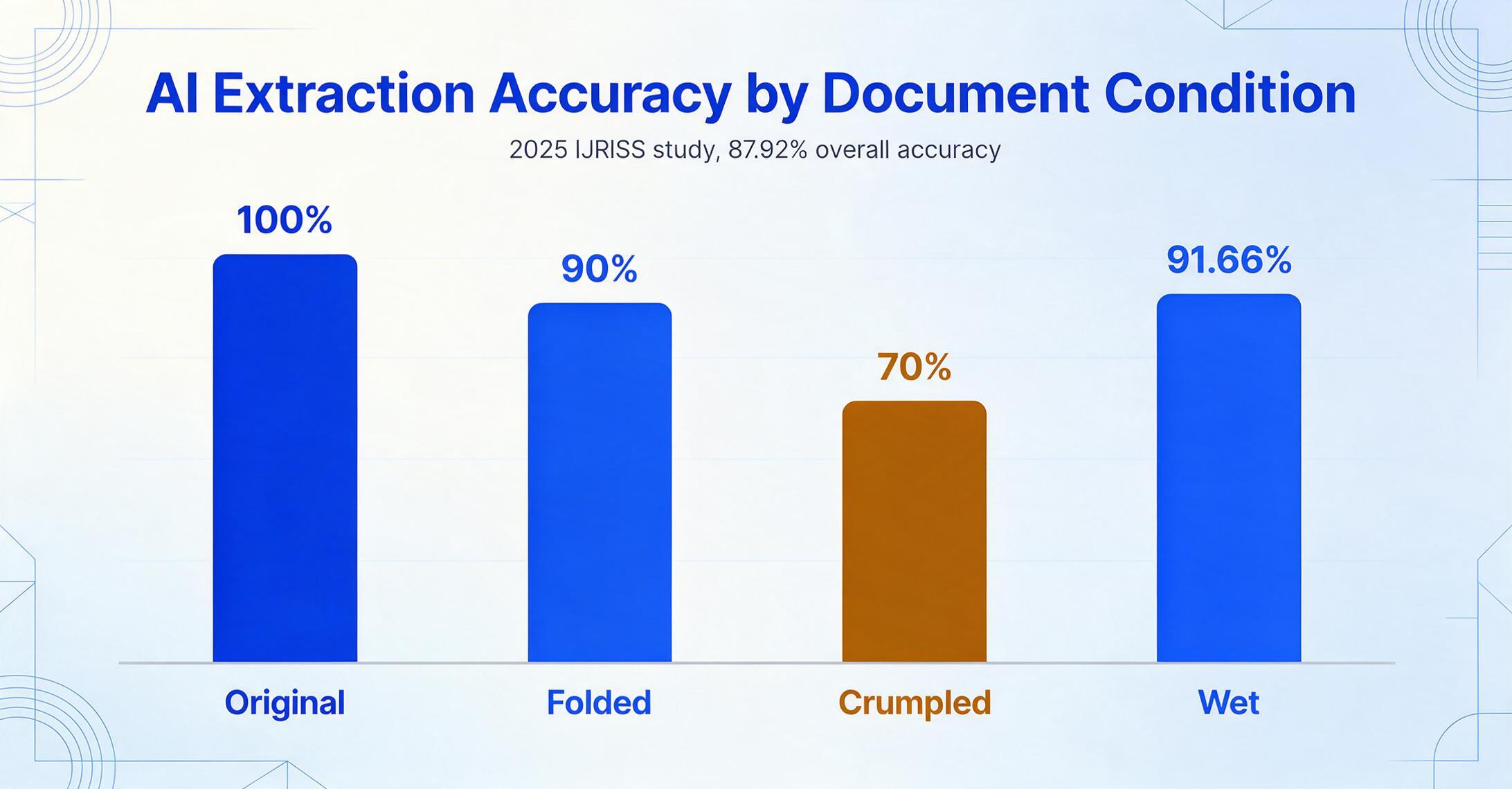
Handwriting is the norm, not the exception. Job-site time cards, field service logs, and staffing agency timesheets are filled out by hand — often in a truck cab, on a tailgate, or at the end of a 10-hour shift. The 2025 IJRISS study on AI-powered timesheet OCR tested multimodal extraction across four document degradation states — original (100% accuracy), folded (90%), crumpled (70%), and wet (91.66%) — achieving 87.92% overall accuracy, a 12–47 percentage point improvement over traditional OCR. An extraction tool that only handles clean, printed PDFs solves the easy 30–40% of the problem. The handwritten remainder is where manual entry costs live.
Table structure, not form structure. Most document extraction tools are designed for forms: one label, one value. "Invoice Number: INV-12345" is a form field. A timesheet is a grid — employee names down the left column, Monday through Sunday across the top, hour values in the intersecting cells. The tool must understand that the "8" in row 3, column 4 is John Smith's Wednesday regular hours — and that this relationship must be preserved in the output whether the grid has 5 columns or 14, whether the header reads "Wed" or "Wednesday" or "W," and whether the row label is "John Smith" or "Smith, J." Template-based approaches break when the grid layout changes; semantic extraction reads the structure by understanding what each cell represents, not where it sits.
Project and cost codes multiply the extraction complexity. A payroll clerk reading one timesheet might see "8 hours" and type one row. But that "8" might need to be split across three cost codes (03 30 00 — Concrete, 03 24 00 — Rebar, 03 00 00 — General) with different classifications and potentially different wage rates. On a Davis-Bacon project, the DOL requires workers who perform more than one classification to show an accurate breakdown of hours by classification. The extraction output must be capable of producing multiple rows per worker — not collapsing everything into one.
Overtime logic varies by jurisdiction. Federal Davis-Bacon projects require overtime at 1.5× after 40 hours per week. California requires 1.5× after 8 hours per day and after 40 hours per week, with double-time after 12 hours in a day. Union agreements may layer entirely different thresholds on top of both. An extraction tool that only reads what's written on the card — and can't calculate overtime from daily hour totals — leaves the hardest part of the payroll calculation on the desk where it started.
Multi-project allocation blurs the pay period boundary. A single worker might log hours on three different projects in one week, each with different wage determinations, different cost codes, and different certified payroll reporting requirements. The timesheet may or may not capture these splits clearly — but the payroll run must reflect them accurately, because a worker paid at the wrong wage determination is a compliance failure regardless of whether the timesheet was ambiguous.
Traditional Methods vs AI Extraction
Three approaches dominate the timesheet-to-payroll pipeline today. Only one of them is designed for the volume, variety, and compliance stakes that most organizations actually face.
| Manual Data Entry | Template-Based OCR | AI Semantic Extraction | |
|---|---|---|---|
| How it works | Payroll clerk reads paper card and types every field into payroll system | OCR reads characters from a predefined position; requires a parsing template per timesheet format | Vision AI reads the document holistically, understanding names, hours, and codes by meaning rather than position |
| Handles handwriting? | Yes (human deciphers it) | Poor — traditional OCR drops to <50% on cursive | Yes — 85–95% field-level on handwriting, 87.92% across degraded conditions |
| Handles format changes? | Yes (human adapts) | No — each new format requires a new template | Yes — format-independent, reads any layout on first encounter |
| Handles table grids? | Yes (human reads the grid) | Partial — often loses row-column relationships | Yes — preserves grid structure, row context, and column headers |
| Per-timesheet processing time | 2–5 minutes | 10–30 seconds (after template is built) | 5–10 seconds |
| Setup effort | Zero (per-timesheet); training time per new clerk | High — build and maintain a template per format, per vendor, per layout change | Near-zero — define output columns once; reuse across all formats and sources |
| Error profile | 1–3% per field typed; invisible until paycheck dispute | Depends on template quality; breaks silently when layout shifts | 1–5% field-level; errors are visible for human review before payroll runs |
| Scales with volume? | No — linear cost per timesheet | No — template maintenance scales with format diversity | Yes — marginal cost near-zero after initial column definition |
| Best for | 1–5 timesheets per week, single format | High-volume, single-format digital timesheets from one source | Mixed-format, multi-source handwritten and printed timesheets; compliance-sensitive environments |
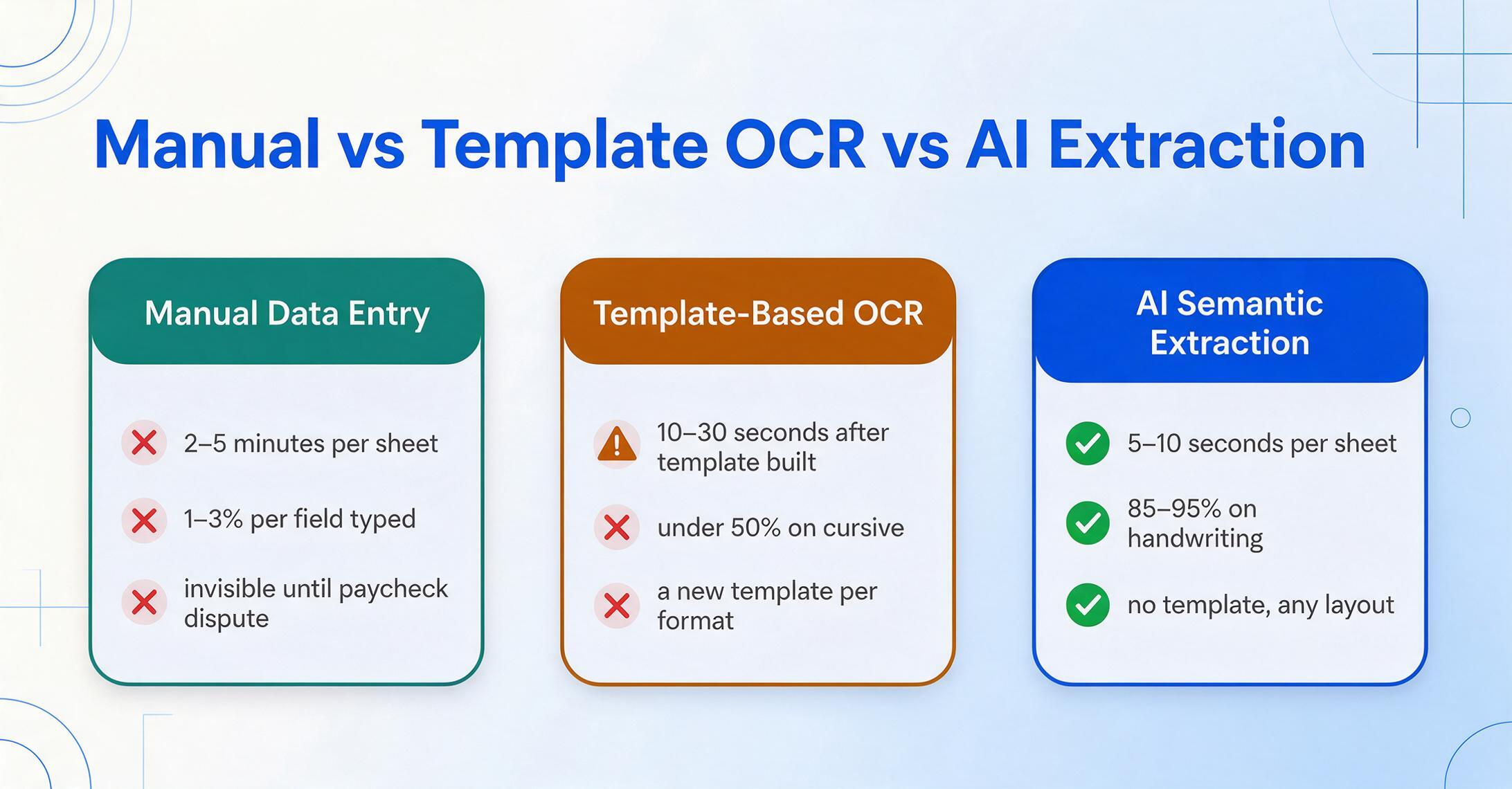
The critical insight: template-based OCR fails at the exact point where most organizations need extraction most. If your timesheets all come from one source in one format, you don't need extraction at all — you have a standardized digital process. Extraction is needed precisely when formats vary: five subcontractors sending five different timesheet layouts, a staffing agency with its own PDF format, a legacy paper card from a crew that doesn't use apps. Each new format breaks a template-based system. A template-free system reads them all with the same column definition — because it locates "Employee Name" by understanding what an employee name looks like, not by expecting it at coordinates (120, 45).
This is the architecture decision that determines whether extraction reduces your workload or just moves it: position-based extraction (where is the data?) vs semantic-based extraction (what does the data mean?). Tools in the first category — most legacy OCR and zonal systems — require you to maintain a map of where each field lives on each document variant. Tools in the second category — modern vision AI platforms — read documents the way a person does: by understanding content, not matching coordinates. If you process timesheets from more than three different sources, the cost of template maintenance alone can exceed the cost of manual entry within a year. For a deeper comparison, our definition guide to timesheet extraction covers the technology layer in detail.
Files are processed securely and not stored.
Key Fields for Timesheet Extraction
The fields you extract depend on where the data is going — a simple payroll run needs fewer fields than a Davis-Bacon certified payroll report, which needs fewer fields than a full job-cost allocation spreadsheet. Define your output columns based on your downstream system's requirements, not the timesheet's layout.
Employee & Period
- Employee Name
- Employee ID / Badge Number
- Week Ending / Pay Period Date
- Supervisor Name & Signature
Daily Hours Grid
- Regular Hours — Mon through Sun
- Overtime Hours (1.5× and 2×)
- Break / Meal Period Deductions
- Sick / Vacation / Holiday Hours
Project & Cost Allocation
- Project Code / Job Number
- Cost Code / Phase Code
- Craft / Trade Classification
- Work Description / Task
Payroll & Compliance
- Hourly Rate / Pay Rate
- Total Regular Hours
- Total Overtime Hours
- Fringe Benefit Rate
- Prevailing Wage Determination Number
The extraction tool you choose should let you define columns once and apply them across every timesheet format your organization receives. This approach — called Custom Column Extraction — means you define the output structure based on what your payroll or ERP system needs, not what each individual timesheet provides. A worker name column in your output will capture "John Smith" whether the source card lists it as "John Smith," "Smith, John," or "J. Smith" in the top-left corner — the AI resolves each variant to the same output column based on semantic understanding, not positional matching.
Batch Processing: When Volume Makes Speed Structural

Processing 40 timesheets one at a time isn't meaningfully faster than manual entry once you account for the overhead of opening each file, waiting for processing, reviewing results, and moving to the next. The time savings compound only when you can upload all 40 at once and receive a single unified spreadsheet in return.
Batch processing is the operational difference between "extraction is an interesting demo" and "extraction replaced the payroll clerk's Wednesday afternoon." The workflow is straightforward:
Collect all timesheets for the pay period
Photo the paper cards, forward the emailed PDFs, download the portal exports — gather every timesheet into one folder regardless of its source format. No pre-sorting, no renaming, no standardizing.
Define your output columns once
Set up the column structure that matches your payroll import format: Employee Name, Date, Project Code, Regular Hours, Overtime Hours, Classification, Cost Code. These columns apply to every timesheet in the batch regardless of its layout. Save the column set as a template for reuse next period.
Upload all timesheets and process as a batch
Upload the entire folder at once. The tool processes each timesheet independently but collects all results into one unified table — one row per worker per timesheet, with columns matching your definition. A 40-timesheet batch that would take 2–3 hours of manual entry completes in 3–7 minutes of processing time.
Review flagged results, not every field
Instead of verifying 240 individual fields (40 sheets × 6 fields), review only the cells the AI flagged as uncertain — typically 5–15% of fields. Spot-check a random sample of confident extractions. The review step shifts from comprehensive data entry verification to exception-based quality assurance.
The batch-first architecture matters especially for payroll cycles with hard deadlines. If timesheets arrive Friday afternoon and payroll must be submitted by Tuesday morning, a process that requires sequential processing is a process that fails during vacation season. Batch processing lets the extraction run in the background while the payroll team reviews results — parallelizing what was previously a serial, person-bound workflow.
Export and Payroll/ERP Integration
Extracted data that lives in a spreadsheet you can't connect to your payroll system is just a different shape of manual entry. The integration step is where extraction either delivers value or becomes a science project.
Most modern extraction tools export to Excel (XLSX) or CSV — formats that every major payroll and ERP platform accepts as an import source. The critical factor isn't whether the tool can produce these formats (nearly all can), but whether the output column structure matches what your downstream system expects. If your payroll system imports "Employee ID" as a column header and your extraction output labels it "Worker Number," you're renaming a column before import — not retyping data. The structure is correct; the naming convention is yours to control.
The software ecosystems for timesheet data integration fall into three categories:
| Category | Platforms | Integration Method | Typical Use Case |
|---|---|---|---|
| General Payroll | ADP Workforce Now, Paychex Flex, QuickBooks Payroll, Gusto, Sage | CSV/XLSX import | Standard hourly payroll for direct employees; timesheets from staffing agencies and contractors |
| Construction ERP | Sage 300 CRE, Viewpoint Vista, Foundation, HCSS HeavyBid, Procore | CSV/XLSX import with cost code and project field mapping | Job cost allocation, certified payroll, field-to-office time reconciliation |
| Certified Payroll | LCPtracker, eMars, Miter, Payroll4Construction | CSV import or direct integration | WH-347 generation, prevailing wage compliance, union reporting |
For teams that work in Google Sheets — common in small to mid-size construction and field service operations — extraction tools with a Google Sheets add-on eliminate the export-import step entirely. Extracted data lands directly in a spreadsheet tab, ready for import into payroll or sharing with the accounting team. For organizations that process varying document types beyond timesheets, the related convert timesheets to Excel tool handles single-format batch extraction.
If your payroll or ERP system requires a specific field order or column naming convention, verify that the extraction tool lets you name columns freely — most do, but some auto-generate column headers from document field labels, which produces inconsistent column names when timesheet formats vary within a batch. A tool that lets you define and save column templates ensures the output structure matches your import format every period, regardless of how many different source formats were in the batch.
Certified Payroll, Prevailing Wage & Construction Compliance
For construction contractors working on federally funded projects, timesheet data extraction isn't just about efficiency — it's about the difference between a clean certified payroll submission and a compliance violation that can cost jobs, money, and bidding eligibility.
Under the Davis-Bacon Act (40 U.S.C. § 3141 et seq.), any federal construction contract exceeding $2,000 requires contractors to pay workers at locally prevailing wage rates and submit weekly certified payroll reports — typically on Form WH-347 — documenting every worker's name, trade classification, hours worked per day, wage rate, and fringe benefits. Thirty-two states layer their own prevailing wage laws on top of the federal framework, each with different thresholds, calculation methods, and reporting formats.
The DOL's instructions are explicit: if a worker performed work in more than one classification during the week, the certified payroll must show "an accurate breakdown of hours worked in each labor classification." When time data originates as handwritten numbers on a paper card — "John — Carpenter 3h, Laborer 5h, Operator 2h" — the path from that card to a compliant WH-347 runs through manual data entry. Every keystroke on that path carries the same 1–3% error rate as any other manual transcription, but the consequences are steeper: a misclassified hour defaults to the highest applicable wage rate for all hours; a pattern of errors can trigger back-wage restitution, penalties up to $13,508 per violation, and debarment from future federal contracts.
How extraction fits into the certified payroll workflow:
Extract classification as a first-class field
Define "Classification" as a column in your extraction template. The AI reads the trade or craft as written on the timesheet — "Carpenter," "Electrician," "Laborer," "Operator" — and outputs it alongside hours. When a worker splits 3 hours as Electrician and 5 as Laborer, you get two rows with two classifications. The extraction tool doesn't assign wage rates (that depends on the project's wage determination number, which varies by county and contract), but it provides the structured classification data that wage rate mapping requires.
Map extracted data to WH-347 fields
The extraction output provides worker name, classification, daily hours (regular and overtime), rate of pay, and project identification — the core fields WH-347 requires. Structured in a CSV, this data can populate certified payroll software (LCPtracker, eMars, Miter) directly, or serve as a verified source for manual form completion. The step that's eliminated is the transcription from paper to digital — the step where keystroke errors enter the compliance chain.
Maintain a digital audit trail
Under Davis-Bacon regulations (29 CFR Part 3), certified payroll records must be retained for at least three years after project completion. Extraction creates a digital record that includes the original timesheet photo plus the extracted structured data — a contemporaneous audit trail that paper originals alone cannot provide. If an auditor questions a classification or hour count three years later, you can show the source document and the extraction output that matches it.
What extraction does not do: generate a completed, signed WH-347. The Statement of Compliance on page 2 of the form requires a signature from an officer with knowledge of payroll — attesting that wages are correct, classifications are accurate, and fringe benefits were paid. That certification is the contractor's legal responsibility and cannot be automated. Extraction eliminates the data entry errors that trigger failed certifications; it does not replace the certification itself. For the full regulatory context, see our guide to construction timesheet extraction.
Union reporting adds another compliance dimension. Union craft classifications (Carpenter, Electrician, Laborer, Operating Engineer, Ironworker, Plumber/Pipefitter) are not just payroll categories — they're contractual obligations with specific wage scales, fringe benefit contribution rates, and apprentice-to-journeyman ratios. When a foreman writes "Joe — 8hrs" without specifying that 3 of those hours were Union Carpentry and 5 were general labor, the extraction tool can only output what the card captures. The structural fix isn't better extraction — it's better time cards. Requiring classification on the source document is the single highest-impact compliance improvement a construction contractor can make, regardless of what processing tool they use.
What to Look For in a Timesheet Extraction Tool
Timesheet extraction tools range from legacy OCR systems requiring per-format template configuration to modern AI platforms that read semantically. Six criteria separate tools that reduce payroll workload from tools that move the typing to a different screen.
1. Template-free, format-independent operation. This is the single most important differentiator — because timesheet formats multiply with every subcontractor, staffing agency, and field crew added to your operation. A tool that requires you to define a parsing template per format is not extraction; it's template management. Template-free extraction reads by semantic understanding: a timesheet from a source you've never processed before works on the first upload. Ask the vendor: "If I receive a timesheet in a format I've never seen, does it work immediately?" If the answer involves "first create a parsing template," you're buying maintenance, not automation.
2. Handwriting accuracy under real conditions. The demonstration video showing a perfectly scanned PDF is not the test. Ask to test on your actual worst timesheets — the handwritten crew card with classifications in the margin, the card where a 4 looks like a 9, the photo taken at dusk on a job site. A tool that only handles clean, printed digital PDFs solves the easy 30–40% of your timesheet volume — and leaves the hard 60% on your desk. The IJRISS 2025 benchmark of 87.92% accuracy across degraded conditions is a useful reference point, but your own worst-case test will tell you more than any published number.
3. Table and grid structure preservation. A timesheet is a grid, not a form. The tool must understand row-column relationships and preserve them in the output. If the extraction sees "8" in a cell but can't tell you it's John Smith's Tuesday regular hours in the correct row, the output is unusable for payroll. Test with crew sheets — one card listing 6–12 workers — and verify that the output produces one row per worker, with each worker's hours correctly assigned to the right day columns.
4. Batch-first architecture. Processing timesheets one at a time eliminates the time savings that justify using extraction in the first place. The tool should accept batch uploads (40+ files at once), process them in parallel, and produce one unified output table. A tool designed for single-document processing with batch capabilities bolted on will show its seams under real payroll volume.
5. Computed column support for overtime and calculations. The most time-consuming part of manual timesheet processing isn't transcribing hours — it's calculating overtime based on jurisdiction-specific rules. A tool with computed columns lets you define a column like "OT Hours (hours > 40/week → 1.5×; hours > 8/day → 1.5×)" and the AI applies the calculation during extraction. This eliminates the separate spreadsheet calculation step that typically follows manual data entry.
6. Payroll-compatible export with consistent column structure. The extraction output must match what your payroll or ERP system expects — both in file format (XLSX or CSV) and column structure. If you have to restructure, reformat, or reorder columns before import, extraction has shortened the typing step but created a new data-wrangling step. The best tools let you save column templates that produce identical output structure every pay period, regardless of how many different timesheet formats were in the source batch.
Frequently Asked Questions
Can AI read handwritten timesheets accurately?
Yes. Modern vision AI models read handwritten timesheet data — names, hours, classifications, cost codes — on paper cards filled out in the field. The 2025 IJRISS study found multimodal AI achieved 87.92% accuracy across original, folded, crumpled, and wet documents, substantially outperforming traditional OCR. Clear block print is highly reliable (95%+); rushed cursive with ambiguous numbers (1 vs. 7, 4 vs. 9) remains the hardest case. The AI uses context — day-of-week column headers, row labels, grid structure — to disambiguate characters a traditional OCR engine would guess at. The practical difference: instead of typing every field by hand, you review a pre-populated spreadsheet and correct the occasional ambiguous entry.
How is timesheet extraction different from QuickBooks Time or ADP?
QuickBooks Time and ADP Workforce Now are time tracking apps — employees clock in and out digitally, and hours flow directly into payroll. They prevent paper timesheets from being created at the source. Timesheet extraction processes paper timesheets that already exist — from subcontractors, staffing agencies, field crews without app access, or legacy records. They solve different problems: the app is upstream (capture), the extraction tool is downstream (processing what was captured on paper). Many organizations use both: time tracking apps for direct employees, extraction for timesheets from external sources that arrive on paper regardless of what app you've deployed.
Does timesheet extraction handle overtime calculations automatically?
Yes, when the tool supports computed columns. You define a column like "OT Hours (hours > 40/week → 1.5×)" and the AI sums daily entries per worker, determines which hours cross the threshold, and outputs the overtime total. Construction overtime rules are jurisdiction-specific — federal Davis-Bacon requires 1.5× after 40 hours/week, California requires 1.5× after 8/day and 40/week with double-time after 12/day, and union agreements may add entirely different thresholds. A tool with computed column capability lets you encode the rules that apply to your projects and have the AI calculate the result during extraction, eliminating the post-extraction spreadsheet calculation step.
What happens when a worker splits time across multiple projects or cost codes?
If the paper timesheet captures the split — for example, "Project A: 4 hours, Project B: 4 hours" — the extraction tool reads both allocations and outputs two separate rows for that worker, each with the correct project code and hours. If the paper timesheet does not capture the split and only shows "8 hours," the extraction tool outputs what's on the card — it won't fabricate a split. This highlights a structural issue: the extraction tool can only be as accurate as the timesheet it reads. The most common cause of missing cost-code splits is the foreman or worker not recording them on the source document, not a failure of extraction technology.
Can extraction produce a completed WH-347 certified payroll form?
No — and no tool should claim to, because the WH-347 requires a signed Statement of Compliance attesting to the accuracy of reported wages, which is the contractor's legal responsibility under the Davis-Bacon Act. What extraction provides is the structured data the form needs: worker name, classification, daily hours (regular and overtime), rate of pay, and project identification — in a format that can populate WH-347 fields or import directly into certified payroll software like LCPtracker, eMars, or Miter. The certification step remains the contractor's obligation, but the data entry step that introduces most compliance errors is eliminated.
Can the extracted data feed into Sage 300 CRE or Viewpoint Vista?
Yes. Sage 300 CRE, Viewpoint Vista, Foundation, and HCSS HeavyBid all accept structured Excel or CSV imports. The extraction output is a standard XLSX or CSV file with consistent column headers — the same format these construction ERPs import. The key requirement is that the output column structure matches what your ERP expects. If Sage expects "Job Code" and your extraction column is "Project Number," you rename the header before import. The hours, classifications, cost codes, and project assignments are populated correctly; you're mapping column names, not retyping data.
What's the accuracy difference between AI extraction and manual data entry?
AI extraction achieves 85–99% field-level accuracy depending on document quality — 95–99% on clean printed PDFs, 85–95% on handwritten field cards. Manual data entry carries a 1–3% error rate per field typed, but unlike extraction errors (which are visible for review), manual entry errors are invisible until a paycheck dispute surfaces them. A weekly timesheet with 60 fields has a 45–83% probability of containing at least one keystroke error. The structural advantage of extraction isn't necessarily higher raw accuracy — it's that errors are surfaced for review rather than buried in a payroll run.
Do I need extraction if all my employees use a time tracking app?
Not for those employees. Time tracking apps produce structured digital data that flows into payroll natively — extraction adds no value to a digital clock-in. Extraction is relevant when your payroll pipeline includes timesheets from sources that don't use your app: subcontractors with their own paper systems, staffing agencies that email PDFs, field crews on sites without reliable cell service, or legacy paper records you need to digitize. If 100% of your workforce clocks in digitally, you don't need timesheet extraction. Most organizations with more than 20 field workers fall well short of 100% digital adoption — and that gap is where extraction replaces manual entry.
What file formats do timesheet extraction tools accept?
Most AI extraction tools accept JPG, PNG, PDF, and WebP — covering phone photos, scanned documents, and digitally generated PDFs. Some also accept TIFF (common in enterprise scanning) and AVIF. The critical capability is handling phone photos — because the most common source of paper timesheets in 2026 is a foreman photographing a crew card with a smartphone and texting or emailing it to the office. A tool that requires flatbed-scanned, deskewed, 300 DPI documents is solving a problem from 2015. The real-world input is a slightly angled, unevenly-lit phone photo — and the extraction should work on that without pre-processing.
How much does timesheet extraction cost compared to manual entry?
AI extraction tools typically cost $9–$39/month for individual users or $39–$99/month for small teams, with usage-based tiers at higher volumes. Compare this to the cost of manual entry: at 3 minutes per timesheet and a $25/hour fully-loaded payroll clerk rate, processing 100 timesheets per week costs $125/week or $6,500/year in labor alone — before accounting for the 1–8% payroll error cost the APA identifies. At those volumes, extraction breaks even financially in the first month. The cost comparison becomes more dramatic when you include compliance exposure: a single Davis-Bacon violation can cost more than a decade of extraction tool subscriptions.
From Time Card to Payroll Run
Timesheet extraction isn't about replacing your payroll software — ADP, Sage, Viewpoint, and Paychex do their jobs well. It's about closing the gap between where time data originates (a paper card, a phone photo, a subcontractor's PDF) and where it needs to land (a structured row in your payroll system, a line on a WH-347, a cost allocation in your job cost ledger).
That gap is currently bridged by human keystrokes — each carrying a 1–3% chance of error, multiplied across hundreds of fields per payroll run, with costs that compound from payroll corrections to compliance violations to corrupted job cost data that produces wrong estimates for the next bid. The technology to read a timesheet — to understand its grid structure, decipher job-site handwriting, preserve craft classifications, and output cost-coded structured data — exists today without templates, without training, and across any format.
The best way to evaluate whether extraction fits your payroll workflow is to test it on your actual timesheets — particularly the difficult ones you dread processing every pay period. Upload a sample timesheet and see the structured data you get back — or use the embedded demo above to try extraction right now with the timesheet preset.