The Complete Guide to
COI Data Extraction (2026)
The International Risk Management Institute audited hundreds of contractor insurance programs and found that more than 9 out of 10 certificates of insurance on file failed to meet the insurance specifications written into the underlying contracts — while every single certificate appeared fully compliant in the tracking spreadsheet. That gap between what a COI says and what the policy actually covers is not a paperwork glitch. It is the predictable result of asking someone to manually transcribe policy numbers, coverage limits, and expiration dates from dozens of different agency layouts into spreadsheet rows, week after week, without making a single mistake.
Key Takeaways
- IRMI audits found more than 9 out of 10 certificates of insurance failed compliance checks, while every single one appeared fully compliant in the tracking spreadsheet.
- Manual COI entry fails not because the person is slow but because transcribing 15 fields and verifying coverage compliance compete for the same time budget — and the inbox always wins over the audit.
- When extraction collapses data entry from 5 minutes to 10 seconds per certificate, compliance review stops being a transcription task and becomes an actual risk management decision you finally have time to make.
What Is COI Data Extraction?
COI data extraction is the automated process of reading key insurance fields from a Certificate of Insurance — whether it is an ACORD 25 liability certificate, an ACORD 27 evidence of property insurance, or a non-standard certificate issued by a smaller agency on its own letterhead — and outputting those fields as structured data in a spreadsheet. Instead of a person opening each PDF, locating the policy number, reading it, typing it into a cell, then repeating for every other field, extraction software handles the reading and data entry in seconds.
The output is a row in a spreadsheet with labeled columns: "Named Insured," "Policy Number," "General Liability — Per Occurrence Limit," "General Liability — Aggregate Limit," "Expiration Date," "Additional Insured (Y/N)," "Certificate Holder." That row is sortable, filterable, and comparable against your project's minimum coverage requirements. If you are new to the concept, our what is COI data extraction article covers the basics in more detail. This guide takes the wider view: the forms landscape, the specific challenges that make COI extraction harder than typical document extraction, the critical fields for compliance, and the end-to-end workflow from a stack of certificates to a compliance-ready dashboard.
The core insight: COI extraction is not about reading text from a document — it is about preserving the relationship between each coverage type and its limit, between each policy and its effective window, and between the named insured and the additional insured endorsements. A tool that reads characters but loses those relationships produces data that looks accurate but is not useful for compliance.
Why Manual COI Tracking Is Costly
The cost of manual COI tracking arrives through four channels, and most GCs only see the first one clearly.
The labor of transcription. A mid-size GC with 45 subcontractors and three active projects processes roughly 180 certificate updates per year. Each certificate requires extracting 10 to 15 fields from a dense multi-column form. At five to seven minutes per certificate, that is 15 to 21 hours of pure data entry annually. At 200 subcontractors, it is a full-time role — except the person doing the data entry is typically a project coordinator, not a risk management professional. The extraction task and the compliance review task are loaded into the same role, and emptying the inbox consistently wins over verifying the data.
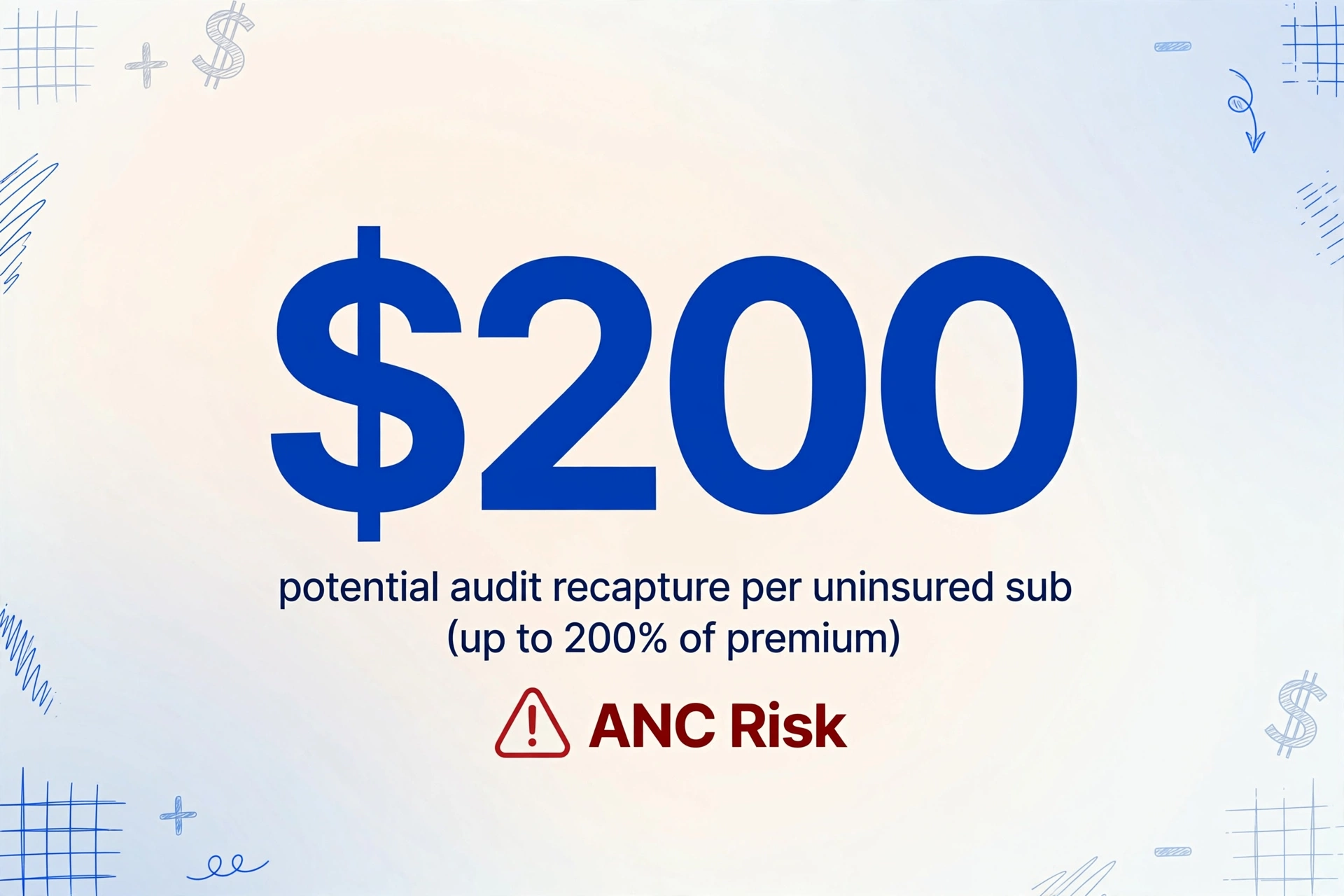
Audit premium recapture. Workers' compensation and GL insurers audit contractor policies annually. When a sub's COI is missing, expired, or carries limits below the contract requirement, the carrier reclassifies payments to that sub as uninsured subcontracted cost and charges the GC's policy retroactively at the full manual rate. Under many policies, the Audit Noncompliance Charge can recapture up to 200% of what the premium would have been. On a project where 30% of subs trigger ANC, the audit bill alone can erase the project's anticipated margin.
Uninsured claim exposure. When an incident occurs and the responsible sub's coverage has lapsed — or contains a gap that manual review never caught — the liability chain shifts. The sub's carrier denies. The GC's policy excludes the sub's own work. The exposure becomes uninsured. Average GL claims from construction site incidents run $30,000 to $75,000; claims involving serious injury routinely exceed $150,000. A single uninsured claim at that level is company-altering for a mid-size GC. Learn more in our breakdown of what COI non-compliance actually costs.
Project delay. An insurance investigation triggered by a coverage gap can stop work for days. At $3,500 per day in delay costs for a mid-size commercial project — equipment standby, supervisory overhead, schedule compression — a coverage dispute that takes seven business days to resolve adds $24,500 in delay cost. The root cause traces back to someone opening a COI, reading the expiration date, and not noticing it lapsed six weeks ago.
These four bills are not independent. A single subcontractor's lapsed policy can trigger all four in sequence. The arithmetic makes the business case for automated extraction self-evident — but only if the extraction method catches the fields that trigger each of these bills.
The Real Challenge: It Is Not Just One Form
COI extraction is harder than most document extraction tasks because the "standard" form is not actually standard. The ACORD framework provides templates, but every insurance agency modifies them, and a significant percentage of certificates arrive on non-ACORD layouts entirely.
ACORD 25, 27, and 140: Three Forms, Three Extraction Problems
ACORD 25 — Certificate of Liability Insurance is the most widely used COI form, developed by ACORD (Association for Cooperative Operations Research and Development, a non-profit founded in 1970 that maintains over 850 standard insurance form variants). It condenses an entire liability policy onto one page: general liability, auto, workers' comp, employers' liability, and umbrella. The critical extraction challenge is the coverage limit grid. The GL section alone contains up to five sub-limits in a compact table — each occurrence, damage to rented premises, medical expense, personal and advertising injury, and aggregate. Different agencies format this grid with different abbreviations ("GEN'L AGG" vs "AGGREGATE") and different column alignments. Position-based tools consistently misalign sub-limits when the column structure shifts between agencies.
ACORD 27 — Evidence of Property Insurance covers building coverage, business personal property, and equipment breakdown. Unlike the grid-heavy 25, the 27 includes free-form description blocks where agents type coverage details in narrative paragraphs. Extracting deductibles, coinsurance percentages, and mortgagee information from narrative text requires semantic understanding, not position-based capture. Property managers commonly require ACORD 27 evidence alongside liability certificates — if your workflow only handles the 25, you will manually re-enter property coverage from a separate form that arrived in the same email.
ACORD 140 — Property Loss Notice is used to report claims to insurers. Less common in compliance workflows, it still crosses the desk of risk managers who handle COI tracking, and extracting loss data from it follows a similar pattern to COI extraction.
Non-Standard Insurer Formats
The harder problem is certificates from smaller regional agencies, surplus lines carriers, and specialty insurers — printed on their own letterhead with fields arranged in whatever layout their management system generates. Some use two-column layouts. Some embed policy numbers in headers. Some place the coverage table on page two. Template-based OCR fails entirely here because every document is a snowflake. Semantic AI extraction — which reads by field meaning rather than field position — is the only approach that handles these documents with zero per-agency configuration.
Additional Insured, Waiver of Subrogation, and the Expiration Date Problem
The most compliance-critical data on a COI is not always numeric. Additional insured status is indicated through checkboxes that tell you some endorsement is attached, but not which form. The CG 20 10 (ongoing operations only) and CG 20 37 (completed operations included) are fundamentally different in what they cover. A sub who checks the box but only carries a CG 20 10 may leave the GC exposed for post-completion defects. Extraction captures that a checkbox is checked. Determining whether it is the right form requires a human — but extraction gets you to that question instead of leaving it invisible inside a PDF.
Waiver of subrogation operates similarly. If the GC requires waivers from all subs — standard on projects involving GC equipment or premises — an unchecked box means a gap that no coverage-limit increase can fill. AI can reliably detect whether the certificate says the waiver exists, which is the first question most compliance reviews never get to ask because data entry consumes the time budget.
Every COI has an expiration date, and on projects with staggered renewal cycles the compliance coordinator is chasing a rolling calendar. Extraction solves the reading part — the date lands in a column and gets flagged when it falls within a configurable window. But a COI issued in January reflects the policy period at that moment. If the sub changes carriers in March, the January COI is stale. Extraction cannot detect stale certificates. Only requiring fresh certificates and cross-referencing against a project timeline can do that. For more on how these challenges compound, read our analysis of what breaks when you scale from 20 subs to 200.
Traditional COI Processing vs AI Extraction
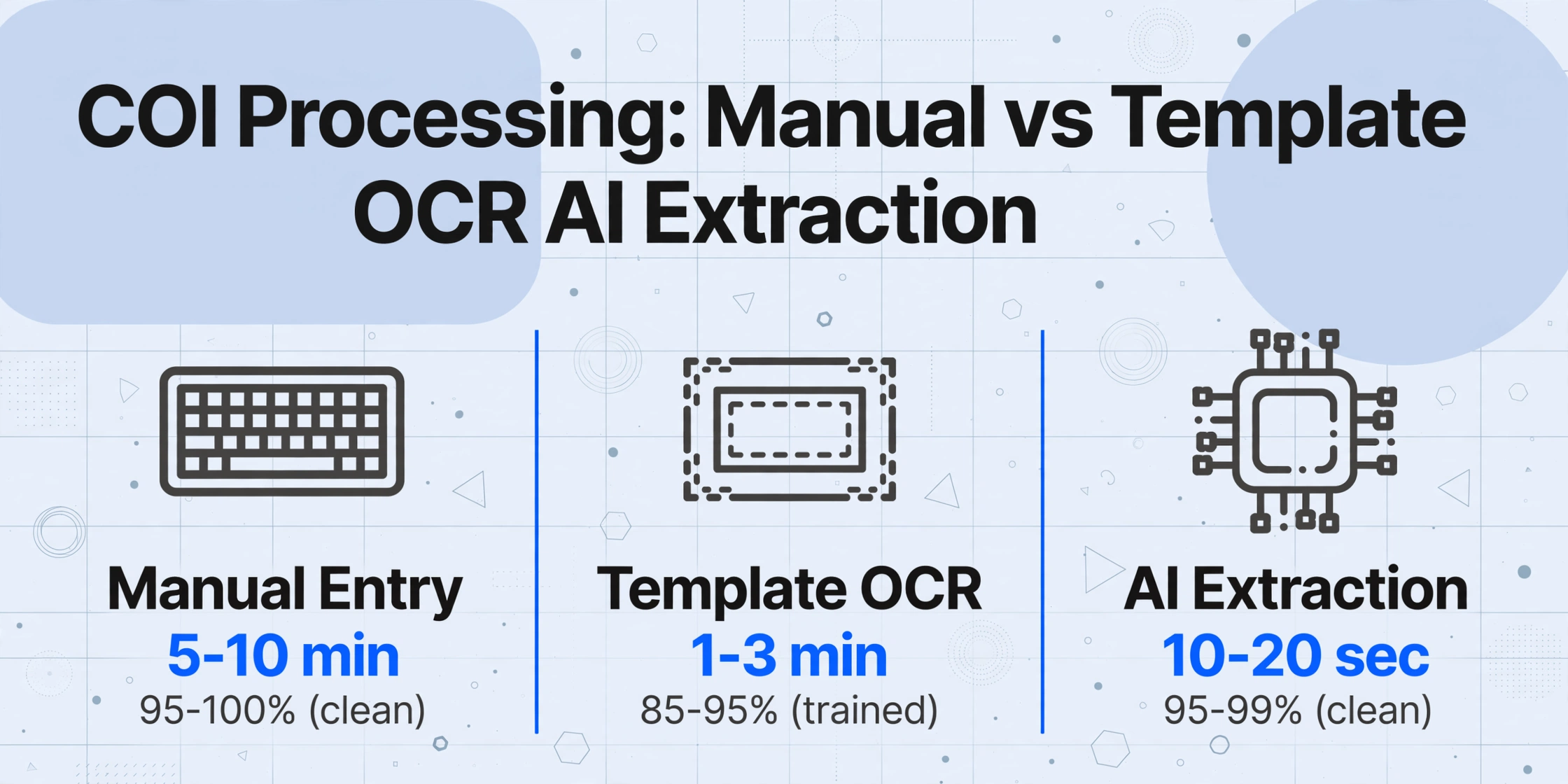
There are three approaches to getting COI data into a tracking system. Each has a different cost profile and a different point where it breaks.
| Approach | Setup | Per-COI Time | Accuracy (Clean PDFs) | Accuracy (Non-ACORD) | Breaks At |
|---|---|---|---|---|---|
| Manual entry | None | 5-10 min | 95-100% (degrades with fatigue) | 95-100% (same) | ~30 subs / 120 certs per year |
| Template-based OCR | 1-2 hrs per agency layout | 1-3 min | 85-95% on trained layouts | 0% — no template | ~5 different agency layouts |
| AI semantic extraction | None (name your columns) | 10-20 sec | 95-99% | 80-95% | Does not break — scales linearly |
Manual entry works on any format but fails at scale because human attention degrades. Studies in adjacent fields show error rates of 2-5% even under ideal conditions, climbing to 10-15% under workload pressure. Organizations relying on manual COI tracking typically achieve only 40-60% compliance rates.
Template-based OCR (Docparser, Parseur, ABBYY FlexiCapture) automates the typing by drawing bounding boxes around field locations. It works for one agency's layout and breaks silently when the next one shifts fields by half an inch. Construction GCs work with subcontractors who obtain insurance from dozens of agencies — each using different form-filling software (AcordForms.com, Applied EPIC, TAM, or hand-fill). A template drawn for one does not work for the others.
AI semantic extraction uses vision-language models to read the entire page and identify each field by what it means rather than where it sits. It knows that "Policy #," "POL NO," and "Policy Number" refer to the same thing. It distinguishes between the per-occurrence limit and the aggregate limit by understanding the labels adjacent to each number. This mechanism — called Custom Column Extraction — lets you type the column names you want and have the AI locate matching data across every certificate in a batch, regardless of agency. No templates, no zones, no training.
The honest limitation: AI extraction achieves 95-99% on clean digital ACORD PDFs and 80-95% on photographed or handwritten certificates. The value proposition is not zero-review — it is that review time collapses from 5-10 minutes per certificate to 10-20 seconds of spot-checking the extracted fields.
Critical Fields Every COI Extraction Must Capture
Not every field on a COI matters equally for compliance. If your extraction tool misses any of the following, the data will not support a compliance decision.
Policy Identity
- Named Insured — The legal entity holding the policy. Must match the sub's name on the contract. Mismatches are common when a sub operates under a DBA.
- Insurance Carrier — The insurer. Used to verify financial rating.
- Policy Number — Unique identifier. Critical for cross-referencing endorsements.
- Producer / Agency — Who issued the certificate. Useful when requesting a fresh one.
Coverage Types & Limits
- GL — Per Occurrence Limit — Most verified field. Typical minimum: $1,000,000.
- GL — General Aggregate — Cap for all occurrences. Typical min: $2,000,000.
- GL — Products/Completed Operations — Separate sub-limit. Critical for subs whose work poses post-completion risk.
- Auto Liability — For subs operating vehicles on site. Typical min: $1,000,000.
- Workers' Compensation — Usually "Statutory." Carrier matters more than dollar value.
- Employers' Liability — Each accident/disease/policy. Typical min: $500K/$500K/$500K.
- Umbrella / Excess — Above underlying limits. Required for higher-risk trades.
Dates & Legal Indicators
- Policy Effective Date — Must precede the sub's first day on site.
- Policy Expiration Date — The single most-tracked field in every compliance spreadsheet.
- Certificate Holder — Must match the GC or project name.
- Additional Insured (Checkbox + Form #) — Whether the GC is named as additional insured, and which endorsement form.
- Waiver of Subrogation (Checkbox) — Whether the carrier waives subrogation rights.
- Description of Operations — Free-text specifying which projects the certificate applies to.
The coverage limit grid is where most extraction errors concentrate. An AI tool that correctly pairs each dollar value with its corresponding coverage type — distinguishing the GL aggregate from the umbrella aggregate — is producing compliance-useful data. A tool that dumps five dollar values into five unlabeled columns is producing a transcription liability.
Batch Processing: From 200 Certificates to One Compliance Matrix
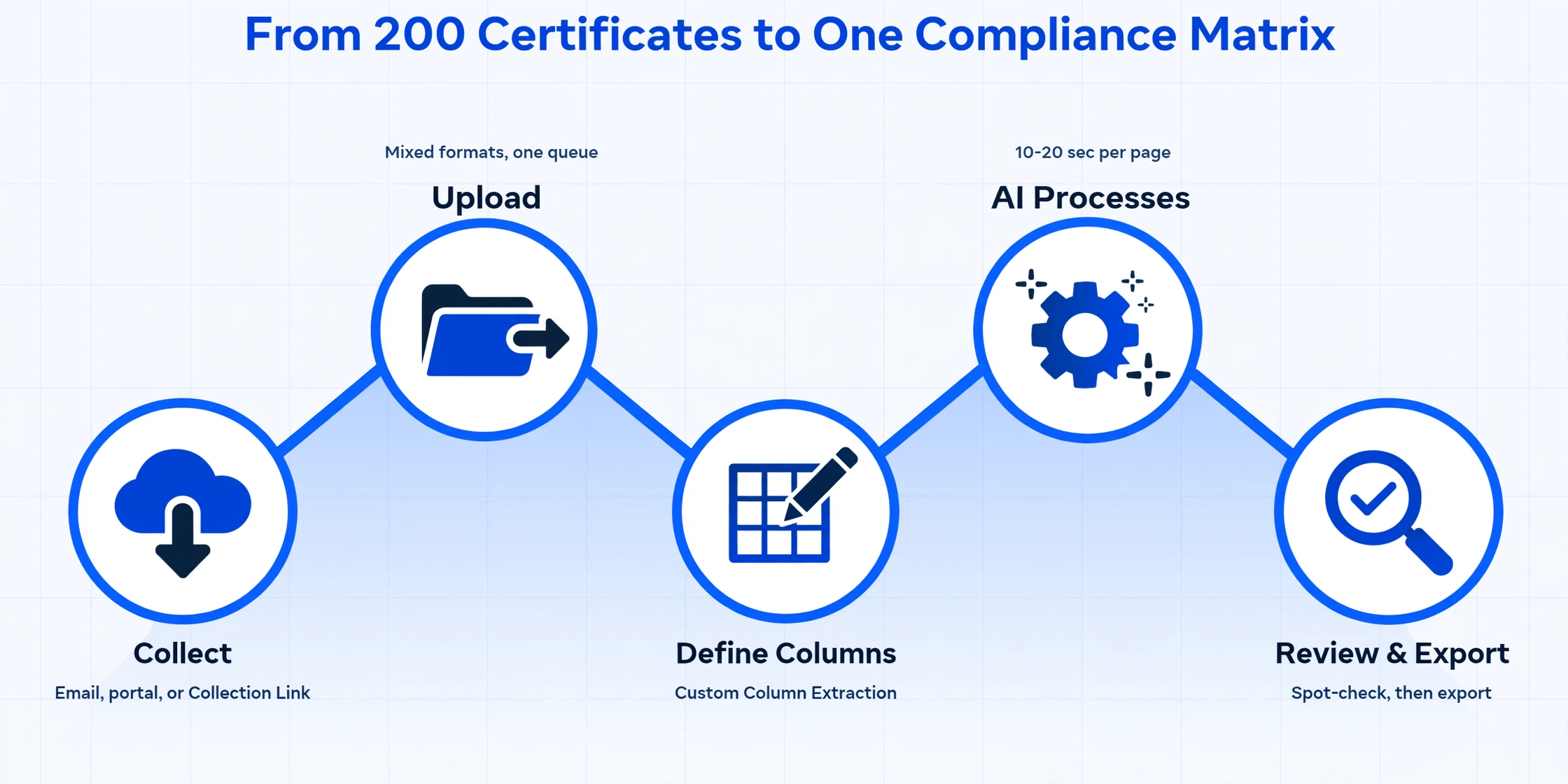
Single-certificate extraction is useful for spot checks. The real value emerges when you process certificates in batches — because compliance is not about whether one sub has coverage today, but whether all 200 subs on every active project have coverage this week.
Collect certificates
Subs email PDFs, upload through a portal, or submit via a Collection Link — a shareable URL like /c/xxxx that lets anyone upload files into your queue without registering. The goal is a single intake point.
Upload the batch
Drop all collected PDFs and images into the tool at once. Mixed formats — clean digital ACORD 25s alongside phone photos of paper certificates — all process in the same queue.
Define extraction columns
Type the column names you need: "Named Insured," "Policy Number," "GL Per Occurrence," "GL Aggregate," "Expiration Date," "Additional Insured (Y/N)." The AI uses Custom Column Extraction — you define the output structure; the AI locates each value by meaning across every certificate.
AI processes the batch
Processing averages 10-20 seconds per page. A batch of 50 certificates completes in under 15 minutes. Non-standard formats run alongside ACORD forms — no need to sort by layout first.
Review and export
Spot-check the extracted data: a "$0" limit usually means the AI defaulted, a mismatched named insured suggests the wrong certificate. Scan additional insured and waiver indicators (most variable), then export as Excel or Google Sheets — one row per certificate, no data entry needed.
The difference between batch extraction and single-file processing is the difference between a data entry task and a compliance review task. When extraction takes 10 seconds per certificate, the reviewer's time shifts from typing to evaluating: "Does this sub's aggregate limit meet the contract? Is the additional insured form right?" Those questions were invisible during manual entry because typing consumed the time budget.
Files are processed securely and not stored.
Exporting to a Compliance Dashboard
Extracted COI data is most useful when it lives in a spreadsheet structured for ongoing monitoring — one that answers "who is compliant and who is not" at a glance.
| Column | Example | Compliance Check |
|---|---|---|
| Sub Name | Excel Electrical LLC | Match to contract |
| GL Per Occurrence | $1,000,000 | ≥ $1,000,000? ✓ |
| GL Aggregate | $2,000,000 | ≥ $2,000,000? ✓ |
| Auto Liability | $1,000,000 | ≥ $1,000,000? ✓ |
| WC / EL | $1M / $1M / $1M | EL each accident ≥ $500K? ✓ |
| Umbrella | $2,000,000 | ≥ $1,000,000? ✓ |
| Expiration Date | 2026-09-15 | Days until expiry: 80 |
| Additional Insured | Yes | Flag: verify form number |
| Waiver of Subro | Yes | ✓ |
| Certificate File | Excel_Electrical_COI_2026.pdf | Link to original |
With this structure, conditional formatting surfaces problems instantly: red for expiration dates within 30 days, yellow for any limit below the contract minimum, orange for additional insured rows awaiting endorsement verification, and blank cells for fields the extraction could not read. For long-running projects, maintain a master compliance spreadsheet and use batch re-extraction at each renewal cycle to refresh the data. We cover this workflow in more depth in our guide to batch subcontractor COI tracking.
How to Choose a COI Extraction Tool
Not every document extraction tool handles COIs well. The coverage grid, ACORD layout variations, and compliance-critical data require specific capabilities.
Must-Have Capabilities
Template-free semantic extraction. If the tool requires zones or templates per agency layout, it will not work at scale. The engine must read by field meaning — recognizing that "General Aggregate" and "GEN'L AGG" refer to the same limit.
Coverage limit grid handling. The tool must distinguish between sub-limits in the GL grid by reading the label next to each value. Test this specifically: upload a certificate from a regional agency that places the aggregate on the right instead of the left, and see whether extracted values map to the correct columns.
Checkbox detection. Additional insured and waiver of subrogation are indicated through checkboxes or typed YES/NO. The tool must output a structured yes/no for each.
Batch processing across mixed formats. One batch should handle ACORD PDFs alongside phone photos of paper certificates with the same extraction columns applied to all.
Spreadsheet-native output. Extracted data must land in Excel, CSV, or Google Sheets without intermediate transformation. Tools with native Google Sheets add-ons eliminate the export step entirely.
Red Flags
- "Upload and we will train a model" — means it cannot handle documents from hundreds of different agencies.
- "97% accuracy guaranteed" without specifying the test set — assume it was tested on clean digital invoices, not photographed ACORD certificates from 20 different agencies.
- Enterprise sales qualification before you can try it on your own certificates — you should be able to upload a sample within five minutes.
- Minimum subscription commitment before validating accuracy on your actual document mix — always test on your own subs' certificates first.
For a broader comparison of how different tools perform on construction documents, see our test of eight document extraction tools on construction documents.
FAQ
What is the difference between COI data extraction and COI tracking software?
Extraction reads the certificate and outputs structured data — it solves the data entry problem. Tracking software (myCOI, TrustLayer, Procore's insurance module) manages the full compliance workflow: renewal reminders, coverage gap analysis, vendor portals, audit reports. Extraction costs $20-50/month in processing credits. Tracking platforms start at $200-500/month. If your spreadsheet process works and the bottleneck is typing, extraction alone solves it. If you still spend 10 hours a week chasing subs for expired certificates, you need the workflow layer.
Can COI extraction handle certificates from every insurance agency?
Semantic AI extraction handles any agency's ACORD form because it reads by field meaning rather than position. Non-standard certificates — handwritten forms from very small agencies or surplus lines carriers using custom layouts — may produce lower accuracy. Test your actual document mix before committing.
How accurate is COI extraction for coverage limit values?
On clean digital ACORD 25 PDFs, accuracy reaches 95-99% for structured fields. The coverage limit grid is the most error-prone section. Non-standard certificates and photographed paper produce 80-95%. No tool reaches 100% — but 20 seconds of review beats 5 minutes of manual entry.
Does COI extraction check whether coverage limits meet my contract requirements?
No. Extraction outputs what the certificate states. Comparing values against contractual minimums is a compliance judgment. Some tracking platforms automate this; standalone extraction tools deliver the data for you to evaluate in your spreadsheet.
Can AI verify whether the additional insured checkbox is accurate?
AI detects whether the box is checked or "YES" is typed on the certificate. It cannot verify that the actual endorsement (CG 20 10 vs CG 20 37) is attached to the policy. A checked box is a statement by the agent, not proof. Only requesting and reviewing the endorsement form from the insurer provides that proof.
Can I extract COI data from handwritten certificates?
Partially. AI reads clearly printed handwriting at useful accuracy — especially numeric fields like policy numbers and dollar amounts. Faint, cursive, or smudged handwriting reduces accuracy. For subs who consistently submit handwritten COIs, requesting a digitally issued replacement from their agent is more reliable.
Does COI extraction work for property certificates (ACORD 27)?
Yes, with caveats. The ACORD 27 includes free-form description blocks rather than structured grids. Semantic AI reads these by meaning — identifying deductibles, coinsurance, and mortgagee info from narrative text — but accuracy is typically lower than on the ACORD 25's grid layout.
What are the four layers of COI compliance?
(1) A current certificate on file — extraction checks the expiration date. (2) Coverage limits meet contract requirements — extraction gives you the numbers; you compare. (3) The additional insured endorsement is actually attached — extraction flags what the COI claims; only the carrier confirms. (4) The policy is in force — a COI is evidence at issuance, not a guarantee. Extraction handles 1 and 2. Layers 3 and 4 require workflow beyond extraction. See our comparison of AI extraction vs dedicated compliance software for which approach fits your scale.
What happens if the AI reads a limit value incorrectly?
Incorrect reads happen — most commonly on the coverage grid where a per-occurrence limit is misaligned with the aggregate column, or a faint digit turns "$2,000,000" into "$200,000." The mitigation is workflow: spot-check a sample, use conditional formatting to flag anomalously low values, and always verify additional insured and waiver sections manually. Extraction at 95% accuracy removes 19 out of 20 transcription errors. A well-designed review process catches the remaining one.
From a Stack of Certificates to a Compliance Dashboard
The gap between "we have COIs on file" and "we know every sub on this project is compliant" is filled with manual data entry that produces errors you cannot see until a claim triggers an audit. Extraction removes the typing. What remains is the actual work of risk management — verifying coverage, chasing endorsements, and making sure the 200 subcontractors on your project are all protected. Document extraction across the construction industry follows the same pattern: the tool handles the mechanical data entry, and the professional handles the judgment calls.