OCR for Education:
A Complete Guide to Student Records, Transcripts & Enrollment Forms
OCR for education is the application of character recognition and AI document extraction to student records — including transcripts, enrollment forms, financial aid letters, standardized test scores, IEPs, diplomas, and other academic documents that schools and universities process by the thousands each enrollment cycle. Unlike invoice or receipt extraction where formats are relatively stable, education documents come from thousands of different institutions, each with its own layout, grading scale, credit system, and terminology. The difference between a tool that reads pixels and a tool that understands academic data structures determines whether your registrar's office processes 50 transcripts a day or 500.
Key Takeaways
- A mid-sized university receives 30,000 transcripts each admissions cycle and each one still demands 15 to 25 minutes of human attention just to locate the GPA across the page, translate the grading scale, and type the course names into the student system.
- Template-based OCR produces a 55% GPA extraction error rate on unfamiliar formats because over 4,000 U.S. postsecondary institutions each arrange their transcripts differently and tools that trust pixel position over meaning grab the wrong number when the layout shifts even slightly.
- Semantic AI extracts a transcript in 45 seconds at 96.7% accuracy and $0.15 per document — because it reads meaning instead of pixel coordinates and doesn't break when the next feeder school puts the GPA in a different corner of the page.
What Is OCR for Education?
Optical Character Recognition (OCR) technology converts scanned or photographed text into machine-readable characters. That much is true for any industry. What makes OCR for education a distinct category is the nature of the documents being processed and what schools actually need to extract from them.
A university's enrollment office doesn't just need to read a transcript — it needs to extract a specific GPA value, verify that it was calculated on a 4.0 scale (not 4.3 or 5.0), identify which courses are transferable, check whether the credit hours are semester-based or quarter-based, and flag any duplicates. A K-12 district processing enrollment forms needs to pull guardian contact information, prior school records, special education status, and free/reduced lunch eligibility from a stack of handwritten or photocopied forms — each one formatted differently.
Traditional OCR — which matches pixel patterns against a character database — can digitize the text on these documents. But it has no understanding of what a GPA represents, whether "3.75" is a grade point average or a course number, or that "09/01/2026" is an enrollment date and not a fee amount. That semantic gap is the reason education institutions are moving beyond traditional OCR toward AI-powered document extraction.
Why Education Needs Automated Document Processing
The volume of paper that moves through an average school system is difficult to overstate. A single mid-sized public university in the United States processes 20,000 to 30,000 undergraduate applications per admissions cycle. San Diego State University, for example, processed more than 93,000 applications for fall 2018 alone, and handled over 31,000 college transcripts that year — 18% of which required OCR processing because they arrived as PDF scans rather than structured EDI data.
For K-12 districts, the administrative load is different but equally heavy. A large virtual public charter school like Epic Charter Schools in Oklahoma processed over 15,000 student records in a single enrollment period using an AI system that classified 65+ document types — cutting per-student processing from hours to seconds.
The cost of manual processing compounds across every document type the institution touches:
- Transcript evaluation — Each incoming transcript requires a staff member to read course codes, convert grades to the home institution's scale, check accreditation, and manually enter results. At 15-25 minutes per transcript, 30,000 applications equal 7,500 to 12,500 hours of labor per admissions cycle.
- Enrollment forms — Registration packets for new students typically contain 8 to 15 separate pages (emergency contact, health information, residency proof, prior schooling). Manual data entry error rates in administrative form processing average 18-25%, with the most critical fields — guardian contact numbers and medical alert details — carrying the highest error cost.
- Financial aid paperwork — Verification of FAFSA data, tax transcripts, and income documentation is one of the most document-intensive workflows in higher education, often requiring multiple rounds of document review per student.
Most schools still default to manual processing for the same reason: the formats are too varied for conventional template-based OCR, and the consequences of an extraction error — a wrong GPA, a missed course credit — are higher than in most business document processing scenarios.
Types of Documents in Education
Each document type in the education ecosystem presents its own extraction challenges. Understanding the range helps clarify why a one-size-fits-all OCR approach rarely works for schools.
1. Academic Transcripts
Transcripts are the most complex education document to process at scale. A single transcript from a U.S. high school typically includes the student's name, date of birth, graduation date, cumulative GPA (weighted and unweighted), class rank (if applicable), a list of courses by academic year, final grades for each course, credit hours earned, attendance records, and standardized test scores. An international transcript adds language barriers, different grading scales (percentage-based, letter-based, IB 1-7 scale, UK A-level tariff points), and credential evaluation requirements.
The core extraction challenge: GPA is not a fixed label. One school calls it "Grade Point Average," another uses "Cumulative GPA," a third places it in a box labeled "Academic Standing," and some only show a weighted GPA alongside an unweighted one without labeling either. A template-based OCR system needs a separate configuration for each of these variations. At Stony Brook University, legacy OCR tools processing transcripts produced error rates as high as 55% — not because the OCR couldn't read the characters, but because it couldn't reliably tell which number on the page was the GPA.
2. Enrollment & Registration Forms
Enrollment forms are semi-structured at best. School districts across the country use different form layouts, some generated by student information systems (SIS) like PowerSchool or Infinite Campus, others photocopied from paper masters. Key fields — student legal name, date of birth, parent/guardian contact, prior school — are present on nearly every form but positioned differently on each one.
The handwritten element adds further difficulty. Parent signatures, handwritten emergency contact numbers, and medical information sheets are common sources of extraction failure for traditional OCR. AI models trained on handwriting recognition now achieve 85-95% accuracy on reasonable-quality handwritten enrollment forms, but the field-level variability remains significant — a poorly written digit in a phone number can render the entire contact field unusable.
3. Financial Aid Letters & Award Documents
Financial aid award letters contain structured financial data that institutions must verify against FAFSA/ISIR records. Award amounts, scholarship names, disbursement schedules, and loan terms appear in varying formats across institutions. The extraction challenge here is less about character recognition and more about semantic mapping — the same type of aid (a Federal Pell Grant) might be labeled "Pell Grant," "Federal Pell," "PELL," or "Pell Award" depending on the institution's template. Without semantic understanding, each variation triggers a separate data entry decision.
4. Standardized Test Score Reports
SAT, ACT, AP, IB, and state assessment score reports each have their own layout conventions — and within those, format variations across years. AP score reports changed their layout structure in 2023, for example, breaking templates built on older formats. These documents are typically short (1-2 pages) but field-dense: a single AP score report page lists multiple test subjects, scores (1-5 scale), and performance descriptors. The low page count masks a high extraction density that demands precise field-level accuracy.
5. Individualized Education Programs (IEPs) & Special Education Documents
IEPs are among the most legally sensitive documents in K-12 education. They contain a student's disability classification, annual goals, accommodations, service minutes, and progress reporting data — all of which must be accurately transferred between systems when a student transfers districts. Unlike transcripts that follow loosely shared conventions, IEP structures vary dramatically by state, district, and even individual school. An IEP from one district might organize accommodations in a checklist format, while another embeds the same information in narrative paragraphs.
FERPA regulations add an additional layer: the transcript must never indicate that a student received special education accommodations in a general education classroom. The Office for Civil Rights (OCR) at the U.S. Department of Education has issued multiple rulings on this point — meaning the extraction system must know what to exclude from certain outputs, not just what to include.
6. Diplomas, Certificates & Credentials
Diplomas and completion certificates are less data-dense than transcripts but carry high verification stakes. A forged diploma or an incorrectly transcribed credential date can create liability for the issuing institution. Extracting the graduate's name, date of conferral, credential type, and issuing authority from diploma scans requires OCR that handles ornate fonts, gold foil text, and non-standard layouts — conditions that trip up traditional OCR engines.
Unique Extraction Challenges in Education
Beyond the document-level variety, OCR systems in education face structural challenges that make education one of the hardest verticals for document extraction:
Cross-Institution Format Variance
There are over 4,000 degree-granting postsecondary institutions in the United States and roughly 100,000 public K-12 schools. The vast majority use different transcript and form layouts. A template-based OCR approach — where each format requires a pre-configured template — confronts an impossible maintenance burden: every new feeder school, every format redesign by an existing school, and every international transcript requires a new template or a manual fallback.
AI-powered extraction solves this by being format-independent. Instead of learning where data sits on a page, the model learns what data looks like semantically: it recognizes a GPA because the surrounding context says "GPA" or "Grade Point Average" or because the number sits next to a credit total in a specific visual position. Traditional OCR identifies characters without understanding them; AI extraction reads the document as a human would — holistically and in context.
GPA Extraction Accuracy
GPA is the single most critical field on a transcript, yet it is also the most error-prone to extract automatically. Two problems compound:
- Multiple GPAs on one document — Many transcripts display a weighted GPA, an unweighted GPA, and sometimes a cumulative GPA alongside a term GPA. Extracting the wrong one can change a student's admissions eligibility classification.
- Scale ambiguity — A 4.0 GPA on a 4.0 scale is not the same achievement as a 4.0 on a 5.0 scale, yet the document often doesn't make the scale explicit. The extraction system must infer the scale from context or use external reference data.
A 2026 research paper on multi-agent AI systems for high school transcript processing reported 96.7% accuracy with 100% completion rates on diverse high school transcripts, processing each transcript in 45 seconds at a cost of $0.15. The paper identified GPA extraction as the primary "trust signal" for overall extraction quality — when the GPA was correct, the rest of the fields were overwhelmingly likely to be correct as well.
Handwriting & Historical Paper Archives
Schools transitioning from decades of paper records face a digitization backlog that spans generations of students. Many enrollment forms, special education records, and older transcripts exist only as handwritten originals or photocopies. The handwriting difficulty compounds with variable ink quality, aging paper, and inconsistent form completion — some sections filled in pen, others in pencil, others left blank.
This is a scenario where traditional OCR falls below usable accuracy thresholds, but modern vision-language models trained on diverse handwriting samples can extract usable data from a higher proportion of documents. The practical approach for historical archives is a human-in-the-loop review pipeline: AI processes the first pass, flags low-confidence fields, and a trained reviewer validates or corrects those specific values.
Data Consistency Across Systems
An extracted GPA or enrollment date is only useful if it lands in the correct field of the institution's SIS (Ellucian Banner, Workday Student, PowerSchool, etc.). Many OCR tools extract data into a spreadsheet but leave the SIS integration as a manual step. Education IT departments evaluating extraction tools should prioritize solutions that either export structured CSV/JSON data for automated import or connect directly via API to their SIS platform.
Old Way vs AI-Powered Extraction
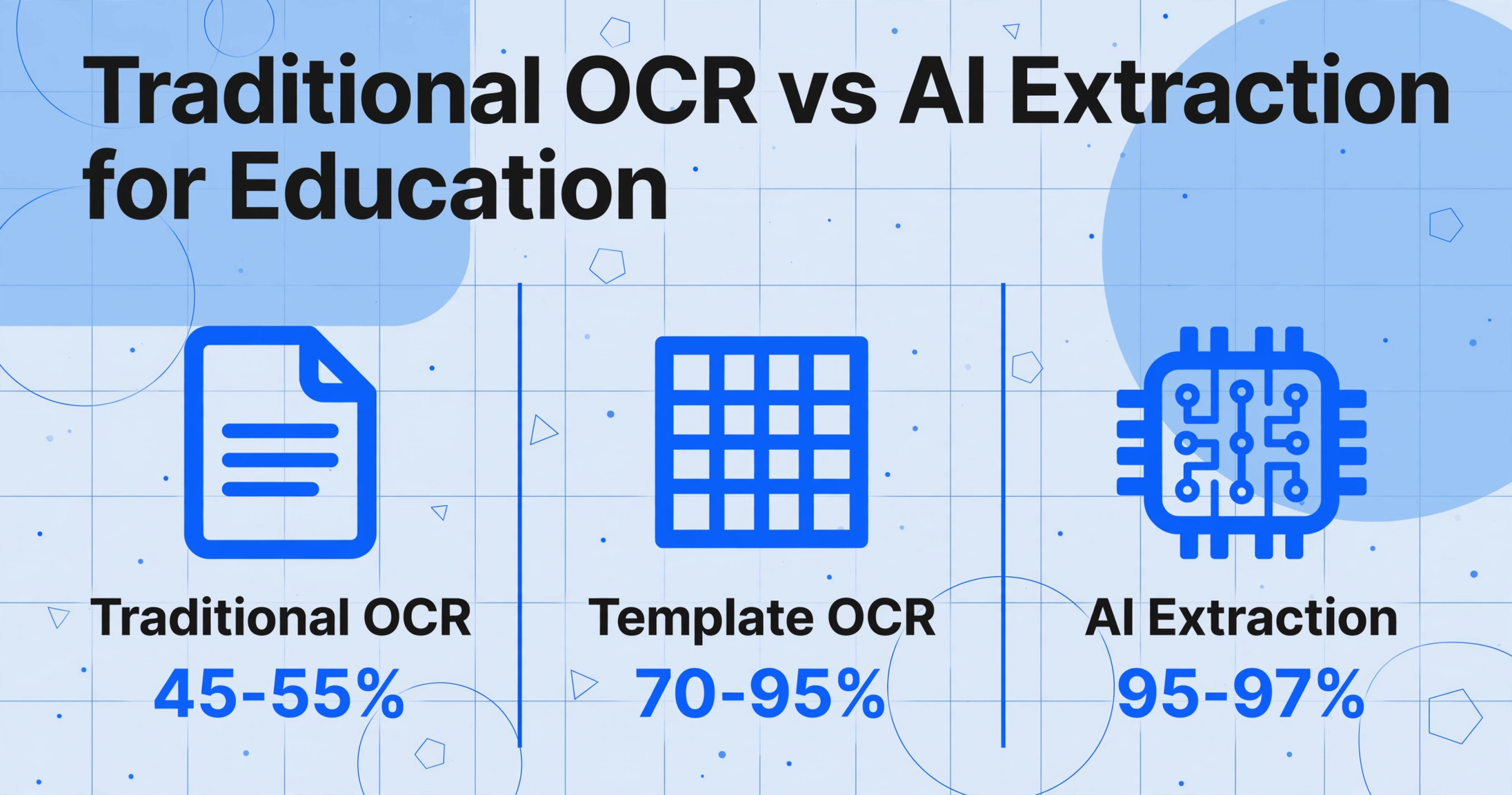
| Dimension | Traditional OCR / Template Approach | AI-Powered Extraction |
|---|---|---|
| Format handling | Requires a separate template per institution's layout | Reads any layout without pre-configuration |
| GPA extraction | Zones-based: prone to extracting wrong GPA when position shifts | Semantic: identifies GPA by meaning and context |
| Handwriting | Below 50% accuracy on cursive or mixed-handwriting forms | 85-95% accuracy on reasonable-quality handwriting |
| Scale handling | Cannot distinguish 4.0 vs 5.0 GPA scales without manual labeling | Infers scale from context (e.g., "AP" courses → weighted scale) |
| Format change response | Template breaks; manual reconfiguration needed | Adapts automatically; no maintenance required |
| International documents | Per-country templates needed; fails on unanticipated layouts | Handles mixed-language and unfamiliar formats |
| Setup time | Weeks to months of template creation and testing | Minutes: upload a document, name your fields, extract |
The critical difference: Traditional OCR extracts characters without understanding them. AI-powered extraction reads a document semantically — it knows that "3.75" next to "Cumulative GPA" is the number that determines admissions eligibility, while the same three characters in a course code column is something entirely different.
Key Fields to Extract by Document Type
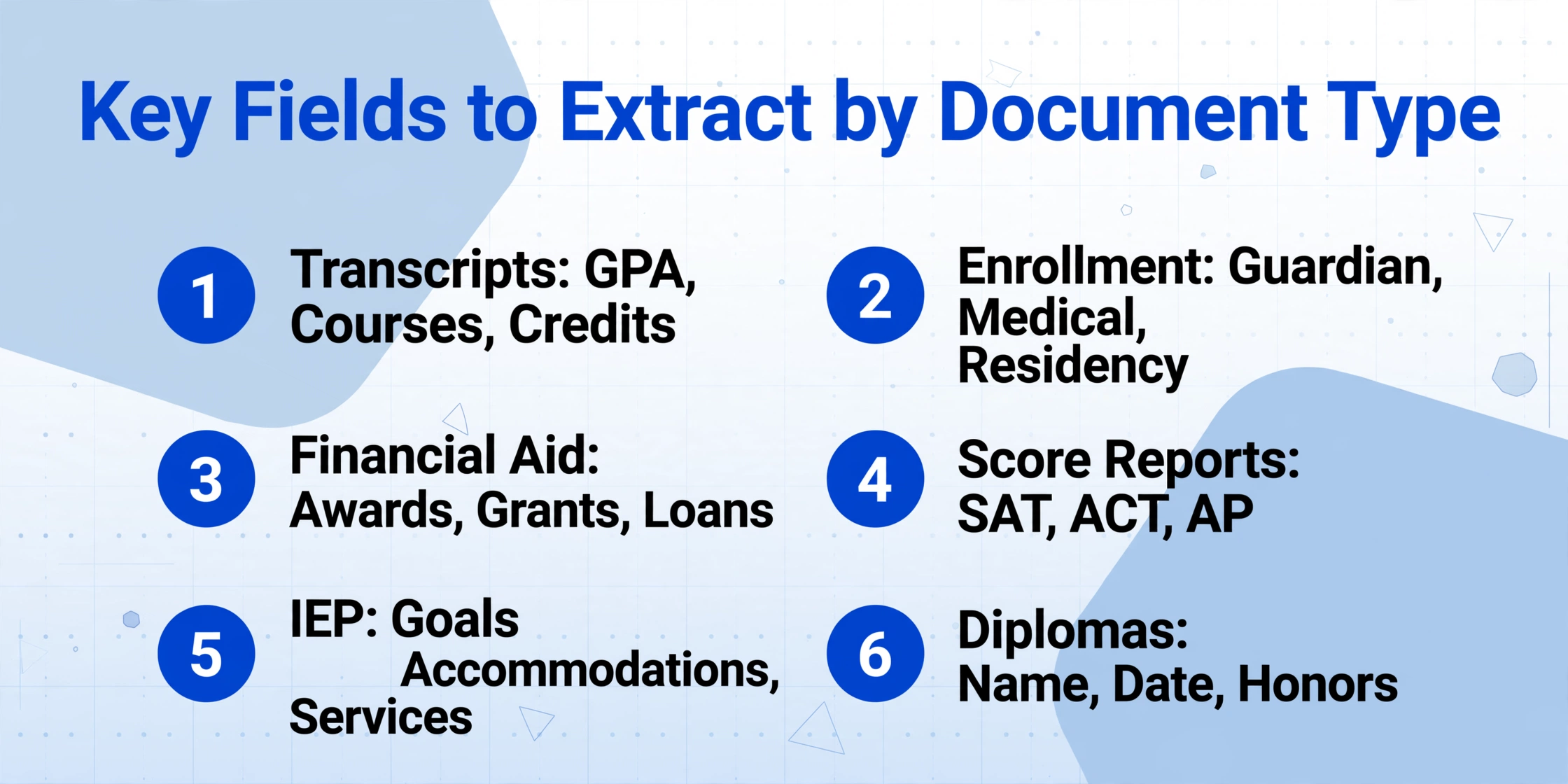
Below is a reference table of the most important fields across the major education document types. Institutions planning an extraction rollout should start with this list and customize based on their specific workflow requirements.
| Document Type | Primary Fields | Key Extraction Challenge |
|---|---|---|
| Academic Transcript | Student name, DOB, GPA (weighted & unweighted), class rank, course list with grades, credit hours, graduation date, grade scale | Multiple GPAs, scale ambiguity, course code variance across institutions |
| Enrollment Form | Student legal name, DOB, address, parent/guardian name, contact info, prior school, grade level, emergency contacts, medical alerts | Handwritten fields, semi-structured layout, missing or inconsistent field labels |
| Financial Aid Award Letter | Award amounts, scholarship names, grant types (Pell, SEOG, institutional), loan terms, disbursement schedule, academic year | Inconsistent naming conventions for the same aid type |
| SAT/ACT/AP Score Report | Student name, test date, subject scores, composite score, percentile rank, score scale | Dense multi-subject layout, format changes across test years |
| IEP / Special Education Document | Student name, disability classification, annual goals, accommodations, service minutes, IEP date, review date, case manager | Wide structural variation, narrative vs. checklist formats, FERPA-sensitive content |
| Diploma / Certificate | Graduate name, date of conferral, credential type, issuing authority, honors designation | Ornate fonts, gold foil, non-standard layout, low scanning contrast |
For institutions using a Custom Column Extraction approach — where you simply type the field names you want and the AI locates them semantically — this table doubles as your configuration guide. Unlike template-based tools that require you to draw zones around each field on a sample document, semantic extraction lets you add new fields by typing a name. When a new feeder school sends a transcript that labels "GPA" as "Academic Index," you don't need a new template — the AI infers the match from context.
FERPA & Compliance: What OCR Systems Must Address
The Family Educational Rights and Privacy Act (FERPA), enacted in 1974 and codified at 34 CFR Part 99, governs the privacy of student education records at any institution receiving federal funding from the U.S. Department of Education. For schools considering OCR or AI-based document extraction, FERPA creates specific obligations that the extraction system and its deployment must accommodate — similar to how legal document OCR must meet FRCP and ABA Model Rules, but with its own distinct requirements around parental consent and disclosure tracking.
What FERPA Protects
FERPA defines "education records" broadly: any record directly related to a student and maintained by an educational institution or its agent. This explicitly includes transcripts, grades, GPA calculations, class schedules, disciplinary records, special education records (including IEPs), and health/immunization records maintained by the school. When a school uses a third-party document extraction tool to process these records, FERPA's requirements apply to the tool and its data handling as if it were the school itself.
Key Requirements for Document Extraction Systems
- Access controls — Only staff with a "legitimate educational interest" may access student records. The extraction system must enforce role-based access controls and maintain audit logs of who viewed or exported each document.
- Disclosure tracking — FERPA requires institutions to maintain a record of each request for access to and each disclosure of personally identifiable information from education records. The extraction platform should log all data exports and share actions by default.
- Parent and eligible student rights — Parents of minor students and eligible students (age 18+ or attending postsecondary institution) have the right to inspect education records within 45 days of request. Digitized records must be retrievable and producible within that window.
- Third-party service obligations — Any third-party extraction provider that stores, processes, or transmits student education records must be contractually obligated to comply with FERPA's use restrictions. Schools must evaluate vendors' data security practices, encryption standards, and sub-processing arrangements before deployment.
Record Retention under FERPA
FERPA itself does not prescribe specific retention periods, but state laws and accreditation requirements set practical minimums. The common industry standard:
- Temporary records (attendance data, grade rosters, scheduling documents) — retain for at least 5 years after the student separates from the institution.
- Permanent records (transcripts, diplomas, official test scores, final discipline records) — retain for at least 60 years.
An OCR or AI extraction system operating within this framework must store extracted data for a comparable period, with data integrity guarantees and exportability in standard formats (CSV, JSON, XLSX) so that records remain accessible regardless of the original extraction tool.
Special Considerations for Special Education Documents
IEPs and special education records have additional compliance nuance. The U.S. Department of Education's Office for Civil Rights has determined that transcripts cannot indicate that a student received accommodations in a general education classroom through special notations, asterisks, or symbols. Any extraction pipeline that outputs transcript data from the same system handling IEP data must ensure that disability-related markers are not inadvertently carried over into transcript fields.
This is a compliance requirement that template-based OCR systems struggle to meet — they extract whatever is in the zone, without understanding which content is permissible to include in a given output. Semantic extraction systems can apply output rules: they understand that "Accommodations: extended time" belongs in the IEP dataset but must be excluded from the transcript feed.
What to Look For in an Education OCR Tool
Not every document extraction tool is suited for education workflows. Here are the specific criteria to evaluate when selecting a solution for student record processing:
The tool must understand what fields mean, not just where they sit. If the GPA field breaks because a transcript from a new feeder school puts it in a different corner of the page, the tool is not suitable for education at scale.
Role-based access controls, encryption at rest and in transit, audit logging, and contractual FERPA compliance commitments. If the vendor cannot produce a signed FERPA data protection agreement, move on.
Education is a batch workflow — 200 transcripts arrive together, not one at a time. The tool must process multiple documents concurrently and merge results into a single aggregated table that maps each extracted value back to a specific document.
A significant portion of enrollment forms, permission slips, and historical records include handwritten entries. The tool's handwriting recognition capability directly determines whether it can process these documents without manual transcription.
CSV and JSON exports with clearly mapped fields allow IT teams to build automated import pipelines to Ellucian, Workday, PowerSchool, or other SIS platforms. Manual re-entry of extracted data defeats the purpose of automation.
Not all extracted values are equally certain. A tool that reports confidence scores per field — not just per document — lets reviewers focus their verification effort on the 10% of fields that need it, rather than rechecking every entry.
Frequently Asked Questions
What types of education documents can OCR handle?
Modern AI-powered OCR can process academic transcripts, enrollment and registration forms, financial aid award letters, standardized test score reports (SAT, ACT, AP, IB), IEPs and special education documents, diplomas and certificates, immunization records, and residency verification forms. The key variable is not the document type but the quality of the scan and the tool's ability to understand field semantics rather than fixed positions.
How accurate is OCR for transcript GPA extraction?
Accuracy depends heavily on whether the tool uses position-based OCR (template matching) or semantic AI extraction. Template-based systems show wide accuracy variance — from as high as 95% on known formats to as low as 45% on unfamiliar layouts. AI-powered systems that understand academic context achieve 95-97% field-level accuracy across diverse transcript formats, with the primary failure point being ambiguous GPA scale indicators. Most production deployments supplement automated extraction with a human review layer for the highest-stakes fields.
Is using a third-party OCR tool FERPA-compliant?
Yes, provided the institution and the vendor meet FERPA's requirements: the vendor must be contractually designated as a "school official" with a "legitimate educational interest"; student data must be encrypted at rest and in transit; access must be role-based; and the institution must maintain direct control over how the data is used and retained. Schools should request a signed FERPA compliance agreement from any vendor before processing live student records.
Can OCR read handwritten enrollment forms?
Traditional OCR has limited handwriting capability — typically below 50% accuracy on cursive or mixed-handwriting documents. Modern AI vision models trained on handwriting datasets achieve 85-95% accuracy on clear handwritten text and 70-80% on challenging handwriting (poor penmanship, low-contrast ink, overlapping marks). For critical fields like phone numbers or legal names, a human-in-the-loop review step is recommended for handwritten content.
How much does it cost to implement OCR for student records?
Costs range from free open-source OCR engines (with high manual configuration effort and ongoing template maintenance) to subscription-based AI extraction tools priced per page or per document. For mid-sized institutions processing 10,000-50,000 documents annually, AI-powered extraction typically costs $0.10-$0.50 per page with no template setup fees. This compares favorably against the labor cost of manual processing, which averages $3-$6 per transcript in staff time alone when factoring in data entry, verification, and system updates.
Can we digitize decades of historical paper records with OCR?
Yes, but with caveats. Historical paper archives face challenges that current incoming documents do not: aged or yellowed paper reduces contrast, handwritten records from multiple decades use different writing instruments and styles, and older transcript layouts bear little resemblance to modern ones. A phased approach — start with incoming documents to build the workflow, then process historical archives in batches with a human review pass — is more practical than attempting a single mass-digitization project.
Education records processing doesn't have to be a bottleneck — not during enrollment season, not for transcript evaluation, not for historical digitization.
The difference between a tool that reads characters and a tool that understands academic data determines whether your office processes 50 documents a day or 500. With template-free, semantic extraction, you define the fields you need — student name, GPA, course codes, enrollment dates — and the AI locates them across any document format, from any institution, without pre-configuration.
Test it on your own student records. See what your next transcript evaluation cycle could look like.