Best Table & Form Data
Extraction Tools in 2026
Most document extraction tools promise to "extract tables." But the three-column invoice grid you need as Excel rows, and the filled-out checkbox form your field team submitted, are not the same problem. A tool that handles one well may fail on the other — and generic OCR will fail on both the moment the layout changes. The difference isn't a matter of accuracy percentages; it's a difference in what the software is actually trying to do.
Key Takeaways
- Table extraction and form extraction are two different problems and every tool's accuracy percentage hides which one it actually solves.
- The real extraction failure is not a misread digit but a merged cell that shifts one column and destroys every row beneath it.
- Before choosing any tool ask one question: are you fighting table structure or form structure because no tool optimizes for both equally.
Table Extraction vs Form Extraction: Two Different Problems
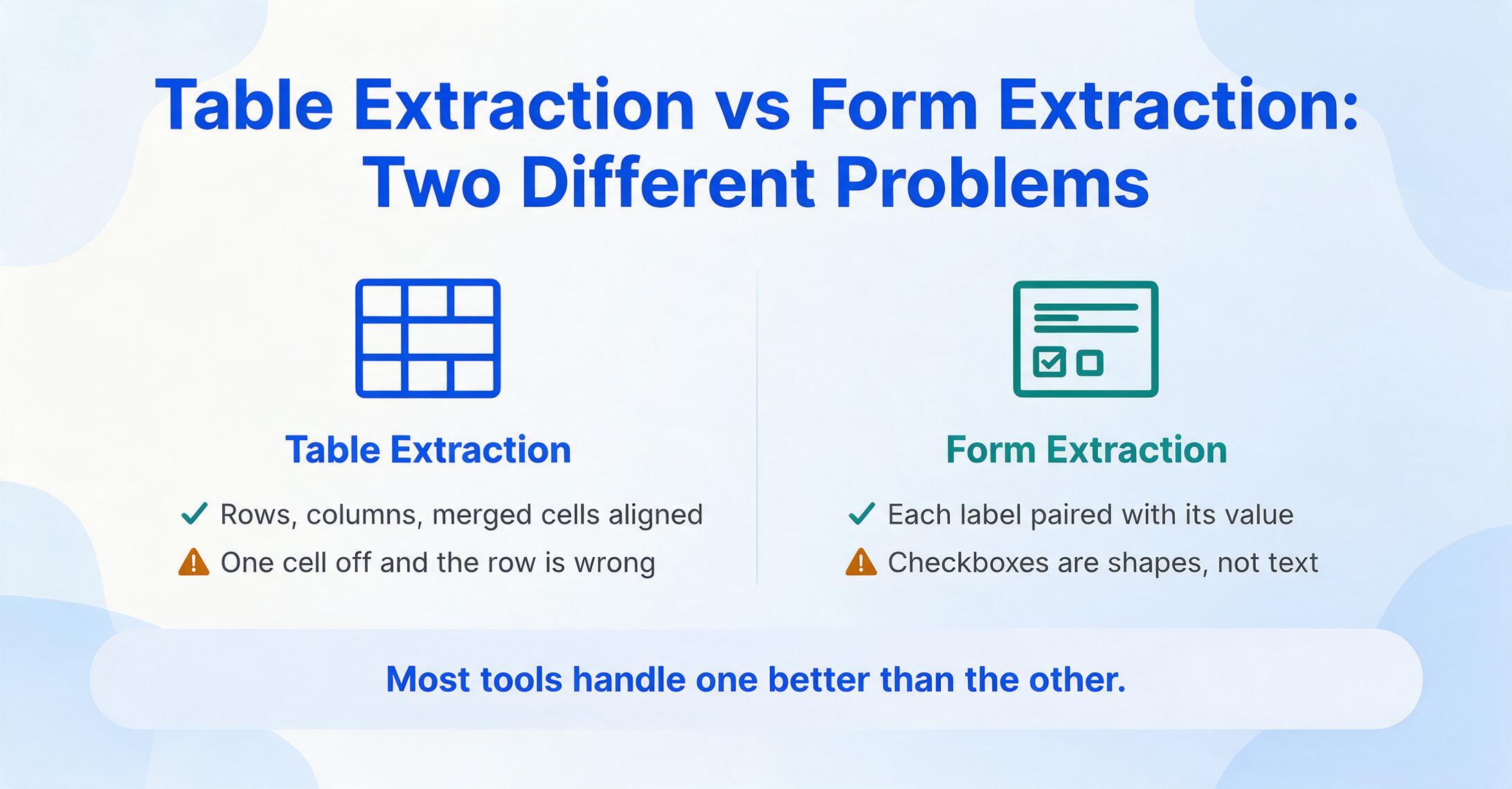
Most roundups treat "table extraction" and "form extraction" as interchangeable. They are not. Understanding the difference is the starting point for choosing the right tool — because a tool optimized for one will produce unpredictable results on the other.
Table extraction is about preserving structure. The software needs to recognize rows, columns, merged cells, and spanning headers — then map each cell's content to the correct position in a row-column grid. The challenge compounds when tables span multiple pages, use borderless layouts, contain nested sub-tables, or have hierarchical column headers (like a row label that covers three sub-columns). A one-cell offset in column detection makes the entire row meaningless. This is why table structure recognition is its own research subfield — the CVPR 2025 OmniDocBench evaluates table extraction across six structural dimensions including merge cells, formulas, and rotated text, and even top models struggle with borderless and multi-page tables.
Form extraction is about reading key-value pairs and interactive elements from a filled-out layout. A form has labeled fields — "Patient Name," "Date of Birth," "Insurance Provider" — and the extraction job is to pair each label with the handwritten or typed value that belongs to it. Forms add another layer: checkboxes and selection marks. Is a box checked? A circle filled? A cross mark or a tick? These are not text characters — they are visual indicators that require spatial reasoning to map to their corresponding field label. Traditional OCR treats checkboxes as noise or tiny images and skips them entirely.
The core insight: table extraction asks "what belongs in which cell?" Form extraction asks "what value pairs with which label, and which options are selected?" A tool can be excellent at one and mediocre at the other. The best choice for your workflow depends on which problem you actually have.
If you're weighing tools on table and form structure specifically because your documents vary a lot in layout, our broader data extraction software comparison covers the same tools filtered on that axis. And if the tables you're pulling are specifically bank transaction tables — where reconciliation, not just cell placement, is the hard part — our bank statement extraction tools guide goes deeper on that one document type.
Why Extracting Tables Is Harder Than Most OCR Promises
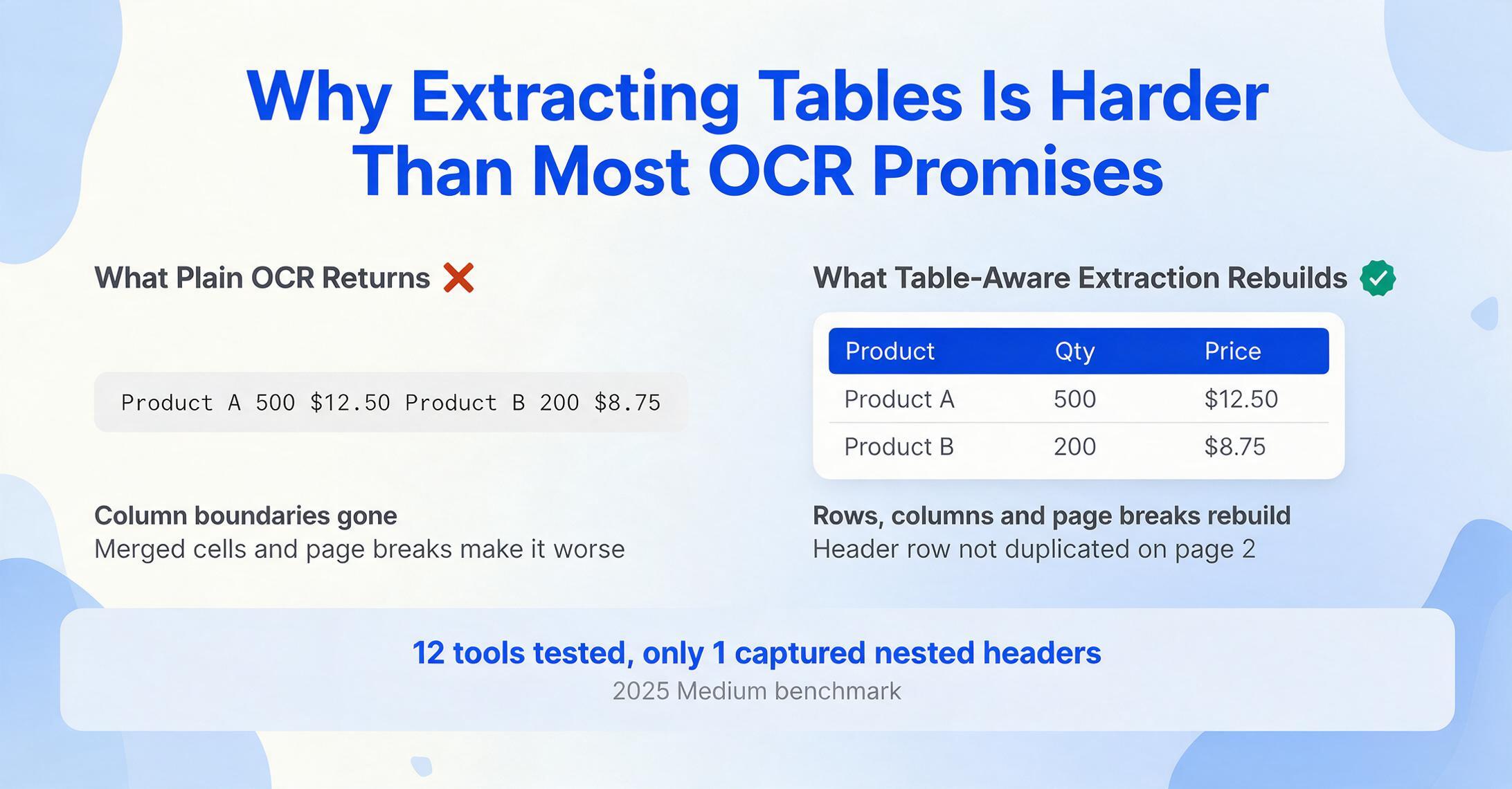
Standard OCR reads a page top-to-bottom, left-to-right, as a single stream of characters. Feed it a three-column table and it returns one long sentence — "Product A 500 $12.50 Product B 200 $8.75" — with no column boundaries preserved. Table-aware extraction needs to reconstruct the original grid. That step alone is difficult, but real-world documents rarely cooperate.
Merged cells break row-column detection. A cell spanning two rows in column A means column B's value for row 2 must be associated with the correct merged label. Most tools assign the label to row 1 and leave row 2 blank, destroying the relationship. Multi-page tables compound the problem: the extraction system must recognize that page 2's continuation is the same table, not a new one, and append rows without duplicating headers. Borderless tables remove the visual cues that table detection algorithms depend on — without visible lines, the tool must infer structure from text alignment alone, which is brittle when columns have variable-width content.
Hierarchical headers — where one category label sits above multiple sub-columns — are another common failure point. A 2025 Medium benchmark tested 12 commercial table extraction tools on a complex table with nested headers and found that only one tool (ComPDF) correctly captured the hierarchy, and even it missed row-label merges and rotated text. The researcher eventually abandoned all 12 commercial tools and built a custom solution using pdfplumber plus OpenCV as a fallback — not because the tools were bad, but because the table structure was genuinely hard.
These structural challenges explain why different tools take fundamentally different approaches — from layout-based algorithms (detect lines and text positions) to vision-language models (understand the table semantically), with large differences in what each can handle.
How We Picked and Tested
We evaluated each tool on five criteria that reflect what happens after you click "extract" — not just marketing claims.
We consulted independent benchmarks including the OmniDocBench (CVPR 2025) for document parsing evaluation across table frames, merged cells, and formulas, as well as the AIMultiple DeltOCR Bench (January 2026) for OCR accuracy across handwriting, printed text, and printed media categories. Real user perspectives came from Reddit communities including r/dataengineering, r/automation, and r/MachineLearning, where practitioners share field-tested tool experiences rather than marketing claims. No tool in this roundup paid for placement or was given preferential treatment — ImageToTable.ai is one of the tools reviewed, positioned alongside competitors with the same evaluation criteria applied to all.
Quick Comparison: All 7 Tools at a Glance
| Tool | Starting Price | Pricing Model | Best For | Key Limitation | Free Trial? |
|---|---|---|---|---|---|
| ABBYY FlexiCapture | Contact sales | Per-page / annual license | High-volume enterprise table & form processing | Opaque pricing; requires professional services for setup | Demo on request |
| Google Document AI | Usage-based (~$30/1K pages Form Parser) | Pay-per-page, tiered | Developer teams building custom extraction pipelines on GCP | Requires engineering to integrate; no no-code UI | $300 free credit |
| AWS Textract | Usage-based (~$15/1K pages tables+forms) | Pay-per-page, tiered | AWS-native teams needing table & form API extraction | Raw JSON output needs downstream normalization; no validation rules | 1,000 pages/mo free (3 months) |
| Docparser | $39/mo | Subscription (credits) | Recurring, consistent-format documents with predictable layouts | Template-dependent; breaks when document format changes | 14-day free trial |
| Airparser | $39/mo | Subscription (credits) | GPT-powered parsing of complex, unstructured documents | GPT-based approach can hallucinate on highly structured tables | 30 credits free |
| ImageToTable.ai | Free tier, then $9/mo | Subscription (credits) | No-code table, form & checkbox extraction for small teams | No ERP integrations; no SOC2/HIPAA certification | Free tier (daily quota) |
Pricing checked June 2026. All prices from public pricing pages. "Contact sales" indicates no published minimum on the vendor's website.
ABBYY FlexiCapture: The Enterprise Heavyweight for Table & Form Processing
ABBYY FlexiCapture is the incumbent in large-scale document processing. It combines strong OCR with intelligent document classification, table extraction, and form field mapping — deployed on-premise or in the cloud. For organizations processing hundreds of thousands of pages monthly across diverse document types (invoices, tax forms, survey forms, compliance reports), FlexiCapture is the reference implementation.
Its table extraction engine is among the most mature: it handles bordered and borderless tables, multi-page continuations, and hierarchical headers with configurable validation rules. The form processing module can read hand-printed text in multiple languages and map extracted fields to database schemas. ABBYY's strength is scale and reliability — once configured, it processes consistently without the variability that newer AI-native tools sometimes exhibit.
Best for: Large enterprises and government agencies that need high-accuracy table and form extraction at scale, with structured workflows for human review and exception handling. If your annual volume exceeds 500,000 pages and you have an IT team to manage deployment, ABBYY is the benchmark.
Not ideal for: Small teams or individual users. FlexiCapture pricing is opaque — contact sales only — with professional services for initial setup typically ranging from $10,000 to $30,000. The learning curve is steep; template configuration often requires ABBYY-certified specialists. If you process fewer than 5,000 pages per month, the cost-per-page economics don't work.
Read our detailed ABBYY comparison.
Google Document AI: The Developer's Swiss Army Knife for Document Parsing
Google Document AI is a cloud platform offering specialized processors for different document types: an Enterprise Document OCR processor for raw text extraction ($1.50 per 1,000 pages), a Form Parser for key-value pair extraction from forms ($30 per 1,000 pages), a Layout Parser for structural analysis including tables ($10 per 1,000 pages), and pre-built processors for invoices, receipts, identity documents, and more. You pick the processor that matches your document type.
The Form Parser is particularly relevant here: it extracts key-value pairs and tables from structured forms, returning bounding boxes for each field with confidence scores. Google's processor breadth means one platform can handle invoices, forms, tables, and identity documents — attractive for teams with diverse document ingestion needs who want a single cloud vendor. In independent testing (AIMultiple DeltOCR Bench, January 2026), Google Vision OCR maintains ~98% accuracy on mixed datasets of printed, media, and handwritten documents.
Best for: Engineering teams already operating in Google Cloud who need to embed document extraction into larger pipelines. The REST and gRPC APIs make it straightforward to integrate extraction as a step in a data processing workflow. If your team can write code and needs extraction as a building block — not a finished product — Document AI is one of the strongest platforms available.
Not ideal for: Non-technical users. There is no point-and-click UI for extraction — you interact with Document AI through API calls, the Google Cloud Console, or custom-built frontends. The Form Parser at $30 per 1,000 pages is also meaningfully more expensive than subscription-based alternatives for moderate volumes. If you process 5,000 pages per month of forms and tables, you'll pay roughly $150-$200 in Document AI charges — versus a flat $29-$59 subscription for a no-code tool.
AWS Textract: The Dedicated Table API for Developers
AWS Textract is the closest thing to a "pure" table and form extraction API. Unlike Google Document AI's processor-based approach, Textract has a single AnalyzeDocument API that returns text, tables, and forms in one call — and a dedicated AnalyzeExpense API for invoices and receipts. The table output is explicitly structured: each cell is returned with its row index, column index, row span, and column span. This is the raw data a developer needs to reconstruct a table in a spreadsheet.
In the 2024 Source.OpenNews independent media review, Textract was the reviewers' top pick among paid tools: "its Python library, Textractor, makes it dead simple to go from image to table to CSV or Excel file. As far as programmatic tools go, it was the simplest to use and implement." The reviewers tested on real-world government and journalistic documents, not vendor-provided demo files. Textract also offers a generous free tier: 1,000 pages per month for the first three months.
Best for: AWS-native development teams building custom table and form extraction pipelines. If extraction is a step in a data engineering workflow — pull PDFs from S3, extract tables via Textract, load into Redshift — the AWS toolchain integration is seamless. The table API's explicit cell coordinates and merged-cell spans give developers complete control over output formatting.
Not ideal for: Teams that need finished, human-readable output without writing code. Textract returns JSON arrays of blocks — you need to write the logic that turns those blocks into rows and columns, handles multi-page continuations, and validates extracted values. The Docsumo technical review notes "no native validation, workflow, or case management. Outputs require significant downstream processing." It is an extraction engine, not a product.
Read our in-depth AWS Textract comparison.
Nanonets: Enterprise Document AI with Pre-Trained Table Models
Nanonets is an enterprise AI platform built around pre-trained models for common document types — invoices, receipts, purchase orders, bank statements, and more. Each model is trained to recognize the fields and table structures typical of that document class. For table extraction specifically, Nanonets offers line-item extraction that pulls row data from invoice tables, bank statement transaction lists, and similar structured grids — mapping each column to the correct field name without template configuration.
The platform's strength is its balance of pre-built intelligence and customizability. You can use off-the-shelf models for common document types, or upload 10-50 sample documents to train a custom model for specialized forms and table layouts. The validation UI lets reviewers flag low-confidence extractions before data enters downstream systems — important for AP workflows where a wrong dollar amount in the wrong column has real financial consequences.
Best for: Mid-to-large enterprises that process high volumes of invoices, purchase orders, and financial documents with table structures — and need built-in review workflows, not just extraction. If your AP team handles 1,000+ invoices per month with multi-line item tables, Nanonets' pre-trained models eliminate the setup time that generic tools require.
Not ideal for: Small teams on a budget. The Pro plan starts at $499/month — 12x the entry price of no-code alternatives. Custom model training, while less demanding than traditional ML, still requires sample collection and annotation, adding days to onboarding. For ad-hoc table extraction from varied, non-recurring document types, the setup overhead may outweigh the accuracy benefit.
Read our detailed Nanonets comparison.
Docparser: Template-Based Extraction for Predictable Layouts
Docparser takes a fundamentally different approach: instead of AI understanding, it uses user-defined parsing rules. You upload a sample document, draw zones around the table areas you want to extract, define column boundaries, and save the configuration as a template. Docparser applies that template to every incoming document — pulling tables and fields from the exact same coordinates every time.
This rule-based approach has a specific advantage: determinism. When a document matches the template you defined, extraction is consistent and predictable — no AI hallucination, no confidence-score uncertainty. Docparser also integrates well with automation platforms: built-in connectors for Google Sheets, Excel, Zapier, and Make let you route extracted table data directly into spreadsheets or databases without writing code.
Best for: Businesses processing recurring documents from a known set of sources, where formats are consistent and predictable. If you receive the same purchase order format from the same 3-5 vendors every week, Docparser's template approach gives reliable, auditable extraction at a low monthly cost ($39/month Starter plan).
Not ideal for: Variable-format documents. If each vendor's table layout is different, or form fields shift position between versions, you'll need a separate template for each variant. Maintaining a library of 50+ templates across vendors becomes its own operational burden. As one Reddit user in r/automation noted: "Docparser is great — until the vendor changes their invoice format and your template breaks silently." Docparser also does not natively handle checkbox recognition or handwritten form fields.
Read our in-depth Docparser comparison.
Airparser: GPT-Powered Parsing for Unstructured Document Chaos
Airparser takes the opposite approach from Docparser: instead of rigid templates, it uses GPT-based AI to read documents and extract whatever you ask for. You describe the data you want in natural language — "extract all line items with product name, quantity, and price" — and the GPT engine reads the document and returns structured results. For complex, varied, or truly unstructured documents where template-based tools fail, Airparser's approach can work where others can't.
The AI-powered parser handles a wide range of document types without pre-configuration, which makes it suitable for ad-hoc extraction tasks or environments where document formats are unpredictable. At $39/month, it sits in the same price bracket as Docparser, offering a different trade-off: lower determinism but higher flexibility.
Best for: Processing complex, unstructured, or highly variable documents where template-based tools break. Emails with embedded tables, PDFs with mixed text and data, documents where the table structure isn't clean enough for layout-based extraction — these are Airparser's sweet spot. The natural-language extraction instructions make it accessible to non-technical users.
Not ideal for: High-accuracy table extraction from structured grids. GPT-based extraction can introduce inconsistencies: the model might misalign a column boundary, skip a row, or reinterpret a value. As one Reddit user in r/Rag noted about AI-based table extraction: "for scanned documents or images I try using paddleocr or easyocr but recreating the table structure is often not simple." The same challenge applies to GPT-based approaches — the AI reads the content correctly but may not reconstruct the grid faithfully. For financial data where every cell must be correct, a deterministic tool or a dedicated table API is safer.
Read our detailed Airparser comparison.
ImageToTable.ai: No-Code Table, Form & Checkbox Extraction
ImageToTable.ai is the tool we build — so let's be specific about what it does well and where it doesn't compete. It uses a vision-language model to read documents semantically rather than by position: you type the column names you want (e.g. "Product Name," "Quantity," "Unit Price," "Line Total"), and the AI locates the corresponding values anywhere on the page by understanding what they mean — not where they sit.
For table extraction, this means Custom Column Extraction: you name the columns of your output table, and the AI fills each row from the document's data — preserving row-level relationships across the table. For form extraction, the same mechanism extracts labeled fields by their semantic meaning, handling layout variations across different form versions. The platform also recognizes checkboxes, tick marks, and circle selections on forms — reading visual selection indicators that traditional OCR skips — and converts them into structured data (e.g. "Insurance Type: Private ✓" as a column value). This is a capability that none of the other tools in this roundup offer as a built-in feature.
ImageToTable.ai is credit-based: 1 credit = 1 page. The free tier gives a daily quota to try a single document with no sign-up required. Paid plans start at $9/month (Basic), with Pro at $19/month and Max at $59/month. Team plans run Growth $149/Scale $399/Enterprise $899 per month. The platform outputs to Excel (XLSX), CSV, JSON, and Word — and offers a native Google Sheets add-on for extraction directly into a spreadsheet sidebar.
Best for: Small teams and individual users who need to extract tables, forms, and checkbox data from varied documents — without templates, training, or coding. If you process invoices from 20 different vendors, intake forms from multiple clinic locations, or survey forms with checkbox responses, the template-free approach means one column definition works across all format variants. The checkbox recognition makes it uniquely suited for forms with selection marks.
Not ideal for: Enterprise deployment requiring ERP integration, SOC2/HIPAA compliance, or dedicated table structure APIs. ImageToTable.ai is designed as an end-user tool, not a developer building block. If you need a raw table API to integrate into a custom data pipeline, AWS Textract or Google Document AI are better architectural fits. Also, while the free tier lets you test thoroughly, high-volume production use (5,000+ pages/month) is better served by plans with higher page allocations.
For a deeper look at how template-free extraction compares to rule-based tools, read our Custom Column Extraction explainer or try the free demo on your own document.
How to Choose: Match the Tool to Your Table and Form Reality
The right tool depends on three factors: what your documents actually look like (not what you wish they looked like), who will use the tool, and what happens to the data after extraction.
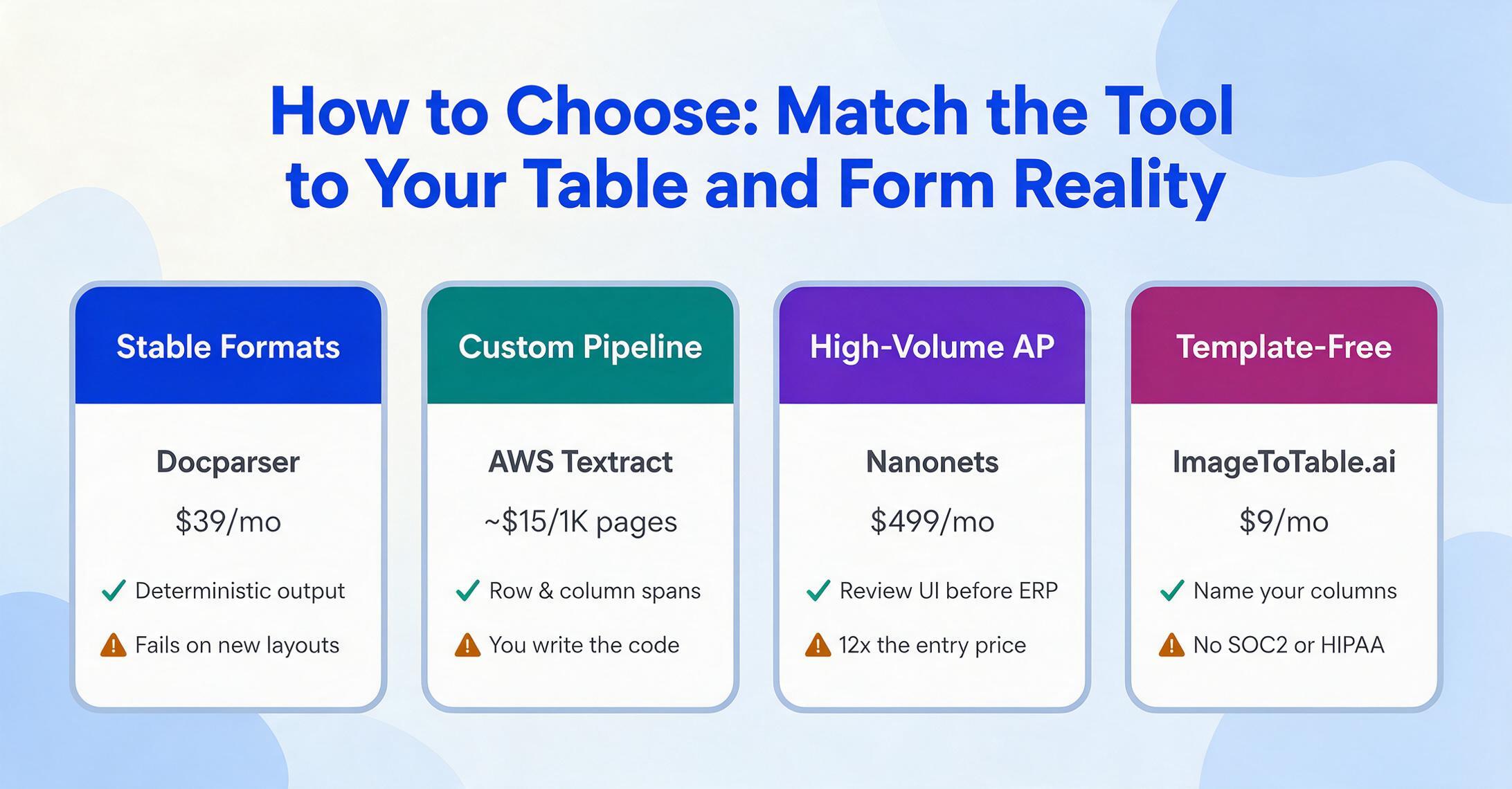
If your tables have consistent, clean structures and come from a known set of sources: Docparser gives you deterministic, auditable extraction at $39/month. The template setup is upfront work, but if your document pool is stable, you set it once and forget it.
If you need table extraction as a building block in a custom data pipeline — and you have developers: AWS Textract is the strongest dedicated table API. The explicit cell coordinates, row/column spans, and confidence scores give developers complete control. Google Document AI is the alternative if your stack runs on GCP, especially if you need the Form Parser for key-value extraction alongside tables.
If you process high volumes of financial documents with table line items and need built-in review workflows: Nanonets' pre-trained models reduce setup time for common document types, and the validation UI catches errors before they enter your ERP. The $499/month price reflects the enterprise AP automation use case, not general-purpose table extraction.
If you want template-free table extraction at a moderate volume, with a spreadsheet-native workflow: ImageToTable.ai at $9/month is the most affordable AI extraction option. Airparser at $39/month offers GPT-powered flexibility at a higher per-page cost if your documents are truly unstructured.
If your documents are truly unstructured — mixed text and tables, unpredictable layouts, no recurring pattern: Airparser's GPT-based approach handles the chaos that template tools can't. Accept the lower determinism as the price of flexibility.
If you need a single tool to extract both tables and form fields — including checkboxes, tick marks, and handwritten selections — without templates or coding: ImageToTable.ai's Custom Column Extraction handles both table rows and form key-value pairs with the same mechanism. The free tier lets you test on your actual documents before committing. At $9/month, it's the lowest-cost entry point among AI-native tools in this roundup.
If you're an enterprise processing 500,000+ pages annually across diverse document types: ABBYY FlexiCapture remains the reference platform for scale, accuracy, and structured exception handling. Budget for professional services and a 3-6 month deployment timeline.
Frequently Asked Questions
Can I extract tables from a scanned PDF — or does it need to be a digital PDF?
It depends on the tool. Tools like AWS Textract, Google Document AI, ABBYY, and ImageToTable.ai include OCR engines and can extract tables from scanned PDFs and images. Template-based tools like Docparser also support scanned PDFs with OCR. However, free open-source tools like Tabula and Camelot only work on native PDFs with embedded text layers — they cannot process scanned documents. If your PDF contains an image of a table rather than selectable text, you need a tool with OCR capability.
What's the difference between extracting a table and extracting form fields?
Table extraction preserves the row-column grid structure — each cell's value is mapped to the correct row and column. Form extraction pairs labels with values ("Patient Name" → "John Smith") and reads interactive elements like checkboxes and selection marks. A single document can contain both — for example, a medical intake form has labeled fields at the top and a table of medications in the middle. The best tool for you depends on which structure dominates your documents. Most tools handle one better than the other, and few handle both equally well.
Do any of these tools handle merged cells in tables?
AWS Textract explicitly returns row-span and column-span metadata for merged cells, making it the strongest option for programmatic merged-cell handling. ABBYY FlexiCapture handles merged cells well in enterprise deployments. Most AI-native tools (Airparser, ImageToTable.ai, Nanonets) can handle simple merged cells but may struggle with complex hierarchical headers where a parent category spans multiple child columns. For documents heavy with merged cells and nested headers, test with your actual files before committing — merged-cell handling varies widely even among premium tools.
Can I extract checkbox and tick-mark data from forms automatically?
Most document extraction tools treat checkboxes as images or noise and skip them. ImageToTable.ai is the only tool in this roundup that explicitly recognizes checkboxes, tick marks, cross marks, and circle selections as structured data — mapping each selection to its corresponding field label. AWS Textract returns "SelectionStatus" in its form key-value pair output, which indicates whether a checkbox was selected, but you need to write code to interpret it. Traditional OCR tools like ABBYY and Docparser generally do not recognize checkboxes without custom configuration.
What's the cheapest way to extract tables from PDFs to Excel?
For one-off extractions from clean, native PDFs: Tabula (free, open-source) or Excel's built-in "Data > From Picture" feature. For ongoing use with varied document formats: ImageToTable.ai's free tier handles occasional use, and the $9/month Basic plan is the lowest-cost paid option among AI-native tools. Docparser at $39/month is cost-effective if you have consistent, recurring document formats. AWS Textract's free tier (1,000 pages/month for 3 months) is the best route for developers who want to build a custom solution with zero upfront cost.
How accurate is table extraction compared to manual data entry?
Manual data entry has an average error rate of 1-4% according to industry benchmarks, and costs U.S. companies an average of $28,500 per employee annually according to a 2025 Parseur/QuestionPro survey of 500 professionals. Automated table extraction can achieve 98-99% printed-text accuracy on clean documents (per the AIMultiple DeltOCR Bench, January 2026), but accuracy drops on handwriting, degraded scans, borderless tables, and complex merged-cell layouts. The practical advice: automated extraction is faster and more consistent than manual entry for clean printed tables, but always budget for human review on critical financial or compliance data — no tool is 100% on every document type.
Disclosure: ImageToTable.ai is one of the tools reviewed in this article. We applied the same evaluation criteria to all tools. No vendor paid for inclusion or placement. Pricing data verified June 2026 from public pricing pages. External links to reviewed tools use rel="noopener" and open in new tabs. All other external links carry rel="nofollow noopener".