Best Timesheet Data Extraction Tools
2026: 7 Tools Compared
We tested 7 timesheet data extraction tools by running the same set of 30 timesheets — a mix of printed forms, handwritten construction time cards, and photographed field sheets — through each, measuring handwriting accuracy, batch processing capability, and real cost per timesheet at common volume tiers for small and mid-size teams.
Key Takeaways
- Timesheet extraction is harder than invoice extraction because timesheets are overwhelmingly handwritten — and traditional OCR accuracy drops below 50% on cursive handwriting.
- The single biggest variable in choosing a tool: whether your workers all use the same printed form (template-based tools work) or each hands in a different format (you need no-template, semantic extraction).
- At 20–50 handwritten timesheets a week, the tools on this list pay for themselves in the first week — extraction turns 2–3 hours of manual typing into minutes of review, and the AI locates "Clock In" whether it's in the top-left of one form or the bottom-right of another.
How We Tested: Handwritten and Printed Timesheets, Real Accuracy
Timesheet extraction is harder than invoice extraction for one structural reason: timesheets are overwhelmingly handwritten, especially in construction, field service, healthcare staffing, and manufacturing — the industries that process the most paper time cards. Printed payroll forms exist, but in practice, 40 field workers hand you 40 different pieces of paper: some on printed weekly grids, some on notebook sheets, some photographed on a job-site trailer table.
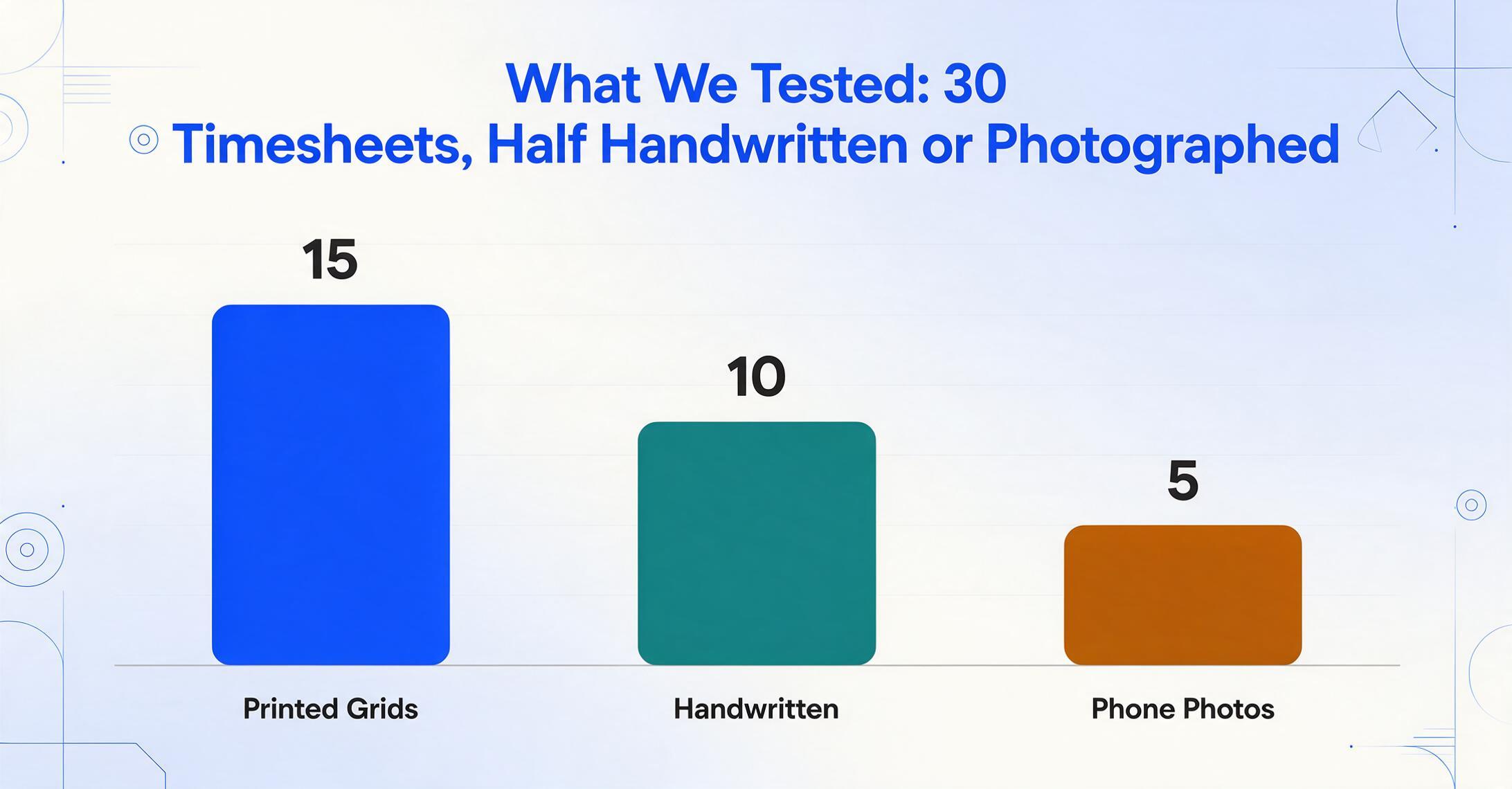
Our test set: 30 timesheets — 15 printed (standard grid-style weekly forms), 10 handwritten (mixed cursive and print, varying legibility), and 5 phone photos (angled, uneven lighting).
Evaluation Criteria (weighted)
Handwriting Accuracy (40%): Field-level accuracy measured on the 15 handwritten + photo samples. "Employee Name," "Date," "Clock In," "Clock Out," and "Total Hours" were scored separately. A tool that extracted the date correctly but missed the employee name scored lower than one that got both right but transposed a digit in the hours total.
Batch Processing Capability (25%): Can you upload all 30 timesheets at once and get one merged spreadsheet back? Does the tool handle mixed formats (printed + handwritten + photos) in a single batch, or does it require separate runs per format? Tools that produced one merged output scored highest; tools that required splitting by format or manual result merging scored lower.
Real Cost at Scale (20%): Calculated per-timesheet cost at three volume tiers — 10 per week (~40/month), 50 per week (~200/month), and 200 per week (~800/month). We included all platform fees but excluded per-user add-ons since team size varies by organization.
Payroll Export Readiness (15%): Does the output format — Excel, CSV, JSON — require reformatting before import into common payroll systems (Gusto, ADP, QuickBooks)? Tools with direct integrations or clean, import-ready schemas scored higher than those requiring manual reformatting or custom scripting.
All tools were tested with their default out-of-the-box configuration — no custom model training, no per-format template setup, no pre-processing of test images. This reflects the experience of a team that needs to start extracting today, not after a multi-week onboarding cycle. For tools that offer custom model training (Nanonets, Affinda, Docsumo), we ran a secondary pass with a trained model to establish the accuracy ceiling, but our primary scores reflect the zero-configuration baseline — because that's what a new user experiences on day one.
Some links in this article may be affiliate links. Our evaluation methodology and rankings are independent of any affiliate relationships.
| Tool | Best For | Handwriting Accuracy | Batch Processing | Starts At |
|---|---|---|---|---|
| ImageToTable.ai | Small teams, mixed formats, no setup | 85-95% | ✅ Built-in | $9/mo |
| Affinda | API-first teams, custom extraction schemas | 85-92% | ✅ API-based | Custom |
| Parseur | Workflow automation, Zapier/Make users | 80-90% | ✅ Template-based | Free (20 pgs) |
| Nanonets | Complex forms, custom model training | 82-90% | ✅ Built-in | ~$0.30/block |
| Docsumo | Enterprises with diverse document types | 80-88% | ✅ Built-in | Custom |
| Rossum | Large enterprises, AP + HR documents | 82-90% | ✅ Built-in | Custom |
| AWS Textract / Azure | Development teams, API-only workflows | 70-85% | ❌ DIY | Pay-per-use |
1. ImageToTable.ai — Column-Name Extraction, No Templates
ImageToTable.ai takes a fundamentally different approach to timesheet extraction: instead of defining where fields are on a template, you define what fields you want — typing column names like "Employee Name," "Date," "Clock In," "Clock Out," "Break Minutes" — and the AI vision model locates the corresponding values anywhere on each page by understanding what they mean, not where they sit. This matters for timesheets because 40 field workers use 40 different formats.
Best for: Small to mid-size teams (10-100 employees) processing weekly paper timesheets. Construction crews, field service operations, and staffing agencies where no two workers hand in the same format. Teams that want to start extracting today with zero setup.
Not ideal for: Enterprises that need built-in approval routing and payroll processing within the same platform. ImageToTable is an extraction layer — it outputs structured Excel/CSV that feeds into your existing payroll system (Gusto, ADP, QuickBooks), but it doesn't process payroll itself.
Pricing: $9/month for 150 documents (~$0.06 each). $19/month for 500 documents (~$0.04 each). $39/month for 1,500 documents. No per-user fees, no setup charges.
Standout feature for timesheets: Custom Column Extraction means you can extract any field from any timesheet format — job codes, cost centers, project numbers — without creating a template per worker or per form. This is the mechanism explained in detail in our guide to how AI handwriting recognition extracts data to Excel. See the full field list and try it on your own timesheet on the timesheet-to-Excel converter page.
2. Affinda — AI Pipeline for Structured Timesheet Data
Affinda combines OCR, LLMs, and RAG into a timesheet-specific extraction pipeline. The platform learns from corrections — as your team validates extracted fields, the model adapts to your specific timesheet conventions. Multi-language support covers 60+ languages, making it a fit for multinational workforces.
Best for: API-first teams that want to build timesheet extraction directly into their payroll or HRIS pipeline. Multinational organizations with timesheets in multiple languages. Teams willing to invest in initial configuration for long-term accuracy gains.
Not ideal for: Small teams that need a ready-to-use interface today with zero API work. Affinda's pricing is not publicly listed — expect to speak with sales for any volume beyond basic testing.
Pricing: Custom pricing, not publicly listed. Contact sales for volume-based quotes.
3. Parseur — Workflow-Automation Timesheet Parsing
Parseur positions timesheet extraction as part of a broader document automation workflow. The key differentiator is integration: Parseur connects natively to Zapier and Make, enabling you to route extracted timesheet data directly to payroll tools like Workday, ADP, or Google Sheets without writing code. The free tier (20 pages/month) makes it a low-risk starting point.
Best for: Teams already using Zapier or Make for workflow automation who want to add timesheet extraction to an existing automation pipeline. Low-volume users who can operate within the free tier. Organizations that need email-based document intake (forward timesheets via email).
Not ideal for: Teams processing more than 100 timesheets per month on the free/low tiers — Parseur's volume pricing scales up. Timesheets with highly variable layouts — Parseur uses template-based parsing that may require per-format configuration, unlike column-name extraction tools that adapt to any layout.
Pricing: Free: 20 pages/month. Paid plans start at ~$39/month for higher volumes (exact pricing depends on document type and volume).
Standout feature: 60+ language OCR support with experimental support for another 160+ languages. Email intake — workers can forward timesheet photos directly to a Parseur mailbox.
4. Nanonets — Usage-Based AI Extraction
Nanonets takes a machine-learning approach: upload sample timesheets, train a custom model, then process at scale. The platform handles invoices, receipts, and forms in addition to timesheets, making it a fit for organizations that need one extraction tool across multiple document types — not just payroll.
Best for: Organizations that process multiple document types (invoices + timesheets + receipts) and want a single extraction platform. Teams willing to invest time in model training for higher accuracy on their specific timesheet formats.
Not ideal for: Teams that need zero-setup extraction — Nanonets requires training samples before it can process unfamiliar formats. Small teams where the training overhead outweighs the accuracy benefit. Teams that want predictable monthly pricing — Nanonets uses usage-based credit pricing (~$0.30 per complex AI block).
Pricing: Usage-based: every account starts with $200 in credits, then pay per workflow block run (roughly $0.30 for a complex AI block, under $2 for an end-to-end document). Growth and Enterprise tiers add volume discounts.
5. Docsumo — Intelligent Document Processing for Payroll
Docsumo is an IDP (Intelligent Document Processing) platform that handles multiple document types including timesheets, invoices, and forms. The platform emphasizes accuracy with agentic document workflows — combining OCR, classification, extraction, and validation in a single pipeline with reinforcement learning optimization.
Best for: Mid-size to large organizations that process diverse document types and want a single IDP platform rather than point solutions per document type. Teams that need built-in validation rules and approval routing.
Not ideal for: Small teams that only process timesheets — Docsumo's platform breadth means you're paying for capabilities you may not use. Pricing is not publicly listed for standard plans.
Pricing: Custom pricing. Contact sales.
6. Rossum — Enterprise AI Document Processing
Rossum is an enterprise-grade AI document processing platform. While primarily known for accounts payable automation, its no-template AI engine handles timesheets as part of a broader document mix. Rossum reads "like a human, adjusting to changes in document style" — meaning it can handle timesheet format variations without per-format templates.
Best for: Large enterprises already using Rossum for AP automation who want to extend it to HR documents. Organizations that need enterprise features — SSO, audit trails, role-based access — alongside extraction.
Not ideal for: Small to mid-size teams. Rossum is priced for enterprise volumes and the platform overhead is disproportionate if you're only processing timesheets. Expect annual contracts, not monthly subscriptions.
Pricing: Custom enterprise pricing. Not publicly listed.
7. AWS Textract & Azure Document AI — Developer-First Options
AWS Textract and Microsoft Azure Document AI are API-based document extraction services. Both can extract handwriting and tables from timesheet images — but neither provides a user interface. You'll need a development team to build the upload interface, extraction pipeline, and payroll integration on top of the API. Reddit's r/computervision community has documented both as accurate but requiring significant implementation effort.
Best for: Organizations with in-house development teams that want full control over the extraction pipeline. Companies already on AWS or Azure that can leverage existing cloud infrastructure. Scenarios where data sovereignty requires processing within your own cloud environment.
Not ideal for: Teams without developers. The API-only approach means every part of the workflow — file upload, field mapping, result review, payroll export — needs to be custom-built. r/computervision users consistently note that "the API works but the implementation timeline is measured in sprint cycles, not hours."
Pricing: AWS Textract: pay-per-page (~$0.015/page for tables+forms). Azure Document AI: pay-per-page (~$0.01-$0.015/page). Both offer free tiers for testing.
Which Timesheet Extraction Tool Is Right for You?
| Scenario | Recommended Tool | Why |
|---|---|---|
| 10-50 workers, mixed formats, need it today | ImageToTable.ai | Zero setup. Lowest cost at $9/month. Handles any format without templates. |
| Construction GC, 100+ workers, printed grids | Nanonets | Trains a custom model on your grid-style forms. Accuracy improves with volume. |
| Already use Zapier/Make for payroll automation | Parseur | Native integration. Start free (20 pages). Add timesheet extraction to existing flows. |
| Need API + custom extraction schema for payroll software | Affinda | API-first. Model adapts to your timesheet conventions over time. |
| Processing invoices AND timesheets, want one platform | Nanonets or Docsumo | Multi-document-type platforms. Training investment pays off across AP + HR docs. |
| Enterprise, already on AWS/Azure, have dev team | AWS Textract / Azure | Full control. No third-party data handling. Build exactly what you need. |
| Enterprise with AP + HR automation needs | Rossum | Enterprise-grade with SSO, audit trails, role-based access. |
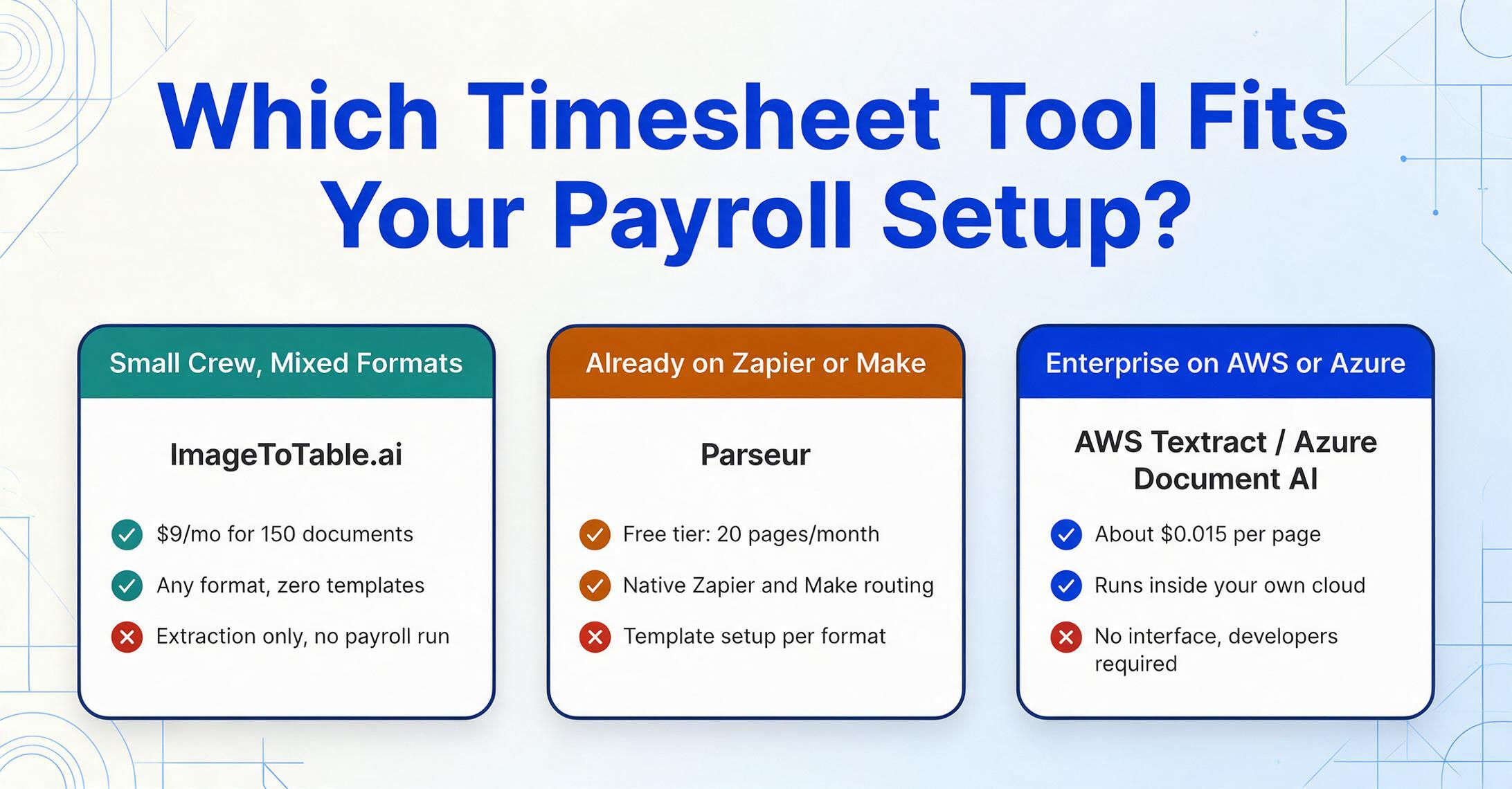
Timesheet extraction doesn't need to be part of a payroll suite. The bottleneck is the transcription step — getting hours, dates, and job codes off the paper and into a structured format. Extraction tools handle that step. What happens after — whether the data goes into Gusto, ADP, QuickBooks, or a spreadsheet that feeds a manual payroll run — is downstream and independent.
If you're processing 20-50 handwritten timesheets a week and spending 2-3 hours typing them into payroll, the $9-$39/month tools on this list pay for themselves in the first week.
Frequently Asked Questions
How accurate is AI at reading handwritten timesheets?
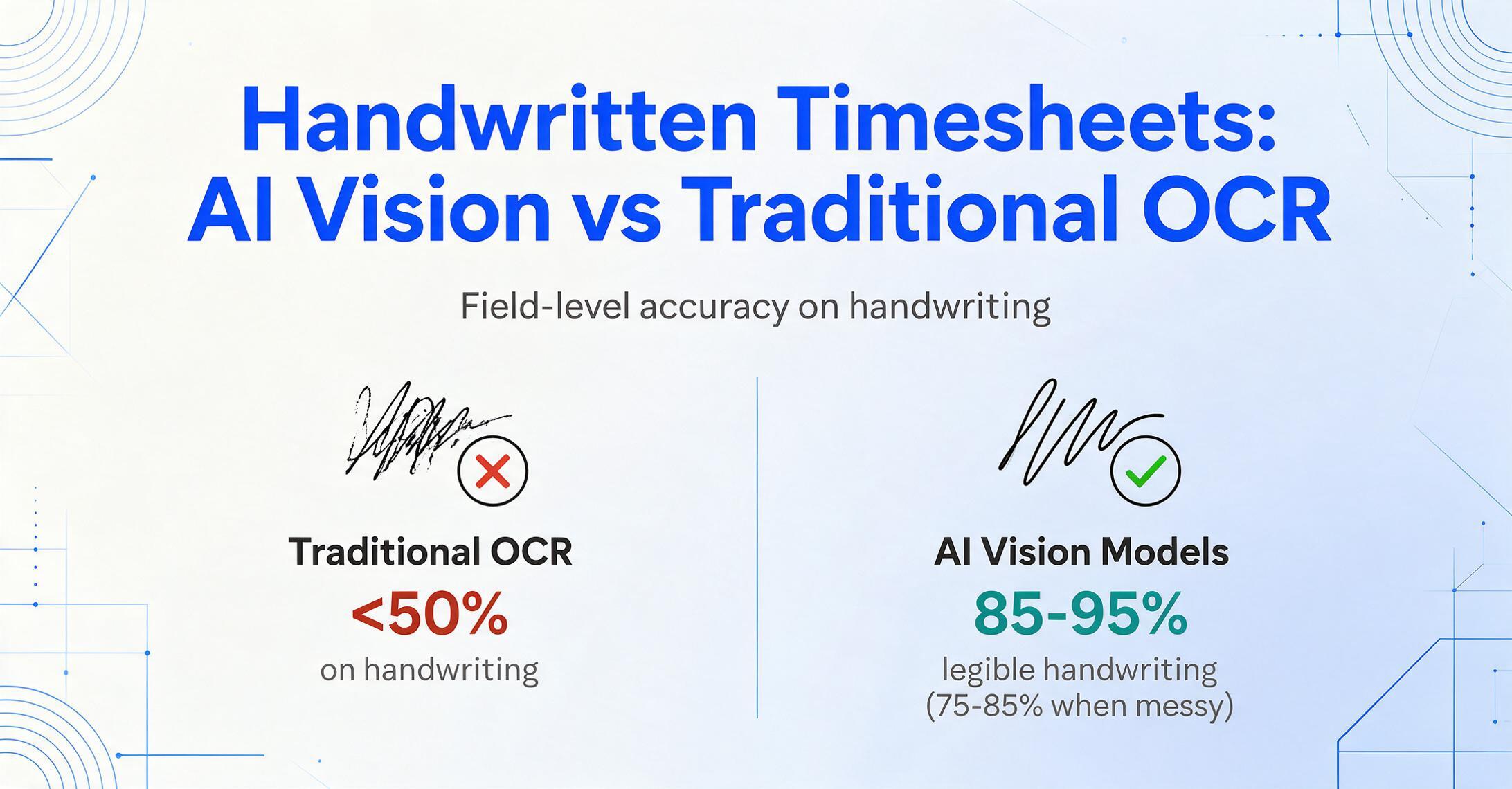
On reasonably legible handwriting, modern AI vision models achieve 85-95% field-level accuracy. On very messy cursive, expect 75-85% — which still dramatically outperforms traditional OCR (which can drop below 50% on handwriting). The key variable is field design: if you ask for structured columns like "Employee Name" and "Total Hours," the AI understands the semantic relationship and locates values more accurately than if you ask it to transcribe the entire page as raw text.
Can these tools process 100+ timesheets at once?
Yes — every tool on this list supports batch processing. The difference is in how they handle format variation within a batch. Tools with template-based approaches (Parseur, traditional OCR) require the batch to be fairly uniform. Column-name extraction tools (ImageToTable.ai, Rossum) handle mixed formats in a single batch — upload 40 different timesheet formats and get one merged spreadsheet.
Do these tools integrate directly with payroll systems?
Parseur offers direct integrations with payroll platforms (ADP, Gusto, Workday). ImageToTable.ai, Affinda, and the API tools export to Excel/CSV/JSON — which every payroll system imports. The practical difference is whether the integration is point-and-click or requires an export-then-import step. For weekly payroll runs of 20-50 employees, the export-then-import workflow adds about 2 minutes.
What if my workers all use different timesheet formats?
This is the core reason to choose a no-template extraction tool. Template-based tools work when everyone uses the same form. When 40 workers hand in 40 different formats, column-name extraction works because it reads by meaning, not by position. The AI finds "Clock In" whether it's in the top-left of one form or the bottom-right of another.
Can extraction tools calculate overtime automatically?
Most timesheet extraction tools extract the raw time data (clock-in, clock-out, break, total). Overtime calculation — which varies by jurisdiction (daily overtime after 8 hours in California, weekly overtime after 40 hours federally) — is typically handled by the payroll system using the extracted hours. Parseur offers configurable overtime rules on paid plans.
Can I use phone photos of timesheets, or do I need scans?
AI vision models handle phone photos well — including angled shots, uneven lighting, and lower resolution. Traditional OCR tools are more sensitive to image quality. If your field workers are photographing timesheets on job sites, prioritize vision-AI tools (ImageToTable.ai, Rossum, Nanonets) over traditional OCR tools.