Best Pay Stub & Payslip Data Extraction Tools
in 2026, Honestly Compared
Income and employment misrepresentation now accounts for 45% of total fraud loss exposure in auto lending — a share that grew 21% year over year, against a record $10.4 billion in fraud exposure, per Point Predictive's 2026 fraud report. The pay stub sits right at the center of that: it is the front-line document a lender, landlord, or HR team reads to confirm what someone actually earns. So "best payslip extraction tool" is a real, high-intent search — and the honest first finding is that the field of tools that genuinely read a payslip into structured data is small. Most "payslip OCR" lists pad the roster with payroll platforms that issue payslips but can't read someone else's, and generic OCR that copies text but doesn't understand a single field. This review covers the five tools that actually extract payslip data into rows, gives each a candid "best for" and "not ideal for," and — disclosure up front — ImageToTable.ai, published by this site, is one of them.
Key Takeaways
- Only about six tools genuinely read a payslip into labeled rows — the rest of every "payslip OCR" list is payroll platforms that issue slips but can't read another employer's, plus generic OCR (text-copying software) that has no idea which number is net pay.
- There is no canonical payslip — an ADP stub, a QuickBooks one, a UK National Insurance layout, and a French bulletin de paie carry the same fields in totally different places, and that variety is exactly what shatters a template parser the moment a new employer appears.
- Price tells you almost nothing here — a $9 browser tool and a $500 developer API read a stub with the same intelligence, so the one question that decides everything is whether the tool finds each field by meaning instead of by a fixed position on the page.
How We Picked and Tested These Tools
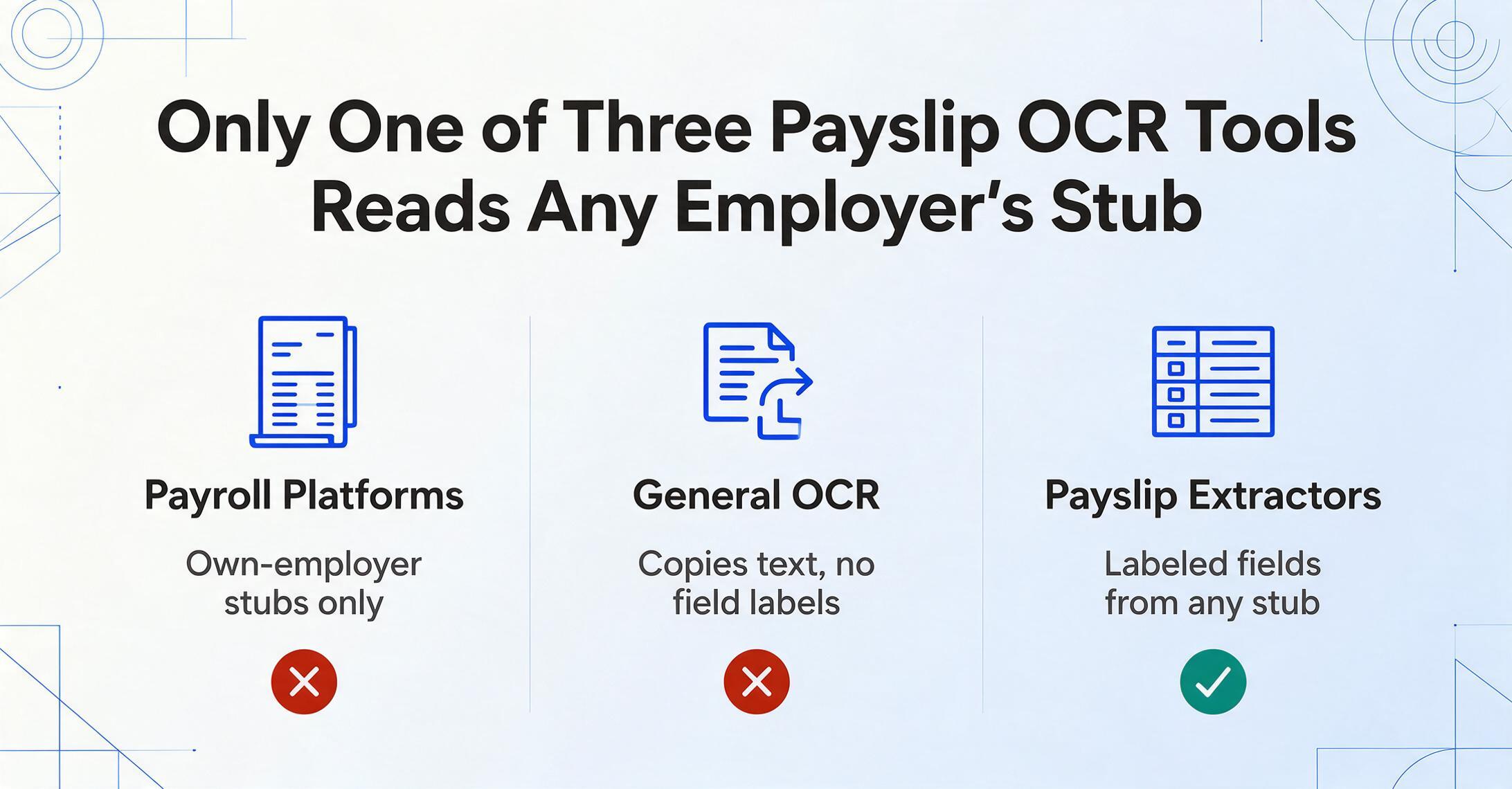
We kept only the tools that genuinely extract payslip data — not the ones that merely appear in payslip searches. That cut is the whole point of this list, because a search for "payslip OCR" surfaces three different things wearing the same label. Payroll-run platforms (ADP, Gusto, Paychex) generate payslips natively but cannot read a payslip issued by a different employer — useless if your job is to ingest stubs from many sources. General OCR (Adobe Acrobat, ABBYY FineReader) copies the text off the page but has no concept of "gross pay" versus "net pay," so you still hand-organize everything afterward. What's left — tools that take an arbitrary payslip and return labeled fields — is a short list of about five, and we reviewed all of them.
For each tool we did three things. First, we pulled the lowest publicly listed price from the vendor's own pricing page, every figure labeled "Pricing checked June 2026" rather than a vague "starting from." Second, we identified each tool's core extraction model — zonal template, GPT/vision-LLM, or developer OCR API — because on payslips specifically, that one choice decides whether a new payroll provider's format breaks your setup. Third, we wrote a plain "best for" and "not ideal for" for every tool, our own included, based on where its price, setup model, and destination honestly fit.
Disclosure
ImageToTable.ai, the tool published on this site, is one of the five tools reviewed below. We've placed it where it honestly fits — template-free, multi-provider payslip batches into a spreadsheet at the lowest per-page cost — and named the tools that beat it for developer-grade capture at scale (Veryfi) and single fixed-layout volume (Docparser). It is not built to run payroll or to verify whether a stub is forged.
Why Payslip Extraction Is Harder Than It Looks
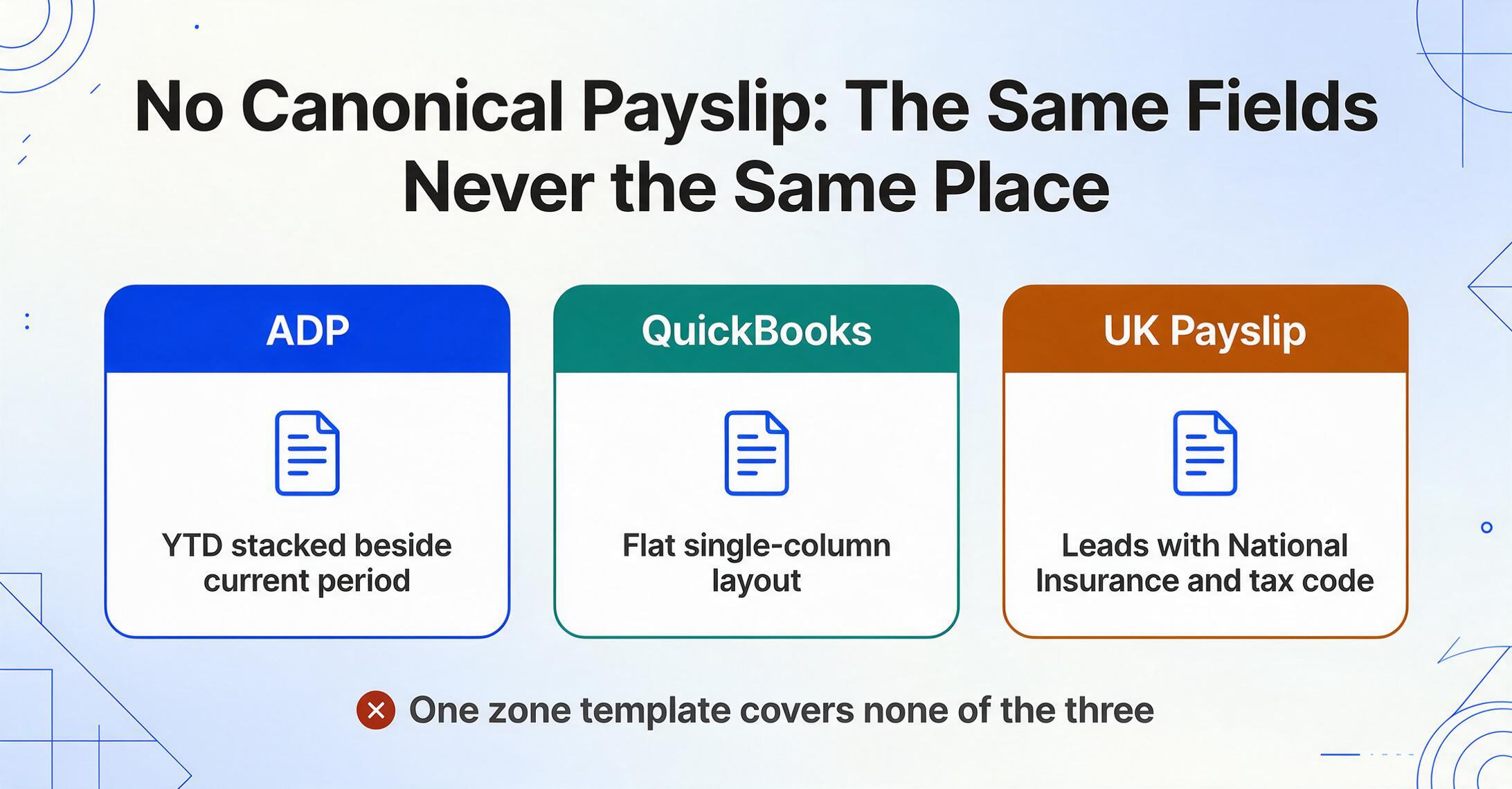
Payslip extraction is hard not because reading text is hard, but because no two payroll systems format a payslip the same way. Every pay stub carries the same core data points — gross pay, net pay (take-home after deductions), the itemized deductions (tax withholdings, social-security or pension contributions, health premiums, garnishments), year-to-date (YTD) totals, the pay period, and the employer and employee identifiers — yet those fields sit in a different place on every provider's template. ADP stacks YTD beside current-period; a small-business stub from QuickBooks lays it out flat; a UK payslip leads with National Insurance and tax code; a French bulletin de paie runs dozens of mandatory lines. There is no canonical payslip, only thousands of near-misses across providers and countries.
That layout variety is exactly what breaks a template-based parser, and it's why the people who need this hit a wall. Two groups need payslip data, for opposite reasons. Lenders, mortgage processors, and landlords read paystubs to verify income — most mortgage lenders require around two years of employment and income history through pay stubs, W-2s, and tax documents, and the IRS even runs a formal channel for it, the Income Verification Express Service (IVES), using Form 4506-C. HR, payroll, and accounting teams read payslips for the inside-out reason: audits, system migrations, reconciliations, and employee record-keeping. Both groups receive stubs from many different employers and payroll systems — which is precisely the case a template can't handle.
That pain shows up in plain language from practitioners. One bookkeeper described inheriting a setup on r/Bookkeeping: "my predecessor had set up a complicated Excel spreadsheet for another employee to enter all employee hours into. The resulting spreadsheet is hand keyed into Paylocity." The hand-keying is the bottleneck — and it gets worse the more payroll formats you touch. This is the one technical distinction the rest of the review turns on:
Template / zonal tools
You map each field to a region of a sample payslip — "net pay lives in this rectangle." It's precise and cheap when every stub comes from one payroll provider whose layout never changes. But the map is layout-specific: feed it a payslip from a different employer and the zones land on the wrong numbers, so you build a new template. Across many employers, template maintenance becomes the job.
Template-free AI extraction
A vision-language model reads the payslip by meaning, not position. You name the fields you want — "Employee, Employer, Gross Pay, Net Pay, Tax Withheld, YTD" — and the AI finds each value wherever it sits, on a payroll layout it has never seen, with no template to build. The trade-off is less pixel-perfect control on one rigidly fixed form, in exchange for handling any provider without setup.
So when a tool claims it "handles any payslip," the question is which side of that line it sits on. A template tool handles any payslip you've already built a template for; a template-free tool handles payslips it has never seen. If every stub you process comes from one employer, the first is fine. If you ingest stubs from dozens of employers — every lender and every multi-source HR team does — "reads any provider's layout without templates" is the single feature that separates a tool that scales from one that becomes a second job. (For the full mechanism — why YTD totals, deduction splits, and multi-provider layouts each test a tool differently — our complete guide to payslip data extraction breaks it down field by field. We also walk through that mechanism on real stubs in our guide to batch payslip extraction for an HR audit.)
The 5 Tools at a Glance
Here is every tool on the same six dimensions. Prices are the lowest publicly available entry point as of June 2026; "transaction-based" means you pay per document with a monthly minimum rather than a flat seat fee.
| Tool | Starting Price | Pricing Model | Best For | Key Limitation | Free Trial? |
|---|---|---|---|---|---|
| ImageToTable.ai | Free tier, then $9/mo | Credit-based (1 credit = 1 page) | Multi-provider payslip batches into a spreadsheet | No payroll run, HRIS posting, or fraud check | Yes — free tier, no sign-up |
| Parseur | Free 20 pages/mo, then ~$39/mo | Flat + volume | Emailed payslips flowing into HR apps | Built around intake + integrations, not ad-hoc batch | Yes — free 20 pages/mo |
| Airparser | $33/mo (annual, 100 credits) | Flat + credits | GPT-style parsing of irregular stubs | No confidence scoring; tiny 30-credit trial | Yes — 30 credits |
| Docparser | $39/mo (Starter) | Flat subscription | One employer's fixed, repeating payslip layout | Zone templates break on a new provider's format | Yes — 14-day + free tier |
| Veryfi | ~$500/mo (OCR API minimum) | Transaction-based | Developers embedding capture into a lending/fintech app | SDK-oriented; high entry price for a back office | Yes — free 100 documents |
Pricing checked June 2026 from each vendor's public pricing page. Transaction-based tools (Veryfi) bill per document, so monthly cost depends on volume. For the broader accountant-and-bookkeeper view across every financial document — not just payslips — see our financial document extraction tools for accountants roundup.
No-Code & Spreadsheet-First Tools
These are the tools a small HR team, a solo bookkeeper, or a lean loan-processing desk should start with: everything runs in a browser, with no model to train and no developer to hire. They became viable for payslips in the last two years because vision-language models read by meaning rather than coordinates, which is what makes template-free extraction possible at $9–$33/month entry points. This is also the band where the template-vs-template-free distinction decides everything, since these tools all sit on the template-free side and the destination — a spreadsheet — is the same.
ImageToTable.ai
A no-code, vision-LLM extraction tool built around Custom Column Extraction: instead of drawing zones on a sample stub, you type the columns you want — "Employee, Employer, Gross Pay, Net Pay, Tax Withheld, YTD Gross" — and the AI locates each value anywhere on the page by understanding what the field means. The names you type become your spreadsheet headers. It is batch-first (drop in 60 payslips from 30 different employers, get one merged Excel file where each stub is a row), supports computed columns (write "Net Check (Gross − Total Deductions)" and the math is verified during extraction, so you catch a stub that doesn't foot), ships a Google Sheets add-on that writes results into the active sheet, and offers a Collection Link — a shareable URL that lets employees or applicants upload their own payslips into your queue without an account.
Best for: HR, accounting, and loan-processing teams pulling payslips from many payroll providers into one spreadsheet — including a derived net-pay check — at the lowest per-page cost. Layout variety across providers is exactly what it's built to absorb.
Not ideal for: Teams that need to run payroll, post into an HRIS, or detect a forged stub. It extracts payslip data extremely well; it doesn't calculate this period's payroll and it isn't a fraud-verification engine.
Pricing (checked June 2026): Free tier (a daily quota, and you can try a single document with no sign-up), then $9/month (Basic), $19/month (Pro), and $59/month (Max); team plans run Growth $149, Scale $399, and Enterprise $899. Billing is credit-based, where one credit equals one page — one of the lowest effective per-page costs in this list. You can turn pay stubs into an Excel sheet or extract payslip data with net pay computed for you without any setup.
Airparser
A GPT-based parser with a vision/LLM engine that handles unstructured, human-formatted documents well, which extends naturally to payslips with irregular layouts. Setup is no-code, it reads scanned and even handwritten input, and it integrates through Zapier and Make for downstream automation.
Best for: No-code users who want GPT-style extraction on variable payslip layouts and don't need per-field confidence scoring or a large test allowance.
Not ideal for: Teams that need confidence scores to flag low-certainty fields for review, heavy multi-line deduction tables, or a generous trial — the free allowance is just 30 credits.
Pricing (checked June 2026): Starter from $33/month (billed annually) for 100 credits, with Growth, Business, and Premium tiers at 500, 2,000, and 5,000 credits; one credit equals one page, and the free trial is 30 non-renewable credits.
Airparser pricing → · Airparser vs ImageToTable, side by side
Email-Intake, Template & Developer Tools
These three tools win on a specific delivery mechanism rather than on raw extraction. The deciding factor isn't whether they read a payslip — they all do — but how the payslips reach them and where the data has to go: an inbox pipeline, one unchanging form, or an embedded software product. Pick by your plumbing, not by accuracy claims.
Parseur
Built around email and PDF intake, with a dedicated payslip parser. Send stubs to a shared inbox (or forward them) and Parseur extracts the standard set — employee name and ID, company, pay period, gross and net, deductions, YTD — then routes the data through 60+ language support and integrations like Zapier and Make into HR tools such as Workday. Its edge is the pipeline, not the click-and-upload experience.
Best for: Recurring payslips that arrive by email and need to flow automatically into a payroll or HR application.
Not ideal for: A team that just wants to drag a folder of mixed-employer stubs into a browser and get one spreadsheet back — Parseur's value is the intake-and-integration layer you'd be setting up around it.
Pricing (checked June 2026): A permanent free tier (20 pages/month), with paid plans from roughly $39/month and volume tiers scaling up from there.
Docparser
One of the longest-running parsers in the market, and fundamentally zone-based: you define rules anchored to keywords and regions to pull values from specific spots on a payslip. For a single employer whose stub never changes shape — the same payroll provider, the same form, period after period — that approach is precise and dependable, and it has an HR-document automation track.
Best for: High-volume processing of one consistent, repeating payslip layout where you can set a template once and trust it.
Not ideal for: Mixed payslips from many employers. When layouts vary, zone templates need maintenance, and a new provider's format means a new template — the exact failure mode the template-vs-template-free split describes.
Pricing (checked June 2026): Free tier (limited pages/month), Starter from $39/month, and Professional at $74/month, with a 14-day free trial.
Veryfi
Built around a mobile-first SDK and OCR API, with dedicated processors for financial documents including a W-2 OCR API. Veryfi's standout is fast, accurate capture from phone-camera photos and a developer-grade API, which makes it the right fit when you're embedding income-document capture inside your own lending or fintech product rather than processing stubs by hand.
Best for: Engineering teams building real-time payslip or W-2 capture into an app, and high-volume programmatic income-document pipelines.
Not ideal for: A small HR or loan-processing team that just wants to upload a batch of PDFs in a browser — Veryfi's developer/SDK orientation and entry price are more than they need.
Pricing (checked June 2026): A free plan covers 100 documents total; the OCR API carries a $500/month minimum on its Starter tier and bills per transaction (roughly $0.08–$0.16 per document), while the separate Expense product runs about $19.99 per active user/month.
How to Choose by Use Case, Volume, and Destination
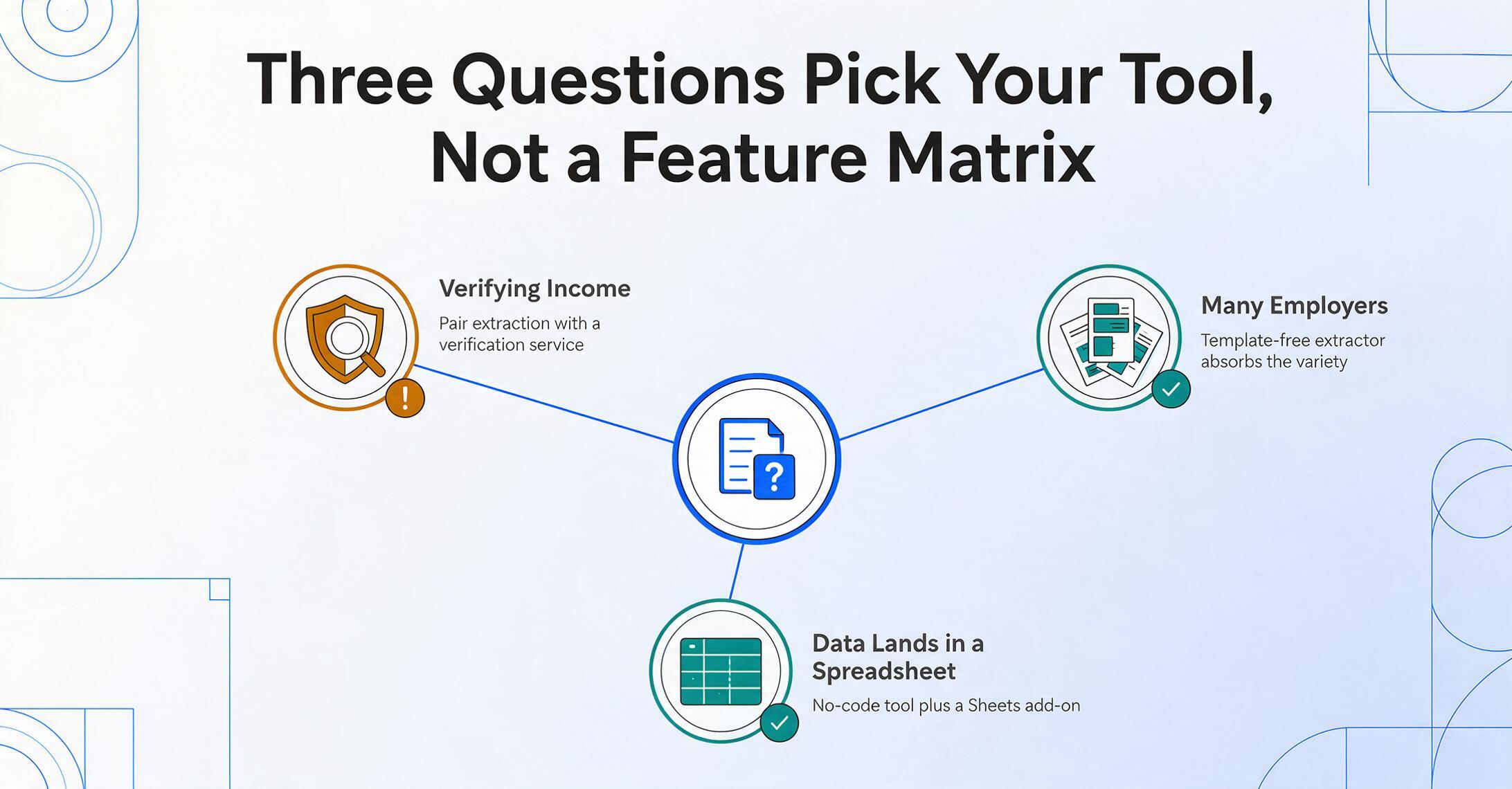
The right payslip tool falls out of three questions, not a feature matrix. Answer them in order and six options collapse to the one or two worth trialing on your own messiest stub.
Are you verifying income or keeping records?
If you're a lender or landlord whose real concern is whether a stub is genuine, note that none of these extraction tools authenticate documents — they read what's printed. For high-stakes lending, pair extraction with a dedicated income-and-employment verification service. If your job is HR/accounting record-keeping — audits, migrations, reconciliations — a template-free extractor (ImageToTable.ai, Airparser) is the right tool, because accuracy of capture, not fraud detection, is the task.
How many payslips, and from how many different employers?
A steady stream from one payroll provider whose layout never changes: Docparser's zone templates are precise and cheap. Stubs from many employers — the norm for lenders and multi-source HR teams: a template-free no-code tool (ImageToTable.ai, Airparser) absorbs the variety without setup. Programmatic capture at app scale: Veryfi's API. Email-driven recurring intake into HR apps: Parseur.
Where does the payslip data go after extraction?
Into a spreadsheet you review and reconcile: a no-code tool is enough, and ImageToTable.ai's Google Sheets add-on removes the export step. Into an HR or payroll app via automation: Parseur's integration layer. Into your own software product: Veryfi's API. If you also need others to send you their stubs, a collection link that gathers employee payslips beats chasing email attachments.
One honest scoping note: if your real need is to run payroll — calculate this period's pay, file taxes, post journal entries — none of these extraction tools do that, and a payroll platform (Gusto, ADP, Paychex) or your accounting system is the right home. These tools get clean payslip data out of documents; they don't compute the payroll that produced them.
Frequently Asked Questions
What is the best pay stub extraction tool in 2026?
There's no single best tool — the right one depends on whether you're verifying income or keeping records, your volume, and where the data lands. For a small or mid-size team extracting payslips from many employers into a spreadsheet, a template-free no-code tool like ImageToTable.ai or Airparser is usually the fastest and cheapest fit. For developers embedding capture into a lending app, Veryfi's API is purpose-built. For email-driven intake into HR software, Parseur fits. For one unchanging employer layout at volume, Docparser's templates work.
Can these tools extract net pay, deductions, and YTD totals — not just the gross?
Yes. Every tool here reads the full payslip field set: gross pay, each deduction line (tax, social security/pension, health, garnishments), net pay, year-to-date totals, pay period, and employer/employee identifiers. The difference shows up on messy multi-line deduction tables and country-specific layouts, where template tools miss fields a new provider introduces. Some tools, like ImageToTable.ai, can also compute a derived check during extraction — for example "Net Check (Gross − Total Deductions)" — so you immediately spot a stub whose math doesn't foot.
Why don't ADP, Gusto, or Paychex show up as extraction tools?
Because they generate payslips, they don't read them. ADP, Gusto, and Paychex are payroll-run platforms — they produce your own employees' stubs natively, so there's nothing to OCR for documents they issued. The moment you need to extract data from a payslip issued by a different employer — which is the whole job for a lender or an HR team consolidating records from many sources — those platforms can't help, and you need an extraction tool from this list.
Can a payslip extraction tool tell if a pay stub is fake?
No — extraction and fraud verification are different jobs. The tools in this roundup read what's printed on the page accurately; they don't confirm the document is authentic. That distinction matters because forged paystubs are a growing problem: income and employment misrepresentation made up 45% of auto-lending fraud exposure in 2026, with fraudsters now generating synthetic stubs. For high-stakes lending, run extraction for the data and a dedicated income/employment verification service for authenticity — don't ask one tool to do both.
Is there really only a handful of dedicated payslip tools?
Yes, and that's worth knowing before you spend a week searching. The genuine payslip-extraction field is roughly five tools — the ones reviewed here. Most "best payslip OCR" lists look longer only because they mix in payroll-run platforms that issue stubs and general OCR that copies text without understanding fields. Once you filter for tools that take an arbitrary payslip and return labeled data, the real shortlist is short.
Is ImageToTable.ai included here because it's your product?
Yes — and we've said so plainly. ImageToTable.ai is published by the same team that wrote this article, and it's reviewed alongside four other tools on the same six dimensions. We placed it where it honestly fits — template-free, multi-provider payslip batches into a spreadsheet at the lowest per-page cost — and named the tools that beat it for developer-grade capture (Veryfi) and single fixed-layout volume (Docparser).
The Bottom Line
The hardest part of payslip extraction was never reading the numbers — it's that no two payroll systems format a stub the same way, and the people who need this data receive it from dozens of different employers. That single fact reorders the whole (small) market: a tool's price tells you less than which side of the template line it sits on, and whether it can absorb provider variety without turning template maintenance into a job. A $9/month template-free browser tool and a $500/month developer API read a payslip with comparable intelligence; what differs is how the document reaches the tool and where the data goes afterward.
So shortlist by your situation, not by a ranking. First decide whether you're verifying income (pair extraction with a real verification service) or keeping records (extraction alone is the job). Then test your two finalists on your least cooperative stub — the scanned one, the foreign payroll layout, the one with eight deduction lines. Five minutes on your own worst payslip tells you more than any comparison table, including this one.
Disclosure: This article is published by ImageToTable.ai, which is one of the five tools reviewed above. All competitor pricing was checked against public pricing pages in June 2026; transaction-based prices vary with volume. We aim to describe every tool — including our own — accurately, and we welcome corrections.