Best Bank Statement & Financial Data Extraction
Tools in 2026
Invoice extraction is a solved problem for most tools — pick out a vendor name, an amount, a date. Discrete fields, one page. A bank statement is a different beast. It is a multi-page transaction table where every row depends on the row above it: a running balance that must stay consistent from the opening figure on page one to the closing total on page twelve. If the tool loses one transaction or shifts a column by one row, the whole statement no longer reconciles. That is why generic OCR — which reads characters, not context — produces spreadsheets that look complete but fail the most basic accounting test: does opening balance + credits − debits = closing balance?
Key Takeaways
- Every one of these seven tools leads with an accuracy percentage — and that number is the one thing that won't tell you whether your statement actually reconciles.
- A twelve-page statement can be 99% accurate and still be useless — miss a single transaction row and every running balance below it is silently wrong.
- The only metric worth comparing is whether the tool checks opening + credits − debits = closing before the data ever leaves — reconciliation built into extraction, not bolted on after.
Why Bank Statements Break Generic OCR — and What to Look for Instead
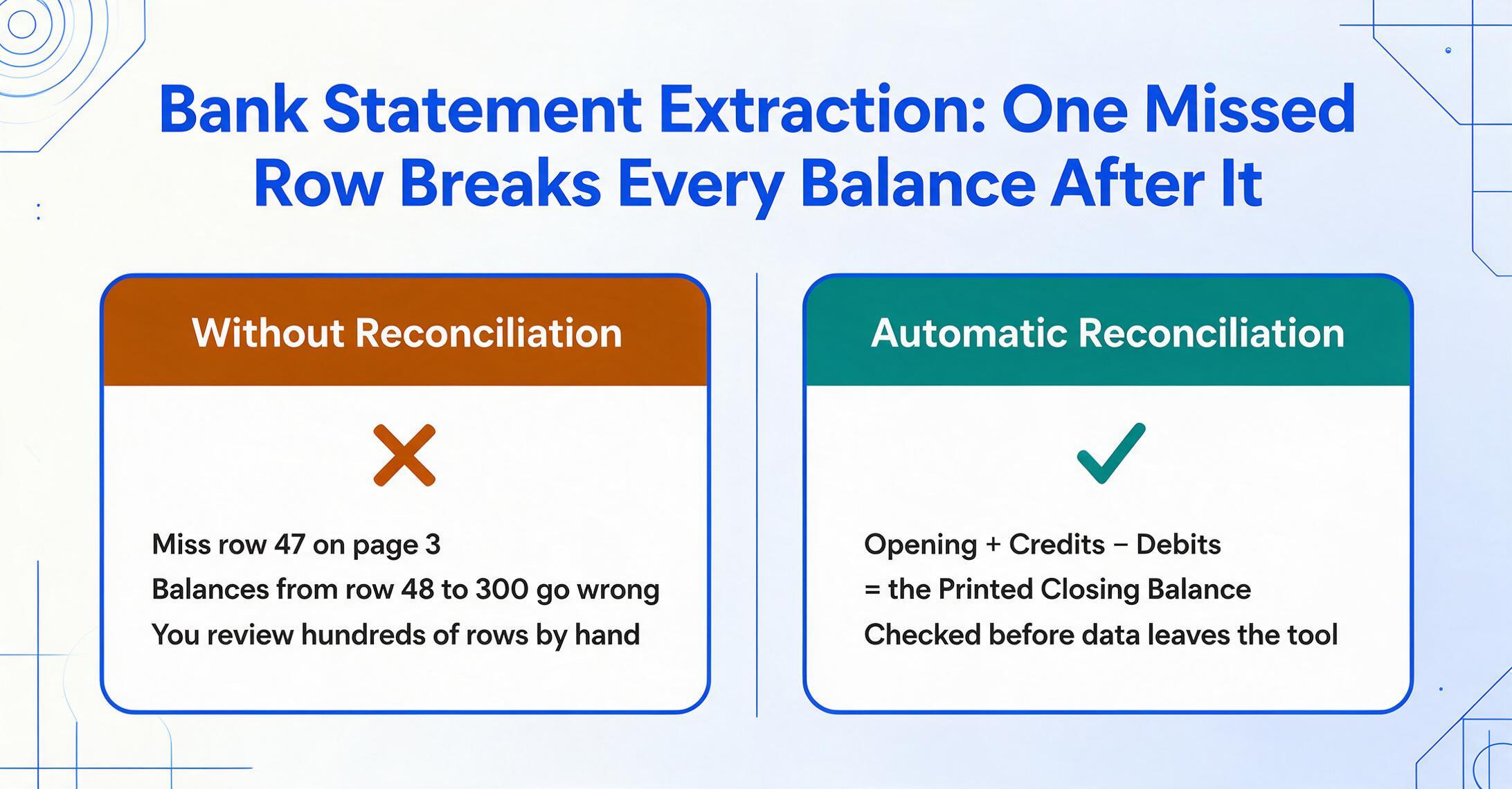
Most document extraction tools were built for invoices. An invoice has a header block (vendor, date, total) and line items. Header extraction is hard to get wrong. The output schema is consistent: one row per line item, one invoice per row. But a bank statement has no header block. It has a transaction table that can span 30 pages, and every row carries a running balance calculated from the previous row. If the tool misses row 47 on page 3, every balance figure from row 48 to row 300 is now wrong. If you handle table-heavy documents beyond bank statements too, our table and form extraction tools guide covers the general structural problem this section describes.
For a deeper dive into the technical mechanics of bank statement data extraction — including how to set up a bank statement to Excel pipeline that works across formats — see our step-by-step extraction guide. The short version: the single most important quality signal for a bank statement extraction tool is not a marketing percentage on its homepage. It is whether the tool performs automatic reconciliation — checking that the sum of extracted credits minus debits, added to the opening balance, equals the printed closing balance — before the data leaves the tool. If a tool does not do this, the burden shifts to you: your team reviews hundreds of transaction rows one by one, which defeats the purpose of automation.
The global banking industry is standardizing around ISO 20022 camt.053 (the BankToCustomerStatement message format) and its predecessor SWIFT MT940. These standards define the exact XML schema for digital bank statements — structured fields for opening balance, closing balance, transaction credit/debit indicators, and statement-level totals. But the majority of small-business and consumer statements still arrive as PDFs, not structured XML. The extraction tool's job is to reconstruct the structured data that the PDF rendering destroyed. The best tools cross-reference the reconstructed data against the statement's own totals, the same way a bank's internal system would validate a camt.053 message before publishing it.
A real-world measure of the problem: one CPA interviewed by Flowboost reported spending 20 to 25 hours per month manually processing bank statement PDFs across just 20 clients. On Reddit, a thread titled "Are we the only firm still manually inputting bank statements from PDFs?" drew 93 upvotes and 83 comments from accountants describing the same grind. One commenter summarized the workflow: "download the PDF, open Excel, type every line, hope the running balance ties at the end. If it doesn't, spend another hour finding the missing transaction." That is not a problem accuracy claims alone solve — it is a reconciliation problem that only automated validation fixes.
How We Evaluated These Tools
We looked at seven bank statement extraction tools across five dimensions that matter in daily accounting practice, not just on a demo call. Each tool was assessed on:
- Reconciliation capability: Does the tool verify that extracted transaction totals match the statement's printed opening and closing balances? Is this check automatic, or does it require manual review?
- Bank format coverage: Does the tool handle the banks your clients actually use — including credit unions, international institutions, and older scanned statements — or just the top 5 US banks?
- Output destinations: Can the data go directly into QuickBooks Online, Xero, or Sage? Or does every statement stop at Excel, requiring a second import step?
- Setup effort: Do you need to build templates per bank format, train a model, or write parsing rules? Or does the tool work on the first statement you upload with zero configuration?
- Pricing transparency and predictability: Is the pricing published, per-page or per-document, and does it scale linearly with volume — or do you need a sales call to get a quote?
We tested each tool on a mix of digital and scanned bank statement PDFs from major US banks (Chase, Bank of America, Wells Fargo), a regional credit union, and an international bank (Deutsche Bank). The goal was to see how each tool handled format variety, multi-page statements, and transaction tables with running balances — the real-world mix that lands in an accountant's inbox.
Disclosure: ImageToTable.ai is one of the tools reviewed in this article. We have written each review to be honest about strengths and limitations, including our own. No tool in this list paid for placement, and no affiliate commissions influence the rankings.
Bank Statement Extraction Tools Compared (2026)
Pricing checked June 2026. All prices are the lowest paid monthly tier with publicly listed pricing.
| Tool | Starting Price | Pricing Model | Best For | Key Limitation | Free Trial? |
|---|---|---|---|---|---|
| DocuClipper | $39/mo | Per-page, tiered | Accounting firms needing direct QuickBooks/Xero push | No mobile app; per-page costs add up on long statements | 14-day, 120 pages |
| Nanonets | ~$499/mo | Per-page, tiered | Enterprise teams with 5,000+ pages/month | High entry price; requires model training for custom formats | Free tier, 500 pages |
| Docparser | $39/mo | Per-document, tiered | Teams with stable, repeatable bank layouts | Template-based; new bank formats require new parsing rules | 14-day trial |
| Parseur | $39/mo | Per-page, tiered | Email-heavy bank statement workflows | Limited multi-layout support on lower tiers | Free tier, 20 pages/mo |
| Airparser | $33/mo | Per-credit, tiered | GPT-powered extraction for varied statement formats | No native accounting integrations; accuracy varies by doc type | 30 credits trial |
| Affinda | ~$67/mo (annual) | Per-parse, annual | Multi-document-type financial processing | Bank statement extraction less mature than resume/invoice; annual commitment | 14-day trial |
| ImageToTable.ai | Free tier + paid | Per-use, tiered | Template-free batch processing with computed columns | No direct QuickBooks/Xero integration; spreadsheet-native only | Free tier available |
Pricing checked June 2026. Entry-tier monthly pricing shown; higher-volume plans available for all tools. Consult each vendor's pricing page for current rates.
DocuClipper — Best for Accounting Firms & Bookkeepers
DocuClipper is the most frequently cited bank statement extraction tool in this market — and for good reason. It is one of the few tools purpose-built for financial document extraction from day one, not a general-purpose parser that added bank statement support later. Read our full DocuClipper comparison →
What it does well: DocuClipper extracts transactions from any bank's PDF — digital or scanned — and performs automatic reconciliation before export. The tool verifies that opening balance + deposits − withdrawals = closing balance, flagging discrepancies for review. It exports directly to QuickBooks Online, QuickBooks Desktop, Xero, Sage, Excel, and CSV. The platform includes transaction categorization, cash flow analysis, and fraud detection on higher-tier plans. It is trusted by 10,000+ firms including Baker Tilly, BDO, and Sikich.
Where it comes up short: There is no mobile app for camera-based capture — this is a desktop/cloud workflow. Page-based pricing means a 15-page statement from one client consumes 15 pages from your monthly allocation, which adds up for firms processing full-year statement runs. The $39/mo entry tier includes only 200 pages.
Pricing: Starter $39/mo (200 pages), Professional $74/mo (500 pages), Business $159/mo (2,000 pages). 14-day trial with 120 pages included.
Best for: Accounting firms and bookkeepers processing client statements monthly, who need the output to go directly into QuickBooks or Xero without a spreadsheet middle step. Not ideal for: Solo users with occasional, low-volume needs who cannot justify the monthly minimum.
Nanonets — Best for Enterprise-Scale Bank Statement Processing
Nanonets is an AI-powered document processing platform built for organizations processing thousands of documents per month across multiple document types. Its bank statement extraction capabilities sit inside a broader IDP platform with API-first architecture and enterprise integrations. Read our full Nanonets comparison →
What it does well: Nanonets handles structured and unstructured documents with high accuracy, supports custom model training for specialized bank formats, and offers API integration for automated pipelines. It connects to SAP, Xero, Sage, NetSuite, and QuickBooks, and can process thousands of documents per hour. The platform includes validation rules and error correction capabilities, and it handles handwritten text and low-quality scanned documents that trip up lighter tools.
Where it comes up short: The $499/month entry point puts it out of reach for small firms and solo bookkeepers. Custom use cases require initial model training — you cannot simply upload a new bank format and get results instantly the way template-free tools allow. Pricing is complex: block-based credits with separate charges for extraction, formatting, and lookups, making costs hard to predict.
Pricing: Pro plan ~$499/month for 5,000 pages. Enterprise pricing available. Free tier includes ~500 pages total.
Best for: Mid-market to enterprise finance teams processing high volumes of bank statements alongside invoices and other financial documents, with the technical resources to manage API integrations. Not ideal for: Small accounting practices or individuals — the pricing and setup overhead are disproportionate to low-volume needs.
Docparser — Best for Template-Based Bank Statement Workflows
Docparser is a mature, rule-based document parsing tool that extracts data from PDFs using user-defined parsing templates. It is the oldest product in this category (established 2013) and has a well-tested template engine for consistent document layouts. Read our full Docparser comparison →
What it does well: For bank statements from the same institution arriving in the same format every month, Docparser's template engine is reliable and predictable. Once you create a parsing rule for a specific bank layout, subsequent statements process automatically with no variation. It supports PDF, Word, and image formats, and exports to CSV, Excel, JSON, XML, and Google Sheets. The platform integrates with cloud storage and supports webhook and Zapier delivery.
Where it comes up short: Template maintenance is the hidden cost. If you process statements from 15 different banks, you need 15 separate parsing templates. When a bank updates its statement layout — which happens more often than you might expect — the template breaks and needs reconfiguration. For firms with diverse client banks, this maintenance burden can erase the time savings. Docparser also lacks built-in reconciliation checking; you verify the output yourself.
Pricing: Starter $39/mo (100 documents), Professional $74/mo (250 documents), Business $159/mo (1,000 documents). 14-day free trial.
Best for: Operations teams processing bank statements from a known, small set of institutions with stable formats, who prefer deterministic rule-based extraction over AI. Not ideal for: Firms with clients across dozens of banks and credit unions — the template maintenance per format becomes unmanageable.
Parseur — Best for No-Code Email-to-Excel Bank Statement Parsing
Parseur is a no-code document processing platform with strong email ingestion capabilities. It is designed for non-technical users who want to start extracting data without configuring models or writing parsing rules. Read our full Parseur comparison →
What it does well: Parseur's pre-trained AI models for bank statements work out of the box — upload a PDF and the tool identifies and extracts transactions, dates, descriptions, and amounts automatically. The email parsing workflow is a standout: you can set up a dedicated Parseur email address, forward bank statement PDFs to it, and have the extraction happen automatically on arrival. It connects to 6,000+ apps via Zapier and Make, and exports to Excel, CSV, JSON, and Google Sheets. The perpetual free tier (20 pages/month) makes evaluation genuinely no-risk.
Where it comes up short: Multi-layout support — handling statements from widely varying bank formats within the same workflow — is limited on lower-tier plans. Parseur is primarily an email-first tool; if your bank statements arrive via client portals, shared drives, or upload links, the email-forwarding workflow adds a step rather than removing one.
Pricing: $39/mo (100 pages, annual billing), $99/mo (1,000 pages), $399/mo (10,000 pages). Free tier: 20 pages/month permanently.
Best for: Small businesses and solo practitioners who receive bank statements by email and want extraction to start automatically without any setup. Not ideal for: Firms needing direct QuickBooks/Xero integration without Zapier as middleware, or high-volume processors who would hit the free tier limit quickly.
Airparser — Best for GPT-Powered Flexible Bank Statement Extraction
Airparser takes a different technical approach: instead of pre-trained models for specific document types, it uses GPT-based LLM extraction where you describe what you want in plain English. This makes it highly flexible — but with trade-offs in consistency for financial documents.
What it does well: The natural-language schema setup is genuinely fast. You type "extract the date, description, debit amount, credit amount, and running balance from each transaction row" and Airparser attempts to find those fields. It handles PDFs, images, Word documents, emails, and spreadsheets, and supports OCR for scanned documents. The GPT-based engine adapts to format changes without template updates — a real advantage over rule-based tools when bank layouts shift unexpectedly.
Where it comes up short: Accuracy varies by document type and complexity. GPT extraction on multi-page bank statements can produce inconsistent results across pages — a transaction table spanning 10 pages may have different column interpretations on page 7 than on page 2. Airparser lacks native accounting software integrations; output is CSV, Excel, or JSON that requires a separate import step. There are no reconciliation checks, so you must verify the output manually.
Pricing: Starter $33/mo (100 credits, annual), Growth $49/mo (500 credits), Business $149/mo (2,000 credits). 30-credit free trial. One credit = one PDF page, image, or email.
Best for: Users who process statements from many different, unpredictable formats and need an extraction tool flexible enough to adapt without per-format configuration. Not ideal for: Production accounting workflows where extraction consistency and direct accounting software integration are non-negotiable.
Affinda — Best for Multi-Document-Type Financial Extraction
Affinda is an AI document processing platform best known for resume parsing, but it also offers extraction models for account statements, financial statements, invoices, and contracts. Its strength is processing diverse document types in a single platform rather than deep specialization in any one.
What it does well: Affinda's pre-built account statement model extracts transaction-level data from bank and credit card statements, and the platform supports natural-language validation rules — for example, "flag any transaction over $5,000 for review." The human-in-the-loop review interface lets you verify low-confidence extractions before data enters your downstream systems. Affinda is SOC 2 Type II and ISO 27001 certified, which matters for firms with compliance requirements.
Where it comes up short: Bank statement extraction is not Affinda's primary strength — the platform invests more deeply in resume parsing, invoice processing, and ID document extraction. The annual pricing model ($800/year minimum) locks you into a commitment before you have fully evaluated the bank statement extraction quality. There is no QuickBooks or Xero integration natively; output is via API, CSV, or Excel. The async API model adds latency compared to synchronous extraction tools.
Pricing: ~$800/year (6,000 parses, billed annually), scaling to $18,000/year (780,000 parses). 14-day free trial.
Best for: Organizations processing bank statements alongside resumes, contracts, and ID documents who want a single extraction platform for all document types. Not ideal for: Accounting firms that need bank-statement-specific features like reconciliation checking and direct QuickBooks push.
ImageToTable.ai — Best for Template-Free, Batch Bank Statements with Computed Columns
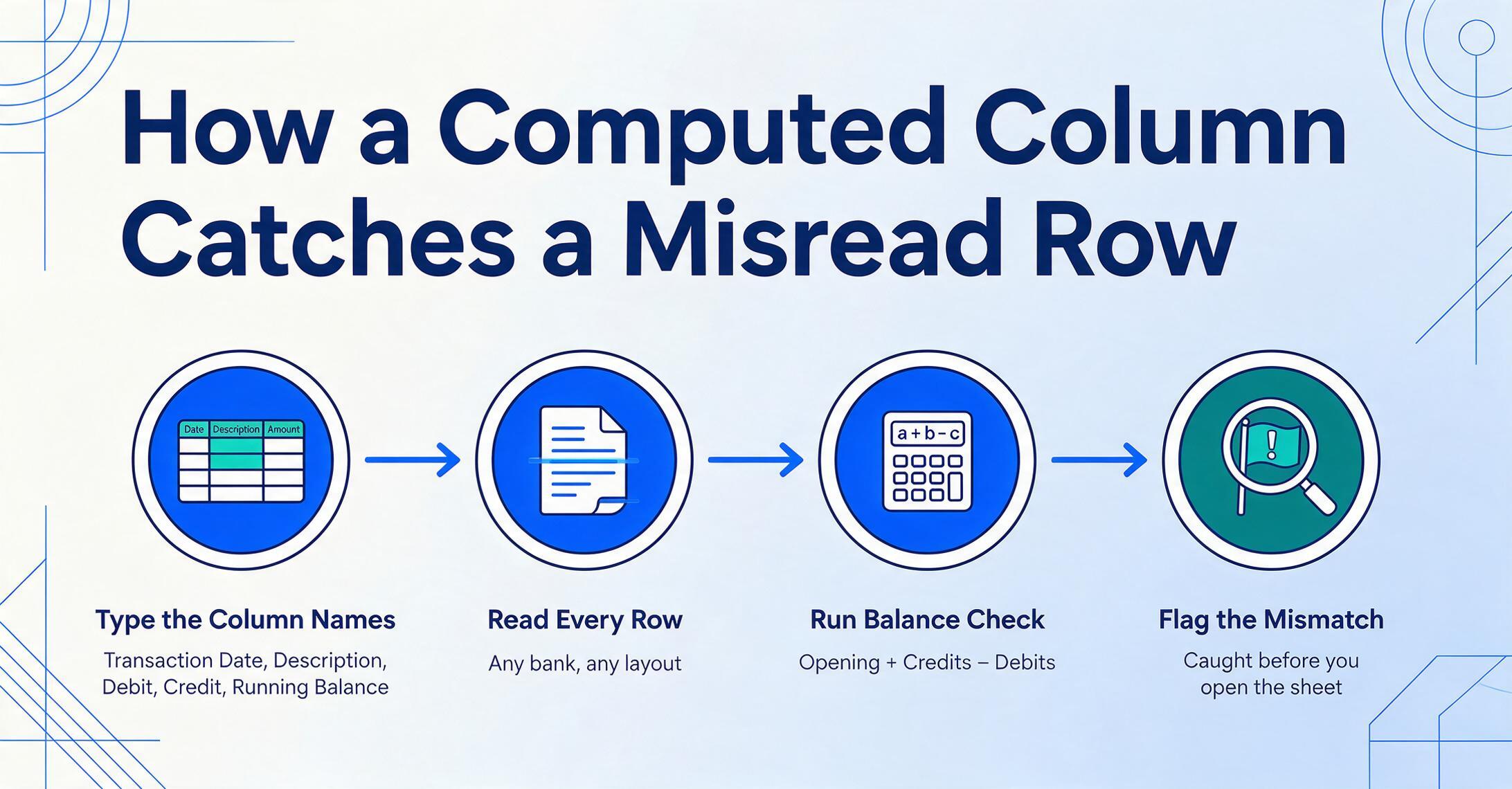
ImageToTable.ai takes a fundamentally different approach to bank statement extraction. Instead of requiring pre-trained models, parsing templates, or training datasets, it uses Custom Column Extraction: you type the column names you want — "Transaction Date," "Description," "Debit," "Credit," "Running Balance" — and the AI locates each field anywhere on the document by understanding what it means, not where it sits. This is Semantic-Based Extraction rather than Position-Based Extraction: the document's layout is irrelevant.
What it does well: The template-free approach handles statements from any bank — major, regional, credit union, international — without per-format configuration. Batch processing is built into the core workflow: upload 12 months of statements from multiple accounts, and the tool merges all extracted transactions into one unified Excel spreadsheet with consistent column headers.
The Computed Columns feature is uniquely useful for bank statement work. You can define a column that runs a reconciliation check during extraction — for example, a column named Balance Check (Opening + Credits - Debits) that calculates whether each row's running balance is consistent with the row above it. If a transaction is misread, the computed column catches it before you ever open the spreadsheet. Other useful computed columns for bank statements include Transaction Type (Debit or Credit) for statements that use a single amount column, or Reconciled? that outputs "Yes" when the extracted closing balance matches the printed closing balance — a single-cell signal that tells you whether the extraction is trustworthy. You can also define inferred columns like Category (options: Payroll/Supplies/Utilities/Rent/Other) to auto-classify transactions by description — extraction and categorization in one pass.
The Collection Link feature generates a shareable upload page — send it to clients who need to send you their bank statement PDFs, and their files land directly in your processing queue without them needing an account.
Where it comes up short: ImageToTable.ai does not have direct QuickBooks, Xero, or Sage integration. The output is Excel, CSV, or JSON — you will need to import it into your accounting software as a separate step. It is also not purpose-built exclusively for financial documents; it handles any document type, which means it lacks the specialized fraud detection, cash flow analysis, and bank-format-specific heuristics that DocuClipper has built over years of financial-document-specific development. If your primary need is a dedicated bank statement → QuickBooks pipeline with categorization and analysis built in, purpose-built tools are a better fit.
Pricing: Free tier available with paid plans for higher volumes. No per-bank-template fees — the template-free model means one plan covers any number of bank formats.
Best for: Accountants, bookkeepers, and small business owners processing bank statements from many different banks who want template-free extraction, batch merging, and computed column reconciliation in a single spreadsheet-native workflow. The Collection Link feature makes it particularly strong for firms that gather statements from multiple clients. Not ideal for: Teams that need direct QuickBooks/Xero push without a manual import step, or firms that require bank-specific fraud detection and cash flow analytics built into the extraction tool.
How to Choose: By Team Size, Volume & Accounting Stack
Every tool on this list can extract data from a bank statement PDF. The differences that matter show up at month-end, when you have 30 statements from 20 different banks and the output needs to be in QuickBooks by Wednesday. For a detailed walkthrough of one reconciliation pipeline, read our guide on building a bank reconciliation workflow in Google Sheets — it covers the end-to-end process from extraction to verified ledger.
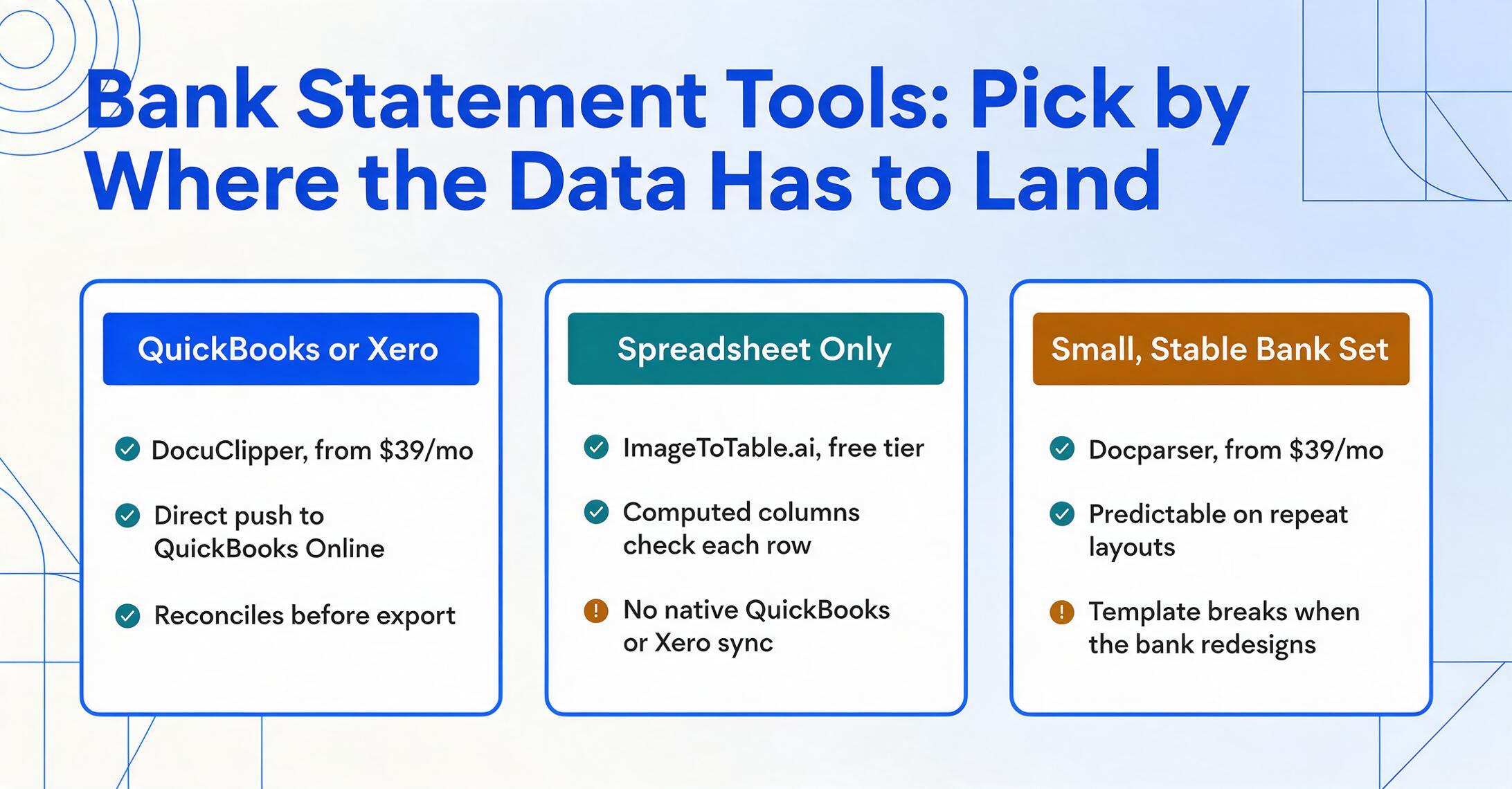
If your end destination is QuickBooks Online or Xero: DocuClipper is the strongest fit — direct push, reconciliation checking, and a workflow tuned for accountants. Nanonets works at enterprise scale but the price gap is dramatic.
If you work entirely in spreadsheets: ImageToTable.ai is the standalone spreadsheet-native option, with computed columns for automatic reconciliation checks during extraction and the Collection Link feature for client file gathering.
If you have a small, known set of banks with stable formats: Docparser's template engine delivers predictable, repeatable results — as long as the layout doesn't change.
If your statements arrive by email in unpredictable formats: Parseur's email ingestion + pre-trained AI is the fastest zero-setup option. Airparser's GPT-based approach handles format variety better but with less consistency on multi-page transaction tables.
If you process diverse document types beyond bank statements: Affinda and Nanonets are the multi-document-type platforms. Affinda is the more accessible option; Nanonets the enterprise-grade choice.
If you are price-sensitive and process fewer than 100 pages per month: ImageToTable.ai's free tier is the lowest-barrier option, and Parseur's perpetual free tier (20 pages/mo) is the only truly free ongoing option.
Frequently Asked Questions
How accurate are bank statement extraction tools in 2026?
Modern tools achieve 99%+ field-level accuracy on clean digital PDFs from major banks. Scanned and photographed statements typically run 95–98%. The accuracy number that actually matters is not on a vendor's homepage — it is whether the tool performs automated reconciliation (opening balance + credits − debits = closing balance) before export. A tool that claims 99.9% accuracy but does not reconcile is less trustworthy than one that claims 97% but flags every statement where totals do not match.
Can these tools handle scanned or image-based bank statement PDFs?
Yes — but not equally. DocuClipper, Nanonets, Parseur, and Airparser all support OCR for scanned PDFs. Docparser supports scanned PDFs on higher-tier plans. ImageToTable.ai handles both digital and scanned PDFs natively. Scan quality matters significantly: 300 DPI or higher produces the best results. Faded ink, skewed pages, or low-contrast scans will reduce accuracy on any tool.
Do any of these tools integrate directly with QuickBooks?
DocuClipper pushes directly to QuickBooks Online and QuickBooks Desktop. Nanonets connects to QuickBooks, Xero, Sage, and SAP via its API and connectors. Docparser and Parseur can reach QuickBooks through Zapier or Make automation — this works but adds middleware. Airparser, Affinda, and ImageToTable.ai output to Excel/CSV, requiring a separate import step.
What is the difference between a bank statement converter and a bank statement extraction tool?
A converter focuses on format transformation: PDF → CSV/Excel, with the output being a digital copy of what was on the page. An extraction tool adds intelligence: it identifies which rows are transactions (not headers or footers), separates debits from credits, preserves running balance continuity across pages, and often validates totals against the statement's printed balances. If you just need a PDF turned into a spreadsheet — any spreadsheet — a converter is sufficient. If you need the output to be accounting-ready without manual row-by-row cleanup, you need an extraction tool. (For the underlying mechanics, see our primer on what bank statement extraction is.)
Can I use ChatGPT or Claude to extract bank statement data?
You can — and many people do, as evidenced by multiple Reddit threads in r/Bookkeeping and r/Accounting. General-purpose LLMs can read a single page of a bank statement and produce a reasonable extraction. The limitations show up at scale: multi-page statements require manual stitching, there is no batch processing, no reconciliation validation, and each extraction is a separate prompt session with no persistent workflow. For a one-off task — "I have one 3-page statement I need in Excel today" — ChatGPT or Claude works. For monthly recurring bookkeeping across multiple clients, purpose-built extraction tools are faster, more consistent, and cheaper per statement than API-based LLM calls. There is also the data security question: general-purpose LLM providers may use uploaded content for training, while document extraction tools typically have contractual commitments not to train on customer data.
Are free bank statement converters reliable?
Free converters like Tabula, BankStatementLab (500 free docs/month), and bankstatementconverter.com (1 page/day anonymous) work for simple, clean digital PDFs from common banks. Their limitations are consistent: no reconciliation, no scanned PDF support (except BankStatementLab), no batch processing, and manual cleanup required before the data is usable in accounting software. For occasional personal use they are adequate. For professional bookkeeping where accuracy and time matter, paid tools repay their cost in reduced cleanup time within the first month. As one Reddit commenter in r/Bookkeeping put it: "I'd rather pay $39/month and review clean data than save $39 and spend 5 hours fixing misaligned columns."