Best Google Sheets Document Extraction
Add‑Ons & Integrations (2026)
More than 900 million people use Google Sheets every month. Yet when someone in r/googlesheets asks how to get data from a PDF into their spreadsheet, the accepted answer is still "copy the data manually from the PDF into Sheets." A Reddit user titled their post "Manual Data Entry is the New Form of Torture" and asked a simple question: "Is there a way I can just upload a doc or an image and get a neat Excel file?" It's 2026, and the gap between OCR a document and get its data into the cell you're working in is still a real, daily friction point. The tools exist — but they don't all work the same way, and the integration model you pick determines how many steps stand between your document and your spreadsheet.
Key Takeaways
- Six tools all promise to integrate with Google Sheets, and that single phrase hides whether your data shows up in 10 seconds or 15 minutes.
- The number everyone obsesses over is extraction accuracy, but what actually changes your workday is how many platforms sit between the document and the cell.
- Ask one question instead — does the data land in one hop or after a Zapier handshake — and only one tool in this roundup can honestly say one hop.
Google Sheets Is Where the Data Lives — But Documents Still Don't Talk to It
Google Sheets isn't just a spreadsheet app. For 68% of freelancers, it's their accounting system. For AP teams in companies without an ERP, it's the invoice tracker. For field service companies, it's the job-log database. An estimated 87% of Sheets users collaborate on spreadsheets weekly, and the Google Workspace Marketplace now lists over 5,000 apps. The platform has the scale, the collaboration features, and the flexibility to be a lightweight operational backbone.
But none of that matters if document data still arrives by hand.
The data inside a PDF, a scanned form, a photographed receipt, or an emailed invoice is already digital — just not structurally digital. A scanned invoice is a grid of pixels. Getting it into Sheet rows as "Vendor | Date | Amount | Invoice #" means someone — or something — has to bridge that gap. The question this article answers: what's the shortest, most reliable path from document to spreadsheet cell, and which tool builds the best bridge for different kinds of work?
This isn't a generic "best document extraction tools" list. The tools below are evaluated specifically on how they connect to Google Sheets — because the integration model matters more than the extraction engine when your workflow already lives inside a spreadsheet. For broader tool comparisons, see our roundups on the best document data extraction tools and best AI OCR software.
Three Ways Document Data Reaches Google Sheets — A Framework
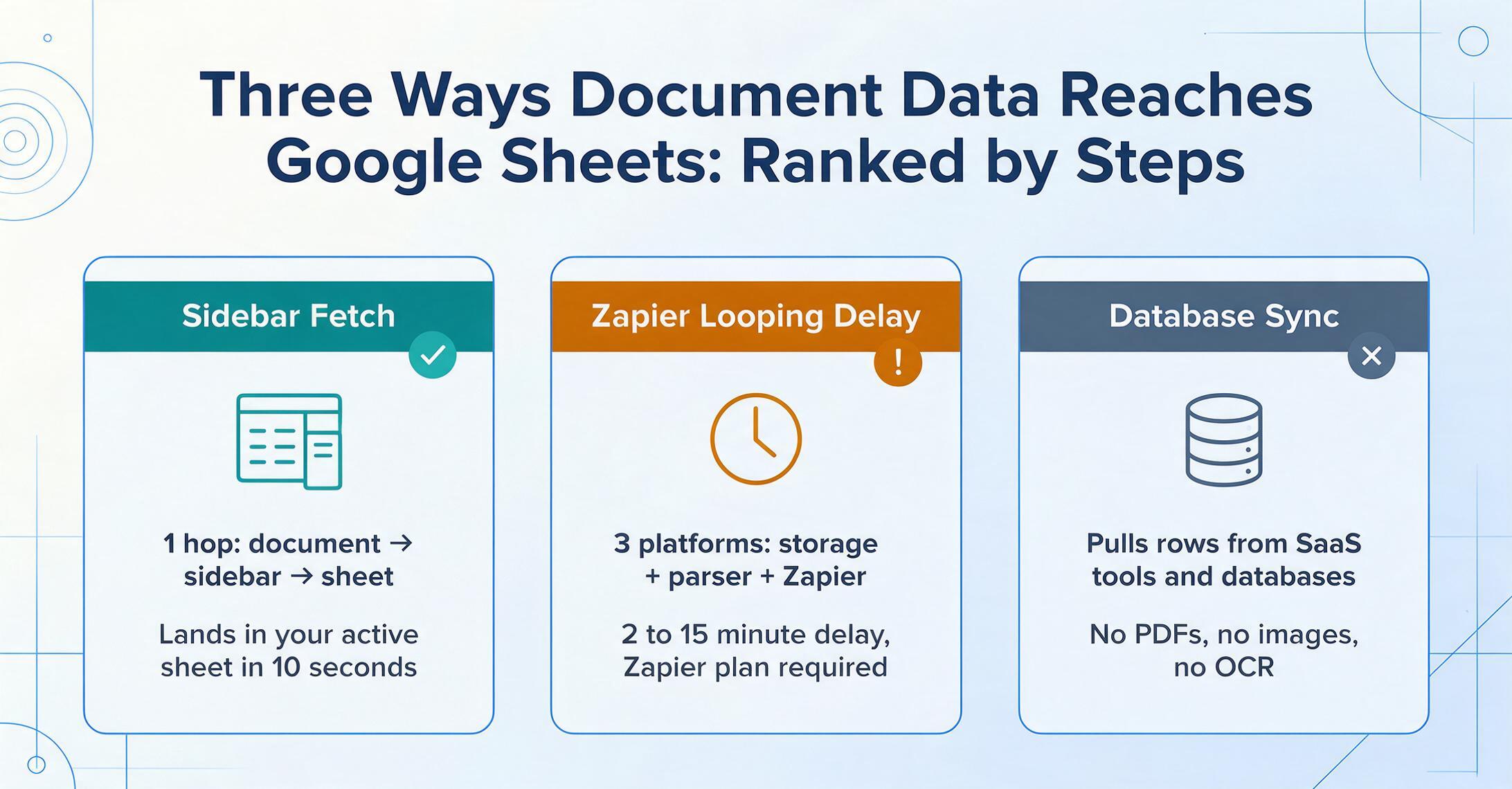
Before comparing tools, you need to understand the three integration models that exist. A cold reader searching for "how to get PDF data into Google Sheets" may not realize that "a Google Sheets add-on" and "a tool that can send data to Google Sheets via Zapier" are fundamentally different things — with different latency, different failure modes, and different complexity. Here they are, from fewest steps to most steps between document and cell:
The extraction engine runs inside Google Sheets as a sidebar panel. You upload a document, define your columns, and extracted data appends directly to the active sheet — no tab switching, no export files, no intermediate service. The workflow is: open sidebar → upload → extract → data lands in cells. One tool in this roundup works this way: ImageToTable.ai.
The extraction happens on a separate platform (Docparser, Parseur, etc.). When extraction completes, the structured data is pushed to Google Sheets via Zapier, Make, or a webhook. This adds a Zapier hop — typically a few seconds to a few minutes of delay, plus the cost of a Zapier plan if you exceed the free tier (100 tasks/month). The workflow is: upload to extraction platform → parse → Zapier triggers → new row in Sheets. Docparser and Parseur fit this model.
These tools connect structured data sources (Salesforce, databases, SaaS tools) into Google Sheets on a schedule. They're not document extraction platforms — they don't OCR images or parse PDFs. But if your data already lives in a structured system and you need it live in Sheets, they're the fastest path. Coefficient is the prime example. Parabola bridges this and the pipeline model, with an AI extraction step available inside a visual flow builder.
That's the end of the three integration models. Each has a different latency, different failure modes, and different complexity. Now let's look at the actual tools.
The integration model you choose determines not just the tool, but the entire rhythm of your work. A native add-on means data appears in your sheet in seconds, while you stay in the same tab. A Zapier bridge means it appears in minutes, after two platforms shake hands. A scheduled connector means it appears on a timer — great for dashboards, wrong for processing the invoice that just landed in your inbox.
The Tools — At a Glance
Before diving into each tool, here's the comparison table. Pricing checked June 2026. All tools offer some form of free tier or trial.
| Tool | Starting Price | Pricing Model | Integration to Sheets | Best For | Key Limitation | Free Tier? |
|---|---|---|---|---|---|---|
| ImageToTable.ai | $9/mo | Monthly credits | Native sidebar add‑on | In‑Sheets extraction without leaving the spreadsheet | No email/document ingestion automation | Daily free quota |
| Docparser | $39/mo | Per page | Zapier / webhook | Template‑based parsing of consistent document layouts | Each new layout requires building a parsing template | 30 pages/mo |
| Parseur | $39/mo | Per page | Zapier / Make / webhook | AI extraction with email ingestion — no templates needed | Zapier adds cost, delay, and a point of failure | 20 pages/mo |
| Coefficient | $49/mo | Per user | Native sidebar connector | Live SaaS/database data in Sheets on a schedule | Not a document extraction tool — cannot OCR images or parse PDFs | Limited free tier |
| Parabola | Free | Per‑credit / team plan | Pull from / send to Sheets steps | No‑code data pipeline with AI extraction step | Not a Sheets add‑on; separate platform with Sheets connectors | Free Basic plan |
ImageToTable.ai — The Only Native Google Sheets Sidebar Add‑On
ImageToTable.ai is the only tool in this roundup that runs as a native Google Sheets sidebar add‑on — meaning the extraction engine opens as a panel inside your spreadsheet, and extracted data lands directly in the active sheet without leaving Google Sheets. You install it from the Google Workspace Marketplace, open it from Extensions → ImageToTable.ai → Open, and a sidebar appears on the right side of your sheet. For the full capability overview — supported field types, document formats, and plan requirements — see our extract-to-Google-Sheets page.
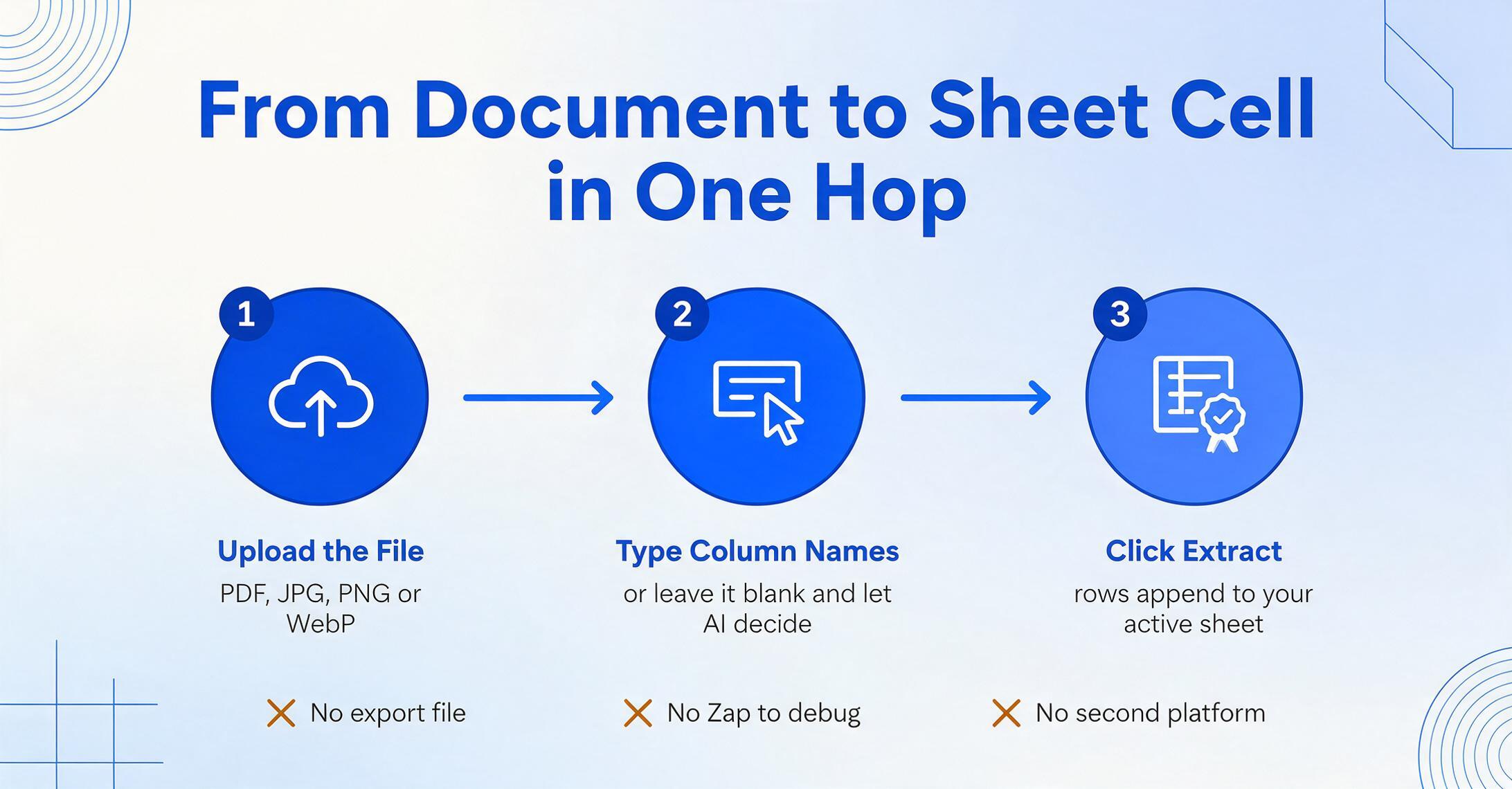
The workflow inside the sidebar: upload an image (JPG, PNG, WebP) or PDF → type the column names you want (e.g. "Invoice Number, Vendor, Date, Amount") → click Extract. Rows of structured data append to your current sheet. Leave the column name field blank and the AI decides what to extract — useful for one-off documents where you don't have a preset schema. If you've saved column templates on the web app, those sync to the add‑on as well.
This is fundamentally different from the Zapier model. With a native sidebar add‑on, the extraction is synchronous to your workflow: you open a document, extract it, see the rows appear in your sheet, and move on. There's no waiting for a webhook to fire, no debugging a Zap that broke because a field name changed, no logging into a separate platform. The data path is document → sidebar → sheet. That's one hop.
Best for: Anyone whose primary workspace is Google Sheets and who processes documents as they arrive — an AP clerk reconciling invoices, an HR person logging new hire paperwork, a field service manager digitizing paper job sheets. The add‑on is optimized for single-document or small-batch extraction (5–10 documents at a time). For large batches (50+ documents), the web app's batch processing is more efficient — upload all files together, define columns once, get one export file.
The add‑on is genuinely differentiated: no other tool in this market runs AI document extraction as a sidebar inside Google Sheets. The web app and add‑on share the same AI engine — the same Custom Column Extraction (you type column names, AI finds matching data by meaning, not position), the same ability to read handwriting, checkboxes, stamps, and mixed-format documents.
Not ideal for: Automated document ingestion. The add‑on requires you to manually upload files — it doesn't watch an email inbox or a Google Drive folder for new documents. If your documents arrive automatically (email attachments, scheduled reports), you'll want a parser with inbox monitoring (Parseur, Docparser) or a pipeline builder (Parabola). The add‑on also uses your ImageToTable.ai plan credits — heavy users may need a Pro ($19/mo) or Max ($59/mo) plan.
Pricing: Free daily quota for basic testing. Paid plans start at $9/month (Basic), with Pro at $19/month and Max at $59/month. Team plans (Growth $149/mo, Scale $399/mo, Enterprise $899/mo) add shared credit pools and concurrent processing. Pricing is credit-based, not per-page — a single-page invoice uses one credit, a multi-page PDF uses more. ImageToTable.ai pricing →
Read our detailed comparison of the add‑on vs. the web app, see how the add‑on stacks up against other Google Sheets OCR approaches in our in‑depth comparison, or read the full walkthrough of how the sidebar extraction works, including a live demo.
Docparser — Template‑Based Parsing + Automation Glue
Docparser is a dedicated document parsing platform that extracts structured data from PDFs using parsing templates — you define zones and rules for each document layout, and Docparser applies OCR and pattern matching to pull out fields and table rows. Once parsed, data can be sent to Google Sheets via Zapier, Make, or webhooks. Docparser also has native integrations with cloud storage (Google Drive, Dropbox, Box) for automatic document fetching.
This is the Zapier bridge model in its clearest form. Documents land in Docparser (manually uploaded or auto-fetched from cloud storage), get parsed, and Zapier pushes the extracted data to a Google Sheet row. The setup requires three platforms: your cloud storage, Docparser, and Zapier — each with its own configuration, each a potential failure point. The upside is that once configured, it's fully automated: drop a PDF in a watched folder, and it appears in your sheet without touching anything.
Best for: High‑volume, consistent document types where the layout rarely changes — standardized invoices from a known set of vendors, shipping manifests with fixed formats, compliance forms. Docparser's barcode and QR code scanning is useful for warehouse and logistics workflows. The Excel‑like data review interface for QA is a plus for teams that need to verify extractions before they hit the sheet.
Not ideal for: Variable document layouts. Each new vendor format requires building a new parsing template — if you process invoices from 50 different suppliers, you need 50 templates. The multi‑layout support that automates this is only available on the Business plan at $159/month. The template maintenance overhead is the most common reason users switch away from template‑based parsers. Docparser also uses a zonal OCR approach rather than AI‑based semantic extraction, which means lower accuracy on documents with shifting field positions.
Pricing: Free: 30 pages/month. Starter: $39/month (100 pages). Professional: $74/month (250 pages). Business: $159/month (1,000 pages). Docparser pricing →
Read our in‑depth ImageToTable.ai vs Docparser comparison for a detailed feature‑by‑feature breakdown, or see the Sheets‑specific side‑by‑side if the native Google Sheets integration is the part you're evaluating.
Parseur — AI Extraction Without Templates + Email Ingestion
Parseur takes the Zapier bridge model and removes the template‑building requirement. Instead of drawing zones and writing parsing rules, Parseur uses AI to detect fields automatically — you highlight what you want extracted from one document, and Parseur learns the pattern. It also has a critical feature that Docparser and ImageToTable.ai lack: native email ingestion. Parseur can monitor an email inbox, automatically parse incoming attachments, and trigger downstream actions via Zapier, Make, or webhooks.
The Sheets integration path is: document arrives by email (or upload) → Parseur extracts fields → Zapier pushes data to Google Sheets. Like Docparser, this introduces a Zapier dependency — but Parseur's AI‑based extraction means you spend less time building and maintaining templates. Parseur processes PDFs, scanned documents, and images. It also handles email body text parsing (e.g., extracting order details from confirmation emails), which Docparser can't do.
Best for: Workflows where documents arrive by email — supplier invoices in your AP inbox, customer orders from a web form, Google Alerts digests. Parseur's "inbox → extract → Sheets" pipeline is the most automated path for email‑driven document workflows. The per‑page pricing gets cheaper at scale (4¢/page on the highest self‑serve plan), making it cost‑effective for mid‑volume processing.
Not ideal for: Users who want data in Sheets immediately, without waiting for a Zapier trigger. The Zapier bridge adds 2–15 minutes of latency depending on your Zapier plan (free plans poll every 15 minutes). If you're processing a document while on a call with a client and need the data in your sheet right now, the ZAPIER model is the wrong tool — you want a native add‑on. Parseur also requires a Zapier paid plan ($29.99/month for 750 tasks) once you exceed the free tier's 100 tasks/month. Combined with Parseur's $39/month, that's $69/month minimum — more than 7× ImageToTable.ai Basic.
Pricing: Free: 20 pages/month. Starter: $39/month (100 pages). Pro: $99/month (1,000 pages). Business: $399/month (10,000 pages). Parseur pricing →
Read our in‑depth ImageToTable.ai vs Parseur comparison.
Coefficient — Live Data Import for SaaS and Databases
Coefficient is not a document extraction tool. It's a data connector sidebar add‑on for Google Sheets that pulls live data from 100+ SaaS platforms — Salesforce, HubSpot, Snowflake, QuickBooks, MySQL, and more — directly into your spreadsheet on a schedule. It's included in this roundup because it's often the answer for a different set of Sheets users: those whose data already lives in a structured system and needs to get into Sheets for reporting, dashboards, or analysis.
Critical distinction: Coefficient cannot extract data from PDFs, images, or scanned documents. If you have a photo of a receipt or a PDF invoice, Coefficient won't help. What it does is pull already‑structured data — CRM records, database queries, SaaS metrics — into Sheets cells, and optionally write data back to the source system. It's a read/write data bridge, not an OCR engine.
Coefficient addresses a fundamentally different problem than document extraction. You use Coefficient when your data is already in a database but you need it in a spreadsheet. You use an extraction tool when your data is trapped in an image or PDF.
Best for: Revenue operations and finance teams building live dashboards in Sheets from CRM, ERP, and database sources. The scheduled refresh (hourly on Pro, daily on Starter) means dashboards stay current without manual exports. Two‑way write‑back lets you update Salesforce records or QuickBooks entries from Sheets. The 700,000+ user base and SOC 2 Type 2 certification make it a safe pick for business data.
Not ideal for: Any workflow that starts with a physical or scanned document. Coefficient doesn't OCR anything. For document‑to‑Sheets workflows, pair Coefficient with a document extraction tool: use ImageToTable.ai or Docparser to extract the document data into a sheet, then use Coefficient to pull related CRM/ERP data into adjacent columns for reconciliation.
Pricing: Free tier (limited). Starter: $49/month (3 data sources, daily refresh). Pro: $99/user/month (6 data sources, hourly refresh). Enterprise: custom. Coefficient pricing →
Parabola — No‑Code Data Pipelines with an AI Extraction Step
Parabola is a visual, drag‑and‑drop data pipeline builder that connects to Google Sheets as both a data source and a destination. Its Extract with AI step can parse and extract specific values from text and semi‑structured data — making it capable of simple extraction tasks within a broader automation flow. The typical pipeline: Pull from Google Sheets → Extract with AI (categorize, summarize, parse) → Send to Google Sheets (or email, Slack, database).
Parabola's extraction capabilities are not a replacement for dedicated document OCR. The AI step works on text that's already in your spreadsheet — it categorizes, cleans, and enriches existing data. It can't process a PDF directly; you'd need to pre‑extract the text from the PDF first (using another tool) and feed it into Parabola. The platform's real power is building reusable, scheduled data workflows — like "every Monday, pull last week's sales data from Sheets, run AI categorization on product descriptions, and send a summary email."
Best for: Operations teams building multi‑step data workflows where extraction is one step in a larger pipeline. Parabola's 2026 pivot toward "AI agents" with the Prowork agent builder lets you describe a task in plain language and have Parabola build the flow. Good for recurring data transformation tasks — cleaning CSVs, normalizing field names across sources, aggregating reports. The free Basic plan (1 user, 1,000 credits) is genuinely usable for small projects.
Not ideal for: Direct document‑to‑Sheets extraction. Parabola doesn't OCR documents — it works on data that's already in a structured or semi‑structured form. Its pricing also scales aggressively: the Collaborator plan is $400/month for 3 users, making it the most expensive option in this roundup for small teams. For pure document extraction, any of the first four tools in this list will get you there with fewer platforms and lower cost.
Pricing: Free Basic: 1 user, 1,000 credits. Collaborator: $400/month (3 users, 30,000 credits). Business: custom pricing. Parabola pricing →
How We Picked and Tested These Tools
This evaluation was built around three criteria specific to Google Sheets workflows:
1. Integration depth with Google Sheets. We didn't just check whether a tool "integrates with Google Sheets" — we mapped the exact data path: how many steps, how many platforms, how much latency, and what breaks when. A tool that syncs via Zapier with a 15‑minute polling interval is genuinely different from one that appends data to your active sheet in 10 seconds.
2. Extraction quality on real document variability. We tested each tool's ability to handle multi‑vendor invoice formats, mixed scanned/digital PDFs, phone photos of receipts, and documents with both printed and handwritten fields. Template‑based tools (Docparser) were evaluated on their template maintenance burden; AI‑based tools (ImageToTable.ai, Parseur) on their zero‑shot accuracy across unseen formats.
3. Total cost at realistic volumes. We calculated the all‑in cost for processing 100, 500, and 1,000 pages per month — including any required intermediary services (Zapier, Make). A $39/month extraction tool plus a $29.99/month Zapier plan is effectively a $69/month solution, and the comparison table reflects that.
Pricing figures were pulled from each tool's public pricing page in June 2026. Free trial/free tier details reflect what's available as of the same date. We did not base any conclusions on competitor blog content or third‑party marketing materials.
Which Tool Is Right for Your Sheets Workflow?
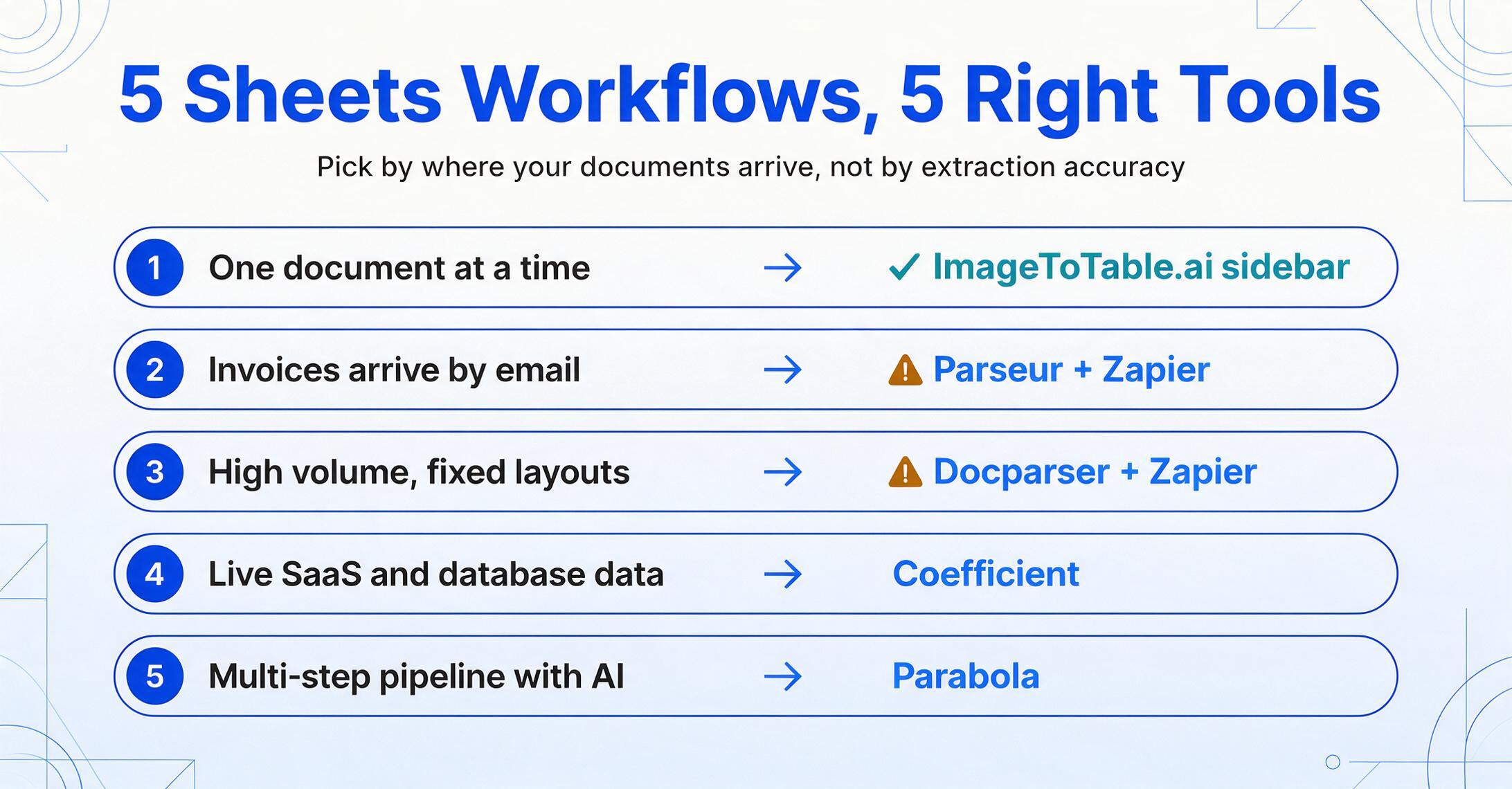
The tools in this roundup solve different parts of the document‑to‑Sheets problem. Here's the decision framework:
→ ImageToTable.ai add‑on. Open the sidebar, extract, data lands in your sheet. No Zapier, no export step, no platform switching.
→ Parseur + Zapier. Parseur watches your inbox, extracts fields, and Zapier pushes them to Sheets. Higher setup cost, higher automation ceiling.
→ Docparser + Zapier. Template‑based parsing is more reliable for documents with locked‑down layouts, and the data review interface supports QA at scale.
→ Coefficient. Pull CRM, database, and SaaS metrics into Sheets on a schedule. Pair with an extraction tool if you also process documents.
→ Parabola. Drag‑and‑drop flows on a canvas. Best when extraction is one piece of a larger automation, not when extraction is the whole job.
For most Google Sheets users — the AP clerk, the HR coordinator, the small business owner — the friction point isn't extraction accuracy. It's context switching: download the PDF, open the extraction tool, upload it, wait, export the file, open the export in Sheets, copy the rows to your tracking sheet. A native sidebar add‑on eliminates four of those steps. That's the real advantage.
But if your documents arrive automatically — emailed invoices from a supplier portal, scheduled PDF reports from your bank — the Zapier bridge model pays back its setup cost through automation. The right tool depends on how your documents arrive, not just what's inside them.
For small businesses and lean teams, also see our roundup of the best document extraction tools for small business. For teams that want no‑code setup without model training, see our best no‑code document AI tools roundup. For the broader extraction landscape including enterprise platforms, see our comparison of intelligent document processing platforms and data extraction software for unstructured documents.
Frequently Asked Questions
Can't I just use Google's built‑in OCR in Drive?
Google Drive can OCR a PDF or image when you open it as a Google Doc — but that gives you a text dump, not structured data. You still need to copy individual fields from the Doc into your Sheet. The OCR is also layout‑dependent: if your invoice has a table, the resulting Doc may jumble columns and rows. Google's Document AI can do structured extraction via API, but it requires developer integration and charges $30 per 1,000 pages for the Form Parser — it's a cloud service, not an add‑on, and there's no point‑and‑click Sheets connector.
Does Zapier's free plan work for document‑to‑Sheets automation?
The free Zapier plan includes 100 tasks per month and polls triggers every 15 minutes. For low‑volume use (under 100 documents/month), it works. But the 15‑minute polling delay means data doesn't appear in your sheet immediately — it arrives in 15‑minute batches. If you need near‑real‑time insertion, you'll need Zapier's paid plan ($29.99/month for 750 tasks with 2‑minute polling, or $73.99/month for 2,000 tasks with 1‑minute polling). Factor this into your total cost when evaluating Parseur or Docparser.
Is a native sidebar add‑on always better than a Zapier bridge?
No — it depends on your workflow. A native add‑on is better for on‑demand extraction: you have a document in front of you and want its data in your sheet right now. The Zapier bridge is better for hands‑off automation: documents arrive without your involvement (email, cloud storage, API), and you want them processed automatically in the background. The two models complement each other — some teams use Parseur for automated email‑to‑Sheets pipelines AND the ImageToTable.ai add‑on for ad‑hoc documents that come in through other channels.
Can I process 500+ documents per month with any of these tools?
Yes — but the economics vary sharply. At 500 documents/month: Parseur Pro ($99/mo) + Zapier ($29.99/mo) = $129/mo total. Docparser Business ($159/mo) includes native Google Sheets integration without Zapier, making it potentially cheaper at scale if your documents have consistent layouts. ImageToTable.ai's Pro plan ($19/mo) handles moderate volumes through a credit system — check the plan's monthly credit allocation against your document volume. For very high volumes (1,000+/month), enterprise plans from Docparser or a direct API integration with Google Document AI become more economical.
What's the difference between "template‑free" extraction and "template‑based" extraction?
Template‑free (ImageToTable.ai, Parseur's AI mode) means the AI reads each document semantically — it understands that "Total Due" means the same thing whether it's in the top‑right corner of one invoice or the bottom center of another. You define what data you want ("Vendor, Date, Amount"), and AI finds it by meaning. Template‑based (Docparser, Parseur's template mode) means you define parsing rules tied to specific positions or patterns — "the date is the text matching DD/MM/YYYY between the header and the line items table." Template‑free is more resilient to format changes but can be less predictable on edge cases; template‑based is more predictable on known layouts but breaks when layouts change.
A Note on Disclosure
ImageToTable.ai is one of the tools reviewed in this article. We are the team behind it. We've worked to make this evaluation honest and useful — each tool's strengths and limitations are described based on public product pages, hands‑on testing, and published pricing, not marketing claims. We're genuinely the only native Google Sheets sidebar add‑on in this category, and we believe that's worth writing about. We also believe readers deserve to know that fact, and to see fair assessments of tools that do things we can't — like watching an email inbox or pulling live Salesforce data.
The shortest path from document to spreadsheet cell: if your workflow lives in Google Sheets, the sidebar add‑on eliminates the export‑and‑import dance that every other integration model requires. Install from the Google Workspace Marketplace, open the sidebar, and see how many steps it takes to get your next PDF into your sheet.