What Is Purchase Order Data Extraction?
Automating PO Processing
Purchase order data extraction is the automated process of reading key fields — like PO number, vendor, ship-to address, line items (item code, description, quantity, unit price, line total), and total amount — from a PDF or scanned purchase order and outputting them as structured data in a spreadsheet. It is not the same as running OCR on a PO — OCR gives you a wall of text. Extraction gives you a table with every field in its own column, ready for matching, analysis, or ERP import.
Key Takeaways
- $14 to $200 — that's what one purchase order costs to process manually, and none of that money does anything you couldn't automate with a single upload.
- When a supplier changes their PO layout, template-based tools silently put wrong values in right columns — and each resulting three-way match failure costs 30 minutes to untangle.
- Define your columns once by name — PO Number, Item Code, Quantity — and semantic extraction reads every supplier's format by meaning instead of position, with zero templates to build or maintain.
What Purchase Order Data Extraction Actually Is
Purchase order extraction is the specific step that turns a supplier's PO document — whether it arrives as a PDF attachment, an emailed scan, or a photo from a buyer's phone — into structured data fields you can actually work with. It is not the same as PO automation, which manages the full procurement workflow (requisition, approvals, dispatch, matching, payment). Extraction is the data entry layer: the bridge between "a PO file in your inbox" and "rows in your spreadsheet or ERP."
The fields typically extracted from a purchase order fall into two categories:
Header Fields (one per PO)
- PO Number
- PO Date
- Vendor/Supplier Name & Address
- Bill-To / Ship-To Address
- Buyer Name / Department
- Payment Terms
- Subtotal, Tax, Shipping, Total
Line Items (multiple rows per PO)
- Item Code / SKU
- Description
- Quantity
- Unit of Measure (UOM)
- Unit Price
- Line Total
- Delivery Date (per line)
The line items are where extraction gets hard. A header field is a single value. A line-item table can contain 20, 50, or over 100 rows — each with its own item code, description, quantity, UOM, and pricing — spread across multiple pages with column arrangements that change from one supplier to the next. One supplier uses "EA" for unit of measure; another uses "PCS"; a third spells out "Each" in full. A purchase order from an industrial supplier might specify delivery dates per line item, while a retail PO might lump everything under one ship date. Getting line items right — across formats, across suppliers, across page breaks — is what separates usable extraction from a partial result that still needs manual cleanup.
This is the gap that template-based tools fall into. If you've configured a template for Supplier A's layout — "PO Number is at coordinates (50, 20), line items start at row 8" — it works until Supplier A changes their PO template because they upgraded their ERP. Now the PO number is at position (75, 30), and your template silently extracts the wrong value into the PO Number column. Multiply that by 50 suppliers, and template maintenance becomes a full-time job. For a broader look at how AI shifts this paradigm across document types, see our guide on what AI document extraction actually is.
PO Extraction vs PO Processing vs OCR — Key Differences
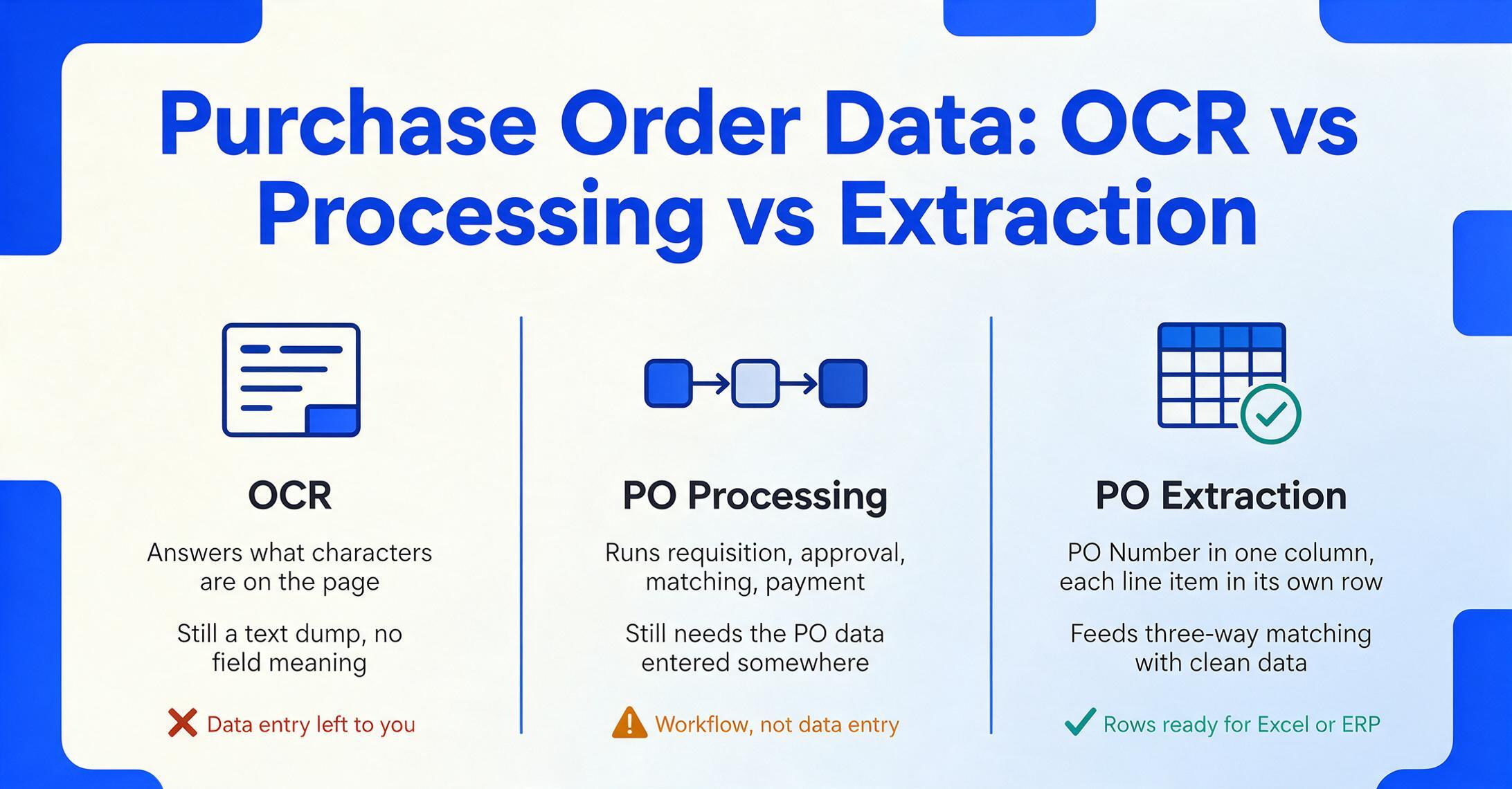
These three terms sit in adjacent procurement conversations, but conflating them leads to buying tools that solve the wrong problem.
OCR (Optical Character Recognition) converts an image of text into machine-readable characters. It answers "what characters are on this page?" but has no concept of what those characters mean. Feed a PO through OCR and you get back something like PURCHASE ORDER PO-2026-0412 DATE 12/04/2026 VENDOR Atlas Fasteners QTY 500 DESC M8 Hex Bolt UNIT $0.42 TOTAL $210.00 — a text dump. You still have to manually extract each field and type it into the right cell. OCR digitized the characters. It did not do the data entry.
PO processing is the full procurement workflow that surrounds extraction: creating the requisition, routing it for approval, issuing the purchase order, receiving goods, matching the PO against the invoice and goods receipt (three-way matching), scheduling payment, and archiving. Processing tools like SAP Ariba, Coupa, or Oracle Procurement manage the workflow — but they still need the PO data to enter the system somewhere. That entry step is extraction.
PO data extraction is the specific step that turns a PO document into structured fields: PO Number in one column, Vendor in another, each line item in its own row, the total in a cell that Excel can sum. It is the data entry layer that feeds into processing. You can have world-class procurement workflow automation, but if the extraction step is feeding it wrong data — wrong quantities, mismatched item codes, incorrect totals — the workflow just automates the mistakes faster.
The downstream consequence of extraction errors is three-way matching failure. Ardent Partners' 2025 AP benchmarks report that best-in-class AP teams achieve a 9% exception rate on invoice matching — the rest average 22%. Every mismatch that traces back to a PO data entry error costs an AP clerk roughly 30 minutes to investigate across procurement, receiving, and finance. Getting extraction right at the PO stage prevents those exceptions before they reach matching.
How PO Data Extraction Works
Behind the interface, extraction runs on a fundamental shift that happened in the last two years: the move from position-based extraction to semantic extraction.
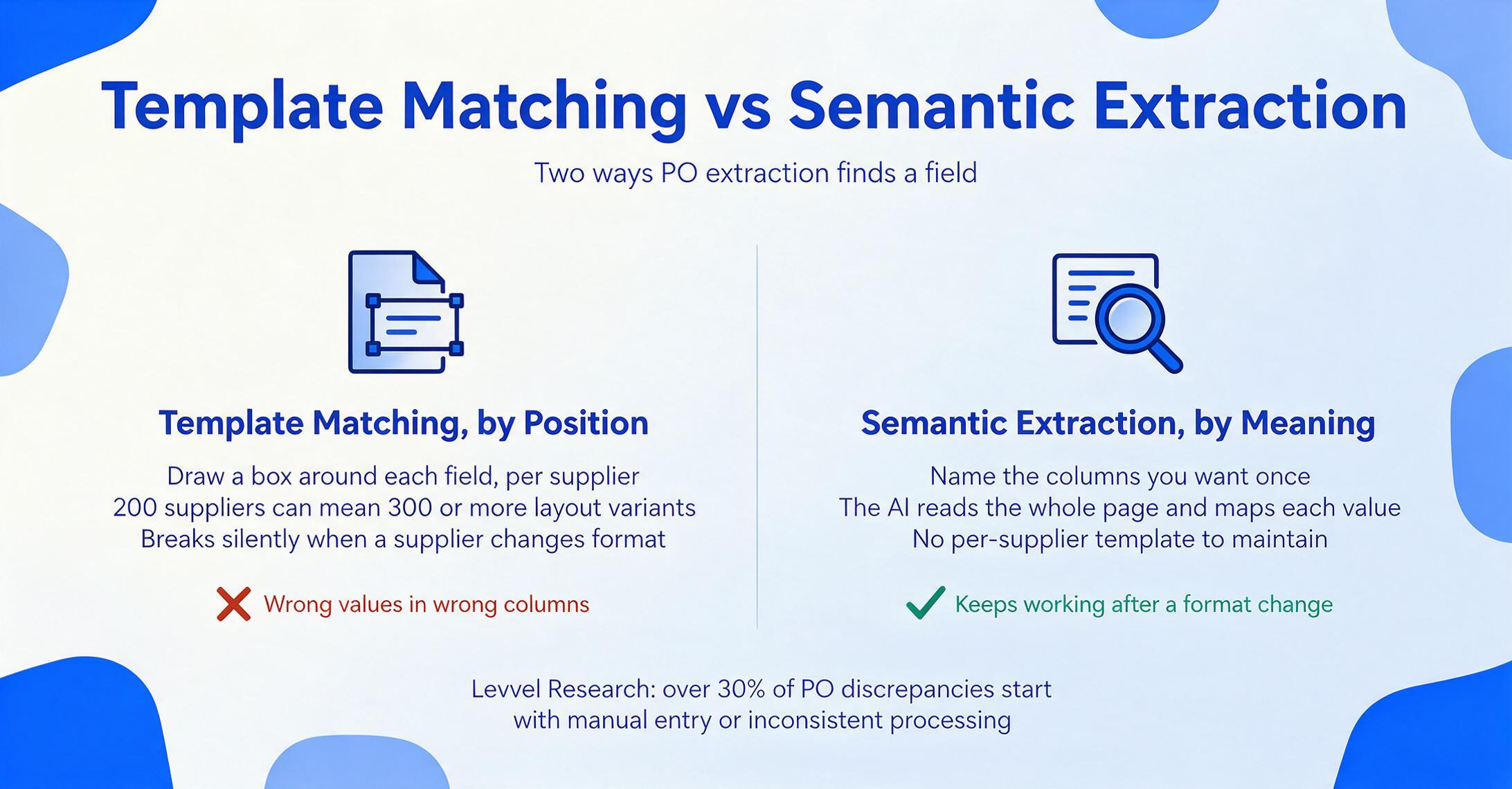
The old way — template matching. Traditional PO extraction tools work by position. You draw a rectangle around "PO Number" on one supplier's layout and tell the system "the value is to the right." You repeat this for every supplier, every layout variant, every field. A mid-size manufacturer with 200 active suppliers might face 300+ format variants. Worse, when a supplier changes their PO format — which happens every time they upgrade their ERP or rebrand — the template silently breaks and starts pulling wrong values into wrong columns. Levvel Research found that over 30% of PO discrepancies stem from manual entry or inconsistent processing — and template-based extraction just automates that inconsistency instead of fixing it.
The modern way — semantic extraction. Modern AI-based extraction works by meaning, not by position. Instead of training the system on where each field lives, you specify what you want to find: "PO Number," "Vendor Name," "Item Description," "Quantity," "Unit Price," "Line Total." The AI reads the entire document, understands what each piece of text represents in context, and maps it to the right output column — regardless of where it appears on the page. This is Custom Column Extraction: you define the output columns you want, and the AI locates the matching data anywhere on the page by understanding what each field means. A field labeled "PO #" on one supplier's document and "Order Reference" on another's is recognized as the same thing because the AI understands the semantic role, not the label text.
Here's the pipeline end-to-end:
Upload
Drop in PDFs, scans, or photos — single PO or a batch of 50. No pre-sorting by supplier, no renaming, no format requirements beyond legibility. Each document is received as a visual image, not as text — the AI sees the layout, fonts, tables, and whitespace the way a human reader would.
Define Columns
Type the field names you want extracted — "PO Number," "Vendor," "Item Code," "Description," "Quantity," "Unit Price," "Line Total." These become the headers of your output spreadsheet. No template setup, no training data, no drawing zones. The same column list works across every supplier's format because the AI maps by meaning, not position.
AI Reads & Maps
The vision model scans each page, identifies which text blocks correspond to which fields by understanding their semantic role, and maps them to your columns. A quantity of "500" next to an item description is recognized as a line-item quantity, not a PO number. A "Ship To" address block is distinguished from a "Bill To" block by its surrounding context — even when both contain similar address structures. Line items spanning page breaks are assembled into continuous rows.
Export Structured Data
Download as Excel (XLSX), CSV, or JSON. Each PO gets one row in the header table; line items expand into separate rows with the PO header fields repeated for filtering and pivot tables. Or write results directly into Google Sheets. The data is pre-formatted — dates as YYYY-MM-DD, amounts as plain numbers — so there is no reformatting between extraction and import into QuickBooks, NetSuite, or your ERP.
Files are processed securely and not stored.
When You Need PO Data Extraction
Not every business needs extraction. A small operation issuing five POs a month to the same three suppliers can type those into a spreadsheet during a coffee break. Extraction becomes worth it when volume and variety cross a threshold where manual entry stops being a minor inconvenience and starts compounding across suppliers, departments, and months.
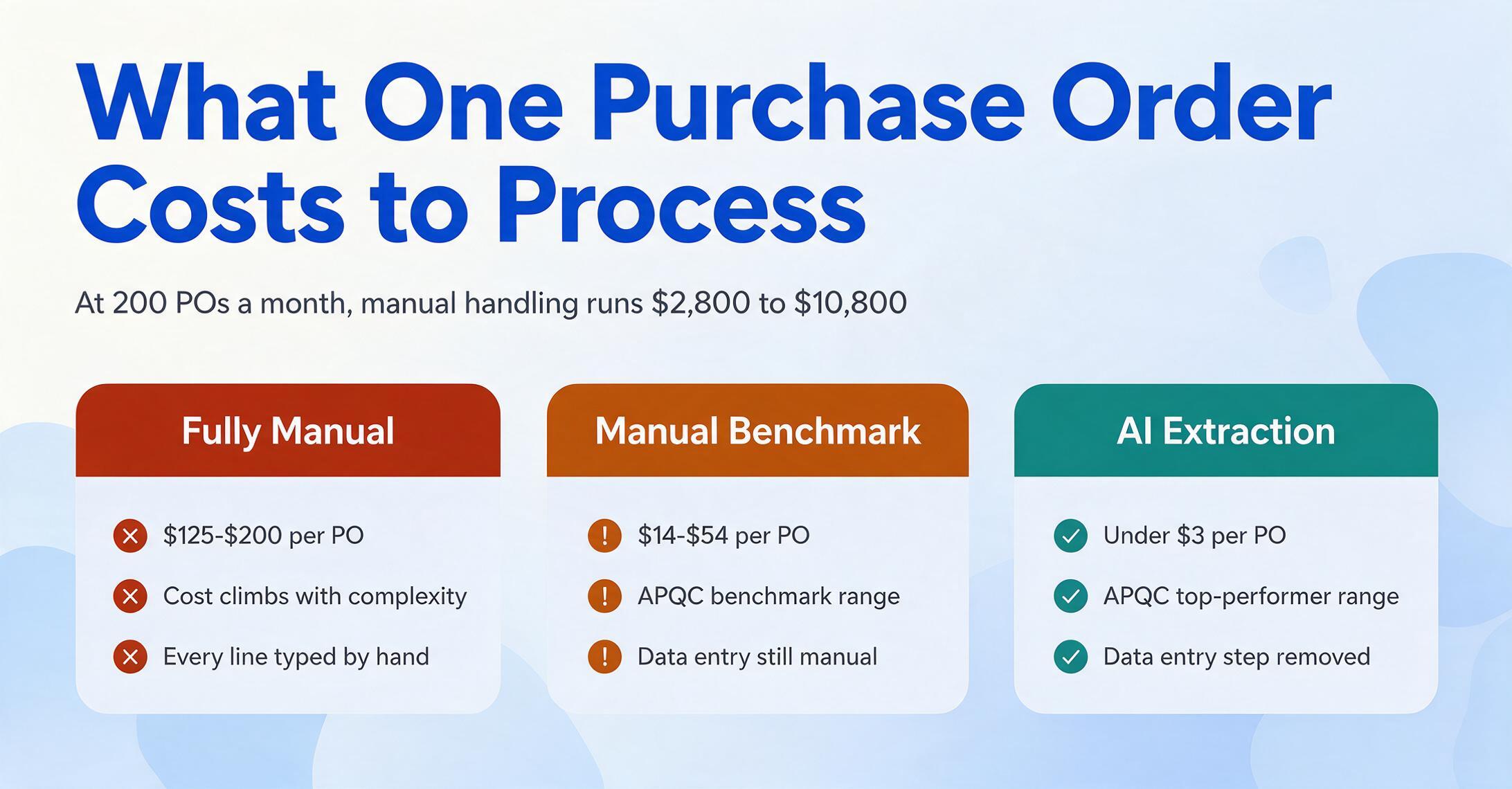
1. PO volume outruns headcount. CAPS Research data shows that in the industrial sector, procurement spend averages 55.64% of revenue — meaning for a $50M manufacturer, roughly $27.8M flows through purchase orders. APQC benchmarks show manual PO processing costs ranging from $14 to $54 per PO, with fully manual processes reaching $125–$200 per PO depending on complexity. At 200 POs a month, that is $2,800 to $10,800 per month in processing cost before a single invoice is matched. Automated extraction — by eliminating the data entry step — pushes the per-PO cost toward the sub-$3 range APQC benchmarks for top performers.
2. Every supplier sends a different PO format. This is the universal procurement reality. Even two suppliers both running SAP produce POs that look nothing alike because their administrators configured different output templates. One uses "PO-2026-XXXX" as the PO number format; another uses six digits with no prefix. One puts line items in a bordered table; another uses indented text blocks with no visible table structure. One includes delivery dates per line item; another puts a single ship date in the header. Template-based tools break under this diversity. Semantic extraction does not depend on format at all — which is the difference between a tool you set up once and a tool you maintain forever. For a hands-on walkthrough of this workflow, see our guide on automating purchase order data entry.
3. You need line-item detail, not just header totals. Many extraction tools handle header fields well: PO number, date, vendor, total. But if you need line items — item codes, descriptions, quantities, unit prices — for goods receipt verification, inventory reconciliation, or three-way matching, the tool requirements get stricter. A header-only extraction that still forces someone to manually type 50 line items from a 3-page PO has not actually solved the data entry problem. This is the most common discovery point: teams realize their current process only automates 20% of the fields but 80% of the data points live in the line items.
4. PO data errors are cascading into three-way matching failures. When a PO has the wrong quantity, unit price, or UOM recorded at data entry, the downstream matching step — comparing the PO against the goods receipt and supplier invoice — will flag a discrepancy. Each flagged mismatch requires a manual investigation: was the PO entered wrong? Did the supplier ship a different quantity? Is the invoice billing for something not ordered? If the root cause is a PO data entry error, you are spending 30 minutes to discover a problem that cost 3 seconds to create. Fixing extraction accuracy at the PO stage prevents those exceptions from ever reaching the matching queue. For more on this dynamic, see our article on why three-way matching breaks down in procurement.
What to Look For in a PO Extraction Tool
Extraction tools range from basic OCR wrappers to AI-native platforms. The feature lists all sound similar, but these are the criteria that actually differentiate them in daily procurement use. For the full field-by-field reference — header fields, line items, export formats, and the complete selection framework — start with our complete guide to purchase order extraction.
Template-free operation. This is the single most important differentiator. A tool that requires you to create and maintain parsing templates per supplier format is not extraction — it is template management with some extraction on the side. The right question to ask a vendor: "If a supplier changes their PO layout tomorrow, what do I need to do?" If the answer involves updating a template, retraining a model, or re-mapping fields, you are buying a maintenance burden. The alternative is Custom Column Extraction: you type the field names you want — "PO Number," "Item Code," "Quantity" — once, and the AI finds them in every supplier's format because it reads by meaning, not by position. The column names you type become your output headers. For a deeper look at why this distinction matters, read about extracting purchase order fields to Excel.
Line-item extraction quality across page breaks. Tools that reliably extract header fields are table stakes. Line items — especially across multi-page POs with inconsistent column layouts and UOM variants — are the real test. Ask to test the tool on a 4-page PO with a 30-row line-item table that spans pages 2 through 4, with merged cells in the description column and quantities split across multiple delivery dates. If it handles that cleanly, it will handle everything else.
Batch processing capability. Can you upload 50 POs from 20 different suppliers at once and get one unified spreadsheet back? Or do you need to process them one at a time? Batch processing is the difference between "this tool saves me time per PO" and "this tool saves me hours per day." The output should be a single table where all POs are merged — same columns, same structure — ready for analysis, matching, or import. For more on this workflow, see our guide to batch PO extraction to Excel.
Output format and integration. The output should match your procurement workflow. If you run everything through Excel, XLSX export with properly typed columns is non-negotiable. If your team works in Google Sheets, a tool that writes results directly into a sheet — eliminating the upload-download-import cycle — is worth the difference. A dedicated Google Sheets add-on for PO extraction lets you process POs without leaving your spreadsheet. CSV and JSON matter if you are feeding data into NetSuite, QuickBooks, or a custom ERP.
Handling of real-world PO edge cases. Partial shipments where one PO generates multiple goods receipts. Unit of measure mismatches — the PO orders in "Cases" but the line items specify "Units per Case." Tax and shipping charges that appear in the header but should be allocated across line items for cost accounting. Blanket POs that cover months of deliveries with variable pricing. A tool that handles 95% of your POs but fails silently on the 5% that are slightly unusual creates more risk than a tool that is honest about its limits. Test the tool on your most complex POs — the blanket orders, the international supplier POs with dual currency, the hand-marked POs from smaller vendors — not your cleanest ones.
Frequently Asked Questions
Does PO extraction work with handwritten purchase orders?
Yes, with qualifications. Modern AI extraction tools that use vision-based models can read handwriting on purchase orders — including handwritten quantities, manual corrections, and filled-in form fields. Accuracy depends on handwriting legibility: clear block printing extracts at 90%+, while dense cursive in low-quality scans will be lower. The key advantage of semantic extraction here is that the AI uses field context to disambiguate: if it is looking for a "Quantity" and sees both a typed "500" and a handwritten "520" next to it, it can reason about which is the actual order quantity. For POs that arrive entirely handwritten — common with smaller suppliers who fill out paper forms — extraction accuracy is comparable to invoice extraction: good-enough for review, not touchless. For more on this scenario, see our guide on handwritten purchase order extraction.
Can PO extraction handle line items that span multiple pages?
Yes, this is a core capability of modern AI extraction. When a line-item table breaks across page boundaries — common in POs with 20+ line items — the AI identifies that the table continues on the next page and reassembles the rows into continuous records. The key requirement is that column headers repeat or are visually inferable on the continuation page. If the second page drops column headers entirely and relies on the reader remembering the column order from the first page, accuracy may drop. This is one of the scenarios to test when evaluating a tool — bring a multi-page PO where the table spans pages and check whether line items from pages 2+ land in the right columns.
What about different units of measure — can extraction normalize them?
AI extraction can read whatever UOM the supplier uses — "EA," "PCS," "Each," "CTN," "BOX," "KG," "LB" — and capture it in a dedicated UOM column. However, normalizing UOMs (e.g., converting "CTN of 12" to 12 individual "EA") requires downstream logic because the conversion factor varies by item. The extraction tool captures what the PO says. Converting "3 Cases × 24 Units/Case = 72 Units" is a calculation step that happens after extraction — either in your spreadsheet, your ERP, or through computed columns that let you define the conversion formula once. The extraction tool's job is to capture the raw values accurately so the normalization step has clean inputs.
How is PO extraction different from three-way matching?
PO extraction and three-way matching are sequential steps in the procurement chain, not alternatives. PO extraction is the data entry step: turning a PO document into structured fields. Three-way matching is the verification step: comparing the extracted PO data against the goods receipt and the supplier invoice to confirm that what was ordered, what was received, and what is being billed all align. Extraction happens first. If the PO data extracted is wrong — wrong quantity, wrong unit price, wrong item code — the three-way match will fail with a false discrepancy, and someone has to investigate. Getting extraction right at the PO stage is what makes touchless three-way matching possible. For more on how these pieces fit together, read our analysis of PO-invoice matching in manufacturing.
Can I extract PO data directly into my ERP?
Most extraction tools output to Excel, CSV, or JSON — formats that every ERP can import. The typical workflow is: extract PO data → review the output → import the file into your ERP (QuickBooks, NetSuite, SAP, Microsoft Dynamics). The advantage is that the data arrives pre-formatted — dates as YYYY-MM-DD, amounts as plain numbers with two decimal places, item codes as text — so there is no reformatting between extraction and import. Some tools offer direct ERP integrations via API, but the CSV/Excel import path works for virtually every system and requires no IT setup. For a step-by-step walkthrough, see our guide on converting purchase orders to Excel.
What file formats and document types does PO extraction support?
Modern extraction tools accept PDF (both digitally generated and scanned), JPG, PNG, and WebP. PDF is the universal format — most supplier POs arrive as PDF email attachments. Phone photos of paper POs work as long as the image is reasonably sharp and well-lit. Some tools also support AVIF and TIFF. The format flexibility matters because POs arrive through multiple channels: email attachments (PDF), supplier portals (PDF download), photos from a buyer's phone at a trade show (JPG), and legacy paper POs (scanned to PDF). A tool that only handles one format forces you to pre-convert everything before extraction. For other document types that follow similar extraction patterns, see our guides on what invoice data extraction is and what receipt OCR is.
Where to Go From Here
PO data extraction sits at the intersection of two procurement realities: the universal problem of supplier format diversity, and the downstream dependency of three-way matching on clean PO data. The tools exist today to extract PO data reliably, across formats and suppliers, without per-vendor template setup — something that was not true even two years ago. CAPS Research data showing procurement spend at 55.64% of revenue underscores how much money flows through purchase orders, and APQC benchmarks showing a $11–$51 per-PO gap between manual and automated processing make the ROI case concrete.
The best way to evaluate whether extraction fits your workflow is to test it on real purchase orders — ideally a mix of your highest-volume suppliers and your most complex POs. If it handles your hardest cases cleanly, the easy ones are a given. For a broader view of how AI extraction works across document types, start with our foundational guide to AI document extraction. Or if you are ready to see how extraction handles a real purchase order, upload a sample and try it now.