Affordable PO Extraction for
Small Manufacturers Without ERP Budgets
The barrier to automated purchase order processing for small manufacturers isn't technology. It's a category error. The software market has spent two decades bundling PO data extraction into full ERP suites — SAP, Oracle, NetSuite — that start at $10,000 a year. A shop running 30 purchase orders a month and tracking inventory in Excel looks at those numbers and concludes automation isn't for them. But PO extraction doesn't actually require an ERP. It's a standalone layer that reads a PDF purchase order, pulls out vendor name, line items, quantities, and unit prices, and outputs a spreadsheet — the same spreadsheet the shop already uses. This article maps what that layer costs at small manufacturing volumes, from $0.12 to $499 per month, and what the shop owner who skipped the ERP actually gets.
Key Takeaways
- For 20 years, the software market has told small manufacturers that automating purchase orders requires a $10,000-a-year ERP. A 30-PO-a-month shop can do it for $9.
- Template-based PO tools at $39 a month hide a labor trap: every new supplier needs a new parsing rule, and every supplier ERP upgrade breaks the old one. With 20 vendors, you're maintaining templates, not processing orders.
- ImageToTable.ai reads any PO layout without templates — and the side effect nobody discusses is an IRS-compliant seven-year audit trail that protects COGS deductions, because when extraction costs $0.30 per document, every PO gets recorded, not just the urgent ones.
The Spreadsheet Reality: How Small Manufacturers Track Purchases Today
According to research cited by Sana Commerce, 48% of manufacturing companies still use manual spreadsheets or similar systems to record operational data. Among small manufacturers — shops with 10 to 50 employees and $500,000 to $5 million in annual revenue — that number is almost certainly higher, because these businesses sit below the threshold where even mid-market ERP vendors show up with a quote.
The workflow at a typical small manufacturer looks like this: a purchase order arrives by email as a PDF — sometimes a clean QuickBooks-generated form, sometimes a fax-to-email scan that's been through three conversions, sometimes a photo of a handwritten order slip. The operations manager opens the PDF, locates the vendor name, PO number, line items, quantities, and unit prices, and types them into an Excel spreadsheet that serves as the shop's informal purchasing log. That spreadsheet gets cross-referenced later when the shipment arrives and the invoice lands. The whole cycle — open PDF, find fields, type into cells — takes roughly three to five minutes per purchase order, depending on line-item count.
At 30 purchase orders per month with an average of 5 to 8 line items each, that's two to three hours of manual data entry. At 60 POs, it's half a day a week. The operations manager isn't failing to automate because they don't see the value. They've searched. They saw Fishbowl Manufacturing at $329 a month. They saw SAP Business One quotes that exceed their annual software budget. They concluded, reasonably, that automation means buying an ERP they can't afford. That conclusion is wrong — but it's wrong for a reason the market never explains clearly.
Why ERP Isn't the Answer for 20 POs Per Month
The National Association of Manufacturers (NAM) represents 14,000 member companies across the United States. Ninety percent of those members are small and medium-sized manufacturers — the exact businesses that ERP vendors claim to serve. But the pricing tells a different story.
Here is what small manufacturers actually encounter when they go looking for a system to manage purchase orders:
| System | Starting Price | What It Is | What a 30-PO/Month Shop Doesn't Need From It |
|---|---|---|---|
| SAP Business One | $3,000–$10,000+ /year | Full ERP: finance, procurement, production, inventory, CRM | Everything except PO data entry. SAP's procurement module assumes you already run SAP finance, inventory, and production. |
| Fishbowl Manufacturing | $229–$729/mo (or $6,595 perpetual + annual renewal) | Inventory management + light MRP, designed as QuickBooks add-on | Warehouse management, barcode scanning, multi-location inventory, demand forecasting — all useful at scale, all overhead at 30 POs/month |
| MRPeasy | $49–$149/user/mo | Cloud MRP for 10–200 employee shops: production scheduling, BOM, inventory | MRPeasy is the most accessible option on this list. But it's still a full production planning system — not a tool for the shop that just needs PO data in a spreadsheet |
| Katana | $299–$799/mo | Cloud manufacturing ERP: real-time inventory, production scheduling, Shopify sync | Built for D2C brands and batch manufacturers selling through e-commerce. A machine shop making custom parts for 12 industrial customers runs on a different logic |
None of these systems are overpriced for what they do. A 200-employee factory running 500 POs a month across three production lines gets genuine value from Fishbowl's multi-location inventory control or MRPeasy's production Gantt charts. The problem is that a 20-person shop running 30 POs a month and tracking inventory in Excel doesn't need any of that — and shouldn't have to buy it to solve the one problem they actually have: getting data from a PDF into a spreadsheet.
This is the category error the software market created. By bundling PO data entry into full ERP suites, it taught small manufacturers that the price of PO automation is the price of an ERP. It isn't. PO data extraction is a standalone function — and the tools that do it well cost a fraction of any system on this table.
PO Extraction vs PO Management: Two Different Things (and You Only Need One)
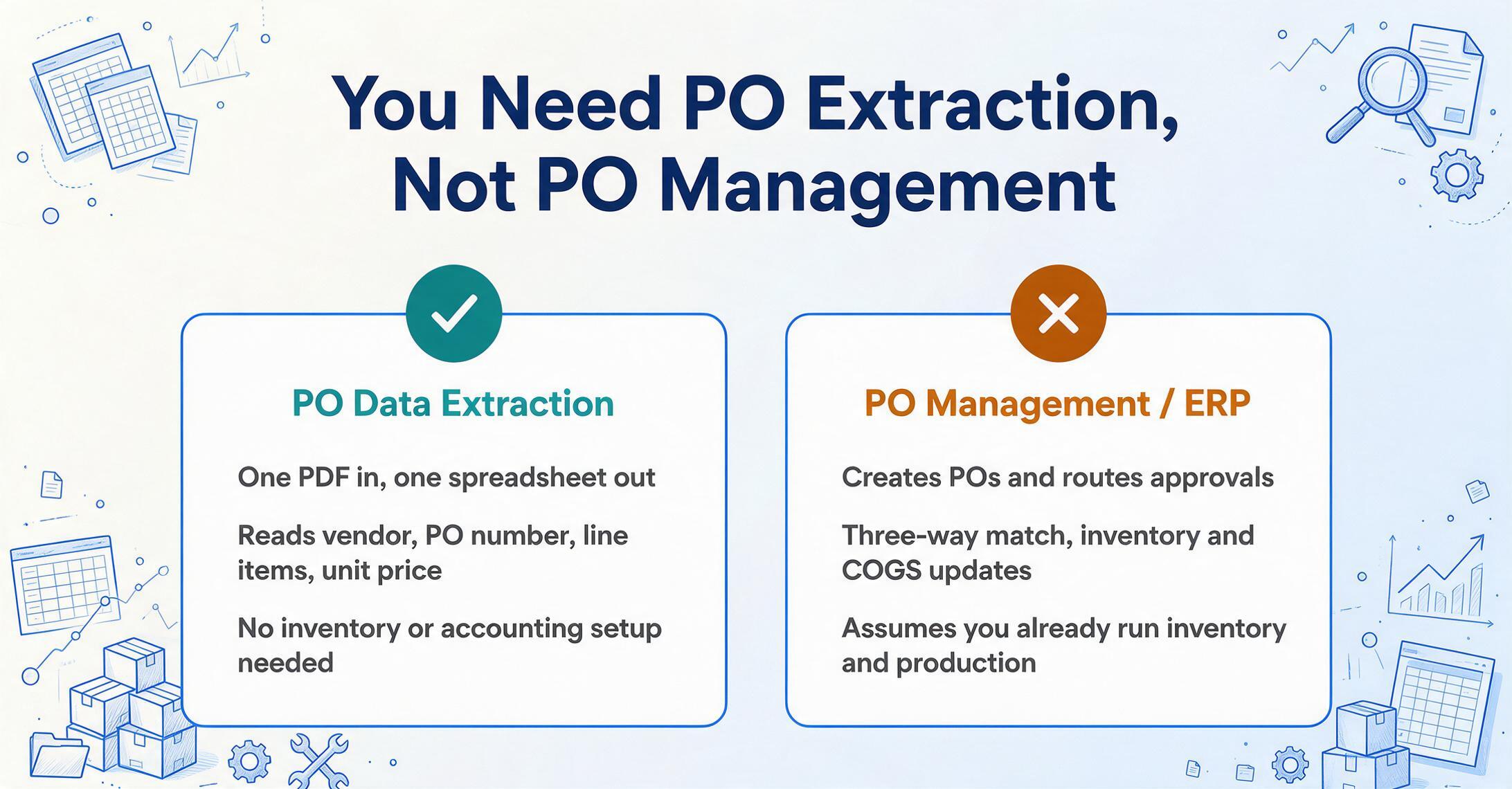
This distinction is the single most important concept for a small manufacturer evaluating tools. The market conflates two separate functions:
Reads a PDF or scanned purchase order. Locates vendor name, PO number, line items, quantities, unit prices, total. Outputs the data as an Excel file (XLSX), CSV, or Google Sheet. One document in, one spreadsheet out. The tool doesn't need to know your inventory levels, your accounting chart of accounts, or your production schedule. It just needs to read the document.
Creates and sends purchase orders to suppliers. Routes them through approval workflows. Tracks order status (sent → acknowledged → shipped → received). Matches POs against invoices and goods receipts (three-way match). Updates inventory levels and COGS in the accounting system. This is what Fishbowl, MRPeasy, Katana, SAP, and NetSuite do.
These two functions live at different layers. A small manufacturer can run PO extraction without PO management software. The output goes into the same Excel spreadsheet they already use to track purchases and reconcile against incoming shipments. The spreadsheet remains the hub. The extraction tool replaces the typing — not the process.
For the full batch workflow — dropping 20, 50, or 100 supplier POs into one spreadsheet in a single run — see our guide to batch PO extraction to Excel. If you're evaluating whether automated extraction pays for itself at your PO volume, our cost breakdown of automating PO data entry works through the per-PO economics.
This also means PO extraction works with whatever accounting system the manufacturer already uses. Whether the books run on QuickBooks, Xero, or a paper ledger handed to an accountant once a quarter, the output format — Excel — imports everywhere. For manufacturers already processing purchase orders through a Google Sheets workflow, see our guide to PO-to-Excel inventory tracking for the spreadsheet-based approach. And for a broader comparison of using one tool versus multiple tools for document extraction, our one-tool vs multi-tool cost analysis covers the economics of consolidating document workflows.
The Three-Way Match Without an ERP
Three-way matching — comparing the purchase order, the goods receipt, and the supplier invoice before authorizing payment — is standard procurement practice. NetSuite describes it as a core AP control: the PO confirms what was ordered and at what price, the goods receipt confirms what was received, and the invoice confirms what the supplier is billing. If all three match, you pay. If they don't, you investigate.
In an enterprise ERP, this matching is automated — the system pulls data from three modules and flags discrepancies. In a small manufacturer without an ERP, the three documents sit on a desk (or in an email inbox) and the owner does the comparison mentally. The PO said 500 units at $3.25. The packing slip says 500 units arrived. The invoice says $1,625. Math checks out — approved. This works for five POs a month. At 30, it's the bottleneck that keeps the owner at the shop until 7 p.m.
What a small manufacturer actually needs to do a three-way match isn't an ERP. It's structured data from all three documents in the same format. If the PO data is extracted to a spreadsheet, the invoice data is extracted to the same spreadsheet, and the receiving clerk logs quantities received, the comparison becomes a few spreadsheet formulas — no ERP required. PO extraction is the first link in that chain, and it's the one that currently consumes the most manual labor. For a deeper look at the manual reconciliation problem and its costs, our article on PO reconciliation pain in supply chains examines the wider impact.
What PO Extraction Costs at 20, 50, and 80 Orders Per Month
The PO extraction market now spans three tiers — and which tier makes sense depends on monthly volume, not on company revenue. Below is a comparison at three small-manufacturer volume levels, with effective per-PO cost calculated so the unit economics are visible.
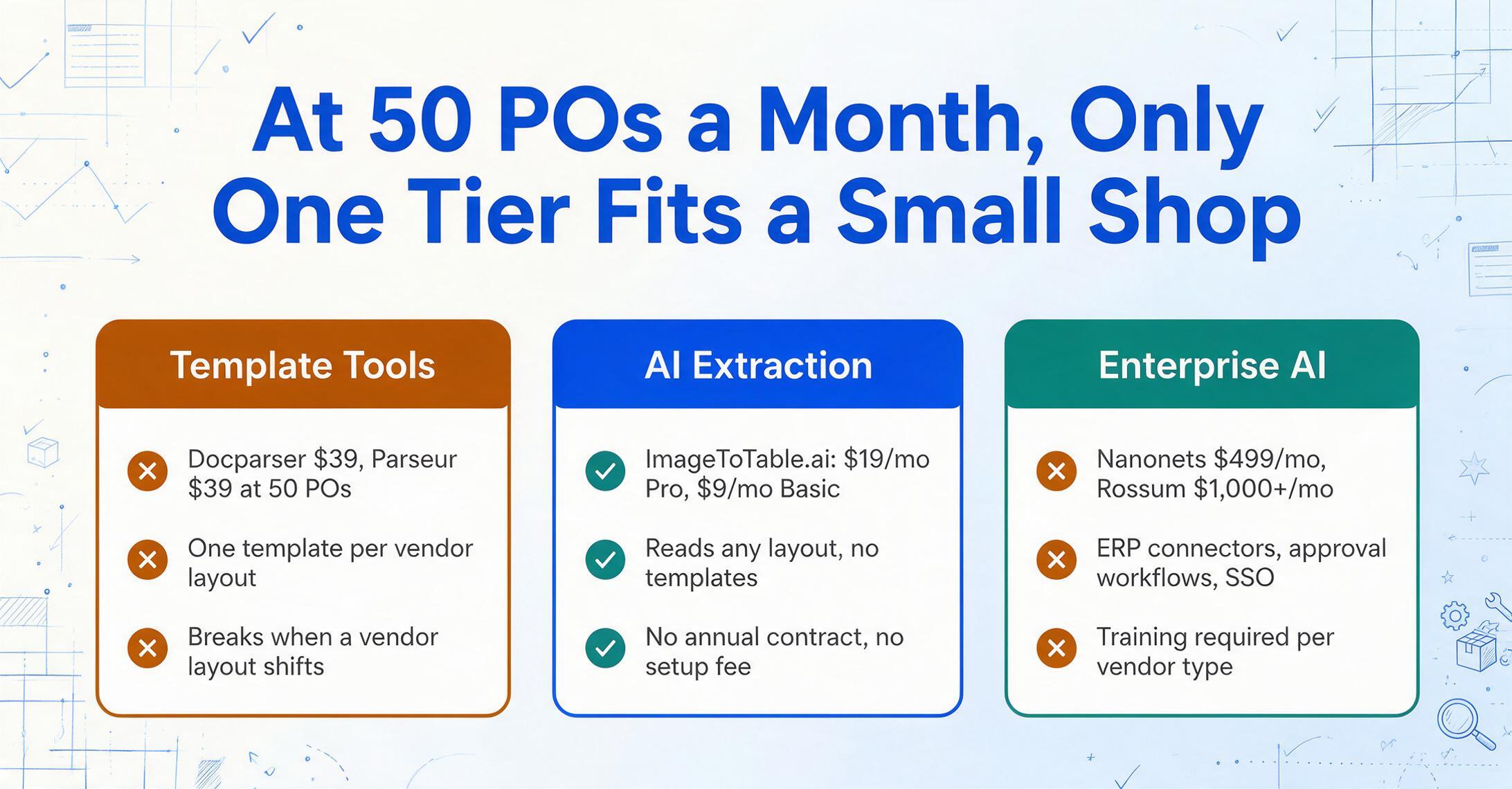
| Tool | Pricing Model | Monthly Cost (20 POs) | Monthly Cost (50 POs) | Monthly Cost (80 POs) | Handles Any Layout? |
|---|---|---|---|---|---|
| ImageToTable.ai Basic | $9/mo (150 credits) | $9.00 | $9.00* | $9.00† | Yes — AI reads any layout |
| ImageToTable.ai Pro | $19/mo (400 credits) | $19.00 | $19.00 | $19.00 | Yes |
| Docparser | $39/mo (100 docs) | $39.00 | $39.00 | $39.00 | No — template per vendor layout |
| Parseur | $39/mo (100 pages) | $39.00 | $39.00 | $39.00 | No — template per sender |
| ImageToTable.ai Max | $59/mo (1,500 credits) | $59.00 | $59.00 | $59.00 | Yes |
| Nanonets Pro | $499/mo (annual) or $0.30/page | $499.00 / $6.00 | $499.00 / $15.00 | $499.00 / $24.00 | Partially — training required per vendor type |
| Rossum | $1,000+/mo (sales quote) | $1,000+ | $1,000+ | $1,000+ | Yes — enterprise AI |
* At 50 single-page POs, the Basic plan's 150 credits may be tight if some POs are multi-page. † At 80 single-page POs, Basic runs out of credits; Pro or Max is required.
At 50 single-page purchase orders per month — the middle of the typical small-manufacturer range — ImageToTable.ai Pro costs $19. Docparser and Parseur cost $39. Nanonets at the $0.30/page pay-as-you-go rate costs $15, which is competitive on price, but carries a different cost: every new vendor format requires training the model or defining extraction rules. Over a year of 50 POs per month, the difference between $19 and $39 is $240 — not a rounding error for a shop running on tight margins. The difference between $19 and $499 is $5,760 — more than a month of raw materials for many small operations.
But price alone doesn't decide the right tool. The variable that matters most for a manufacturer is what happens when a new supplier sends their first PO in a format the tool has never seen.
Why Manufacturing Vendor Diversity Breaks Template-Based Tools
A small manufacturer's supplier base is surprisingly diverse. A single fabrication shop might buy steel bar stock from a national distributor (PO arrives as a clean ERP-generated PDF), cutting fluid from an industrial supply house (PO arrives as a thermal-print scan with smudged text), fasteners from a specialty distributor (multi-page PDF with 40 line items), and packaging materials from a regional supplier (handwritten order confirmation, photographed and emailed). Four vendors. Four completely different document formats.
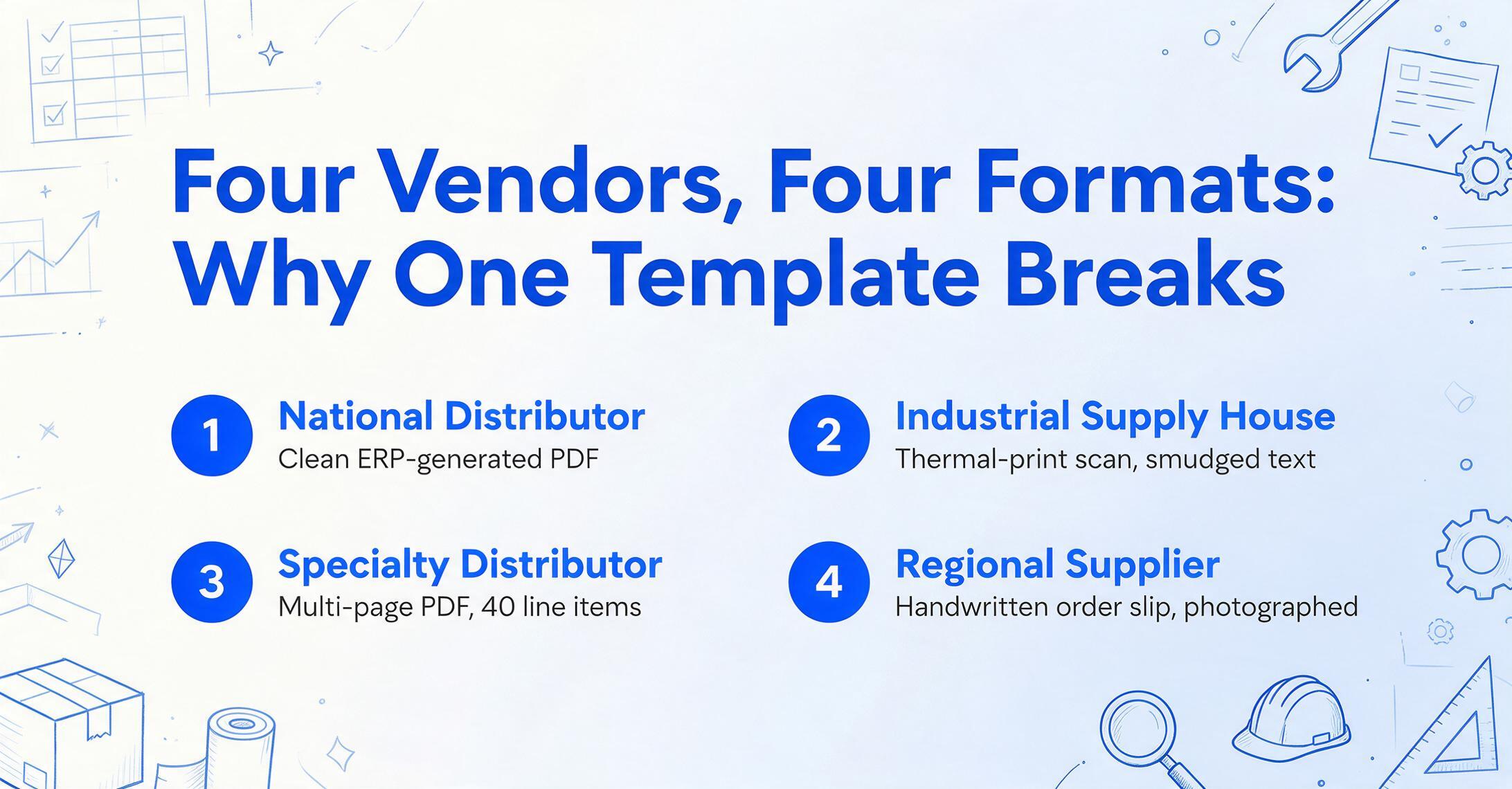
Template-based extraction tools — Docparser, Parseur — work by defining parsing rules per layout. You upload one PO from Vendor A, draw zones around "PO Number," "Line Item," "Unit Price," and the tool applies that template to future POs from Vendor A. When Vendor A changes their ERP and the PO layout shifts — which happens more often than most people expect — the template breaks. Someone has to build a new one.
AI-powered extraction — the approach ImageToTable.ai uses — works differently. Instead of remembering where fields sit on a page, it understands what each field means. You type the column names you want: "PO Number," "Vendor Name," "Item Description," "Quantity," "Unit Price," "Line Total." This is Custom Column Extraction: the column names you enter become the headers of your output spreadsheet, and the AI locates matching values across every document by understanding the semantic role of each piece of data — a PO number looks like a PO number regardless of whether it sits in the top-right corner or bottom-left, whether it's labeled "PO #," "Order No," or "Reference."
For a manufacturer with 5 long-term suppliers, a template tool is manageable — build 5 templates once, maintain them occasionally. For a manufacturer with 20 suppliers whose formats change when they upgrade software, the template overhead becomes the cost center. You buy a $39/month template tool and spend the saved money on template maintenance time. The real cost isn't $39. It's $39 plus the hours spent rebuilding broken parsing rules whenever a supplier changes their purchase order template.
The hidden cost of template-based PO extraction for manufacturers: Every new supplier = one new template. Every supplier ERP upgrade = one broken template. A manufacturer with 20 vendors averaging one format change every 18 months is maintaining roughly one template repair per month, plus new templates for each new supplier onboarded. If each template takes 15 minutes to build or fix, that's roughly 20 minutes of template labor per month — free labor that the $39 subscription price doesn't reflect.
The question isn't whether template tools are cheaper than AI tools. The question is whether they're cheaper in total — subscription plus labor. For manufacturers with stable, standardized supplier PDFs from a small vendor base, they can be. For the more common scenario — diverse suppliers, evolving formats, plus the occasional handwritten order slip — the labor math tilts toward AI-powered, layout-agnostic extraction. Our free OCR vs AI extraction cost comparison breaks down this tradeoff in more detail across document types.
What ImageToTable.ai Costs at a 30-PO Shop
ImageToTable.ai operates on a credit system. One credit processes one page — an image or a PDF page. A single-page purchase order consumes one credit. Multi-page POs consume one credit per page. For a manufacturer running 30 purchase orders a month, most of which are single-page documents, the math is straightforward:
| Plan | Monthly Cost | Included Credits | Effective Cost/Page | Covers This Monthly Volume |
|---|---|---|---|---|
| Basic | $9/mo | 150 | $0.06/page | Up to ~40 single-page POs (with headroom for multi-page documents) |
| Pro | $19/mo | 400 | $0.048/page | Up to ~100 single-page POs |
| Max | $59/mo | 1,500 | $0.039/page | Up to ~400 single-page POs, or a mix of POs, invoices, and other documents |
At 30 single-page POs per month, the Basic plan at $9 covers the volume with 120 credits to spare — enough headroom for a few multi-page purchase orders, the occasional receiving document, or batch-processing invoices from the same suppliers. The per-PO cost works out to $0.30. Compared to the APQC benchmark of $14 to $54 to manually process a single purchase order, that's a 40-to-1 cost reduction on the extraction step alone — before accounting for error prevention, searchable records, or the time reclaimed for production management.
And unlike ERP systems, there's no annual contract, no setup fee, no per-user charge. A small manufacturer picks a plan and uploads a PO. If December runs 80 POs and January runs 15, the plan adjusts month to month. The tool scales to manufacturing volume — not the other way around. For a look at how subscription pricing compares to pay-as-you-go across document volumes, our pay-as-you-go vs subscription analysis models the break-even points at every tier.
Files are processed securely and not stored.
The Recordkeeping Side: Why POs Matter Long After Goods Are Received
PO extraction is usually framed as an efficiency problem. For a small manufacturer, it's also a compliance and cost-control problem — with dollar figures attached at both ends.
IRS Publication 334, the Tax Guide for Small Business, governs how businesses report income and expenses on their tax returns. It requires that business expenses be substantiated with documentation — purchase orders, invoices, receipts — and that records be retained for at least three years from the filing date. If income is understated by more than 25%, the lookback period extends to six years. Accounting industry best practice, documented by the U.S. Chamber of Commerce and major CPA firms, extends PO retention to seven years — matching the typical recommendation for all accounting records supporting tax positions.
Here's what that means in a manufacturing context: a purchase order is the first link in the cost-of-goods-sold chain. Raw materials arrive. Production consumes them. The finished product ships. The COGS deduction flows through to Schedule C or the corporate return. If an auditor questions a COGS entry and the manufacturer can't produce the original PO that initiated the purchase, the deduction is vulnerable — not because the expense didn't happen, but because the paper trail is incomplete.
For manufacturers with government contracts, the retention requirement is even clearer. FAR Subpart 4.7 mandates that federal contractors retain purchase order files and supporting documentation — invoices, receiving reports, memoranda of negotiations — for four years after final payment. A manufacturer doing even occasional government work can't afford a PO filing system that consists of "the email is in my inbox somewhere."
The compliance case for affordable PO extraction doubles as a financial case: when extracting one purchase order costs $0.30 instead of 3 to 5 minutes of labor, every PO gets recorded — not just the ones that feel urgent. The Excel purchasing log becomes complete. The audit trail is maintained. The COGS substantiation exists. And the operations manager stops sorting POs into "worth entering tonight" and "I'll get to this one later." For a broader perspective on document extraction pricing across the market, see our 2026 pricing overview.
Frequently Asked Questions
Can I really extract PO data from a PDF for $9 a month?
Yes — if your monthly volume is roughly 40 single-page purchase orders or fewer. ImageToTable.ai's Basic plan at $9/month includes 150 credits, which covers 150 single-page documents. If your POs average two pages, you'd process about 75 per month at $9. The AI engine is the same at every plan tier — what changes is the credit cap. If you need more volume, Pro at $19/month provides 400 credits, which handles the upper end of small-manufacturer PO volumes with room left over for invoices and other documents.
What's the difference between PO extraction and a full MRP like MRPeasy?
PO extraction reads data from a purchase order PDF and outputs it to a spreadsheet. MRPeasy (and Fishbowl, Katana, etc.) manages the entire production workflow — bills of materials, production scheduling, inventory levels across locations, purchasing, shipping, and accounting. MRPeasy at $49/user/month is good value for a manufacturer ready for a full production management system. But many small shops aren't ready for that — they just need PO data in a spreadsheet. Those are different problems with different price points. One does not require the other.
Why are Nanonets and Rossum so much more expensive?
They're built for a different operating scale. Nanonets at $499/month bundles ERP integration (SAP, Oracle, NetSuite connectors), multi-step approval workflows, SSO/SAML for large teams, and human-in-the-loop verification services. Rossum at $1,000+/month adds native SAP S/4HANA and Oracle Fusion integration, multi-language processing across global procurement operations, and custom SLAs. These features are essential for a procurement department processing thousands of POs across multiple legal entities. For a 30-person machine shop, they're infrastructure the shop will never use — but the monthly bill charges for them regardless.
Does ImageToTable.ai handle handwritten or non-standard purchase orders?
Yes, within limits. The AI vision model reads legible handwritten text, block letters, and clear cursive on purchase orders. Thermal-print scans (common from industrial suppliers) are handled well. Heavily stylized handwriting, smudged fax-to-email documents, or extremely low-resolution phone photos may produce errors or require manual correction. This limitation is consistent across all AI extraction tools — handwriting accuracy is inherently lower than printed text. If a significant portion of your suppliers still send handwritten POs, test the tool on a representative sample of your actual documents before committing to a plan.
What if my POs come as multi-page documents?
ImageToTable.ai charges one credit per page. A three-page PO consumes three credits. Most small-manufacturer POs are one to two pages, but if your typical PO runs 5+ pages with extensive line-item tables across multiple pages, your credit consumption will be higher. At the Pro plan (400 credits, $19/month), you could process roughly 80 five-page POs per month. The free demo lets you test on your actual documents to estimate per-document credit usage before subscribing.
Can I integrate PO extraction with QuickBooks?
ImageToTable.ai exports to Excel (XLSX), CSV, and JSON — formats that QuickBooks Online, QuickBooks Desktop, Xero, and every other accounting platform accept for import. There's no direct API integration with QuickBooks, but the Excel export route works in practice: you extract PO data to a spreadsheet, then import the spreadsheet into QuickBooks as a bill or item receipt. This is a manual step, but it replaces the more time-consuming manual step of typing PO data from a PDF. For manufacturers processing high volumes where direct integration becomes necessary, see our document extraction without enterprise contracts for approaches that avoid vendor lock-in.
PO data extraction for small manufacturers isn't about replacing ERP systems. It's about recognizing that the extraction step is independent — and that a tool purpose-built for it costs what a small shop can actually pay: $9 to $59 a month, no contract, no implementation fee. The manufacturers who figure this out stop spending Wednesday evenings retyping PDFs into Excel. They spend that time on the production floor, where the value per hour is measured in output, not keystrokes.