Pay-As-You-Go vs Monthly Subscription
for Document Extraction
Spendesk analyzed 332,000 business subscriptions and found only 34% are actively used. The other 66% represent a quiet drain — money leaving every month for services that sit idle, credits that expire, and usage caps that don't match actual workflow patterns. Document extraction tools sit squarely inside this problem. Most pricing pages show a monthly fee and a per-page rate, but the number on the pricing page isn't what you actually pay. What you pay is a function of your volume pattern multiplied by a pricing model — and the model matters more than the listed price.
Key Takeaways
- 66% of business software subscriptions go unused — and document extraction tools compound this by resetting your paid-for monthly page credits to zero whether you processed 5 pages or 500.
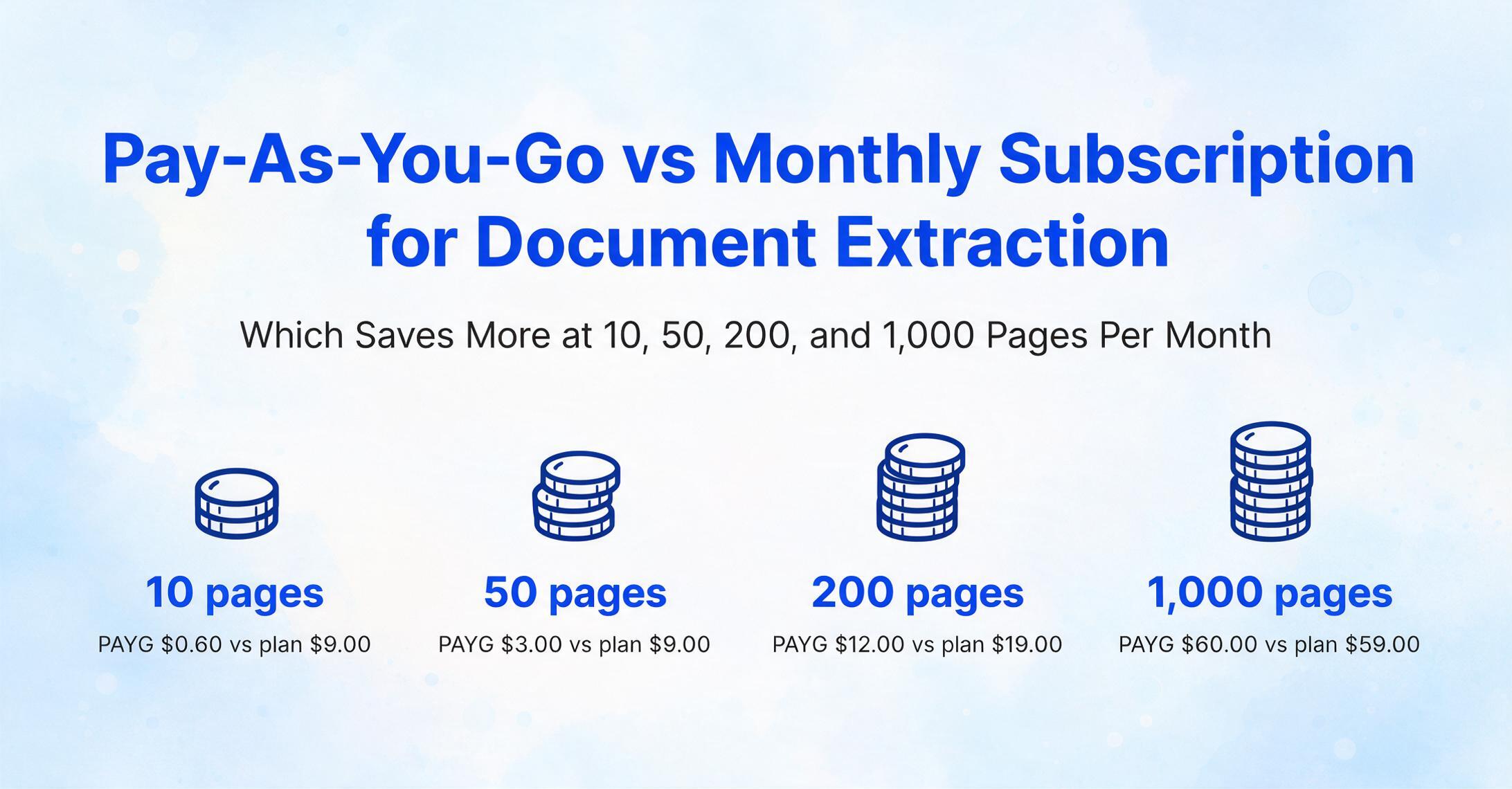
- At 50 pages a month, pay-as-you-go costs $6.00 total while the cheapest subscription costs $9.00 — the $3 gap is the price of a monthly commitment on volume you never consistently fill.
- The subscription model wins only when your volume is high and rock-steady every month — for everyone else, credits that never expire are cheaper, no matter how 'professional' the subscription sounds.
A note if you're here for Australia's PAYG form: "PAYG" in this article means the pay-as-you-go pricing model — buying extraction credits as you use them instead of a monthly subscription. If you arrived looking for the Australian Tax Office PAYG Payment Summary tax form (the annual income statement employers issue), that's a different topic — see our dedicated guides on extracting PAYG Payment Summary data to Excel for payroll and the complete guide to PAYG Payment Summary extraction.
Why the Pricing Model Matters More Than the Listed Price
A document extraction tool's pricing page typically shows a monthly subscription fee — $9, $39, $499 — with an included page allowance. Below that, sometimes in a smaller font, there's an overage rate for pages beyond the allowance. A few tools add a pay-as-you-go option, usually prepaid credits that you draw down as you use them.
The mistake most buyers make is comparing listed subscription prices without modeling their own volume against both structures. Two tools can both cost $39/month but deliver wildly different real costs if your usage is volatile. A subscription priced at $499/month isn't objectively expensive — it's expensive for your volume. The same math that makes it a bad deal at 50 pages per month makes it a reasonable one at 5,000.
The four volume tiers below — 10, 50, 200, and 1,000 pages per month — cover the range most small to mid-size operations actually sit in. At each tier the math shifts, and with it the right answer.
The Math at 10 Pages Per Month — Where Subscriptions Waste Money
Ten pages a month is a freelancer processing a handful of client invoices, a small shop digitizing vendor receipts, or a contractor converting a few timesheets. It's also the volume where subscriptions make the least sense.
| Tool | Subscription Model | Monthly Cost at 10 Pages | Effective Cost Per Page |
|---|---|---|---|
| Nanonets | Pro — $499/mo (5,000 pages) | $499.00 | $49.90 |
| Affinda | Starting $299/mo | $299.00 | $29.90 |
| Parseur | $99/mo (1,000 pages) | $99.00 | $9.90 |
| Docparser | $39/mo | $39.00 | $3.90 |
| Airparser | $39/mo | $39.00 | $3.90 |
| ImageToTable.ai | Basic — $9/mo (150 pages) | $9.00 | $0.90 |
| ImageToTable.ai (PAYG) | $0.12/page (Starter pack), never expires | $1.20 | $0.12 |
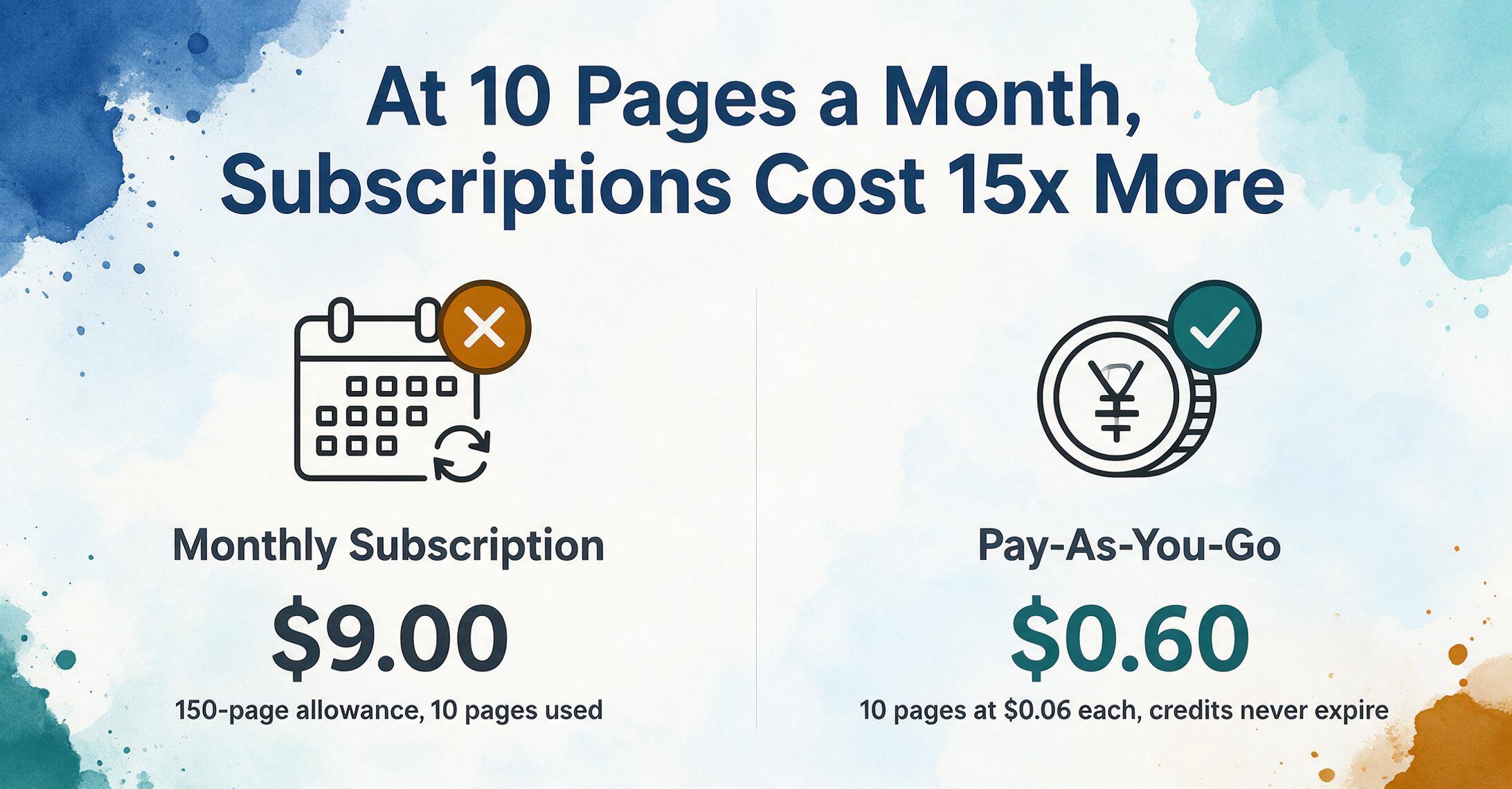
At 10 pages per month, the gap between even the most affordable subscription ($9) and pay-as-you-go ($1.20) is 7.5x. But the more important comparison is against the broader market: Nanonets charges $499 for a month in which you process 10 documents — that's $49.90 per page for a service whose per-unit value doesn't change with volume. The subscription model charges you for capacity you don't use. At light volume, the waste is near-total.
The subscription pitch at this tier is usually "you get access to advanced features." But a user processing 10 pages per month is not running automated approval workflows or API integrations with their ERP — they're extracting data from documents, and the extraction engine is the same regardless of plan tier. Paying monthly for features you won't touch is an infrastructure tax on light usage.
The Math at 50 Pages Per Month — The Break-Even Zone
Fifty pages per month — roughly two documents per business day — is where many small businesses land. An accounts payable person handling vendor invoices for a 20-person construction firm, a bookkeeper processing monthly bank statements for a handful of clients, or a retail manager digitizing weekly supplier receipts. This is the volume band where the subscription pitch gets its strongest argument, and where the math still says otherwise.
| Tool | Monthly Cost at 50 Pages | Effective Cost Per Page |
|---|---|---|
| Nanonets Pro | $499.00 | $9.98 |
| Docparser | $39.00 | $0.78 |
| ImageToTable.ai Basic | $9.00 | $0.18 |
| ImageToTable.ai PAYG | $6.00 | $0.12 |
Even at 50 pages, pay-as-you-go comes out ahead — $6.00 vs $9.00 for the cheapest subscription tier. But this is the inflection point where the gap narrows enough that non-price factors start to matter. Subscription plans at this tier typically include concurrent processing (processing multiple documents in parallel rather than one at a time) and higher queue priority, which with ImageToTable.ai's 3x concurrent processing on the Pro tier can meaningfully reduce the wall-clock time for a batch of 50 documents.
Whether those extras are worth $3/month is a judgment call. For someone whose workflow is "upload 5 documents every Friday afternoon," the speed difference is negligible — pay-as-you-go wins the value argument cleanly. For someone processing the full 50 in one sitting every Monday morning, the concurrent processing might save 10–15 minutes of wait time, which at even a modest hourly rate tips the calculation.
The bigger point, though, is that the subscription plans of enterprise IDP tools — Nanonets at $499, Rossum at $1,000+ — don't even enter the conversation at this volume. You're not choosing between pricing models with those tools; the pricing model itself excludes you.
The Math at 200 Pages Per Month — Subscriptions Pull Ahead, Under One Condition
Two hundred pages per month — roughly 10 per working day — is where the subscription model begins to earn its case. An accounting firm processing client invoices, a mid-size retailer handling purchase orders from 30–40 suppliers, or a logistics office digitizing delivery confirmations. This is steady enough volume that the included page allowance in a subscription plan is actually useful.
| Tool | Plan | Monthly Cost at 200 Pages | Effective Cost Per Page |
|---|---|---|---|
| Nanonets | Pro — $499/mo | $499.00 | $2.50 |
| Parseur | $99/mo | $99.00 | $0.50 |
| Docparser | $39/mo | $39.00 | $0.20 |
| ImageToTable.ai | Pro — $19/mo (400 pages) | $19.00 | $0.095 |
| ImageToTable.ai PAYG | $0.12/page | $24.00 | $0.12 |
At 200 pages, the picture flips. The Pro subscription at $19 delivers a per-page cost of just under $0.05 — and the total monthly spend is $19 vs $24 for four pay-as-you-go Starter packs. This is the crossover zone: at roughly 100 pages per month, the subscription's lower unit cost overtakes pay-as-you-go's lower absolute entry price. If your volume reliably clears that line, the subscription now wins on both metrics.
Whether this tradeoff makes sense depends on something most pricing comparison articles ignore: volume consistency. If those 200 pages arrive every single month, the subscription saves you $5 a month — $60 a year — enough to justify the commitment several times over. If volume fluctuates between 120 and 280 pages depending on the month, the subscription still works because the 400-page allowance absorbs the peaks without overage charges. But if you have a quarterly cycle — 50 pages in quiet months, 600 in the month following a project close — pay-as-you-go's flexibility becomes worth the higher per-page rate, because you only pay for the months you actually process documents.
The condition under which pay-as-you-go still wins at this tier is an uneven quarterly cycle. Once steady monthly volume clears ~100 pages, the subscription costs less in absolute dollars.
The Math at 1,000 Pages Per Month — The Enterprise Trap
At 1,000 pages per month, you're in the territory where automation is no longer optional — manual processing of this volume costs $3,000–$15,000 in labor per month depending on document complexity, per IOFM and Ardent Partners staffing benchmarks. The question isn't whether to use extraction software, it's which pricing model minimizes the tool cost without locking you into capacity you don't consistently use.
| Tool | Plan | Monthly Cost at 1,000 Pages | Effective Cost Per Page |
|---|---|---|---|
| Nanonets | Pro — $499/mo (5,000 pages) | $499.00 | $0.50 |
| Veryfi | $500/mo | $500.00 | $0.50 |
| Affinda | $299/mo | $299.00 | $0.30 |
| Parseur | $99/mo (1,000 pages) | $99.00 | $0.10 |
| ImageToTable.ai | Max — $59/mo (1,500 pages) | $59.00 | $0.059 |
| ImageToTable.ai PAYG | $0.08/page (Pro pack) | $80.00 | $0.08 |
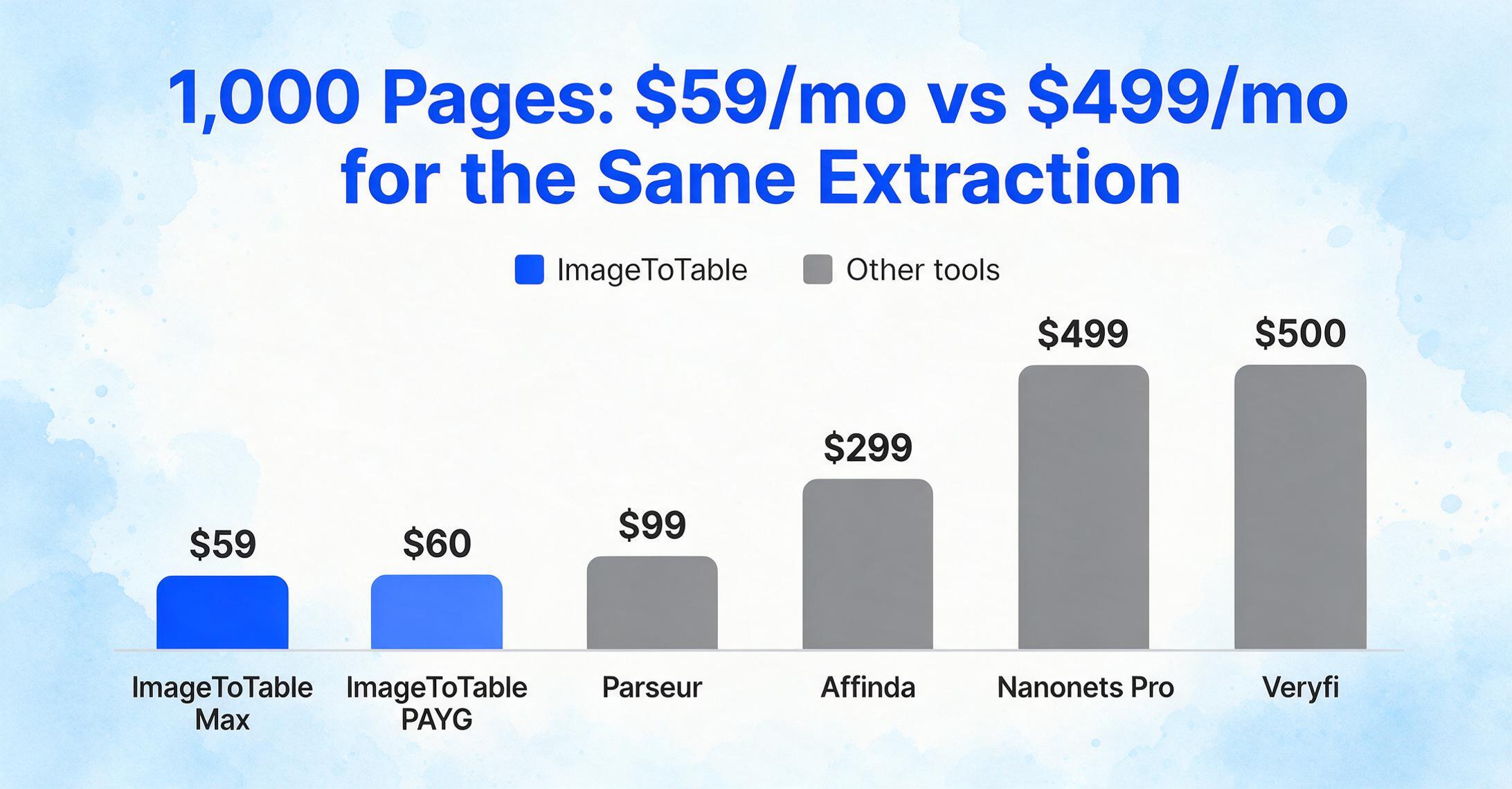
At 1,000 pages, the subscription wins outright on the same engine — the Max plan at $59 (1,500 credits) undercuts the best pay-as-you-go pack ($80 for 1,000 credits at $0.08/page) by $21 while covering 50% more volume. At this tier the pricing model stops being a tradeoff: steady high volume belongs on the subscription, and PAYG's role shrinks to topping up months that exceed the plan allowance.
But look at what happens when you reach this volume on enterprise IDP platforms. Nanonets at $499/month, Rossum at $1,000+/month, Veryfi at $500/month — these tools are charging 8–17x more for functionality that, at 1,000 pages, isn't fundamentally different from what a $59/month plan delivers. The extraction is AI-driven on both sides. The output is structured data. The accuracy gap between a $59 tool and a $499 tool on standard documents like invoices and receipts is measured in fractions of a percentage point — and at 1,000 pages, the cost gap between them is $440 per month, or $5,280 per year.
This is the enterprise trap: tools priced for procurement departments with five-figure software budgets make their pricing pages look like the only option at scale. They're not. They're one end of a spectrum where the other end delivers the same core output at a fraction of the cost. Our document extraction pricing landscape maps the full spread.
Subscription Hidden Costs: Monthly Reset, Overage Charges, and "Use It or Lose It"
The number on the pricing page is a starting point. The real cost of a subscription depends on three mechanisms that most tools don't surface prominently but that directly affect your monthly bill.
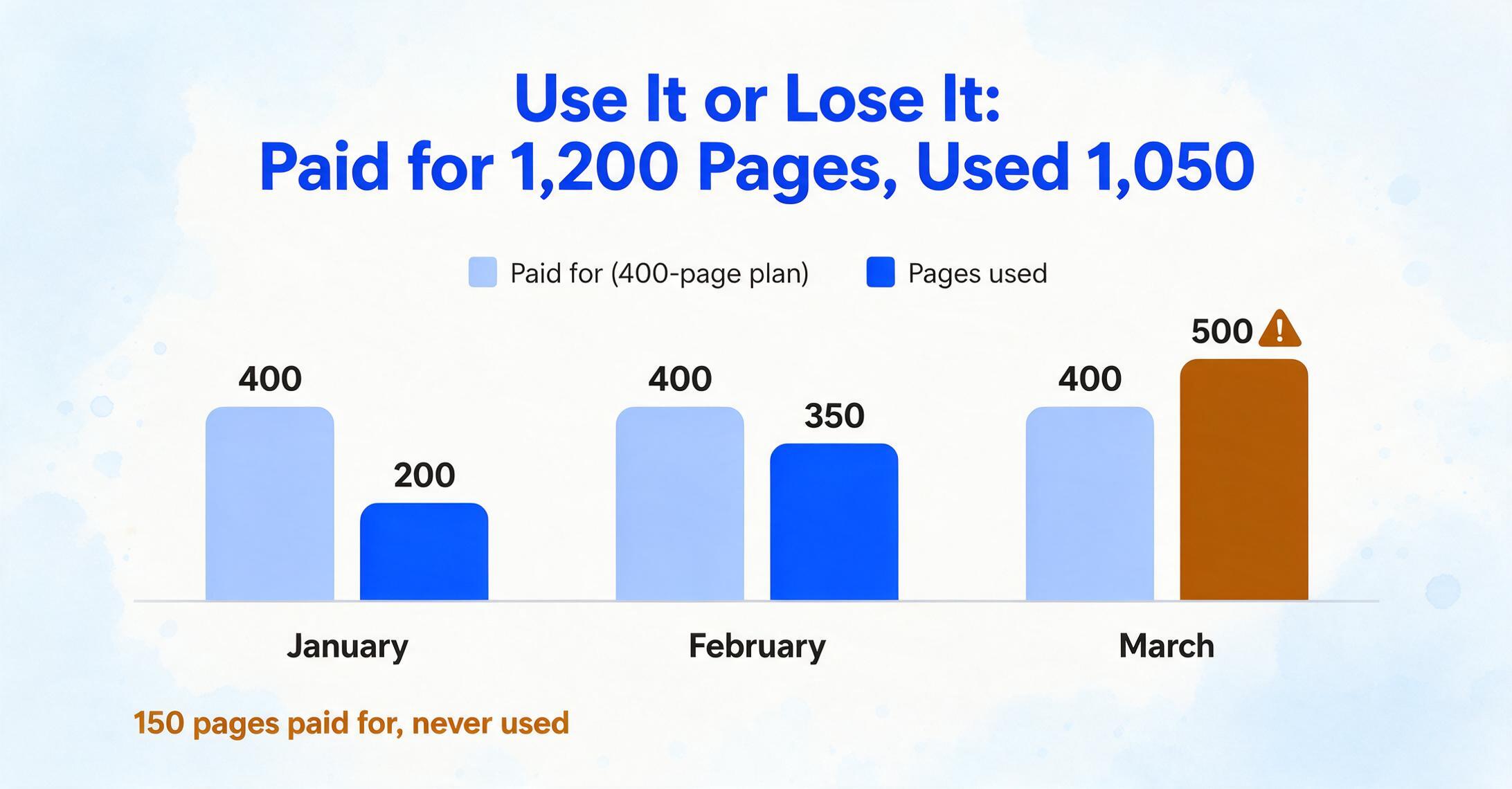
Monthly credit reset. Most document extraction subscriptions work on a "use it or lose it" model — your included page allowance resets on the billing date, and unused pages don't roll over. DocAnalyzer's pricing FAQ states this explicitly: "Monthly credits included in your subscription plan are valid only for the current calendar month. Unused credits from the previous month do not roll over." OLOCR confirms the same: "Unused credits do not carry over. Your credit allowance is refreshed to the full amount at the start of each new billing cycle."
This means if you're on a 400-page monthly plan and process 200 pages in January, 350 in February, and 500 in March, you've paid for 1,200 pages across three months but only used 1,050. The 150 unused pages cost you without delivering value. Over a year, this waste can total $50–$100 on a low-cost plan, or hundreds on enterprise tiers. It's not that the per-page price is deceptive — the billing structure just doesn't account for natural volume fluctuation.
Overage charges. When you exceed your plan's page allowance, the cost per page typically spikes. A plan that prices included pages at $0.05 each might charge $0.10–$0.15 for overage pages. The spike is intentional — it incentivizes upgrading to a higher tier, where the extra capacity might also go partly unused. The result is a ratchet effect: overage charges push you to upgrade, the higher tier gives you more pages than you consistently need, unused pages reset each month, and you're paying for a capacity buffer you only need in peak months.
LandingAI's credit expiration tiers illustrate how nuanced this gets. On its "Pay-As-You-Go" plan, purchased credits expire after one year. Credits allocated as part of a subscription expire at the end of each billing period. Free trial credits expire after 90 days. Three different expiration windows for three different credit types within the same product — the user has to track which batch of credits is expiring when. Subscription billing complexity isn't a bug; it's a feature of the model.
Stripe's own billing documentation acknowledges this friction, recommending that companies "consider limited rollover options (e.g., roll over unused credits for one additional month)" and "be transparent — customers should never be surprised by lost credits." The fact that Stripe's docs have to say this suggests how common the surprise is.
What Pay-As-You-Go Gives You That Subscriptions Don't
Pay-as-you-go pricing in document extraction is structurally different from subscription, not just cheaper at low volume. The differences are worth naming explicitly because they change the user's relationship with the tool.
Credits that never expire. When you buy a credit pack — ImageToTable.ai's $6, $30, or $300 options — those credits sit in your account until you use them. No monthly countdown. No pressure to use them before the 1st of the month. If you process 40 pages in January and 15 in February, the credits you didn't use in January are still there in March. A subscription billing cycle treats unused credits as expired revenue. A pay-as-you-go credit balance treats them as prepaid inventory — you bought them, they're yours.
Buy as needed, not as committed. The subscription model forces a capacity decision upfront: estimate your volume, pick a tier, and hope the estimate holds. If your client workload doubles in Q4, you pay overage charges or upgrade. If it halves in Q1, you pay for idle capacity. Pay-as-you-go decouples the buying decision from the usage pattern — you add credits when your balance gets low, not when the calendar says a new billing cycle started.
No monthly pressure. A subtle but real psychological cost of subscriptions is the ticking clock. Every month you process fewer documents than your plan allows, you've left money on the table. That pressure pushes users to either find unnecessary documents to process (busywork) or feel a low-grade regret about "not getting full value." Pay-as-you-go eliminates the clock. You use it when you need it, and when you don't, nothing expires.
Volume swings don't break the model. A construction contractor might process 5 inspection reports in a slow month and 150 in the month a project wraps. A retail accountant might handle 20 supplier invoices in February and 200 in November. These patterns break subscription economics — you're either overpaying in slow months or hitting overage fees in peak months. Pay-as-you-go absorbs the swings without penalty. The per-unit cost doesn't change because your volume did.
The subscription model works best when your volume is both predictable and high enough that the included page allowance is fully used every month. Pay-as-you-go works best when your volume is variable or moderate — which describes most businesses processing fewer than 200 pages per month. The industry's default assumption that subscriptions are the "serious" option and pay-as-you-go is for dabblers is backward: for the majority of users by volume, pay-as-you-go is the more cost-effective model.
Why ImageToTable.ai Offers Both — and Why Most Tools Don't
Most document extraction tools commit to one pricing model and optimize their entire product around it. Enterprise IDP platforms (Nanonets, Rossum) run on annual contracts and per-block consumption — the sales motion, onboarding process, and support infrastructure are built for companies with dedicated procurement budgets. Template-based tools (Docparser, Parseur) run on tiered subscriptions — the product is designed around per-user seats and monthly allowances, and pay-as-you-go isn't offered because the revenue model depends on recurring commitments.
Offering both subscription and pay-as-you-go on the same AI engine is uncommon because it complicates the business: you need to track two different credit systems, manage two different billing cadences, and ensure that neither model cannibalizes the other. Most tools choose one model because it's simpler to build and easier to explain on a pricing page.
ImageToTable.ai offers both because the user base spans both usage patterns. The subscription plans — $9/mo Basic (150 credits), $19/mo Pro (400 credits), $59/mo Max (1,500 credits) — are built for users with steady weekly or daily document intake: consistent batch processing with predictable volume. The pay-as-you-go credit packs — from $6 to $300, at $0.12 down to $0.06 per credit as pack size grows — are built for users whose volume fluctuates, or who process documents in bursts rather than as an ongoing workflow.
Critically, both models use the same AI extraction engine. A document processed with a subscription credit and one processed with a PAYG credit get identical treatment — same accuracy, same output quality, same column-based extraction that lets you type the field names you want and have the AI locate the corresponding values in the document. The pricing model doesn't gate the extraction quality — it only changes how you pay for it.
This design choice matters because it acknowledges that the right pricing model isn't a function of how "serious" a user is — it's a function of their volume pattern. A freelancer processing 30 invoices a month isn't a "light" user in a way that justifies a crippled product experience. They're a user whose volume doesn't fit a subscription's minimum viable capacity, and they deserve the same extraction quality as someone processing 500.
Same engine on both subscription and PAYG — try it above.
FAQ
Is pay-as-you-go always cheaper than subscription for document extraction?
Not always — it depends on volume. Below roughly 200 pages per month, pay-as-you-go is consistently cheaper in absolute dollars. Above 1,000 pages, subscription plans with volume discounts can deliver lower per-page costs. Between 200 and 1,000 pages, the answer depends on whether your volume is steady every month (subscription wins) or fluctuates (PAYG wins).
What happens to unused subscription credits at the end of the month?
At most tools, unused subscription credits reset to zero on the billing renewal date. They don't roll over to the next month. This is standard across the industry — DocAnalyzer, OLOCR, PDFCrowd, and others all explicitly state no rollover. A few exceptions exist (Extend.ai rolls over unused credits for one extra month on some plans), but they're uncommon.
Do pay-as-you-go credits expire?
Depends on the tool. ImageToTable.ai's PAYG credits never expire — once purchased, they remain in your account until used. Other tools have expiration windows: LandingAI's PAYG credits expire after one year, Extend's after one year, and some tools' credits expire as quickly as 90 days. Always check the expiration policy before buying a large credit pack.
Can I switch between subscription and pay-as-you-go on the same account?
On ImageToTable.ai, yes — you can maintain a subscription plan for your baseline volume and purchase pay-as-you-go credit packs as a top-up for months with unusually high volume. The credits draw from the same balance and the extraction quality is identical. Most competing tools don't offer this dual-model flexibility — you pick one model and commit to it.
What's the cheapest document extraction option for a small business processing under 100 pages per month?
Pay-as-you-go at $0.12 per page — 100 pages costs $12.00 total (or the $30 Growth pack at $0.10/page if you'll reuse the balance), with no recurring monthly commitment. The cheapest subscription in the market starts at $9/month (ImageToTable.ai Basic, 150 credits), so the crossover sits around 75–100 pages: under that, pay-as-you-go costs less in absolute dollars. For comparison, Nanonets' starter tier is pay-as-you-go at $0.30/page — 2.5x the Starter-pack per-page rate — and Docparser's minimum subscription is $39/month regardless of usage.
Why do enterprise tools charge so much more than small-business tools?
Enterprise IDP tools like Nanonets ($499/mo), Rossum ($1,000+/mo), and ABBYY FlexiCapture pack their pricing with features that large organizations need — SAML SSO, role-based access control, dedicated account managers, custom SLAs, SOC 2 compliance, on-prem deployment options. These features have real engineering and operational costs. But if your organization doesn't need SSO, doesn't have compliance requirements that mandate on-prem hosting, and doesn't require a dedicated support team, those costs are being paid for and not used — same pattern as the unused credit problem, just at a much larger scale.
How do I calculate my actual monthly cost for a subscription?
Take your average monthly page count, multiply by 1.3 to account for fluctuation, and compare against plan allowances. If the result exceeds your plan's limit, add the overage rate for the excess pages. Then multiply the monthly cost by 12 to get your annual spend, and divide by your actual annual page count to get your real cost per page. That number — not the listed per-page rate — is what you're actually paying. Factor in that any pages under your plan allowance in a given month represent waste, and subtract their value from your effective spend.
Which Model Is Right for You
A subscription is not automatically the "serious" option and pay-as-you-go is not the "casual" one. The right model is the one that matches your volume pattern — not the one with the most features on the pricing comparison grid.
If your monthly page count is under 50 or fluctuates by more than 40% month to month, pay-as-you-go eliminates waste that subscriptions bake in by design. If you process 200+ pages every single month with minimal seasonal variation, a subscription's volume discount starts to earn its keep — provided you pick a plan where the allowance matches your usage, not one where you're paying for capacity you'll never fill.
What separates the tools worth considering from the ones you should skip isn't the headline price — it's whether the pricing model was designed for your usage pattern or for someone else's. See ImageToTable.ai's plans to check which model fits your volume.