Automate Purchase Order Data Entry
From Any PDF, Without Templates
Search for "purchase order automation" and the results paint a picture of a solved problem: procurement suites with approval routing, budget enforcement, three-way matching, and ERP synchronization. But for the person who opens a supplier's PO PDF every morning and manually types a dozen line items into a spreadsheet, that picture describes a different building. The step most PO automation vendors cover — what happens after the data is already in the system — isn't the bottleneck. The bottleneck is getting the data into the system in the first place.
This page covers the economics of PO automation and the semantic AI extraction approach. For the step-by-step batch workflow — turning 50 supplier PDFs into one Excel sheet — see our batch PO extraction to Excel guide. For the complete field-by-field reference, see the complete guide to purchase order data extraction.
A Reddit user in r/smallbusiness described the problem with precision: "Need to automate data extraction from Order/PO PDFs — any tools or methods?" No mention of an ERP. No mention of approval workflows. Just PDFs, and data that needs to move from them into something usable. Across r/automation, another user asked whether anyone had "successfully automated invoice or purchase-order data extraction without relying on templates" — the template question surfacing because format variance across suppliers is the real obstacle, not the act of typing itself.
Key Takeaways
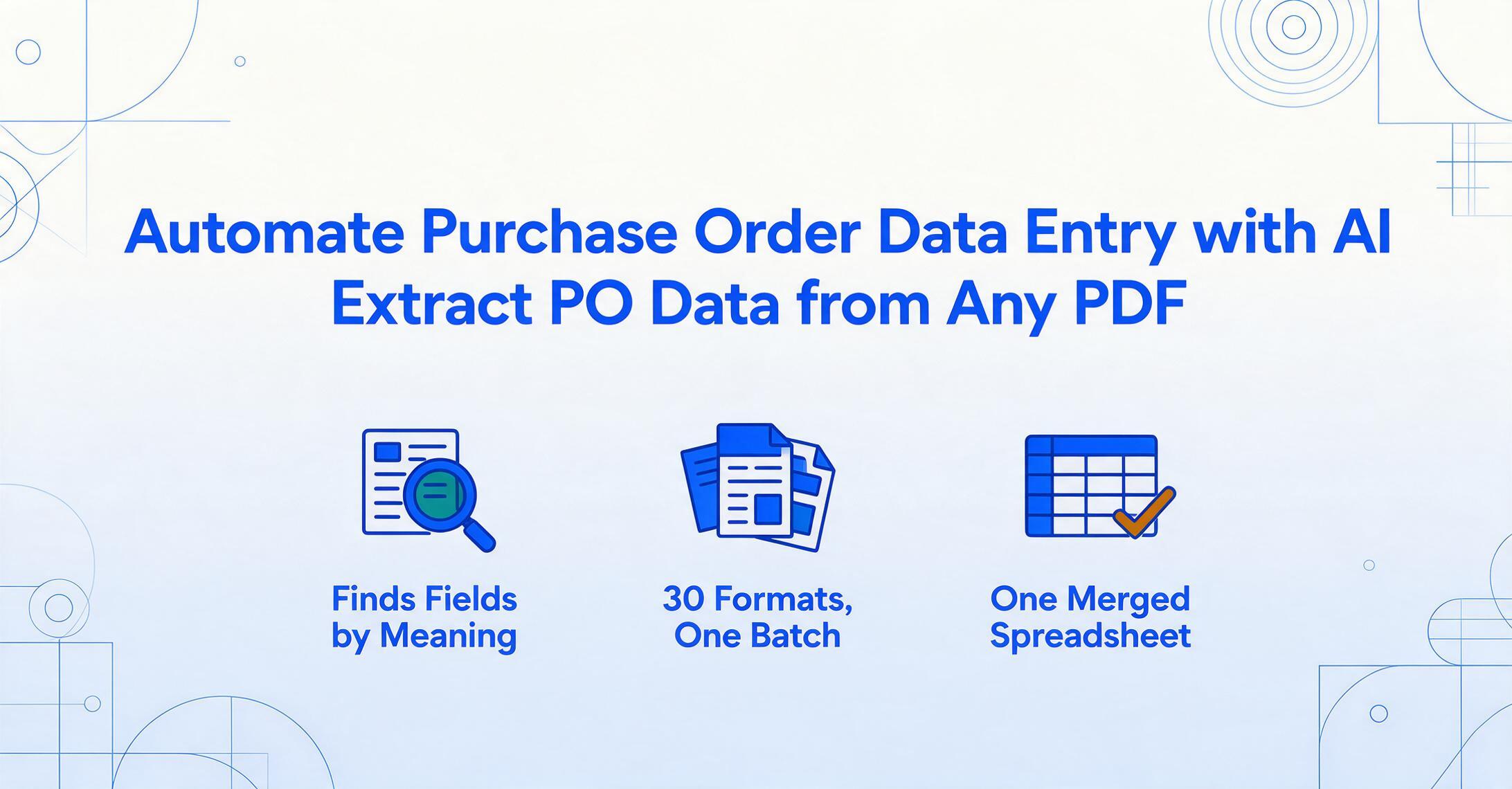
- PO automation tools like Coupa and SAP Ariba automate everything after the data is in the system — the moment a supplier's PDF hits your inbox, you're on your own.
- Template extraction — billed as the fix for multi-supplier POs — doesn't cut manual work, it relabels it: 30 templates cost 5–7.5 hours to set up and break silently the moment any supplier changes format.
- Semantic AI finds "Quantity" by understanding what a quantity is, not by memorizing where Supplier #17 puts it on the page — define your columns once, and every supplier's PO, in any layout, lands in the same spreadsheet.
What PO Automation Actually Solves — and What It Doesn't
To understand why manual data entry persists, it helps to see what the standard PO automation narrative covers. The typical procure-to-pay (P2P) flow that tools like Coupa, SAP Ariba, and Precoro automate looks like this:
Every one of these steps happens after the purchase order data is already in the system. For a company issuing POs to suppliers, that's the right sequence — the PO originates internally, so data entry into the system is the starting point, not a problem to solve.
But this description misses an entire category of purchasing workflows: companies that receive purchase orders from their customers as PDFs, emails, or scanned attachments. A manufacturer, distributor, or service provider that gets POs from 30 different buyers — each in its own format — faces a data entry problem that upstream P2P automation was never designed to address. Their PO data doesn't originate in their system. It arrives from outside, in someone else's format, and someone has to type it in.
Key insight: PO automation tools automate the workflow around the data. They don't automate the entry of data that arrives from outside the organization in unstructured PDF form. That gap — moving line-item data from a supplier's PO into a spreadsheet or order management system — is where the majority of manual hours are actually spent.
The Real Cost of Manual PO Data Entry, Broken Down
Procurement is one of the most heavily benchmarked business functions, and the numbers quantify what anyone who's ever keyed in purchase orders already knows: manual entry is expensive, slow, and error-prone. APQC Open Standards Benchmarking data — the most widely cited independent source in procurement performance measurement — shows that organizations spend between $14 and $54 to process a single purchase order, with a median of $42. At the 75th percentile, that's nearly four times as much as top performers at the 25th percentile.
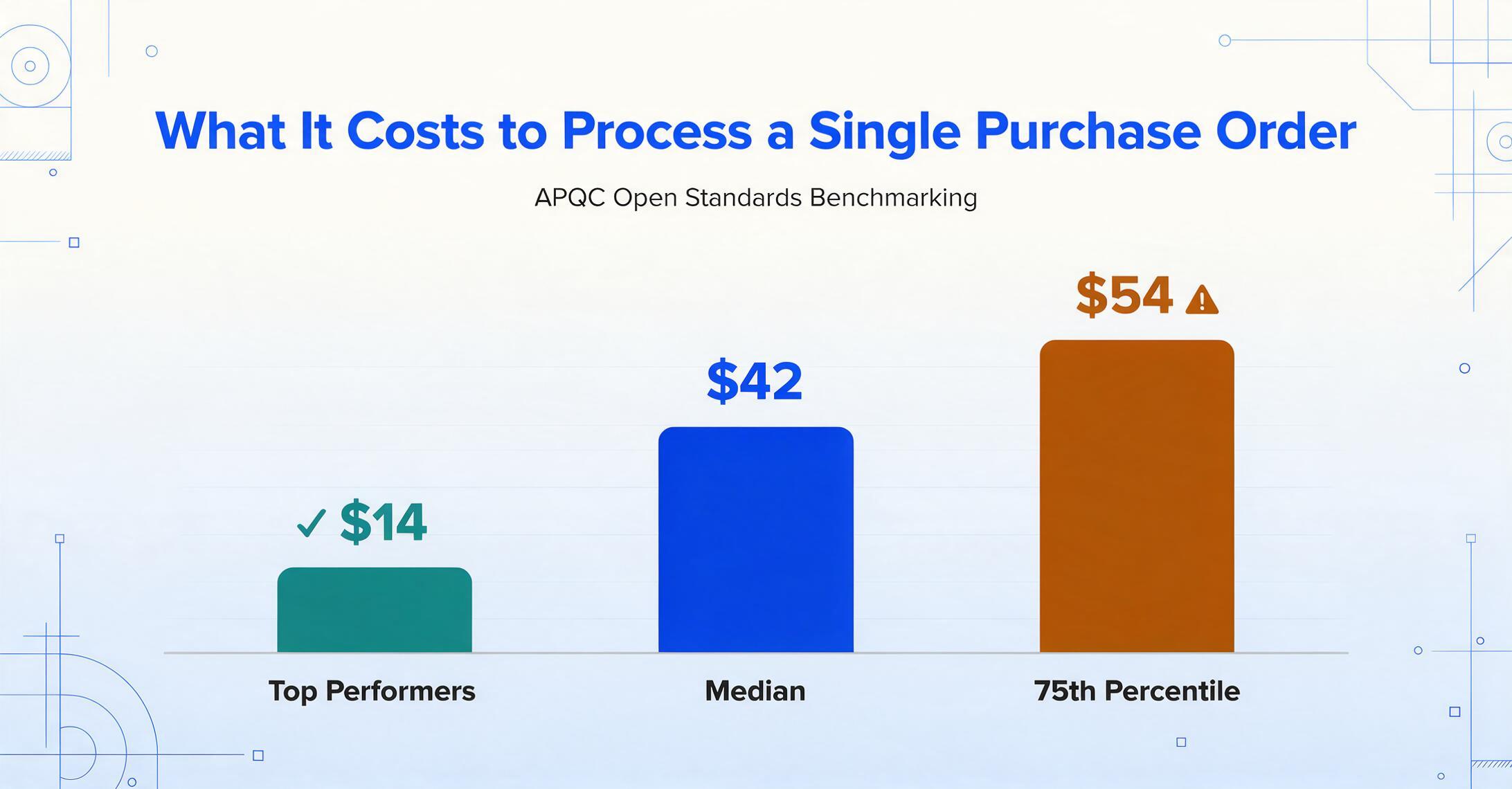
For a company processing 1,000 POs per month, the gap between $14 and $54 doesn't just represent efficiency — it represents $40,000 per month in operating cost variance for the same set of transactions. Over a year, that's nearly half a million dollars that separates the bottom quartile from the top.
APQC also found that top-performing procurement organizations issue purchase orders in about one day, while lower performers take more than twice as long. Organizations with automated procurement processes complete PO cycle times in 24 hours versus 35 hours for those relying on manual systems or spreadsheets.
The cost driver is time, and the time driver is data entry. Manual PO processing means someone reads each field — PO number, vendor name, item codes, quantities, unit prices, delivery dates — and types them into a system. A standard PO with 10–20 line items takes 8 to 12 minutes of manual touch time, according to invoice processing benchmarks. The majority of that time is consumed by line-item data entry and verification, not by strategic decision-making.
| Metric | Manual PO Processing | AI-Assisted Extraction |
|---|---|---|
| Cost per PO | $14–$54 (APQC median: $42) | ~$0.07–$0.29 per document |
| Time per PO | 8–12 min (standard line-item PO) | ~10 seconds per page |
| Error rate | 1–3% per field typed | ~1% total, consistently |
| Cycle time (request → PO issued) | 35+ hours (manual) | Under 24 hours (data available immediately) |
| Scalability | Linear: more POs = more staff hours | Near-zero marginal cost per additional PO |
Error rates compound the time cost. A human data entry worker operating at 97% accuracy on 1,000 documents makes roughly 30 mistakes per month — each requiring a separate investigation and correction cycle. In procurement, where a single wrong quantity or unit price can cascade into over-ordering, delayed shipments, or invoice disputes, those 30 errors aren't just a cleanup task. They're a source of operational friction that multiplies across the supply chain.
Why Templates Work Against You When Every Supplier Sends a Different Format
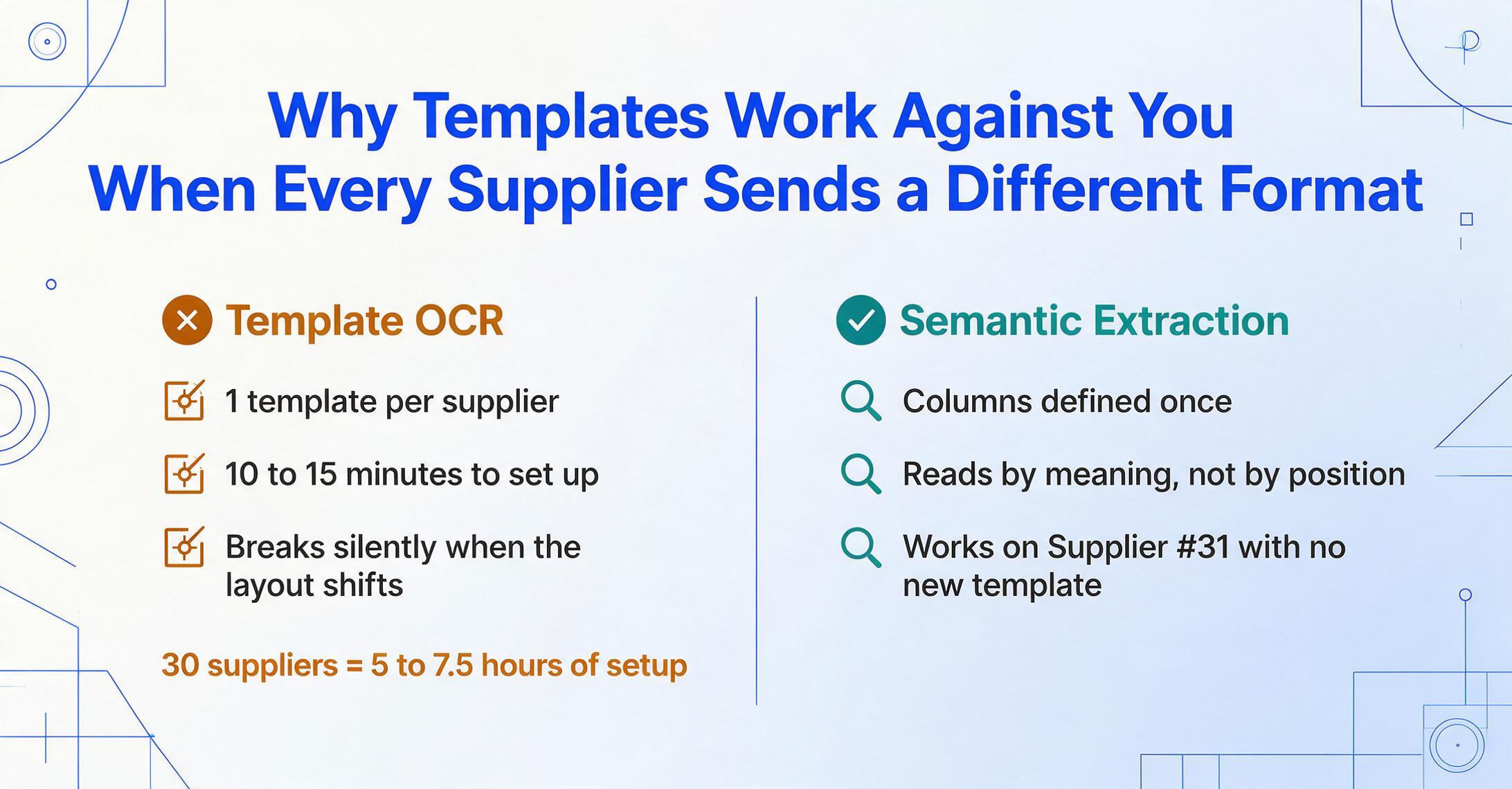
Template-based extraction is the most common approach to PO automation. The workflow is intuitive: upload a sample PO from Supplier A, draw boxes around each field, label them, and save. Future POs from Supplier A with the same layout get processed automatically. It's straightforward — until you have 30 suppliers.
Each new supplier requires a new template. A template setup session — drawing bounding boxes, labeling fields, verifying extraction — typically takes 10 to 15 minutes. With 30 suppliers, that's 5 to 7.5 hours of upfront template creation. When Supplier #31 comes onboard, someone stops what they're doing and builds template #31. And if any of your existing 30 suppliers changes their PO format — an ERP upgrade, a merger, a new purchasing system — the template silently breaks, and you find out when data goes missing.
The underlying problem is that templates encode position, not meaning. A template says "the PO number is at coordinates X,Y on the page." When the layout shifts — which it will, across suppliers, across time — the template becomes a liability. You haven't eliminated manual work; you've changed its nature from "typing data" to "maintaining a growing library of position-based rules." The challenge of PO format diversity — especially line-item tables that vary in column order, page breaks, and header repetition — is structural, not incidental. Templates solve for a static world that doesn't exist in procurement.
If your team currently runs on ERP template imports — or is debating whether to keep building them — our ERP template imports vs. AI extraction comparison breaks down the five dimensions where the gap widens, the EDI 850 reality gap, and the hybrid approach most teams actually need.
Semantic Extraction: Finding "Quantity" by Meaning, Not by Position
Here's a fundamentally different approach: instead of telling the tool where each field sits on the page, you tell it what each field means. This is called Custom Column Extraction — you define the columns you want in your output (e.g., "PO Number," "Vendor Name," "Item Code," "Description," "Quantity," "Unit Price," "Line Total"), and the AI locates each value by understanding its semantic role in the document. It doesn't matter whether Supplier A puts the PO number in the top-right corner and Supplier B puts it in the top-left, or whether one supplier lists quantities before descriptions and another does the reverse. The AI finds the value by understanding what a purchase order number is, not where it sits.
This is the difference between template OCR and vision AI. Template OCR matches patterns by position. A vision large model — the same class of AI that understands images, reads handwriting, and reasons about document layouts — reads a purchase order the way a person does: by understanding context and meaning. It recognizes that a number printed near "PO #" or "Purchase Order Number" is the PO number. It understands that a column of prices under a heading that says "Unit Price" contains unit prices, even if that column appears in position 4 on one supplier's PO and position 2 on another's.
The column names you enter become the headers of your output spreadsheet. If you type "PO # / Supplier / SKU / Description / Qty / Unit Price / Total," those are the exact columns in your exported Excel — across every supplier, every format. No template creation per vendor. No retraining when formats change. The AI adapts to the document; you don't adapt the document to the tool.
Files are processed securely and not stored.
From PDF to Spreadsheet: A 3-Step PO Extraction Workflow
The end-to-end workflow for extracting purchase order data into a spreadsheet takes three steps. There's no template configuration, no training data, and no per-supplier setup — just upload, name your columns, and export.
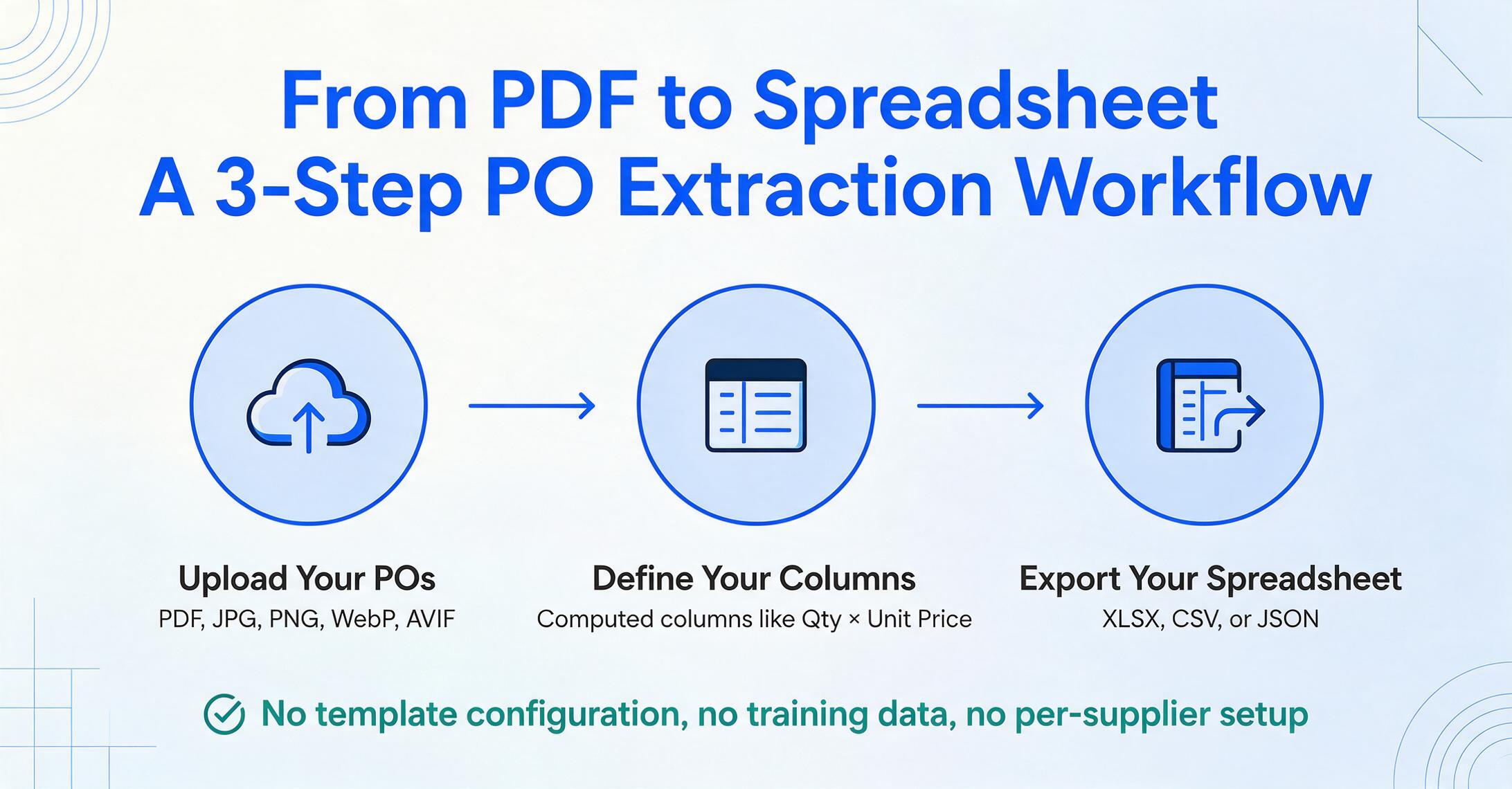
Extended Price (Qty × Unit Price) — to have the AI perform calculations during extraction rather than after.The batch processing capability is what distinguishes this from one-at-a-time extraction. Rather than opening each PDF individually, you upload everything at once — 20, 50, or 100 POs — and the tool processes the entire batch, merging the results into a single spreadsheet. For a procurement team receiving daily PO attachments from dozens of buyers, this eliminates the queue-based bottleneck where each document waits its turn for manual entry.
The tool also handles batch processing with cross-document consistency: if PO #1034 from Buyer A lists 8 line items and PO #1035 from Buyer B lists 3, both appear as rows in the same output table. Empty fields — where a PO lacks a particular data point — are left blank rather than filled with error values. The output is analysis-ready without additional spreadsheet manipulation.
What This Doesn't Replace — and What It Does
It's important to be clear about where semantic PO data extraction fits in the procurement technology landscape — and where it doesn't.
What it does: It extracts structured data from purchase order documents in any format, from any supplier, and outputs it as an Excel spreadsheet. If the problem you're solving is "I have a PDF of a PO and I need its line items in a table," this is the tool for that problem. It handles format diversity across suppliers, processes documents in batch, and produces a single merged output — all without templates or training.
What it doesn't do: It doesn't route purchase orders through an approval chain. It doesn't enforce budget controls or spending policies. It doesn't match supplier invoices against POs (three-way matching — see our guide to building a matching pipeline in Google Sheets if you need that layer too). It doesn't post transactions to an ERP general ledger. And it doesn't manage the supplier relationship — onboarding, performance scoring, contract tracking.
These are functions of full procure-to-pay platforms like Coupa, SAP Ariba, and Procurify — enterprise-grade suites that orchestrate the entire purchasing lifecycle. If your organization needs that scope of procurement governance, a P2P platform is the right tool. But for the specific step of getting PO data off a PDF and into a spreadsheet, a semantic extraction tool fills the gap that those platforms leave open — often at a fraction of the cost and implementation complexity.
In practice, the two can work together. A wholesaler might use semantic extraction to convert incoming customer POs into structured data, then feed that data into their order management system or accounting software. The extraction tool handles the format diversity problem; the downstream systems handle fulfillment, invoicing, and reporting. Neither tool needs to do the other's job.
Frequently Asked Questions
Does AI extraction work on handwritten purchase orders?
Yes. Vision AI models are trained on diverse handwriting samples and can extract data from handwritten POs, including those with mixed print and cursive. Accuracy on handwriting is lower than on printed text — especially for sloppy or heavily stylized handwriting — but the technology handles legible handwritten documents well. For small suppliers or field-generated POs that may arrive as handwritten forms, handwritten PO extraction is one of the strongest use cases for semantic AI over template OCR, since template systems typically fail entirely on handwriting.
Can I process POs from multiple suppliers in one batch?
Yes. That's the primary use case. Upload all your POs — regardless of supplier count, format differences, or page count — into a single batch. Define your target columns once, and the AI extracts data from every document into a unified spreadsheet. Each document's line items become rows keyed to the batch name and source file, so you can trace every row back to its originating PO.
Do I need an ERP system to use automated PO extraction?
No. The extraction tool outputs standard Excel (XLSX), CSV, or JSON files that can be opened in any spreadsheet application or imported into any system that accepts structured data. You don't need an ERP, an accounting platform, or any integration setup. If you can open an Excel file, you can use the output. For users who do want direct integration, the extracted data can be imported into QuickBooks, Xero, NetSuite, or any system via standard file import.
How does the AI handle line items that span multiple pages?
The AI treats the entire document as a single data source, not as isolated pages. Line items that continue across page breaks — with or without repeated column headers on the continuation pages — are captured as a continuous set. The tool recognizes repeated headers on subsequent pages and doesn't extract them as separate line items. For POs with 50+ line items spread across 6 pages, the output is one clean table rather than a fragmented per-page extraction that needs manual stitching.
What does it cost compared to other PO automation tools?
ImageToTable.ai pricing starts at $9/month (Basic) for 50 AI credits, $19/month (Pro) for 200 credits, and $59/month (Max) for 600 credits — with each credit processing one page. By contrast, enterprise P2P platforms like Coupa and SAP Ariba use custom pricing that typically starts in the mid-five-figure range annually. Mid-market P2P tools like Precoro start at approximately $499/month. For organizations whose primary need is PO data extraction rather than full procure-to-pay governance, this represents a significant cost difference. There's no implementation fee, no training requirement, and no minimum commitment. If you want to weigh this against other extraction-focused tools specifically (not full P2P suites), see our side-by-side comparison of 7 purchase order extraction tools. Ready to run your own POs through it? Use the purchase order data extraction tool directly.
What's the accuracy rate on purchase order data extraction?
Printed table data on clearly scanned or digital PDFs achieves up to 99% accuracy. Factors that reduce accuracy include low-resolution scans, heavy background noise, extreme skew, and densely packed line items with small font sizes. The tool is most reliable on digital PDFs, high-quality scans, and screenshots. For critical fields like quantities and unit prices — where errors carry financial consequences — it's good practice to spot-check the first few extractions against the source document, especially when using a new supplier format for the first time. This isn't a fully hands-off process, but it replaces 8–12 minutes of manual typing per PO with seconds of AI extraction plus a quick verification pass.