How to Match Supplier Invoices
to POs in Manufacturing
Most accounts payable teams spend more time getting invoice data into a comparable format than they spend actually comparing it. A supplier sends a PDF with 47 line items scattered across two pages. The purchase order lives in your ERP. The receiving report is a paper packing slip signed at the dock. Before anyone can ask "do these match?", someone has to type or copy-paste all three datasets into the same place. In manufacturing, where MRO suppliers alone can number in the hundreds and partial deliveries are the norm, this pre-matching step eats more hours than the matching logic itself.
Key Takeaways
- A mid-sized manufacturer processing 500 supplier invoices a month spends roughly 25 hours on manual data entry, at about 3 minutes per document, before a single PO comparison begins.
- The bottleneck isn't the matching logic. It's that 66% of AP teams still type invoice data into their ERP by hand, while every supplier uses a different PDF layout. A better matching module can't fix data that's still locked inside a PDF.
- ImageToTable.ai reads each supplier invoice, from Grainger and Fastenal to the local machine shop, into a structured, normalized spreadsheet in seconds per page, with every value traceable back to the spot it came from. With the join key consistent, 3-way matching becomes XLOOKUP, a conditional formatting rule, and one afternoon.
Why Manufacturing PO Matching Breaks More Often Than You'd Expect
Manufacturing accounts payable is structurally harder than AP in most other industries. The difficulty comes from the variety of supplier relationships, the frequency of partial shipments, and the fact that every new production run creates a fresh wave of POs that need matching within payment terms.
A mid-sized manufacturer might process 500 to 2,000 supplier invoices per month. The IFOL 2025 Accounts Payable Automation Trends report found that 66% of AP teams still manually key invoice data into their ERP, so most matching input is retyped by hand before any comparison starts. A large share of manufacturing transactions never generates a PO at all, because phone orders, email approvals, and verbal buy instructions leave the match with no anchor document. Ardent Partners' 2025 research shows how far exception handling spreads the gap: best-in-class teams hold invoice exceptions to 9%, while the industry average runs at 22%. In manufacturing, every invoice stuck in an exception queue is a potential production delay.
Three structural factors make manufacturing PO matching uniquely difficult:
1. The MRO supplier problem. Maintenance, Repair, and Operations suppliers — Grainger, MSC Industrial Supply, Fastenal, McMaster-Carr — each use their own invoice format. MSC's EDI 810 specification, for example, requires the PO number in field BIG04 and the supplier's item number in IT109 — a structure entirely different from Grainger's PDF format or McMaster-Carr's web-generated invoices. An AP clerk processing 50 invoices from 12 different MRO suppliers is essentially decoding 12 different invoice layouts before the matching can begin.
2. Partial deliveries are the rule, not the exception. A PO for 500 units of a custom fastener might arrive in three shipments across six weeks — each with its own packing slip and each triggering a separate supplier invoice. The PO quantity says 500, the first invoice says 175, the second says 200, and the receiving dock has only logged the first two deliveries. Without a system that tracks cumulative received quantities against the PO, partial matches become a manual reconciliation exercise that compounds with every split shipment.
3. Line-item descriptions rarely match across documents. Your PO might list "Stainless Steel Hex Bolt, M10×1.5, Grade A2-70" while the supplier's invoice abbreviates it to "SS Bolt M10 A2." To a matching algorithm (or a tired AP clerk at 4 PM), these could be different items. To the production floor, they're the same bolt. This description drift is pervasive in industrial procurement and is the single biggest source of false mismatches in manufacturing PO matching.
Those three factors push the invoice-to-approval cycle out. Ardent Partners' 2025 AP benchmarking shows how wide the gap runs: best-in-class AP teams process invoices in 3.1 days and spend $2.78 per invoice, while manual-heavy teams average 17.4 days and $12.88. That gap comes from how invoice data enters the system, not from typing speed. For a deeper look at why the three-way match itself breaks down in manufacturing, including blanket POs, unit-of-measure drift, and the organizational gap between procurement, receiving, and AP, see our analysis of why three-way matching hurts manufacturing AP more than teams admit.
The Three Documents You Need — And What Happens When One Goes Missing
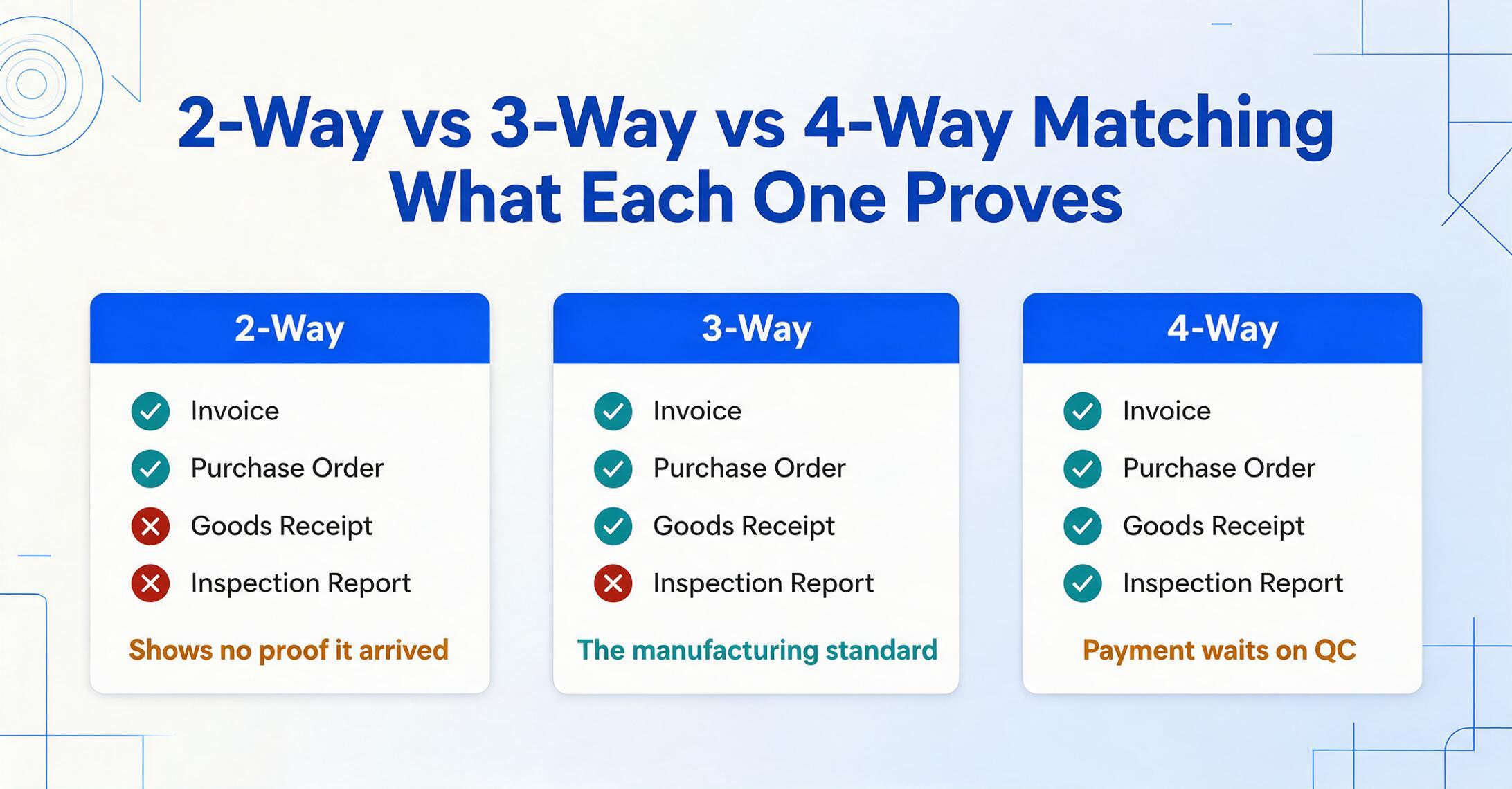
Before you can match anything, you need to know what you're matching. Purchase order matching in AP comes in three standard forms, each adding a layer of verification:
2-way matching compares the supplier invoice against the purchase order. It confirms that quantities, prices, and item descriptions on the invoice match what was ordered. This is the minimum for any PO-based transaction and is sufficient for service contracts or low-risk purchases where physical receipt isn't in question.
3-way matching adds the goods receipt (packing slip or receiving report) as a third document. This is the standard for manufacturing because it confirms not just that you ordered the item and were billed for it, but that it actually arrived. Without the goods receipt, you're paying off the PO and the invoice alone — with no confirmation that what was ordered is what the dock received.
4-way matching includes an inspection or quality acceptance document on top of the other three. Used when specifications and compliance matter — aerospace components, pharma raw materials, first-time orders from new suppliers — this ensures payment is held until the delivered goods pass quality verification.
In practice, most manufacturers run a hybrid: 3-way for physical goods, 2-way for services and recurring subscriptions, 4-way only for high-stakes or regulated items. The common failure mode isn't choosing the wrong matching type — it's missing one of the three core documents when it's time to run the match.
The most frequent gaps, based on AP practitioner reports and Reddit discussions among procurement and accounting professionals:
- The PO was never created. Phone orders, email approvals, verbal buy instructions — none generate a PO. Without a PO, there's nothing to match the invoice against, and the entire matching process breaks before it starts. This is the no PO, no pay discipline problem that separates well-run AP functions from reactive ones.
- The goods receipt never reached finance. The dock signed the packing slip and filed it. The PO stayed open. When the invoice arrives three weeks later, nobody can confirm what was delivered. In one Reddit thread, a manufacturing accounting professional described the recurring ritual: "When POs don't get marked received upon delivery, we need to request receiving to verify delivery and mark the PO received after the fact." This after-the-fact scramble adds days to every mismatch.
- The invoice doesn't reference the PO number. A supplier sends an invoice with their internal reference number but no PO number. The AP clerk now has to cross-reference by vendor name, date, and amount — a manual lookup that turns a 30-second match into a 10-minute investigation.
For publicly traded manufacturers, SOX Section 404 adds a compliance layer: three-way matching must be documented, the audit trail must be unalterable, and duties must be segregated between those who create POs, those who approve invoices, and those who execute payments. A missing goods receipt isn't just a process headache — it's a control deficiency that auditors will flag.
Getting Invoice Data Into Excel — Without Typing Every Field
This is the step that nearly every AP automation vendor's blog skips: how does invoice to Excel conversion actually happen — how does the data get from the PDF into a table where you can compare it? The assumption is always that you either (a) already have an AP platform that captures invoice data automatically, or (b) you'll type it in manually. For manufacturers running QuickBooks, Sage, or a lightweight ERP module without built-in capture, that assumption breaks.
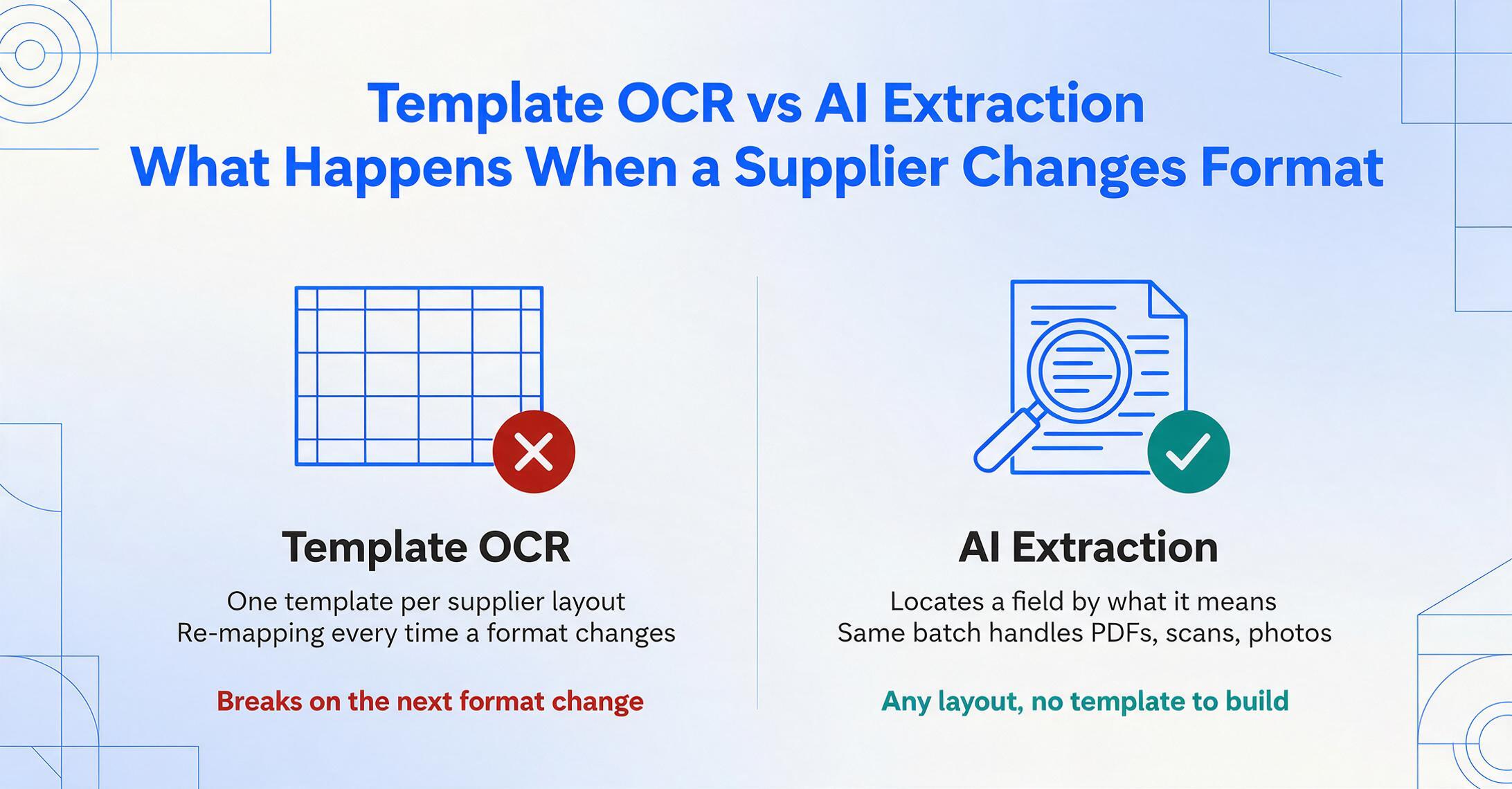
The alternative is an AI-powered document extraction tool — one that reads an invoice as a human would, understanding that "Invoice No:" and "Inv #" and "Document Number" all refer to the same data field, regardless of where they appear on the page.
Unlike template-based OCR — which requires you to pre-configure a template for each supplier's invoice layout and breaks when a supplier updates their format — AI extraction uses visual language models to locate data by understanding what it means, not where it sits on the page. You define the columns you need — Invoice Number, PO Number, Vendor Name, Line Item Description, Quantity, Unit Price, Line Total, Invoice Total, Due Date — and the tool extracts those values from any invoice layout, including scanned PDFs with handwritten notes.
This approach, known as Custom Column Extraction, is what makes the Excel-based matching workflow viable: you type your desired column headers once, upload your batch of supplier invoices (any mix of PDFs, scans, or images from Grainger, Fastenal, raw material distributors, or the local machine shop), and get a structured spreadsheet where every row is one invoice — or one line item — with all fields populated and normalized. If you're new to this, our explainer on what manufacturing invoice extraction is covers the field-level breakdown — lot codes, UOM variants, and why each one matters for matching.
Files are processed securely and not stored.
For the PO matching workflow, the columns you'll typically extract are:
- Invoice Number — the supplier's reference
- PO Number — your purchase order reference (the join key for matching)
- Vendor Name — for grouping and supplier performance tracking
- Invoice Date — for aging and payment term calculation
- Due Date — for prioritization
- Line Item Description — what was billed
- Quantity — units billed
- Unit Price — agreed price per unit
- Line Total — Qty × Unit Price (or extract this directly, or use a Computed Column to calculate it during extraction if the invoice doesn't print it)
- Invoice Total — gross amount, for tolerance checking
One detail decides whether that spreadsheet is usable for matching: the join key has to come out consistent. A PO number printed as "PO 12345" on one invoice, "PO#12345" on another, and "12345-1" on a third will not join to your PO export without cleanup, and dates arrive in just as many shapes. ImageToTable.ai normalizes dates, amounts, and serial numbers as part of extraction, so the PO Number column lands in one format and the XLOOKUP in Step 2 matches on the first pass instead of throwing "PO Not Found" over a formatting difference. That normalization is extraction work, not a separate cleanup project.
With this data in a spreadsheet, the matching step becomes a structured comparison rather than a manual page-by-page exercise. The extraction itself takes 5–10 seconds per page, against the 3 minutes per document that manual data entry averages. At 500 invoices per month, that's roughly 23 hours saved on extraction alone.
Setting Up Your Matching Workflow in Excel
Once invoice data is in a spreadsheet, the matching workflow in Excel comes down to three steps: import your PO and receiving data, join them to the invoice data, and flag discrepancies.
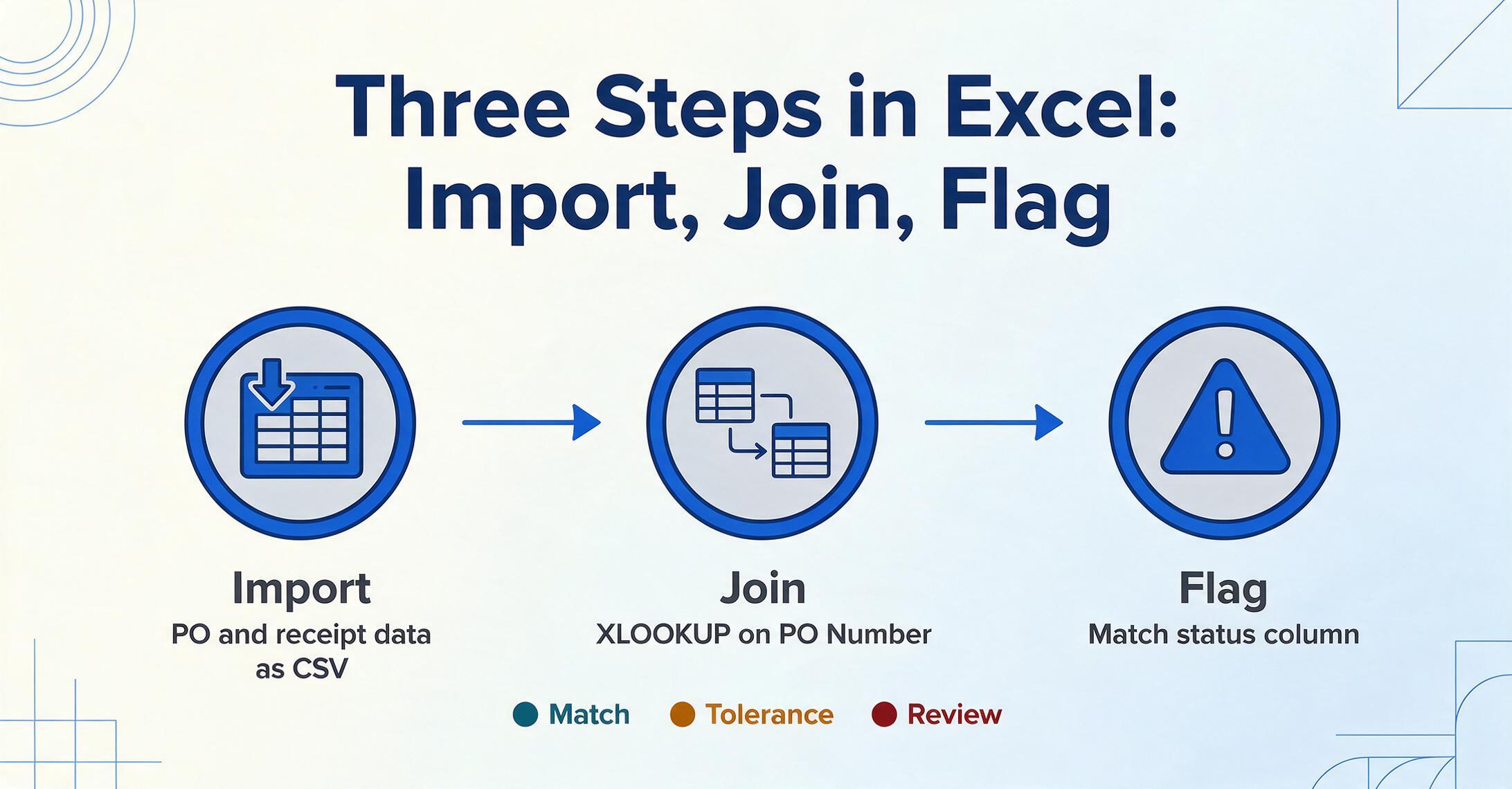
Step 1: Export your open POs from your ERP or procurement system. Most ERPs — SAP, Microsoft Dynamics 365, Oracle NetSuite, and even QuickBooks — can export open PO data as CSV or Excel. Export the PO number, line item details, ordered quantity, unit price, and vendor name. Do the same for goods receipts if your receiving process generates digital records.
Step 2: Join invoice data to PO data using the PO number as the key. In Excel, XLOOKUP (or VLOOKUP on older versions) can pull PO details into the invoice sheet:
// Pull ordered quantity from PO sheet
=XLOOKUP([@[PO Number]], PO_Sheet[PO Number], PO_Sheet[Ordered Qty], "PO Not Found")
Step 3: Flag mismatches with conditional formatting and a match-status column. Add a column that compares billed quantity to ordered quantity (and received quantity, for 3-way). Set tolerance thresholds, because count discrepancies on bulk items are routine in manufacturing; the 5% band used in the formula below is a common starting point:
// Match status with 5% quantity tolerance
=IF(ABS([@[Billed Qty]]-[@[Ordered Qty]])/[MAX]([@[Ordered Qty]],1)<=0.05,
"Match",
"REVIEW")
Apply a three-color conditional formatting rule to the match-status column: green for "Match," amber for within-tolerance variances, red for "REVIEW." This gives you a visual dashboard of every invoice's matching status at a glance.
Step 4: Set up a price-variance column. Even when quantities match, prices can drift — especially with commodity-linked raw materials where surcharges fluctuate. Compare the billed unit price against the PO unit price and flag anything outside your tolerance:
// Price variance check (absolute difference)
=IF(ABS([@[Billed Unit Price]]-[@[PO Unit Price]])>0.01, "Price Variance", "OK")
For manufacturers working with many line-item invoices, you can take this further with Power Query to automate the join-and-compare step. Power Query can ingest the invoice extraction spreadsheet, the PO export, and the goods receipt log, merge them on PO number and line number, and output a consolidated matching report — all refreshable with a single click when new data arrives. One Reddit user in r/procurement described exactly this approach: "It's not a perfect solution, but it doesn't require a subscription, which is to use Excel Power Query. You'd have to set up each vendor's format." The AI extraction step removes that last constraint: there are no vendor-specific formats to set up, because the extraction reads every invoice through the same column definition.
Handling Partial Deliveries, Price Variances, and the Messy Reality
The spreadsheet matching workflow handles clean matches automatically. The real work — and where manufacturing AP teams spend most of their time — is in the exceptions. Here's how to handle the three most common exception types in your Excel workflow.
Partial deliveries. When a PO for 500 units arrives in three shipments, each with its own invoice, a simple quantity comparison will flag every invoice as a mismatch because the billed quantity (175) doesn't equal the ordered quantity (500). The fix: maintain a cumulative received quantity column in your PO master that sums all goods receipts and invoices to date. Compare each invoice against the remaining open PO balance, not the original ordered quantity. Add a column for Open PO Balance = Ordered Qty - SUMIF(all receipts + prior invoices for this PO). An invoice is only a true over-bill if its quantity exceeds the open balance.
Unit of measure mismatches. A PO might specify "cases" while the supplier invoices in "each." A bolt order placed as "1 box of 100" arrives with an invoice listing "100 pieces." These UOM mismatches are common with MRO suppliers and raw material distributors. In your Excel workflow, add a UOM conversion table for known suppliers and apply it before the quantity comparison. For one-off mismatches, flag them for manual review — there's no automation shortcut for "the supplier used a different counting unit than the PO."
Description drift. "SS Bolt M10 A2" vs "Stainless Steel Hex Bolt, M10×1.5, Grade A2-70" — semantically identical, textually different. Excel's fuzzy matching (available in Power Query via the "Fuzzy Matching" option on merge operations) can catch many of these, but the most reliable approach is to match on structured identifiers (PO number + line number + supplier part number) rather than free-text descriptions. If your PO system assigns line numbers and your extraction captures the supplier's part number from the invoice, the match becomes deterministic: PO #12345, Line 3, Supplier PN MSC-4455-A2 either matches or it doesn't.
When the invoice total doesn't equal the sum of line items. This can indicate a legitimate discrepancy (a freight charge not listed as a line item, a volume discount applied at the invoice level) or an extraction error. Add a sanity-check column: =IF(ABS([Invoice Total] - SUM of [Line Totals for this invoice]) > 1, "Total Mismatch", "OK"). This catches extraction errors, such as a missed line or a garbled total, before they become payment errors.
That check has a blind spot, though: it can't tell you whether a vendor name came through as "Fastenall" when the invoice said "Fastenal", or whether a PO number lost a digit in transit. Review Mode covers that gap: hover any extracted cell and the invoice highlights the spot the value came from, and clicking a region on the invoice jumps back to its cell. Auto-annotate can run it on every batch, leaving a traceable record of what was extracted and where it came from.
For SOX-compliant manufacturers, document every exception resolution in the spreadsheet itself — add a "Resolution" column with a dropdown (Approved / Returned to Supplier / Credit Memo Requested / Partial Pay) and a "Notes" column for the auditor's trail. The spreadsheet becomes both your matching tool and your compliance record.
FAQ
Do I need an ERP to do 3-way matching?
No. Three-way matching requires three documents — a purchase order, a goods receipt, and a supplier invoice — and a system that compares them. That system can be an ERP, an AP automation platform, or a well-structured Excel workbook. The structural requirement is that all three documents exist and their data is accessible in a comparable format. If your PO data lives in a CSV export from a purchasing module and your goods receipts are logged in a shared spreadsheet, you already have the raw materials for matching — you just need the invoice data to complete the set. Prefer Google Sheets to Excel? Our guide to three-way matching in Google Sheets without an ERP walks through the same workflow in the Google ecosystem.
What if my suppliers don't include PO numbers on their invoices?
This is the single most effective process change you can make. Require PO numbers on all invoices as a condition of payment — most suppliers will comply with minimal pushback because it also speeds up their payment. For suppliers who genuinely can't adapt their invoicing system, you can match on vendor name + invoice date + total amount, but this is a fallback with higher error risk. Better to make PO-on-invoice a supplier onboarding requirement.
How accurate is AI extraction for supplier invoices?
AI-powered extraction using vision large models achieves up to 99% accuracy on printed invoice data, against the low single-digit error rate of a careful human keyer, at a fraction of the time. The accuracy edge comes from consistency: the AI doesn't get tired, and it doesn't transpose digits at hour 7 of data entry. Every value it extracts can also be traced back to the spot on the invoice it came from, so a misread surfaces in a spot-check instead of surviving into a payment. Scanned invoices with handwritten annotations will have lower accuracy and may require spot-checking.
Can this workflow handle invoices in different languages and currencies?
Yes. AI extraction tools that use visual language models can read invoices in multiple languages without separate configuration — the model understands "Total," "Gesamtbetrag," and "Montant total" as the same field type. Multi-currency handling depends on whether your extraction tool normalizes currency symbols and decimal conventions. If you're matching invoices from international suppliers (common in manufacturing — raw materials from Germany, components from China, MRO from domestic distributors), verify that your extraction tool handles European decimal commas (1.234,56) and currency formatting correctly before running a full batch. For a regional deep-dive on the same PO-invoice matching problem, see our analysis of the PO-delivery-invoice matching problem in Japanese procurement.
What's the practical limit — how many invoices can this Excel workflow handle?
An Excel-based matching workflow stays manageable up to a few thousand invoices per month, beyond which spreadsheet performance and manual exception handling become bottlenecks. Beyond that point the extraction step (getting invoice data into the spreadsheet) remains valuable regardless, but the matching and exception routing may benefit from a dedicated AP platform. Where the ceiling falls depends on team size and exception rate: a team of 3 AP clerks with a 15% exception rate will hit it sooner than a team of 5 with a 5% exception rate.
The Bottom Line
In manufacturing, supplier invoice PO matching doesn't fail because the matching logic is hard. It fails because invoice data arrives locked inside PDFs, with no two suppliers using the same format. Once that data is free and structured, matching it to a PO or a goods receipt is a spreadsheet exercise any AP clerk can set up in an afternoon. The 66% of AP teams still keying invoice data into their ERP by hand are stuck one step before the match, at the extraction step every platform assumes is already solved. Fix that first, and the matching becomes the easy part.
Try the extraction step yourself: upload a supplier invoice below and see what structured data you get back in under 30 seconds. If extracting the data is no longer the bottleneck, you can build whatever matching workflow fits your operation.