What Zonal OCR Is and the
Four Shapes That Break It
Zonal OCR made document automation possible decades before anyone expected a machine to understand a page. It did that by refusing to understand anything. You draw a rectangle around the invoice total, the software reads only that rectangle, and the value lands in a named field.
That trade bought speed, determinism, and a very specific kind of brittleness. What follows covers what a zone is at the level of pixels and OCR calls, the four document shapes where zones break, and the question that decides whether you should keep them: who controls the layout of the page.
Key Takeaways
- Zonal OCR reads only the boxes you draw on a form, so its worst failure is a well-formed wrong number rather than an error.
- Two degrees of scan rotation is enough to put the subtotal, 1,065.00, into the total field without any validator objecting.
- Rotate one page two degrees and re-run it to see whether your tool catches the shift or quietly posts it.
A Zone Is a Rectangle of Pixels, and the Template Is the Program
A zone is a rectangle of coordinates on a page, bound to a field name. A template is a set of those rectangles, applied to every document that is supposed to look the same.
The technique travels under several names. Zone OCR, zonal OCR, template OCR, and field-level OCR all name the same technique, so vendors use the terms interchangeably. If a tool's setup begins with "upload a sample and draw boxes," it is zonal OCR regardless of what the brochure calls it.
The difference between zonal OCR and full-page OCR is what comes out the other end. Full-page OCR converts the whole page into text and keeps the reading order, which is what you want for search, archiving, or a searchable PDF. Zonal OCR returns named values, which is what you want for a spreadsheet column. Neither one interprets what it reads. One produces a document, the other produces a record.
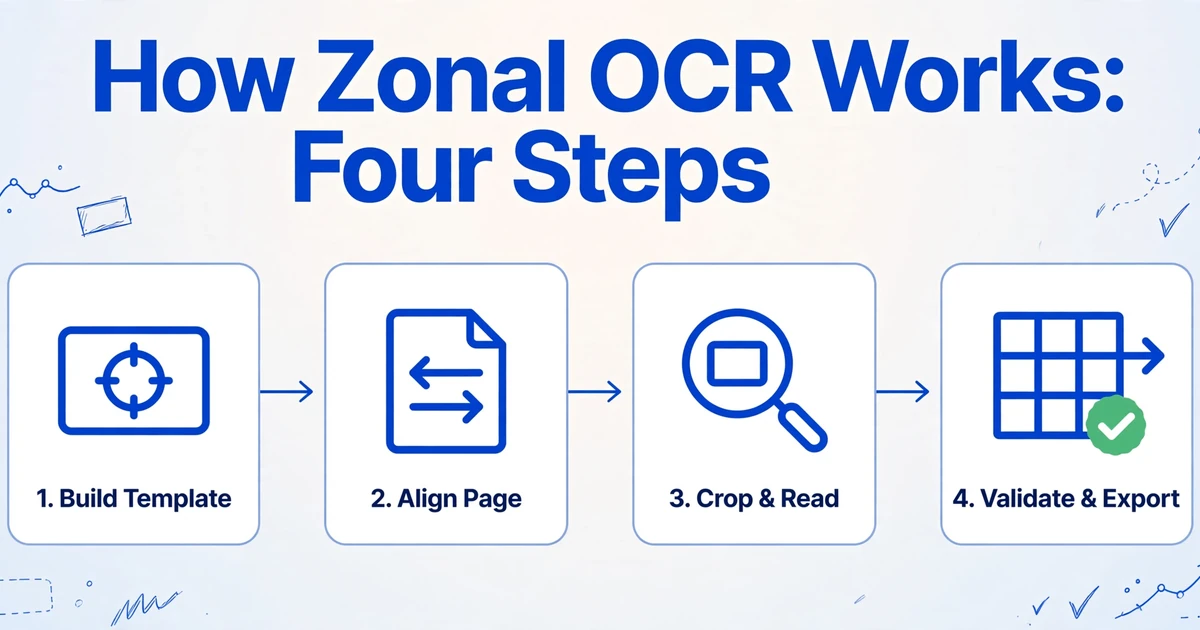
The work happens in four steps, and the third one is where the architecture shows through.
Build the template
Scan one representative document, draw a rectangle around each field, and give it a name. The tool stores the coordinates, often relative to page width and height so a resize does not invalidate them.
Align the incoming page
Deskew, rescale, and sometimes match a registration mark or an anchor word, so the stored coordinates land on the same content they landed on in the sample.
Crop and read
Each zone is cut out of the page image and passed to the OCR engine as its own small image. The engine never sees the rest of the page.
Validate and export
A pattern or data type checks the shape of each value, then the labeled results go to a spreadsheet, a database, or an ERP.
Step three explains a failure that looks like a configuration mistake and is not. Tesseract's documentation states that the engine expects a page of text by default, and that OCR'ing a small region requires a different segmentation mode, such as treating the input as a single line. A zone is not a pointer into a page. It is a new image, and the engine has to be told what kind of image it is looking at.
The payoff for all this constraint is cost. Reading five narrow strips costs a fraction of reading a full page, and on a local engine the marginal cost per page is close to nothing. That economics, more than accuracy, is why zonal OCR is still running inside scanning software, capture suites, and a long tail of internal scripts.
Where Zones Still Beat Everything Else
Zonal OCR remains the correct choice when the layout is under your control. This is not nostalgia. It is the cheapest deterministic option available for a page that does not change.
The fit is narrow and recognizable: internal forms you design and print (expense claims, inspection checklists, onboarding packets), standardized government forms where only one official version circulates, the output of a single sender at volume (one bank's statements, one lab's reports), ID documents, and test sheets. Inside a zone, the same engines can also run ICR for hand-printed characters and OMR for checkboxes, so a hand-filled internal form is a legitimate use case.
The cost model is the part most comparisons skip. A local zone engine processes a page in about a second or less and bills nothing per page. A vision model takes seconds per page and charges for the inference. At fifty thousand pages of one unchanged form, that gap decides the project before accuracy enters the conversation.
The technique is also less rigid than its reputation. Production tools add anchors (find the words "Invoice No." and read to the right of them), patterns (search a wider zone for something shaped like an invoice number), and dynamic zones that grow down the page until a stop word. Each addition buys tolerance. None of them removes the per-layout configuration, which is the part that costs money.
If one form, printed by one system, in one version, already reads correctly, adding a vision model buys nothing you do not already have.
The Four Document Shapes Where Zones Break
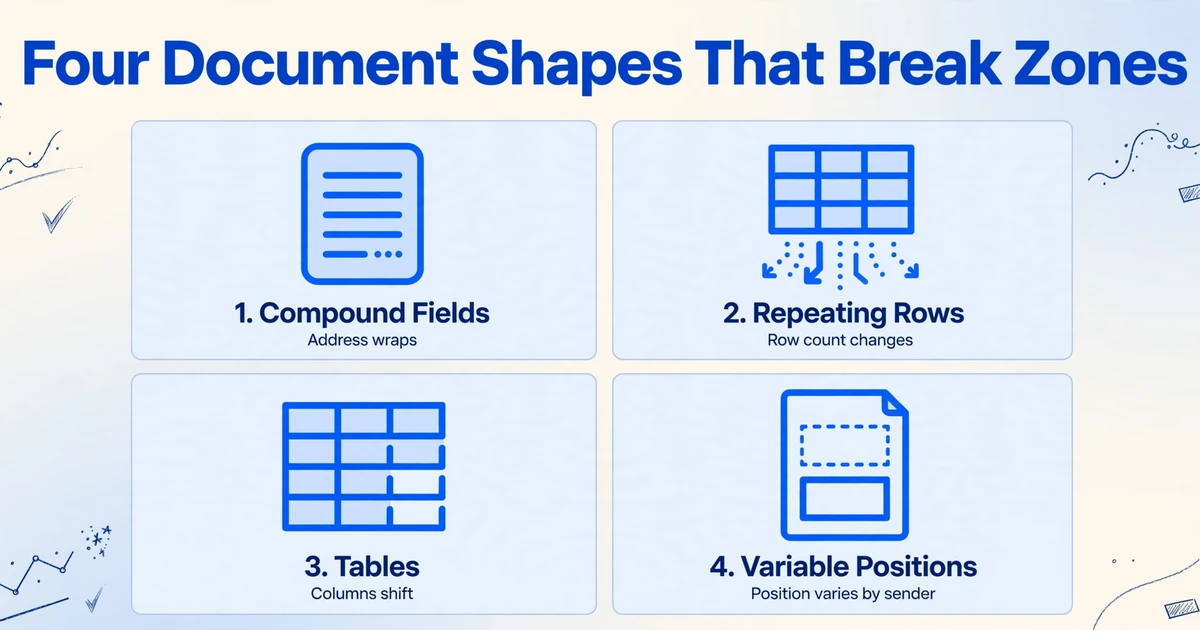
Zones break on four document shapes, and each one fails for a different mechanical reason. Knowing which shape you are looking at is more useful than a generic warning that layouts change.
1. Compound fields
A compound field holds a value that is not a single line inside a fixed rectangle. A billing address runs two to five lines depending on the customer. An amount appears once in digits and once in words. A vendor name wraps. "Invoice No." and "Date" share one horizontal band with a gap that moves with the length of the number.
A zone has to be tall enough for the longest address and narrow enough not to catch the phone number printed underneath. Those two requirements contradict each other, and the template can only satisfy one. The result is a truncated address or a phone number filed as a city.
2. Repeating rows
Every line item you add pushes everything below it down the page. A template built on a six-row invoice places the total at a fixed height. Send the same vendor an invoice with nine rows and the total zone lands on a line item instead.
A fixed grid encodes a row count that the sender never agreed to. Long orders add a second failure on top: the total moves to page two, and a template defined for page one returns the last line item instead.
3. Tables
A zone per column assumes the columns keep their horizontal positions and the rows keep their height. Neither holds on a real line-item table. A description wraps to a second line, a quantity is right-aligned in a cell of variable width, a totals row spans the columns, and a merged cell shifts everything to its right.
Tesseract's own documentation notes that the engine has trouble with tables without custom segmentation and layout analysis. A zonal template is a hand-built substitute for exactly that analysis, and it has to be rebuilt whenever the table changes shape.
4. Variable positions
The same field sits at different coordinates on different senders' documents. A discount line, a tax breakdown, or a purchase order reference appears on some invoices and not others, and every optional block pushes the fields below it downward. A different scanner scale moves everything at once.
This is the shape that turns one template into two hundred. ABBYY, which sells zonal capture, states in its own glossary entry that the approach is not appropriate for supplier invoices or any document type where layout varies across senders. When the vendor of the technique draws that boundary, it is worth taking seriously.
What a Two-Degree Skew Does to a Zone
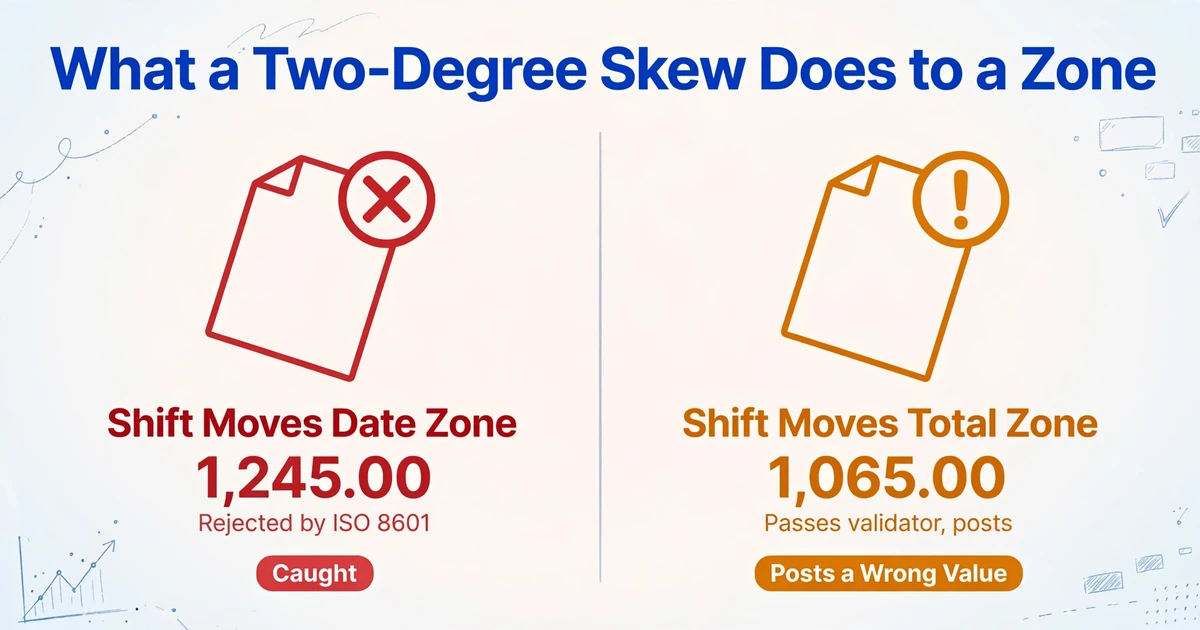
A two-degree rotation is enough to move a value out of a tight zone. Which direction it moves decides whether you ever find out.
Rotating a Letter page by two degrees moves a point four inches from the page center by about 0.14 inch. At 300 DPI that is roughly 42 pixels, close to one line of 10-point text. A zone that was drawn to the edge of a value is now reading its neighbor.
If the shift moves the date zone onto the total, the field receives something like 1,245.00. A date rule built on ISO 8601 rejects it, the document goes to an exception queue, and someone fixes the scan. Annoying, visible, safe.
If the shift moves the total zone up by one line, the total field receives the subtotal, 1,065.00. Nothing about that value is malformed. It passes the amount validator, it posts, and the $180 difference appears at reconciliation weeks later. The extraction step reported success.
The failures that get fixed are the ones that throw an error. The failures that cost money are the ones that return a perfectly well-formed wrong number.
Testing uses clean, well-aligned samples. Production includes the page that came through the scanner at a slight angle, and the validator has no opinion about whether the number it just accepted belongs to the field it was assigned to.
Who Maintains the Templates, and Who Finds the Bad Rows
The template has an owner, and the person who finds the bad row is usually someone else. That separation is where the real operating cost sits.
Templates are typically built by whoever configured the tool: an operations analyst, an IT staffer, sometimes the person who signed the contract. Why a zone was drawn a few pixels wider than the text, or starts above the rule rather than below it, lives in that person's memory, not in the tool. When they change roles, the template library becomes archaeology.
The bad row is found later and elsewhere. An AP clerk reconciles a vendor statement and cannot match an amount. A controller notices a variance at month end. A supplier emails to ask why an invoice is still unpaid. In each case the error was created at extraction, discovered downstream, and traced back through a layout change that nobody logged.
Onboarding is the other half of the bill. One practitioner in r/dataengineering put the difference plainly: "We went from ~4 hours to build a template for a new vendor layout to 0 seconds." The same comment notes where that time went instead, into validating output rather than writing templates. The hours do not vanish. They move.
Coverage is binary. A layout is either in the library or it is not, and the edge of the library moves every time a sender redesigns a form, changes a logo, or adds a field. There is no middle state where the tool handles 80% of a new layout and tells you which 20% it missed.
What Changes When Extraction Stops Depending on Coordinates
Semantic extraction changes the question from where the value is to what the value is. The page still matters. Its coordinates stop being the address.
ImageToTable.ai works through Custom Column Extraction: you type the column names you want, such as "Invoice Number", "Due Date", and "Total", and a vision model reads the whole page and locates each value by what it means. The column names you type become the headers of the output table. This is the same idea as extracting specific fields from a document by name rather than by location, with no boxes to draw and no coordinates stored. That is what format-independent means here: the layout can change and the extraction does not.
Layout is still evidence. A number sitting under a rule, beside the word "Total", in the lower right corner is more likely to be the total than the same number in the header. The difference is that this evidence is interpreted at extraction time rather than frozen into a template months earlier. Nothing goes stale, because nothing was memorized.
The practical consequences follow directly. The first invoice from a new vendor needs no setup. A table with sixty rows is read in full rather than clipped to the six rows a template expected. A scan rotated by two degrees has no alignment step to fail, because there is no coordinate frame to align to.
Files are processed securely and not stored.
What this approach does not fix is worth stating just as plainly. When a document contains two plausible candidates, a subtotal and an amount due, the model still has to choose, and the column name has to be specific enough to decide. Arithmetic errors printed in the source are copied faithfully. Faint handwriting still limits what any model can read. And a vision model can be confidently wrong, which is why the review screen highlights the region each cell came from, so a suspicious value can be traced back to the page in a second or two.
Printed table data is recognized at up to 99% accuracy, at roughly 5 to 10 seconds per page. That is fast enough for batch work and not a reason to skip review on fields that post to a ledger. The failure modes differ in a way that matters: a shifted zone returns the same wrong value for every document that shares the layout, while a model's occasional miss is specific to one document and does not repeat on the next.
How to Decide Which One Your Documents Need
Count layouts, not documents, and ask who controls them. Ten thousand invoices from three suppliers is a problem zones solve well. Two hundred invoices from two hundred suppliers is not.
A workable rule: if the layouts are yours, stable, and few, zones are cheaper, faster, and more exact. If the layouts belong to other people, arrive in new versions without notice, or reach a dozen or more distinct formats, the maintenance cost of zones overtakes the per-page cost of a model. The awkward middle, a few hundred pages a month from eight or ten senders, usually comes down to how much staff time you have for template repair.
Three checks settle it faster than a vendor demo.
- Run the field that moves. Take the total, the tax amount, and the due date across twenty documents you have never templated. Count failures. Do not average accuracy across fields.
- Rotate one page two degrees and re-run it. Watch whether the tool throws an error or returns a plausible wrong number. The second behavior is the one that reaches your books.
- Ask who would notice a wrong total, and when. If the answer is "at reconciliation next month", add a review step no matter which engine you choose.
| Dimension | Zonal OCR | Semantic extraction |
|---|---|---|
| Setup per layout | Draw boxes on a sample, name each field | Type the column names you want |
| First document from a new sender | Waits for a template | Processed like any other |
| Layout change | Template repair, often discovered late | No template to repair |
| Line-item tables | Fixed row grid; long tables overflow | Read in full, however many rows |
| Rotated or rescaled scan | Realign, or read the wrong pixels | No alignment step |
| Cost per page | Near zero on a local engine | Model inference, seconds per page |
| Typical failure | A valid-looking value from the wrong place, repeated on every page with that layout | An occasional per-document miss, caught in review |
| Best fit | Fixed forms you print and control | Documents from many senders or changing versions |
If you are comparing tools rather than techniques, the difference shows up in how each one handles a vendor it has never seen. A template-based product such as Docparser needs a parsing rule for the layout before it can read anything, while a semantic tool asks for column names and starts on the first document. Broader comparisons of OCR software and their pricing sit in our OCR software roundup, and if what you actually need is software that turns scanned pages into table rows rather than text, the OCR software for data entry page covers that path.
FAQ
What is zonal OCR in simple terms?
It is OCR restricted to boxes you draw on a sample page. Each box is tied to a field name, so the output is a set of labeled values instead of a block of text. The software reads only what falls inside the boxes.
Is zonal OCR the same as template OCR?
Yes. Zone OCR, zonal OCR, template OCR, and field-level OCR name the same technique. The giveaway is the setup: if it starts by uploading a sample and drawing rectangles, it is zonal OCR.
What is the difference between zonal OCR and full-text OCR?
Full-text OCR reads every character on the page and returns them in reading order, usually as a searchable text layer. Zonal OCR reads only the regions you defined and returns named fields. Full-text OCR is built for search and archiving; zonal OCR is built for data capture. Neither one understands what the text means, which is where the accuracy limits of traditional OCR begin.
What are the main limitations of zonal OCR?
Fixed positions, fixed field sizes, variable row counts, scan skew, and one template per layout. The most expensive limitation is that a failure often returns a valid-looking value from the wrong place rather than an error, so it is discovered downstream.
Does zonal OCR work with handwriting?
Inside a zone, ICR can read hand-printed characters in constrained fields such as a date box or a numeric grid. Cursive and unconstrained handwriting remain unreliable, and a zone cannot help with a value whose length or position changes from form to form.
Should I replace zonal OCR entirely?
No. Keep it where the layout is yours, the volume is high, and the form does not change. Replace it where the layouts belong to senders you do not control. The deciding question is ownership of the page, not the age of the technique.
A zone is a promise that the page will look the same next time. Whether that promise holds is a property of your documents, not of your software.
If you print the form, the promise is yours to keep, and a zone is a good way to keep it. If someone else prints it, the promise was never yours to make. That is the case where typing the column names you want, and letting the model find them wherever they sit, replaces a maintenance queue with a spreadsheet.
Bring the layout that keeps breaking. See what comes back.