OCR Speed vs. Accuracy:
The Trade-off No Vendor Explains
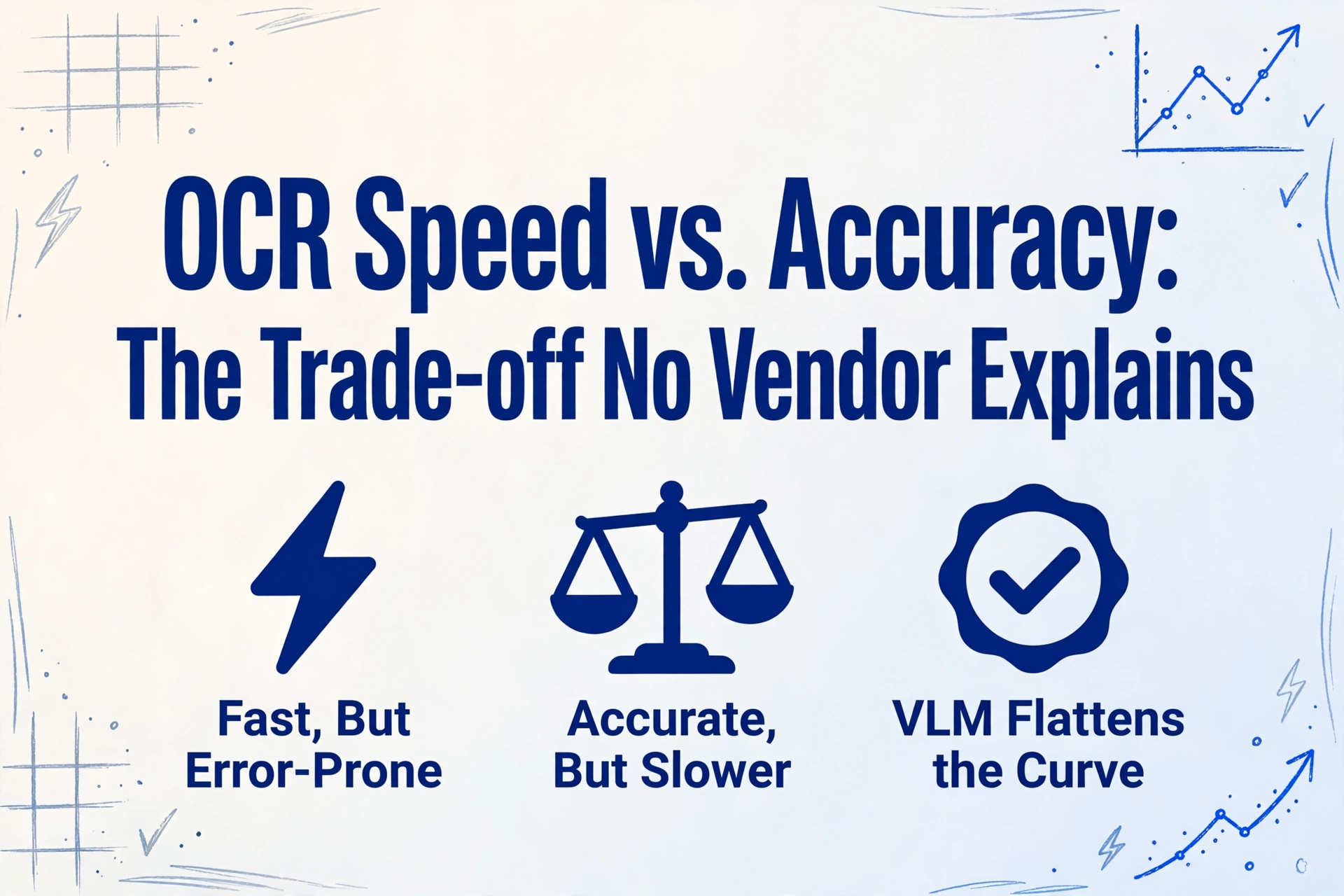
Every OCR vendor tells you their tool is "fast" and "accurate" — as if the two qualities exist on the same axis and you get both automatically. The reality is the opposite: speed and accuracy are in direct tension in every OCR pipeline, from a free open-source library running on a laptop to a cloud API backed by thousands of GPUs. A Tesseract instance configured for maximum speed processes a page in 0.16 seconds but misreads 1 in 8 words. A vision AI model that reads the same page with near-perfect accuracy takes 30 to 60 times longer. Which one is right for your workflow? The answer depends on what you are processing, what you are building, and what a single wrong digit costs you. Most vendors skip that question because the honest answer — "it depends" — does not fit in a comparison table.
Key Takeaways
- Tesseract reads a page in 0.16 seconds and misses 1 in 8 words — that 0.16-second speed creates five minutes of correction work per document, and no vendor benchmark counts it.
- OCR benchmarks measure latency at the wrong checkpoint — the real bottleneck is not how fast the engine reads a page, but how fast you fix what it misread.
- Vision-language models flatten the curve — you no longer choose between a fast-wrong engine and a slow-right one, you choose one engine and adjust how much you trust the output.
Why Speed and Accuracy Are Inversely Related
The trade-off between speed and accuracy is not a limitation of any particular tool — it is a consequence of how OCR works at the architectural level. Every OCR system, whether it is a legacy pattern-matching engine or a modern vision-language model, follows a sequence of steps: image preprocessing, text detection, character recognition, and post-processing. Each step consumes compute resources, and the more thoroughly each step is executed, the more accurate the result — and the longer it takes.
Preprocessing depth. A speed-optimized OCR pipeline skips or minimizes preprocessing: it downsamples the image to reduce pixel count, applies a simple binarization threshold, and passes the result directly to the recognizer. Independent benchmarks show that skipping preprocessing steps like skew correction, noise removal, and contrast enhancement can cut processing time by 40–60% — but it also drops accuracy by 10–20 percentage points on imperfect inputs. The standard recommendation across OCR literature — 300 DPI minimum, adaptive binarization, geometric correction — is itself a speed-accuracy compromise. At 300 DPI, a 10pt character spans roughly 42 pixels, giving the recognizer enough resolution to distinguish fine strokes. Below 150 DPI, accuracy drops sharply for every engine tested. Above 300 DPI, accuracy gains plateau while file size and processing time continue to increase.
Model complexity. This is where the trade-off becomes most visible. Tesseract's legacy engine uses hand-crafted feature extraction — it matches character shapes against a library of templates using pre-computed classifiers. This is fast (0.1–0.3 seconds per page on a modern CPU) but brittle: accuracy on challenging inputs like mobile phone photos drops to roughly 70–80%. Tesseract 4's LSTM engine adds a neural network layer that reads characters in sequence context, improving accuracy by 5–15 percentage points on noisy documents while roughly doubling processing time. Modern deep learning OCR engines like PaddleOCR and EasyOCR replace the entire pipeline with neural networks — CNN-based text detection followed by attention-based sequence recognition. These models achieve substantially higher accuracy (especially on complex layouts and handwriting) but require 3–30 times more compute per page. A March 2026 benchmark by Codesota measured the following on a single invoice: Tesseract 5.5 at 0.162 seconds with 87.5% accuracy, EasyOCR at 0.656 seconds with 62.5% accuracy, and PaddleOCR at 4.85 seconds with 100% accuracy. The correlation is not perfect — PaddleOCR dominated on this specific test — but the pattern across document types is clear: the deeper the model, the slower and more accurate it tends to be.
Post-processing chain. Accuracy-optimized pipelines add validation steps after recognition: dictionary-based spelling correction, cross-field consistency checks (does the invoice total match the sum of line items?), format validation (does the date parse correctly?), and confidence-score thresholding with human-in-the-loop routing. Each step adds latency. A bare-bones OCR that outputs raw text in 0.2 seconds may require 2–3 additional seconds of post-processing to reach production-grade accuracy. The total system latency — not just the recognition step — is what determines real-world throughput.
The Speed Landscape: What the Numbers Actually Look Like
Raw processing speed varies by two orders of magnitude depending on the OCR engine, hardware, and document complexity. The table below distills published benchmarks from multiple independent sources into ranges that reflect real-world production conditions — not cherry-picked best-case runs.
| Engine / API | Speed (per page, CPU) | Speed (GPU) | Accuracy (clean printed) | Accuracy (challenging) |
|---|---|---|---|---|
| Tesseract 5.5 (legacy mode) | 0.1–0.3s | N/A (CPU only) | 90–96% | 50–70% |
| Tesseract 5.5 (LSTM mode) | 0.3–0.8s | N/A (CPU only) | 93–97% | 60–80% |
| EasyOCR | 0.6–2.5s | 0.2–0.8s | 90–95% | 55–75% |
| Google Cloud Vision OCR | 1–3s (API) | — | 96–99% | 75–85% |
| AWS Textract | 2–4s (API) | — | 95–98% | 78–85% |
| Azure Document Intelligence | 3–5s (API) | — | 96–99% | 80–88% |
| PaddleOCR | 3–6s | ~0.5s (120 pages/min) | 95–99% | 75–88% |
| Vision-Language Model (VLM) | 5–15s | 2–6s | 96–99% | 85–95% |
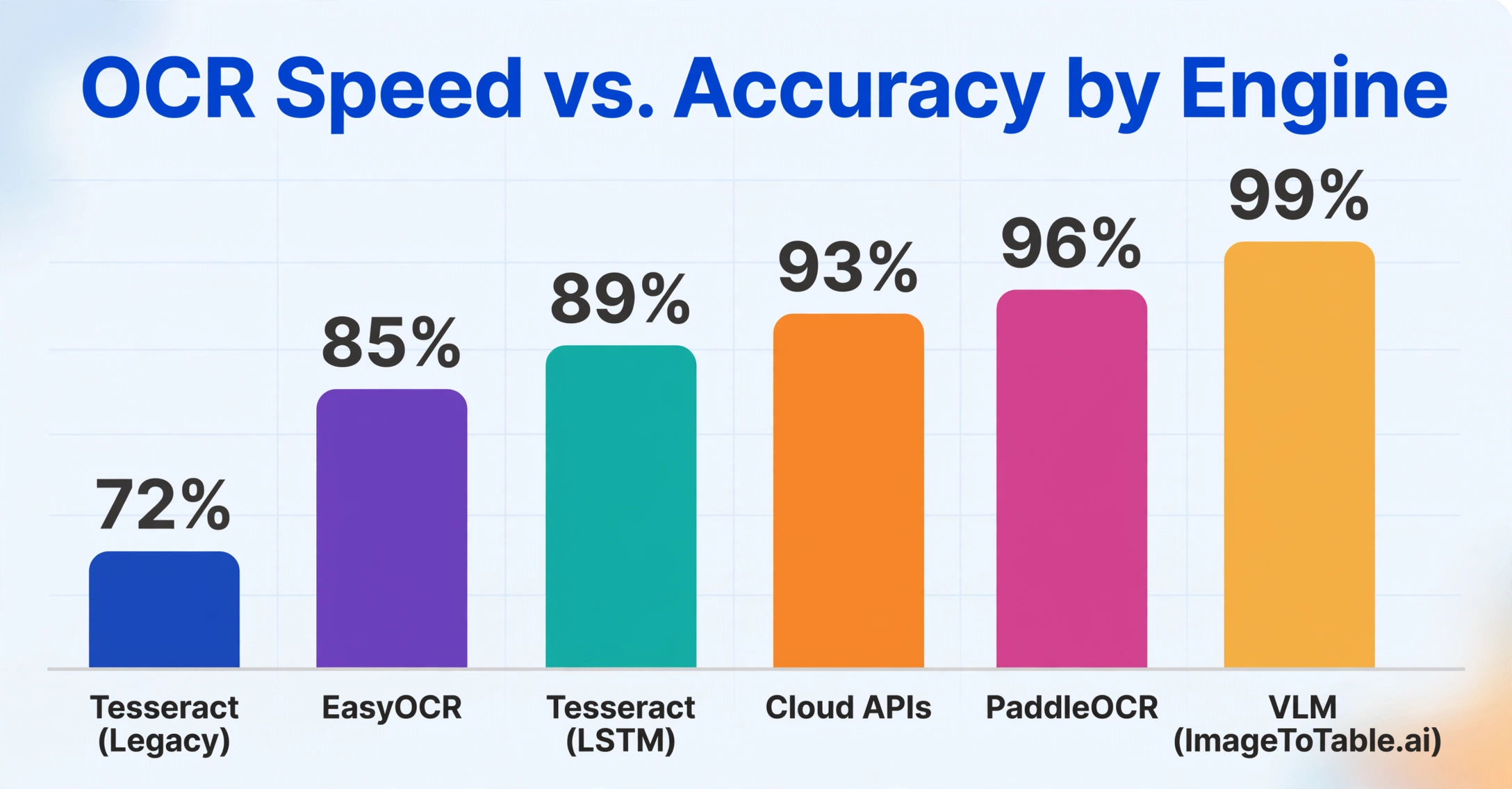
Sources: Codesota (March 2026), AIMultiple DeltOCR Bench (Jan 2026), GigaGPU PaddleOCR benchmark, AWS/Azure/Google official documentation. "Challenging" includes low-resolution scans, mobile phone photos, and documents with mixed layouts. VLM category represents tools like ImageToTable.ai and Qwen-VL.
The key insight from these numbers: the relationship between speed and accuracy is not a smooth curve. It has inflection points. Tesseract gives you speed but hits a hard accuracy ceiling on imperfect documents. Cloud APIs offer a higher ceiling at moderate latency. VLMs push the ceiling highest but require the most time per page. Choosing between them means knowing which inflection point your documents and your tolerance for errors place you at.
The practical takeaway: Tesseract processes an invoice in the time it takes a human to blink. But if that invoice is a phone photo of a crumpled contractor receipt, the 0.16-second extraction may have a 20–30% error rate — and fixing those errors in your accounting system takes minutes per document. The fast extraction creates slow downstream work.
When Speed Matters More
Not every document workflow requires field-level perfection. Several real-world scenarios correctly prioritize throughput over character-level accuracy — and the vendors who market only "99% accuracy" are doing their users a disservice by not acknowledging these cases.
Real-time point-of-sale scanning. A retail checkout system scanning a receipt to look up a price or validate a return needs an answer in under a second. If the OCR misreads one character on a product name but the inventory system still finds the correct SKU through fuzzy matching, the transaction completes without interruption. Speed is the binding constraint; the system processes hundreds of transactions per hour and an extra 3 seconds per scan would create a queue at the register. For these scenarios, Tesseract's legacy mode or a lightweight cloud API with aggressive timeouts is the correct choice — even if it means accepting a 2–5% character error rate.
Document triage and routing. Many document processing pipelines need to classify an incoming document (is this an invoice, a purchase order, or a delivery note?) before routing it to the correct downstream processor. The classification step requires extracting just enough text to identify the document type — typically the header, title, or a few key fields — not every character on the page. A fast OCR pass that correctly identifies 95% of document types at 0.2 seconds per page is more valuable than a slow OCR pass that correctly identifies 98% at 5 seconds per page, because the misclassified 3% can be caught at the human review stage. Google Cloud Vision OCR, with its 1–3 second latency and broad language support, is a common choice for this routing layer.
High-volume archival with searchable text. When the goal is to make millions of pages searchable in a document management system — rather than extract specific data fields — the accuracy threshold is lower. A Tesseract-generated searchable PDF with 90% character accuracy still allows users to find most documents through keyword search, because a document that contains "Invoice #12345" will still be found even if Tesseract reads "Invoice #1234S" on some pages. The cost difference between a fast OCR pipeline (thousands of pages per hour on a single server) and a slow one (hundreds of pages per hour) determines whether the archival project is feasible at all.
Mobile OCR on battery-constrained devices. Running a deep learning OCR model on a smartphone or handheld scanner requires balancing accuracy against battery drain and heat. EasyOCR on a modern smartphone takes approximately 0.2–0.8 seconds per image when GPU-accelerated, but at the cost of significant power consumption. For field workers who scan hundreds of labels per shift, a lighter model that sacrifices 5% accuracy to double battery life is the right operational choice.
When Accuracy Must Win
Every scenario above shares one characteristic: the cost of a single error is low or easily absorbed. Flip that assumption, and the trade-off reverses completely.
Tax and financial documents. A single misread digit in a VAT return, a W-2 wage field, or an invoice total creates a cascading problem. The $1,500 invoice total that OCR reads as $15,000 triggers a payment error that requires reconciliation, vendor follow-up, and potentially a corrected tax filing. A 2025 Gennai analysis calculated that a system processing 500 invoices at 94% accuracy (30 invoices with errors) created 5 hours of correction work per batch, while a system processing 400 invoices at 99% accuracy (4 with errors) created only 40 minutes of cleanup — despite the slower per-page rate. The slower system was more productive in terms of usable output per hour. For tax documents specifically, the IRS and most tax authorities expect 100% accuracy on reported figures — not "close enough." A single field error in an annual tax return can trigger an audit, penalties, and interest charges that dwarf any processing cost savings.
Legal contracts and compliance documents. Contract data extraction for compliance monitoring, lease abstraction, or regulatory filings is the domain where accuracy is non-negotiable. A contract renewal date that is off by one month, an indemnification clause that is misclassified, or a liability cap that is misread as $500,000 instead of $5,000,000 creates legal exposure that no amount of processing speed justifies. For these documents, the right approach is accuracy-optimized extraction with confidence scoring and mandatory human review of any low-confidence field. Vision-language models — which read the entire document in context and can interpret clause structure and semantic relationships — are increasingly the standard here, even at 10–15 seconds per page, because the cost of a single extraction error can exceed the entire annual budget of the extraction tool.
Medical billing and patient data. Healthcare document extraction sits at the intersection of accuracy requirements and regulatory constraints. A CPT code misread on a CMS-1500 claim form can result in claim denial, delayed payment, or — in the worst case — an incorrect procedure billed to a patient's record. HIPAA compliance requires both accuracy and auditability. The standard in medical document extraction is field-level accuracy above 98% with full traceability of every extracted value back to its position on the source document. Speed is secondary; a claim submitted incorrectly is more expensive than a claim submitted late.
Cross-currency and international transactions. Documents that mix currencies, decimal conventions, and number formats are particularly unforgiving of speed-optimized OCR. A European invoice showing "€ 1.234,56" (1,234.56 EUR) processed by a system trained on US decimal conventions can misread the amount as €1.23 — a 1,000x error. The accuracy drop on multi-language and multi-format documents is well documented, and correcting these format-specific errors requires either a model trained on international formats or post-processing validation rules that add latency. In this domain, accuracy must win because the cost of a format error is not proportional to the character error rate — one misplaced decimal point can bankrupt a transaction.
Quick rule of thumb: If a human re-checking a single field in your output takes more than 30 seconds, and you process more than 200 documents per week, optimize for accuracy — the review time saved by fewer errors will more than compensate for the slower extraction speed. If a human checking the same field takes under 5 seconds and errors are immediately obvious, optimize for speed.
A Practical Decision Framework
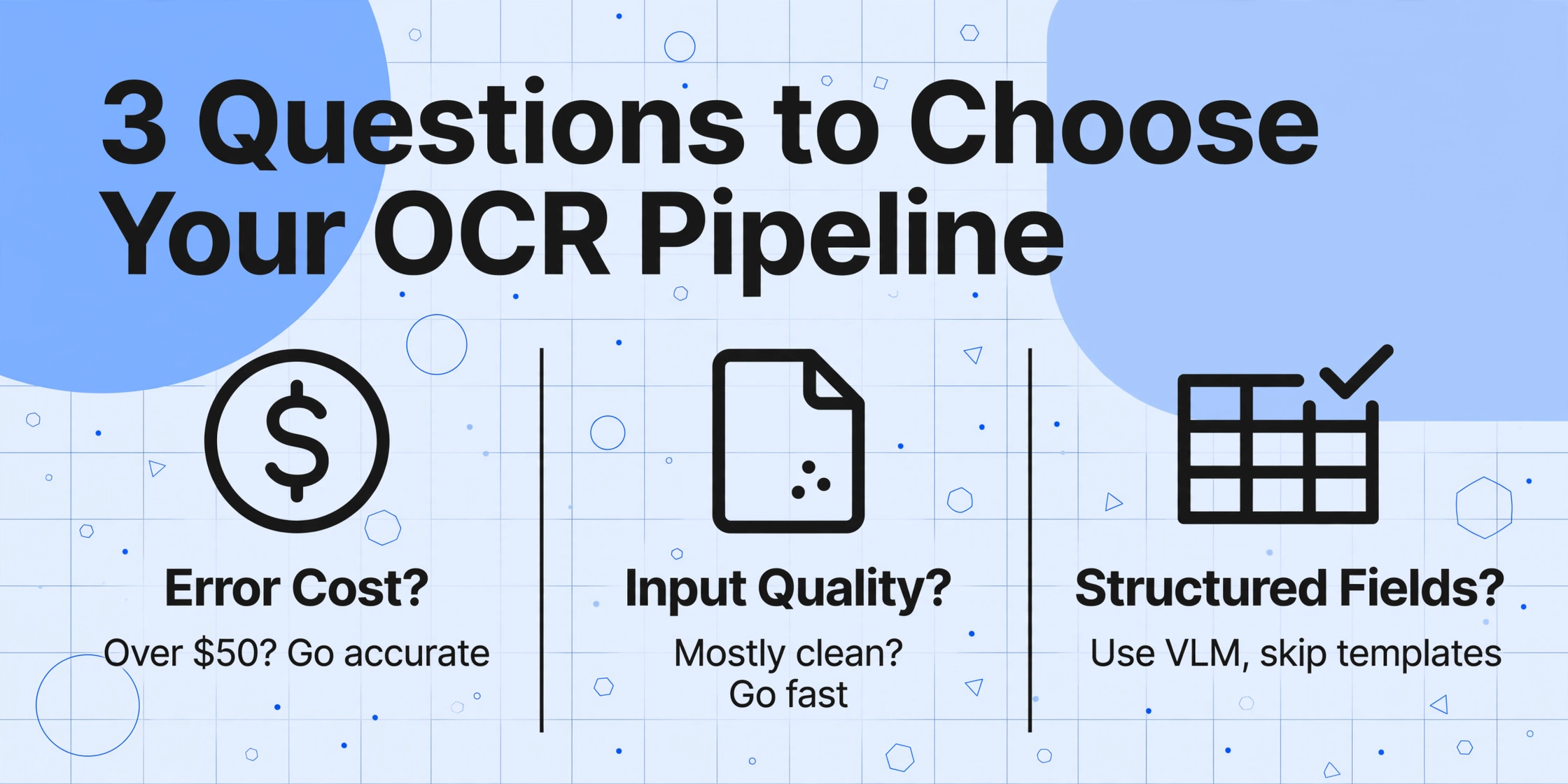
Rather than asking "which OCR tool is best," ask these three questions about your workflow in order:
What is the cost of a single extraction error in your workflow?
If a single misread field costs more than $50 in corrections, downstream delays, or compliance risk, start with an accuracy-optimized pipeline and accept slower throughput. If errors are caught quickly and cost little to fix, a speed-first pipeline is appropriate.
What is the quality distribution of your input documents?
If 90% of your documents are clean, printed PDFs with standard fonts — Tesseract in LSTM mode at 0.3 seconds per page is likely sufficient, and you only need to handle the remaining 10% of edge cases with a slower, more accurate fallback system. If the majority are mobile phone photos of crumpled thermal receipts, start with a model that handles degradation well — which means accepting slower per-page speed.
Do you need structured field extraction or just raw text?
Extracting specific fields (invoice total, PO number, tax ID) from arbitrary formats requires semantic understanding — a task where traditional OCR speed advantages disappear because the post-processing needed to identify and validate fields adds latency regardless of the recognition speed. This is where template-free, VLM-based extraction tools like ImageToTable.ai change the equation: they eliminate the template setup and maintenance that slow down traditional pipelines, making their 5–10 second per page processing net faster in total workflow time.
Apply this framework as a filter: if Question 1 points toward accuracy and Question 2 confirms you have heterogeneous input quality, skip the speed-first tools entirely and go directly to a platform designed for accuracy on diverse documents. If Question 1 points toward speed and Question 2 confirms clean, uniform input, a lightweight pipeline built on Tesseract or a fast cloud API is the correct call. The mistake most teams make is not evaluating these questions in order — they benchmark tools on speed first, then discover later that their accuracy requirements force them to rebuild the pipeline.
How Vision-Language Models Change the Equation
The speed-accuracy trade-off described so far applies to traditional OCR architectures — engines that break document reading into sequential, independent steps (detection → recognition → post-processing). Vision-language models (VLMs) approach the problem differently: they read the document as a single visual scene, understanding layout, text, and field relationships in one integrated pass. The practical consequence is that VLMs do not face the same speed-accuracy trade-off curve as traditional OCR.
Where Tesseract's accuracy collapses on challenging inputs (50–70% on handwriting, for example), a VLM's accuracy degrades gradually — from 96% on clean printed text to 85–90% on moderate handwriting to approximately 75–80% on the worst case. There is no cliff. Where EasyOCR requires GPU acceleration to reach acceptable speeds on complex documents, a VLM running on CPU can still produce usable results — slower, but without the sharp accuracy drop that traditional OCR exhibits when preprocessing is skipped.
This changes the decision framework. With a VLM-based tool like ImageToTable.ai, the speed-accuracy trade-off is no longer a binary choice between "fast and wrong" or "slow and right." Instead, the same model serves both scenarios: you can process a single invoice in 5–10 seconds with field-level accuracy exceeding 95%, or batch 50 invoices and review only the low-confidence outputs. The consistency of the model across document qualities — the absence of accuracy cliffs — is what makes this possible. You are not choosing between two different engines for high-speed triage and high-accuracy extraction; you are choosing one engine and adjusting the review threshold.
For teams evaluating OCR solutions in 2026, the important shift is this: the speed-accuracy trade-off is still real, but the curve has flattened. Tools built on vision-language models deliver a higher accuracy floor at every speed point than traditional OCR architectures can match. The question is no longer "how much accuracy am I willing to trade for speed?" but "how much latency can my pipeline tolerate to achieve the accuracy I need?" — and the answer, for most document workflows, is more than you think.
Frequently Asked Questions
Q: Can I use Tesseract for production document extraction, or is it too inaccurate?
It depends on your documents and your error tolerance. On clean, machine-printed PDFs with standard fonts at 300 DPI, Tesseract 5.5 in LSTM mode delivers 93–97% character accuracy — sufficient for many internal workflows where the occasional typo is not catastrophic. On mobile phone photos of receipts, scanned carbon copies, or documents with handwriting, accuracy drops to 50–80%, which is likely too low for production use without a significant manual review overhead. For a detailed comparison of open-source tools, see our guide to open-source OCR tools.
Q: Which is faster — AWS Textract or Google Cloud Vision OCR?
Both typically process a single page in 2–4 seconds in synchronous mode, with Google averaging slightly faster on simple documents (1–3 seconds) and Textract comparable at 2–4 seconds. In batch/asynchronous mode, both services can process hundreds of pages per hour. The larger difference is not speed but accuracy profile: Google Vision excels on multilingual documents and noisy images, while Textract has stronger form and table extraction. For a head-to-head comparison of cloud OCR APIs, see our Best OCR API 2026 guide.
Q: How much slower is "accurate" mode vs "fast" mode in the same OCR tool?
Tesseract's LSTM mode is roughly 2–5x slower than legacy mode on the same document — 0.3–0.8 seconds per page vs 0.1–0.3 seconds. ABBYY FineReader's "accurate" mode runs approximately 2–2.5x slower than "fast" mode. The accuracy gain is typically 5–10 percentage points on challenging documents. Some tools' "super-accurate" modes run multiple engines in parallel and take the best result, multiplying processing time by the number of engines. The CVISION analysis of diminishing returns applies here: each halving of error rate requires roughly 2x the processing time.
Q: Does GPU acceleration eliminate the speed-accuracy trade-off?
It narrows the gap significantly but does not eliminate it. PaddleOCR on an RTX 3090 GPU processes ~120 pages per minute — roughly 5x faster than its CPU speed and nearly 5x Tesseract's CPU-only throughput — while maintaining the same accuracy. GPU acceleration allows teams to run deep learning OCR models at speeds comparable to lightweight engines, effectively letting them have both speed and accuracy. However, GPU cost, availability in cloud environments, and power consumption on edge devices remain constraints. Not every workflow has a GPU available.
Q: Should I optimize for speed or accuracy when processing invoices from multiple vendors with different formats?
Accuracy. The primary challenge of multi-vendor invoice processing is not reading speed — it is format variation. A template-based OCR tool that processes each invoice in 0.5 seconds but requires a separate template per vendor layout will spend far more total time on template maintenance than on actual processing. A template-free, VLM-based tool that processes each invoice in 5–10 seconds but handles any format with zero setup will be faster in total workflow time — especially as the number of vendors grows. Our guide on what OCR accuracy actually means explains why field-level accuracy matters more than character-level speed in multi-format workflows.
Q: When should I use a hybrid approach — fast OCR for triage and accurate OCR for extraction?
A hybrid pipeline makes sense when you have a bimodal document quality distribution: a large volume of clean, standardized documents (where a fast pass suffices) mixed with a smaller volume of complex or degraded documents (where accuracy-optimized processing is necessary). Document triage via Tesseract or lightweight cloud OCR classifies each incoming document as "clean" or "challenging," routing clean documents to a fast extraction pipeline and challenging ones to a VLM or human review. This is a common pattern in enterprise AP departments processing both electronic invoices from large suppliers and paper invoices from small vendors. The catch: the routing logic itself must be highly accurate, or challenging documents slip through to the fast pipeline and produce errors.
Make the Trade-off Deliberately
The speed-accuracy trade-off in OCR is not a problem to be solved — it is a design parameter to be set deliberately. For every document processing workflow, there is a correct balance point. The mistake is letting the vendor's default settings or a single benchmark number make the decision for you.
Most teams over-index on speed during evaluation because speed is easy to measure (one number, one run, one timer) and accuracy is not (it varies by document type, quality, field, and error definition). The honest evaluation process benchmarks accuracy on the actual documents you process — including the messy ones — and measures total workflow time, not just OCR latency. That total includes the time spent correcting errors, which is where the "fast" OCR loses its advantage.
Vision-language models have flattened the accuracy curve, making high accuracy accessible at tolerable speeds for most business document workflows. If accuracy is your constraint — and for most document extraction use cases, it should be — a VLM-based tool that processes a page in 5–10 seconds and delivers field-level accuracy above 95% is a better choice than a tool that processes the same page in 0.2 seconds and leaves you verifying every 5th value.
Test the trade-off on your actual documents. See what 5 seconds per page looks like when the errors that used to take minutes to find simply are not there anymore.