How to Reconcile Pay Stub Income
With the 1003
Form 1003, the Uniform Residential Loan Application, does not ask for one income figure. Section 1b, current employment and income, asks for base, overtime, bonus, commission, military entitlements and other income as separate monthly amounts, then a total. A pay stub usually prints the same categories under different labels, plus a year-to-date (YTD) column. The comparison often goes wrong when someone matches the application's total to the stub's gross pay and treats the gap as a borrower problem.

Key Takeaways
- $467 a month can separate two documents that are both correct, and nothing was keyed wrong.
- The same $2,800 gross annualizes to $6,067 biweekly and $5,600 twice monthly, so the pay frequency decides the number.
- Compare base to base, then request the relationship letter or a current stub instead of editing the 1003 to match.
A pay stub and a loan application can both be accurate and still report different income. One describes a pay period and a year-to-date total, the other describes a monthly figure the borrower stated at application. The work is to explain the difference. A processor who tries to make the numbers identical will chase the wrong document, and one who ignores the difference will hand underwriting a file it sends back.
This is a document consistency check, not a qualifying income calculation. The aim is to find and explain the rows that disagree before the file moves on.
Four parties touch the two documents. The borrower supplies the stub and states the income on the application. The processor compares the two and writes the condition when they do not settle it. The employer or payroll provider confirms employment and pay when the paper cannot. The underwriter calculates qualifying income under the applicable program and makes the decision. The order that holds up: confirm the two documents describe the same borrower and employer, normalize the pay period, compare the income lines, then decide what to request.
A Pay Stub and a 1003 Disagree for Ordinary Reasons
A mortgage pay stub income discrepancy is usually a definition problem before it is a data problem. The two documents measure different things, so a difference is not evidence that anyone made a mistake. A stub reports the current pay period and a year-to-date total through a specific date. The 1003 reports a monthly figure the borrower stated on the application date. A stub is an employer or payroll-provider record. The 1003 is a declaration that a loan officer or the borrower entered into the loan origination system, and it is not verified until someone compares it with documents like this one.
Two consequences follow. First, comparing the application's total monthly income to the stub's gross pay this period compares a total to a component. A bonus or an overtime line can create the gap by itself. Second, comparing the application's figure to a stub that is several weeks old compares two different moments in a pay history. The stub can be recent enough to accept and still describe a rate the borrower no longer earns.
The selling guides treat consistency as the requirement, not equality. Fannie Mae's base income guidance says qualifying income must be consistent with year-to-date base earnings, and it gives a different monthly conversion for each pay frequency. That is why the first useful question is not "how far apart are they" but "what does each figure include, and for which period".
Check the Borrower and the Employer Before You Compare the Number
If the borrower or the employer is not the same entity on both documents, the income comparison has no meaning. The names are the cheapest thing to check, and a name difference is a common source of a false discrepancy.
Borrower names vary in ways that are not errors: a maiden name on an older payroll record, a married name on the application, a middle initial on one document and a full middle name on the other, a suffix that payroll drops, or a hyphenated surname split across two lines. Fannie Mae requires the pay stub to clearly identify the borrower as the employee, and a stub that prints "J. Smith" can satisfy that while still looking different from "Jordan A. Smith" on the 1003. Put the name as printed into its own column and resolve it against the application and a government ID before you resolve the income. A co-borrower with the same surname is a separate person and a separate row.
Employer names diverge for structural reasons. A small business may use a payroll provider, so the stub carries the provider's name while the application carries the worksite employer. A professional employer organization (PEO) can appear as the employer of record. A company may trade under a DBA (doing business as), operate as a franchise, or have been acquired and renamed between the W-2 and the current stub. Borrowers run into this regularly: one borrower on r/Mortgages described working for a company whose pay stubs and W-2 listed the payroll company as the employer, then that payroll company changed its name mid-file, and the underwriter insisted the borrower worked for two different payroll firms (r/Mortgages, June 2025). The reply from an industry reader was that it happens all the time and needs a confirmation from HR or the payroll company.
When the employer names differ, compare the address and phone on the stub with the employer block and EIN on the W-2 before treating it as a different job. A payroll provider, a PEO, a DBA or a renamed company produces a second name for one employer. The fix is a relationship letter or a completed Form 1005 (the request for verification of employment), not an edit to the application that makes the names match. Changing the application to agree with the stub hides the question instead of answering it.
Identity first, arithmetic second. A name or employer difference can make two correct income figures look like a discrepancy.
The Same Gross Pay Can Annualize to Two Different Monthly Incomes
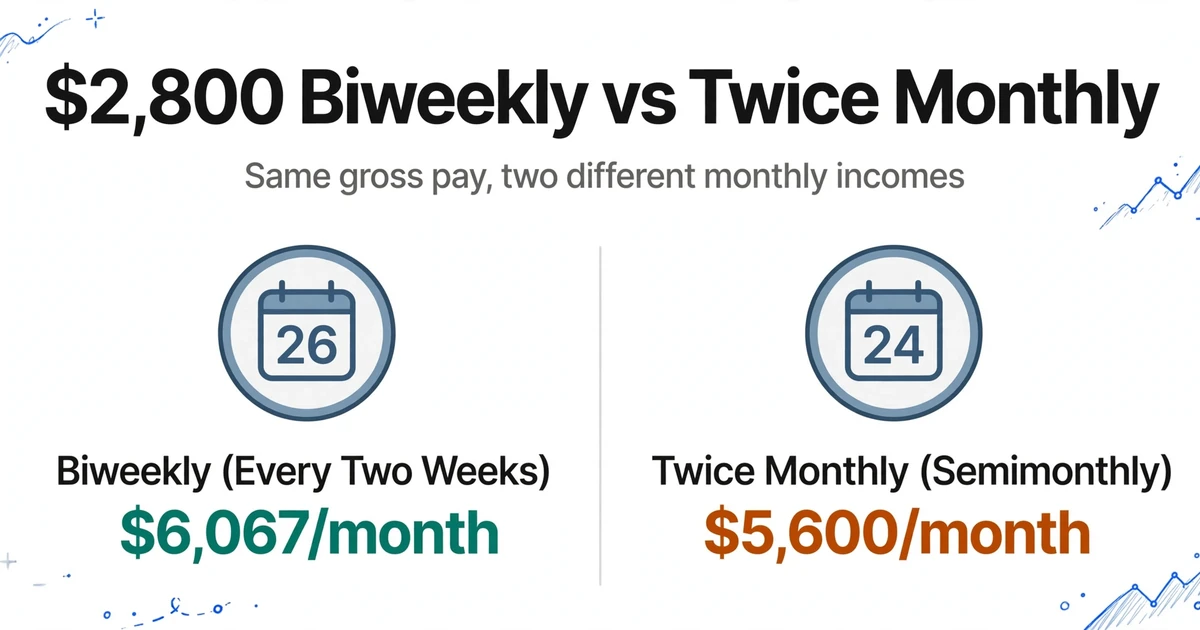
Twenty-six biweekly paychecks are not the same as twenty-four semimonthly paychecks, and confusing the two produces a convincing but false discrepancy. Fannie Mae's base income table makes the conversion explicit: weekly gross times 52 divided by 12, biweekly gross times 26 divided by 12, twice-monthly gross times 2, and monthly gross used as printed (Fannie Mae Selling Guide B3-3.3-01).
| Pay frequency printed on the stub | Monthly income from the gross pay shown |
|---|---|
| Weekly | Gross pay × 52 ÷ 12 |
| Biweekly (every two weeks) | Gross pay × 26 ÷ 12 |
| Twice monthly (semimonthly) | Gross pay × 2 |
| Monthly | Gross pay as printed |
A stub showing $2,800 every two weeks annualizes to about $6,067 a month. The same $2,800 paid twice a month annualizes to $5,600. The $467 gap exists with no change in pay and no error on either document. If the application says $5,600 and the stub is biweekly, the first question is which frequency the borrower is on, not whether the borrower misstated income.
The dates need the same care. A stub issued on October 30 may cover a period that ended October 24, and the year-to-date figure runs through that period end, not the pay date. Freddie Mac's YTD paystub requirements ask for the time period covered, the current pay period dates and earnings, the complete YTD earnings, the employer name, the borrower as employee, and the issue date (Freddie Mac Guide 5302.2). Fannie Mae requires the most recent stub to be dated no earlier than 30 days before the initial application date and to include all year-to-date earnings (B3-3.2-01). A stub can pass the recency test and still be a poor comparison if its YTD through date predates a raise.
A mid-year raise is the clearest case. Suppose base pay was $6,000 a month from January through June and $6,600 from July. A September stub shows $55,800 in YTD base earnings. Divide that by nine months and you get $6,200, which matches neither the old rate nor the current one. The YTD figure is a blend, and the arithmetic explains it: six months at $6,000 plus three months at $6,600 equals $55,800. Rebuilding the rate history takes a minute and prevents a condition that asks the borrower to explain correct pay.
Annualize only a whole pay period, and use the YTD through date rather than the pay date.
Compare Base, Overtime, Bonus and Commission Separately

The 1003 already gives you the component lines. Section 1b lists base, overtime, bonus, commission, military entitlements and other income, each as a monthly amount, with a total at the bottom (Form 1003). The stub prints the same kinds of earnings under labels that vary by payroll system: regular, OT, bonus, commission, holiday, PTO, shift differential. Put the application's lines beside the stub's lines and the comparison becomes specific. Among mortgage income verification documents, a pay stub carries the most period detail: it states a rate, a period and a year-to-date total on one page, and that detail is what makes a line-by-line comparison possible.
Start with base. If the application says $5,600 in monthly base and the stub's regular pay annualizes to $5,600, base income agrees, even when the application total is $6,100 because it includes $500 of overtime. The remaining question is whether that overtime is stable and documented enough to count under the lender's variable income policy. That is a different question from whether the numbers match, and it is the underwriter's call.
A total-to-total comparison hides which line moved. If the application total includes a one-time bonus that the current stub does not show, the gap is timing. If the stub includes a shift differential that the application does not, the gap is a missing line, not an understated total. Gross and net are another trap: a stub's net pay is gross minus taxes, retirement contributions and benefits, so comparing net pay to the application's gross monthly income guarantees a difference that has nothing to do with income.
Hourly borrowers add a separate issue. A stub showing 38 hours instead of 40 is not a data error; it is a variable hours question. Fannie Mae treats fixed base income and variable base income differently, and variable income has its own history requirement. The comparison can show you the hours and the rate. It cannot decide how many hours belong in qualifying income.
Put Both Documents in the Same Columns, Then Read the Rows That Disagree
The comparison gets cheap when the application and the stubs are extracted with one identical column set, because the two exports stack into a single table. That is the difference between opening a PDF viewer and opening a sheet where the application row sits directly above the stub rows for the same borrower.
ImageToTable.ai calls the mechanism Custom Column Extraction. You type the column names you want, and the AI reads each document and fills a value under the matching column by understanding what the field means, not where it sits on the page. The names you type become the headers of the output spreadsheet. That matters here because payroll layouts differ across ADP, Paychex, Gusto, QuickBooks Payroll, Paylocity and the in-house templates small employers use. A fixed template breaks on the next provider. A column name does not.
Run the application pages as one batch and the pay stubs as another, and use the same column names on both. Blanks are expected: the application has no pay period, and the stub has no stated monthly income. The identical headers are what let you paste one export under the other without rebuilding the table. If the 1003 arrives as a multi-page PDF that splits into one task per page, turn on Multi-Page Merge for that batch and either match by a shared reference such as the loan number or start a new group when the borrower name changes, so the application occupies one row. Leave it off for the stub batch unless a single stub arrives as several images; two stubs from the same employer are two pieces of evidence, not one document.
| Column name | On the 1003 batch | On the pay stub batch |
|---|---|---|
| Source Document | 1003 | Pay Stub |
| Borrower Name (as printed) | Section 1a | Employee name |
| Employer Name (as printed) | Section 1b | Employer block |
| Pay Frequency | Blank | Weekly, biweekly, semimonthly, monthly |
| Pay Period End | Blank | Last day covered by the stub |
| Pay Date | Blank | Issue or deposit date |
| YTD Through | Blank | Period end of the YTD figure |
| Base Pay (This Period) | Blank | Regular earnings |
| Overtime (This Period) | Blank | OT line |
| Bonus (This Period) | Blank | Bonus line |
| Commission (This Period) | Blank | Commission line |
| Gross Pay (This Period) | Blank | Total gross for the period |
| Stated Base (Monthly) | Section 1b base | Blank |
| Stated Overtime (Monthly) | Section 1b overtime | Blank |
| Stated Bonus (Monthly) | Section 1b bonus | Blank |
| Stated Commission (Monthly) | Section 1b commission | Blank |
| Stated Total (Monthly) | Section 1b total | Blank |
Two settings do most of the work before the stub batch runs. The first is a computed column. A computed column is a column the AI calculates from other extracted fields instead of copying a value off the page. The one to add here annualizes the printed pay: a column such as Monthly Base (Base Pay × 26 ÷ 12) for a biweekly batch, or the same form with 52, 24 or 12 for the other frequencies. The multiplier is a fixed parameter, so split a mixed batch by pay frequency rather than letting one multiplier run across every row. Keep the raw base, frequency and YTD columns as well, because the reviewer needs to see what was printed before trusting a derived number.
The same mechanism can check the application against itself. Add a computed column that subtracts the stated component lines from the stated total; a nonzero result means either the 1003 was keyed inconsistently or a component line was missed, so check the source before treating it as an application error.
The second is Model Tier, the account setting that selects processing quality. Standard covers most printed tabular documents. Pay stubs photographed on a phone, printed on a dot-matrix printer or typed by a small employer's bookkeeper are the cases where Advanced or Premium is worth selecting before submitting the batch. The tier active at submission is what that batch is processed and billed against, so the setting is decided per batch.
Before you flag a row, verify the extraction. Review Mode + Bbox highlights the place on the original image that a cell came from when you hover or click the cell, and clicking a region on the image jumps back to the matching cell. Turn on auto-annotate after processing so the boxes are ready when the file opens. If someone edited a value, the original AI reading can be restored in one click. This is the step that separates two different problems: the AI may have misread the stub, or the stub and the application may genuinely disagree. They call for different fixes.
Files are processed securely and not stored.
Then stack the exports in one sheet, keep the Source Document column, and sort by borrower and employer. Add two variance columns in the sheet: annualized base minus stated base, and stated total minus the sum of the stated components. The first shows the income gap. The second catches an application that was keyed inconsistently before you ever compare it with a stub.
The tool does not join the two documents for you. It extracts each into the same columns, and the alignment and subtraction happen in the sheet. Multi-Page Merge works within one document. It will not merge the application with the stub because those are two documents. That identical-columns pattern is what makes expense report reconciliation and patient intake and EOB reconciliation work, with a different set of identity fields.
If the stub itself needs more than the total, the field-level walkthrough in the complete guide to payslip extraction covers gross, net, deductions and YTD. For the extraction step itself, the workflow for pulling pay stub gross, net and deduction lines into a spreadsheet covers the same document in a single-file setting. Once a batch is processed, spot-check sampling is the right follow-up before you rely on every row.
What Each Disagreement Usually Means
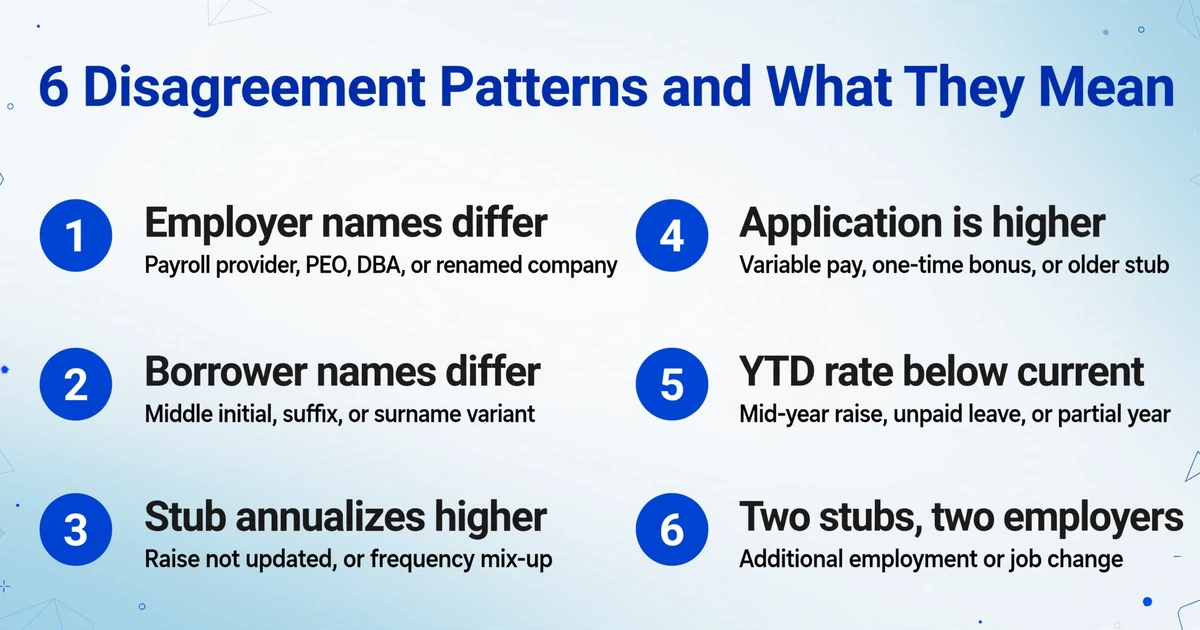
Most flagged rows fall into six patterns, and the pattern tells you what to request next. The point is to send a real document problem and a definition problem down different paths.
| What the rows show | What it usually means | What to check or request |
|---|---|---|
| Employer names differ, but the address, phone or EIN match | Payroll provider, PEO, DBA or a renamed company | Employer relationship letter or completed Form 1005. Do not edit the 1003 to match the stub. |
| Borrower names differ by middle initial, suffix or surname | A name variant, not a second person | Compare the application and a government ID, then confirm the variant with the borrower or employer. Keep the rows separate until confirmed. |
| Stub annualizes higher than the application | Application not updated after a raise, a frequency mix-up, or a base figure keyed from an older stub | Check pay frequency and the raise date, then update the application if the current rate is supported. |
| Application is higher than the stub | Variable pay included in the total, a one-time bonus, or an older stub | Compare the component lines and the pay period dates. Request a current stub if the one on file predates the application. |
| YTD annualized rate is below the current rate | A mid-year raise, unpaid leave, or a partial year | Rebuild the rate history and check the effective date. Do not annualize a partial YTD as if it were the current rate. |
| Two stubs, two different employers | Additional employment under Section 1c, or a job change | Keep them as separate rows and separate 1c entries. Do not sum them into one income figure. |
In Fannie Mae's random sample of loans acquired in the third and fourth quarters of 2025, misrepresentation of income ranked second among the top initial defects and incorrect base income calculation ranked seventh (Fannie Mae Quality Insider, June 2026). Those are defects found after purchase, not ordinary pay stub differences. The ranking explains why lenders treat the income comparison as a control, not a formality.
What This Check Does Not Decide
The tool does not calculate qualifying income under Fannie Mae, Freddie Mac, FHA, VA or USDA guidelines. It does not run an automated underwriting system, pull credit, or make an underwriting decision. It reads the documents and puts the values where you asked for them.
It also does not join the application to the stub automatically, and it does not know that a payroll company is the same employer as the worksite company on the 1003. Those are human confirmations. Name variants, corporate relationships and the question of whether overtime is stable enough to count all sit outside what the extraction can decide.
Self-employed borrowers, 1099 income, K-1 income and rental income use different methods and different documents. A pay stub comparison is the wrong frame for them. Altered or fabricated documents are another separate problem: this check finds disagreements, and a forensic review is what determines whether a document was changed.
The output is a spreadsheet, not a LOS update. The figures still go into Encompass or whichever system holds the file, and the condition is still written by a person. Borrower documents also carry personal information, so handle the exports under your own retention and vendor rules.
Mortgage Pay Stub and Loan Application Reconciliation: Frequently Asked Questions
Does this calculate the borrower's qualifying income?
No. It extracts the income lines from the pay stub and the application and puts them in a comparable table. Qualifying income is calculated under the applicable agency and lender guidelines, and that calculation stays with the underwriter.
Can it match each pay stub to the right borrower automatically?
Not automatically. It extracts both sets of documents into the same columns so the rows can be sorted and compared, and a person confirms the match. The tool does not resolve name variants on its own.
Why is the employer on the pay stub different from the employer on the 1003?
The stub may carry the payroll provider, a PEO, a DBA or a former company name. Compare the address, phone and employer identification number, then ask for a relationship letter or a completed Form 1005. Do not change the application to match the stub.
The stub is biweekly. Which monthly figure do I compare?
Annualize it first: gross pay times 26 divided by 12. A twice-monthly stub uses gross pay times 2, and a weekly stub uses gross pay times 52 divided by 12. Compare the annualized monthly base with the application's stated monthly base, not with its total.
What if the borrower received a raise this year?
Year-to-date earnings are a blend of the old rate and the new one, so dividing YTD by months elapsed will land between the two. Rebuild the total from the months at each rate, then check that the application states the current rate and that the effective date is documented.
Can I use this for a self-employed borrower?
Not for the income calculation. A self-employed borrower's income comes from tax returns, schedules and business returns, not from a pay stub. The same column method can organize those documents, but the qualifying income method is different.
The goal is a figure you can explain to the next reviewer, with the source line behind it. Once the application and the stubs share one column set, that explanation is a row on a sheet instead of a search through a PDF.