Automated Payment Reconciliation
Still Starts With a Document
Every automated payment reconciliation platform makes the same promise: load your transactions and it will match them against your ledger, flag the exceptions, and shorten the close. That promise holds for teams whose data already arrives as clean rows. It says nothing about where the transactions come from when the data does not. Before a single matching rule runs, someone has to turn a bank statement PDF, a processor's settlement report, and a folder of payment screenshots into one consistent table. That conversion is the first step of automated payment reconciliation, most vendor guides pass over it in a sentence, and it is where implementations stall.
Key Takeaways
- The matching was never the hard part, yet every reconciliation tool automates it while assuming your transactions arrived as clean rows.
- Bank statements, processor reports, and payment screenshots arrive as documents, so the engine flags exceptions that are really extraction gaps.
- The bottleneck is the gather step before matching, and defining your own columns lets ImageToTable.ai read those documents into rows with no template.
What Automated Payment Reconciliation Actually Automates
Payment reconciliation is the practice of proving that three records agree for every payment: what your business expected to happen, what actually cleared, and what was posted to the general ledger. The expected side lives in your accounting ledger or billing system. The cleared side lives on a bank statement, a card program file, or a payment processor's payout report. The posted side lives in the ledger once an entry is recorded.
Automated payment reconciliation is software that performs the comparison across those sources and isolates the items that do not agree. Instead of a person opening a statement and checking each line against a ledger, the system ingests both sides, applies matching rules, pairs what fits, and routes the rest into an exceptions queue. The work that remains for a person is investigating the exceptions rather than reading every row.
Automated payment reconciliation runs the comparison. It does not create the records being compared. If a transaction exists only inside a PDF or a screenshot, the matching engine cannot see it until something turns that document into a row.
This is why the tools that look powerful in a demo depend on an upstream assumption. Most platforms advertise plug-and-play integrations: a bank feed, an automatic transaction import that pulls lines straight from a linked account, or an API connection to a processor. Those channels work when the data was born digital and the integration exists. They do not cover the older statements, the password-protected bank PDF, the processor report that has no accounting integration, or the confirmation screenshot that is the only record of a payment. That gap is the subject of this guide.
Why the Process Exists: Fraud Detection and a Faster Close
Reconciliation is a control, not a chore. The Association of Certified Fraud Examiners names account reconciliation among the active detection methods associated with lower fraud losses and faster discovery, and its Occupational Fraud 2024 study found the typical scheme runs about 12 months before anyone notices. A year is long enough for duplicate payments, altered bank details, and unsupported charges to compound unnoticed.
The second reason is the close. Reconciliation sits on the critical path of the month-end process, because the books cannot be finalized until cleared cash is tied to ledger entries. APQC's Open Standards Benchmarking puts the cross-industry median for completing monthly consolidated statements at six days, with top performers at five and the slowest at ten. Every day reconciliation runs late pushes that number out.
Two things justify the effort: reconciliation is one of the few controls that catches fraud while it is still small, and it gates the close. Both get harder when the source data arrives as documents instead of feeds.
The Six Steps, and the One Automation Treats as Solved
The reconciliation process follows a repeatable sequence. The versions published by payment platforms and accounting firms differ in wording, but they describe the same six gates, in the same order.
| Step | What happens | What automation typically handles |
|---|---|---|
| 1. Gather and normalize | Collect statements, processor reports, screenshots, and ledger entries, and put them into one consistent structure of dates, amounts, directions, and references. | Usually assumed to be solved by integrations that may not cover your actual sources. |
| 2. Match | Pair each internal record with its external counterpart by amount, date, reference, or a tolerance rule. | Automated by rules and scoring, once both sides are structured. |
| 3. Identify discrepancies | Flag anything that does not pair, producing an exception list. | Automated through matching output and reason codes. |
| 4. Investigate | Establish why the item failed: a fee, a timing gap, a partial payment, a duplicate, or a real error. | Assisted, not replaced. A person still decides. |
| 5. Adjust and record | Post fees, corrections, and FX differences with a clear description. | Assisted by suggested entries, approved by a person. |
| 6. Review and close | Verify balances, keep the evidence, and lock the period. | Automated reporting and audit trail. |
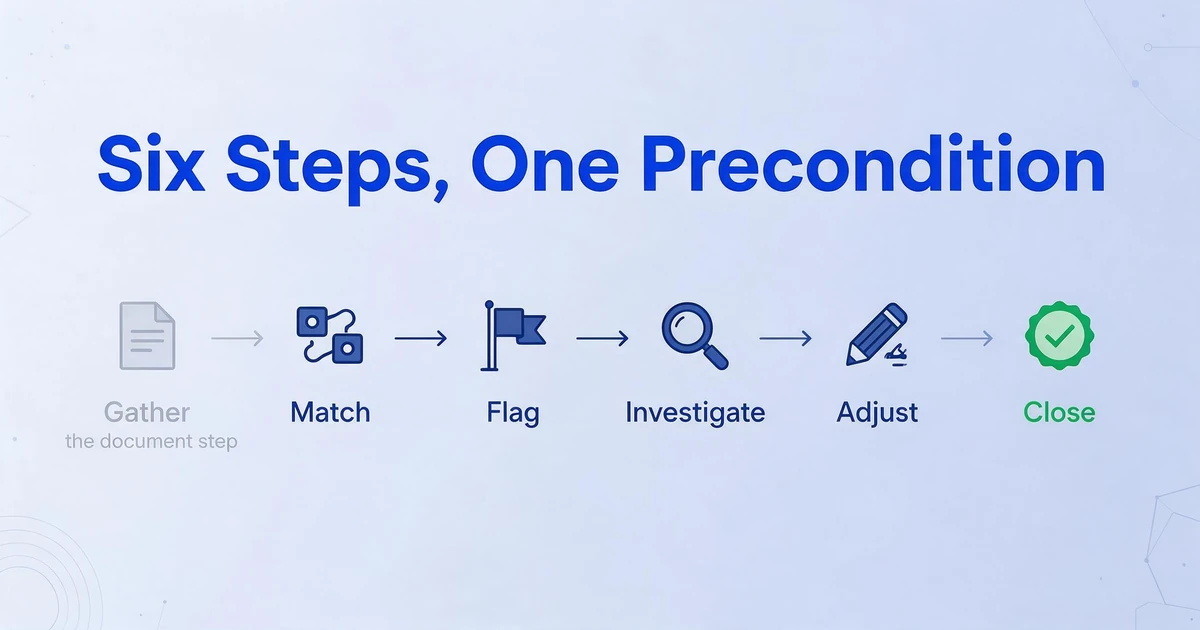
Notice where the automation vendors spend their engineering. Steps two through six are where the matching engines, exception queues, and dashboards live, and those are genuinely automated. Step one is treated as a precondition, a line that says "connect your data sources." That framing is fair when every source is an API, a CSV export, or a live bank feed. It is not fair for the many teams whose statements and confirmations arrive as documents, which is why the first step deserves its own look.
Where the Manual Hours Actually Go
Ask people who reconcile for a living where the time disappears, and the answer is not the matching rules. It is the gathering and the figuring out. On r/Accounting, a thread titled "anyone else just stuck in spreadsheet hell trying to match payments to invoices" describes the loop directly: "every month im cross referencing invoices with bank transactions and it takes forever... half my time is just figuring out who paid what and whether it matches the right invoice" (r/Accounting). The matching is the easy part. Establishing what an unlabeled bank line actually is takes the hours.
The pattern repeats at larger scale. In an r/fintech thread on manual reconciliations, a finance lead at a 40-person software company wrote that three people "spend the first 10 days just matching bank feeds, chasing receipts, and rekeying vendor invoices," with exceptions still eating hours on top of that (r/fintech). Rekeying, in both accounts, is the tell: the data already exists somewhere, and someone is retyping it to make it matchable.
One reason the retyping is unavoidable sits with the payment processors. A single deposit into your bank account is rarely a single transaction. As Stripe's payout reconciliation documentation explains, an automatic payout "can include funds from multiple transactions," so one bank line is a settlement batch covering many customer payments, minus fees, refunds, and adjustments. Stripe also notes that manual and instant payouts cannot be reconciled at the transaction level at all, which leaves the merchant responsible for the breakdown. To match one deposit to the transactions inside it, you first need those transactions as rows.
The bottleneck in automated payment reconciliation is not the matching. It is the step before it: turning documents and batch deposits into transaction-level rows that a matching rule can read.
Why the Source Documents Resist Automation
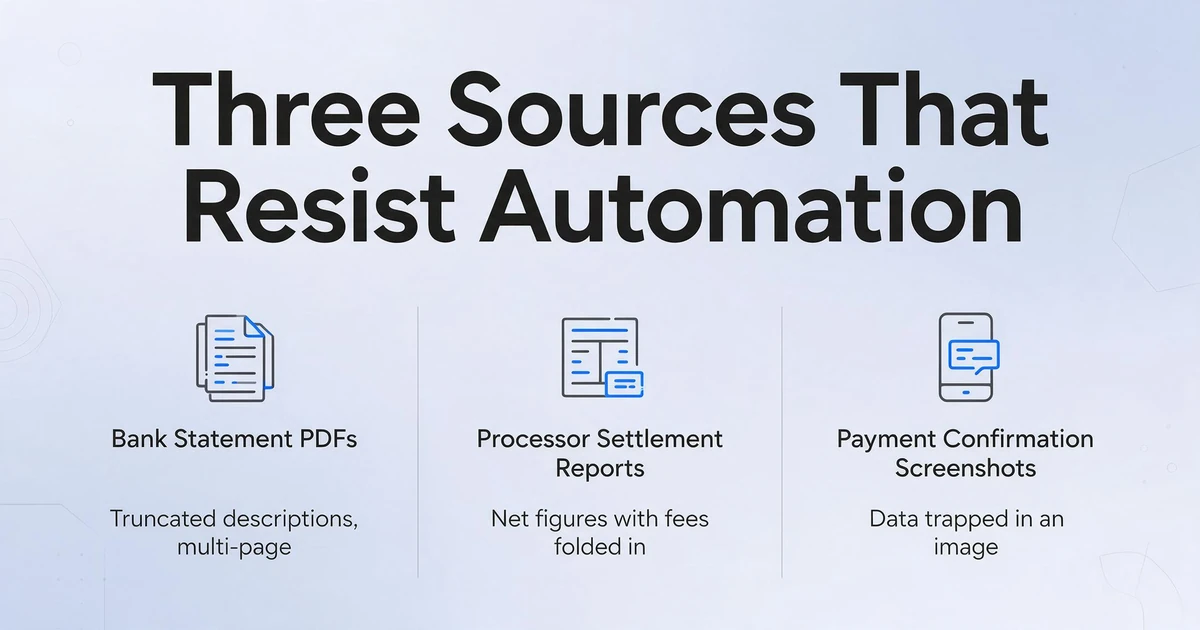
Three kinds of source record cause most of the friction, and each resists automation for a different reason.
Bank statement PDFs. A monthly statement carries a table of transactions with truncated descriptions, mixed debits and credits, and a running balance, often across several pages. A single account's statement may have no column headers that map to anything in your ledger. When the account spans multiple pages, the rows have to be reassembled into one continuous list before matching, or a transaction on page three gets treated as a different record from the same transaction referenced on page four.
Processor settlement reports. These report the batch behind a payout, and the numbers that matter are frequently net figures with fees folded in. A $10,000 day of card sales can land in the bank as a smaller net amount, and reconstructing which transactions produced that deposit means comparing gross amounts, fees, refunds, and chargebacks across two different files.
Payment confirmation screenshots. When a payment runs through an app that has no accounting integration, the confirmation screen can be the only complete record of the transaction. The amount, date, and counterparty are visible, but they are trapped in an image, and the only way into a spreadsheet is to read the screen and type. This is the same fragmentation that makes reconciling payments across multiple apps a manual job even for businesses that use accounting software.
None of these sources is exotic. They are what arrives when a bank does not offer a feed, a processor does not integrate with your ledger, or a payment method never had an export designed for bookkeeping. The common thread is that the data is present and readable to a human, but not structured for a machine, and that is precisely the gap the next two sections address.
What Clean Transaction Data Looks Like, Field by Field
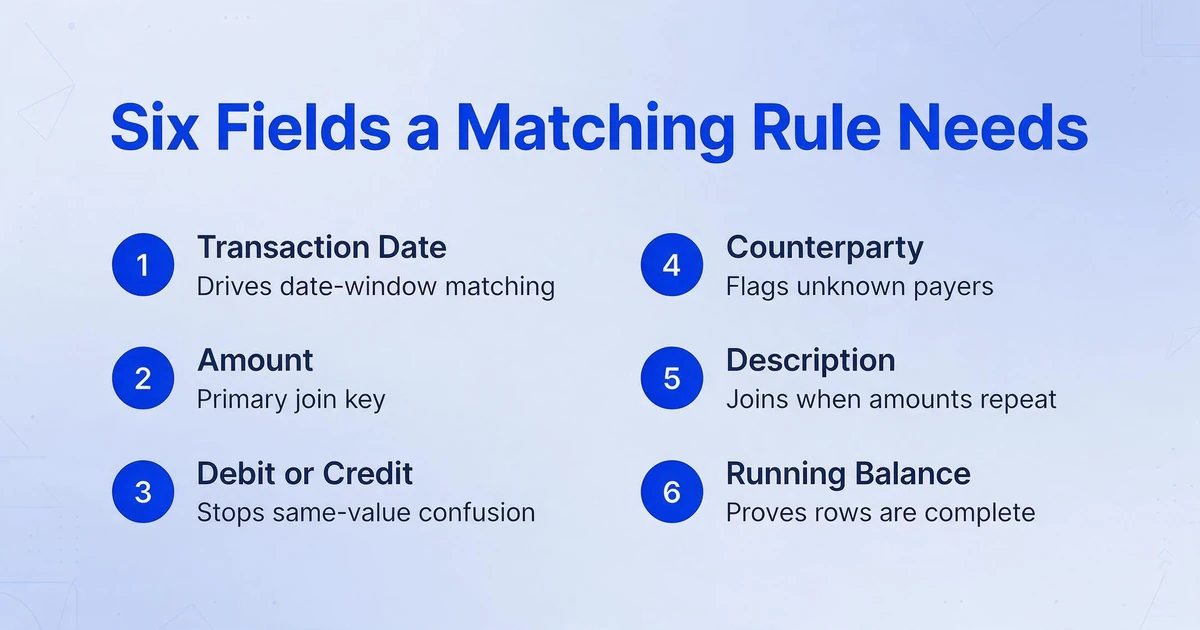
A matching rule can only work with the fields it is given, so the output of the gather step should carry the same columns a bookkeeper would write by hand. If a field is missing, the rule has less to match on, and the item lands in the exception queue for a reason that a better extraction would have avoided.
| Field | Why the matching step needs it |
|---|---|
| Transaction date | Drives date-window matching and decides which period the row belongs to. |
| Amount | The primary join key for exact and tolerance matching. |
| Debit or credit direction | Stops a payment and a deposit of the same value from being read as the same event. |
| Counterparty or payer | Supports matching when there is no invoice number, and flags unknown payers. |
| Description or reference | The only join key between a bank line and an invoice when amounts differ or repeat. |
| Running balance | Proves the extracted rows are complete, since each line should tie to the next. |
Payout records carry a second set of fields, because one deposit contains many transactions. To reconcile a batch, the extract needs the gross amount, the processor fee, the net amount, and an identifier that ties the transactions to the deposit, whether that is a payout ID, a settlement date, or a batch reference. Without the payout identifier, the transactions exist but cannot be grouped, and the one deposit stays a mystery line in the ledger.
The test for whether transaction data is ready to reconcile is simple: can each row be joined to a counterpart by at least two fields, and can every row be tied back to a batch or a statement total? If not, the matching engine will report exceptions that are really extraction gaps.
The Step You Can Automate Today: Getting the Rows Out of the Documents
The gather step is not unsolvable just because a document is a PDF or an image. It is a data extraction problem, and it is the one part of this workflow where a tool can remove the manual work without pretending to run the rest of the process.
ImageToTable.ai reads the source documents and returns the transaction rows as a spreadsheet. Its core mechanism is Custom Column Extraction: you type the column names you want, such as "Transaction Date," "Amount," "Description," and "Debit or Credit," and the AI locates each value by understanding what it means rather than by where it sits on the page. There is no template to draw and no sample to train. The column names you enter become the headers of the output table, so the fields listed in the previous section are the fields you ask for.
For reconciliation work, three further capabilities matter. Batch processing means you upload many files at once, for example twelve monthly statements or a month of payment screenshots, and they merge into a single Excel table with consistent columns, so the gather step produces one dataset rather than one file per source. Multi-Page Merge groups results that belong to the same logical document: turn it on and configure a grouping rule, such as starting a new group when a tracked column's value changes, matching a shared reference across the batch, or grouping a fixed number of uploads, and a statement that spans several pages or a screenshot set that covers one account folds into one continuous set of rows. For processor batches, a computed column performs a calculation you describe in the column name during extraction, so a column like Net (Gross - Fee) outputs the reconciled figure on every row and saves a later subtraction pass.
The output lands as Excel, CSV, or JSON, which is exactly the input a matching engine or an accounting import expects. Getting a bank statement PDF into that form is a known path, and the mechanics of turning a bank statement PDF into Excel apply equally to card statements, processor reports, and confirmation screenshots. The point of the step is modest and specific: the documents stop being documents and become rows.
Extraction does not reconcile anything. It produces the structured transaction data that reconciliation, whether manual or automated, consumes as its input.
What Extraction Does Not Do
Drawing the boundary honestly is part of using the tool well. ImageToTable.ai does not connect to your bank or your accounting system, does not match transactions against your ledger, does not decide whether a payment is correct, and does not post journal entries. It reads documents and returns data. The matching, the judgment, and the posting stay with your team or your accounting platform.
That boundary is deliberate, because the alternative claims are usually false. A tool that promises end-to-end automated reconciliation has to either integrate with every source you have, which is rarely true for PDFs and screenshots, or guess at matches it cannot verify, which creates the exact exception backlog you were trying to remove. The useful split is: automate the reading, keep the deciding.
For the reading to be trustworthy, the output needs to be checkable. The review mode with bbox verification lets you hover or click an extracted cell and see exactly where on the original image that value came from, and click a region on the image to jump back to the corresponding cell. A corrected field can be compared against the original AI value with one click. That layer matters for financial data, because a single misread digit in an amount becomes a false exception downstream. It does not remove the need to reconcile; it makes the extracted data safe to reconcile against.
Where the remaining manual effort sits is well documented. Reconciling a single credit card statement by hand, from downloading the statement to verifying every charge, runs to hours a month, and the labor cost is spelled out in the hidden cost of manual credit card reconciliation. For smaller businesses, the structural reasons reconciliation falls behind are covered in the small business bank reconciliation problem. Extraction removes the rekeying that both describe; it leaves the investigation and the approval, which is where a person belongs.
Frequently Asked Questions
What is automated payment reconciliation?
It is software that matches payment records across your internal ledger, external statements such as bank files or processor reports, and the entries posted to the general ledger. It pairs what it can by rule, flags what it cannot as exceptions, and keeps an audit trail. The matching and exception handling are automated; the decisions on exceptions usually are not.
What are the steps in the payment reconciliation process?
Six steps in order: gather and normalize the source data, match records, identify discrepancies, investigate the cause, adjust and record the corrections, then review and close the period. Reconciliation tools automate the matching, the exception flagging, and the reporting. They depend on the first step, producing structured data, being done before they run.
Does ImageToTable.ai reconcile payments for me?
No. It extracts the transaction data from bank statements, processor reports, and payment screenshots and returns it as a spreadsheet. It does not connect to your bank or accounting system, match transactions to invoices, or post entries. It completes the gather step so that the matching step, whether you do it manually or with software, has clean rows to work with.
What transaction data can it pull from a statement?
Whatever columns you name. For bank and card statements, that typically means transaction date, description, amount, debit or credit direction, counterparty, and running balance. For processor payout records, that means gross amount, fee, net amount, and a payout or batch identifier. Because you define the columns rather than accepting a fixed schema, the output matches what your reconciliation process expects.
Can it read scanned statements and payment screenshots?
Yes. Inputs include PDFs, including password-protected bank statements, plus JPG, PNG, WebP, AVIF, and screenshots. Because extraction is based on the meaning of each value rather than its position on the page, a scanned statement and an app confirmation screen can both feed the same table with the same columns. Up to 99 percent recognition accuracy applies to printed table data; dense handwriting or a low-quality scan is better handled on a higher processing tier.
Do I still need accounting software if I extract the data?
Yes, in most cases. Extraction produces structured transaction data; it does not keep a ledger, reconcile a bank account, or produce financial statements. The extracted file is the input to the software you use to reconcile, or to a manual process in a spreadsheet. The tool removes the retyping between the document and the system, not the system itself.
Automated payment reconciliation gets sold as a matching engine, and the matching engines are good at what they do. The part that quietly decides whether any of it works is upstream: whether the transactions exist as rows. The teams that get the most from reconciliation automation treat the gather step as a project in its own right, because a matching rule cannot find a payment that is still trapped in a PDF or a screenshot.