Catch Make, Model, and Serial Number from Scanned and Digital PDFs
The equipment register this workflow feeds is only as good as its make, model, and serial number columns, and those columns are only as good as whoever copies from the PDF. On the documents customers and suppliers send, the model string usually sits below a header printed above it: the word Model at the top of a narrow strip, the value beneath, Serial No. doing the same in the next strip. Anyone who has opened one knows what the fields are. The extraction problem is that the page gives a row-based table reader nothing to walk, because there is no row structure to follow.
Key Takeaways
- If your register keeps going wrong, the instinct is to blame OCR (the character reader), but a vertical table gives a row-based reader nothing to walk.
- Retyping a value from a source document runs at 6.57 percent error against 0.29 percent for keying with the source right in front of you.
- Name the columns once and ImageToTable.ai locates each value by meaning, so the next supplier's layout is just another page.
The failure mode is described precisely by someone who does this work. In r/pdf, a user who opens 10 to 100 customer PDFs a day wrote: "I process between 10-100 pdf pages a day from customers where I have to manually pull the make model and serial number into a table." The pages, they added, "are both scanned and regular and the pdfs do not always share the same format which can make it difficult. They have vertical tables most the time where the title of the column is serial and then they are listed below." A second commenter in the same thread answered before any solution arrived: "Vertical tables are always a headache for standard OCR. I've dealt with similar messy PDF layouts before" (r/pdf).
The make, model, and serial number are not hard to find by eye. They are hard to get into a register without a typing stage, and the layouts that defeat that stage are common enough to name.
The reader who owns this problem is any team with a register to keep and a daily pile of vendor or customer documents: equipment spec sheets, nameplate photographs, catalogs, service and calibration records. Operations, procurement, asset management, and the finance staff who revalue equipment all touch the same three fields. The names vary, the formats never match, and a register does not accept a half-wrong serial number any better than it accepts a blank one. This article works through where that workflow actually stalls and what a layout-independent extraction pass changes.
Who Does This Work, and What a Register Needs from It
The work falls on one desk even when three roles touch the outcome. A receiving coordinator, service or asset admin, or account manager opens each PDF, reads the three values, and types them into a sheet that becomes the register. The register itself is usually an Excel workbook, and at some point it is either imported into a CMMS or queried for warranty, calibration, and replacement decisions. The tools practitioners actually run that downstream side on include IBM Maximo, UpKeep, Fiix, Limble, and eMaint, and every one of them imports rows rather than documents.
| Role | What they actually do | Where the data can start drifting |
|---|---|---|
| Receiving coordinator | Opens each PDF, reads make, model, and serial by eye, types them into the register sheet | Skips a line, transposes digits, copies from a low-resolution scan, reads the header as a value |
| Asset or admin lead | Owns the register, matches each row to a tag and location, prepares the import into a CMMS | Trusts the typed row; a mismatch with the physical tag only surfaces at verification or audit |
| Finance and procurement | Uses serial-linked records for warranty claims, depreciation, spare part reordering, and disposals | A wrong serial is a different asset to every downstream system, so lookups return nothing or the wrong machine |
Register practice converges on a small field set: make, model, serial number, tag or asset ID, location, and install date. A register built on those fields supports the maintenance decisions covered in turning maintenance logs into a pm schedule, and the import mechanics matter because a sheet full of near-right values still fails at the ERP boundary, the failure our guide to why clean spreadsheets get rejected by ERP walks through in detail.
A Vertical Table Gives a Row-Based Reader Nothing to Walk
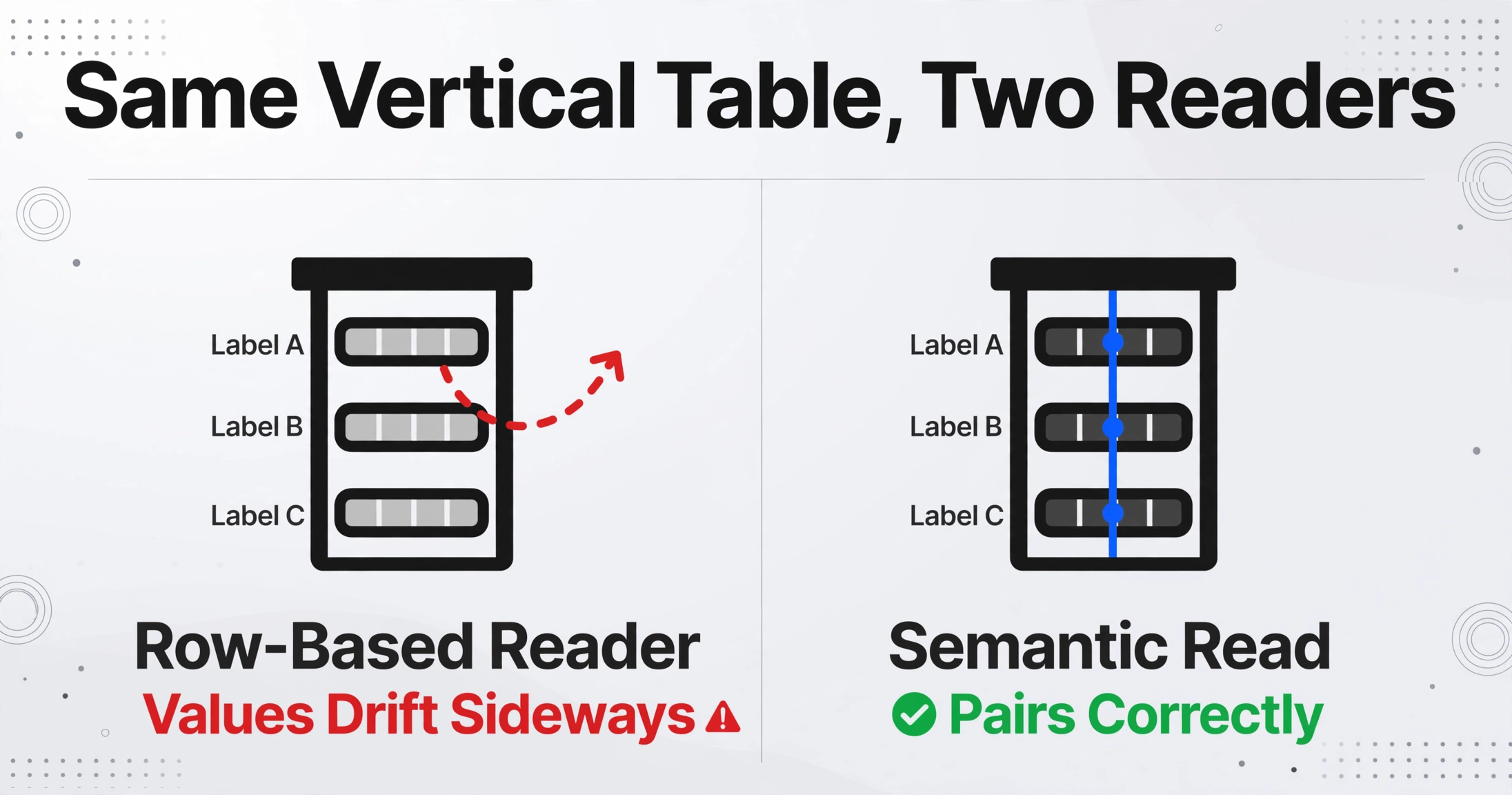
A vertical table has no row per machine, so a row-based extractor invents rows that do not exist. The layout the r/pdf poster described, a header printed above its values with several such strips side by side, is exactly the structure that defeats table reconstruction. A person reads the column of serial numbers under the Serial No. header and the column of model strings under Model. A tool that assumes a left-to-right grid instead pairs every model with whichever serial happens to follow it in reading order, so values drift sideways across the page.
People who build this software for a living say the same thing in their own forums. A developer working on table extraction summarized the landscape in r/MachineLearning: "table transformer, paddleOCR, google doc AI, GOT OCR, GraphOCR, and many are good with simple table structure but fails to detect and extract tables with complex structure." Another practitioner in the same thread was blunter: "It's also my experience that all of the publicly released models fail completely on complex real world tables" (r/MachineLearning). The reason the failure is structural and not an OCR accuracy problem is stated cleanly in a thread on table extraction: "OCR is good at characters, but tables are about relationships (row/col/header meaning). Most failures are structural, not 'bad OCR'" (r/founderledsales).
One page can carry one machine or a hundred. The r/pdf poster noted 1 to 100 make/model/serial sets per page, which means the extractor cannot assume "one page, one asset." Every value set has to be located against its own label, which is where the failure becomes expensive: a register row built from two columns that drifted apart has a model from one machine and a serial from another, and nothing about the row looks wrong until a lookup fails.
Scans Add a Second Error Source: The Characters Themselves

A scan adds a second error source on top of the layout problem: the characters can be read wrong. Serial numbers invite it because they are short, alphanumeric, and deliberately look-alike heavy. The letter O and the digit 0, the lowercase l and the digit 1, the letters Z and 2, and B and 8 are the classic pairs, and applied research has documented the scale: in the Bell Laboratories work still cited in the medical literature, the pairs l/1, O/0, Z/2, and 1/7 accounted for more than half of all symbol misidentification errors (PMC5614409). A single substituted character in a serial number makes it a different string, and a different string is a different asset to every downstream system.
The identifier that ties a machine to its history depends on that string staying intact. The GS1 General Specifications define the Global Individual Asset Identifier (GIAI) as the digital key that links an asset to its owner, location, value, and lifecycle records, and they are explicit that the manufacturer serial number sits at the center of that identifier, that it must not change during the life of the asset, and that formatting variations such as hyphens, leading zeros, and case can break a lookup (GS1 General Specifications). Industry observation puts the practical cost in the same place: MRO data specialists report that a majority of industrial ERP and CMMS equipment records are incomplete, with technical detail "trapped inside PDF documents" that were never extracted into the system in the first place (Sharecat Data Services).
The typing stage is the part that concentrates error. A 2023 systematic review of data processing methods in clinical research measured exactly the task at hand here, reading a value from a source document and entering it into a database, and pooled the error rate of manual abstraction from source records at 6.57 percent, against 0.29 percent for single direct keying with the source in front of the operator (Garza et al., 2023). Reading and re-typing from a document is measurably the highest-error path, which is why a register's accuracy is decided before the first formula runs, by what the person at the desk copied.
No Supplier Shares a Format, and Nobody Controls It
Every supplier prints the same three fields in a different layout, and the party receiving the documents does not get a vote. The nameplate guidance community has documented why: UL 9691, the recommended practice for nameplates on electrical equipment, states plainly that nameplate information can vary widely even between products certified to the same standard, and that "this variability causes difficulties in the field, as every manufacturer provides essential information in a different format based on their interpretation and application of the requirements" (UL 9691-2021).
The fields themselves are standardized even though the layouts are not. NFPA 79, the electrical standard for industrial machinery, requires a nameplate bearing the supplier name and the model and serial number on control equipment, among other markings (NFPA 79), and the OPC UA machinery identification model treats Serial Number as a mandatory property of every machine identity, unique within the context of its manufacturer and model (OPC UA 40001-1). The content is regulated. The visual arrangement is not, which is exactly why template-based OCR keeps breaking: a template is a map of where a field sits on one format, and drift between vendors, even between revisions from one vendor, invalidates the map.
Asset management standards put the burden on the register rather than the document. ISO 55013:2024, the guidance for managing data in an asset management context, requires organizations to specify quality requirements for asset data, including accuracy, completeness, consistency, and timeliness, and to understand data quality before using it for decisions (ISO 55013:2024). In practice that clause means the register has a documented accuracy requirement, and the manual entry path has to be measured against it. The generic mechanics of converting scanned documents are covered in extracting scanned PDFs into a spreadsheet and the table extraction approach that works for simpler layouts.
The Fix: Say What You Want, Not Where It Sits
The solution is to extract by meaning instead of by position. Custom Column Extraction works the other way around from templates: you type the column names you want, Make, Model, and Serial Number, and the AI locates each value in the document by understanding what the field means, rather than by matching a fixed zone or template. The column names you enter become the exact headers of the output table. Because the search is semantic, the layout stops mattering: the Serial No. header above its values is read as the label it is, and the values beneath it land in the Serial Number column whether the page is one vertical strip or three, whether the text is above, below, or beside the label.
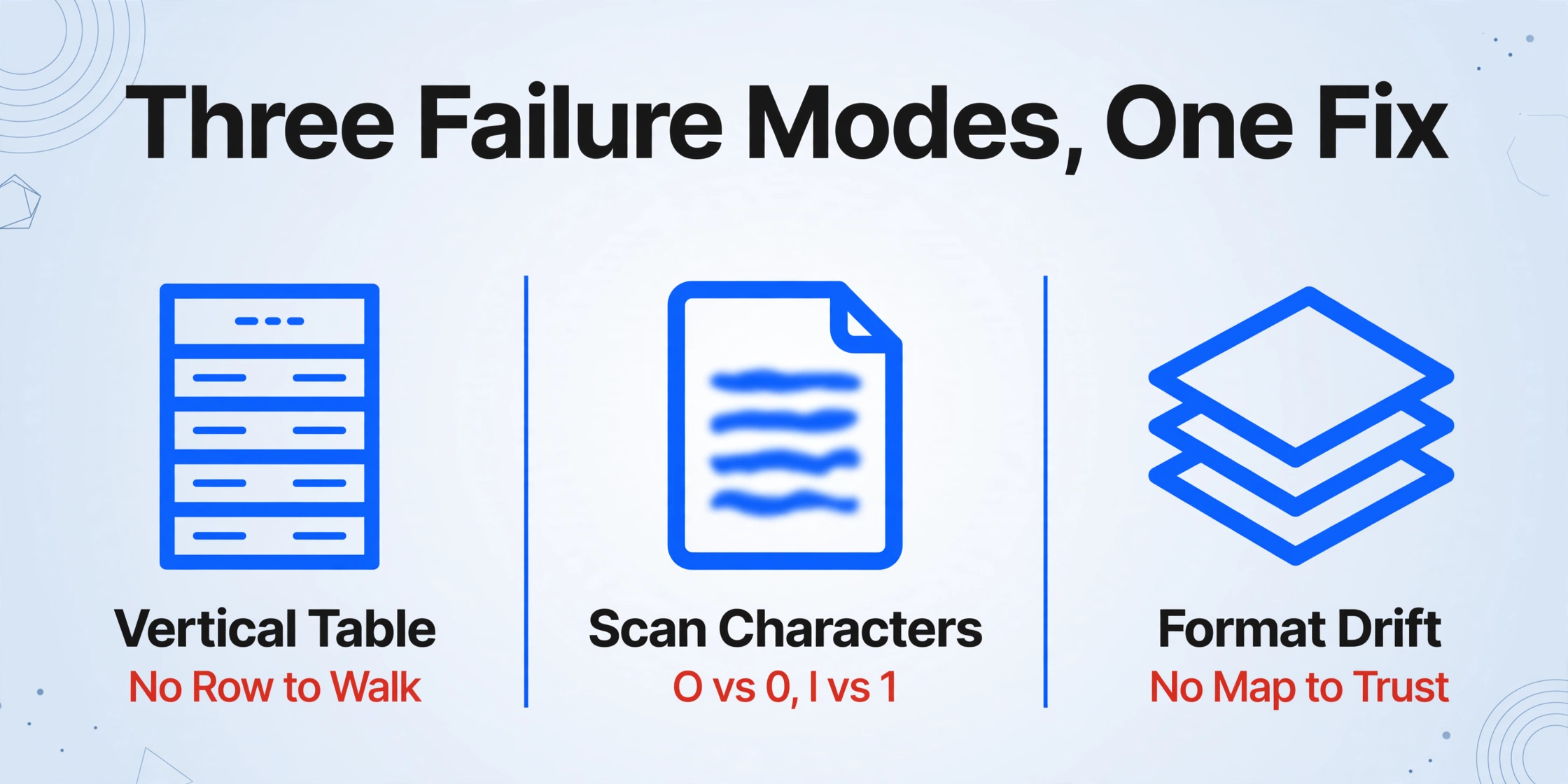
That one mechanism answers each of the three failure modes from the previous sections. The vertical table loses its threat because no row structure needs to be reconstructed: the AI anchors on the meaning of the label. The scanned and digital mix loses its threat because both pass through the same semantic read, with no separate OCR pipeline per source. And format drift loses its threat because there is no map to invalidate: a new supplier layout is just another page. The seed complaint that started this thread asked exactly this question, whether a tool could handle "the make model and serial number listed with the headers above the data." That is the layout this approach reads natively.
The rest of the workflow follows the register the team already keeps. Upload the whole folder as one batch, and batch processing merges every file into one table, one row per document, with the same three headers throughout. Model Tier lets the account run a stronger vision model for the batches where legibility is poor, low-contrast scans, dusty or laminated nameplates, and documents where extra precision pays for itself. And because a serial number with one wrong character is worse than a blank one, Review Mode shows where each extracted value came from: hovering any cell highlights the exact region of the original image it was read from, so the 0-versus-O calls become a glance at the source instead of a guess.
Step by Step: From a Folder of PDFs to Register Rows
The workflow has four steps, and none of them involves drawing boxes or building a parser per supplier. Here is the pass to run on the next mixed batch that lands on the desk.
Name the columns the register needs
Type the field names as you want them to appear, Make, Model, Serial Number, and add tag or location columns if the register carries them. These names become the headers of the output, so they should match the register sheet exactly, no translation step afterward.
Upload the whole folder as one batch
Scanned pages, digital PDFs, and nameplate photos go into the same batch. No preprocessing, no sorting by source type, no minimum quality pass. Batch processing fuses everything into one merged table so the register is rebuilt in one run rather than one file at a time.
Verify the values you would bet on
Turn on auto-annotate so every processed file comes back with its source regions marked. Hover the cells that matter, the serial numbers most of all, and confirm each value against the highlighted spot on the original. The step that used to mean re-reading every row now means checking the flagged ones.
Export into the register or the CMMS import
The result exports as XLSX, CSV, or JSON, ready to drop into the register workbook or prepared for the import template that Maximo, UpKeep, Fiix, or the spreadsheet the team already keeps expects. For a team working in Google Sheets, the add-on extracts directly into the active sheet.
The efficiency baseline makes the arithmetic obvious: the product spec on this workflow is 5 to 10 seconds per page versus about 3 minutes of manual entry, with accuracy up to 99 percent on printed table data. The caveat that keeps it honest is that register data feeds maintenance, warranty, and audit decisions, which is why the verification step is not optional. For the batch-OCR path people usually try first, the boundary is worth stating: batch OCR makes files searchable but does not produce rows, which is the difference that matters here.
Files are processed securely and not stored.
What This Workflow Still Cannot Do
A few boundaries deserve to be named, because the point of extraction here is a register a team actually trusts.
A scan that a person cannot read is not recoverable. Blurred, low-contrast, or torn pages produce unreliable reads no matter the model tier, and the right move is requesting a resean or a photo of the physical nameplate rather than cleaning up illegible output.
Some ambiguous characters stay genuinely ambiguous. The 0-versus-O and l-versus-1 decisions often resolve from context, the field, the spacing, the format checksum, or the surrounding characters, and Review Mode exists precisely so the residual cases are checked against the image rather than guessed. A small share of rows still wants a human glance, which is the honest ceiling of any character-reading approach.
It fills the register from the documents; it does not validate the documents. If a vendor printed a wrong serial or a data entry error exists upstream in the source file, the extracted row reproduces it faithfully. For decisions like warranty entitlement where the source document is the record of truth, verification against the physical plate or a second record remains the control.
The register is the deliverable, and a CMMS is a bigger decision. Extraction feeds either one, but it does not make a team choose a CMMS, and it does not replace the plate-to-plate verification work that a physical asset inventory involves. For field and industrial teams weighing the wider landscape, the field and industrial extraction tool landscape covers where each approach fits, and the manufacturing side of the same decision is separated in document extraction for manufacturing procurement.
FAQ
What exactly is a vertical table, and does it really break extraction?
It is a layout where the field label sits above its values rather than beside them, often as several narrow strips side by side. Yes, it breaks row-based table readers, because a row-based reader rebuilds the page as a grid and pairs whatever happens to be adjacent in reading order, so models and serials drift across the page. Semantic extraction reads the label as a heading and takes the values beneath it, so the layout stops mattering.
Our files are a mix of scanned and digital PDFs. Do we need two setups?
No. Both go into the same batch and are read by the same semantic pass, so a scanned page and a digital export end up as rows in the same table with the same headers. The mix is the normal case, not an edge case.
How do I tell a misread serial (0 vs O, 1 vs l) from a correct one?
By looking at the source. Review Mode highlights the exact region of the original document each value came from, and both directions work, hover the cell for the image location, click a region to jump to the cell. Turn on auto-annotate after processing so the check is available for every row without running anything extra. For harder scans, a higher Model Tier gives the underlying vision model more leeway on complex or low-contrast pages.
We already run Maximo or UpKeep. Is this a replacement?
No, and it does not need to be. The register data has to get in somehow, and extraction replaces the typing at the intake step, producing the import-ready rows a CMMS expects. For teams not on a CMMS yet, the same pass keeps the spreadsheet workflow alive without the hand entry.
We have hundreds of back pages. Is a batch that size realistic?
Yes. Batch processing is built for exactly this, upload everything at once and review the merged output, which turns a typing project into a verification task against the same column definitions. The office-side time moves from keystrokes to spot checks, with the Review Mode highlight as the audit trail.
What columns should the register carry beyond make, model, and serial?
The standard minimum from CMMS import practice is tag or asset ID, location, and install date alongside the OEM trio. Any of those can be added as extracted columns where the documents carry them, and the columns that are not in the document simply stay blank rather than breaking the pass.
A serial number is not a note, it is a key. The register holds keys for every machine your documents describe, and the difference between a register that works and one nobody trusts is whether those keys arrived intact.
The next batch that lands in your mailbox has every serial number your register is missing. Name the three columns once, run the folder through, and check the values against the original pages, and the register stops depending on the person at the desk typing the same document twice.