How to Extract Sparkasse Kontoauszug
to Excel
Sparkasse holds roughly half of Germany's retail banking market — and every single one of those accounts generates a Kontoauszug in the same standardized PDF format. If you handle Buchhaltung for a German business or manage your own finances as a Freiberufler, extracting Sparkasse Kontoauszug data into Excel isn't optional: it's the prerequisite for every downstream task from Umsatzsteuer-Voranmeldung to Jahresabschluss. The question is whether you type each transaction by hand from the PDF, download a CSV from online banking that only covers 90 days, or use AI extraction to pull the full statement — every row, every Verwendungszweck, every Soll/Haben indicator — into a structured spreadsheet in under a minute.
Key Takeaways
- Sparkasse's free CSV export caps at 90 days — so every Jahresabschluss you're manually stitching quarterly downloads before you even touch the numbers.
- A single OCR-skipped transaction looks like a minor glitch — until 12 months of missed rows turn into a formal compliance question from the Finanzamt.
- Semantic AI reads the full Kontoauszug — every page, every Verwendungszweck line, every running balance — in one pass, with built-in balance validation and no per-bank template needed.
Understanding the Sparkasse Kontoauszug Format
A Sparkasse Kontoauszug (bank statement) follows a standardized layout across all ~385 Sparkassen — but the layout is distinct from any other German bank's format. Understanding where each data field lives is the foundation of accurate extraction. If you are new to the document itself, start with our guide to what a Kontoauszug is and how German bank statements work.
Sparkasse is not a single bank. The Sparkassen-Finanzgruppe comprises roughly 385 independent institutions — Stadtsparkassen, Kreissparkassen, Landesbanken — each legally separate. What unifies them is a common technical standard for their Kontoauszug PDFs, often called the "Sparkassen-Format." Whether your statement comes from Sparkasse KölnBonn, Haspa Hamburg, or Kreissparkasse Biberach, the PDF layout, field positions, and terminology are consistent.
A typical Sparkasse Kontoauszug contains three structural layers. The header block at the top carries the account holder's name and address, the IBAN and BIC of the account, the old-style Kontonummer (account number) and BLZ (Bankleitzahl, the routing code), the statement number, and the period covered. Below it, the transaction table lists every Umsatz (transaction) with five key columns: Buchungsdatum (booking date), Vorgang/Text (process type and description), the Umsatz amount with a Soll/Haben (debit/credit) indicator, and the running Kontostand (balance). At the bottom, the footer section shows the Alter Saldo (opening balance), the sum of credits and debits for the period, and the Neuer Saldo (closing balance).
The critical extraction challenge sits in the transaction description column. Each transaction carries a Verwendungszweck (purpose of payment) field that can extend across multiple lines — sometimes up to 14 lines in the electronic format. This field contains the SEPA reference codes that identify the counterparty: SVWZ+ (the actual purpose text), EREF+ (end-to-end reference), MREF+ (mandate reference for SEPA-Lastschrift), and CRED+ (creditor identifier). A single Amazon purchase might show as "SVWZ+AMAZON MARKETPLACE" followed by the order number, while a SEPA-Lastschrift from a utility company will carry the mandate reference and the invoice number across four or five lines.
The transaction type itself is encoded in the Buchungstext column. The most common codes include SEPA-Lastschrift (direct debit — money pulled by a third party), SEPA-Überweisung (credit transfer — an outgoing payment you initiated), Dauerauftrag (standing order — recurring fixed-amount transfer), Gutschrift (credit received), Entgelt (account fee), Zinsgutschrift (interest credit), and Abschluss (quarterly closing entry). For an extraction tool to produce a usable spreadsheet, it must not only read these codes but preserve them as structured fields — not bury them inside free-text description cells.
Understanding this format matters because generic PDF-to-Excel converters treat every line of text equally. They do not recognise that "SVWZ+" introduces a purpose-of-payment field, that "Soll" and "Haben" determine the sign of the amount, or that the Verwendungszweck across lines 3 through 6 all belong to the same transaction. The result is a spreadsheet where multi-line descriptions drift into separate rows, debits and credits need manual reclassification, and the running balance column becomes unverifiable.
Method 1: CSV Export from Sparkasse Online Banking
Every Sparkasse online banking account offers a native CSV export. It is free, immediate, and machine-readable — but it comes with constraints that make it insufficient for many bookkeeping workflows.

To download your transactions as structured data, log in to your Sparkasse online banking portal, select the account, choose a date range, and click "Exportieren & Drucken" (Export & Print). In the export dialog, select "Excel (CSV-CAMT V2)" as the format — this produces a CSV file in the CAMT.053 bank-to-customer statement format, compliant with SEPA requirements. The resulting file contains every transaction in the selected period with fields including Buchungstag, Valutadatum, Buchungstext, Verwendungszweck, Empfänger/Zahlungspflichtiger, IBAN, and Betrag.
This approach works well under specific conditions. It is ideal for ongoing monthly exports covering the most recent 90 days, and the CAMT.053 format is directly importable into German accounting software like DATEV, Lexware, and sevDesk — provided your Steuerberater or your software expects that schema.
The limitations are threefold. First, the Sparkasse online banking CSV export typically caps the retrievable history at 90 days. For annual book closing (Jahresabschluss), tax audits (Betriebsprüfung), or historical reconciliations, you cannot download a full 12-month statement as CSV — you must export quarter by quarter and stitch them together. Second, the CSV export does not include the opening and closing balance lines that appear on the PDF Kontoauszug. You get transaction rows without the balance context that a Buchhalter needs to verify the ledger closes. Third, the CSV-CAMT format uses SEPA-level coding that is less human-readable than the PDF version — the Verwendungszweck is split across multiple SEPA fields rather than presented as a continuous text block, which can make manual review harder.
Method 2: AI-Based Extraction from PDF Kontoauszug
When the CSV export falls short — beyond 90 days, or when you need the complete statement with balance validation — AI-driven PDF extraction fills the gap by reading the Kontoauszug the way a human does: visually, semantically, and in full context.
The second approach starts with the same raw material — the PDF Kontoauszug you download from your Sparkasse online banking's electronic mailbox (Elektronisches Postfach). Most Sparkassen provide statements as digitally-signed PDF/A files, which can be either text-based (selectable text, generated by the banking system) or scanned images (older paper statements digitised as image PDFs). The extraction method must handle both.
This is where the difference between semantic AI extraction and traditional OCR becomes decisive. A regular OCR engine reads characters at pixel coordinates — it does not understand that "Soll" and "Haben" are accounting indicators that determine the sign of each transaction amount, or that the Verwendungszweck spanning four lines belongs to a single transaction row. Bank statement extraction based on vision AI, by contrast, reads the document as a complete visual scene: it identifies the transaction table structure, groups multi-line descriptions into single rows, distinguishes page headers from transaction data, and recognises structural elements like the opening balance, closing balance, and page-level subtotals.
The practical workflow is straightforward. You upload the Sparkasse Kontoauszug PDF — any number of pages, digital or scanned, from any Sparkasse institution — and define the columns you want: "Buchungsdatum," "Verwendungszweck," "Soll (Debit)," "Haben (Credit)," "Kontostand (Balance)." The AI reads every page, extracts each transaction into the defined columns, and produces a single spreadsheet. Because the AI understands the semantic structure, a multi-line Verwendungszweck stays in one cell, the Soll/Haben indicators are correctly mapped to debit and credit columns, and the opening and closing balances are captured for arithmetic verification.
The result is a spreadsheet where every row corresponds to one transaction, every column contains the correct data type, and the running balance can be validated against the statement's own Neuer Saldo — giving you the same verification that a Buchhalter would perform manually, but in seconds instead of hours.
Files are processed securely and not stored. Try it with a sample Kontoauszug PDF.
Which Columns to Define for a Sparkasse Statement
The advantage of Custom Column Extraction — ImageToTable.ai's core mechanism — is that you define the output structure, not the document. For a Sparkasse Kontoauszug, the right column definitions make the difference between a spreadsheet that needs hours of cleanup and one that is ready for Buchhaltung.
Custom Column Extraction works by asking you what data you want, not by scanning for predefined fields. You type the column names — in any language, in any order — and the AI locates the matching values on the document by understanding what each field means, not where it sits on the page. This is a fundamentally different paradigm from template-based tools (Docparser, Parseur) that require you to draw bounding boxes around each field, or from training-based platforms (Nanonets, Rossum) that need labeled samples before they can extract.
For a Sparkasse Kontoauszug, the recommended column set is:
| Column Name | Sparkasse Source Field | Example Value |
|---|---|---|
| Buchungsdatum | Transaction date in DD.MM.YYYY | 15.03.2026 |
| Valutadatum | Value date | 16.03.2026 |
| Buchungstext | Transaction type code | SEPA-Lastschrift |
| Verwendungszweck | Purpose of payment (incl. SEPA codes) | SVWZ+AMAZON MARKETPLACE EREF+2026031500123456 |
| Auftraggeber / Empfänger | Counterparty name | Amazon EU S.à r.l. |
| IBAN | Counterparty IBAN | DEXX 1002 0500 0001 2345 67 |
| Soll (Debit) | Outgoing amount | 49.99 |
| Haben (Credit) | Incoming amount | 2500.00 |
| Kontostand | Running balance after transaction | 3241.56 |
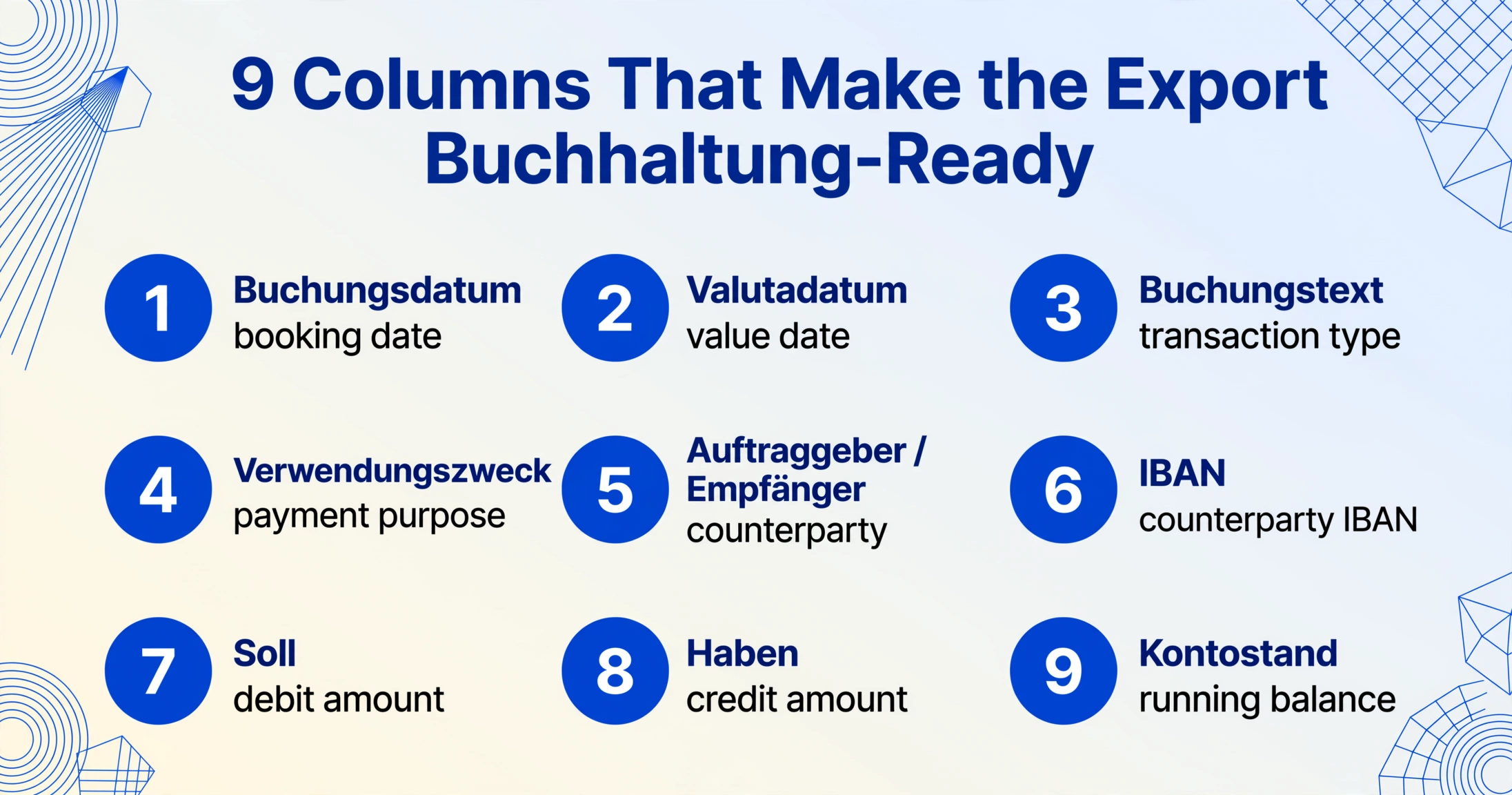
The Verwendungszweck column is where most generic extraction tools fail. On a Sparkasse statement, a single transaction's purpose text often spans four to six lines — the SEPA Verwendungszweck (SVWZ+), the End-to-End reference (EREF+), the Mandate reference (MREF+), and the Creditor ID (CRED+). A position-based OCR tool that extracts line by line will split these across multiple rows, breaking the one-row-per-transaction structure. Semantic extraction — AI that understands this text block as a multi-line field belonging to one transaction — groups it into a single cell, preserving the complete purpose text exactly as it appears on the statement.
You can also add computed columns to automate validation. A column like Balance Check (Kontostand - previous row's Kontostand + Soll - Haben = 0) tells the AI to verify the arithmetic automatically — extracting the data and confirming the ledger closes in one pass.
Preparing Data for DATEV, Lexware, and German Accounting Software
Getting the transactions into Excel is half the work. Getting them into your DATEV workflow or Lexware Bookkeeping in a format your Steuerberater can use is the other half — and it requires understanding how German accounting software expects the data.
The most widely used accounting platforms in Germany — DATEV Unternehmen Online, Lexware buchhalter, sevDesk, and FastBill — all accept structured transaction imports, but each expects a specific column layout and encoding. A raw CSV from a generic PDF converter will typically require manual re-mapping before it can be imported.
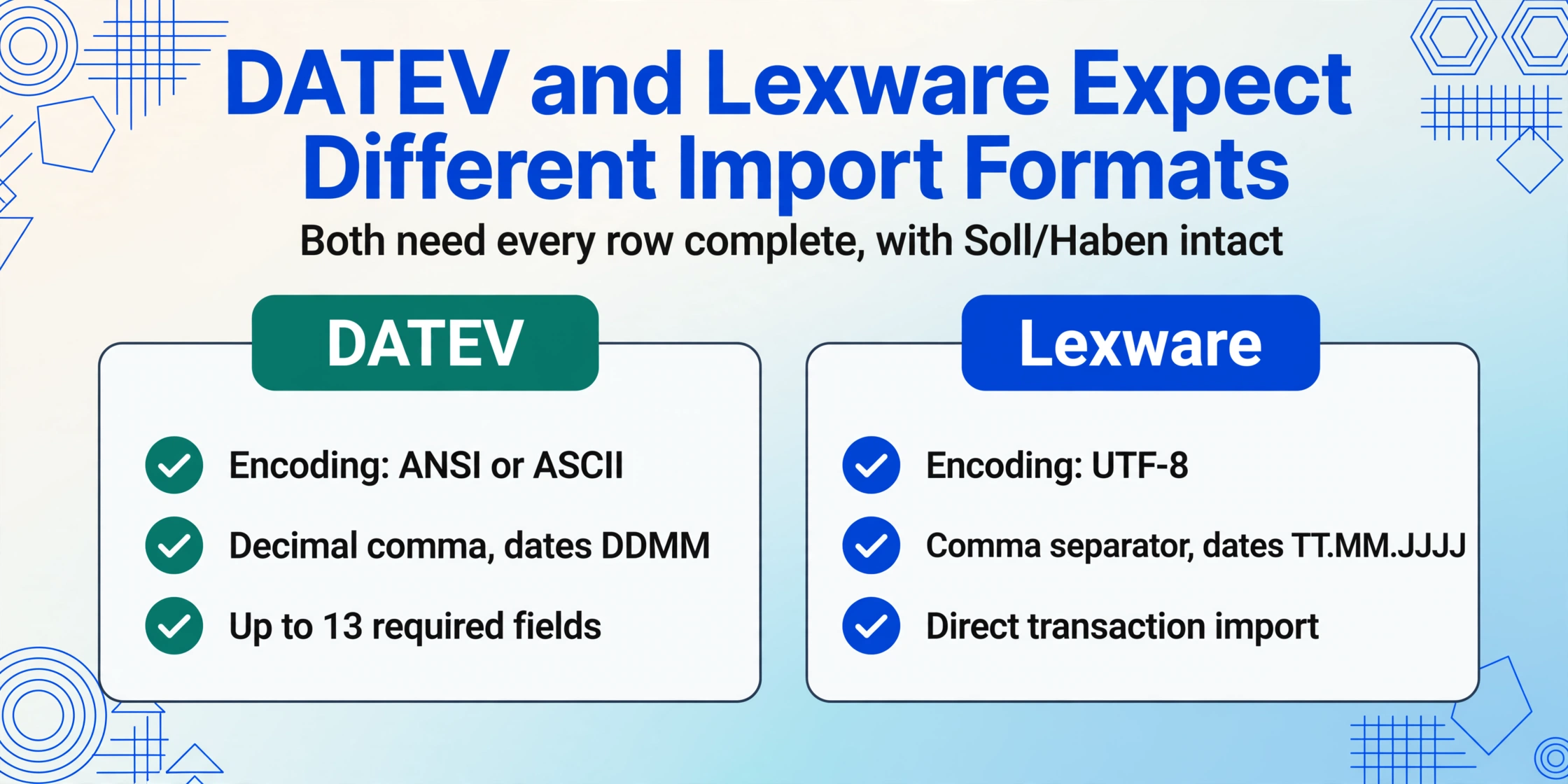
DATEV, the market leader used by the majority of German Steuerberaterkanzleien (tax advisor firms), expects a particular import format with up to 13 required fields including Buchungsdatum, Belegdatum, Buchungstext, Betrag, Soll/Haben-Kennzeichen, Gegenkonto, and Steuerschlüssel. The encoding must be ANSI or ASCII, the decimal separator is a comma, and the date format is DDMM without separators. Lexware, by contrast, accepts UTF-8 with comma separators and the date format TT.MM.JJJJ.
When you extract a Sparkasse Kontoauszug into Excel with semantic AI, you can structure the output to match your downstream target from the start. Define your column names to match the field order your Steuerberater's DATEV import profile expects — or export to a neutral format and re-map once. The key advantage is that every transaction row is complete — no split Verwendungszweck, no missing Soll/Haben indicators, no orphan balance values — which means the import into any of these systems succeeds on the first pass rather than requiring manual correction for each batch.
For businesses using sevDesk or BuchhaltungsButler, the transition is even simpler. These platforms accept CSV files with bank transaction fields — date, description, amount, counterparty — and handle the chart-of-accounts mapping automatically. The extracted Excel file from an AI tool can be formatted to match these platforms' import templates, reducing the entire monthly close workflow to: download PDF, extract, import, review.
GoBD Compliance: Why Extraction Accuracy Matters for Your Tax Audit
German tax law does not merely require that you have your Kontoauszug data — it requires that the data be maintained in a format that complies with the GoBD (Grundsätze zur ordnungsmäßigen Führung und Aufbewahrung von Büchern, Aufzeichnungen und Unterlagen in elektronischer Form). This regulatory framework makes extraction accuracy a compliance issue, not just a convenience issue.
The GoBD, established by the Bundesministerium der Finanzen (BMF), codifies principles that every bookkeeping-relevant document must satisfy: Nachvollziehbarkeit und Nachprüfbarkeit (traceability and verifiability), Vollständigkeit (completeness), Richtigkeit und Ordnung (correctness and order), zeitgerechte Buchung (timely booking), and Unveränderbarkeit (immutability). These principles are anchored in §146 and §147 of the Abgabenordnung (AO) and §§238-263 of the Handelsgesetzbuch (HGB).
For a business that processes Sparkasse Kontoauszüge as part of its Buchhaltung, GoBD compliance translates into specific requirements. The extracted transaction data must be vollständig (complete) — every transaction on the Kontoauszug must appear in the extraction output, with no omitted rows. It must be richtig (correct) — the amounts, dates, and counterparty information must match the original PDF exactly. And it must be nachprüfbar (verifiable) — meaning you must be able to trace any extracted value back to its source in the original Kontoauszug.
This is where extraction accuracy intersects with compliance risk. A generic OCR tool that drops one transaction row per month may seem trivial in isolation, but over a 12-month audit period, twelve missing rows can raise questions about the completeness of your bookkeeping. If the Finanzamt identifies gaps during a Betriebsprüfung (tax audit), the consequences can include Hinzuschätzung (addition of estimated income) or, in cases of substantial deficiencies, Vollschätzung (full estimation of tax bases) under §162 AO — potentially resulting in significant Nachzahlungen (back taxes) plus interest.
An AI extraction tool that preserves every row, validates the balance arithmetic, and maintains an auditable link between the extracted cell and its source document position reduces this compliance risk substantially. The output is not just a convenient spreadsheet — it is a complete, verifiable transaction ledger that satisfies the GoBD requirement for machine-readable, auditable bookkeeping records.
The GoBD also require that electronic documents be stored in a revisionssicheren (tamper-proof) archive for the legally mandated retention period — typically 6 years for business correspondence and 10 years for accounting documents under §147 AO. The extracted Excel file should be archived alongside the original PDF Kontoauszug, and both should be stored in a format that ensures Unveränderbarkeit — typically as PDF/A for the original and a write-once format for the extracted data.
Frequently Asked Questions
Should I use Sparkasse CSV export or AI PDF extraction?
The CSV export from Sparkasse online banking (CSV-CAMT V2) works well for regular monthly exports covering the most recent 90 days, especially if your accounting software accepts CAMT.053 natively. AI PDF extraction is the better choice when you need full historical statements beyond 90 days, when you need balance validation, when the Sparkasse CSV export doesn't include all the fields you need, or when you receive scanned Kontoauszug PDFs that don't have machine-readable text. Many businesses use both: CSV for routine monthly exports and AI extraction for annual closing, tax audits, and historical reconciliations.
Does the extraction work for all Sparkasse institutions?
Yes — the Sparkassen-Format is standardised across all ~385 Sparkassen institutions. Whether your account is at Sparkasse KölnBonn, Haspa, Kreissparkasse Biberach, or Berliner Sparkasse, the Kontoauszug layout, field terminology (Soll/Haben, Verwendungszweck, Alter/Neuer Saldo), and data structure are consistent. No per-institution configuration is needed. Austrian Sparkasse accounts (Erste Bank / Sparkasse group) use a different format and are not covered by this workflow — they use the George platform with a distinct statement structure.
How does extraction handle Soll (debit) and Haben (credit) indicators?
Semantic AI extraction reads the Soll/Haben column on the Sparkasse statement and maps it to the correct output column. If you define separate "Soll (Debit)" and "Haben (Credit)" columns, the AI places each transaction's amount into the appropriate column based on the Soll/Haben indicator — debits go into Soll, credits into Haben. If you define a single "Betrag" column, the AI can prefix or sign the amount (e.g., -49.99 for Soll) based on the indicator. This is a critical differentiation from generic OCR, which reads "Soll 49,99" as a text string without understanding the accounting sign.
Can extraction handle multi-line Verwendungszweck fields?
Yes — and this is where semantic extraction diverges most sharply from OCR. A Sparkasse Kontoauszug routinely shows four to six lines of Verwendungszweck per transaction (SVWZ+, EREF+, MREF+, CRED+, etc.). A line-based OCR engine treats each line as a separate text row, fragmenting one transaction across multiple spreadsheet rows. Semantic AI reads the document visually — it sees that lines 3 through 6 sit in the description column of a single transaction row and groups them into one cell. The complete Verwendungszweck is preserved as a single field, making it searchable and usable in Excel without reconstruction.
How do I download the Sparkasse Kontoauszug PDF for extraction?
Log in to your Sparkasse online banking portal and navigate to your Elektronisches Postfach (electronic mailbox). Sparkassen automatically deliver Kontoauszüge to this mailbox at your chosen frequency — typically monthly or quarterly. Open the statement and use the download option to save the PDF. The files are delivered in PDF/A format with a qualified electronic signature (qualifizierte elektronische Signatur) that the Finanzamt recognises as equivalent to a paper statement. If you still receive paper Kontoauszüge at a Kontoauszugsdrucker (statement printer), you can switch to electronic delivery by activating the Elektronisches Postfach in your online banking settings.
Is the extracted Excel file GoBD-compliant?
The extracted Excel file is a structured transaction record that can be part of a GoBD-compliant bookkeeping workflow if properly archived. The key requirements are: (1) the extraction must be complete and correct (all transactions present, amounts matching the original), (2) the extracted file must be stored immutably alongside the original PDF Kontoauszug, and (3) you must be able to trace any extracted value back to its source. The original PDF/A Kontoauszug remains the primary audit document — the Excel file is a derived working copy. The GoBD do not prohibit using AI extraction, but the final responsibility for completeness and correctness rests with the Buchhalter or Steuerberater.
A Practical Choice Between CSV and AI Extraction
The Sparkasse Kontoauszug is not a difficult document to extract — once you understand its structure. The Verwendungszweck field is multi-line but well-defined. The Soll/Haben column is unambiguous. The Alter Saldo and Neuer Saldo provide built-in validation points. The barrier is not the document itself — it is the tools that treat it like any other printed table.
The practical path depends on your volume and need. If you handle a single personal account and need the last three months for a quick review, the native CSV-CAMT V2 export from Sparkasse online banking is sufficient and free. If you manage a business account, need full-year data for Jahresabschluss, or need to forward structured transactions to your Steuerberater's DATEV workflow, AI-based PDF extraction saves hours of manual correction per cycle — and eliminates the compliance risk of missed rows or misclassified amounts.
The common thread across both methods is that Sparkasse's standardised format makes them predictable. Once you know what a Verwendungszweck looks like and where to find the Neuer Saldo, the extraction — whether from CSV or from PDF — becomes a repeatable process rather than a monthly scramble. For teams handling multiple accounts, see our guide to batch-processing German bank statements for Buchhaltung.