How to Turn Maintenance Logs
Into a Preventive Maintenance Schedule
Every preventive maintenance schedule starts with the same two raw materials: an equipment list and a maintenance log. Most teams already have the second one — usually several years of it, in a binder next to the machine, a spiral notebook in the toolbox, or a folder of phone photos. The schedule they want to build is already inside those records. The only thing standing between a box of paper logs and a working PM schedule is transcription.
Key Takeaways
- Paper maintenance logs hide failure intervals — three bearing replacements on three separate pages look like isolated incidents, but in a spreadsheet they resolve into a repeating 7-month pattern.
- Unplanned downtime costs the Fortune 500 $1.4 trillion a year — driven not by failed equipment but by maintenance intervals invisible inside a paper binder.
- Years of log pages convert to a working PM schedule in an afternoon — and the schedule is built from data your team already collects, with no new habits to enforce.
The Log Already Contains the Schedule
The data a preventive maintenance schedule needs — equipment ID, work date, task performed, condition found, parts replaced — is already sitting in your maintenance logs. The missing step is getting it out of the binder and into a spreadsheet.
Consider what a PM schedule actually requires for each asset: an identity, the work that needs doing, and how often. The maintenance log answers all three. The equipment name and serial number are written at the top of the page. Every service date is a timestamp of the previous cycle. The task description — "greased bearings," "replaced drive belt," "calibrated torque," "oil changed at 1,250 hours" — is exactly the kind of work that should appear on the next work order. The log is not a record of the past. It is an unread schedule of the future.
This is why the spreadsheet template approach fails most teams. Nearly every result at the top of a search for maintenance tracking is a downloadable template — a blank sheet with well-designed columns waiting for data. Templates are not wrong. They are just aimed at the wrong problem: they assume you will start typing entries today and build up history over the coming months. Most facilities do not have months. They have a machine that has been breaking down on a two-month cycle for two years, and the evidence of that cycle is in a logbook that has never been opened as a data source.
On a discussion thread in r/manufacturing titled "How are you guys actually tracking maintenance work? (Excel feels broken)," one shop owner described exactly this situation: "we're supposed to log work in an Excel sheet on a shared computer, but in reality, it's kind of a mess. Half the time, stuff gets fixed and never written down, or someone scribbles notes on paper, and it never makes it into the sheet. When a machine breaks again, they are basically relying on memory to remember what was done last time." The reply from another user cut to the structural problem: "been there with the excel mess tbh. the adoption problem is real - if ppl dont log stuff, no system will fix that." Both statements are true, and together they describe the actual bottleneck: not a lack of systems, but a wall of un-transcribed records.
Why Paper Logs Break Preventive Maintenance
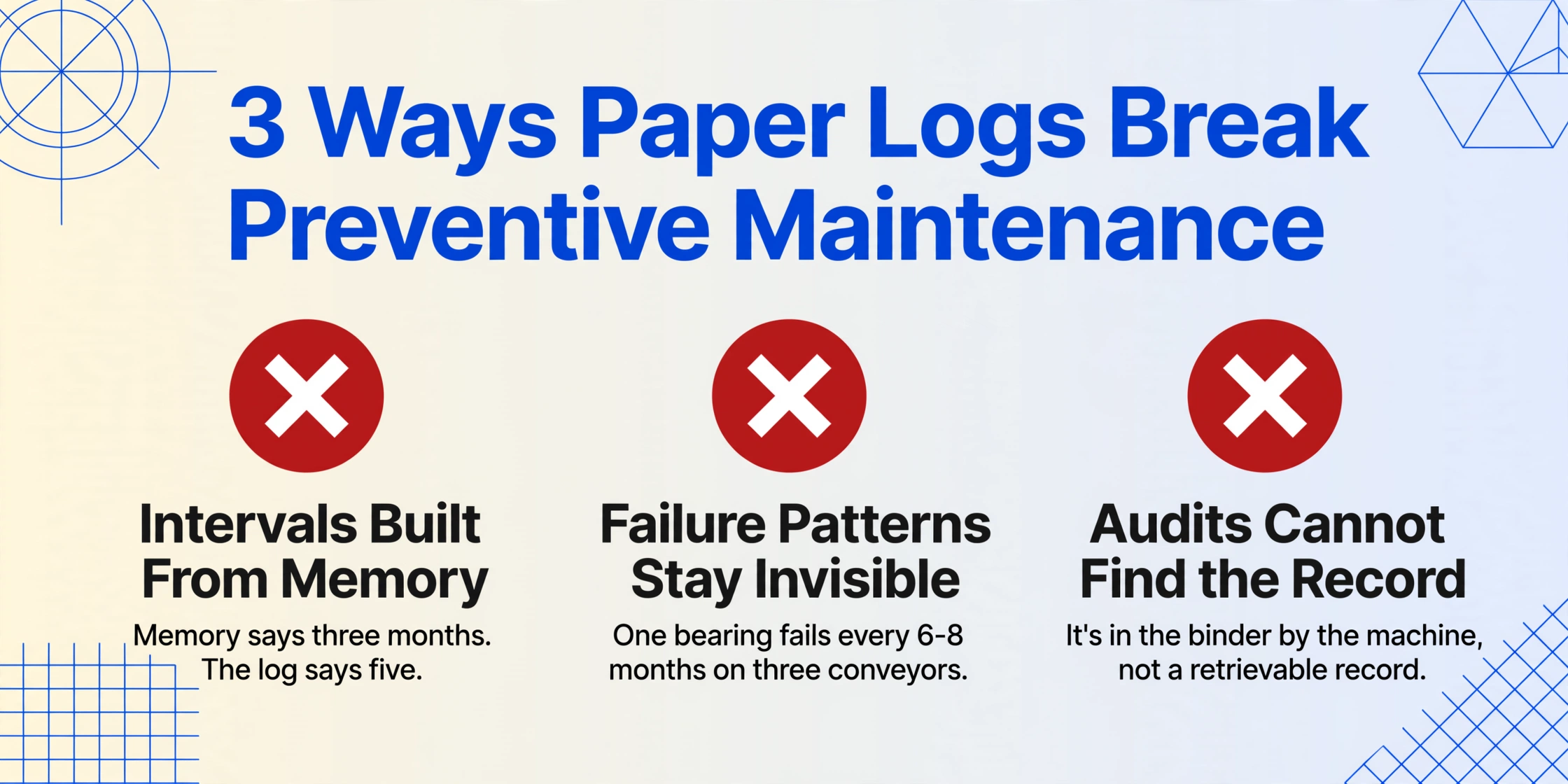
Paper maintenance logs fail PM programs in three specific ways, and all three share the same root cause: the data exists but never becomes information anyone can act on.
The stakes behind these failures are not theoretical. Siemens' True Cost of Downtime 2024 report found that unplanned downtime costs the Fortune Global 500 approximately $1.4 trillion per year — 11% of total revenues, up from 8% in 2019. In the automotive sector, an idle production line now costs up to $2.3 million per hour. The majority of unplanned downtime is not caused by exotic failures. It is caused by maintenance that did not happen on schedule — which is a scheduling problem, which is a data problem.
Two regulatory developments in the US have made this concrete for facilities that were previously able to treat maintenance records as optional. The 2023 edition of NFPA 70B was elevated from a "Recommended Practice" to a mandatory Standard for Electrical Equipment Maintenance — it now requires facilities to establish and document a risk-based Electrical Maintenance Program, with defined maintenance intervals (equipment in better condition can go up to 60 months between inspections; deteriorating equipment drops to 12) and accessible records. And under OSHA 29 CFR 1910.147(c)(6), lockout/tagout energy control procedures must be inspected at least annually, and the inspection must be certified with a record of the equipment, date, employees involved, and the person who performed the inspection. Both requirements assume maintenance records are findable. Paper logs do not satisfy that assumption.
What a Maintenance Log Needs to Become a Schedule
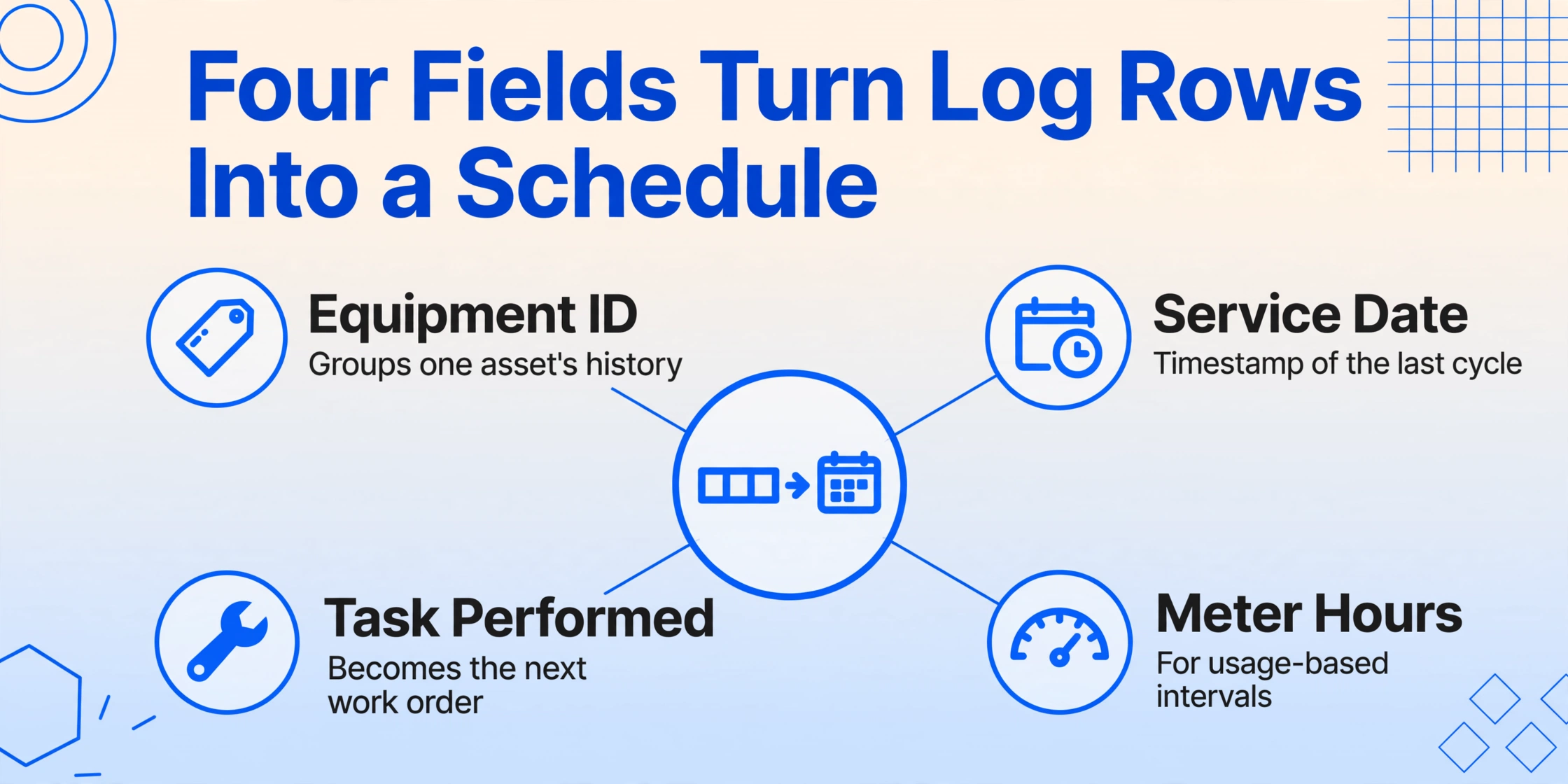
A maintenance log becomes a PM schedule when its rows are structured enough to compute three things: what to work on, when it was last worked on, and when it is due next. That requires a small, fixed set of fields — and most existing logs already contain them, just buried in free-form notes.
The maintenance metrics framework published by the Society for Maintenance and Reliability Professionals (SMRP) — the industry body that defines standardized maintenance KPIs — makes clear why these fields matter. SMRP's work-management pillar measures Planned Maintenance Percentage (PMP), the share of maintenance hours that are planned rather than reactive, with a world-class target above 85%. PM compliance, another SMRP metric, tracks whether scheduled PM work orders are completed on time. Neither metric can be computed without a reliable record of what was done, on which asset, and when. The log is the raw material for every one of these numbers.
When you extract a maintenance log, these are the fields that turn rows into a schedule:
| Field | Why the schedule needs it |
|---|---|
| Equipment ID / Name | The identity that groups all service history for one asset — the key you will sort and filter on. |
| Service Date | The timestamp of the previous cycle. Interval math — "due every 90 days" — is impossible without it. |
| Task / Work Performed | What was done becomes what should be repeated: lubrication, inspection, calibration, part replacement. |
| Meter / Hours at Service | For usage-based intervals (every 250 engine hours, every 500 miles), the reading at service is the baseline. |
| Technician | Assigns accountability and identifies recurring issues associated with specific work. |
| Parts / Materials Used | Feeds inventory planning — the parts replaced most often are the parts to stock. |
| Condition / Findings | Notes like "bearing noise present" are the early-warning system that converts reactive repair into scheduled replacement. |
The good news for anyone facing a pile of existing logs: these fields are almost never missing from the records. They are missing from the structure. A page of a logbook might read: "7/14 – Greased all 3 pump bearings, replaced belt, found play in motor coupling." Every field the schedule needs is in that sentence — date, task, parts, condition. What is missing is the conversion of that sentence into columns.
Step by Step: From Log Page to Spreadsheet Rows
This is the workflow for turning existing maintenance logs into a structured spreadsheet, using an AI extraction approach that handles whatever format your records are in — printed pages, handwritten entries, or phone photos of logbooks. The five steps below take you from a stack of paper to a schedule-ready table.
The extraction itself takes seconds per page — the ImageToTable.ai efficiency baseline is 5–10 seconds per page versus roughly 3 minutes of manual entry, which is where the "18x faster" comparison comes from. Accuracy reaches up to 99% on printed table data; handwriting accuracy depends on legibility, which is exactly why the verification step exists. Try it on a page from your own logbook:
Files are processed securely and not stored.
Turning the Extracted Rows Into a Working Schedule
Once the log entries are rows in a spreadsheet, the schedule builds itself with the same Excel skills you already use — and one shortcut that saves the most tedious part: computing the next due date for every row at extraction time instead of after.
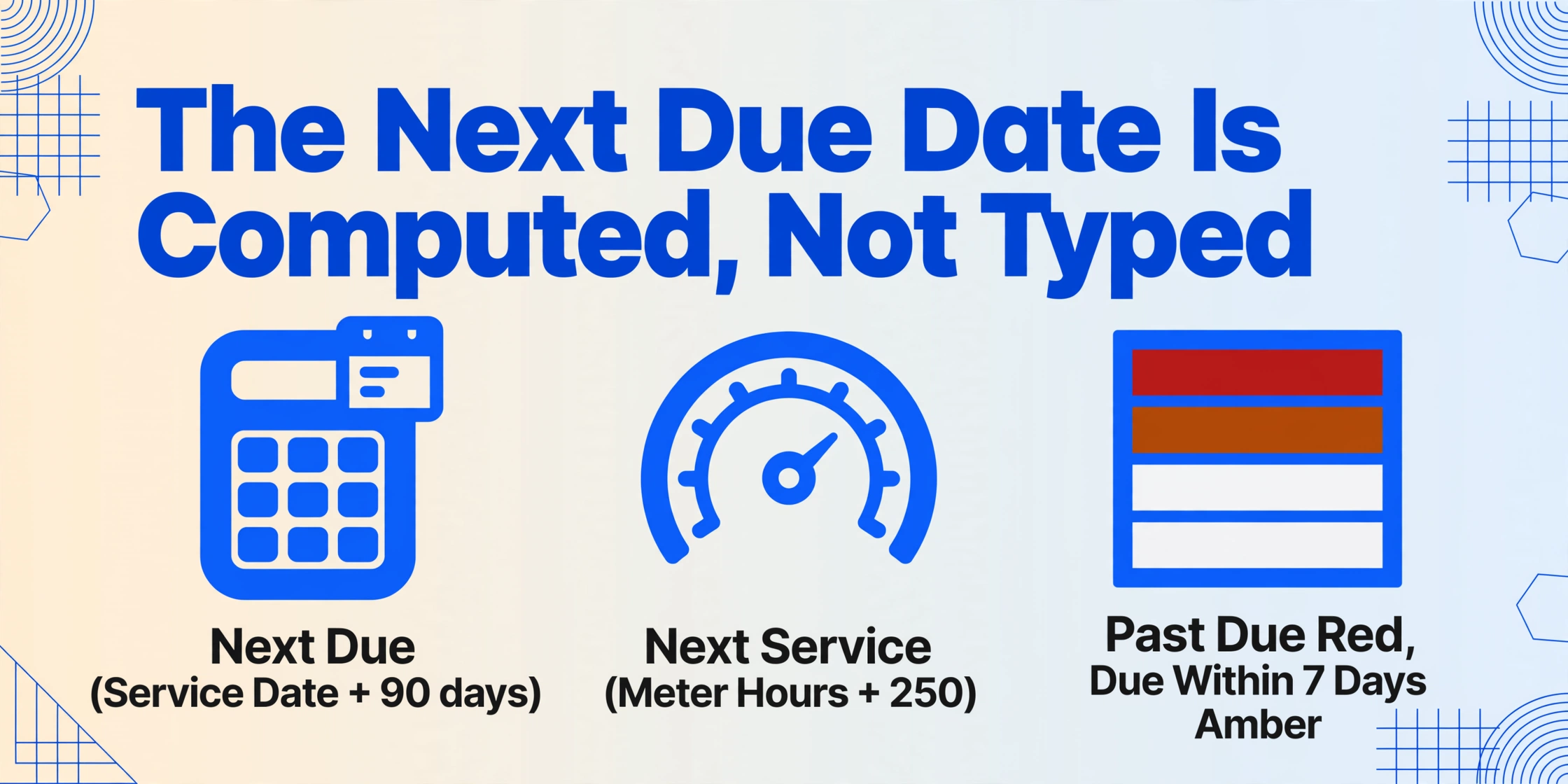
The single most useful column to add is the next-due date. Rather than calculating it row by row after export, define a computed column at extraction: name it "Next Due (Service Date + 90 days)" and the AI computes it while extracting, filling each row with the service date plus the interval. Computed columns are part of the extraction step itself — the tool reads the document, performs the calculation, and outputs the answer, so you receive "next due" dates instead of raw dates plus manual spreadsheet math. For usage-based intervals, the same mechanism works from meter readings: "Next Service (Meter Hours + 250)."
Three spreadsheet moves finish the schedule:
This is the moment the paper log becomes a decision tool. The same rows that documented the past now tell you exactly which asset is due, when, and what the recurring failures suggest should be done about it. The extracted spreadsheet inherits all the history that was already in the logs — it just makes that history computable.
For teams capturing readings and inspections across many sites — where a maintenance technician's route mirrors a meter reader's — the same extraction pipeline handles those records too: field data goes from photo to spreadsheet without a typing step, and any field photo becomes spreadsheet rows with the same column-driven workflow. For inspection checklists and condition forms that accompany maintenance rounds, extraction handles checkboxes and handwritten findings in the same pass as the printed fields.
When a Spreadsheet Stops Being Enough
A spreadsheet is the right tool for maintenance tracking up to a real, knowable scale — and it is worth being honest about where that boundary sits, because every maintenance team eventually hits it.
The Reddit thread on tracking maintenance work produced a classic answer from a veteran in r/PLC: "The term you're looking for is CMMS. Even just a pen & paper logbook that is exchanged between shifts is better than nothing." Another commenter laid out the common growth path: "A spread sheet is fine for a small operation. As the number of machines grows you can switch to a commercial CMMS, like Maximo. If the business continues to grow you might eventually want an ERP system like SAP, which incorporates a maintenance management module." The tools practitioners actually name — IBM Maximo, SAP PM, Fiix (now Rockwell), UpKeep, Limble, eMaint (now Fluke) — all sit at that larger scale. For a single site with a few dozen assets, the spreadsheet remains the workhorse, and extraction feeds it the same way it would feed a CMMS.
Signals that it is time to move up: more than a few hundred active assets, multiple sites that need centralized scheduling, work-order workflows with approval chains, or auditors who want maintenance history exportable on demand. If those apply, the extracted log data is not wasted — it is the first clean dataset a CMMS implementation needs. Every CMMS migration guide in existence starts with the same instruction: get your asset and maintenance history into a structured format before you migrate. The extraction workflow described here is precisely that step — it produces the clean, structured history that makes a CMMS rollout possible instead of a data-entry slog.
There is also a middle path for teams who want to skip the per-entry typing entirely while keeping a spreadsheet workflow: batch extraction of maintenance logs produces the structured history that either feeds your existing tracking sheet or becomes the seed data for a CMMS later. Whatever you choose, the underlying principle is the same — the history you already have is the most valuable dataset in your maintenance operation, and the only thing required to use it is converting it from pages to rows.
FAQ
How well does AI extraction read handwritten maintenance logs?
Handwritten entries are readable when the writing is legible — block letters and separated characters extract reliably, and mixed printed-and-handwritten forms work well because the AI anchors on printed labels and interprets the handwritten values in context. Cursive script, heavy smudging, or very low-contrast photos reduce accuracy. The verification step exists for this reason: you review flagged values rather than type every entry, which is still far faster than full transcription.
Our logs are a mix of printed forms, handwritten pages, and phone photos. Do we need a different setup for each?
No. Custom Column Extraction reads for meaning rather than layout, so the same column definitions work across printed PM checklists, handwritten logbook pages, and photos of equipment tags. This is the fundamental difference from template-based OCR, which requires a defined zone per layout and breaks when the format changes.
We have years of logs — hundreds of pages. Is batch processing realistic at that volume?
Yes — batch processing is designed for exactly this. Upload all pages in one batch, define the columns once, and the AI processes them together into a single merged table. The office-side time shifts from transcribing hundreds of pages to reviewing the batch output, which takes a fraction of the time. A two-year backlog that would take a clerk weeks to type becomes an afternoon's work.
Does this replace a CMMS like Maximo or UpKeep?
No — it solves the problem in front of a CMMS. For teams already running a CMMS, extraction feeds it: log photos and paper records convert into the structured history a CMMS needs. For teams not ready for a CMMS, extraction keeps the spreadsheet workflow they already use while removing the typing. Both outcomes are improvements; neither is a migration in disguise.
What photo quality does a log page need?
Clear enough that a person could read the entry. A flat, well-lit phone photo of a logbook page is typically sufficient — most modern cameras in daylight exceed the threshold. Severe blur, extreme angles that foreshorten the text, or pages partially obscured by shadows will produce unreliable results, and those pages should be re-photographed.
Can we keep our existing maintenance spreadsheet and its formulas?
Yes — and that is the point. Extraction populates the data columns; every formula, conditional format, and pivot you have built continues to work against the extracted rows exactly as it did against typed ones. The spreadsheet does not know or care whether the value in a cell arrived by keystroke or by AI extraction. For teams working in Google Sheets, the add-on extracts directly into the active sheet with the same workflow.
The insight to take away is simple: your maintenance operation already collects the data a preventive schedule needs — it just stores it in pages instead of rows. Converting what you have is the highest-leverage maintenance improvement available to most facilities, because it requires no new field behavior, no new discipline, and no waiting for records to accumulate. The schedule is in the binder. The only question is whether it stays there.