From paper packets to SIS-ready rows:
The complete guide to K-12 enrollment form extraction
Every August, roughly 49 million U.S. public school students return to class (National Center for Education Statistics, 2024–25). For the families who still enroll or submit updated packets on paper, every handwritten name, checkbox selection, and medical note has to be typed into a Student Information System before instruction starts. A typical K-12 enrollment packet runs 15 to 25 pages across a dozen sections: student demographics, parent and guardian contacts, emergency contacts with multi-field relationships, medical conditions, immunization records, transportation preferences, and multiple consent forms. Each section uses a different data format: printed block letters, cursive, checkboxes, circled options, free-text narratives. Each one fails differently when processed through traditional OCR.
Key Takeaways
- Most school districts assume an online registration portal eliminates the data entry burden. In practice, many families still hand in paper packets every August, and those stacks of 15-to-25-page forms land on the front office.
- Template OCR was supposed to solve this, but it fails on the three characteristics that define enrollment forms: mixed handwriting and print on the same page, checkbox grids alongside free-text fields, and multi-field relationships like emergency contacts that must stay grouped as one record.
- Semantic AI handles all three: define your 28-field column set once, upload every school's packets in a single batch regardless of layout, and focus verification on the fields where errors have real consequences: emergency contacts and medical data.
What Is Student Enrollment Form Extraction?
Student enrollment form data extraction is the automated process of reading data from completed K-12 school registration packets (handwritten or printed names, dates of birth, parent contact details, medical information, and checkbox selections) and converting it into structured spreadsheet rows that can be imported into a Student Information System (SIS). It is a specialized application of AI data extraction that handles the mixed-format reality of enrollment forms: pre-printed labels coexist with handwritten answers, checkboxes sit next to signature lines, and free-text medical narratives share the same page as structured address blocks.
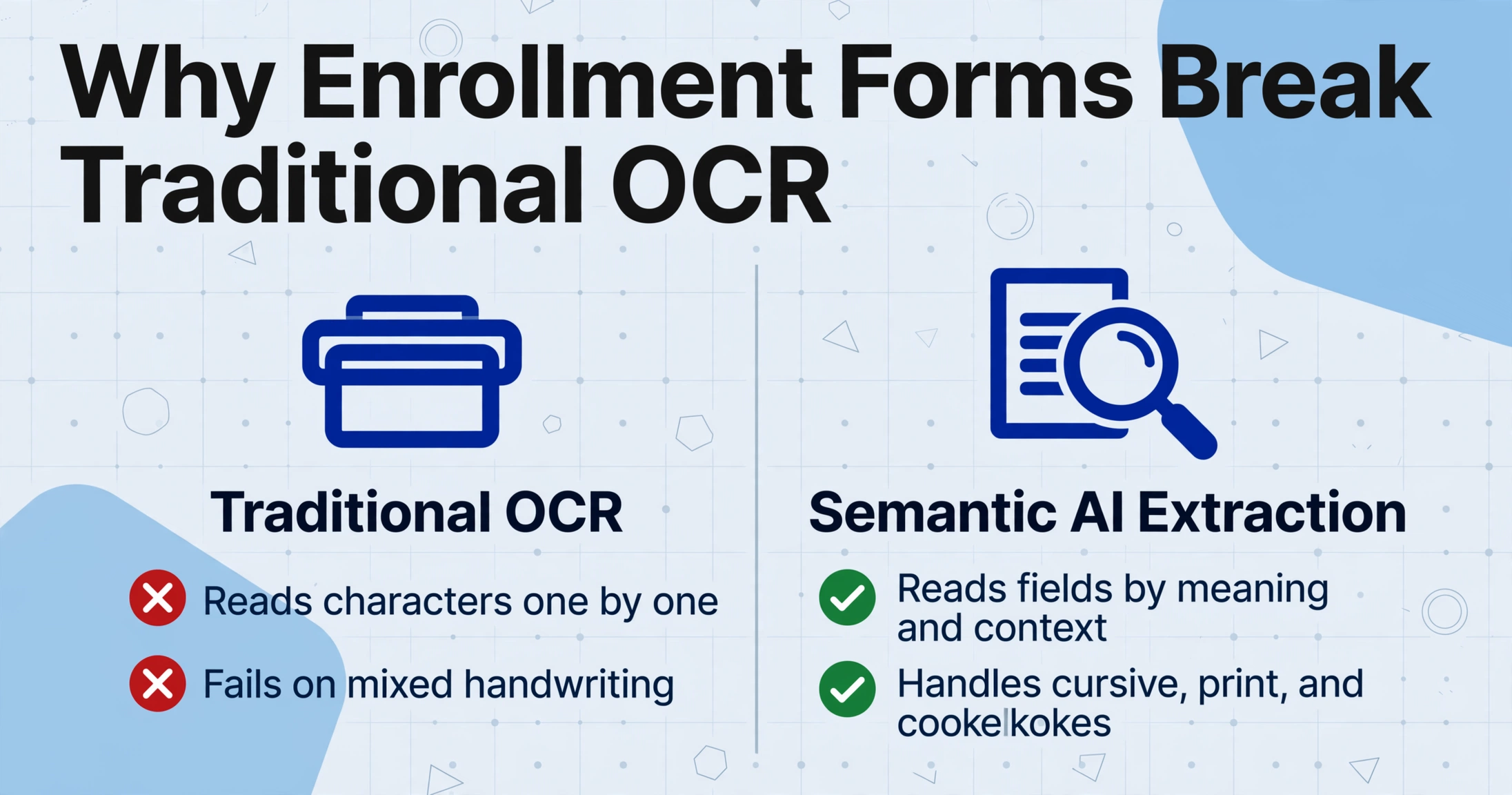
Unlike traditional Optical Character Recognition (OCR), which reads characters one by one without understanding what they mean, semantic AI extraction identifies fields by their meaning and context. This is the approach used by modern tools such as ImageToTable.ai. When the AI encounters a section labeled "Emergency Contact — Name," it knows to extract a person's name from that area, even if the handwriting connects every letter in cursive. This semantic understanding is what makes enrollment form extraction work at a practical scale, because no two school districts print their registration packets the same way, and parents do not fill them out the same way twice.
This guide covers the complete picture: the unique challenges enrollment forms present (they are not invoices or bank statements), the end-to-end workflow from paper packet to SIS import, field-by-field extraction strategies, batch processing for the August-to-September enrollment peak, handling multi-form families where each child has a separate packet, FERPA compliance, and a comparison of the three approaches available to school districts today: manual data entry, template-based OCR, and semantic AI extraction.
Why Enrollment Forms Are a Different Extraction Problem
A school enrollment packet is not one document type. It is a dozen different document structures bound together, and each one behaves differently when processed by an extraction tool. Understanding these structural realities is the prerequisite for building a workflow that works at scale.
Handwriting and printed text on the same page
An enrollment form typically has pre-printed labels in a standard typeface ("Student's Legal Last Name __________") and handwritten answers in the blank spaces. A single page might contain printed block letters from a parent who filled out the form with careful print, cursive from another parent who wrote quickly, and a checkbox mark that is neither print nor cursive but a scribble. Traditional OCR is designed for uniform printed text on clean backgrounds, and it has one recognition mode: character-by-character decoding. That is why it fails on this mixed input. Semantic AI processes each field independently, using the context provided by the printed labels to anchor the extraction of the handwritten content. The same mechanism underlies handwritten form extraction in general, and enrollment packets are one of its harder cases.
Checkboxes and free-text fields side by side
Enrollment forms are dense with binary choices such as "Does your child have any allergies? ☐ Yes ☐ No," followed immediately by free-text fields asking for details. A parent might check "Yes" to the allergies question and write "Penicillin — causes rash" in the text field below. The extraction tool must read the binary signal (which box is marked) and the narrative text (what the parent actually wrote) as two separate but related data points. This pairing is trivial for a semantic AI model that reads the document as a whole. It is surprisingly difficult for template OCR, which typically requires separate rules for checkbox zones and text zones and has no way to link the two.
Multi-field relationship structures
An enrollment form's emergency contact section illustrates the relational complexity that makes student forms harder than most business documents. A single form might ask for "Emergency Contact 1 — Name, Relationship, Phone" and "Emergency Contact 2 — Name, Relationship, Phone". Three fields per contact are linked to the same person reference. The extraction tool must know that "John Smith" and "Father" and "555-123-4567" belong to the same emergency contact record, while "Mary Jones" and "Aunt" and "555-987-6543" belong to a different contact. In a spreadsheet output, this means one row per student with six emergency contact columns (Name 1, Relationship 1, Phone 1, Name 2, Relationship 2, Phone 2), and the AI must map each piece of data to the correct column by understanding which printed label it sits next to on the page.
The August-to-September enrollment peak
The timing constraint is the factor that matters most operationally. In most U.S. school districts, the bulk of new enrollments arrive in a four-to-six-week window between mid-July and early September, and returning student updates land on the same schedule: emergency contact changes, new medical information, consent renewals. For a district of 5,000 students processing roughly 1,000 new and returning enrollment packets, that is 15,000 to 25,000 pages of forms in six weeks. A data entry team of two or three front-office staff cannot type that volume without overtime, backlogs, or errors. What determines whether the enrollment data is ready before school starts is the processing capacity of the extraction tool, not its per-page accuracy.
The companion article Can AI Extract Student Enrollment Forms? covers the field-by-field accuracy estimates in detail, including where AI performs well (printed text, checkboxes, batch throughput) and where it still needs human verification (handwritten phone numbers, free-text medical notes).
The Complete Workflow: From Paper Packet to SIS Record
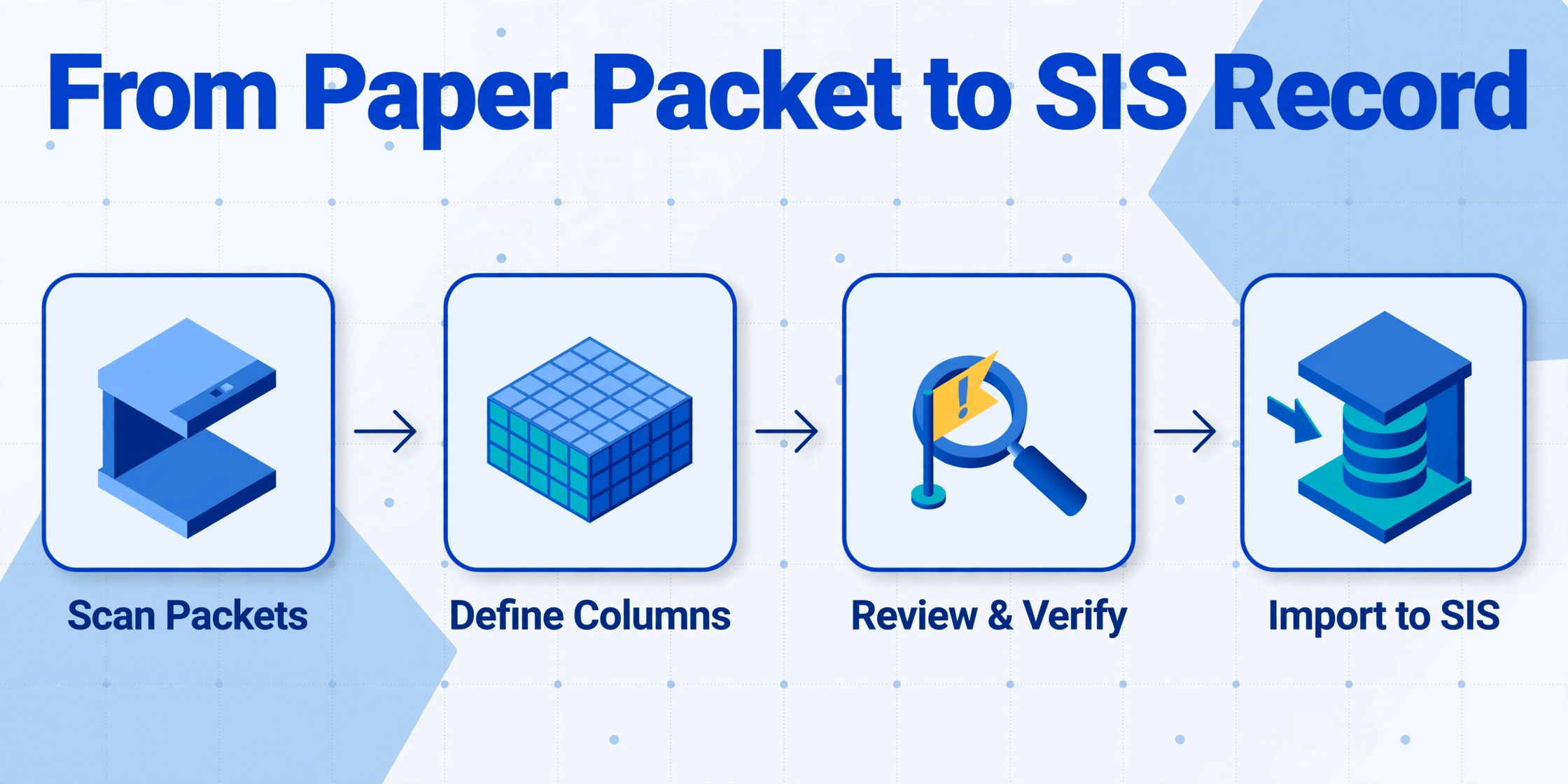
The extraction workflow has four phases. Each phase maps to a specific operational step that a front-office staff member or enrollment coordinator can execute without IT support.
Scan and prepare the enrollment packets
Scan each student's complete packet as a single multi-page PDF. Set the scanner to 300 DPI grayscale. Color adds file size without accuracy gains for most enrollment form layouts, while black-and-white loses the subtle contrast that separates a pencil-checked checkbox from the paper background. Name each file using a consistent convention: [Grade]_[LastName]_[FirstName].pdf. This naming pattern lets you cross-reference extracted data against the source document during verification without opening every PDF individually.
If forms arrive pre-sorted by type (all medical forms together, all transportation forms together), you will need a different collation workflow. In practice, the majority of K-12 enrollment packets arrive organized by student: each family submits one folder or stack per child, and each stack contains the full set of forms needed for that student.
Define output columns
This is the step that programs the extraction. In a semantic AI tool, you define your output by listing the column names you want. Those names become both the instructions the AI uses to locate data on the forms and the column headers in the final spreadsheet. The column set should mirror your SIS import template. A complete set for a typical K-12 enrollment packet runs approximately 28 fields, covering student demographics, parent/guardian information, emergency contacts, medical data, transportation, and consent statuses.
The specific column list and design rationale, including why to split first and last names, how to use inferred columns for binary fields, and where to include SIS field names as hints, is detailed in the companion guide How to Extract Student Enrollment Form Data to Excel for SIS Import. That article walks through the column setup with real field examples.
Process the batch
Upload all scanned PDFs in a single batch. The AI tool extracts every field from every form in parallel, not one form at a time, and merges the results into one spreadsheet where each row is one student record. Processing time scales with the number of files but not with page count per file; a 20-page packet and a 2-page form complete in roughly the same per-document time because the AI reads the entire document as a single semantic unit.
For 200 enrollment packets with 28 fields each, or 5,600 individual data points, the extraction completes in roughly 15 to 20 minutes of wall-clock time, compared to about 67 hours of manual data entry. The output is one Excel file ready for SIS import.
Verify and import to SIS
Spot-check the output against source documents. Focus verification effort on the fields where errors have the highest operational cost: emergency contact phone numbers, medical condition transcriptions, and allergy notations. For most enrollment batches, these high-risk fields represent 5–10% of total extracted data points. The remaining 90–95% (printed fields, checkbox selections, consent statuses) can be accepted at the batch level after verifying a sample.
Export the verified spreadsheet as .xlsx or CSV and import into your SIS using its standard data import tool. PowerSchool, Infinite Campus, and Skyward all support bulk CSV import for student demographic records. After one initial column-mapping setup in the SIS import tool, subsequent enrollment batches follow the same template.
Field-by-Field Extraction Strategy
Not all fields on an enrollment form should be extracted the same way. The table below groups the most common enrollment form fields by extraction approach: direct extraction, inferred classification, or computed derivation. It also notes the expected accuracy level for each. The accuracy ranges and verification rates in this guide come from our own testing on scanned K-12 packets, not a third-party benchmark, so scan quality and handwriting will move them.
| Field Group | Example Fields | Extraction Approach | Verification Priority |
|---|---|---|---|
| Student demographics | Full name, DOB, gender, grade, address | Direct extraction — AI reads the handwritten or printed value next to the corresponding label | Medium — DOB format ambiguity and address line splits are the common failure points |
| Parent/guardian info | Name, relationship, phone, email, employer | Direct extraction with multi-field grouping — AI associates "Father" with the phone and email written in the same section | Medium-High — phone numbers are the fragile field; verify if contact information has no redundancy |
| Emergency contacts | Name, relationship, phone (2–3 contacts) | Direct extraction with relational mapping — AI assigns each contact triad (name + relationship + phone) to the correct numbered slot | High — highest-stakes field group; a misindexed emergency contact (labeling contact 2 as contact 1) compromises emergency reachability |
| Medical conditions | Allergies, medications, chronic conditions, physician name, insurance carrier | Direct extraction of free-text handwriting | Highest — safety-critical data; every medical field should be human-verified before SIS import |
| Immunization records | Vaccine name, date administered, provider | Table extraction — AI reads the vaccine table as a structured grid (rows = vaccines, columns = doses/dates) | Medium — state immunization forms have consistent table layout; verify dates for regulatory compliance |
| Transportation | Bus / car rider / walker, bus route number, AM/PM schedule | Inferred classification — AI reads checkbox selection and outputs the label text ("Bus" not "☐" character) | Low — binary choices with clear visual signal; spot-check at batch level |
| Consent checkboxes | Photo release, tech agreement, handbook acknowledgment, lunch program | Inferred classification — AI outputs "Yes" or "No" based on checkbox state, with optional third column for "Parent Signature Present" | Low — binary signal with 95–98% accuracy; batch-level verification sufficient |
| Home language survey | Primary language, additional languages, parent preferred language | Direct extraction of short handwritten text or checkbox selection | Low-Medium — language names are short fields with limited vocabulary; verify uncommon language names |
The pattern is clear: fields with binary or closed-vocabulary content (checkboxes, consent forms, language selections) can be accepted with minimal verification. Fields with free-text handwriting and no semantic redundancy, especially phone numbers and medical descriptions, need human review. Budget your verification effort accordingly, not uniformly across all fields.
Batch Processing at Enrollment Season Scale
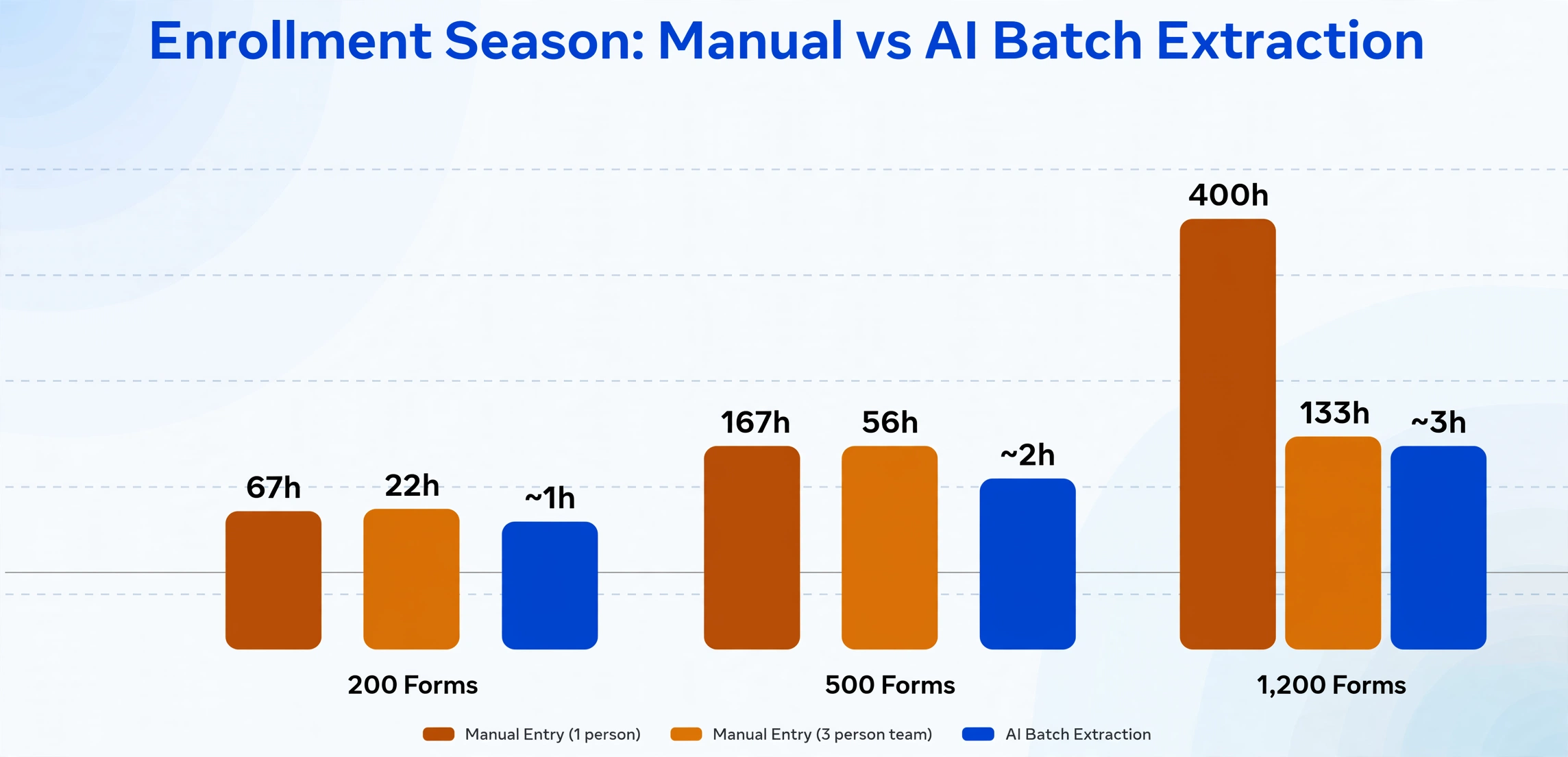
The operational advantage of AI extraction is not that it processes a single form faster. It is that it processes 200 forms in roughly the time it takes a person to key in one packet. The table below shows what this means at three common enrollment volumes, using a measured manual entry rate of about 20 minutes per packet and a single-operator AI workflow.
| Enrollment Volume | Manual Entry (1 person) | Manual Entry (3 person team) | AI Batch Extraction |
|---|---|---|---|
| 200 forms (small elementary) | ~67 hours (1.7 weeks) | ~22 hours (3 days) | ~15–20 min extraction + 30–45 min verification |
| 500 forms (mid-sized K-8) | ~167 hours (4.2 weeks) | ~56 hours (1.4 weeks) | ~25–40 min extraction + 60–90 min verification |
| 1,200 forms (large high school or district batch) | ~400 hours (10 weeks) | ~133 hours (3.3 weeks) | ~45–75 min extraction + 2–3 hr verification |
The verification time assumes a targeted review of high-priority fields only, namely emergency contacts and medical data, plus a random sample of 5% of remaining fields. This is the critical workflow insight: the goal is not to eliminate human review but to reduce the verification surface from 100% of fields (every character typed manually) to 10–15% of fields (only the highest-stakes data).
The extraction tool's batch architecture also matters for workflow reliability. A cloud-based system designed for batch-first processing handles 200 simultaneous file uploads without queueing or per-file processing delays. The throughput constraint becomes the upload bandwidth and the verification step, not the AI model's inference capacity. For a detailed walkthrough of the batch processing workflow, including the exact upload flow and how the Excel output is structured for SIS import, see the companion how-to guide How to Extract Student Enrollment Form Data to Excel for School District SIS.
Quality Assurance: What to Verify and What to Trust
Every extraction workflow needs a quality assurance step. The design of that step determines whether the workflow saves time or simply replaces one kind of data work with another. Here is a practical QA framework designed for enrollment form processing:
Tier 1 — Trust at batch level (70–80% of fields). Printed fields (form labels, pre-filled student information from fillable PDFs), checkbox selections, and consent statuses have high enough accuracy (95–99%) that a batch-level sample check is sufficient. Verify 5% of rows for these field types. If the error rate in the sample exceeds 2%, escalate to per-field review.
Tier 2 — Spot-check per form (15–20% of fields). Parent names, student addresses, grade levels, and physician names fall into this category. These fields are handwritten but follow predictable patterns: names follow naming conventions, and addresses include street/city/state/ZIP structures. Spot-check 100% of these fields in the first 10 forms of a batch to establish a baseline error rate, then reduce to spot-checking 20% of forms if the baseline is clean.
Tier 3 — Verify every record (5–10% of fields). Emergency contact phone numbers, allergy/medical condition descriptions, and immunization dates require per-field verification on every record. The consequence of an error is too high to accept statistical sampling: a wrong emergency contact number during a school crisis, a misread allergy notation during medication administration. These fields should be the only ones that receive 100% human review.
When the extraction tool provides a confidence score for each extracted value (most semantic AI tools do), use it to prioritize verification: sort the output spreadsheet by confidence score ascending and review only the low-confidence records. This typically reduces the verification workload by an additional 30–50% compared to reviewing every high-priority field outright.
Confidence scores tell you where to look; they do not show you what the AI actually read. For the safety-critical fields you verify on every record, a review interface that links each extracted cell back to its position on the page closes that gap. Click a phone number or an allergy note and the original scan highlights the region that value came from; click a region on the image and it jumps back to the matching cell. In ImageToTable.ai this is Review Mode with bbox-assisted verification, and it turns "is this value right?" into a few seconds of visual confirmation instead of a re-read of the packet.
The practical upshot: A well-designed QA framework for enrollment forms verifies 100% of emergency contacts and medical fields, spot-checks 20% of demographic parent data, and trusts checkbox/consent fields at the batch level. This triple-tier approach captures the fields where errors have real consequences while avoiding the trap of reviewing every extracted value as if it were equally likely to be wrong.
Handling Multi-Form Families
A family enrolling three children submits three separate enrollment packets, one per child. Each packet contains the family's shared demographic information (parent names, home address, emergency contacts, insurance carrier) plus child-specific data (grade level, medical conditions, teacher preference, bus route). The three packets are independent PDFs, but the data they contain overlaps a great deal.
The extraction tool processes each packet independently, which is the correct behavior: each child's record in the SIS must be self-contained. The batch output will contain three rows, one per child, with the shared family data repeated across rows. When you import into PowerSchool or Infinite Campus, each row creates a separate student record with its own parent contact and emergency contact fields.
Two operational considerations for multi-form families:
Consistency check. After extraction, compare the parent contact fields across sibling rows. If the extraction produces different parent phone numbers for Child A and Child B (where the same parent filled out both forms on the same day), one of the values is likely an extraction error. Flag these discrepancies for review. This cross-row validation catches extraction errors that a single-row review would miss.
Bulk update vs. per-child data. Some fields in the enrollment packet, such as home address, parent phone numbers, and insurance carrier, are family-level data that apply identically to all siblings. Other fields, such as grade level, teacher assignment, and medical conditions, are child-specific and should never be copied across rows. Your extraction column design should reflect this distinction. A column labeled "Home Address" produces the same value for all three children (the address the parent wrote on each form). A column labeled "Teacher Name" produces a different value for each child. The extraction tool handles this correctly as long as the columns are defined at the right granularity.
FERPA Compliance for Enrollment Form Extraction
The moment a scanned enrollment form is uploaded to a third-party AI extraction tool, the school district has made a disclosure of personally identifiable information from an education record under the Family Educational Rights and Privacy Act (FERPA, 20 U.S.C. § 1232g; 34 CFR Part 99). An enrollment form containing a student's full name, date of birth, address, and parent contact information meets the § 99.3 definition of an education record. That disclosure requires either parental consent or an applicable exception, and for document extraction the applicable exception is the school official exception under § 99.31(a)(1)(i)(B) (see the U.S. Department of Education's PTAC guidance on cloud computing under FERPA).
Three requirements must be satisfied for the school official exception to apply. First, the extraction provider must perform an institutional service: extracting data from enrollment forms is a function the district would otherwise perform with its own staff. Second, the provider must operate under the district's direct control, established through a written contract that restricts how student data can be used and maintained. Third, the provider must be subject to § 99.33(a) redisclosure restrictions, meaning it cannot share extracted student data with sub-processors or other parties without the district's authorization.
The critical operational requirement that most districts overlook: the written contract must specifically prohibit the extraction provider from using uploaded student documents to train its AI models. A provider that uses student enrollment forms to improve its extraction engine is using the data for a purpose beyond the authorized service, and that secondary use is not covered by the school official exception. This is the single most common compliance gap in K-12 district extraction workflows today.
The full regulatory analysis, including how to determine whether a document qualifies as an education record, what the school official exception requires in practice, what the contract must include, retention and deletion requirements, and how state student data privacy laws interact with FERPA, is covered in detail in the companion article FERPA-Compliant Student Data Extraction: A Guide for Admissions. That guide includes a seven-step compliance checklist that maps each requirement to a specific regulatory reference.
Comparing Your Options: Manual Entry vs. Template OCR vs. Semantic AI
School districts processing enrollment forms have three approaches available. Each has a different cost structure, setup time, accuracy profile, and scaling behavior. The table below compares them across the dimensions that matter most for enrollment season.
| Dimension | Manual Data Entry | Template OCR (e.g., Docparser, ABBYY) | Semantic AI (e.g., ImageToTable.ai) |
|---|---|---|---|
| Setup time | None — any staff member can type | 1–3 hours per form layout — requires defining extraction zones for each school's packet | 15–30 minutes — set up column names once for all schools |
| Per-form cost at 500 forms | ~$2.00–$3.00 in staff time | ~$0.20–$0.50 (software + template setup amortized) | ~$0.10–$0.25 per page |
| Handwriting support | Human reads any handwriting | Poor — character-level OCR on cursive typically drops below 60% accuracy | Good (85–92%) — contextual reading improves on structured forms |
| Checkbox detection | Human reads checkbox state | Limited — requires zone-based rules for each checkbox position | Strong (95–98%) — reads checkbox in context of its label |
| Multi-field relationship mapping | Human understands relationships naturally | Not supported — each zone produces an independent data point | Supported — AI associates name + relationship + phone as one contact record |
| Handling multiple form layouts | Human adapts to each layout | Requires separate template per layout — 5 schools = 5 templates | One column set handles any layout — AI reads by meaning, not position |
| Scalability (200→1,000 forms) | Linear — 5x volume = 5x staff time | Sub-linear but template maintenance grows with layout variety | Sub-linear — 5x volume adds ~30 min to processing time |
| FERPA compliance baseline | No external data transfer — no FERPA disclosure | Requires provider contract with school official exception | Requires provider contract with school official exception |
The choice reduces to two questions. If your district processes fewer than 100 enrollment forms per year and the forms are predominantly printed (not handwritten), manual entry may be the simplest option, because the time investment in setting up any automated system does not pay back at that volume. If you process 200 forms or more, or if your forms contain handwriting, checkboxes, or multiple form layouts from different schools, semantic AI offers the best accuracy-to-effort ratio. Template OCR occupies an increasingly narrow middle ground: it handles printed forms at scale but breaks on handwriting, checkboxes, and layout variety: the three characteristics that define K-12 enrollment packets.
Frequently Asked Questions
Doesn't an online registration portal eliminate the need for extraction?
Online portals (PowerSchool Enrollment, SchoolMint, LINQ) handle new registrations completed entirely through the portal. They do not eliminate paper forms in practice because a sizeable share of families still submit paper packets, and the share varies by district and grade level: families who attended in-person registration events, families without reliable home broadband, families whose primary language is not supported by the portal's full workflow, and returning families whose portal accounts expired or were never created. Extraction is the solution for the paper that arrives regardless of the online portal's existence.
What is the practical accuracy limit for handwritten enrollment form fields?
On structured enrollment forms with clear field labels and field boundaries, handwritten extraction typically achieves 85–92% accuracy for names and addresses, and 75–85% for free-text medical narratives. These numbers assume reasonable scan quality (300 DPI, good contrast) and standard handwriting. Forms filled out in all-caps block letters approach 95% accuracy; cursive with abbreviations drops toward 75%. The accuracy ceiling is not the AI model but the inherent ambiguity of handwriting that even human readers occasionally disagree on. No extraction system, AI or otherwise, should be trusted to read handwritten medical fields without human verification.
What happens when our district redesigns the enrollment packet next year?
With semantic AI extraction, nothing changes. The column names remain the same (Student Name, DOB, Parent Contact, Emergency Phone, Allergies), and the AI locates the corresponding data on the new form layout by reading the field labels. You do not need to reconfigure zones, templates, or rules. This is the defining advantage of semantic extraction over template OCR: the form layout is irrelevant to the extraction logic because the AI reads content, not coordinates.
Can extracted data go directly into our SIS, or do we need middleware?
Most K-12 SIS platforms (PowerSchool, Infinite Campus, Skyward, Ellucian Banner) accept bulk CSV or Excel import for student demographic records. After the extraction tool produces a spreadsheet with columns matching your SIS import template, you use the SIS's standard import function to upload the data. No middleware is required. One initial column-mapping setup in the SIS import tool is needed, and subsequent batches follow the same mapping.
Does extraction work on enrollment forms in Spanish or other languages?
Yes. The AI reads handwritten and printed text in most common languages. Spanish is the most frequent non-English language on U.S. K-12 enrollment forms, and the extraction handles it without separate configuration. The column names should be defined in whichever language your SIS expects (typically English for U.S. districts); the AI extracts the Spanish text from the form and places it in the corresponding English-named column. For districts that provide enrollment packets in multiple languages (English, Spanish, Vietnamese, Mandarin, Arabic), one column set processes all of them.
Do HIPAA requirements apply to medical fields on enrollment forms, or does FERPA cover them?
FERPA, not HIPAA, governs student health information maintained by a school. HIPAA's Privacy Rule excludes "education records covered by FERPA" from its definition of protected health information (45 CFR § 160.103). This means the medical conditions, allergy descriptions, and immunization records on an enrollment form are protected under FERPA rather than HIPAA, as long as the school maintains them as education records. The practical implication: the FERPA compliance framework (school official exception, written contract, no model training) covers the medical fields as well as the demographic fields. You do not need a separate HIPAA analysis for enrollment form extraction, though some states have additional student health privacy laws that may apply.
How do we handle enrollment forms that arrive as multi-page scan sets with home-school or out-of-district documentation?
Include all pages in the scan (residency affidavits, proof-of-address documents, home-school notification forms, custody orders) as part of the same multi-page PDF per student. The extraction AI reads only the pages and fields that match your defined column names, skipping pages without enrollment data. Non-matching pages are ignored in the extraction output but remain part of the document record. Flagging specific pages for extraction (e.g., "only extract from pages 1–4 of a 15-page packet") is handled at the column-definition level in most semantic AI tools.
Student enrollment form extraction is not a single technology decision. It is a workflow transformation that touches scanning, column design, batch processing, verification, SIS import, and compliance documentation.
The four-phase workflow of scan, define columns, process batch, and verify-and-import turns August's stack of paper packets into a structured spreadsheet ready for PowerSchool or Infinite Campus. The QA framework tells you which fields to verify on every record (emergency contacts, medical data) and which fields to trust at the batch level (checkboxes, consent forms). FERPA compliance is a prerequisite, not an afterthought: a signed institutional agreement with your extraction provider, a written prohibition on model training, and a documented retention schedule.
Test the workflow on ten enrollment forms from this year's registration. If the accuracy profile matches what's described here, you have your template for every enrollment season to come.
Free to try with no sign-up. Files processed transiently and not retained. Ask about FERPA-compliant institutional agreements for your district.