Japanese Bank Passbook (通帳) Extraction:
Complete Guide for Accounting & Tax Filing
Japan's bank passbook system is unique among developed economies: a physical booklet printed in real time by ATMs using dot-matrix or thermal print heads, carrying every transaction as a five-column ledger with a running balance — and, for the 4.6 million sole proprietors and small businesses that use it as a primary financial record, the definitive source document for tax filing. In 2024, the Japanese Bankers Association (全国銀行協会) reported that major bank ATMs still process over 300 million passbook updates annually — even as digital banking adoption rises. For the extraction problem, that volume means something specific: the passbook is not a disappearing legacy format. It is the format that the accounting workflow must accommodate, and understanding its structure is the prerequisite for automating the data entry that currently consumes hours of manual transcription every tax season.
Key Takeaways
- A Japanese passbook is not a bank statement — it is a running ledger where one misread digit on line 47 corrupts every subsequent balance on all 153 lines that follow.
- The 2027 tax reform collapses the paper-filing blue return deduction from ¥550,000 to ¥100,000 — a ¥450,000 penalty for continuing the same manual passbook transcription you have always done.
- The same five-column extraction schema reads passbooks from MUFG, Japan Post Bank, and regional credit unions in one batch — because the AI reads what each value means rather than where it sits on the page.
What Makes the Japanese Passbook a Unique Extraction Target
In most countries, a bank statement is a monthly summary — a PDF or paper report that covers a discrete period, with a beginning balance, an ending balance, and the transactions in between. Each statement is self-contained. A misread on the March statement does not affect April's.
A Japanese bank passbook (通帳, tsūchō) is not a statement. It is a running ledger printed by an ATM — a continuous physical record maintained by feeding the booklet into a machine that prints new transaction lines directly onto the page using a dot-matrix or thermal print head. Every row carries five fields: date (月日), description (摘要, tekiyō), withdrawal amount (お支払金額), deposit amount (お預り金額), and running balance (差引残高). Each new line extends the chain. The balance on line 47 depends on lines 1 through 46 all being correct. A single misread corrupts every balance that follows — a failure mode called balance drift (残高ずれ) that has no equivalent in statement-based banking.
This printing mechanism creates a second-order extraction problem that most generic OCR tools were never built to handle. Passbook pages are not typeset documents with consistent ink density and alignment. They are printer output — and the print quality varies by ATM model, ink ribbon age, and print head cleanliness. Two passbooks from the same bank, updated at different ATMs six months apart, can have noticeably different character darkness, alignment, and legibility. A dot-matrix print head nearing the end of its replacement cycle produces thinner characters with more gaps between dots — the same 振込 (bank transfer) code that a clean ATM prints in crisp, contiguous strokes becomes a constellation of disconnected dots on a worn one.
The passbook format is governed by the Japanese Bankers Association (全国銀行協会), which sets standards for interbank data exchange, ATM interoperability, and the magnetic stripe (磁気ストライプ) on the back cover that stores account information. The ATM reads this stripe to identify the account, then prints transaction lines — meaning the passbook you hold is a printer output, not a designed document. The format is standardised enough that the five-column layout is consistent across every bank in Japan. The print quality is not. That tension — standard format, variable execution — defines the extraction challenge.
The structural difference that matters for extraction: a UK SA100 self-assessment tax return or an Australian BAS statement is a snapshot — extract it once, verify against an external source, done. A Japanese passbook is a chain — extraction is a continuity operation where each row's correctness depends on every row before it. Treating it like a statement-based document and processing pages independently is the single most common source of extraction failure in Japanese accounting workflows.
Japan's Banking Landscape and What It Means for Passbook Extraction
Japan has over 100 banks issuing physical passbooks, and while the five-column layout is standard, the formatting details — font size, line spacing, the presence or absence of a branch column (取抜店), and whether a single transaction occupies one line or wraps to two — vary by institution. Understanding which bank issued a passbook is not academic. It determines which extraction challenges to expect.
| Bank | Passbook Style | Extraction Considerations | Market Role |
|---|---|---|---|
| MUFG Bank (三菱UFJ銀行) | Single-line entry, date on left, branch code (取抜店) column included. Clean modern layout. | Easiest to extract — consistent dot-matrix alignment, era year header clearly printed at page top. The branch code column is an extra data point to extract or ignore depending on accounting needs. | Japan's largest bank — 7.93% of companies as primary bank (per Tokyo Shoko Research) |
| SMBC (三井住友銀行) | Similar single-line format to MUFG. May abbreviate era year (R6 vs 令和6年). | Abbreviated era years require awareness of abbreviation mapping during date conversion. Otherwise comparable difficulty to MUFG. | 6.34% primary bank share. Strong corporate base. |
| Mizuho Bank (みずほ銀行) | Similar to MUFG/SMBC. Traditional print formatting; era years often full-width characters. | Full-width era year characters can be read as separate characters by character-level OCR. AI-based semantic extraction avoids this by reading the date field as a whole. | 5.04% primary bank share. Most traditional of the three megabanks. |
| Japan Post Bank (ゆうちょ銀行) | Two-line-per-transaction format — description field wraps to a second line. Compact printing. Branch code displayed as numbers only. | Most challenging standard format — the two-line wrapping means template-based OCR trained on single-line formats will miss description details. Semantic extraction handles this by reading the two lines as a single semantic unit. Also offers a "virtual passbook" (デジタル通帳) for Yucho Direct+ account holders. | Nationwide network — 24,000+ ATMs. Default bank for many personal accounts. |
| Resona Bank (りそな銀行) | Single-line format. Strong focus on SME and retail customers; passbooks often include supplementary bank service messages after transaction lines. | Supplementary service messages printed between transaction batches can be misread as data rows by tools that do not distinguish transaction lines from informational text. | Part of Resona Group — strong SME base. Regional banking focus. |
| Regional Banks & Credit Unions (地方銀行・信用金庫) | Varied — most follow the standard five-column layout but with localised printing conventions, older ATM hardware, and legacy era year formats (including Showa-era dates for long-running accounts). | Older ATM hardware means higher variance in print quality. Passbooks opened in the 1980s may contain Showa-era (昭和) dates requiring Showa + 1925 conversion. The wide variance is the strongest argument for semantic extraction — you cannot template for 100+ regional printing conventions. | Collectively serve a larger share of SMEs than the three megabanks combined. |
The practical implication for extraction is that a single-column schema — Date, Description (摘要), Withdrawal, Deposit, Balance — works across all of these banks. The AI locates each value by reading what it means, not by matching a template's pixel coordinates. A passbook from MUFG with clean single-line printing and a Yucho passbook with two-line wrapping produce the same five-column spreadsheet in the same batch because the extraction engine reads field semantics, not field positions. For a detailed walkthrough of this column-based approach, see the step-by-step guide to Japanese passbook extraction.
The Passbook's Five-Column Architecture — and Why Generic OCR Breaks on Each One
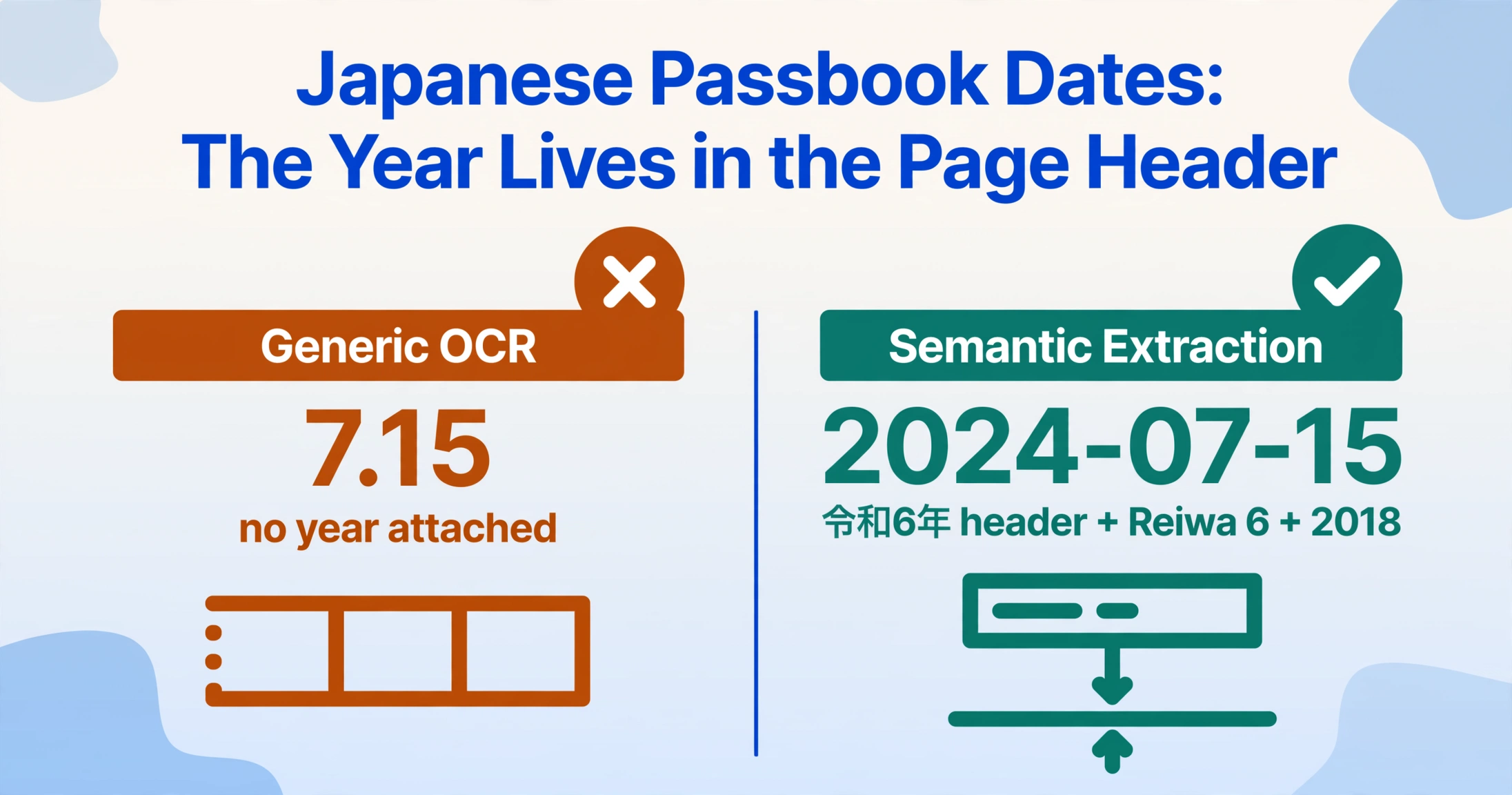
The passbook's five-column layout is elegantly simple on the surface and structurally hostile to conventional OCR at depth. Each column presents a distinct failure mode:
月日 (Date) — the 和暦 problem
Passbook dates use the Japanese imperial era calendar: 令和 (Reiwa, began May 2019), 平成 (Heisei, 1989–2019), 昭和 (Showa, 1926–1989). A date printed as R6.7.15 is July 15, 2024 (Reiwa year 6 + 2018). H30.3.31 is March 31, 2018 (Heisei year 30 + 1988). The era year header is printed once at the top of a page — subsequent lines on the same page and continuation pages carry only month and day. A generic OCR tool that reads "7.15" in isolation has a date with no year, and a year header three pages back that it never saw. The conversion formula is deterministic — Reiwa n = n + 2018, Heisei n = n + 1988, Showa n = n + 1925 — but identifying which formula to apply to which line requires reading the relationship between the page header and its content rows, not reading individual cells.
摘要 (Description) — the code classification gap
The description column uses compact codes that a Japanese reader immediately categorises: 振込 (bank transfer), ATM (ATM transaction), 給与 (salary deposit), 引落 (direct debit), 手数料 (bank fee, typically ¥110–¥550), 利息 (interest), カード (card transaction). A raw extraction that faithfully reproduces these codes produces a transaction list. An extraction that classifies them during processing produces a pre-categorised ledger. The classification logic can be defined once as a Computed Column: if Description contains "給与" then "Salary Income"; if contains "引落" then "Direct Debit"; if contains "手数料" then "Bank Fee"; if contains "利息" then "Interest Income". The most ambiguous code is 振込 — a transfer of ¥500,000 from a known client company is business income; a transfer of ¥15,000 from an individual is likely personal. A Computed Column can combine the description with the amount to disambiguate: if Description="振込" and Amount > 100000 then "Business Income"; else "Personal Transfer".
お支払金額 / お預り金額 (Withdrawal / Deposit) — the mutual exclusion trap
A given transaction has an entry in either the withdrawal column or the deposit column — never both. This mutual exclusivity is the structural basis for balance verification, but it also creates a common OCR failure: a deposit of ¥30,000 placed in the withdrawal column by a misaligned read. The balance math will fail on that row, and every row after it will also fail, because previous balance + 0 (no deposit read) − ¥30,000 (wrong column) cannot equal the printed current balance. This is not a random error — it is a structured error characteristic of column-based formats with mutual-exclusion logic, and template-based OCR that reads cells by position is particularly vulnerable to it.
差引残高 (Running Balance) — the self-verification engine
The running balance is simultaneously the passbook's greatest extraction advantage and its most dangerous failure mode. It is an advantage because the balance column carries its own verification inside itself: previous balance + deposit − withdrawal must equal current balance. Define a Computed Column that checks this on every row during extraction — Balance Check (previous Balance + Deposit − Withdrawal = current Balance? 'OK' : 'REVIEW') — and you know which rows to review before the data enters your accounting software. It is dangerous because a single misread — a dropped comma turning ¥30,000 into ¥3,000 — corrupts the balance on that row, which corrupts the verification on the next row, and every row after it. A 280-transaction passbook with one misread on row 47 produces 233 REVIEW flags — but the root cause is the first flagged row. Fix row 47, and rows 48–280 recalculate correctly. This cascade effect is the subject of the common passbook data entry mistakes guide, which covers balance drift prevention in depth.
Magnetic stripe (磁気ストライプ) — the hardware dependency
The magnetic stripe on the back cover stores the account number, branch code, and account type. When a passbook is inserted into an ATM, the machine reads the stripe, identifies the account, retrieves unprinted transactions, and prints them. The stripe is a machine-read component — the account details it contains are not printed as text on the passbook page itself (the front cover typically shows the account holder's name in katakana, not the account number). For extraction purposes, the account number and branch information are data points that must come from either the cash card (キャッシュカード), the front cover information (if present), or manual entry — the passbook pages themselves do not carry this data in a machine-readable printed form. A damaged magnetic stripe on an old passbook means the ATM cannot read it for printing updates, but it does not prevent the existing printed pages from being extracted — the printed transaction data is independent of the stripe.
The Extraction Workflow: From Paper Passbook to Accounting-Ready Spreadsheet
Extracting Japanese passbook data follows a three-stage architecture that is the same whether you are processing one passbook or ten, one year or five. The setup stage is done once and reused indefinitely. The processing stage is where the extraction engine does the work. The verification stage is where you confirm the output is correct — and the passbook's self-verifying balance column makes this stage orders of magnitude faster than manual reconciliation.
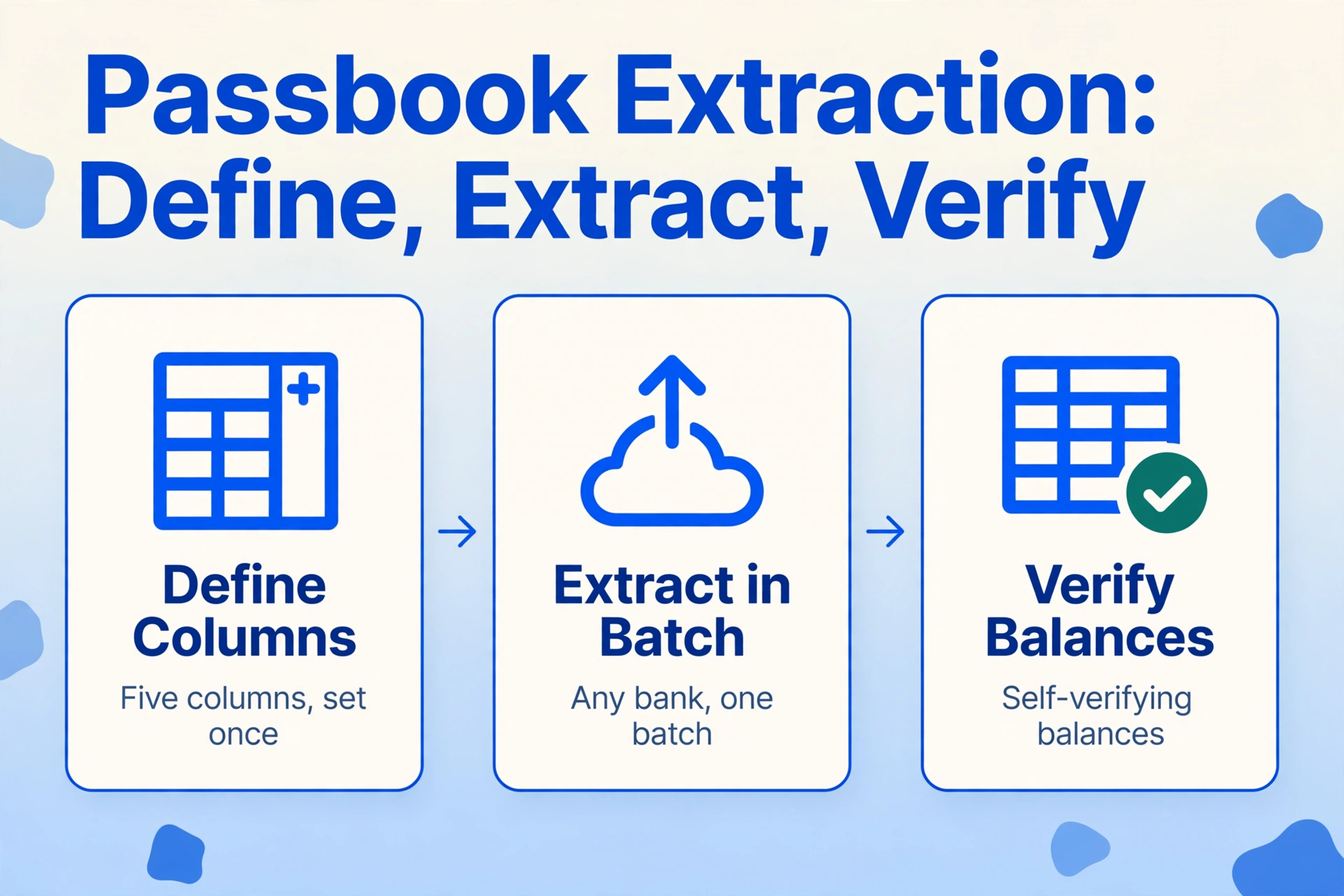
Defining the output schema. You specify five column names — Date, Description (摘要), Withdrawal (お支払金額), Deposit (お預り金額), Balance (差引残高) — and optionally add Computed Columns for pre-classification and verification. This is Custom Column Extraction: you define the output, and the AI maps each passbook's printed fields to your columns by reading what each value means. The same column schema works across every bank — MUFG, SMBC, Mizuho, Japan Post Bank, regional credit unions — because the AI reads field semantics, not pixel coordinates. A template configured for MUFG's single-line layout would fail on Japan Post Bank's two-line wrapping; a semantic schema handles both formats in the same batch because it reads the meaning of each field, not its position.
Uploading and processing. Scan or photograph passbook pages — including front covers showing account holder name, the back cover for reference, and every transaction page — and upload all images as a single batch. Each page is processed independently with the same column schema applied. Era dates (和暦) are converted to Gregorian (yyyy-mm-dd) at the output layer, applying the correct era context per page. Description codes are captured as-is and optionally classified into spending categories via Computed Columns. The running balance on every row is verified against the previous row's balance during extraction, flagging discrepancies.
Exporting and verifying. The output is one Excel file with one row per transaction and every field in its own column. The balance verification column shows OK on every row where the math checks out, and REVIEW on rows with discrepancies. A three-year passbook with roughly 280 transactions typically produces one or two REVIEW flags — misread commas, smudged digits on aging pages, or a handwritten correction that confused the print reader. Fix those rows, and the remaining 278 are verified. The spreadsheet imports directly into any Japanese accounting software that accepts CSV transaction data.
Files are processed securely and not stored.
For a hands-on walkthrough of this workflow — including column setup, page scanning strategies, and common error handling — the single passbook extraction guide covers each step in detail. For the batch processing strategy that handles multiple passbooks across multiple years, the batch processing guide addresses the multi-passbook merge, era date carry-forward across pages, and balance verification at batch scale. For an analysis of why the manual-entry status quo persists despite available digital tools, see the deep-dive on the Japanese passbook manual entry problem.
Batch Processing: When One Passbook Becomes a Decade of Data
A single passbook holds roughly 8–10 transactions per page and 50–100 pages, giving it a typical useful life of one to three years depending on account activity. A sole proprietor filing a blue return (青色申告) who maintains separate passbooks for daily operations (MUFG), tax reserves (Japan Post Bank), and payroll (regional credit union) has three passbooks to extract — roughly 36 pages of printed transactions, 280 rows, across three printing conventions.
Batch extraction handles this as a single operation. The three passbooks go into one upload with the same five-column schema. Era dates are converted per page with the correct era context — the MUFG passbook using abbreviated era years (R6), the Japan Post Bank passbook using full era names (令和6年), and the credit union passbook containing late-Showa transactions from accounts opened in the 1980s — all resolving to Gregorian dates in the output. The same batch handles handwritten margin notes (家賃 for rent, 仕入 for inventory purchases) as a supplementary Notes column, and Computed Columns pre-classify transactions into spending categories and flag balance discrepancies.
The alternative — single-page extraction with manual merge — forces the user to consolidate 36 separate spreadsheet files, cross-reference era dates across pages where the year header appears on page 1 and vanishes for the next seven continuation pages, and manually verify balance continuity across passbook boundaries. For three years of data from three banks, the manual merge step alone takes roughly two to three hours. The batch approach removes it entirely — one upload, one spreadsheet, one verification pass. For the full batch workflow architecture, see the guide to batch processing passbook pages into an annual spending ledger. For a quantified breakdown of what manual data entry actually costs Japanese small business owners, the cost analysis puts time and error rates into concrete numbers.
Passbook batch processing vs. other market batch scenarios: a UK practice batch-processing 80 SA100 self-assessment returns handles independent documents — each return is a self-contained data set, and a misread on return 47 affects only return 47. A passbook batch processes interdependent pages — the running balance cascades across page boundaries, and a misread on page 3 silently corrupts every subsequent page's verification. The batch must be aware of the document type's continuity structure, not just process each page as an island. This is why Computed Column verification at extraction time — not after — is the engineering difference between a batch that produces verified output and a batch that produces data you need to fully re-verify inside your accounting software.
Into the Japanese Accounting Ecosystem: Yayoi, freee, MoneyForward, and Beyond
The extracted spreadsheet is a bridge — the destination is Japanese accounting software. The three platforms that dominate the sole proprietor and small business market — Yayoi Accounting (弥生会計), freee Accounting (freee会計), and MoneyForward Cloud Accounting (マネーフォワード クラウド会計) — collectively cover the vast majority of blue return filers. Each has a distinct import path, and the extraction output must match the target platform's expectations.
Yayoi Accounting (弥生会計). The market leader, particularly among tax accountants (税理士). Import is CSV-based via the Smart Transaction Import (スマート取引取込) function. Yayoi requires dates in yyyy-mm-dd format — the extraction step's era-to-Gregorian conversion must be complete before export. Yayoi uses a proprietary "Yayoi Import Format" (弥生インポート形式) for CSV, so the extraction output should be mapped to the Yayoi field schema: date, debit account (借方勘定科目), debit amount, credit account (貸方勘定科目), credit amount, description (摘要).
freee Accounting (freee会計). Cloud-native with 270+ API endpoints and MCP (Model Context Protocol) support — the most API-rich of the three. Import via manual CSV upload (取引 CSV インポート) using freee's import template format, or via the freee API for automated ingestion. freee's automatic categorisation rules (自動登録ルール) can be configured to recognise passbook description codes and assign account headings (勘定科目) — meaning the extraction step can focus on faithful code capture, and the classification logic lives in the accounting software's rule engine.
MoneyForward Cloud Accounting (マネーフォワード クラウド会計). Import via the data migration function (他社ソフトデータの移行), selecting Yayoi-compatible format as the intermediate CSV format. MoneyForward's strength is the unified dashboard combining passbook data, credit card statements, and receipt scans into a complete financial picture. If the extraction output uses the Yayoi-compatible date and column format, it imports into MoneyForward with the same column mapping.
Other supported platforms that accept the same CSV import include: MJS Accounting (会計大将), TKC (FX2/MX series), OBC Kanjo Bugyo (勘定奉行), Sorimachi Accounting King (会計王), EPSON Financial Support (財務応援R4), and PCA Accounting (PCA会計). The passbook's five-column format is standardised across all Japanese banks, so the same extraction output works with any accounting platform that imports CSV transaction data — the date format, amount columns, and description field are the same regardless of the receiving software.
The key distinction between the three main platforms for extraction planning: Yayoi is CSV-only and requires the extraction to produce a Yayoi Import Format-compatible file. freee supports both CSV and API — the API route enables automated passbook-to-accounting pipelines without manual file transfer. MoneyForward uses Yayoi-format CSV as the intermediate format, so extraction output formatted for Yayoi works for both platforms. For most small businesses without API integration set up, targeting Yayoi Import Format as the extraction output standard provides the widest compatibility.
The 青色申告 Connection: Why Passbook Extraction Becomes Critical Under the 2027 Tax Reform
The Japanese tax reform outline (令和8年度税制改正の大綱), released by the ruling coalition on December 19, 2025, restructures the blue return special deduction (青色申告特別控除) — the tax incentive that has made double-entry bookkeeping worth the effort for sole proprietors since the system was introduced. The changes take effect for the 2027 tax year (filed in 2028) and directly reshape the economics of passbook digitisation.
Under the current system (2026), a blue return filer keeping double-entry books and filing electronically receives a ¥650,000 deduction from taxable income. Paper filers with double-entry books receive ¥550,000. The 2027 reform collapses the paper deduction to ¥100,000 — a ¥450,000 reduction — and introduces a top tier of ¥750,000 for filers who use e-Tax electronic filing AND maintain qualified electronic books (優良な電子帳簿) or use a specified electronic computation system with automatic data linking (デジタルシームレス). The three-tier structure becomes:
| Filing Method | Bookkeeping | Deduction (2026) | Deduction (2027+) | Change |
|---|---|---|---|---|
| e-Tax + Qualified Electronic Books or Auto-Linking | Double-entry | — | ¥750,000 | New tier |
| e-Tax Electronic Filing | Double-entry | ¥650,000 | ¥650,000 | No change |
| Paper Filing | Double-entry | ¥550,000 | ¥100,000 | −¥450,000 |
| Simplified Bookkeeping | Single-entry | ¥100,000 | ¥100,000 (revenue ≤ ¥10M) ¥0 (revenue > ¥10M) | Revenue restriction added |
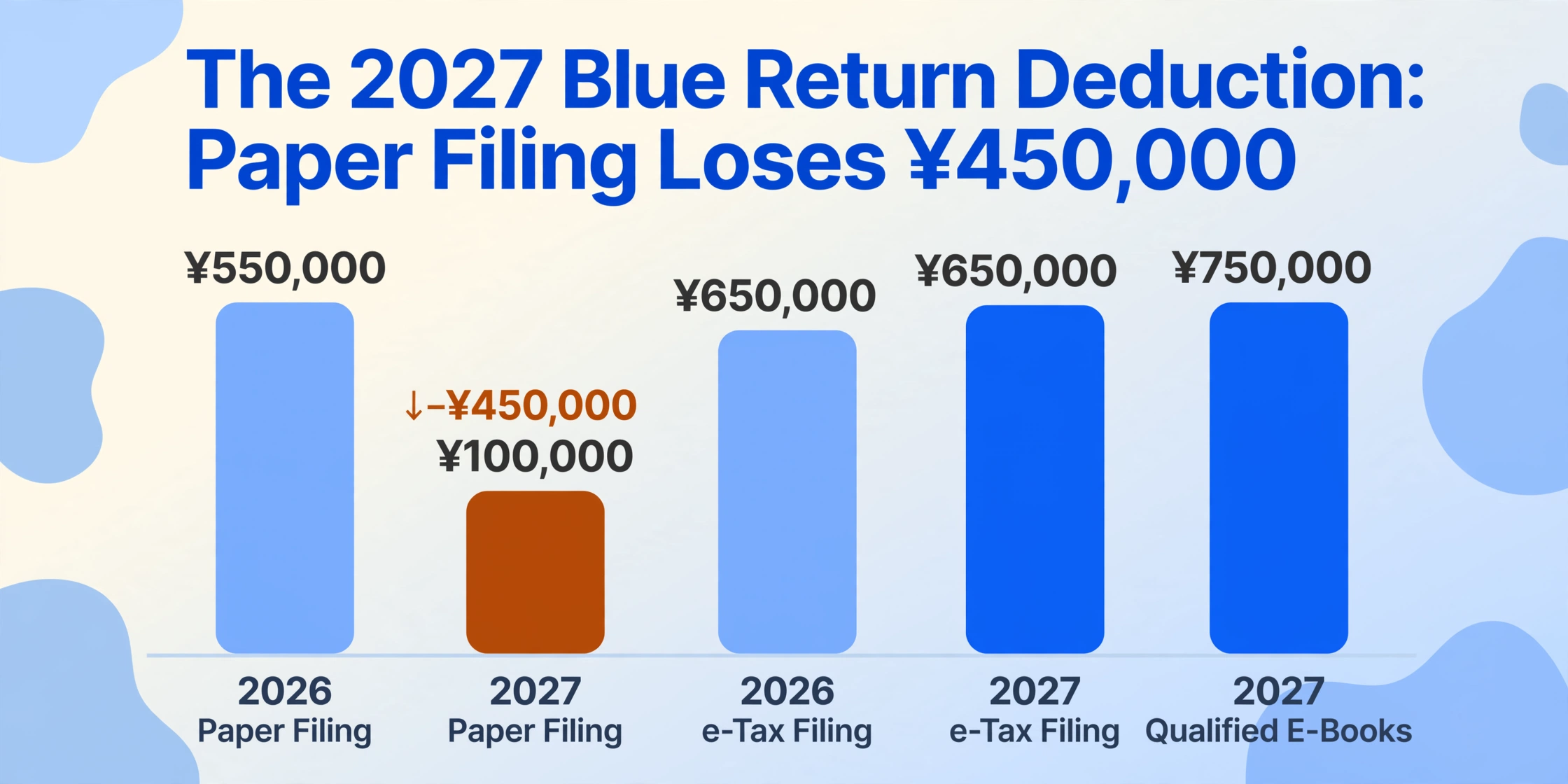
The passbook extraction connection is direct. A sole proprietor filing a paper return in 2026 with double-entry books and manual passbook transcription got ¥550,000. That same filer, continuing the same manual approach in 2027, gets ¥100,000 — a ¥450,000 deduction reduction, equivalent to roughly ¥90,000–¥180,000 in additional tax depending on the marginal rate. The reform makes e-Tax electronic filing mandatory for the ¥650,000 tier — which means the entire accounting pipeline, from passbook data entry to final return submission, must be digital. Passbook extraction is not a convenience upgrade. It is the first link in a chain that now determines your tax deduction tier.
Under the Electronic Bookkeeping Act (電子帳簿保存法), scanned copies of financial documents can serve as legally admissible records if they meet resolution (200 dpi) and colour requirements. The 2024 amendment relaxed the timestamp requirement — scanned documents stored in a system with edit-deletion history (訂正・削除履歴) no longer need a separate timestamp. For passbook extraction, this means the scanned passbook pages used as extraction input can also serve as the legal record copy, provided the scanning resolution meets the 200 dpi colour requirement and the scanned files are stored in a compliant system. The physical passbook must still be retained for the statutory seven-year period — the extraction replaces the manual data entry step, not the legal record.
Edge Cases and Troubleshooting
Most passbook extraction produces clean output with one or two flagged rows. The edge cases below cover the scenarios where extraction results need human review — knowing what they look like before they happen turns a frustrating troubleshooting session into a two-minute fix.
Handwritten corrections (手書き通帳修正)
Passbook users sometimes correct printed entries by hand — a bank teller writes in a correction next to a misprinted amount, or the account holder annotates the description column with a note like 家賃 (rent) or 仕入 (inventory purchase). These annotations are legally part of the record and carry accounting-critical information. Vision-model-powered extraction can read handwritten annotations alongside printed text — but handwriting quality varies: a clear ballpoint kanji annotation is typically readable; a faded pencil note at an angle crossing the printed grid lines is less reliable. For passbooks where handwritten notes are the only record of transaction categorisation, the extracted spreadsheet should be reviewed with the physical passbook open for rows where handwriting was ambiguous. The AI handles the legible majority; the review is exception-handling, not line-by-line.
Description code ambiguity (摘要あいまい性)
A 振込 (transfer) of ¥500,000 from a known client company name is business income. A 振込 of ¥15,000 from an individual is likely personal. The passbook description code alone cannot distinguish them — the accounting software's category assignment does. The extraction should capture the code faithfully; the classification logic lives downstream, either in the accounting software's automatic categorisation rules or in a Computed Column that combines the description code with the amount threshold. A common error mode is writing classification rules that are too aggressive — a rule that classifies all 振込 over ¥100,000 as "Business Income" will miscategorise a one-time family gift of ¥200,000. The rules should be conservative, classifying obvious cases and leaving ambiguous ones for manual review.
Damaged or degraded passbook pages
Passbooks that are five or more years old may have pages with faded print, water damage, ink smudging, or creases that run through the transaction area. For faded print, scanning at higher resolution (300 dpi or above) and adjusting contrast before extraction improves legibility. For creases that distort the dot-matrix characters, photographing the page under natural light from an angle can reduce the crease shadow. For pages where damage makes a transaction line unreadable — typically 1–2 rows in a passbook of 280 — mark the row for manual entry based on the physical passbook. The extraction handles the other 278 rows. The damaged-row failure is visible in the verification column: a REVIEW flag on a row where the balance math does not check out, often caused by a partially unreadable amount digit.
Digital passbooks (デジタル通帳) vs. physical passbooks
Some banks — notably Japan Post Bank through its Yucho Direct+ service — offer digital passbooks that replace the physical booklet with a web-based transaction view and downloadable CSV export. However, the export format, date range, and available columns differ by bank and often do not match the format expected by accounting software. A digital passbook CSV from Japan Post Bank may export dates in Gregorian, while the same account's physical passbook printed at an ATM uses era dates — and the CSV may only cover the last 12 months while the physical passbook has the full account history. For blue return filers whose accounting software expects a specific CSV format, the extraction route — scan the physical passbook or screenshot the digital passbook view — provides format-consistent output across any data source, with era-to-Gregorian conversion handled at the output layer regardless of input format.
Cross-era passbooks and missing year headers
A passbook opened in 2018 and renewed in 2024 contains transactions spanning two imperial eras: 平成 (Heisei) and 令和 (Reiwa). The era boundary — 平成31年 (January–April 2019) transitioning to 令和元年 (May–December 2019) — falls mid-passbook. The extraction must detect the era change at the page where the year header switches from 平成 to 令和 and apply the correct offset per transaction. Similarly, continuation pages within the same passbook that do not reprint the year header rely on context carried forward from the most recent page with a header. If page 5 prints 令和6年 and pages 6–8 print only month and day, the extraction applies the 令和6年 context to all transactions on pages 5 through 8 — and when page 9 prints 令和7年 after the January 1 boundary, the context updates. A missed carry-forward produces transactions with floating dates ("7.15" with no year) that cannot be placed on a timeline and will fail accounting software import.
Frequently Asked Questions
Can passbook extraction handle all Japanese banks in the same batch?
Yes — a MUFG passbook with single-line entry, a Japan Post Bank (ゆうちょ銀行) passbook with two-line-per-transaction format, and a regional credit union (信用金庫) passbook with compact printing can all be uploaded in the same batch and produce a unified spreadsheet with consistent columns. Semantic extraction reads what each value means — a date is a date whether it is printed as R6.7.15 on one passbook or 令和6年7月15日 on another. The same five-column schema works across all formats. The era-to-Gregorian conversion is applied per page based on the era header detected on each page, so a batch containing passbooks from different eras — 平成 on the MUFG passbook, 令和 on the Japan Post Bank passbook, 昭和 on an old credit union passbook — resolves all dates to yyyy-mm-dd in the output.
How does the extraction handle Japanese era dates (和暦) that span different eras?
The extraction reads the era year header from each page and applies the correct conversion formula: Reiwa n = n + 2018, Heisei n = n + 1988, Showa n = n + 1925. For continuation pages without a year header, the era context carries forward from the most recent page with a header. When an era boundary occurs mid-passbook — such as Heisei 31 transitioning to Reiwa 1 on May 1, 2019 — the engine detects the era change at the page where the header switches. For the critical boundary year, transactions on pages with the 平成 header use the Heisei offset, and transactions on pages with the 令和 header use the Reiwa offset. All dates in the output are Gregorian (yyyy-mm-dd) for direct compatibility with Yayoi, freee, and MoneyForward.
What happens if the running balance verification fails on multiple rows?
Multiple consecutive REVIEW flags almost always trace back to a single root cause — the first flagged row. A misread comma (¥30,000 → ¥3,000) on row 47 corrupts the balance on row 47, which corrupts the verification on row 48, and every subsequent row through the end of the passbook. Fix row 47 — correct the misread amount — and rows 48 through 280 recalculate correctly. The Computed Column approach catches the problem at the point of failure; the user fixes the first flagged row, and the rest resolve. Without this verification step, the error surfaces inside the accounting software when the trial balance does not match the bank statement — a reconciliation that must trace backward through every row to find the single misread that started the cascade. The extraction-time flag is two minutes of correction. The accounting-time flag is an hour of forensic bookkeeping. For a full treatment of this and other common passbook data entry failure modes, see the common mistakes guide.
How does the extraction handle handwritten margin notes on passbook pages?
Define a column called "Notes" in your output schema. Any legible handwritten annotation near a transaction line — a note like 家賃 (rent), 仕入 (inventory), or a client name written beside a 振込 entry — is captured as additional context during extraction. Handwriting quality varies significantly: a clear ballpoint annotation in standard kanji is typically readable; a faded pencil note written at an angle and crossing the printed grid lines is less reliable. For passbooks where handwritten notes are the only record of transaction categorisation, the extracted spreadsheet should be reviewed with the physical passbook open for the rows where handwriting was ambiguous. The AI handles the legible majority — reducing the review from every row to the few where annotation quality was insufficient.
Can extracted passbook data go directly into Yayoi Accounting for 青色申告 filing?
Yes — the extraction output is an Excel spreadsheet with dates in yyyy-mm-dd format, which Yayoi Accounting (弥生会計) accepts via the Smart Transaction Import (スマート取引取込) function. Map the extraction columns to Yayoi's field schema: date, debit account (借方勘定科目), debit amount, credit account (貸方勘定科目), credit amount, and description (摘要). If you use Computed Columns to pre-classify transactions — mapping 給与 to "Salary Income" and 引落 to "Utilities" — the account heading fields are already populated before import. If you prefer to let the accounting software handle classification, extract the raw description codes and configure Yayoi's or freee's automatic categorisation rules to map them to the correct account headings. freee's 270+ API endpoints enable automated extraction-to-accounting pipelines without manual file transfer; Yayoi and MoneyForward use CSV import with Yayoi-compatible format as the common intermediate format. Additional supported platforms include MJS Accounting, TKC, OBC Kanjo Bugyo, Sorimachi, EPSON, and PCA — all of which accept the same CSV transaction format.
Do I still need the physical passbook after extraction?
Under the Electronic Bookkeeping Act (電子帳簿保存法), scanned copies of financial documents can serve as legally admissible records if they meet the 200 dpi colour scanning requirement and storage compliance rules. However, the physical passbook remains the definitive original document. The National Tax Agency (国税庁) may request originals during a tax audit. Best practice: extract the passbook to spreadsheet for your accounting workflow, retain the scanned pages as the electronic record copy, and keep the physical passbook for the statutory seven-year document retention period. The extraction replaces the manual data entry step — it does not replace the legal record.
The Full Picture: Where Passbook Extraction Fits in the Japanese Accounting Workflow
A Japanese sole proprietor's tax filing workflow has historically been two disconnected halves. The first half — passbook data entry — is manual: pages spread across a desk, era dates converted mentally, amounts keyed into a spreadsheet or accounting software, one row at a time. The second half — accounting and filing — happens inside Yayoi or freee or MoneyForward, where the data is reconciled, categorised, and assembled into the blue return (青色申告決算書). The two halves are joined by manual transcription, and the quality of the join determines whether the tax return reconciles on the first pass or the fifth.
Passbook extraction replaces the transcription join with an automated one. The passbook pages become images; the images become a spreadsheet with verified dates, categorised transactions, and flagged discrepancies; the spreadsheet imports into the accounting software, where the rest of the workflow is unchanged. The extraction step does not alter the accounting software, the tax filing process, or the blue return deduction structure — it alters the data pipeline that feeds into them.
Under the 2027 tax reform, that pipeline has a deduction value attached to it. A filer who stays on paper — manual passbook transcription, paper return — receives ¥100,000. A filer who digitises the pipeline — extracted passbook data feeding into e-Tax electronic filing — receives ¥650,000, or ¥750,000 with qualified electronic books. The ¥450,000–¥650,000 gap is not a tax credit for using extraction software. It is the tax system pricing the status quo of manual passbook data entry at its true cost — and incentivising the switch to digital before the deduction window narrows.
The how-to guide to single passbook extraction covers the five-column setup and first extraction. The batch processing guide handles multi-year, multi-bank consolidation. The problem analysis explains why the manual status quo persists despite available tools. The cost analysis quantifies the financial drain of continued manual entry. The common mistakes guide covers balance drift and verification strategy. This article — the hub — connects them into a single picture of why passbook extraction exists, how it works, where it fits in the accounting stack, and why the 2027 tax reform makes it the default path forward for every Japanese sole proprietor who files a blue return.