How to Extract Japanese Passbook Data to Excel
for Household Accounting (2026 Guide)
A two-person household in Japan spends an average of ¥300,243 per month according to the Statistics Bureau's 2024 Family Income and Expenditure Survey — roughly ¥3.6 million a year flowing through a bank account, printed line by line into a small booklet at the ATM. For the 4 million-plus sole proprietors and freelancers filing a blue return (青色申告) — Japan's tax filing option that grants a ¥650,000 deduction in exchange for double-entry bookkeeping — every one of those transactions must be traceable. The passbook (通帳) is the definitive record. And for transactions that predate internet banking enrollment, it is also the only record. Extracting it into a spreadsheet is not optional — it is the prerequisite for completing the tax return.
Key Takeaways
- The passbook's running balance was meant to make verification foolproof — instead, one misread comma silently corrupts every balance that follows.
- A bank statement error stays in its row — a passbook error cascades through every subsequent balance because each row's math depends on all previous rows being correct.
- Add one Computed Column that checks balance math on every row during extraction, and errors announce themselves before your data enters the accounting software.
What a Japanese Bank Passbook Contains — and What Each Column Means for Extraction
Japan's bank passbook (通帳, tsūchō) is a globally unique financial record. No other developed economy still uses physical passbooks at this scale — a printed booklet, issued by the bank, into which every ATM deposits and withdraws transaction lines: one row per transaction, five columns per row, running balance on every line. The format is so standardized across Japanese financial institutions that to a first-time observer it looks like a solved extraction problem. The reality is more specific.
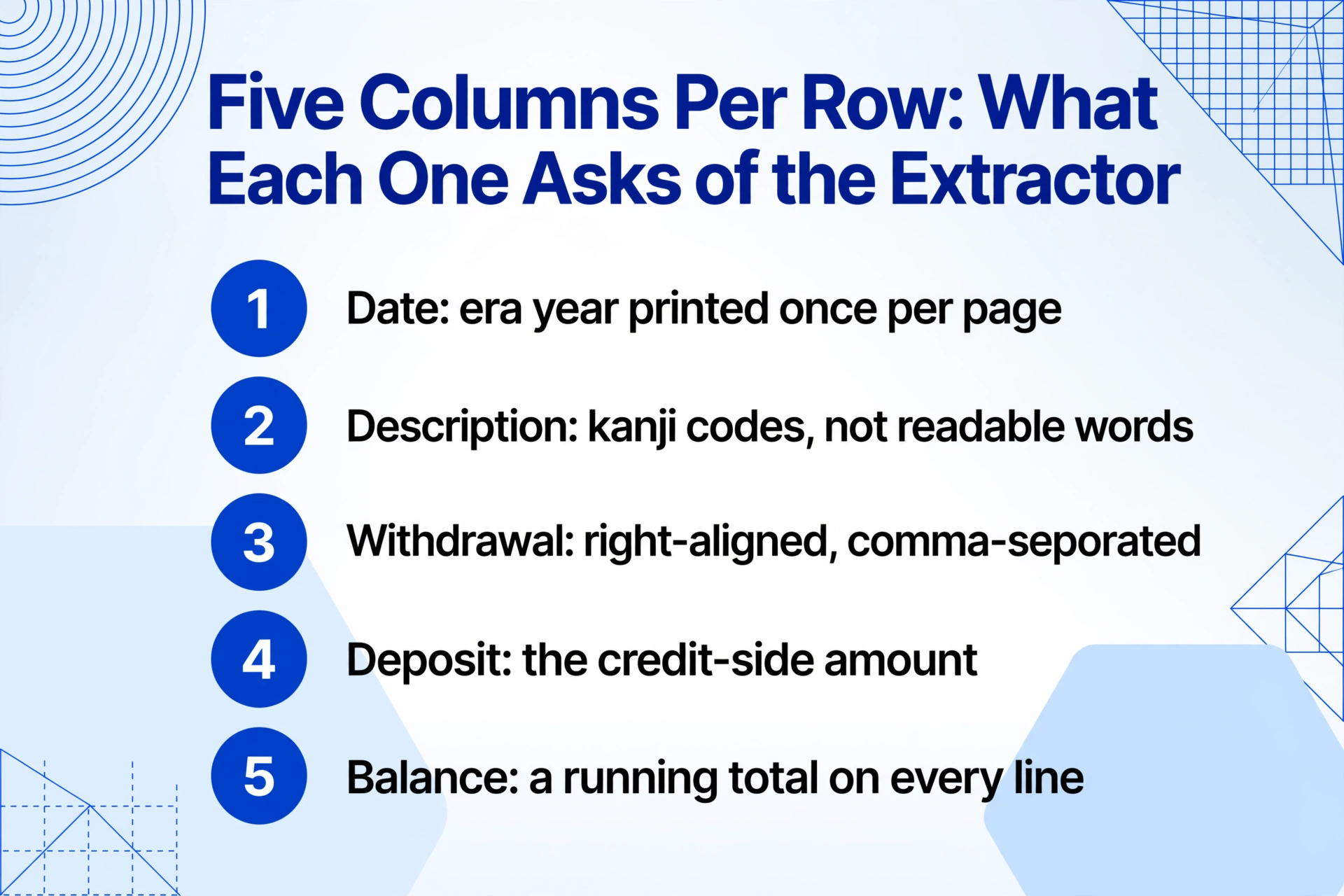
A passbook's five-column layout is fixed — date, description, withdrawal, deposit, balance — but the content inside those columns reflects decades of banking convention, machine-printing technology, and regulatory history that no generic OCR system was built to understand.
The Five Standard Columns
- 月日 (Date) — month and day, typically in Japanese era format (令和6年 or R6). The year header appears once per page. Converting era dates to Gregorian requires knowing which era you are in — and not mistaking 平成30年 (2018) for 令和6年 (2024).
- 摘要 (Description) — a compact code indicating transaction type: 振込 (bank transfer), ATM, 給与 (salary deposit), 利息 (interest), 引落 (direct debit), 手数料 (fee). These codes are the key to transaction categorization but are printed in tight monospace Japanese characters that standard OCR frequently merges or misreads.
Amount and Balance Columns
- お支払金額 (Withdrawal) — the amount debited from the account. Printed with right-aligned commas (e.g. 30,000). OCR reading of comma-separated numbers in narrow columns is a known failure point — a dropped comma turns ¥30,000 into ¥3,000.
- お預り金額 (Deposit) — the amount credited. A single transaction has an entry in either this column or the withdrawal column, never both. This mutual exclusivity is the basis for balance verification.
- 差引残高 (Balance) — the running balance after the transaction. Printed after every line. This column enables a self-verification check: previous balance + deposit − withdrawal must equal current balance. A single misread creates a cascade of errors — every subsequent row's balance will be off, a problem known as balance drift (残高ずれ).
The passbook's physical format is governed by the Japanese Bankers Association (全国銀行協会), which sets standards for interbank data exchange, ATM interoperability, and the magnetic stripe (磁気ストライプ) on the back cover that stores account information. The ATM reads this stripe to identify the account, then prints transaction lines using a dot-matrix or thermal printer directly onto the passbook page — meaning the passbook you hold is a printer output, not a typeset document. This distinction matters for extraction: the print quality varies by ATM model, ink ribbon age, and print head cleanliness. Two passbooks from the same bank, printed at different ATMs six months apart, can have noticeably different character darkness and alignment.
The core extraction principle: You define five output columns — "Date," "Description," "Withdrawal," "Deposit," "Balance" — and the AI locates each value on each page by understanding what the data represents semantically, not by matching pixel coordinates on a template. The same column definition works across passbooks from MUFG, SMBC, Mizuho, Japan Post Bank (ゆうちょ銀行), and regional shinkin banks (信用金庫) because the AI reads field meaning — a date is a date whether it is printed as R6.7.15 on one passbook or 2024-07-15 on another.
Why Passing the Passbook to a Budgeting App Isn't Enough
Japan has three dominant personal finance apps that between them cover the vast majority of digitally-literate households: MoneyForward ME (マネーフォワード ME, 2,451+ financial service connections), Zaim (1,300+ connections, 12 million downloads), and Moneytree (2,387+ connections). All three connect to Japanese bank accounts via API and automatically pull transaction data into categorized spending reports. For ongoing, forward-looking expense tracking, they work well — the banking API feeds them new transactions daily, and the user never touches a paper passbook.
The gap is what happened before you enrolled. A bank API connection pulls data from the date you authorise it — typically, the last 90 days to one year, depending on the bank. Transactions from 2022, 2021, 2019 — years that exist only as printed pages in a physical passbook — do not appear in the app. For a freelancer filing a blue return (青色申告) who needs to account for all business-related transactions across the calendar year, the app covers the present but leaves the past on paper. Similarly, for a small business owner who receives a physical passbook from the bank and shares it with a tax accountant (税理士) for monthly bookkeeping — the accountant is not logging into the owner's MoneyForward account. They are working from the passbook, or from scans of it.
The apps solve for daily spending visibility. They do not solve for the once-a-year moment when five years of paper transactions need to become one spreadsheet — which is exactly the moment that drives the search for passbook extraction.
There is a third path worth understanding: some banks now offer digital passbooks (デジタル通帳), eliminating the physical booklet entirely in favor of web-based transaction views and downloadable CSV exports. The Japanese Bankers Association has been promoting digital passbooks as part of broader banking digitization. However, adoption is uneven — major banks like MUFG and SMBC offer digital passbooks for new accounts, but many regional banks and credit unions (信用金庫) still issue physical passbooks by default. And even for accounts with digital passbook access, the export format and date range often differ from what an accounting package expects. The physical passbook, for all its inconvenience, remains the lowest-common-denominator format: every bank prints one, every transaction appears on it, and it covers the full history of the account.
This last property — coverage of the full account history — is why passbook extraction is fundamentally different from bank statement extraction in other countries. A UK bank statement or a US monthly statement is a summary of a specific period. A Japanese passbook is a ledger — a running, cumulative record from the first printed page to the last. In the extraction workflow that follows, that continuity is both the document's greatest strength and the source of its most common error mode.
Setting Up Your Passbook Extraction Workflow
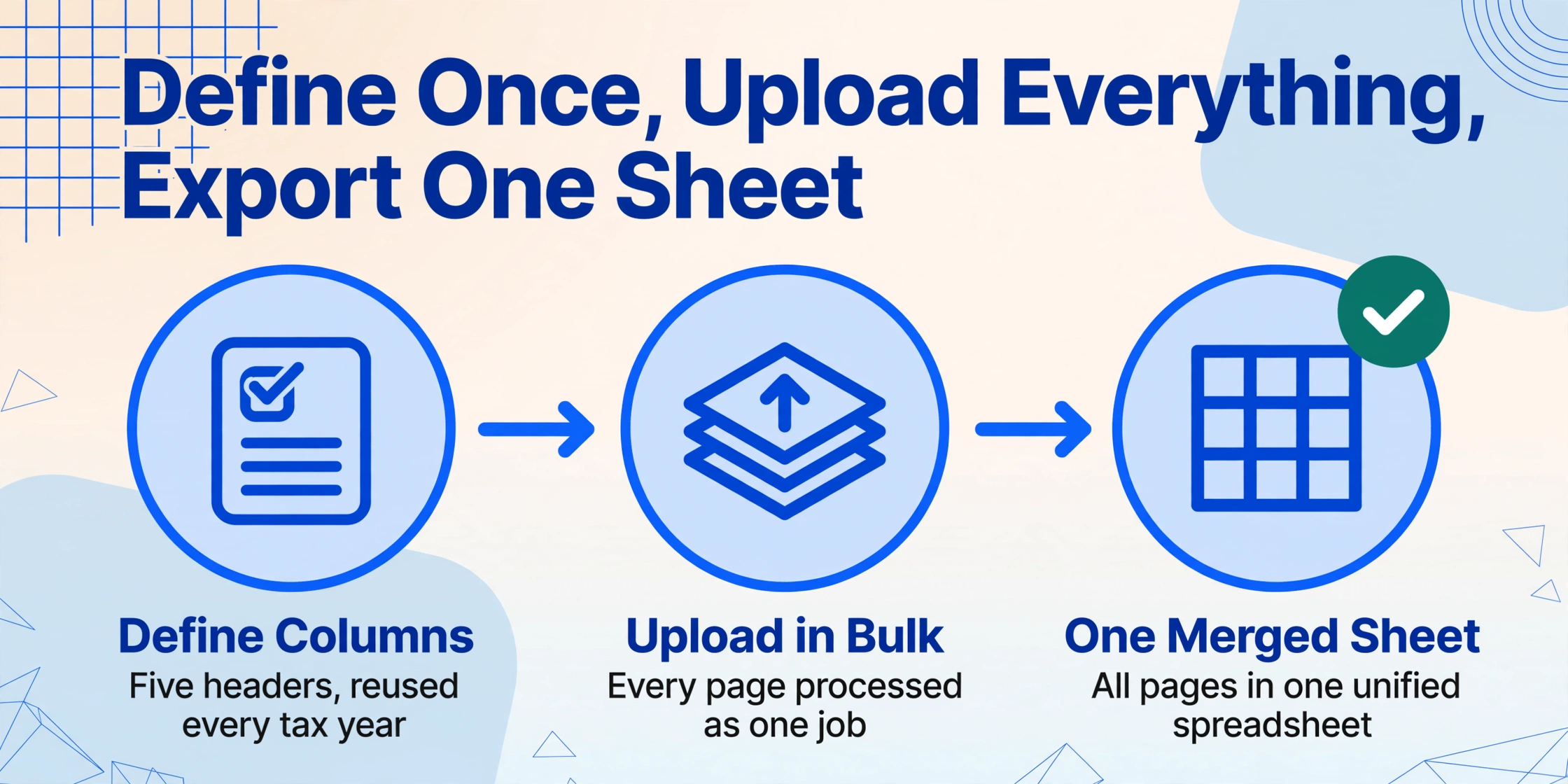
The workflow that replaces retyping passbook data has three steps. The first — defining your columns — is done once and reused across every passbook, every bank, and every tax year.
Define your five output columns — once, for every bank
Type the field names exactly as you want them as column headers in your spreadsheet. For passbook extraction, the standard set is: Date, Description (摘要), Withdrawal (お支払金額), Deposit (お預り金額), Balance (差引残高). This is Custom Column Extraction: you define the output schema, and the AI maps each passbook's printed fields to your columns by semantic meaning. The same column names work across MUFG's vertical layout, SMBC's two-line-per-transaction format, and Japan Post Bank's compact printing style because the AI reads field meaning, not field position. For accounting purposes, add a Category column as a Computed Column — for instance, Category (if Description contains "給与" then "Salary Income"; if contains "振込" and amount > 50000 then "Business Income"; else "Transfer") — which the AI evaluates during extraction so your output arrives pre-categorized.
Upload all passbook pages in one batch
Scan or photograph every page of every passbook — including the front cover showing the account number and the back cover with the magnetic stripe — and drop all the images into one upload. Batch processing handles them as a single job: each page is processed independently with your column schema applied, and all results are merged into one unified spreadsheet. A three-year passbook with roughly 280 transactions across 30 pages (typical for an account with moderate activity) processes in one batch. Pages can be scans from a document scanner, photos taken with a smartphone, or PDF exports from internet banking that include passbook-style transaction listings.
Export to Excel and begin your accounting workflow
Download the merged spreadsheet as an Excel file. You now have one row per transaction, with every field in its own column. The spreadsheet is immediately importable into Yayoi (弥生会計), freee, MoneyForward Cloud Accounting, or any other Japanese accounting software that accepts CSV imports — the next section covers that pipeline. More importantly, the running balance column gives you a built-in audit trail: sort by date descending and scan the balance column. Any row where the balance does not equal the previous row's balance plus deposit minus withdrawal is flagged — the extraction caught a misread, and you fix one cell rather than hunting through 280 lines.
The same column schema works next year, and for passbooks from different banks, and for accounts that have been closed for years but whose records you are required to retain. The passbook format — defined by the Japanese Bankers Association's printing conventions, not by an individual bank's design choice — will not change.
Files are processed securely and not stored.
Handling Japanese Era Dates and Description Codes
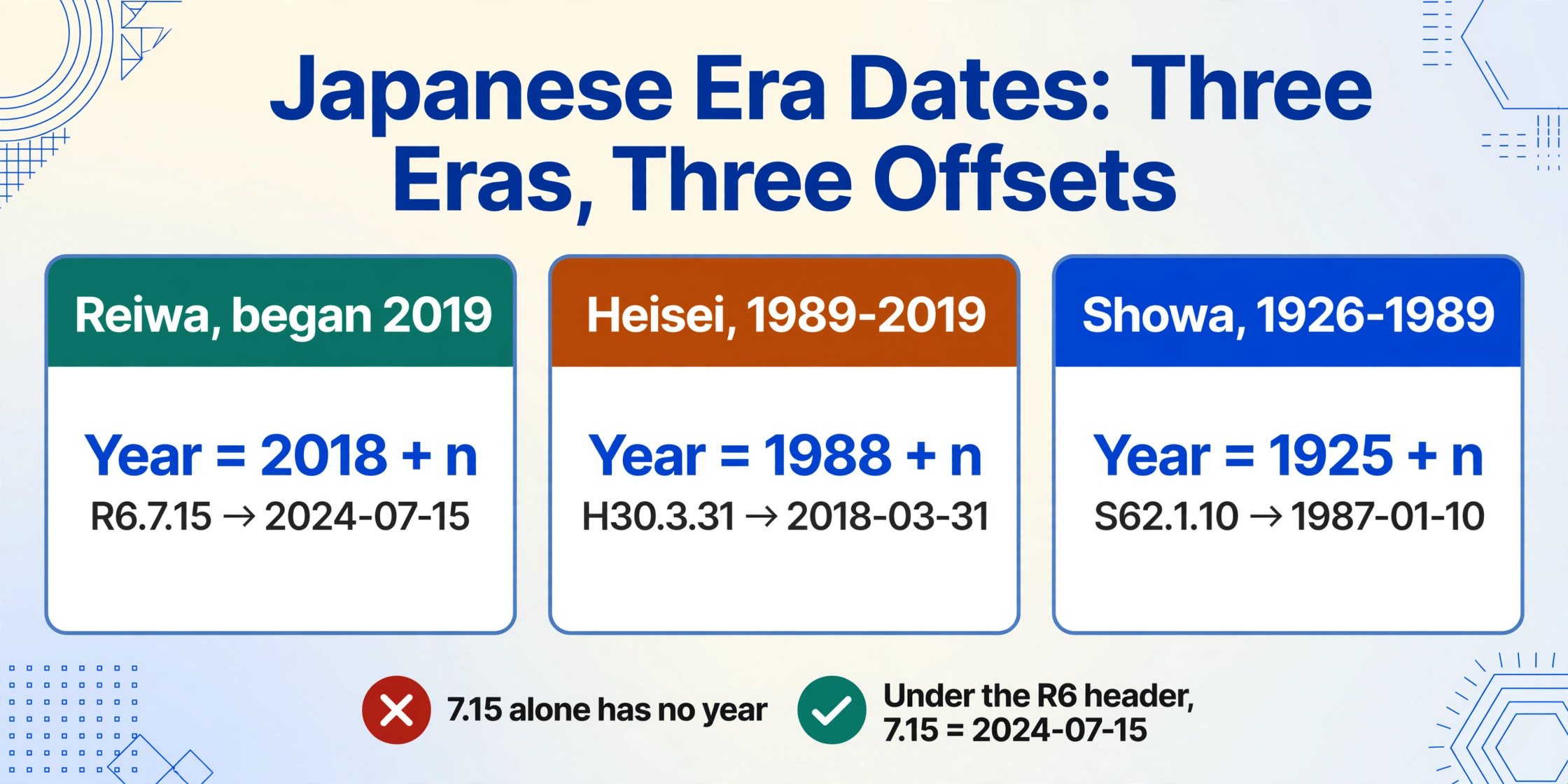
Two aspects of passbook data make extraction specifically harder in the Japanese context than for bank documents in any other market. Neither is a general AI limitation — both are artifacts of how Japanese banking developed.
Japanese Era Dates (和暦)
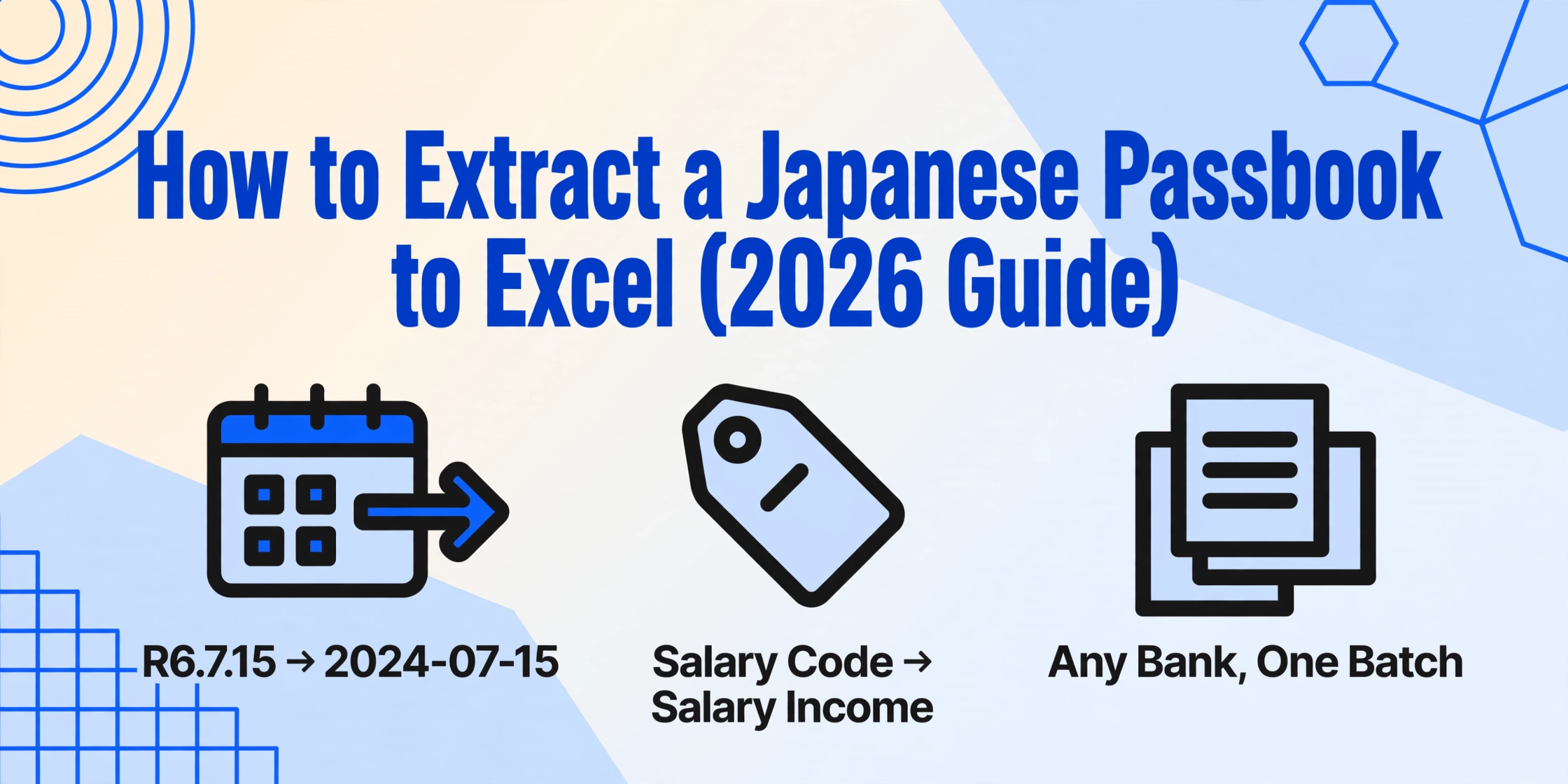
Passbook transaction dates are printed using the Japanese imperial era calendar: 令和 (Reiwa, began 2019), 平成 (Heisei, 1989–2019), or 昭和 (Showa, 1926–1989), often abbreviated to R, H, or S followed by the year number within that era. A date like R6.7.15 means July 15, 2024 (Reiwa year 6). H30.3.31 means March 31, 2018 (Heisei year 30). S62.1.10 means January 10, 1987 (Showa year 62). Conversion to Gregorian (西暦) requires knowing each era's start year — Reiwa = 2018 + n, Heisei = 1988 + n, Showa = 1925 + n — and the conversion must handle the page boundary where a new year begins mid-page. Many passbooks print the era year number once at the top of the page and then only the month and day for subsequent lines. A raw OCR output that reads "7.15" as a date without context produces a value that cannot be placed in a timeline — the year header a few millimeters above it determines whether it is July 2023 or July 2024.
The solution is a two-pass extraction strategy. First pass: read the year header from the page and determine the era. Second pass: parse each transaction date, applying the year context from the header. When the month flips from 12 to 1 at the year boundary, the era year increments by one. This is exactly the kind of structured reasoning that template-based OCR cannot do — it reads individual cells, not the relationship between a header and its dependent rows — but that AI-powered extraction handles by understanding the document as a whole rather than as a grid of isolated text boxes.
Description Codes (摘要)
The description column on a passbook uses abbreviated codes that are instantly legible to a Japanese reader but opaque to a generic text parser. Common entries include: 振込 (bank transfer — could be a client payment or a personal transfer), ATM (ATM withdrawal or deposit — no indication which), 給与 (salary deposit — the most significant income line for an individual), 利息 (interest payment — typically small amounts, tax-relevant), 引落 (direct debit — rent, utilities, insurance), 手数料 (bank fee — usually ¥110–¥550, deductible for business accounts), and カード (card transaction — could be a debit card payment or a credit card settlement).
A passbook row that says "振込 50,000" could be a freelance payment from a client or a friend repaying dinner money. The passbook does not distinguish — the accounting software's category assignment does. Extraction needs to capture the code faithfully, and the categorization logic lives downstream.
Some passbooks also contain handwritten annotations in the margins — a note like 家賃 (rent) or 仕入 (inventory purchase) written in ballpoint next to a printed transaction. These annotations are critical for accounting categorization but present a further challenge: they are written in varying handwriting quality across different-colored ink, sometimes crossing the printed grid lines. If your extraction tool supports handwritten text recognition — as vision-model-powered extraction does — these marginal notes become part of the extracted data rather than a separate manual lookup step.
Moving Data Into Yayoi, freee, or MoneyForward
The extracted Excel spreadsheet is not the destination — it is the bridge between your passbook and your accounting software. Japan's accounting software market is dominated by three platforms that between them cover the vast majority of sole proprietors and small businesses:
Yayoi Accounting (弥生会計). Market leader, particularly among tax accountants. Supports CSV import of transaction data via the Smart Transaction Import (スマート取引取込) function: open the journal, select import, choose the CSV, and map columns to Yayoi's account fields. Yayoi expects date in yyyy-mm-dd format — so the extraction step's era-to-Gregorian conversion must happen before export, not after.
freee Accounting (freee会計). Cloud-native with strong API integration. Import passbook transaction data either through the manual CSV upload path (choose "ご自身で作成したCSV" format and map the columns) or through the bank API for ongoing transactions. For historical passbook data that predates API access, the CSV import is the only route — and freee's automatic categorization rules (自動登録ルール) can be configured to recognise passbook description codes and assign the correct account headings.
MoneyForward Cloud Accounting (マネーフォワード クラウド会計). Import via the "他社ソフトデータの移行" (data migration) function, selecting the Yayoi-compatible format as the intermediate CSV format. MoneyForward's strength is the unified dashboard that combines passbook data, credit card statements, and receipt scans — the extracted passbook rows become part of a complete financial picture rather than an isolated spreadsheet.
Other supported accounting platforms that accept the same CSV import include MJS Accounting (会計大将), TKC (FX2/MX series), OBC (勘定奉行), Sorimachi (会計王), EPSON (財務応援R4), and PCA (PCA会計). The extraction output — a clean five-column CSV — works with all of them because the passbook format is standardized across banks. The date format, amount columns, and description field are the same regardless of which accounting package is receiving them.
A Computed Column worth adding before import: Define a verification column — "Balance Check (previous Balance + Deposit − Withdrawal = current Balance? 'OK' : 'REVIEW')" — and run it during extraction. A single REVIEW flag in a sea of OKs tells you exactly which row needs a second look. Without this, the error surfaces only after the data is in the accounting software and the trial balance does not match the bank statement — a much harder problem to trace back.
This verification step is where the passbook's ledger-like format becomes an advantage over other bank documents. A UK bank statement or an Australian payment summary does not contain a running balance — you verify each row against an external source. A passbook carries its own verification inside itself. The math either checks out on every line, or the extraction misread something. There is no middle ground, and the Computation Column surfaces the discrepancy before it enters your books.
Unlike payroll documents from other countries — where the same extraction logic applies despite different tax codes, as seen in the Australian PAYG workflow, UK P60 processing, or Canadian T4 slip extraction — the passbook's self-verifying structure means reconciliation happens at extraction time, not as a separate accounting step. You are done with data quality before the CSV leaves the extraction tool.
Frequently Asked Questions
Can AI extraction handle passbooks from different banks in the same batch?
Yes — and this is the strongest argument for semantic extraction over template-based OCR. A passbook from MUFG prints transactions with single-line entry, date on the left. A passbook from Japan Post Bank (ゆうちょ銀行) often uses a two-line format where the description wraps. A regional credit union (信用金庫) passbook may print in a slightly different font size. Because semantic extraction reads what each value means — not where it sits — all three formats can be uploaded in the same batch and will produce a unified spreadsheet with consistent columns. A template-based tool configured for MUFG's layout will fail on Japan Post Bank's, and reconfigured for one bank will lose the other.
What if the passbook has handwritten notes in the margins?
Vision-model-powered extraction can read handwritten annotations alongside printed text — so a margin note like 家賃 (rent) or 仕入 (inventory) written next to a transaction line is captured as additional context. However, handwriting quality varies significantly: a ballpoint annotation in clear kanji is typically readable; a faded pencil note written at an angle and crossing the printed grid lines is less reliable. For passbooks where handwritten notes carry critical accounting information, the extracted spreadsheet should be reviewed with the physical passbook open — but the AI handles the majority of legible annotations, reducing the review to exception-handling rather than line-by-line verification.
How does era date (和暦) conversion work, and what if the year header is on a different page?
The AI reads the era year header from each page — typically printed at the top as 令和6年 or R6 — and applies it to all transactions on that page. For pages without a year header (continuation pages), the AI carries forward the era context from the previous page. When a year boundary occurs mid-page (December 31 → January 1), the era year increments. For passbooks spanning multiple eras — a 2018–2024 passbook that crosses from 平成30 to 令和6 — the AI detects the era change at the page where the header switches. The extracted output uses Gregorian dates (yyyy-mm-dd) for direct compatibility with accounting software.
Can I extract only a specific date range from a multi-year passbook?
Yes. You can either upload only the pages covering your target date range, or upload the entire passbook and filter the output by date range in Excel after extraction. The latter is often faster in practice: scan the whole passbook once, get all transactions in one spreadsheet, then filter by date. For a three-year passbook with roughly 300 transactions, extracting everything and filtering in Excel takes less time than identifying and scanning only the pages for a specific 12-month window — especially since the date headers are not always visible when flipping through pages quickly.
What happens if the running balance verification fails on a row?
A balance verification failure — where previous balance + deposit − withdrawal does not equal current balance — is usually caused by one of three things: (1) a misread comma in the amount (¥30,000 read as ¥3,000), (2) a deposit amount incorrectly placed in the withdrawal column or vice versa (the classic OCR 列ずれ problem), or (3) a skipped transaction row (the OCR missed a line entirely). If you use a Computed Column to flag mismatches during extraction, you can fix the specific rows before importing into your accounting software. Without the verification step, a single misread on row 47 of 300 makes every subsequent balance wrong — and the error is invisible until a trial balance fails to reconcile, at which point you are hunting backward through 253 rows to find the source.
Do I still need to keep the physical passbook after extraction?
Under Japan's Electronic Bookkeeping Act (電子帳簿保存法), scanned copies of financial documents can serve as legally admissible records if they meet specific resolution and timestamp requirements (the 2022 amendment relaxed the requirements significantly). However, the physical passbook remains the definitive original — and the National Tax Agency (国税庁) may request originals during a tax audit. Best practice for blue return filers: extract the passbook to Excel for your accounting workflow, but retain the physical passbook for the statutory seven-year document retention period. The extraction replaces the manual data entry step — it does not replace the legal record.
Making Tax Season Routine Instead of a Data-Entry Marathon
The Japanese tax filing deadline — March 15 for individual income tax (所得税の確定申告) — does not move. Every year, sole proprietors, freelancers, and small business owners across Japan face the same sequence: gather passbooks, spread them across a desk, and begin transcribing row after row of transactions into a spreadsheet or directly into accounting software. The passbook's five-column format is elegantly simple, which makes the manual process feel straightforward — right up until page 27, when a single number entered with the wrong comma position silently corrupts the remainder of the balance column and the reconciliation step that should take five minutes takes two hours.
The extraction workflow described here turns that sequence inside out. Instead of spending January and February retyping, you spend an afternoon scanning passbook pages, a few minutes defining columns, and the rest of the pre-deadline window doing what the 青色申告 deduction was designed to reward: analyzing your business's financial performance, not reconstructing it from paper.
The same column schema works next year. The passbook format — defined by the Japanese Bankers Association, printed by bank ATMs, standardised across every financial institution in the country — will not change. What changes each year is the volume of pages and the proximity of the March 15 deadline. Removing the retyping step means the pressure lands on verification — and verification, for a document that carries its own mathematical audit trail inside every row, is the part worth spending time on.