How to Extract Japanese Purchase Order Data to Excel
for Supplier Invoice Reconciliation
In Japanese B2B procurement, the document trail is prescribed by law and refined by decades of industry convention: the quotation (見積書, mitsumorisho) leads to the purchase order (発注書, hatchūsho), which begets the delivery note (納品書, nōhinsho), which triggers the invoice (請求書, seikyūsho). Each document carries a subset of overlapping data — PO number, line items, quantities, unit prices, tax classification — and the procurement manager's job, month after month, is to verify that what was ordered matches what was delivered matches what is being billed. The Japan Fair Trade Commission's Subcontract Act (下請代金支払遅延等防止法) mandates twelve specific fields on every PO issued to subcontractors, including delivery location (納入場所), payment terms (支払条件) with settlement day (締日), and inspection completion date. When fifty of these arrive on your desk as fax printouts and email PDFs from thirty different suppliers, and each must be matched against the corresponding invoice before payment can be approved, the bottleneck is not the approval decision — it is getting the PO data into a format that a lookup formula can see.
Key Takeaways
- Fifty supplier POs arrive every month, every one must match an invoice, and the standard procurement workflow starts with someone retyping data into a spreadsheet.
- The PO says "SUS304 M8×30 bolt," the invoice says "SUS bolt M8" — VLOOKUP returns #N/A not because the data is missing, but because three documents describe the same transaction using different words.
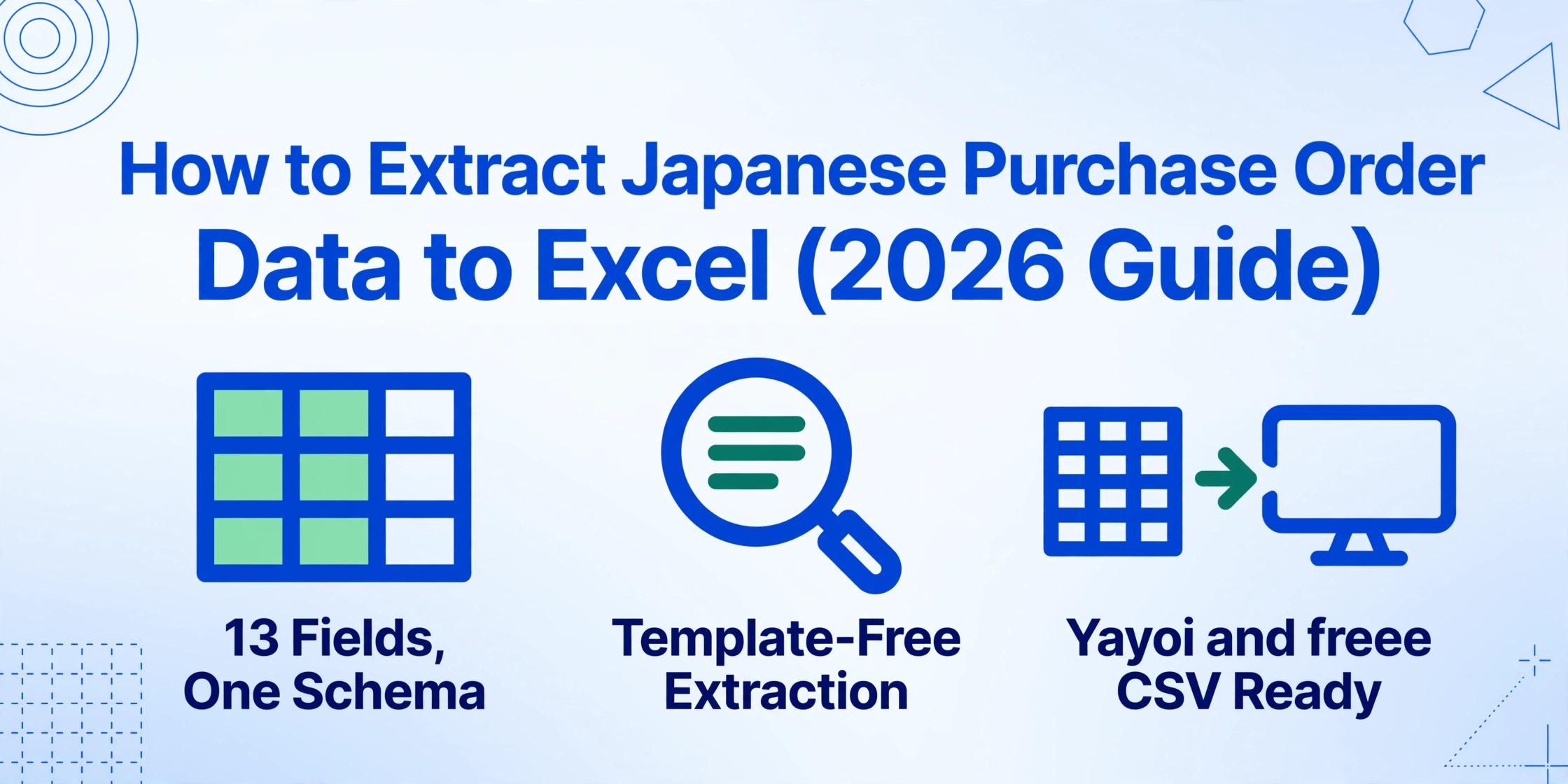
- Semantic extraction reads what each field means instead of where it's printed — your column names extract PO Number and Payment Terms identically from a Mitsubishi Chemical purchase order and a handwritten fax.
What a Japanese Purchase Order Contains — Field by Field
Japanese purchase orders follow a structure that is simultaneously more standardized and more nuanced than their Western counterparts. Standardized because the JFTC's mandatory field requirements for subcontract transactions — codified in the Subcontract Act and reinforced by the 2026 Small and Medium Enterprise Fair Transaction Act (中小受託取引適正化法, or 取適法) — mean every legally compliant PO carries the same core information. Nuanced because the content inside those fields reflects Japanese business conventions that no generic extraction tool was trained to parse.
The JFTC specifies that a PO (formally a 4条書面 under the 2026 Act) must contain at minimum: both parties' names, issuance date, description of deliverables, delivery date, delivery location, inspection completion date, payment amount, payment due date, and payment method. In practice, most Japanese POs include additional fields that matter for the matching workflow. Here is the full structure a procurement manager actually works with:
Header & Identification
- 発注番号 (PO Number) — the unique identifier linking the PO to its quotation, delivery note, and invoice. Without it, three-way matching is guesswork. Most Japanese companies use a format like PO-2026-001. This is the primary key for every downstream lookup.
- 発注日 (Order Date) — the date of issuance. Used as the starting point for calculating payment due dates when terms are expressed relative to delivery (納品後60日以内).
- 発注元 (Buyer) — company name, address, contact information. Must be the official registered name under the Act.
- 発注先 (Supplier) — the vendor receiving the order. Company name as per registration.
Line Items & Pricing
- 品名 (Item Name) — product or service description. Often includes part numbers (品番) or specification codes that a supplier abbreviates differently from how they appear on the invoice — a known source of VLOOKUP failures.
- 数量 (Quantity) — with unit (単位): 個 (pieces), 式 (lot/set), kg, m, hour (時間). Unit mismatches between PO and invoice — PO says 式, invoice says 個 — are a common reconciliation pain.
- 単価 (Unit Price) — typically tax-exclusive (税抜). The invoice may show tax-inclusive prices; if the comparison is done without normalizing for tax treatment, every line looks mismatched.
- 金額 (Amount) — line total = quantity × unit price. Usually shown tax-exclusive.
Logistics & Delivery
- 納期 (Delivery Date) — the date or window by which goods must arrive. Often expressed as a specific date (2026年8月15日) or a relative window (受注後30日以内 — within 30 days of order acceptance).
- 納入場所 (Delivery Location) — where goods are delivered. In Japanese manufacturing, this can be remarkably specific: "株式会社〇〇 第二工場 第3組立ライン" (Company X, Factory 2, Assembly Line 3). This granularity is essential for production planning but produces long, variable-format strings that generic OCR frequently fragments across multiple cells.
Payment & Tax
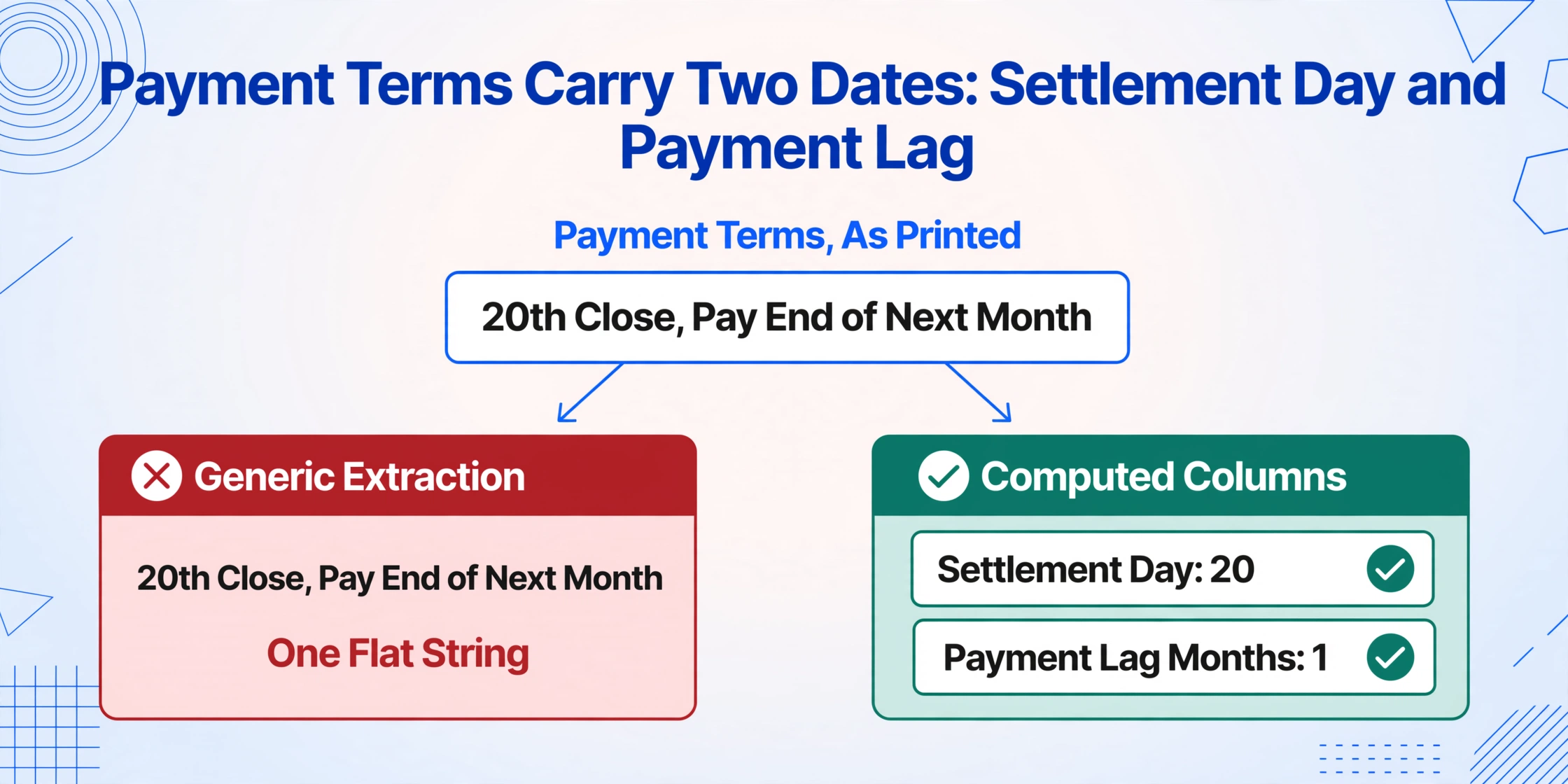
- 支払条件 (Payment Terms) — the settlement schedule. The standard expression is 締日 (settlement day) plus a payment window. "20日締翌月末払い" means the billing period closes on the 20th of the month and payment is due by the end of the following month. "月末締翌々月末払い" (end-of-month close, payment by end of month after next) is common in manufacturing. These text strings contain two calculable values — settlement day and payment lag in months — that a human reads in one glance but an unstructured extraction flattens into a single undifferentiated string.
- 消費税区分 (Consumption Tax Classification) — indicates which tax rate applies. Japan uses a dual-rate system: 10% standard rate (standard goods and services) and 8% reduced rate (food, non-alcoholic beverages, subscription newspapers). Some items may be tax-exempt (非課税) — export transactions, certain medical and educational services. A PO with mixed-rate line items creates a matching problem: the invoice tax total cannot be verified against the PO unless each line's tax classification is preserved through extraction.
The JFTC's sample PO template shows the complete set of mandatory fields as they appear on a compliant document. The takeaway for extraction: a Japanese PO is not a free-form business letter. It is a structured document with predictable fields — but those fields contain content governed by conventions that are invisible to a tool that was not designed for the Japanese procurement context. The extraction task is not "read this document" — it is "read this document and understand what settlement day means for payment calculation."
Why the 発注書-納品書-請求書 Matching Problem Resists Simple Automation
The three-way matching workflow — verify that the purchase order, delivery note, and invoice agree on quantity, price, and terms — is the control point that prevents overpayment, duplicate payment, and fraud in Japanese procurement. It is also where the manual data entry bottleneck concentrates. Here is why it resists the obvious "just VLOOKUP the OCR output" solution that most teams try first.
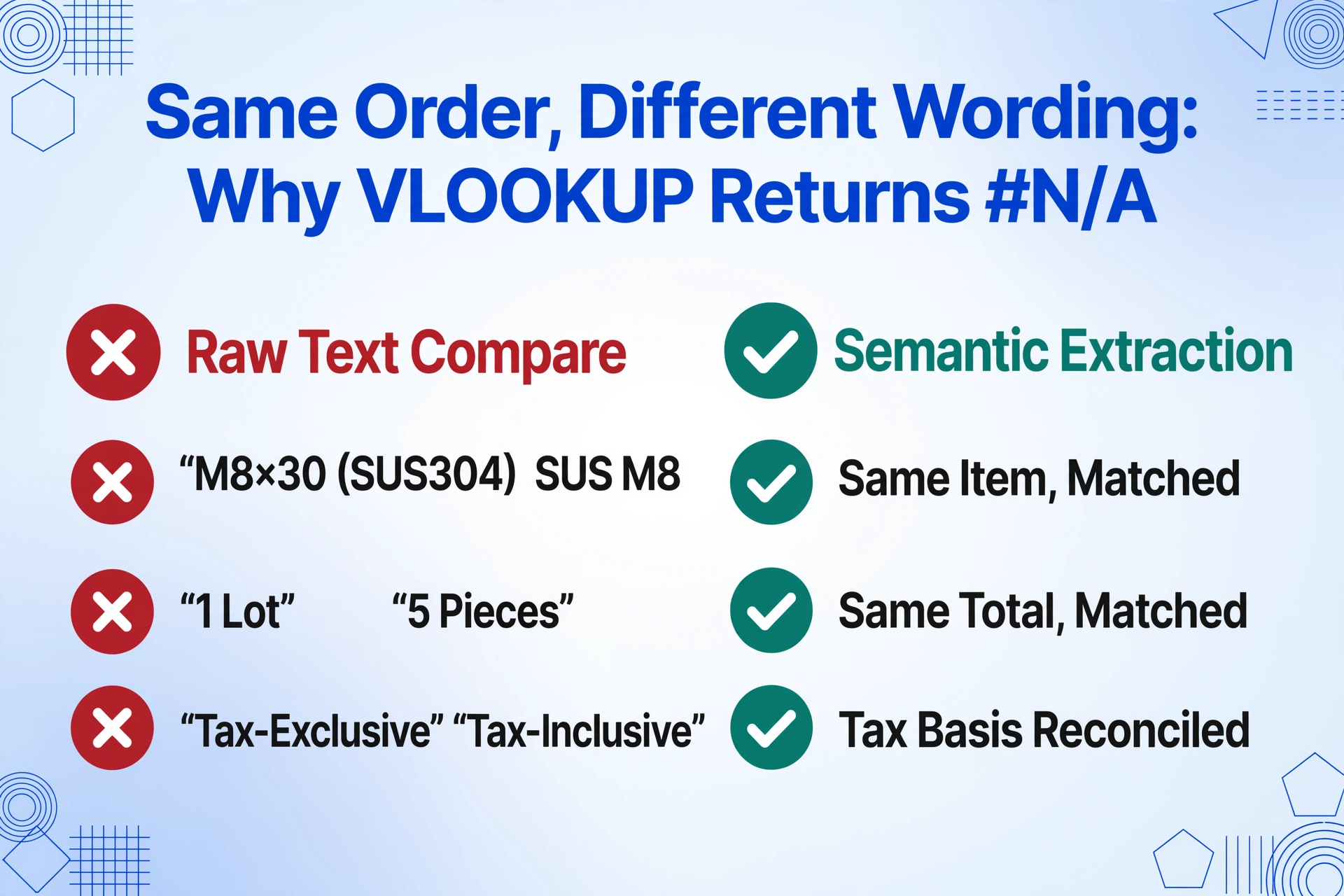
The core difficulty is that the three documents describe the same transaction using different text representations. A supplier's PO might list an item as "ステンレスボルト M8×30 (SUS304)" while the corresponding invoice abbreviates it to "SUSボルト M8" — search for one against the other and Excel returns #N/A. A PO lists quantity as "1式" (one lot), but the invoice itemizes the lot into 5 pieces (個) for the same total — the quantities don't match numerically but they represent the same order. A PO shows unit prices tax-exclusive (税抜), the invoice shows them tax-inclusive (税込), and a naive comparison concludes the prices have changed.
The structural issue: Japanese procurement documents share data but use different representations of that data. A VLOOKUP or INDEX-MATCH on raw OCR text fails not because the data is missing — but because the representations diverge at the exact points where matching is most critical: item names, quantities, and unit price tax treatment.
This is where an extraction approach that reads document semantics rather than matching templates changes the equation. If your extraction step outputs a PO with structured fields — PO number as a column, item name as a column, quantity and unit separated into their own columns, unit price normalized as tax-exclusive — then the matching step against an identically structured invoice extract becomes a straightforward column comparison. The heavy lifting shifts from the spreadsheet (complex multi-condition VLOOKUP formulas that break when suppliers change their formatting) to the extraction step (where the AI resolves the representations into a single schema).
The Subcontract Act also imposes a time constraint that makes extraction speed consequential: payment must be made within 60 days of receiving the goods or services (納品日から60日以内). If extraction and matching take a week out of that 60-day window, the procurement team has 53 days for everything else — approval routing, discrepancy resolution, payment processing. Shrinking the extraction step from days to seconds directly expands the usable portion of the compliance window.
How to Extract PO Data to Excel — Step by Step
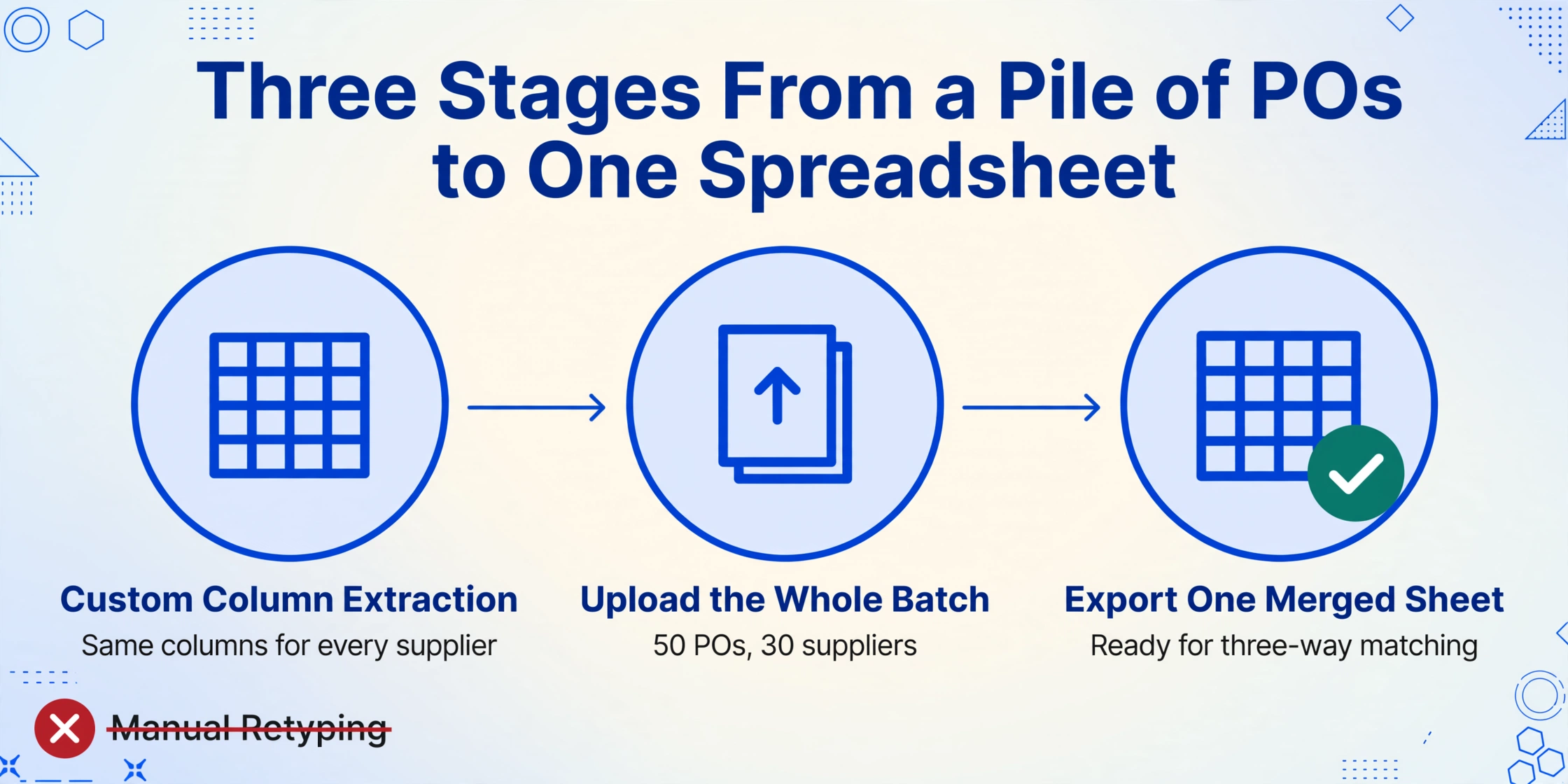
The workflow that replaces manual PO-to-Excel transcription has three stages. The first stage — defining what you want to extract — is done once and applies to every supplier, every PO format, and every subsequent batch.
Define your extraction columns once — reuse across every supplier
Type the field names you want as column headers in your output spreadsheet. For Japanese PO extraction, the practical set is: PO Number (発注番号), Order Date (発注日), Supplier (発注先), Item Name (品名), Quantity (数量), Unit (単位), Unit Price (単価), Line Amount (金額), Delivery Date (納期), Delivery Location (納入場所), Payment Terms (支払条件), Consumption Tax Classification (消費税区分), Total Amount (合計金額). This uses Custom Column Extraction: you define the output schema and the AI locates each field by semantic meaning — not by where it sits on a particular supplier's PO template. The same column names work across POs from trading companies (商社), manufacturers (メーカー), and service providers because the AI reads what each piece of data means, not where it is printed.
Upload all POs in one batch and let the extraction run
Drop all your supplier POs — fax printouts, email PDFs, smartphone photos of paper documents — into a single upload. Batch processing handles them as one job: each PO is processed independently with your column schema applied, and all results are merged into a single spreadsheet. Fifty POs from thirty suppliers with different formats and layouts process in one run. The AI does not need a template per supplier; it understands the document structure of a purchase order — header identification block, line-item table, footer with payment terms and totals — regardless of how a specific supplier arranges those elements.
Export to Excel and begin matching against invoices
Download the merged results as an Excel file (XLSX). You now have one row per PO line item with every field in its own column — ready for import into your accounting software or for VLOOKUP matching against your invoice ledger. The spreadsheet can be imported directly into Yayoi (弥生会計), freee, MoneyForward Cloud Accounting (マネーフォワード クラウド会計), or Kanjo Bugyo (勘定奉行) — the software that Japanese procurement and accounting teams actually use day to day. With PO data structured as clean columns, the matching step becomes a column-to-column comparison: PO Number from the extract against PO Number on the invoice ledger, Line Amount against invoiced amount, Quantity against delivered quantity. One discrepancy report instead of fifty manual checks.
The same column schema works next month, and for POs from new suppliers you onboard, and for archived POs from previous fiscal years (決算年度) that you are legally required to retain for seven years under corporate tax law (法人税法) and two years under the Subcontract Act. A supplier may change their PO format when they upgrade their ERP — the column names you defined do not care.
Files are processed securely and not stored.
The Fields Where Generic Extraction Breaks — and How to Handle Them
Three data points on a Japanese PO resist automatic extraction more than the rest — not because they are difficult to read, but because they contain embedded business logic that extraction must preserve rather than flatten.
Payment Terms (支払条件) — from text string to settlement date
A payment term on a Japanese PO reads as a compact compound expression: "20日締翌月末払い" or "月末締翌々月末払い" or "納品後60日以内." Each encodes two pieces of information: when the billing period closes (the 締日, or settlement day) and when payment is due relative to that close. A procurement team matching POs against invoices needs both pieces of data in separate columns — settlement day to verify that the invoice billing period aligns with the PO, and payment lag to verify that the invoice due date is correct.
Generic extraction outputs these as a single undifferentiated text string. A Computed Column — a column whose value the AI calculates during extraction rather than reading directly from the document — resolves this. Define a column like Settlement Day (extract the day number from Payment Terms; if "20日締" then 20, if "月末締" then 31) and a second column like Payment Lag Months (from Payment Terms; if "翌月末払い" then 1, if "翌々月末払い" then 2). The AI parses the Japanese payment terms convention and outputs structured values that a formula can calculate against.
Consumption Tax Classification (消費税区分) — multi-rate matching
Japan's dual-rate consumption tax system means a single PO can contain line items at 10%, 8%, and tax-exempt. The invoice must break out tax by rate category to comply with the Qualified Invoice System (インボイス制度) that took effect in October 2023. If the PO extract does not preserve which lines are taxed at which rate, the invoice tax total cannot be verified against the PO — the procurement team is approving a payment without being able to confirm the tax calculation.
The fix is an Inferred Column — a column whose value the AI infers from context rather than reading from a labeled field. Define Tax Classification (options: 10% Standard, 8% Reduced, Tax-Exempt) — determine from item description. Food/beverage items → 8% Reduced. Standard goods → 10%. Export items or explicitly marked non-taxable → Tax-Exempt. The AI reads each line item description and assigns the correct tax classification during extraction, so the output spreadsheet arrives with tax categories already populated — ready for rate-grouped total verification.
Delivery Location (納入場所) — granular, variable, critical
Delivery locations on Japanese manufacturing POs are uniquely specific: "〇〇株式会社 埼玉工場 第二組立課 B棟3階" references a specific building, floor, and department within a factory complex. These strings vary in length and detail across suppliers, are frequently abbreviated (埼玉工場 → 埼工), and are a lookup key for internal production scheduling. A corrupted or truncated delivery location — "〇〇株式会社 埼玉工場 第二組立課 B棟" with the floor missing — sends materials to the wrong receiving dock. The extraction must preserve the full string as printed, including kanji characters that OCR engines without Japanese language models frequently misread (工場 vs 工塲, 棟 vs 楝).
Why this matters for matching: These three fields — payment terms, tax classification, delivery location — are not decorative. They are the fields that determine whether a matched PO-invoice pair is financially valid (tax), procedurally correct (payment timing), and operationally deliverable (location). An extraction that captures them accurately is the difference between a reconciliation workflow that takes minutes and one that still requires a human to re-check every line.
Getting Extracted PO Data Into Japanese Accounting Software
The output of an extraction job is a spreadsheet. The destination is the accounting or procurement software where the matching happens. Here is how the pipeline connects to the tools that Japanese businesses actually run on.
Yayoi (弥生会計 / 弥生販売) — the market-share leader in Japanese SME accounting. Yayoi's desktop and cloud products accept CSV imports for journal entries and purchase ledger data. The column headers from your extraction become the field mapping for the import: PO Number → 伝票番号, Date → 日付, Supplier → 仕入先, Amount → 金額. Yayoi Sales (弥生販売), the companion product for purchase and inventory management, imports purchase order data directly into its purchasing module — a dedicated pipeline that reduces the extraction-to-import step to a file upload.
freee — the cloud accounting platform used by over 70,000 Japanese SMBs. freee's API and CSV import support purchase transaction registration with automatic journal entry generation (自動仕訳). PO data extracted with tax classification per line item feeds directly into freee's consumption tax reporting, which supports both the 10% standard rate and 8% reduced rate calculations required for Qualified Invoice compliance.
MoneyForward Cloud Accounting (マネーフォワード クラウド会計) — freee's primary competitor, with the largest number of financial institution API connections in Japan (2,451+). MoneyForward's purchase management module accepts CSV imports; extracted PO data with supplier names and amounts populates the purchase ledger directly. The platform's automatic bank reconciliation matches extracted payment records against bank feeds — closing the loop from PO extraction through payment verification.
Kanjo Bugyo (勘定奉行) — OBC's accounting suite, dominant in mid-size Japanese companies (annual revenue ¥500M–5B). Kanjo Bugyo's purchasing module supports batch import of PO data, with a particular strength in multi-department cost allocation (部門別原価管理) — if your POs carry department codes or cost centers, those fields flow through to segmented P&L reporting automatically.
The common thread: every major Japanese accounting platform accepts structured data imports. The bottleneck has never been the import capability — it has been getting the PO data into structured form in the first place. Once you have clean Excel columns, the import is a file upload or a copy-paste.
FAQ
Can it read handwritten purchase orders faxed from suppliers?
Yes. Japanese suppliers, particularly smaller manufacturers and trading companies, frequently fax handwritten or partially handwritten POs — items and quantities written in ballpoint pen, stamped with the company seal (社判). The AI model reads handwritten Japanese characters, including abbreviated kanji common in procurement shorthand (㈱ for 株式会社, No. for 番号). For heavily degraded faxes — paper grain, skew, ink bleed-through — the output may require spot-checking for difficult characters. Scanning at 300 dpi or higher improves accuracy for fax-origin documents.
What if a single purchase order spans multiple pages?
Upload all pages of the PO in one batch. The extraction engine treats multiple pages from the same file as one continuous document — the header fields (PO number, supplier, date) are extracted once, and line items from all pages are collected into the same row set. For multi-page fax POs where the continuation page has no header — just a line-item table continuing from the previous page — the extraction preserves the continuity by associating all items with the PO number identified on the first page.
Does it work if every supplier uses a different PO format?
Yes — this is the defining advantage of semantic extraction over template-based OCR. A template-based tool requires you to create and maintain a separate parsing template (defining zone coordinates or field labels) for each supplier's format. When a supplier changes their PO layout — as happens when they upgrade their ERP or redesign their stationery — the template breaks and must be rebuilt. Semantic extraction reads the document by understanding what each piece of data is, not where it appears on the page. A PO number is a PO number whether it is printed top-right on a Mitsubishi Chemical PO or bottom-center on a local subcontractor's handwritten fax.
How does extraction handle the 8% and 10% consumption tax split?
Japan's dual-rate consumption tax system requires invoices to itemize tax by rate category. For PO extraction, if you add a column that specifies the tax classification logic — for example, Tax Rate (options: 8%, 10%, Tax-Exempt) — classify based on item description — the AI evaluates each line item and assigns the correct rate during extraction. Food items and subscription newspapers get 8%; everything else gets 10%; export transactions and explicitly exempt items get Tax-Exempt. The extracted data arrives with tax rates already assigned, ready for rate-grouped total calculation that matches the invoice's tax breakdown. This is an Inferred Column — the rate is not printed on the PO but is derived from the item description by the AI during extraction.
Can the same workflow handle other Japanese procurement documents?
The column schema approach applies to the full procurement document chain. For quotations (見積書): extract supplier, item, unit price, and validity period — compare against the PO to verify that the ordered price matches the quoted price. For delivery notes (納品書): extract delivered quantities — compare against PO quantities to identify short shipments before the invoice arrives. For invoices (請求書): extract billed amounts and tax breakdown — compare against PO data to verify before payment approval. The same extraction platform handles all four document types, and the same column-naming logic applies: define the fields you want, and the AI locates them by meaning. We cover related document-level workflows in our guide to extracting Japanese bank passbook data, the Australian BAS extraction workflow, and Canadian GST/HST return data extraction.
From Paper POs to Matched Ledgers
The Japanese procurement document chain — quotation, purchase order, delivery note, invoice — was designed for a world where each document was read by a human who understood the conventions. The PO says "20日締翌月末払い" and the human knows that means payment by the end of the month following the 20th of the billing month. The invoice abbreviates the item name and the human knows it refers to the same product on the PO. The tax classification is implicit in the item description and the human mentally maps it. The friction in procurement digitization has never been that these documents lack structure — they are highly structured — but that the structure depends on shared context between human readers, and a machine that cannot access that context misreads the structure.
PO extraction that reads field meaning rather than field position closes that gap. The PO number becomes a lookup key instead of an OCR error. The payment terms become two columns — settlement day and lag — instead of one garbled string. The tax classification becomes a populated column instead of a head-scratch during invoice review. The procurement team gets back the time they now spend retyping, and the matching workflow — the control point that protects the company's cash — gets faster and more reliable.