How to Track Construction Change Orders
When Every PDF Is Different
The bottleneck in construction change order tracking isn't data entry speed. It's that no two change order PDFs use the same format. An AIA G701 from the architect, a custom form from a mechanical sub, and a hand-marked scan from the field superintendent all contain the same essential data — CO number, cost code, dollar impact, approval status — but they place every field in a different position. By the time a project manager has retyped 47 change orders into a tracking spreadsheet, three more have landed in their inbox and the running total is already stale. Here's how to close that gap.
Key Takeaways
- Template-based document extraction tools promise to automate data entry — but they need every form to match a single predefined layout, and construction change orders arrive in as many formats as you have subcontractors.
- An AIA G701 from the architect, a custom form from an electrical sub, and a hand-marked scan from the field superintendent all contain the same essential data — CO number, cost code, dollar impact — but arrange every field in a completely different position.
- ImageToTable.ai reads a CO by understanding what "Revised Contract Amount" means, not where it sits on the page — so the same extraction logic works on every format without template setup.
What Makes Change Order Data Extraction Uniquely Hard
Most document extraction problems have a shape. Invoices follow predictable layouts. Bank statements use columns. Even purchase orders, across dozens of vendors, share a recognizable anatomy: PO number, date, line items, totals.
Construction change orders have no such anatomy. This is not an exaggeration — it's a structural reality of how the industry works.
The AIA G701-2017 is the closest thing to a standard. Published by the American Institute of Architects, it defines a specific sequence of fields: project name, contract information, change order number and date, owner/architect/contractor details, a description of the change, and — critically — a five-line cost adjustment block that flows Original Contract Sum → Net Change by Previous COs → Contract Sum Prior to This CO → This CO Amount → New Contract Sum. The form is explicit about the arithmetic: the original contract sum stays constant, what accumulates is the running total of all approved changes.
But in practice, the G701 is just one form in a sea of formats. A general contractor on a $5M commercial project might see change orders arrive as: a G701 from the architect's office, a custom Excel-to-PDF form from the electrical sub, a Word document converted to PDF from the plumbing contractor, and a hand-annotated scan of a printed form from a small drywall outfit. Every one of these contains the same categories of information — CO number, description, cost breakdown, schedule impact, signatures — but no two arrange them the same way.
Worse, sub-tier change orders — the CORs subcontractors submit to the GC — look completely different from the prime contract change orders the GC then assembles and forwards to the owner. A mechanical sub's internal CO form might track labor hours, material quantities, and equipment rates in a table format that bears no resemblance to the summary-level G701 the GC produces from that data. The GC's project manager ends up as a human data bridge between formats.
Research from the AIA Contract Documents program confirms the scale of the problem: projects in the $1M to $5M range average 3.73 change orders, with a market standard range of 1 to 8. Projects above $50M average 11.29 change orders, with some exceeding 50. Each one of those is a separate PDF bearing data that someone has to re-enter into a tracking spreadsheet — and each one likely uses a different layout.
The Hidden Cost of Retyping Change Orders
The visible cost of manual data entry is easy to estimate: five minutes per CO, 47 change orders, roughly four hours of typing. Most project managers accept this as overhead and move on. If you're budgeting the exact annual cost of that manual tracking — for a business case, not just a gut check — we've run the full breakdown of what manual change order tracking costs a construction PM per project and per year.
The invisible costs are what eat margins.
First, there's the running total problem. The AIA G701 explicitly requires a cumulative calculation: New Contract Sum = Original + Sum of All Previous Changes + This Change. When a PM retypes CO #12 into a spreadsheet, the formula in the "Revised Contract Amount" column depends on whether CO #11 was entered correctly — and whether COs #1 through #10 were all priced as additive or if some were deductive change orders (yes, change orders can subtract from the contract sum). One transposed digit in the "Change Amount" column of CO #7, and every running total from #7 onward is wrong. The error compounds silently.
Second, manual entry creates a permanent lag between what's happening in the field and what the spreadsheet shows. The median approval time for a change order on a $2M-$20M project is 14.3 days, according to FMI Capital Advisory's 2024 construction technology benchmark. During that two-week window, the GC's cost tracking spreadsheet is frozen at the last manually entered number, while the actual contract exposure keeps moving. A project manager who can see their true running total in real time makes different decisions than one working from a two-week-old snapshot.
Third, the administrative cost per change order — $420 to $680 in labor alone, per FMI's benchmarking — isn't the data entry time. It's the cumulative cost of the email thread, the PDF attachment, the re-typed spreadsheet entry, the formula check, the version-control confusion when the sub sends an updated COR, and the reconciliation meeting where someone has to explain why the spreadsheet total doesn't match the most recent pay application. The typing is the smallest piece of the cost — but it's the piece that sets every downstream step in motion.
Why Template-Based OCR Fails on Construction Change Orders
Template-based OCR tools work by memorizing coordinates. You draw a rectangle around "Invoice Number" on a sample document, and the tool remembers that invoice numbers appear at position (x=450, y=120) on every subsequent page. When the next document in the batch places the same field at (x=320, y=95) — because it came from a different vendor — the tool either misses it entirely or captures the wrong data.
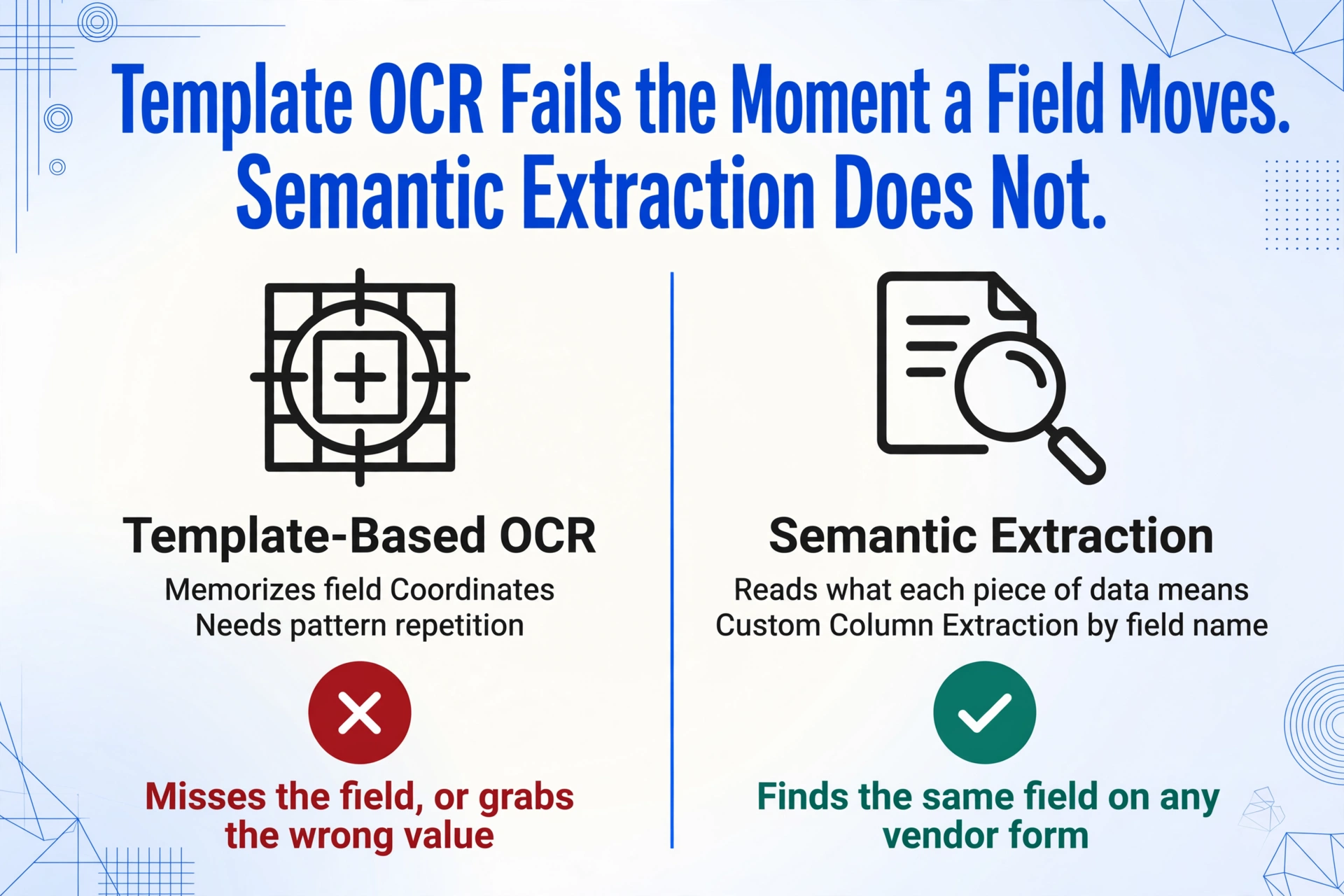
This approach collapses instantly on construction change orders for one reason: there is no template to memorize. Every GC, every subcontractor, every owner's representative uses a different form. Even within a single project, a change order from the electrical contractor won't match a change order from the HVAC contractor won't match the consolidated G701 the architect issued. Template OCR needs pattern repetition to function, and construction change orders are defined by pattern absence.
The alternative is semantic extraction: instead of looking for a field at a specific position, the AI reads the document and understands what each piece of data means. "Revised Contract Amount" is recognized not because it sits in cell B14 of a known template, but because the model understands the relationship between the words "new contract sum," the surrounding numeric values, and the overall structure of a change order document. This is what ImageToTable.ai's Custom Column Extraction does: you type the field names you want — "CO Number," "Cost Code," "Change Amount," "Approval Status" — and the AI locates each value anywhere on the page by understanding what it means, not where it sits. Whether the dollar amount appears in the upper-right corner of a G701, in the middle of a custom contractor form, or scrawled in handwriting at the bottom of a scanned PDF, the extraction logic is the same.
This distinction — coordinate-based vs. meaning-based — is the difference between a tool that works on one format and a tool that works on every format a project throws at you.
A Step-by-Step Workflow for Extracting CO Data to a Tracking Spreadsheet
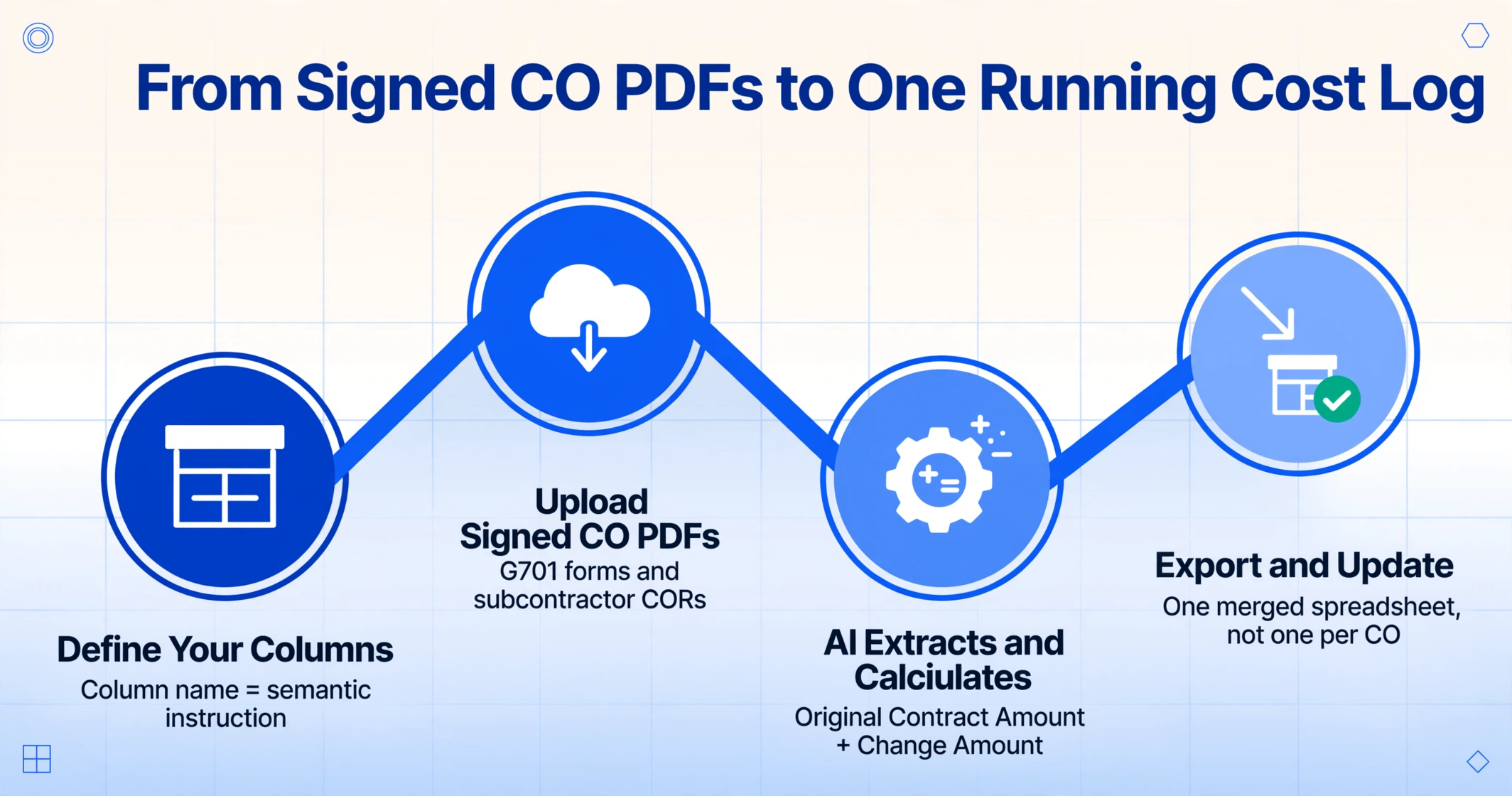
Here's the workflow that replaces retyping, built around the fields a project manager actually needs to track.
Define Your Tracking Columns
Set up custom columns that match your change order log: CO#, Date, Description, Cost Code (CSI MasterFormat), Original Contract Amount, Change Amount, Revised Contract Amount, and Approval Status. Each column name becomes a semantic instruction — the AI searches every uploaded PDF for data that matches the meaning of that column header, regardless of where it appears on the page.
Upload All Your Signed CO PDFs
Drop in every signed change order — G701 forms, subcontractor CORs, and hand-marked scans. Batch upload processes them together; the output is a single merged spreadsheet, not one file per CO. For an ongoing project, you can add new COs to the same batch as they get signed and re-export. The batch workflow that turns a back-to-back stack of twenty COs into one running cost log is covered in batch-processing change orders into a cost impact log.
Let AI Extract and Calculate
The AI reads each PDF and populates the corresponding columns. For Revised Contract Amount, use a Computed Column: write the calculation as Original Contract Amount + Change Amount, and the AI performs the arithmetic during extraction — outputting the calculated total, not raw data you have to formula-check later. Computed columns work per-document and handle negative change amounts (deductive COs) automatically.
Export and Update Your Project Controls
Export to Excel (XLSX) with all COs in a single table. Sort by CO#, filter by approval status, pivot by cost code — the output is structured data ready for integration with your project budget, schedule of values, or ERP system. Re-export anytime a new CO is added; the spreadsheet reflects the current state, not last month's snapshot.
Files are processed securely and not stored.
For GCs managing subcontractor-submitted change orders, the Collection Link feature changes the workflow entirely: instead of subs emailing CO PDFs that the PM then downloads and re-uploads, each subcontractor opens a shareable link, enters a short verification code, and uploads directly into the PM's processing queue. The PM sets the column template once; every sub's CO — regardless of format — feeds into the same extraction pipeline. No training, no portal setup, no chasing email attachments.
Connecting Change Order Data to Project Budgets with Cost Codes
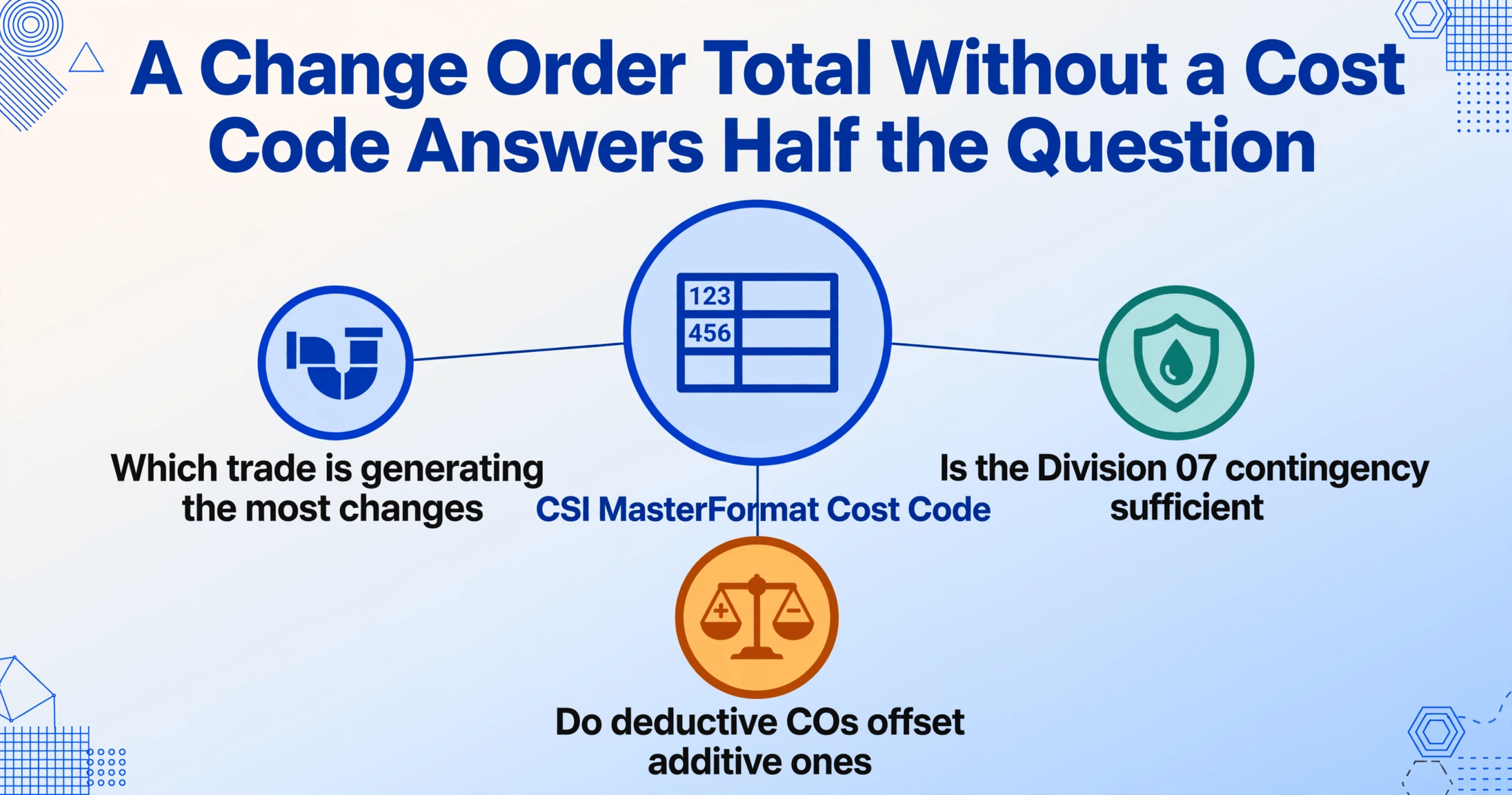
A change order spreadsheet that tracks dollar amounts but not cost codes is answering half the question. You know the contract total changed by $47,300. You don't know whether that hit Division 22 (Plumbing) or Division 26 (Electrical) — which means you can't tell which subcontractor's budget is bleeding or which contingency line item to draw from.
The CSI MasterFormat, maintained by the Construction Specifications Institute, organizes all construction work into 50 numbered divisions — from Division 03 (Concrete) through Division 48 (Electrical Power Generation). Each division breaks down into sections and subsections using a six-digit code: 03 31 00 is cast-in-place concrete, 22 11 00 is facility water distribution, 26 05 00 is common work results for electrical. This is the industry's shared language for cost classification, and it's what connects a change order to the specific budget line item it affects.
When you extract change order data, including the MasterFormat cost code as a column transforms the output from a financial summary into a budget management tool. A pivot table grouped by cost code division answers questions that a running total alone cannot: Which trade is generating the most changes? Is the contingency for Division 07 (Thermal and Moisture Protection) sufficient, or has it been consumed three months before dry-in? Are deductive change orders in one division offsetting additive changes in another — giving a misleading flat total?
Most subcontractor change order forms already include cost codes, because subs use them to bill against the schedule of values. The data is on the page. The problem is getting it out of PDFs that each format differently — which is the same format-fragmentation problem the extraction workflow already solves. One set of columns. Every CO format. All cost codes mapped to budget lines.
Hand-Marked PDFs and Sub-Tier Chaos: The Edge Cases That Break Manual Workflows
The cleanest change order workflow in theory is a digital G701 with typed fields and electronic signatures. The reality on most job sites includes:
- Hand-annotated scans. A superintendent prints a CO form, writes cost adjustments in pen in the margin, signs it, and scans it back as a PDF. The dollar amount is handwritten — sometimes clearly, sometimes not. Traditional OCR struggles with handwriting on forms where printed text and handwritten annotations share the same region.
- Subcontractor forms in proprietary formats. A small electrical contractor submits a CO on a Word template they've used since 2014. The layout is different from the drywall sub's Excel form and completely different from the mechanical sub's accounting-software export. Three subs, three formats, one project manager trying to consolidate data.
- Multi-page COs with supporting documentation. A change order package might include a one-page summary form, a three-page itemized cost breakdown, and five pages of photos and drawings attached as exhibits. The extraction needs to find the summary data without getting confused by the supporting pages.
- Deductive change orders. Not every CO adds money. When the owner deletes a scope item, the change amount is negative. A manual spreadsheet with a SUM formula handles this fine — until someone types the negative number as positive and the running total overstates the contract value by the error amount times two.
Vision-language models handle these edge cases differently than coordinate-based OCR. A hand-marked dollar amount is read the same way a human reads it — by recognizing the shape and context of the number, not by expecting it to appear in a specific field box. A subcontractor's proprietary form is processed the same way as a G701: the AI looks for the meaning of "Change Order Number" and "Cost Code," not their position. Supporting pages are ignored because the extraction columns target summary-level fields that don't appear in photo exhibits.
This is not a claim of perfection. No extraction tool gets 100% of handwritten annotations correct on the first pass. But the difference between "fails completely unless the form matches a known template" and "succeeds most of the time regardless of format" is the difference between a tool you can rely on for daily CO tracking and one you can't.
For project managers already tracking labor costs and material purchases — the other half of the job-cost equation — the same extraction approach applies. A material purchase order cost tracking workflow and timesheet labor hour extraction follow the same principle: set columns once, feed in documents from any source, get structured data out. Combined with the CO tracking spreadsheet, you have labor, materials, and contract changes in three linked datasets — a complete project cost picture without manual entry at any point in the chain.
The format-fragmentation problem that makes change orders hard to track isn't going away. Construction is a fragmented industry by nature — general contractors, specialty trades, architects, and owners each have their own systems. The solution isn't to standardize the industry's paperwork. It's to adopt tools that don't need standardization to function.
Frequently Asked Questions
Does this work with AIA G701 forms?
Yes. The AI reads the G701's cost adjustment block — Original Contract Sum, net change by previous COs, contract sum prior to this CO, this change amount, new contract sum — the same way it reads any change order form. Because the extraction is semantic rather than coordinate-based, the G701's specific layout is just one of many formats the AI can process.
What about hand-marked or scanned change orders?
Handwritten annotations on scanned PDFs are processed by the vision model's handwriting recognition capability. The accuracy depends on handwriting legibility — clear block printing extracts reliably; rushed cursive may produce errors that require review. The tool doesn't guarantee 100% accuracy on illegible handwriting, and no extraction tool should make that claim.
Can it calculate running contract totals automatically?
Yes, using computed columns. You define a column called "Revised Contract Amount" with the calculation Original Contract Amount + Change Amount. The AI performs this calculation per-document during extraction. For a project-level running total that accumulates across all COs, you'd use Excel's SUM formula on the exported data — or sort the export by CO# and add a cumulative sum column in your tracking spreadsheet.
How many change orders can I process at once?
Batch upload handles multiple CO PDFs in a single session, with results merged into one output table. The practical limit depends on your plan's page quota, not on any cap per batch. For a project generating 30-50 change orders over its lifecycle, uploading the full set at once or incrementally as COs get signed are both supported workflows.
Does this work with my existing cost code system?
If your cost codes follow CSI MasterFormat (six-digit division-section codes), include "Cost Code" as a custom column and the AI will extract whatever code appears on each CO form. If your company uses a proprietary cost code numbering system, it works the same way — the column name tells the AI what to look for. The extraction is format-agnostic for cost codes the same way it is for dollar amounts and dates.