3 Years of Japanese Passbook Pages
One Annual Spending Ledger
A sole proprietor in Osaka filing a blue return (青色申告) gathers three bank passbooks (通帳, tsūchō) spanning 2023 to 2025 — MUFG for daily operations, Japan Post Bank (ゆうちょ銀行) for tax reserves, and a regional credit union (信用金庫) for payroll. Between them: roughly 36 pages of printed transactions, 280 rows of deposit-and-withdrawal history, deposited at three different ATMs with three different dot-matrix print heads, and bound in three passbooks of varying wear. The blue return extracts a ¥650,000 deduction in exchange for double-entry bookkeeping — which means every one of those 280 rows needs to land in Yayoi Accounting (弥生会計), freee, or MoneyForward Cloud Accounting as a categorized journal entry. Extracting one page at a time, cross-referencing three passbook balances, and manually converting Japanese era dates (和暦) to Gregorian is manageable for a single year of transactions. For three years across three banks, the single-page workflow collapses under its own manual merge step.
Key Takeaways
- Three years of passbook pages don't defeat you at the typing stage. They defeat you at the merge stage — when 36 single-page extractions need to become one sorted ledger.
- A passbook's running balance is its greatest audit trail — but a single misread flips it into a time bomb that corrupts every row after it, silently, across page boundaries.
- Batch extraction with a Computed Balance Check catches a misread the moment it happens — you fix one row in two minutes instead of hunting backward through 280 rows an hour later when the trial balance fails.
The Batch-to-Ledger Gap: Why Single-Page Extraction Doesn't Solve the 3-Year Problem
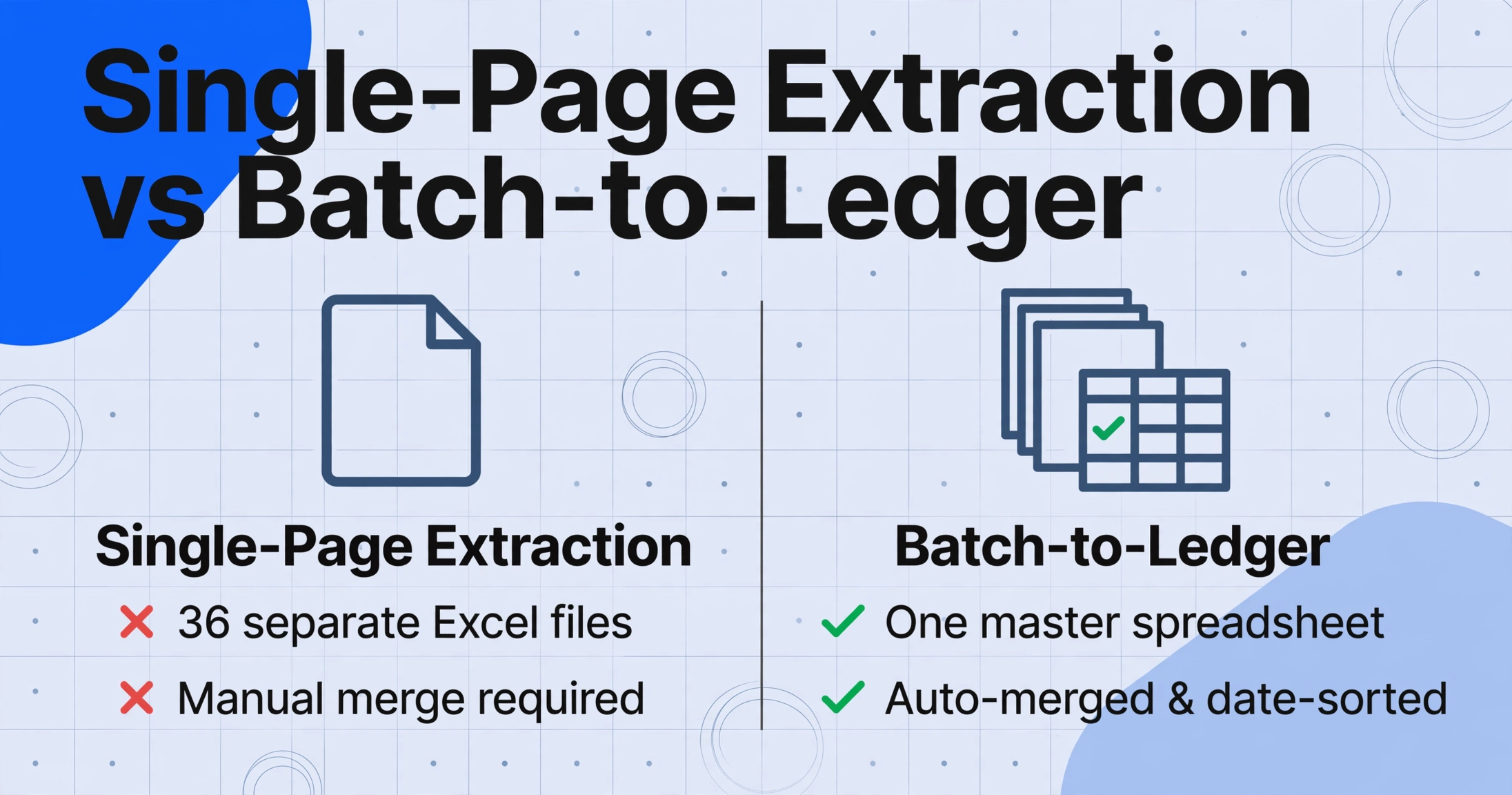
Extracting a single passbook page is the solved half of the problem. The Japanese passbook extraction workflow — define five columns, upload the page, get a spreadsheet row per transaction — handles one page reliably. The unresolved half is what happens when extraction finishes and 36 individual spreadsheets sit on the desktop, each covering 8 to 10 transactions, each from a different page of a different passbook from a different bank.
The manual merge is where single-page extraction's efficiency evaporates. Three passbooks × 12 pages each = 36 separate Excel files. Each file needs its transactions appended into one master sheet, date-sorted across three different era year headers (令和5年 on the MUFG page, R6 on the Japan Post Bank page, 2024 on a digital export), and balance columns cross-verified across passbooks that recorded the same intra-bank transfer on different dates.
A household tracking monthly spending faces a milder version of the same math: two personal passbooks updated monthly over three years (36 updates, potentially across two physical passbook booklets of 50–100 pages each), yielding roughly 250 transactions that need to merge into a single annual spending ledger (家計簿). MoneyForward ME and Zaim pull new transactions from bank APIs daily — but they do not reach backward into the years before API enrollment, which is exactly the collection of pages sitting in the passbook drawer. The apps solve daily visibility. They do not solve the once-a-year moment three years of paper needs to become one spreadsheet.
The batch gap in one number: three passbooks × 280 transactions × 5 fields = 1,400 data points extracted. With single-page extraction, those 1,400 points land in 36 separate files that a person needs to merge. With batch extraction, they land in one spreadsheet with every row sorted, every date converted to Gregorian, and every balance verified against its predecessor — no merge step, no copy-paste, no manual sort.
What Batch Processing Actually Changes for Japanese Passbooks
Batch processing, when applied to bank passbooks (通帳), is different from batch processing a stack of invoices or receipts. An invoice batch is a collection of independent documents — each invoice's data is self-contained, and a misread on invoice 47 affects only invoice 47. A passbook batch is a collection of interdependent pages: each page picks up where the previous page left off, the running balance (差引残高) cascades forward, and the date context — including the era year header — carries across page boundaries. A single misread on page 3 of a 12-page batch silently corrupts every subsequent page's balance verification.
Three dimensions make batch passbook processing a distinct problem from single-page extraction:
Multi-passbook consolidation. A small business with operating, tax-reserve, and payroll passbooks has three separate running balances. Transfers between accounts — moving ¥200,000 from the operating account to the tax-reserve account — appear as a withdrawal on one passbook and a deposit on the other, often on different dates. A batch output that merges all three passbooks into a single sorted ledger makes the transfer traceable across accounts. Three separate spreadsheets make it invisible.
Era date carry-forward across pages. A passbook page prints the year header — 令和6年 or R6 — once at the top. Subsequent lines on the same page carry only the month and day (7.15). When extraction processes pages individually, page 7's transactions become floating dates — "7.15" with no year reference because the header is on page 6. Batch-aware extraction reads the header once and applies it to every transaction on that page and carry-forward pages, converting all dates to Gregorian (西暦) in the output. When the era year increments at January 1, batch logic handles the increment mid-batch — so December 30 of 令和6年 and January 5 of 令和7年 both resolve to the correct Gregorian dates without manual intervention.
Cross-era passbooks. A passbook opened in 2018 and renewed in 2024 contains transactions spanning two imperial eras: 平成 (Heisei, 1989–2019) and 令和 (Reiwa, 2019–present). The era switch happens mid-passbook — Heisei 31 becomes Reiwa 1 on May 1, 2019. Extraction that handles one page at a time might apply the wrong era context to transactions near the boundary. Batch-aware extraction detects the era change at the page where the header switches from 平成 to 令和 and applies the correct era offset (Heisei + 1988, Reiwa + 2018) to each transaction based on its position. For passbooks that also include late Showa-era (昭和) transactions — accounts opened in the 1980s — the same logic extends to Showa + 1925.
A single-page extraction tool processes each page as an island. A batch tool processes them as a sequence — and for a document type defined by its running continuity, that distinction determines whether the output is immediately usable or needs hours of manual reassembly.
The 和暦 Challenge, Multiplied by Batch Volume
Japanese era date (和暦) conversion on a single passbook page is a manageable manual step: read the year header at the top, know the era offset, and mentally convert each date. Across 36 pages from three passbooks — where the year header appears on the first page of each month's batch of ATM printouts and then vanishes for the next 5–7 continuation pages — the manual conversion workload shifts from "manageable" to "the primary source of errors that cascade into accounting software rejections."
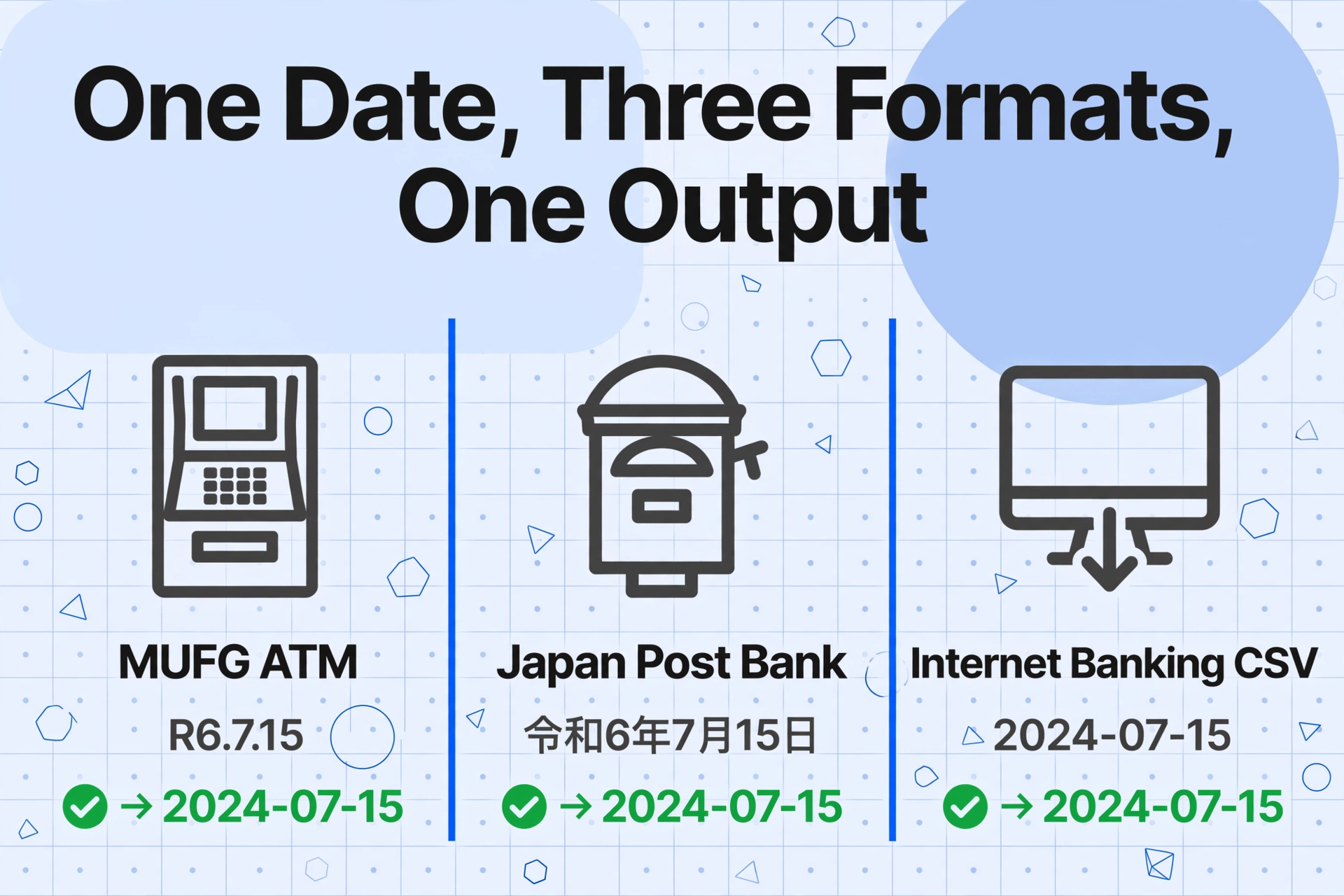
Consider the data path. A passbook printed by an MUFG ATM uses the format R6.7.15 for July 15, 2024 (Reiwa year 6). The same transaction, if printed from Japan Post Bank's ATM, might use the full era name 令和6年7月15日. If the user exports some months from internet banking as a CSV, those dates arrive as 2024-07-15. Three representations of the same date, across one batch.
Yayoi Accounting (弥生会計) expects dates in yyyy-mm-dd format for CSV import. Send it a date string "R6.7.15" and the import fails silently — the transaction row is skipped, and the failure surfaces hours later when the trial balance does not match the passbook.
Batch extraction handles era conversion at the output layer: regardless of how the date appears on each passbook page — abbreviated era + month.day, full era name + 年月日, or already in Gregorian — every date in the consolidated spreadsheet arrives as yyyy-mm-dd. For a batch spanning three years and two eras (2019 straddles 平成31年 January–April and 令和元年 May–December), the extraction engine applies the correct offset per transaction based on the era context detected on each page, not on a user's manual annotation.
The era conversion logic is deterministic: Reiwa year n = Gregorian year (n + 2018), Heisei n = (n + 1988), Showa n = (n + 1925). The challenge is not the arithmetic — it is detecting which era applies to which line on which page when the era header appears once every several pages and the era itself can change mid-batch. Template-based OCR cannot make this determination because it reads isolated cells. Semantic extraction with batch context can, because it reads the relationship between a page header and its content rows.
Building a Batch Passbook Workflow in Three Steps
The workflow that batch-processes three years of passbook pages into one annual spending ledger is the same whether you are processing three passbooks or thirty. The setup step — defining your output columns — is done once and reused across every batch, every bank, and every tax year. If you have already set up columns for single passbook extraction, you reuse the same column schema here.
Define your output columns and verification rules — once, for every bank and every year
Type the field names exactly as they should appear as column headers in the output spreadsheet. For passbook extraction, the standard schema is: Date, Description (摘要), Withdrawal (お支払金額), Deposit (お預り金額), Balance (差引残高). This is Custom Column Extraction: you define the output schema, and the AI maps each passbook's printed fields to your columns by reading field meaning, not field position. The same column names work across MUFG's single-line format, Japan Post Bank's two-line-per-transaction layout, and a regional credit union's compact printing — all three passbooks in the same batch produce a unified spreadsheet. For an annual spending ledger, supplement with Computed Columns that run during extraction: a Balance Check column (previous Balance + Deposit − Withdrawal = current Balance? 'OK' : 'REVIEW') flags float errors before the data enters your accounting software, and a Category column (if Description contains "給与" then "Salary"; if contains "振込" then "Transfer"; if contains "引落" then "Direct Debit"; if contains "手数料" then "Fee"; else "Other") pre-sorts transactions by type so the output is an annual spending ledger, not just a chronologically ordered list.
Upload the full batch — all passbooks, all pages, one upload
Scan or photograph every page of every passbook — including front covers showing account numbers and the back cover with the magnetic stripe (磁気ストライプ) — and drop all images into one batch upload. A MUFG passbook's 12 pages from 2023, a Japan Post Bank passbook's 10 pages from the same year, and a credit union passbook's 14 pages covering 2023–2025 all go into the same upload. Batch processing handles them as a single job: each page is processed independently with your column schema applied, era dates are converted to Gregorian with correct page-level context, and all results are merged into one spreadsheet sorted by date. Pages can be scans from a document scanner, photos taken with a smartphone, or PDF exports from internet banking that include passbook-style transaction listings. The total upload time is dominated by scanning — at roughly 30 seconds per page to align and scan, 36 pages takes about 18 minutes of preparation. The extraction itself completes in a few minutes.
Export the consolidated ledger and begin your accounting workflow
Download one Excel file with roughly 280 rows — one per transaction — and every field in its own column. The date column is Gregorian (yyyy-mm-dd) and ready for Yayoi, freee, or MoneyForward Cloud Accounting CSV import. The Balance Check column shows OK next to every transaction where the math checks out, and REVIEW next to rows where the running balance does not reconcile — typically one or two rows out of 280, caused by a misread comma or a smudged digit on an aging passbook page. Fix those two rows, and the remaining 278 are verified. The Category column groups transactions by type, so filtering by "Direct Debit (引落)" gives you one year of rent, utilities, and insurance payments in a single view. The same column schema works next year for the same passbooks — the fields on a Japanese passbook, defined by the Japanese Bankers Association (全国銀行協会), will not change.
Files are processed securely and not stored.
Description Codes and the Annual Spending Ledger
A passbook's description column (摘要) uses compact codes that a Japanese reader immediately categorizes: 給与 is salary, 振込 is a bank transfer, 引落 is a direct debit, 手数料 is a bank fee, 利息 is interest, カード is a card transaction. A raw extraction that faithfully reproduces these codes — 振込, 振込, 引落, 給与, 振込 — produces a transaction list. A batch extraction that classifies them during processing produces an annual spending ledger.
The distinction matters because the accounting software destination — Yayoi, freee, or MoneyForward Cloud Accounting — needs journal entries with account headings (勘定科目), not raw description codes. The manual workflow after single-page extraction is to open the spreadsheet, add a Category column, and go through 280 rows assigning 売上 (sales revenue) to salary deposits and 水道光熱費 (utilities) to direct debits. For a batch of three years, that is roughly 45 minutes of repetitive categorization — longer if a code like 振込 needs sub-classification (client payment vs. friend repaying dinner money).
A Computed Column that maps description codes to spending categories during extraction — "Salary Income" for 給与, "Utilities" for 引落 to Tokyo Electric (東京電力), "Bank Fee" for 手数料, "Interest Income" for 利息 — turns the output from a transaction list into a pre-categorized ledger. The mapping rules are defined once in the column schema and applied to all 280 rows automatically.
The same computed classification handles the codes that need context beyond the description field alone. A 振込 of ¥500,000 from a known client company name in the payee field is business income. A 振込 of ¥15,000 from an individual is likely personal. A Computed Column can combine the description code with the deposit amount to make the classification: if Description="振込" and Amount > 100000 then "Business Income"; if Description="振込" and Amount <= 100000 then "Personal Transfer". The extraction engine evaluates this logic during processing, and the output arrives with classification decisions made — the user approves or overrides, rather than makes every decision from scratch.
Balance Drift: Why One Misread in a Batch Destroys Every Row After It
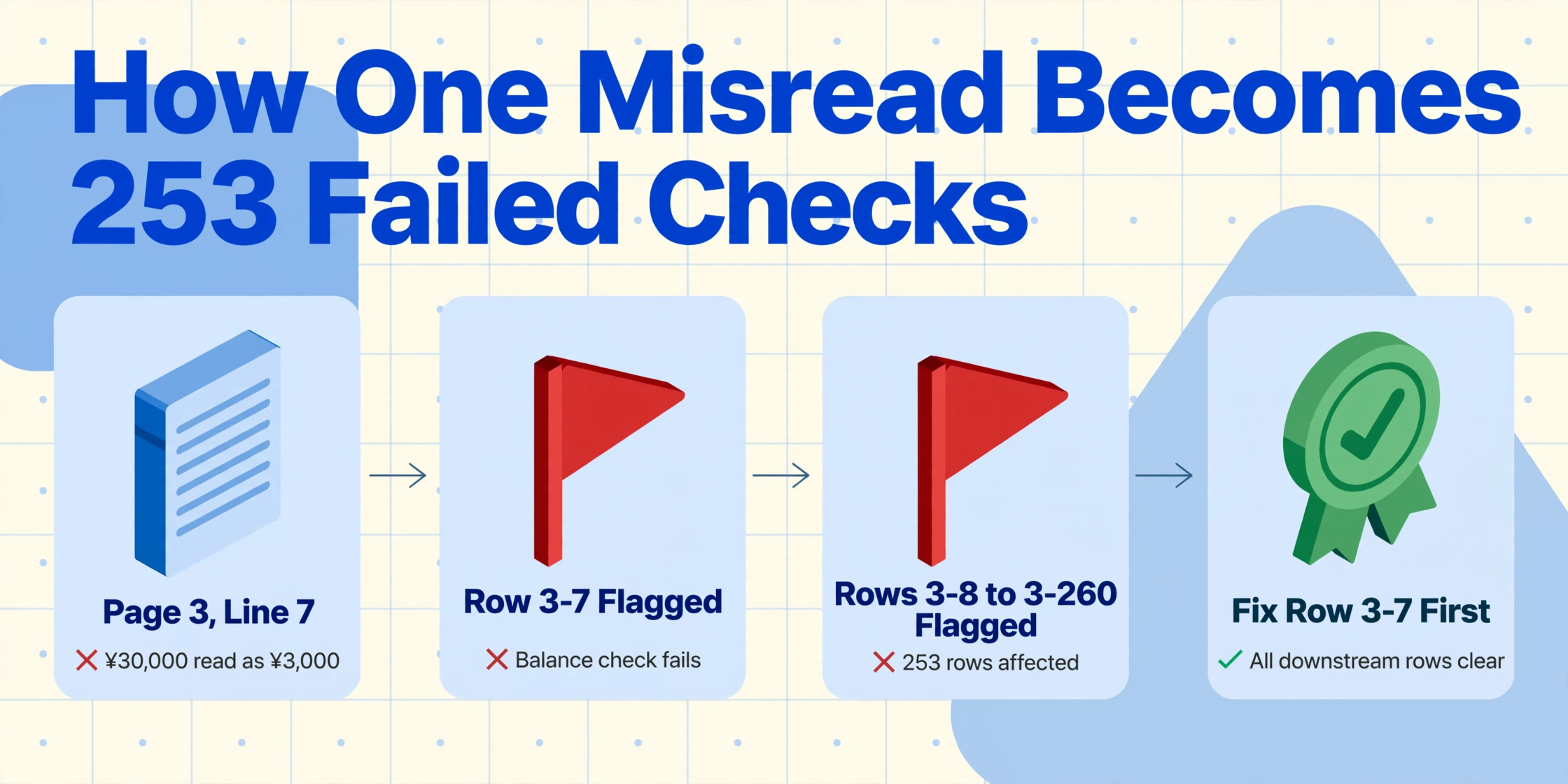
The passbook's running balance (差引残高) is both its greatest strength for accounting verification and its most dangerous failure mode in batch processing. A bank statement is a monthly summary: a misread on line 14 affects only line 14. A passbook is a ledger: the balance on line 15 equals the balance on line 14 plus line 15's deposit minus line 15's withdrawal. A misread on line 14 — a dropped comma turning ¥30,000 into ¥3,000 — corrupts line 14's balance, which corrupts line 15's balance check, which corrupts line 16's, and so on through every subsequent row in the passbook.
In a single-page extraction of 10 transactions, the cascade stops at the page boundary — the next page starts fresh with its own balance continuity. In a batch of 280 transactions merged from 36 pages, the cascade crosses page boundaries because the balance carries forward from the last line of page N to the first line of page N+1. A single comma misread on page 3, line 7 produces 253 incorrect balance verification results — every row from that point forward fails the balance check, making it impossible to identify which row caused the problem without working backward line by line.
The Computed Column approach — Balance Check (previous Balance + Deposit − Withdrawal = current Balance? 'OK' : 'REVIEW') — catches the problem at the point of failure. Row 3-7 is marked REVIEW. Row 3-8, whose balance depends on 3-7's balance, is also marked REVIEW — but the user knows to fix row 3-7 first, after which 3-8 through the end of the batch recalculate correctly. A single REVIEW row in a sea of OKs is a pinpointed fix. Two hundred REVIEW rows in sequence is a single root cause at the first flagged row.
The batch verification advantage: a passbook that has been running for three years has 36 pages of printed balances that must reconcile. A Computed Column that checks balance math on every extracted row during processing catches the discrepancy at extraction time. Without it, the error surfaces inside the accounting software when the trial balance does not match the bank statement — a reconciliation that must trace backward through 280 rows, across three passbooks, to find the single misread that started the cascade. The extraction-time flag is two minutes of correction. The accounting-time flag is an hour of forensic bookkeeping.
This verification logic transfers directly to other batch extraction scenarios where document-to-document continuity creates the same cascade risk. A UK tax practice consolidating 80 SA100 self-assessment returns into one spreadsheet handles independent documents — each return's data is self-contained. An Australian payroll team batch-processing 300 PAYG payment summaries faces the same independence. The passbook batch is different because the document itself creates the continuity — and that continuity, when respected by batch-aware extraction, becomes a built-in audit trail rather than a hidden time bomb.
Frequently Asked Questions
Can I batch-process passbooks from different banks in the same upload?
Yes — and this is one of the strongest arguments for batch-extracting all three years of passbooks together rather than processing them separately. A passbook from MUFG prints transactions with single-line entry and the date on the left. A passbook from Japan Post Bank (ゆうちょ銀行) often uses a two-line-per-transaction format where the description field wraps. A regional credit union (信用金庫) passbook prints in a slightly different font size and alignment. Because the extraction reads field meaning — a date is a date whether it is printed as R6.7.15 on one passbook or 令和6年7月15日 on another — all three formats can be uploaded in the same batch and produce a unified spreadsheet with consistent columns. The same column schema that locates the balance field on a clean MUFG print also finds it in a well-worn Japan Post Bank passbook with faded ink, because the AI reads semantic content, not template-aligned pixel coordinates.
What happens when a passbook spans two imperial eras — 平成 and 令和?
The extraction detects the era change at the page where the year header switches. A passbook that runs from Heisei 30 (2018) through Reiwa 6 (2024) contains both era headers. The batch engine reads the header on each page, determines whether the era is 平成 or 令和, and applies the correct conversion offset per transaction. For the critical boundary year — 2019, which is Heisei 31 from January 1 to April 30 and Reiwa 1 (令和元年) from May 1 to December 31 — the header on the page covering May transactions will have switched to 令和, and all transactions on that page and subsequent pages will be converted using the Reiwa offset (+2018). Transactions on pages with the 平成 header will use the Heisei offset (+1988). For passbooks containing even earlier transactions from the Showa era (昭和, 1926–1989), the same logic extends to Showa + 1925.
How does the batch handle pages where the year header is missing?
Continuation pages — pages within the same passbook that do not reprint the year header because they continue from a previous page — carry forward the era context from the most recent page with a header. If page 5 prints 令和6年 at the top and pages 6–8 print only month and day for each transaction, the extraction applies the 令和6年 context to all transactions on pages 5 through 8. When page 9 prints a new header — 令和7年 after the January 1 boundary — the context updates. The carry-forward avoids the most common era conversion error in manual passbook processing: treating a January transaction on a continuation page as the previous year because the year header is three pages back and the user forgot to check.
What if some passbook pages include handwritten margin notes — rent, inventory purchases, salary breakdowns?
Many passbooks contain handwritten annotations — a note like 家賃 (rent) or 仕入 (inventory purchase) written in ballpoint next to a printed transaction. If the extraction tool supports handwritten text recognition alongside printed text, these margin notes appear in the extracted data as additional context. Define a column called "Notes" in your schema, and any legible handwritten annotation near a transaction line is captured during extraction. Note that handwriting quality varies: a clear ballpoint annotation in standard kanji is typically readable; a faded pencil note written at an angle and crossing the printed grid lines is less reliable. For passbooks where handwritten notes carry critical accounting information — a sole proprietor's only record of which 振込 was a client payment versus a personal transfer — the extracted spreadsheet should be reviewed with the physical passbook open for the few rows where handwriting was ambiguous. The AI handles the legible majority, reducing the review from line-by-line to exception-handling.
What data format does the extraction output, and will Yayoi Accounting accept it?
The batch output is one Excel file (.xlsx) with every passbook transaction in one sheet. All dates are in yyyy-mm-dd format — ready for direct CSV import into Yayoi Accounting (弥生会計) via the Smart Transaction Import (スマート取引取込) function, freee Accounting (freee会計) via the manual CSV upload path, or MoneyForward Cloud Accounting (マネーフォワード クラウド会計) via the data migration function. Other Japanese accounting platforms that accept the same CSV import format include MJS Accounting (会計大将), TKC (FX2/MX series), OBC (勘定奉行), Sorimachi (会計王), EPSON (財務応援R4), and PCA (PCA会計). The passbook's five-column format — date, description, withdrawal, deposit, balance — is standardized across all Japanese banks, so the same output works with any accounting platform that imports CSV transaction data.
Do I still need to keep the physical passbooks after batch extraction?
Under Japan's Electronic Bookkeeping Act (電子帳簿保存法), scanned copies of financial documents can serve as legally admissible records — the 2022 amendment relaxed resolution and timestamp requirements significantly. However, the physical passbook remains the definitive original. The National Tax Agency (国税庁) may request originals during a tax audit. Best practice for blue return filers: batch-extract all passbooks to the annual spending ledger for your accounting workflow, but retain each physical passbook for the statutory seven-year document retention period. The extraction replaces the manual data entry and merge steps — it does not replace the legal record.
The Ledger Waiting in the Drawer
Three years of passbook pages sit in a drawer not because the data is inaccessible — every transaction is printed clearly, five columns per row, running balance on every line — but because the volume crosses the threshold where manual entry stops feeling tedious and starts feeling like wasted time. A blue return filer (青色申告者) who manually types 280 transactions at two minutes per row — reading the date, deciphering the description code, keying the amount, verifying the balance — spends roughly nine hours on data entry alone. Nine hours that the ¥650,000 deduction rewards for bookkeeping diligence, not for retyping bank data.
Batch extraction changes the math. The nine hours of typing become 18 minutes of scanning passbook pages plus two minutes of verifying the Computed Column flags — the one or two REVIEW rows out of 280 where the balance check flagged a potential misread. The remaining 278 rows passed automated verification during extraction and are ready for accounting software import without further review. Next year's batch uses the same column schema with different pages. The year after that uses it again. The passbook format — governed by the Japanese Bankers Association, printed by bank ATMs, standardized across every financial institution in the country — will not change.