500 Freshman Transcripts,
One Admissions Database
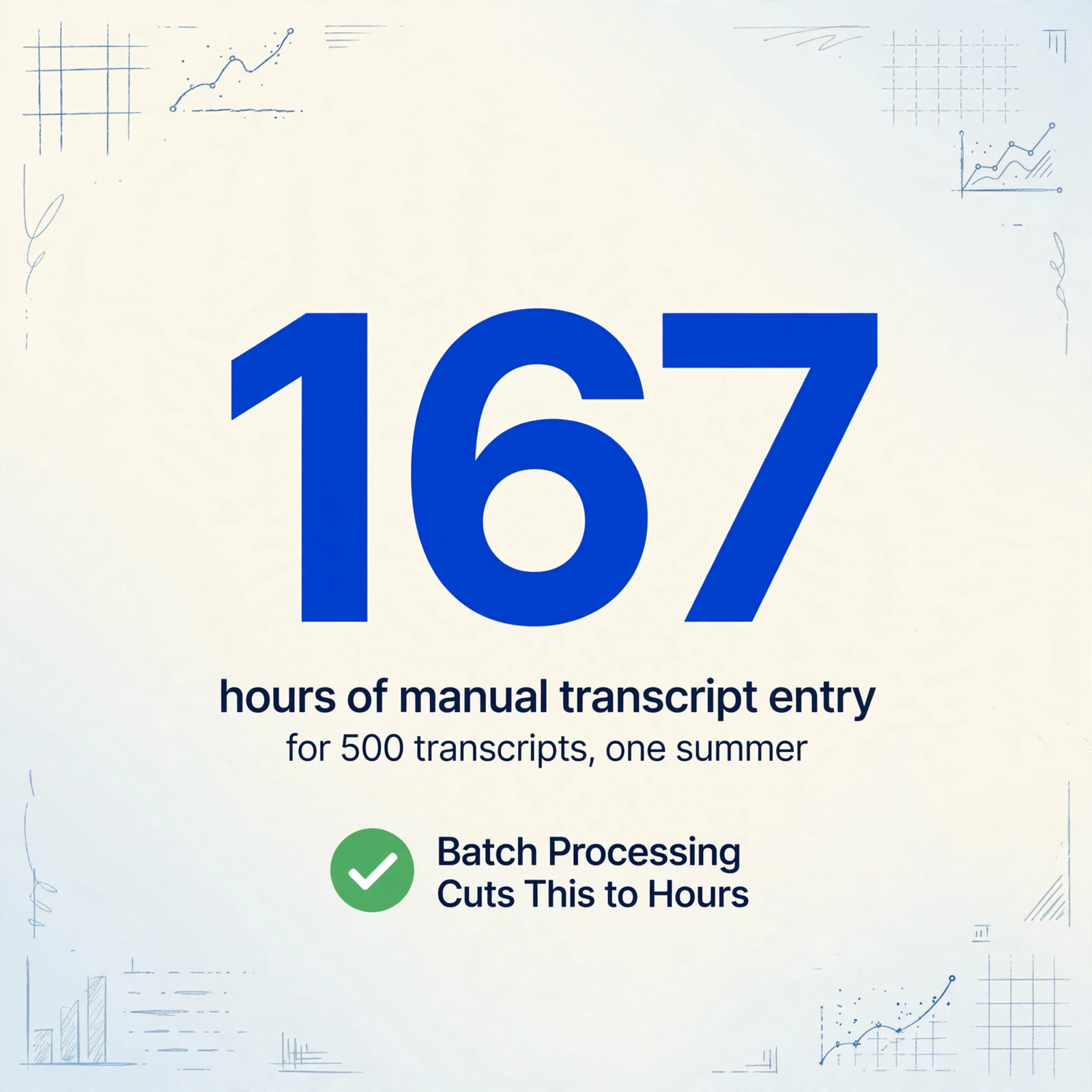
Every summer, after May 1 deposit deadlines close, a mid-size university's admissions office faces the same math problem: roughly 500 incoming freshmen, each with at least one high school transcript — and each transcript taking an estimated 20 minutes to manually enter into the Student Information System. That's 167 staff-hours — four full workweeks for one person — between June and August, with orientation and course registration deadlines bearing down the entire time. The bottleneck isn't the volume. It's that 500 transcripts arrive in 500 different formats from 500 different high schools, and every format requires the same human eyes to decode it.
Key Takeaways
- 167 staff-hours — that's what 500 freshman transcripts at 20 minutes each adds up to, and it all lands between June and August when orientation deadlines don't wait.
- Processing 5 transcripts is an afternoon, but 500 is a structural breakdown — human attention doesn't scale linearly, and at transcript 120 you stop catching that a B+ from a 13-point GPA scale got entered as a 3.3 on a 4.0 scale.
- Batch extraction doesn't eliminate the reviewer — it transforms those 167 hours from typing course names into evaluating course equivalencies, which is what your institutional knowledge was hired to do in the first place.
For the fundamentals of extracting data from a single transcript — which fields to pull, how to set up your column definitions, and what a finished extract looks like — start with our guide to extracting student transcript data to Excel. What follows here is the scaling layer: everything that changes when you go from processing one transcript to processing 500, and how to build a pipeline that delivers one admissions-ready database by August.
The Summer Transcript Surge: Volume by the Numbers
Most admissions workflow discussions center on application season — early decision in November, regular decision January through March. But the transcript processing bottleneck hits later, after deposits are in. The National Association for College Admission Counseling reports that approximately 2.9 million first-time freshmen enroll in U.S. colleges annually. For a mid-size university — defined by the Carnegie Classification as enrolling between 5,000 and 15,000 undergraduates — that translates to roughly 3,000 to 10,000 applications per cycle.
A mid-size university that admits 2,500 students and yields 1,000 enrolled freshmen processes approximately 500 to 700 high school transcripts during the summer months, plus additional transcripts from transfer students and dual-enrollment programs. Each transcript needs course names, grades, credits, GPA, and graduation verification extracted before the student can be placed in the right courses. A 2023 AACRAO Connect article sponsored by Parchment pegged manual transcript data entry at 20 minutes per application. At 500 transcripts, that's 167 hours — compressed into an 8-to-10-week window between deposit deadlines and orientation.
The timing is the multiplier. Admissions offices don't get 167 hours of slack. They get the same 40-hour workweeks they always have, with the same staff, during the same window. And every day of delay — every transcript sitting in a processing queue while the student waits for a placement email — chips away at yield. Students who don't hear back quickly commit elsewhere or enroll in courses based on incomplete evaluation, creating add/drop chaos in September.
Why Manual Transcript Entry Breaks at 500
Processing one transcript manually is tedious but manageable. Five transcripts — an afternoon's work. Fifty — a full week. At 500, the math stops being about time and starts being about a structural breakdown in the way human attention operates at scale.
Each transcript requires the same cognitive sequence: locate the student name and high school, decode the grading scale (is this school on a 4.0, 5.0, or 100-point scale?), read each course title and its grade, map semester designations, verify graduation status, and type every field into the SIS. Course names are the biggest friction point. "English 9 Honors" at one school is "ENGL 101H" at another and "Composition & Literature I (Advanced)" at a third — but all three need to map to the same entry in your articulation database.
At 20 transcripts, a staff member catches these variations. At 120, the pattern-recognition centers of the brain start collapsing similar-looking entries. A "B+" from a school using a 13-point GPA scale (A+ = 4.33) gets entered as a 3.3 on a 4.0 scale because the cursor has been in 4.0-scale mode all morning. A transcript with a "Pass/Fail" column for spring 2020 courses — a common COVID-era variation — gets entered without flagging, because the operator stopped reading column headers at transcript number 80. The Inside Higher Ed sponsored content from Laserfiche confirms this: "student transcripts are so prone to human error" that their automated solution was designed to flag wrong-format entries before they reach human reviewers — an admission that manual entry generates enough errors to require its own validation layer.
The gap between 5 and 500 transcripts is not just more time — it's an entirely different category of problem. At 5, you verify. At 500, you sample — and hope the other 495 don't contain errors that cascade into incorrect course placements, credit miscalculations, or delayed graduation audits.
The Format Landscape: Electronic, Paper, and Everything In Between
The fantasy is that all transcripts arrive through Parchment or the National Student Clearinghouse in a uniform electronic format. The reality inside most admissions offices is a hybrid inbox that looks more like this:
| Channel | Typical Share | Format | Extraction Challenge |
|---|---|---|---|
| Parchment / Clearinghouse ETX | 55–65% | EDI (SPEEDE TS130), PDF, or structured XML | EDI parses automatically into some SIS setups; PDF variants differ by school's Parchment configuration |
| Common App Integration | 10–15% | Structured data feed | Limited fields — usually GPA and core course summary only, no full transcript detail |
| Direct Email / Upload Portal | 10–15% | PDF (scanned or digital export) | Layout varies wildly; some are scanned from paper, others exported from school SIS with custom formatting |
| Physical Mail (Paper) | 5–10% | Paper → scanned to PDF by admissions | Scan quality, skew, shadows; handwritten annotations on official forms |
| International / Non-Traditional | 3–5% | PDF, scanned images, translated documents | Non-standard grading systems (IB, A-Levels, national curricula), language translation, credential evaluation |
The 2018 AACRAO survey on transcript cost, type, and volume found that approximately 15% of transcripts were still delivered on paper. That number has likely declined since, but smaller school districts and international institutions still mail paper — and those transcripts land in your scanner tray before they land in your SIS. Each scan introduces its own variables: contrast, skew, margin cropping, legibility of small-print grading scale keys.
A batch processing pipeline that only handles Parchment EDI is solving half the problem. The transcripts that consume the most staff time are precisely the ones that arrive outside electronic networks — scanned paper, emailed PDFs from schools without exchange agreements, and international credentials. A workflow worth building handles all of them.
Building the Batch Processing Pipeline: 6 Steps from Inbox to Database
This is not a software-review section. It's the practical workflow that turns 500 mismatched documents into one clean admissions database, regardless of which extraction tool you use. For a deeper look at the tool-selection side of batch document processing — what capabilities to look for and where different tool tiers fall short — see our guide to batch OCR workflows. That article covers desktop OCR, cloud APIs, and AI extraction tiers. Here, we focus on the transcript-specific pipeline.
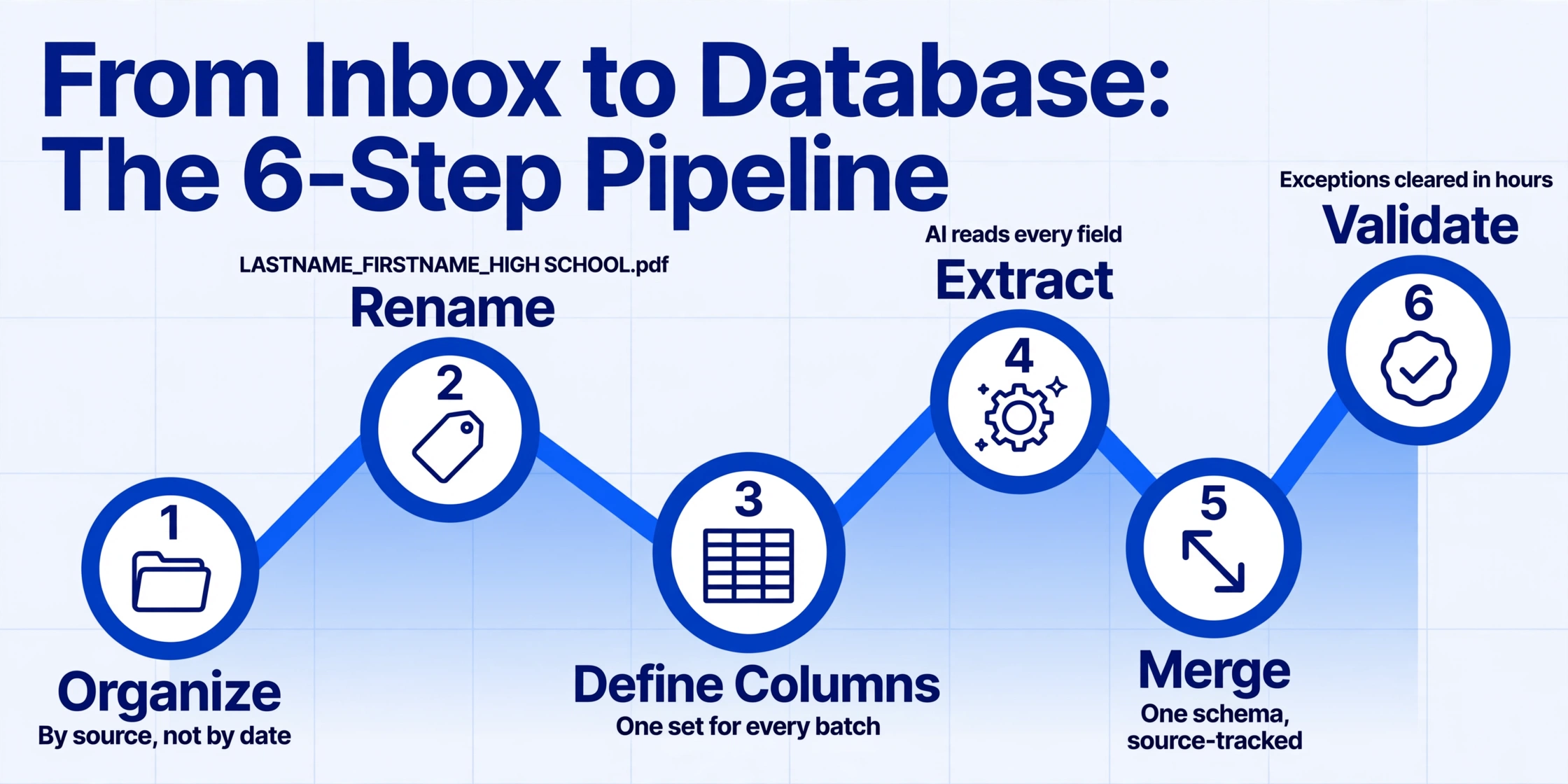
Create one folder per source type: parchment/, common-app/, scanned-paper/, international/. Source is the strongest predictor of format consistency, and grouping by source lets you batch-configure extraction rules once per folder rather than per file. If your tool supports sub-batch processing, each folder becomes its own processing batch.
Name every file before processing: LASTNAME_FIRSTNAME_HIGHSCHOOL.pdf. This convention does triple duty: it serves as a human-readable queue, it embeds a cross-reference key in every output row, and it makes exception handling searchable. The worst-case scenario is 500 files named transcript(1).pdf through transcript(500).pdf — if a row fails validation, you have no way to trace back to the source document.
Your column set should be exhaustive enough to capture every transcript variant but not so granular that AI extraction degrades: Student Name, High School, Graduation Date, GPA, GPA Scale, Course Name, Course Code, Grade, Credits Earned, Term/Semester. The GPA Scale column is the most valuable — it captures whether the school uses 4.0, 5.0, or 100-point scaling, which tells your articulation reviewer whether a "3.8" and a "95" are equivalent or not.
Process each folder as its own batch rather than dumping all 500 into one processing queue. Parchment-sourced transcripts share a common PDF structure — running them together improves extraction consistency because the AI encounters fewer format discontinuities. Scanned paper transcripts go as a separate batch, ideally after you've spot-checked scan quality on the first 5 to 10 files. For an overview of how AI-based extraction differs from traditional OCR — and why it matters when your documents have no consistent layout — see our guide to OCR vs. AI document extraction.
After each batch completes, flag any row where key fields are missing — blank Student Name, blank GPA, or fewer than expected course entries. These become your exception queue: a shortlist of 5 to 15% of transcripts that need human review. The difference between batch processing and batch chaos is whether exceptions get handled immediately or buried in the merged output. Create an "Exceptions" sheet alongside your main database and route flagged rows there mid-pipeline, not as a post-merge cleanup step.
Consolidate all batch outputs into a single spreadsheet or database table, adding a Source Batch column and preserving the original filename in a Source File column. These two columns are your audit trail — when a student disputes a course placement, you need to trace the decision back to the exact transcript and extraction batch, not just trust the database at face value. For batch export workflows across multiple source groups, the same merge-and-track principle applies to batch verification across any document type — the source column is what keeps a merged spreadsheet auditable.
From 500 Transcripts to One Database: The Merge and Validate Step
At this point, you have batch outputs — one spreadsheet per source folder — but not yet a unified admissions database. The merge step is where most batch pipelines lose coherence, because it's where data from different sources, processed at different times, must conform to a single schema.
Schema enforcement happens at merge time. Before consolidating, standardize every batch output to the same column order and naming convention. If your Parchment batch named the GPA column "Cumulative GPA" and your scanned batch called it "GPA (Weighted)," reconcile them before merging — otherwise you get two parallel GPA columns with partial data in each. A pre-merge normalization pass takes 10 minutes and prevents hours of spreadsheet forensics later.
Source tracking is non-negotiable. Add two columns to every merged row: Source Batch (which processing batch produced this row) and Source File (the original filename). When a course equivalency decision is questioned by a department chair in October, these columns tell you in 30 seconds which transcript and which extraction pass generated the data — instead of burning an hour retracing steps through 500 files. This is the audit layer that manual processing never had.
GPA normalization needs a rule, not a formula. When your database contains GPAs from 4.0-scale, 5.0-scale, 100-point-scale, and IB 7-point-scale high schools in the same column, any automatic GPA comparison is meaningless. Create a companion column — GPA Scale — that preserves the original scale alongside the raw GPA value. The normalization into a comparable metric happens downstream in the credit evaluation step, not at the database level. Collapsing all GPAs into a single recalculated number during extraction is a common mistake: it destroys the evidence you need when a student or parent questions the evaluation.
For course entries, the merge step is also where you can begin articulation mapping — matching extracted course names against your university's course equivalency database. This is not a batch-extraction task; it's a post-merge lookup that pairs each extracted course row with a known equivalency when one exists, and flags rows without a match for manual review. The extraction tool's job is to get the course name, code, and grade into labeled columns. The articulation mapping is your admissions team's domain expertise, applied against a clean database rather than against individual PDFs.
Exception Handling: What to Do When 8–15% of Transcripts Need Human Review
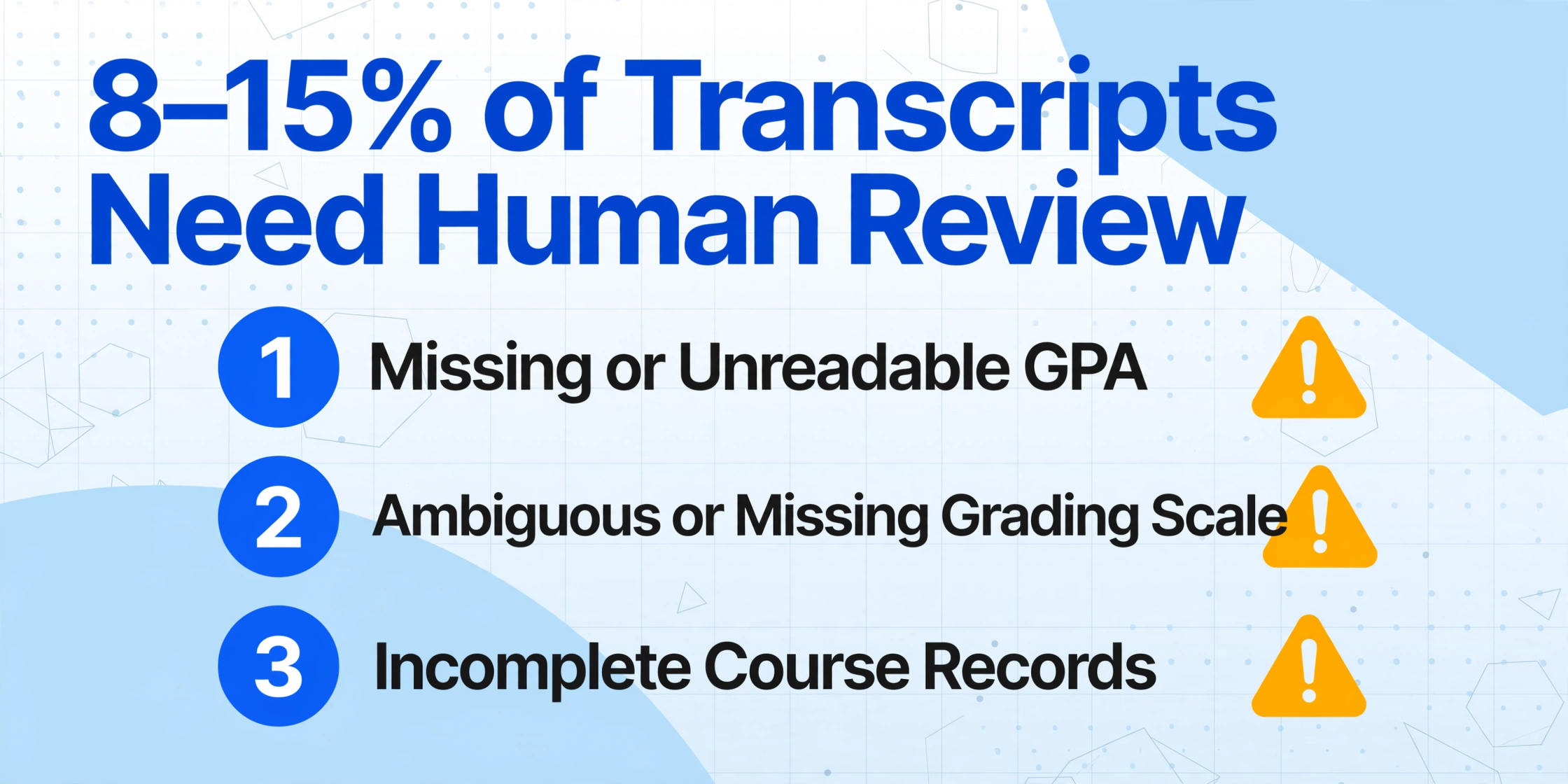
Every batch pipeline produces exceptions. The goal isn't zero exceptions — it's a structured exception queue that a single reviewer can clear in under an hour. Here are the exception categories that appear consistently in transcript batch processing, and how to handle each one without derailing the pipeline.
Missing or Unreadable GPA
Some high school transcripts — particularly from smaller districts and international institutions — don't display a cumulative GPA as a single figure. Others print it in a font size small enough that scanned copies render it as smudged dots. When the GPA field is blank in your extraction output, flag the row, but do not stop the batch. These rows go into the exception queue with a note: "GPA not extracted — verify from original."
Ambiguous or Missing Grading Scale
A transcript that shows GPA as "3.8" without indicating whether the scale is 4.0, 5.0, or 12.0 is a placement risk. The extraction output should populate GPA Scale as "Not Specified" and route the row to exceptions. The reviewer checks whether the transcript's legend, footer, or reverse side states the scale — or whether the high school's website documents their grading policy.
Incomplete Course Records
Some transcripts show only final grades for each course without semester breakdowns, credit hours, or course codes. Others truncate course names to 20 characters. These rows may technically extract cleanly but are incomplete for articulation purposes. Flag rows where the Course Code field is blank or where the number of course entries per academic year is fewer than expected (typically 5–8 courses per year for a standard U.S. high school).
Sparse or Missing Semesters
A transcript that shows courses for fall of senior year but nothing for spring raises a common scenario: the student sent the transcript mid-year, before spring grades posted. These aren't errors — they're partial records. Flag them as "Awaiting Final Transcript," not as exceptions. The batch pipeline should differentiate between "data that exists but wasn't captured" and "data that hasn't been produced yet."
The Exception Queue Workflow
After each batch completes, run a validation pass that checks for blank required fields, unexpected GPA values (outside 0–5.0 or 0–100 ranges), and course counts below a threshold. Flagged rows go to a dedicated Exceptions sheet — never attempt automatic corrections, because an overconfident auto-fix creates errors that are harder to find than blank cells.
Prioritize exceptions that block downstream decisions: blank Student Name or Graduation Date (can't verify identity or eligibility) first; missing GPA second (blocks scholarship and honors evaluation); incomplete course records third (blocks placement but not admission). Arrival-order processing wastes time on low-impact exceptions while high-stakes rows wait.
If you're spending more than 2 minutes on a single exception, escalate it — either to a senior reviewer or to a "Request Clarification" queue where the student or high school is contacted for an updated transcript. The efficiency gain of batch processing disappears when exceptions consume the time they were supposed to save.
A well-structured exception queue processes in 20 to 45 minutes for an incoming class of 500 students. The key is separating "needs human review" from "needs original document re-examination" — two entirely different work categories that bad pipelines conflate into one "problems" pile.
Frequently Asked Questions
Can batch processing handle international transcripts with non-standard grading systems?
Yes, but with an important caveat. Batch extraction can pull course names, grades, and GPA into labeled columns regardless of grading system — whether it's IB (1–7), A-Levels (A*–E), the French Baccalauréat (0–20), or India's CBSE percentage system. What it cannot do is perform the credential evaluation — determining whether an IB 5 in Mathematics HL is equivalent to your university's MATH 101. That domain knowledge lives with your international admissions team and external credential evaluation services like WES or ECE. The batch pipeline's job is to get the raw data into a database so evaluators compare rows, not PDFs.
What percentage of transcripts typically need manual review after batch extraction?
Across the transcript processing use case, expect 8 to 15% of rows to require human review — lower than batch invoice processing (where formatting variance is wider) but higher than batch COI processing (where the ACORD 25 form standardizes layout). The most common triggers for manual review are scanned paper transcripts with image quality issues, transcripts from schools using non-standard grading notation, and international transcripts where course names don't follow U.S. conventions. If your exception rate exceeds 20%, revisit your scan quality — poor scans are the single biggest predictor of extraction gaps.
Does batch extraction work with Parchment and National Student Clearinghouse PDFs?
Yes. Transcripts delivered through Parchment Receive and the National Student Clearinghouse are standard PDFs — the electronic delivery layer handles authentication and routing, but the document itself is still a visual layout that batch extraction reads the same way it reads any other PDF. The advantage of electronic-delivery transcripts is consistent digital quality: no scanner skew, no handwritten margin notes, no faded thermal paper. That said, even Parchment PDFs vary between high schools because each school configures its own transcript template within the Parchment system — so the layout still varies, just with better baseline quality.
How do you make sure the right course data maps to the right student?
Three safeguards. First, the filename convention (LASTNAME_FIRSTNAME_HIGHSCHOOL.pdf) embeds student identity in every source file. Second, each extraction row inherits the source filename, creating a persistent trace. Third, extract Student Name and High School as explicit columns, then cross-reference against your applicant database before merging into the final admissions database. If a row's extracted name doesn't match any enrolled student, or if a transcript references a high school not listed in the student's application, flag it — it's either a system entry error or a student who submitted credentials from multiple institutions.
Can the same batch pipeline process transfer student transcripts alongside freshman transcripts?
Technically yes, but logistically it's better to separate them. Transfer transcripts contain college-level coursework with course codes, credit hours, and prerequisite chains that require a different articulation evaluation process than high school transcripts. Processing them through the same pipeline with the same column definitions will produce rows that look clean but require re-review during articulation mapping — at which point the time you saved by combining batches is lost. Run freshman and transfer transcripts as separate batch projects with different column sets optimized for each document type.
What Changes When You Stop Entering and Start Processing
The shift from manual entry to batch processing changes more than speed. It changes what your admissions team actually does with their time during the summer crunch.
A staff member who previously spent 167 hours typing course names into the SIS now spends those hours on evaluation and articulation — reviewing exception rows, mapping course equivalencies, and verifying that extracted GPAs on non-standard scales are weighted correctly against scholarship thresholds. That's the work that requires institutional knowledge and human judgment, and it's the work that manual entry pushed into September, after orientation, when course corrections are harder to make.
Batch processing doesn't eliminate human review — it moves it to the right place in the pipeline: after the data is structured but before it enters the permanent record. The output is one database where every row is traceable to a source file, every exception is logged with a resolution, and every GPA is annotated with its original scale — the kind of audit trail that manual entry, by its nature, could never produce.
For a mid-size university processing 500 incoming freshman transcripts, that difference is the distance between a summer spent on data entry and a summer spent on student readiness. Start with a single batch — one source folder, 50 transcripts, and the column set defined in Step 3 above. See how many rows make it through clean and how long your exception queue takes to clear. That one pilot run tells you more about your institution's batch-readiness than any feature comparison chart.
Batch-Process Student Transcripts into One Database
Define your columns once, load your transcripts, and get one merged admissions database — no manual data entry.
Start Processing